driving view Acura RDX 2020 Owner's Manual
[x] Cancel search | Manufacturer: ACURA, Model Year: 2020, Model line: RDX, Model: Acura RDX 2020Pages: 657, PDF Size: 33.2 MB
Page 4 of 657
Contents
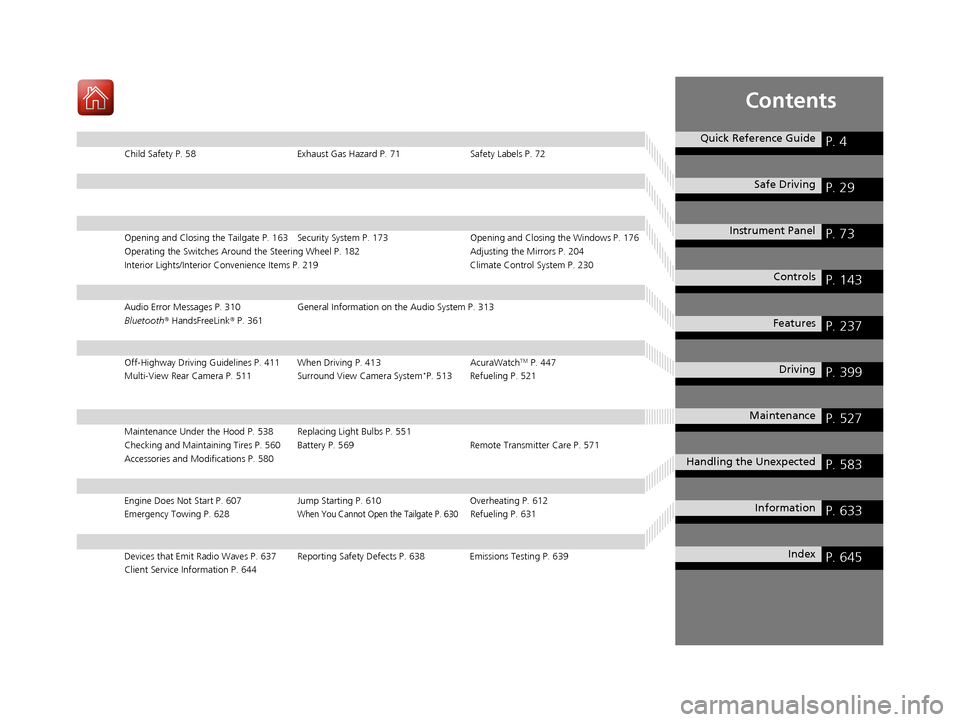
Child Safety P. 58Exhaust Gas Hazard P. 71Safety Labels P. 72
Opening and Closing the Tailgate P. 163 Security System P. 173 Opening and Closing the Windows P. 176
Operating the Switches Around the Steering Wheel P. 182 Adjusting the Mirrors P. 204
Interior Lights/Interior Convenience Items P. 219 Climate Control System P. 230
Audio Error Messages P. 310General Information on the Audio System P. 313
Bluetooth ® HandsFreeLink ® P. 361
Off-Highway Driving Guidelines P. 411 When Driving P. 413 AcuraWatchTM P. 447
Multi-View Rear Camera P. 511 Surround View Camera System*P. 513 Refueling P. 521
Maintenance Under the Hood P. 538 Replacing Light Bulbs P. 551
Checking and Maintaining Tires P. 560 Battery P. 569 Remote Transmitter Care P. 571
Accessories and Modifications P. 580
Engine Does Not Start P. 607 Jump Starting P. 610Overheating P. 612
Emergency Towing P. 628When You Cannot Open the Tailgate P. 630Refueling P. 631
Devices that Emit Radio Waves P. 637 Reporting Safety Defects P. 638 Emissions Testing P. 639
Client Service Information P. 644
Quick Reference GuideP. 4
Safe DrivingP. 29
Instrument PanelP. 73
ControlsP. 143
FeaturesP. 237
DrivingP. 399
MaintenanceP. 527
Handling the UnexpectedP. 583
InformationP. 633
IndexP. 645
20 ACURA RDX-31TJB6111.book 3 ページ 2020年2月11日 火曜日 午後2時6分
Page 18 of 657
17
Quick Reference Guide
Features (P 237)
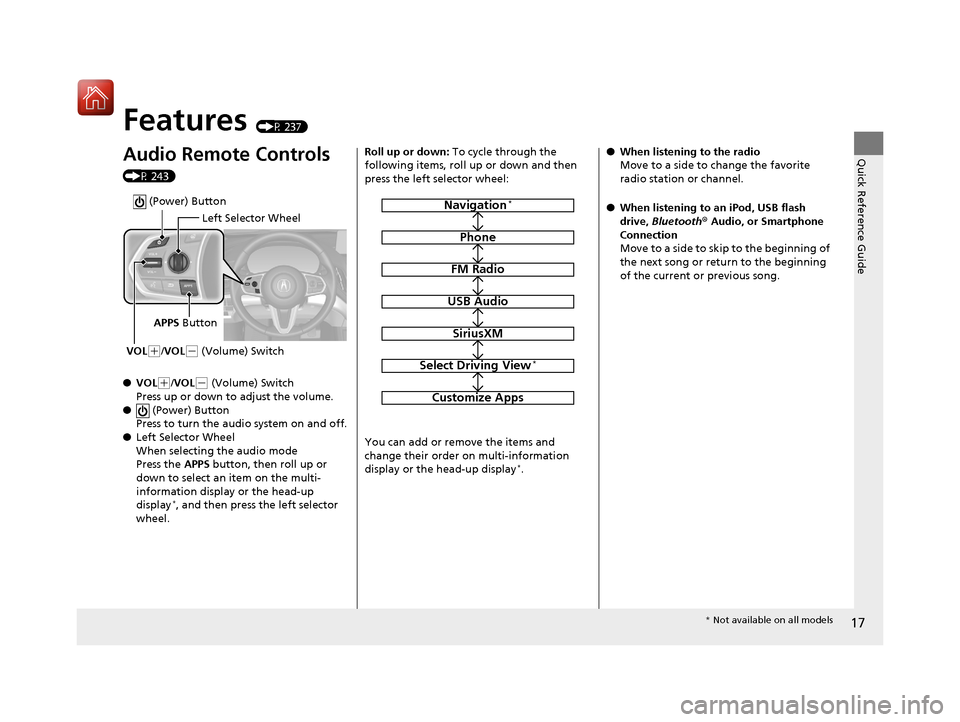
Audio Remote Controls
(P 243)
●VOL
(+/VOL( - (Volume) Switch
Press up or down to adjust the volume.
● (Power) Button
Press to turn the audio system on and off.
● Left Selector Wheel
When selecting the audio mode
Press the APPS button, then roll up or
down to select an item on the multi-
information display or the head-up
display
*, and then press the left selector
wheel.
Left Selector Wheel
APPS Button
VOL
( +/VOL(- (Volume) Switch
(Power) Button
Roll up or down: To cycle through the
following items, roll up or down and then
press the left selector wheel:
You can add or remove the items and
change their order on multi-information
display or the head-up display
*.
Navigation*
Phone
FM Radio
USB Audio
SiriusXM
Select Driving View*
Customize Apps
● When listening to the radio
Move to a side to change the favorite
radio station or channel.
● When listening to an iPod, USB flash
drive, Bluetooth® Audio, or Smartphone
Connection
Move to a side to skip to the beginning of
the next song or return to the beginning
of the current or previous song.
* Not available on all models
20 ACURA RDX-31TJB6111.book 17 ページ 2020年2月11日 火曜日 午後2時6分
Page 139 of 657
138
uuGauges and Displays uHead-Up Display*
Instrument Panel
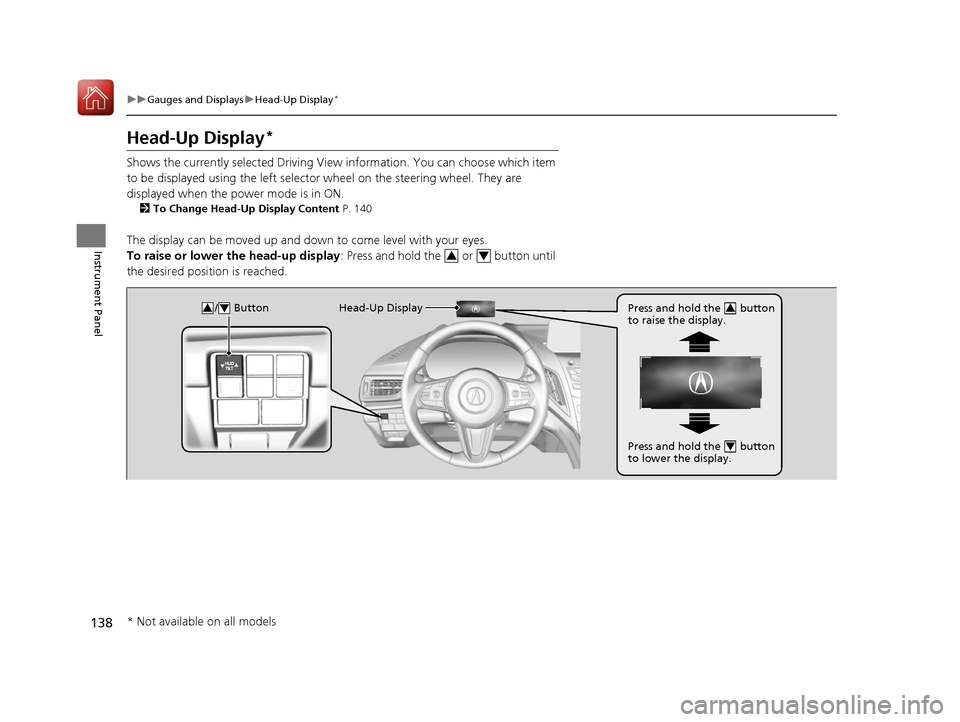
Head-Up Display*
Shows the currently selected Driving View information. You can choose which item
to be displayed using the left selector wheel on the steering wheel. They are
displayed when the power mode is in ON.
2 To Change Head-Up Display Content P. 140
The display can be moved up and down to come level with your eyes.
To raise or lower the head-up display : Press and hold the or button until
the desired position is reached.
34
/ Button34Head-Up Display Press and hold the button
to raise the display.3
Press and hold the button
to lower the display.4
* Not available on all models
20 ACURA RDX-31TJB6111.book 138 ページ 2020年2月11日 火曜日 午後2時6分
Page 141 of 657
140
uuGauges and Displays uHead-Up Display*
Instrument Panel
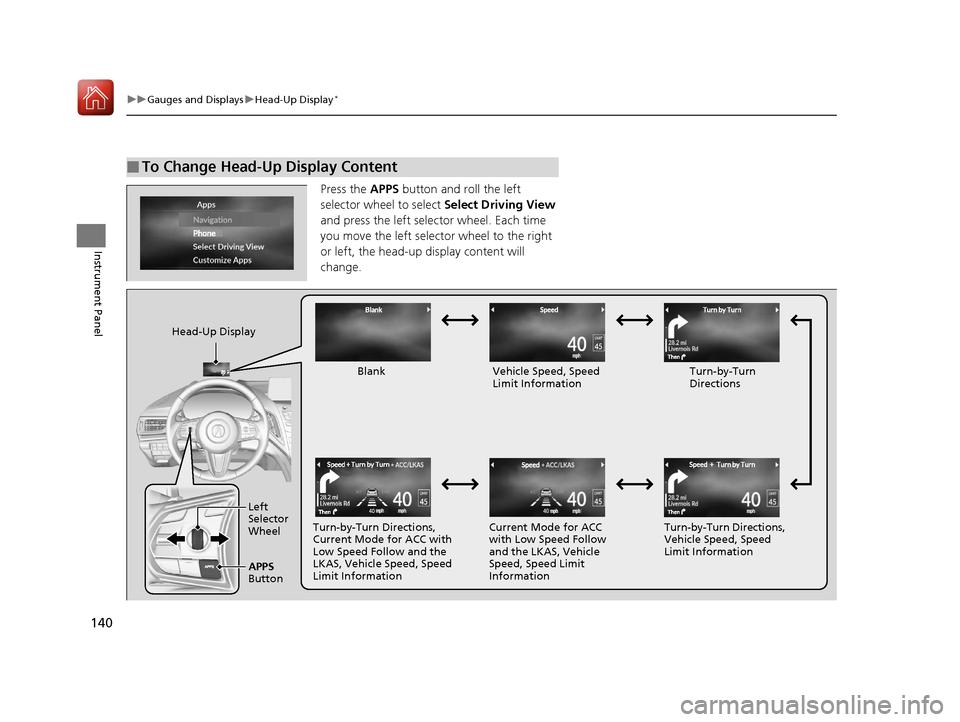
Press the APPS button and roll the left
selector wheel to select Select Driving View
and press the left selector wheel. Each time
you move the left selector wheel to the right
or left, the head-up display content will
change.
■To Change Head-Up Display Content
Head-Up Display
Blank Vehicle Speed, Speed Limit Information Turn-by-Turn
Directions
Turn-by-Turn Directions,
Current Mode for ACC with
Low Speed Follow and the
LKAS, Vehicle Speed, Speed
Limit Information Current Mode for ACC
with Low Speed Follow
and the LKAS, Vehicle
Speed, Speed Limit
InformationTurn-by-Turn Directions,
Vehicle Speed, Speed
Limit Information
Left
Selector
Wheel
APPS
Button
20 ACURA RDX-31TJB6111.book 140 ページ 2020年2月11日 火曜日 午後2時6分
Page 144 of 657
143
Controls
This chapter explains how to operate the various controls necessary for driving.
Clock.................................................. 144
Locking and Unlocking the Doors
Key Types and Functions .................. 146
Low Keyless Access Remote Signal Strength ......................................... 149
Locking/Unlocking the Doors from the Outside .......................................... 150
Locking/Unlocking the Doors from the
Inside ............................................. 159
Childproof Door Locks ..................... 161
Auto Door Locking/Unlocking .......... 162
Opening and Closing the Tailgate ... 163
Security System Immobilizer System .......................... 173 Security System Alarm...................... 173
Opening and Closing the Windows ... 176
Panoramic Roof ................................. 179
Operating the Switches Around the Steering Wheel
ENGINE START/STOP Button............. 182
Turn Signals ..................................... 185
Light Switches.................................. 186
Adaptive Front Lighting System (AFS)*.. 189Fog Lights*...................................... 190
Daytime Running Lights ................... 190
Auto High-Beam .............................. 191
Wipers and Washers ........................ 194
Brightness Control ........................... 198
Rear Defogger/Heated Door Mirror Button ........................................ 200
Heated Windshield Button ............... 200
Driving Position Memory System ...... 201
Adjusting the Steering Wheel .......... 203
Adjusting the Mirrors Interior Rearview Mirror ................... 204
Power Door Mirrors ......................... 205
Adjusting the Seats .......................... 207
Interior Lights/Interior Convenience Items ................................................ 219
Climate Control System Using Automatic Climate Control .... 230
Automatic Climate Control Sensors ... 235
* Not available on all models
20 ACURA RDX-31TJB6111.book 143 ページ 2020年2月11日 火曜日 午後2時6分
Page 205 of 657
204
Controls
Adjusting the Mirrors
Interior Rearview Mirror
Adjust the angle of the rearview mirror when you are sitting in the correct driving
position.
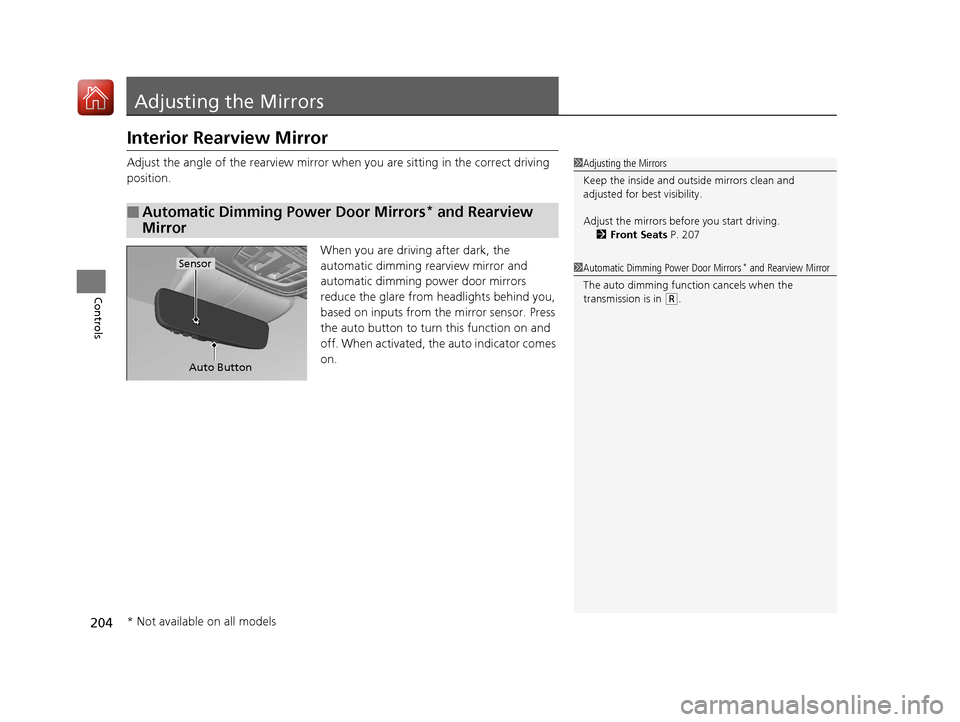
When you are driving after dark, the
automatic dimming rearview mirror and
automatic dimming power door mirrors
reduce the glare from headlights behind you,
based on inputs from the mirror sensor. Press
the auto button to turn this function on and
off. When activated, the auto indicator comes
on.
■Automatic Dimming Power Door Mirrors* and Rearview
Mirror
1 Adjusting the Mirrors
Keep the inside and out side mirrors clean and
adjusted for best visibility.
Adjust the mirrors before you start driving. 2 Front Seats P. 207
Auto Button
Sensor1Automatic Dimming Power Door Mirrors* and Rearview Mirror
The auto dimming function cancels when the
transmission is in
( R.
* Not available on all models
20 ACURA RDX-31TJB6111.book 204 ページ 2020年2月11日 火曜日 午後2時6分
Page 233 of 657
uuClimate Control System u
232
Controls
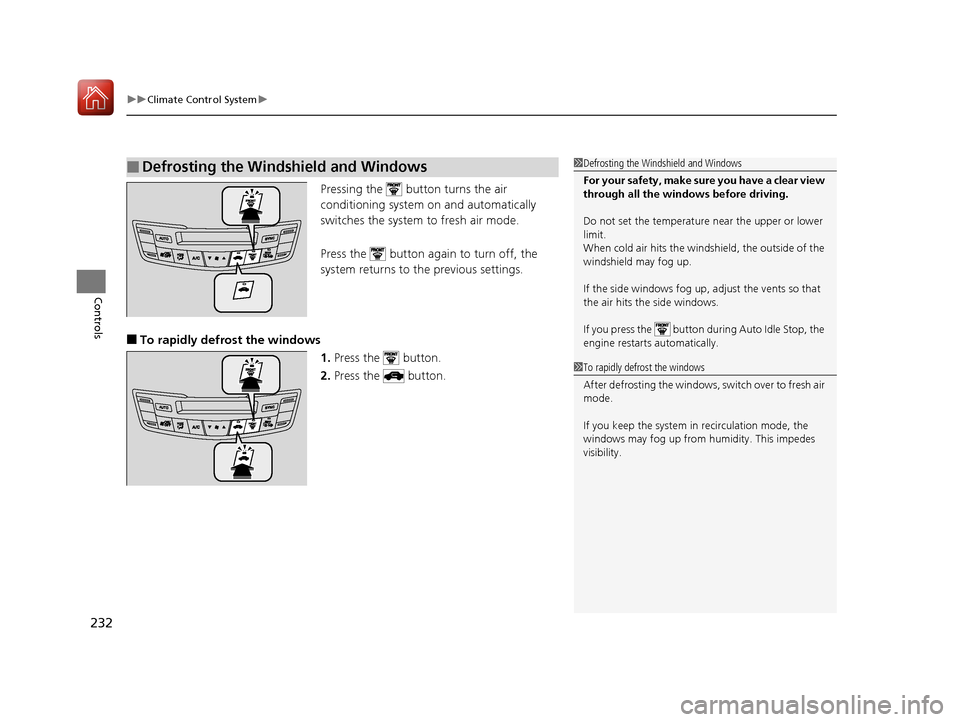
Pressing the button turns the air
conditioning system on and automatically
switches the system to fresh air mode.
Press the button again to turn off, the
system returns to the previous settings.
■To rapidly defrost the windows 1.Press the button.
2. Press the button.
■Defrosting the Windshield and Windows1Defrosting the Windshield and Windows
For your safety, make sure you have a clear view
through all the windows before driving.
Do not set the temperatur e near the upper or lower
limit.
When cold air hits the windshield, the outside of the
windshield may fog up.
If the side windows fog up, adjust the vents so that
the air hits the side windows.
If you press the button during Auto Idle Stop, the
engine restarts automatically.
1 To rapidly defrost the windows
After defrosting the windows, switch over to fresh air
mode.
If you keep the system in recirculation mode, the
windows may fog up from humidity. This impedes
visibility.
20 ACURA RDX-31TJB6111.book 232 ページ 2020年2月11日 火曜日 午後2時6分
Page 245 of 657
uuAudio System uAudio Remote Controls
244
Features
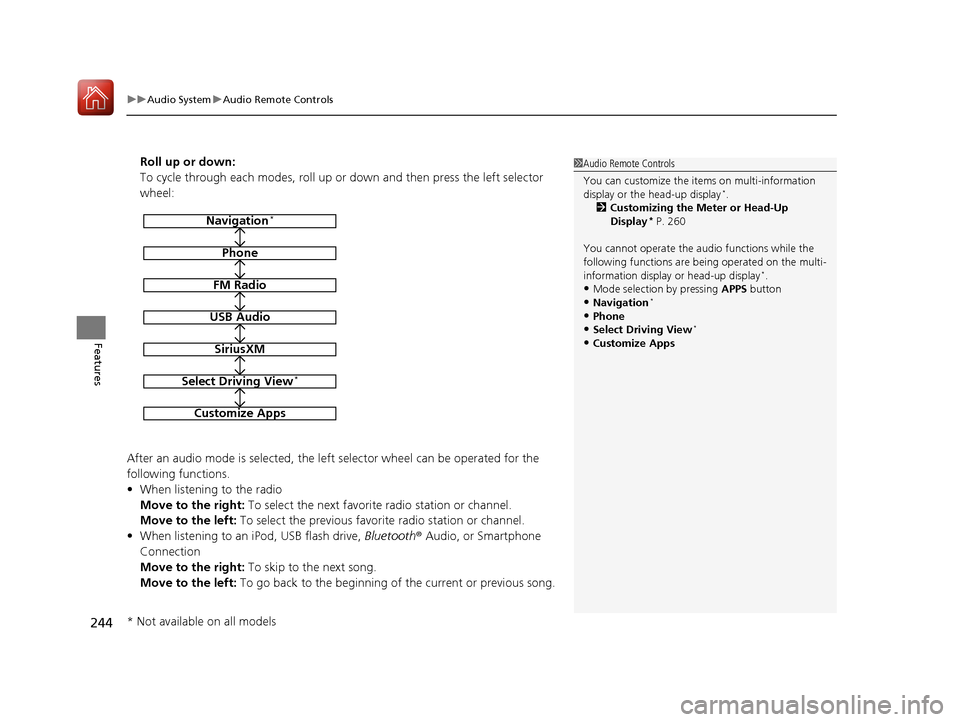
Roll up or down:
To cycle through each modes, roll up or down and then press the left selector
wheel:
After an audio mode is selected, the left selector wheel can be operated for the
following functions.
• When listening to the radio
Move to the right: To select the next favorite radio station or channel.
Move to the left: To select the previous favorite radio station or channel.
• When listening to an iPod, USB flash drive, Bluetooth® Audio, or Smartphone
Connection
Move to the right: To skip to the next song.
Move to the left: To go back to the beginning of the current or previous song.1Audio Remote Controls
You can customize the items on multi-information
display or the head-up display
*.
2 Customizing the Meter or Head-Up
Display
* P. 260
You cannot operate the a udio functions while the
following functions are be ing operated on the multi-
information display or head-up display
*.•Mode selection by pressing APPS button
•Navigation*
•Phone
•Select Driving View*
•Customize Apps
Navigation*
Phone
FM Radio
USB Audio
SiriusXM
Select Driving View*
Customize Apps
* Not available on all models
20 ACURA RDX-31TJB6111.book 244 ページ 2020年2月11日 火曜日 午後2時6分
Page 400 of 657
399
Driving
This chapter discusses driving and refueling.
Before Driving................................... 400
Towing a Trailer ................................ 405
Off-Highway Driving Guidelines ..... 411
When Driving Starting the Engine .......................... 413
Precautions While Driving................. 418
Automatic Transmission ................... 419
Shifting ............................................ 420
Integrated Dynamics System............. 428
Auto Idle Stop .................................. 430
Vehicle Stability AssistTM (VSA®), aka Electronic
Stability Control (ESC), System ................. 436
Agile Handling Assist ....................... 438
Super Handling-All Wheel DriveTM (SH-AWD®)*.. 439
Tire Pressure Monitoring System (TPMS) with Tire Fill Assist .......................... 440
Tire Pressure Monitoring System (TPMS) - Required Federal Explanation ......... 442
Blind spot information System
*........ 444
AcuraWatchTM................................... 447
Collision Mitigati on Braking SystemTM
(CMBSTM) ....................................... 450
Adaptive Cruise Control (ACC) with Low Speed Follow ................................. 460 Lane Keeping Assist System (LKAS) .. 477
Road Departure Mi
tigation (RDM)
System ........................................ 485
Front Sensor Camera ....................... 489
Radar Sensor ................................... 491
Braking .............................................. 492
Parking Your Vehicle ........................ 501
Multi-View Rear Camera .................. 511
Surround View Camera System
*..... 513
Refueling ........................................... 521
Fuel Economy and CO
2 Emissions .... 524
Turbo Engine Vehicle ....................... 525
* Not available on all models
20 ACURA RDX-31TJB6111.book 399 ページ 2020年2月11日 火曜日 午後2時6分
Page 401 of 657
400
Driving
Before Driving
Driving Preparation
Check the following items before you start driving.
• Make sure there are no obstructions on the windows, door mirrors, exterior
lights, or other parts of the vehicle.
u Remove any frost, snow, or ice.
u Remove any snow on the roof, as this can slip down and obstruct your field of
vision while driving. If frozen solid , remove ice once it has softened.
u When removing ice from around the wheels, be sure not to damage the wheel
or wheel components.
• Make sure the hood is securely closed.
u If the hood opens while driving, your front view will be blocked.
• Make sure the tires are in good condition.
u Check air pressures, and check for damage and excessive wear.
2Checking and Maintaining Tires P. 560
•Make sure there are no people or ob jects behind or around the vehicle.
u There are blind spots from the inside.
■Exterior Checks1Exterior Checks
NOTICE
When doors are frozen s hut, use warm water around
the door edges to melt any ice. Do not try to force
them open, as this can damage the rubber trim
around the doors. When done, wipe dry to avoid
further freezing.
Do not pour warm water into the key cylinder.
You will be unable to insert the key if the water
freezes in the hole.
Heat from the engine and exhaust can ignite
flammable material s left under the hood, causing a
fire. If you’ve parked y our vehicle for an extended
period, inspect and remove any debris that may have
collected, such as dried grass and leaves that have
fallen or have been carried in for use as a nest by a
small animal. Also check under the hood for leftover
flammable materials after you or someone else has
performed maintenance on your vehicle.
20 ACURA RDX-31TJB6111.book 400 ページ 2020年2月11日 火曜日 午後2時6分