gear shift Acura RDX 2020 Owner's Manual
[x] Cancel search | Manufacturer: ACURA, Model Year: 2020, Model line: RDX, Model: Acura RDX 2020Pages: 657, PDF Size: 33.2 MB
Page 7 of 657
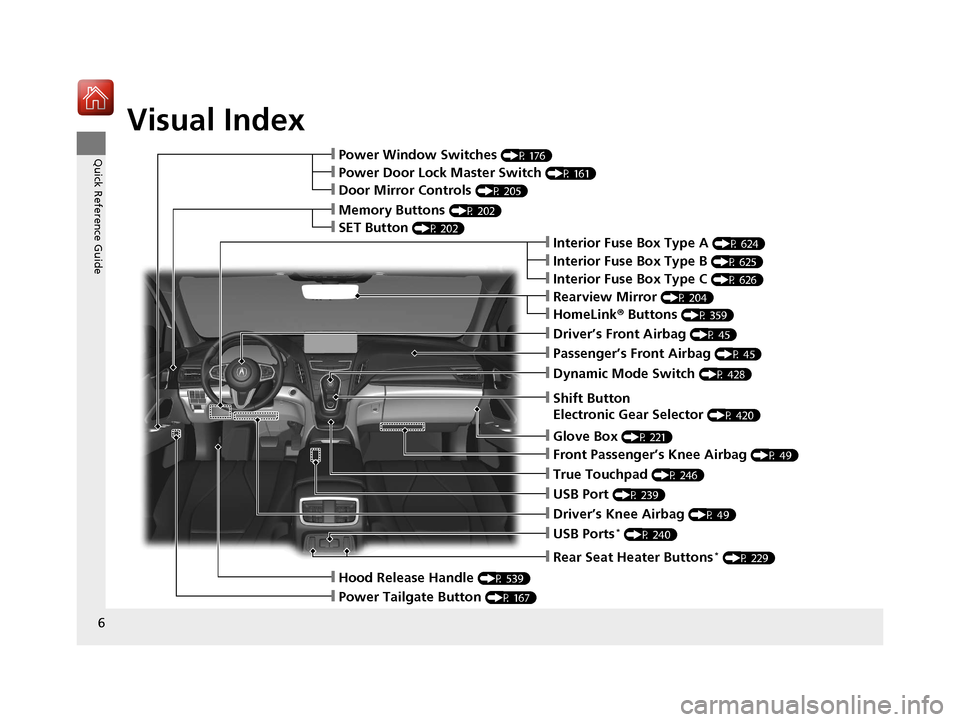
Visual Index
6
Quick Reference Guide
❙Rearview Mirror (P 204)
❙Shift Button
Electronic Gear Selector
(P 420)
❙Driver’s Front Airbag (P 45)
❙Glove Box (P 221)
❙Passenger’s Front Airbag (P 45)
❙HomeLink® Buttons (P 359)
❙Interior Fuse Box Type A (P 624)
❙Dynamic Mode Switch (P 428)
❙Front Passenger’s Knee Airbag (P 49)
❙True Touchpad (P 246)
❙USB Port (P 239)
❙Driver’s Knee Airbag (P 49)
❙USB Ports* (P 240)
❙Power Window Switches (P 176)
❙Memory Buttons (P 202)
❙SET Button (P 202)
❙Power Door Lock Master Switch (P 161)
❙Door Mirror Controls (P 205)
❙Hood Release Handle (P 539)
❙Power Tailgate Button (P 167)
❙Interior Fuse Box Type C (P 626)
❙Rear Seat Heater Buttons* (P 229)
❙Interior Fuse Box Type B (P 625)
20 ACURA RDX-31TJB6111.book 6 ページ 2020年2月11日 火曜日 午後2時6分
Page 20 of 657
19
Quick Reference Guide
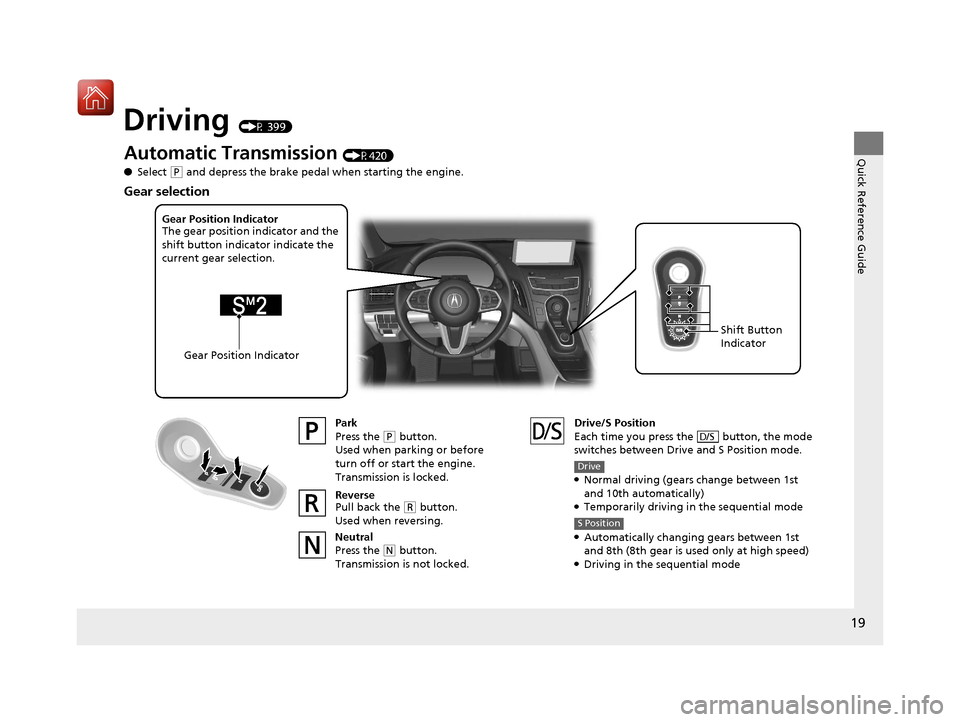
Driving (P 399)
Automatic Transmission (P420)
● Select
(P and depress the brake pedal when starting the engine.
Park
Press the
(P button.
Used when parking or before
turn off or start the engine.
Transmission is locked.
Reverse
Pull back the
( R button.
Used when reversing.
Neutral
Press the
( N button.
Transmission is not locked. Drive/S Position
Each time you press the button, the mode
switches between Drive and S Position mode.
●Normal driving (gears change between 1st
and 10th automatically)
●Temporarily driving in the sequential mode
●Automatically changing gears between 1st
and 8th (8th gear is used only at high speed)
●Driving in the sequential mode
D/S
Drive
S Position
Gear Position Indicator
The gear position indicator and the
shift button indicator indicate the
current gear selection.
Gear Position Indicator Shift Button
Indicator
Gear selection
20 ACURA RDX-31TJB6111.book 19 ページ 2020年2月11日 火曜日 午後2時6分
Page 21 of 657
20
Quick Reference Guide
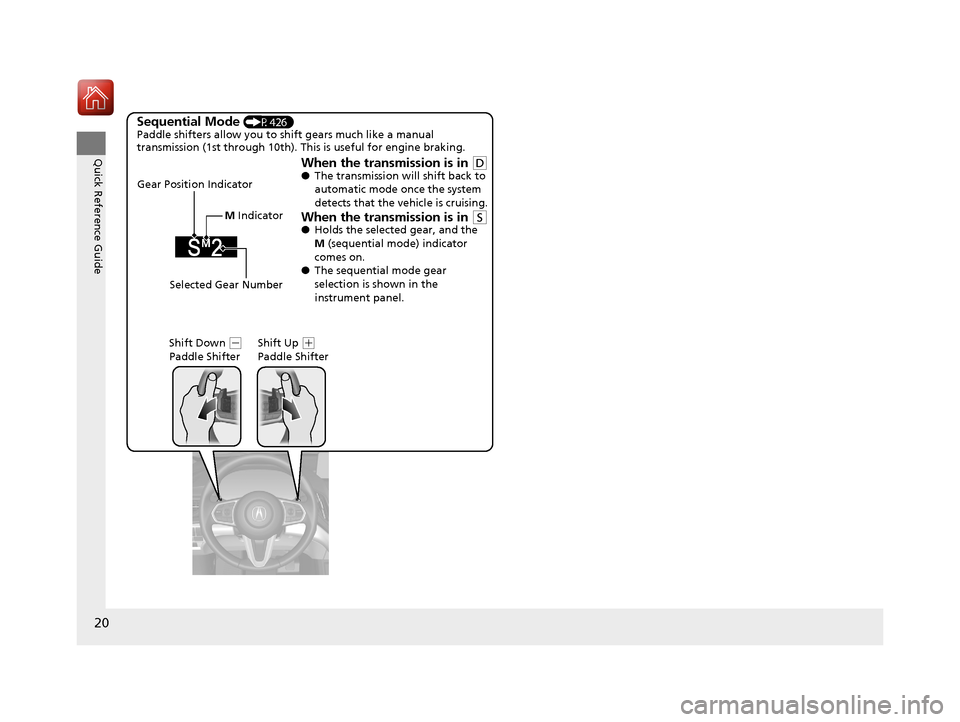
Sequential Mode (P426)
Paddle shifters allow you to shift gears much like a manual
transmission (1st through 10th). This is useful for engine braking.
When the transmission is in (D●The transmission will shift back to
automatic mode once the system
detects that the vehicle is cruising.
When the transmission is in (S●Holds the selected gear, and the
M (sequential mode) indicator
comes on.
● The sequential mode gear
selection is shown in the
instrument panel.
Gear Position Indicator
Shift Down
(-
Paddle Shifter Shift Up (
+
Paddle Shifter
Selected Gear Number M
Indicator
20 ACURA RDX-31TJB6111.book 20 ページ 2020年2月11日 火曜日 午後2時6分
Page 80 of 657
79
uuIndicators u
Continued
Instrument Panel
IndicatorNameOn/BlinkingExplanationMessage
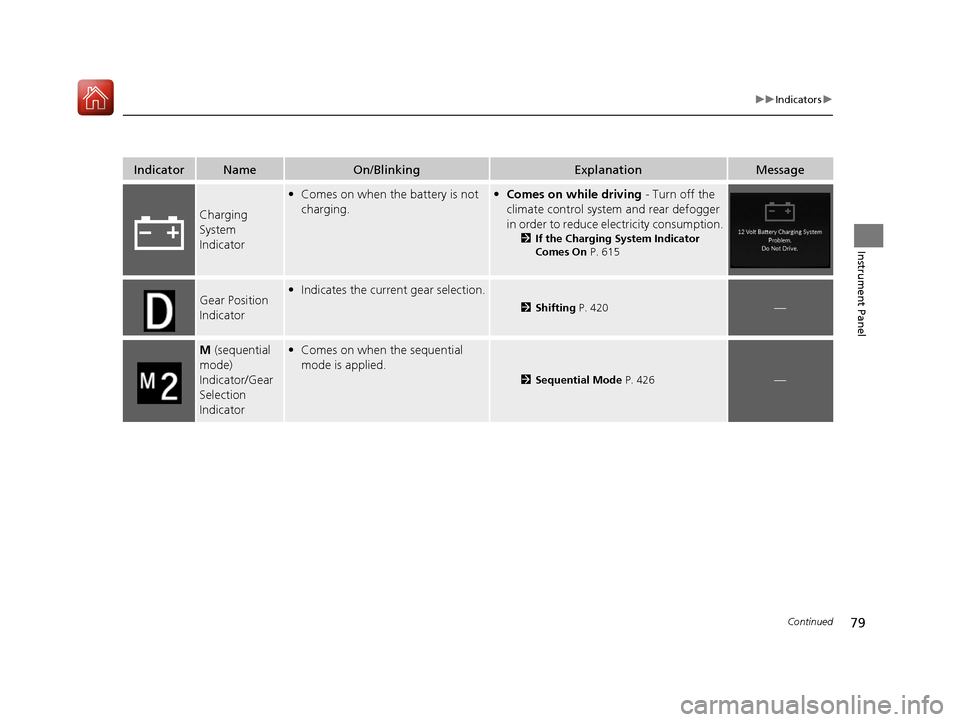
Charging
System
Indicator
•Comes on when the battery is not
charging.•Comes on while driving - Turn off the
climate control system and rear defogger
in order to reduce electricity consumption.
2 If the Charging System Indicator
Comes On P. 615
Gear Position
Indicator•Indicates the current gear selection.
2 Shifting P. 420—
M (sequential
mode)
Indicator/Gear
Selection
Indicator• Comes on when the sequential
mode is applied.
2 Sequential Mode P. 426—
20 ACURA RDX-31TJB6111.book 79 ページ 2020年2月11日 火曜日 午後2時6分
Page 81 of 657
80
uuIndicators u
Instrument Panel
IndicatorNameOn/BlinkingExplanationMessage
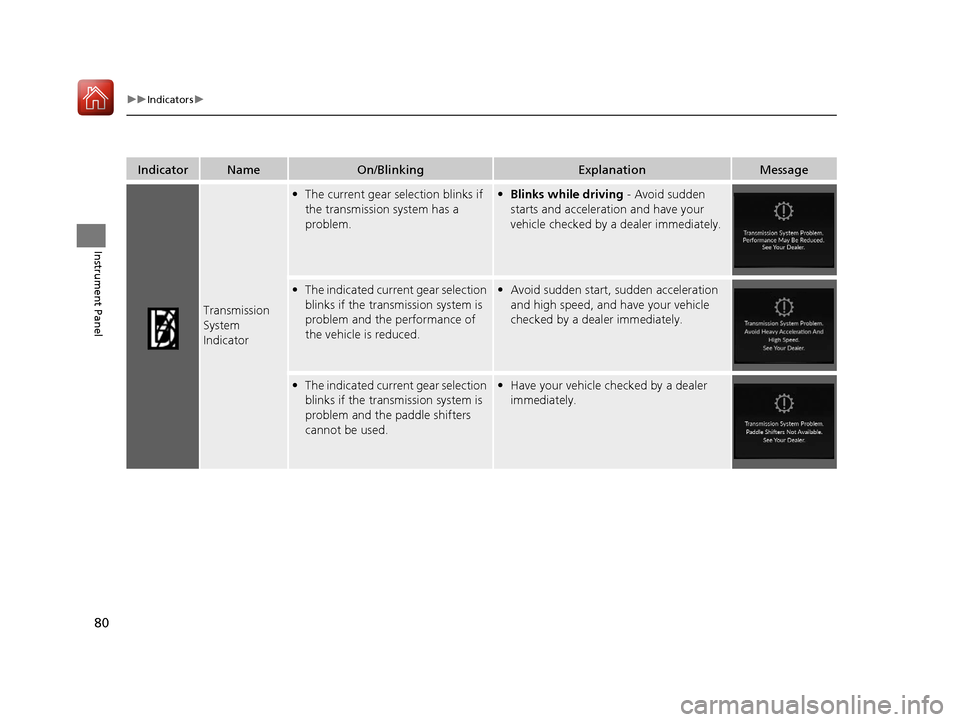
Transmission
System
Indicator
•The current gear selection blinks if
the transmission system has a
problem.• Blinks while driving - Avoid sudden
starts and acceleration and have your
vehicle checked by a dealer immediately.
• The indicated current gear selection
blinks if the transmission system is
problem and the performance of
the vehicle is reduced.• Avoid sudden start, sudden acceleration
and high speed, and have your vehicle
checked by a dealer immediately.
•The indicated current gear selection
blinks if the transmission system is
problem and the paddle shifters
cannot be used.• Have your vehicle checked by a dealer
immediately.
20 ACURA RDX-31TJB6111.book 80 ページ 2020年2月11日 火曜日 午後2時6分
Page 112 of 657

111
uuIndicators uMulti-Information Display Warning and Information Messages
Continued
Instrument Panel
MessageConditionExplanation
• Appears when you try to ch ange the gear position
without depressing the brake pedal.• Depress the brake pedal, then select a shift button.
• Appears when you try to ch ange the gear position
without releasing your foot off the accelerator pedal.• Release your foot off the acce lerator pedal, then select
a shift button.
• Appears when you try to change the shift position
after the position has automatically been changed to
(P with the driver’s door open and the driver’s seat
belt unfastened.
●Press the (P button if you leave the vehicle.
U.S.
Canada
20 ACURA RDX-31TJB6111.book 111 ページ 2020年2月11日 火曜日 午後2時6分
Page 113 of 657
112
uuIndicators uMulti-Information Display Warn ing and Information Messages
Instrument Panel
MessageConditionExplanation
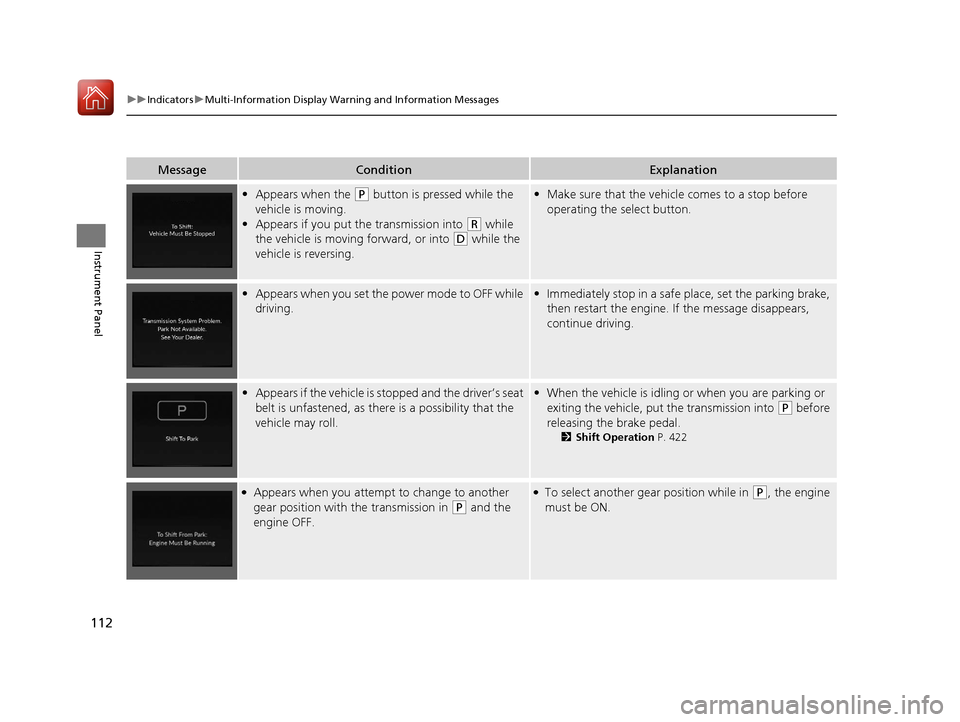
•Appears when the (P button is pressed while the
vehicle is moving.
• Appears if you put the transmission into
(R while
the vehicle is moving forward, or into
(D while the
vehicle is reversing.
• Make sure that the vehicl e comes to a stop before
operating the select button.
• Appears when you set the power mode to OFF while
driving.•Immediately stop in a safe place, set the parking brake,
then restart the engine. If the message disappears,
continue driving.
•Appears if the vehicle is stopped and the driver’s seat
belt is unfastened, as ther e is a possibility that the
vehicle may roll.• When the vehicle is idling or when you are parking or
exiting the vehicle, put the transmission into
(P before
releasing the brake pedal.
2 Shift Operation P. 422
●Appears when you attempt to change to another
gear position with the transmission in
(P and the
engine OFF.
●To select another gear position while in (P, the engine
must be ON.
20 ACURA RDX-31TJB6111.book 112 ページ 2020年2月11日 火曜日 午後2時6分
Page 114 of 657

113
uuIndicators uMulti-Information Display Warning and Information Messages
Continued
Instrument Panel
MessageConditionExplanation
• Appears when you press the (P button but it is not
engaged due to low ATF temperature.• Depress the brake pedal until this message disappear.
• Appears when the temperature of the transmission
is starting to get too hot.
• The performance of the vehicle may be reduced.•Until the message disappears, reduce your speed and
allow the system to cool down.
• Appears when the shift is repeatedly changed
between
(P and any other position.
• Wait for a while then change the gear position.
• Appears when you try to take the transmission out
of
(P immediately after you start engine.
•Try to take the transmission out of (P again.
• Appears if you depress the accelerator pedal when
the transmission is in
(N.
•Release the accelerator pedal. After that, depress the
brake pedal and change the transmission position.
20 ACURA RDX-31TJB6111.book 113 ページ 2020年2月11日 火曜日 午後2時6分
Page 116 of 657
115
uuIndicators uMulti-Information Display Warning and Information Messages
Continued
Instrument Panel
MessageConditionExplanation
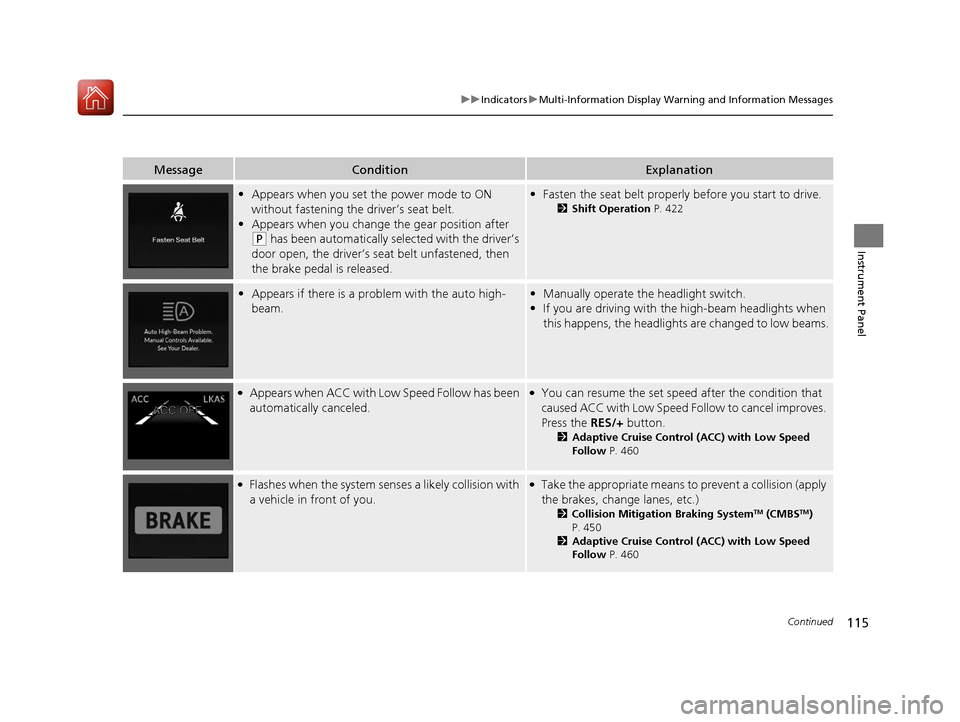
• Appears when you set the power mode to ON
without fastening the driver’s seat belt.
• Appears when you change the gear position after
(P has been automatically selected with the driver’s
door open, the driver’s seat belt unfastened, then
the brake pedal is released.
• Fasten the seat belt properly before you start to drive.
2 Shift Operation P. 422
•Appears if there is a prob lem with the auto high-
beam.• Manually operate the headlight switch.
• If you are driving with th e high-beam headlights when
this happens, the headlight s are changed to low beams.
●Appears when ACC with Low Speed Follow has been
automatically canceled.●You can resume the set speed after the condition that
caused ACC with Low Speed Follow to cancel improves.
Press the RES/+ button.
2Adaptive Cruise Control (ACC) with Low Speed
Follow P. 460
●Flashes when the system senses a likely collision with
a vehicle in front of you.●Take the appropriate means to prevent a collision (apply
the brakes, change lanes, etc.)
2Collision Mitigation Braking SystemTM (CMBSTM)
P. 450
2 Adaptive Cruise Control (ACC) with Low Speed
Follow P. 460
20 ACURA RDX-31TJB6111.book 115 ページ 2020年2月11日 火曜日 午後2時6分
Page 410 of 657
409
uuTowing a Trailer uDriving Safely with a Trailer
Continued
Driving
Driving Safely with a Trailer
• Have the trailer properly servic ed and keep it in good condition.
• Make sure that all the weights and load in the vehicle and trailer are within limits.
2Towing Load Limits P. 405
•Securely attach the hitch, safety chains, and other necessary parts to the trailer.
• Securely store all the items in and on the tra iler so that they do not shift while
driving.
• Check if the lights and brakes on the trailer are working properly.
• Check the pressures of the traile r tires, including the spare.
• Turn off the Auto Idle Stop syst em using the Auto Idle Stop OFF button. The
trailer weight can affect your vehicle’s brake effectiveness if Auto Idle Stop is
activated on a hill wh ile towing a trailer.
• Drive slower than normal.
• Obey posted speed limits fo r vehicles with trailers.
• Use the
(D position when towing a trailer on level roads.
• Turn more slowly and with a wider turning arc than normal.
• Allow more time and distance for braking.
• Do not brake or turn suddenly.
■Things You Need To Know Before Towing a Trailer
■Towing Speeds and Gears
■Turning and Braking
1Driving Safely with a Trailer
Operating speed when towing a trailer must not
exceed 62 mph (100 km/h).
Parking
In addition to the normal precautions, place wheel
chocks at each of the trailer’s tires.
20 ACURA RDX-31TJB6111.book 409 ページ 2020年2月11日 火曜日 午後2時6分