wheel ACURA RDX 2022 Owners Manual
[x] Cancel search | Manufacturer: ACURA, Model Year: 2022, Model line: RDX, Model: ACURA RDX 2022Pages: 709, PDF Size: 25.22 MB
Page 643 of 709

Continued641
uuIf a Tire Goes Flat uChanging a Flat Tire
Handling the Unexpected
1. Place the jack under the jacking point
closest to the tire to be changed.
2. Turn the end bracket cl ockwise as shown in
the image until the top of the jack contacts
the jacking point.
u Make sure that the jacking point tab is
resting in the jack notch.
3. Raise the vehicle, using the jack handle bar
and the jack handle, until the tire is off the
ground.
■How to Set Up the Jack1How to Set Up the Jack
Do not use the jack with people or luggage in the
vehicle.
Use the jack provided in your vehicle.
Other jacks may not support the weight (“load”) or
may not fit the jacking point.
The following instructions must be followed to use
the jack safely:
•Do not use while the engine is running.
•Use only where the ground is firm and level.
•Use only at the jacking points.•Do not get in the vehicl e while using the jack.
•Do not put anything on top of or underneath the
jack.
3WARNING
The vehicle can easily roll off the jack,
seriously injuring anyone underneath.
Follow the directions for changing a tire
exactly, and never get under the vehicle
when it is supported only by the jack.
Jack
Handle Bar
Wheel Nut Wrench as Jack Handle
22 ACURA RDX-31TJB6300.book 641 ページ 2021年8月2日 月曜日 午前11時0分
Page 644 of 709

uuIf a Tire Goes Flat uChanging a Flat Tire
642
Handling the Unexpected
1. Remove the wheel nuts and flat tire.
2. Wipe the mounting surfaces of the wheel
with a clean cloth.
3. Mount the compact spare tire.
4. Screw the wheel nuts until they touch the
lips around the mounting holes, then stop
rotating.
5. Lower the vehicle and remove the jack.
Tighten the wheel nuts in the order
indicated in the image. Go around,
tightening the nuts, two to three times in
this order.
Wheel nut torque:
80 lbf∙ft (108 N∙m, 11 kgf∙m)
■Replacing the Flat Tire1Replacing the Flat Tire
Do not over tighten the wheel nuts by applying extra
torque using your foot or a pipe.
22 ACURA RDX-31TJB6300.book 642 ページ 2021年8月2日 月曜日 午前11時0分
Page 645 of 709

Continued643
uuIf a Tire Goes Flat uChanging a Flat Tire
Handling the Unexpected
1. Put the flat tire in the storage bag provided
with your vehicle.
u The storage bag is in the tool box.
2. Knot the top of the storage bag.
3. Securely put the jack, jack handle bar, and
wheel nut wrench back in the tool box.
4. Bore through the bag, and pass the holding
belt through the hole of the bag and the
wheel of the flat tire as shown.
5. Place the flat tire in the cargo area, and
thread the belt through the tie-down
anchor as shown.
6. Pass the belt through the ring, and tighten
the belt to secure the flat tire in place.
■Storing the Flat Tire1Storing the Flat Tire
3WARNING
Loose items can fly around the interior in a
crash and can seriously injure the
occupants.
Store the wheel, jack, and tools securely
before driving.
Belt
Tie-down Anchor
22 ACURA RDX-31TJB6300.book 643 ページ 2021年8月2日 月曜日 午前11時0分
Page 647 of 709

645
uuIf a Tire Goes Flat uTemporarily Repairing a Flat Tire
Continued
Handling the Unexpected
Temporarily Repairing a Flat Tire
If the tire has a large cut or is otherwise severely damaged, you will need to have the
vehicle towed. If the tire only has a small puncture, from a nail for instance, you can
use the temporary tire repair kit so that you can drive to the nearest service station
for a more permanent repair.
If a tire goes flat while driving, grasp the steering wheel firmly, and brake gradually
to reduce speed. Then, stop in a safe place.
1. Park the vehicle on a firm, level, and n on-slippery surface and apply the parking
brake.
2. Change the gear position to
(P.
3. Turn on the hazard warning lights an d set the power mode to VEHICLE OFF
(LOCK).
Vehicles with temporary tire repair kit
1 Temporarily Repairing a Flat Tire
The kit should not be used in the following situations.
Instead, contact a dealer or roadside assistance to
have the vehicle towed.
•The tire sealant has expired.
•More than one tire is punctured.•The puncture or cut is larger than 3/16 inch (4.8 mm).
•The tire side wall is damaged or the puncture is
outside the contact area.
•Damage has been caused by driving with the tire
extremely under inflated.
•The tire bead is no longer seated.
•The rim is damaged.
Do not remove a nail or screw that punctured the
tire. If you remove it from the tire, you may not be
able to repair the puncture using the kit.
NOTICE
Do not use a puncture-repairing agent other than the
one provided in the kit that came with your vehicle. If
a different agent is used, you may permanently
damage the tire pressure sensor.
When the puncture is:Kit Use
Smaller than 3/16 inch (4.8 mm)Yes
Larger than 3/16 inch (4.8 mm)No
Contact
Area
22 ACURA RDX-31TJB6300.book 645 ページ 2021年8月2日 月曜日 午前11時0分
Page 653 of 709

651
uuIf a Tire Goes Flat uTemporarily Repairing a Flat Tire
Continued
Handling the Unexpected
11. Press the pressure relief button until the
gauge returns 0 psi (0 kPa).
12. Apply the repair notification label to the
flat surface of the wheel.
u The wheel surface must be clean to
ensure the label adheres properly.
Pressure Relief Button
Repair Notification Label
22 ACURA RDX-31TJB6300.book 651 ページ 2021年8月2日 月曜日 午前11時0分
Page 664 of 709

662
uuEngine Does Not Start uEmergency Engine Stop
Handling the Unexpected
Emergency Engine Stop
The ENGINE START/STOP button may be used to st op the engine due to an
emergency situation even while driving. If you must stop the engine, do either of the
following operations:
• Press and hold the ENGINE START/STOP button for about two seconds.
• Firmly press the ENGINE START/STOP button three times.
The steering wheel will not lock. However, because turning off the engine disables
the power assist the engine provides to the steering and braking systems, it will
require significantly more physical effort an d time to steer and slow the vehicle. Use
both feet on the brake pedal to slow down the vehicle and stop immediately in a
safe place.
The gear position automatically changes to
(P after the vehicle comes to a complete
stop. Then, the power mode changes to VEHICLE OFF.
1Emergency Engine Stop
Do not press the ENGINE START/STOP button while
driving unless it is absolute ly necessary for the engine
to be turned off.
If you press the ENGINE START/STOP button while
driving, the beeper sounds.
22 ACURA RDX-31TJB6300.book 662 ページ 2021年8月2日 月曜日 午前11時0分
Page 679 of 709

677
uuFuses uFuse Locations
Continued
Handling the Unexpected
Located under the dashboard.
Fuse locations are shown on the label on
the side panel.
Locate the fuse in question by the fuse
number and label number.
■Interior Fuse Box Type A
Fuse Label
Fuse Box
AB
■Circuit protected and fuse rating
Circuit ProtectedAmps
1BACK-UP LIGHT10 A
2STARTER MOTOR10 A
3OPTION10 A
4−−
5−−
6−(10 A)
7−−
8−−
9IG1 R/B15 A
10 DR REAR DOOR LOCK 10 A
11DR DOOR LOCK10 A
12 AS SIDE DOOR LOCK 10 A
13AS SIDE DOOR UNLOCK10 A
14 DR DOOR UNLOCK 10 A
15OPTION 210 A
16 SMART 10 A
17SUNROOF20 A
18
HEATED STRG WHEEL*(10 A)
19REAR LEFT P/W20 A
20 SRS 10 A
21FUEL PUMP20 A
22 FRONT ACC SOCKET 20 A
23LEFT H/L HI10 A
24 RIGHT H/L HI 10 A
25DRIVER P/W20 A
26 DR REAR DOOR UNLOCK 10 A
27ACCESSORY10 A
28 PASS SRS IND 10 A
29PDM10 A
30 ADS*(15 A)
31REAR RIGHT P/W20 A
32 − −
33TRANSMISSION10 A
34 ACG 10 A
35DRL10 A
36 A/C 10 A
37AUDIO15 A
38 DOOR LOCK 20 A
39AS P/W20 A
AREAR SEAT HEATER*20 A
B−−
Circuit ProtectedAmps
* Not available on all models
22 ACURA RDX-31TJB6300.book 677 ページ 2021年8月2日 月曜日 午前11時0分
Page 683 of 709
681
Handling the Unexpected
Emergency Towing
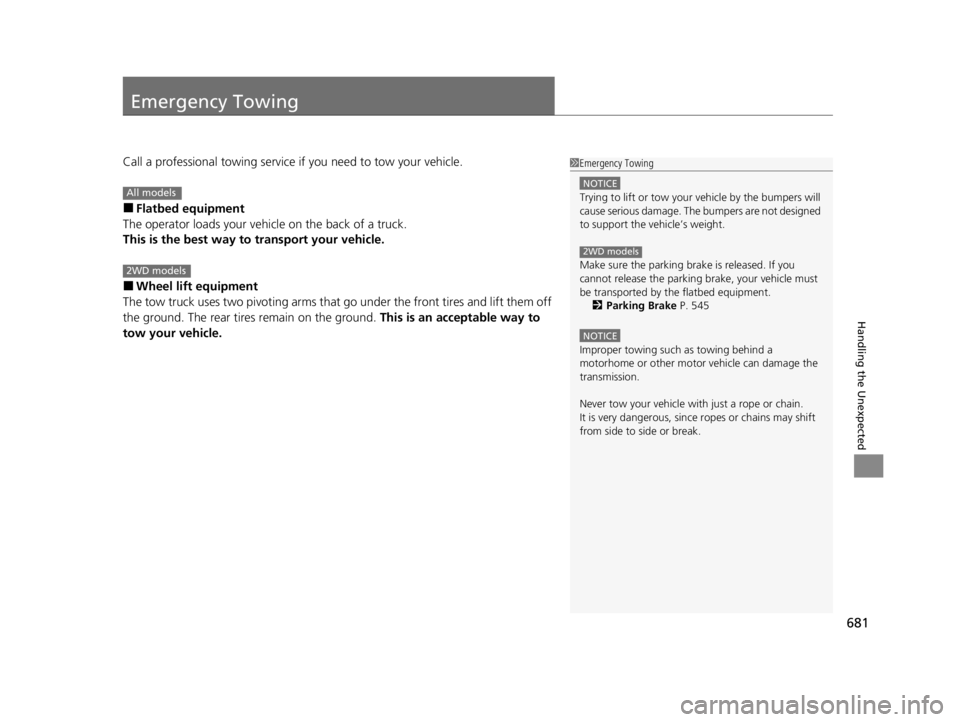
Call a professional towing service if you need to tow your vehicle.
■Flatbed equipment
The operator loads your vehicle on the back of a truck.
This is the best way to transport your vehicle.
■Wheel lift equipment
The tow truck uses two pivoti ng arms that go under the front tires and lift them off
the ground. The rear tires remain on the ground. This is an acceptable way to
tow your vehicle.
1 Emergency Towing
NOTICE
Trying to lift or tow your vehicle by the bumpers will
cause serious damage. The bumpers are not designed
to support the vehicle’s weight.
Make sure the parking brake is released. If you
cannot release the parking brake, your vehicle must
be transported by the flatbed equipment.
2 Parking Brake P. 545
NOTICE
Improper towing such as towing behind a
motorhome or other motor vehicle can damage the
transmission.
Never tow your vehicle with just a rope or chain.
It is very dangerous, since ropes or chains may shift
from side to side or break.
2WD models
All models
2WD models
22 ACURA RDX-31TJB6300.book 681 ページ 2021年8月2日 月曜日 午前11時0分
Page 689 of 709
687
uuSpecifications u
Information
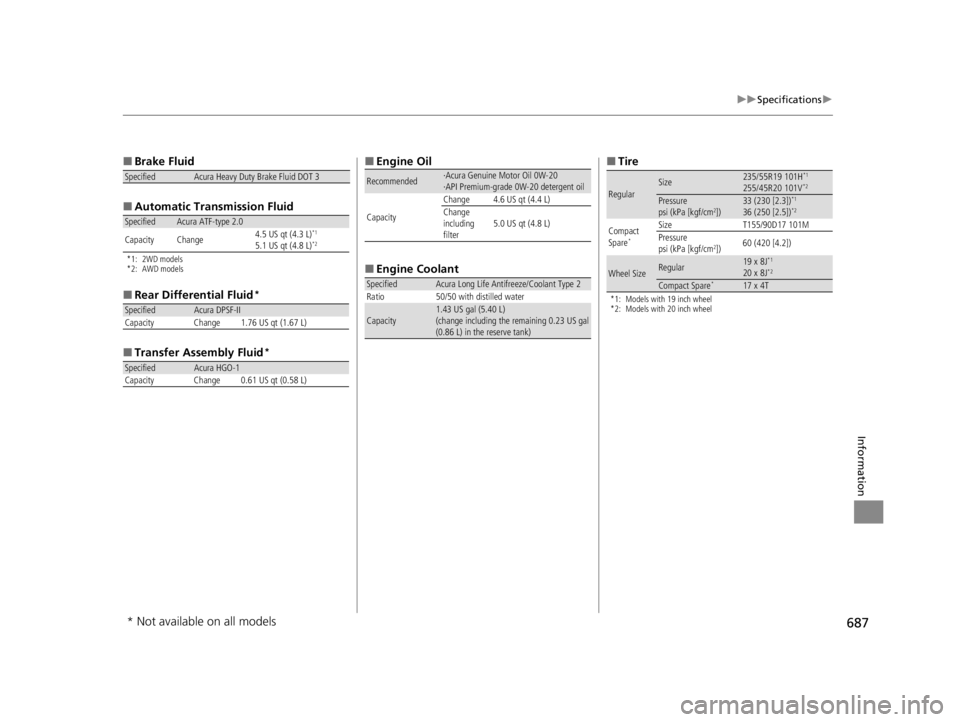
■
Brake Fluid
■ Automatic Tran smission Fluid
*1: 2WD models
*2: AWD models
■
Rear Differential Fluid*
■Transfer Assembly Fluid*
SpecifiedAcura Heavy Duty Brake Fluid DOT 3
SpecifiedAcura ATF-type 2.0
Capacity Change 4.5 US qt (4.3 L)*1
5.1 US qt (4.8 L)*2
SpecifiedAcura DPSF-II
Capacity Change 1.76 US qt (1.67 L)
SpecifiedAcura HGO-1
Capacity Change 0.61 US qt (0.58 L)
■ Engine Oil
■ Engine Coolant
Recommended·Acura Genuine Motor Oil 0W-20
·API Premium-grade 0W-20 detergent oil
Capacity Change 4.6 US qt (4.4 L)
Change
including
filter
5.0 US qt (4.8 L)
SpecifiedAcura Long Life Antifreeze/Coolant Type 2
Ratio 50/50 with distilled water
Capacity1.43 US gal (5.40 L)
(change including the remaining 0.23 US gal
(0.86 L) in the reserve tank)
■ Tire
*1: Models with 19 inch wheel
*2: Models with 20 inch wheel
RegularSize235/55R19 101H*1
255/45R20 101V*2
Pressure
psi (kPa [kgf/cm2])33 (230 [2.3])*1
36 (250 [2.5])*2
Compact
Spare*
Size T155/90D17 101M
Pressure
psi (kPa [kgf/cm
2]) 60 (420 [4.2])
Wheel SizeRegular19 x 8J*1
20 x 8J*2
Compact Spare*17 x 4T
* Not available on all models
22 ACURA RDX-31TJB6300.book 687 ページ 2021年8月2日 月曜日 午前11時0分
Page 700 of 709

Index
698
Index
Index
A
ABS (Anti-lock Brake System)................... 552
Accessories and Modifications ................. 633
Accessory Power Socket ........................... 239
Acura Integrated Dynamics System ......... 459
Dynamic Mode Switch ............................. 460
AcuraLink® ............................................... 419
AcuraWatch
TM........................................... 483
Adaptive Cruise Control (ACC) with Low Speed Follow ........................... 102, 502
Additives
Coolant ................................................... 598
Engine Oil ................................................ 593
Washer .................................................... 602
Additives, Engine Oil ................................ 593
Adjusting Armrest ................................................... 229
Front Seats .............................................. 216
Head Restraints........................................ 225
Mirrors .................................................... 213
Rear Seats................................................ 222
Steering Wheel ........................................ 212
Agile Handling Assist ................................ 473
Air Conditioning System (Climate Control System) .................................................... 247
Changing the Mode ................................ 247
Defrosting the Windshield and Windows ............................................... 249
Dust and Pollen Filter ............................... 626
Rear Temperature Control Dial................. 251
Recirculation/Fresh Air Mode ................... 247 Sensors ................................................... 252
Synchronized Mode................................. 250
Using Automatic Climate Control ............ 247
Air Pressure ....................................... 613, 687
Airbags ........................................................ 46
Advanced Airbags ..................................... 52
After a Collision ........................................ 49
Airbag Care............................................... 63
Front Airbags (SRS) .................................... 49
Indicator.............................................. 60, 95
Knee Airbags............................................. 54
Passenger Airbag Off Indicator .................. 61
Sensors ..................................................... 46
Side Airbags .............................................. 57
Side Curtain Airbags.................................. 59
AM/FM Radio ............................................ 293
Amazon Alexa .......................................... 289
Android Auto ........................................... 327
Anti-lock Brake System (ABS) .................. 552
Indicator.................................................... 94
Apple CarPlay ........................................... 322
Armrest ..................................................... 229
AT&T Hotspot ........................................... 321
Audio Remote Controls ........................... 258
Audio System ............................................ 254
Adjusting the Sound................................ 287
Audio/Information Screen........................ 264
Display Setup .......................................... 288
Error Messages ........................................ 332
General Information ................................ 336
Home Screen........................................... 269 How to Update Wirelessly ....................... 281
How to Update with a USB Device .......... 285
iPod ........................................................ 310
Limitations for Manual Operation ............ 288
MP3/WMA/AAC ..................................... 313
Reactivating ............................................ 257
Remote Controls ..................................... 258
Security Code ......................................... 257
Status Area ............................................. 274
System Updates ...................................... 281
Theft Protection ...................................... 257
True Touchpad Interface ......................... 261
USB Flash Drives.............................. 313, 338
USB Ports ................................................ 255
Audio/Information Screen ....................... 264
Authorized Manuals ................................ 696
Auto Door Locking/Unlocking ................ 172
Auto High-Beam ...................................... 201
Indicator ................................................... 98
Auto Idle Stop .......................................... 464
OFF Button ............................................. 466
Automatic Brake Hold ............................. 550
Indicator ........................................... 85, 550
Automatic Folding Door Mirror .............. 215
Automatic Intermittent Wipers .............. 205
Automatic Lighting .................................. 198
Automatic Transmission .......................... 450
Creeping................................................. 450
Fluid ....................................................... 600
Kickdown ............................................... 450
Operating the Shift Button ...................... 453
22 ACURA RDX-31TJB6300.book 698 ページ 2021年8月2日 月曜日 午前11時0分