roof ACURA RDX 2022 User Guide
[x] Cancel search | Manufacturer: ACURA, Model Year: 2022, Model line: RDX, Model: ACURA RDX 2022Pages: 709, PDF Size: 25.22 MB
Page 189 of 709

Continued187
uuWindows uOpening/Closing the Power Windows
Controls
To open: Press the unlock button, and then
within 10 seconds, press it again and hold it.
If the windows stop midway, repeat the
procedure.
■Opening the Windows with the Remote1 Opening/Closing the Power Windows
While driving with any of the windows open, you
may hear a booming, throbbi ng, or helicopter-type
noise or pressure. This is ca lled wind buffeting. This is
a normal occurrence th at can be minimized.
If you hear a wind buffeti ng noise with any of the
windows open, lower all of the other windows
slightly or open the panoramic roof.
Unlock
Button
1 Opening the Windows with the Remote
If you open the windows with the remote, the
panoramic roof will open automatically along with
them.
22 ACURA RDX-31TJB6300.book 187 ページ 2021年8月2日 月曜日 午前11時0分
Page 190 of 709

uuWindows uOpening/Closing th e Power Windows
188
Controls
To open: Unlock the driver’s door with the
key. Within 10 seconds of returning the key to
the central position, turn the key in the unlock
direction and hold it there.
To close: Lock the driver’s door with the key.
Within 10 seconds of re turning the key to the
central position, turn the key in the lock
direction and hold it there.
Release the key to stop the windows at the
desired position. If you want further
adjustment, repeat the same operation.
■Opening/Closing the Windows with the Key1 Opening/Closing the Windows with the Key
If you open/close the windows with the key, the
panoramic roof will open/ close automatically along
with them.
Close
Open
22 ACURA RDX-31TJB6300.book 188 ページ 2021年8月2日 月曜日 午前11時0分
Page 191 of 709

189Continued
Controls
Panoramic Roof
Opening/Closing the Panoramic Roof
You can operate the panoramic roof and sunshade when the power mode is in ON.
Use the switch in the front of the ceiling to open and close the panoramic roof and
sunshade.1 Opening/Closing the Panoramic Roof
NOTICE
Opening the panoramic roof in below freezing
temperature or when it is covered with snow or ice
can damage the panoramic roof panel or motor.
The panoramic roof and s unshade can be operated
for up to 10 minutes after you set the power mode to
VEHICLE OFF.
Opening either front door cancels this function.
When resistance is detected, the auto reverse
function causes the panoramic roof and sunshade to
change directions, then stop. Auto reverse stops
sensing when the panoramic roof and sunshade are
almost closed to ensure that it fully closes. Make sure
that all objects, including fingers, are clear of the
panoramic roof and sunshade.
3WARNING
Opening or closing the panoramic roof and
sunshade on someone’s hands or fingers
can cause serious injury.
Make sure all hands and fingers are clear of
the panoramic roof and sunshade before
opening or closing it.
22 ACURA RDX-31TJB6300.book 189 ページ 2021年8月2日 月曜日 午前11時0分
Page 192 of 709

uuPanoramic Roof uOpening/Closing the Panoramic Roof
190
Controls
1Panoramic Roof
You can use the remote transmitter or the key to
operate the panoramic roof.
2 Opening the Windows with the Remote
P. 187
2 Opening/Closing the Windows with the
Key P. 188
22 ACURA RDX-31TJB6300.book 190 ページ 2021年8月2日 月曜日 午前11時0分
Page 193 of 709

Continued191
uuPanoramic Roof uOpening/Closing the Panoramic Roof
Controls
■Automatic operation
To open: Pull the switch back firmly.
To close: Push the switch forward firmly.
The panoramic roof automatically opens or
closes all the way. To stop the panoramic roof
midway, pull or push the switch briefly.
■Manual operation
To open: Pull the switch back lightly, and
hold it until the desired position is reached.
To close: Push the switch forward lightly, and
hold it until the desired position is reached.
■Tilting the panoramic roof up
To tilt: Push on the center of the panoramic
roof switch. u The sunshade will open automatically
and the panoramic roof will start to tilt
up.
To close: Push the switch fo rward firmly, then
release.
■Using the Panoramic Roof Switch1 Using the Panoramic Roof Switch
The panoramic roof cannot be fully opened in a
single operation. The pa noramic roof has a
“comfort” position or wind noise reduction position
at which the roof first stops. To open fully, pull the
switch back again after the roof has stopped at this
position.
Whenever the panoramic roof is opening, the
sunshade moves along with it. However, when the
panoramic roof is closin g, the sunshade does not
move.
When you tilt open the panoramic roof, the sunshade
opens slightly to let in fr esh air. When you close the
panoramic roof from this position, the sunshade
returns to its closed position.
Comfort Position
Full Open Position
Open
CloseTilt
22 ACURA RDX-31TJB6300.book 191 ページ 2021年8月2日 月曜日 午前11時0分
Page 194 of 709

uuPanoramic Roof uOpening/Closing the Panoramic Roof
192
Controls
■Automatic operation
To open: Pull the switch back firmly.
To open half: Push on the center of the
sunshade switch.
To close: Push the switch forward firmly.
The sunshade automatically opens or closes all
the way. To stop the sunshade midway, pull or
push the switch briefly.
■Manual operation
To open: Pull the switch back lightly, and
hold it until the desired position is reached.
To close: Push the switch forward lightly, and
hold it until the desired position is reached.
■Using the Sunshade Switch1 Using the Sunshade Switch
The sunshade can be opened or closed to adjust the
amount of light that enters the cabin.
When you use the sunshade switch to open the
sunshade, the panoramic roof does not move.
The sunshade cannot be full y closed if the panoramic
roof is open. When you close the sunshade with the
panoramic roof opened, the sunshade stops slightly
before the panoramic roof glass. When you push the
switch forward again, the sunshade and the
panoramic roof close together.
Open
Half OpenClose
22 ACURA RDX-31TJB6300.book 192 ページ 2021年8月2日 月曜日 午前11時0分
Page 289 of 709
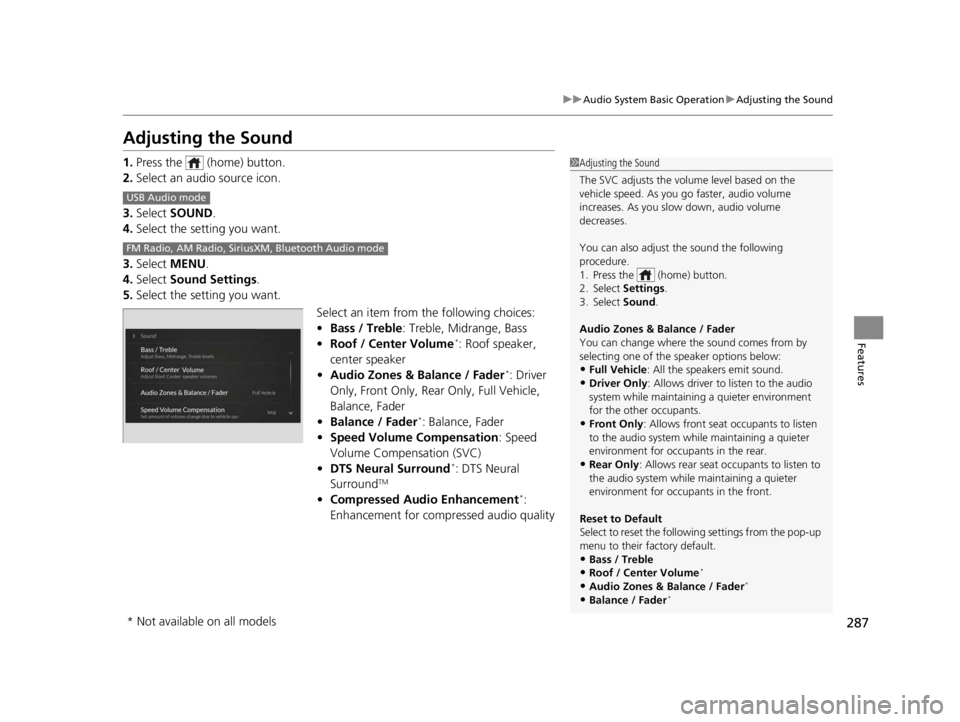
287
uuAudio System Basic Operation uAdjusting the Sound
Features
Adjusting the Sound
1. Press the (home) button.
2. Select an audio source icon.
3. Select SOUND.
4. Select the setting you want.
3. Select MENU .
4. Select Sound Settings.
5. Select the setting you want.
Select an item from the following choices:
•Bass / Treble : Treble, Midrange, Bass
• Roof / Center Volume
*: Roof speaker,
center speaker
• Audio Zones & Balance / Fader
*: Driver
Only, Front Only, Rear Only, Full Vehicle,
Balance, Fader
• Balance / Fader
*: Balance, Fader
• Speed Volume Compensation : Speed
Volume Compensation (SVC)
• DTS Neural Surround
*: DTS Neural
SurroundTM
• Compressed Audio Enhancement*:
Enhancement for compressed audio quality
1 Adjusting the Sound
The SVC adjusts the volume level based on the
vehicle speed. As you go faster, audio volume
increases. As you slow down, audio volume
decreases.
You can also adjust the sound the following
procedure.
1. Press the (home) button.
2. Select Settings .
3. Select Sound .
Audio Zones & Balance / Fader
You can change where the sound comes from by
selecting one of the speaker options below:
•Full Vehicle: All the speakers emit sound.•Driver Only: Allows driver to listen to the audio
system while maintaini ng a quieter environment
for the other occupants.
•Front Only : Allows front seat occupants to listen
to the audio system while maintaining a quieter
environment for occupants in the rear.
•Rear Only : Allows rear seat o ccupants to listen to
the audio system while maintaining a quieter
environment for occupants in the front.
Reset to Default
Select to reset the followi ng settings from the pop-up
menu to their factory default.
•Bass / Treble
•Roof / Center Volume*
•Audio Zones & Balance / Fader*
•Balance / Fader*
USB Audio mode
FM Radio, AM Radio, Siri usXM, Bluetooth Audio mode
* Not available on all models
22 ACURA RDX-31TJB6300.book 287 ページ 2021年8月2日 月曜日 午前11時0分
Page 292 of 709

290
uuAudio System Basic Operation uVoice Control Operation
Features
Voice Control Operation
Your vehicle has a voice control system that allows hands-free operation.
The voice control system uses the (tal k) and (back) buttons on the steering
wheel and a microphone near the map lights on the ceiling.
To achieve optimum voice recognition when using the voice control system:
• The system recognizes natural language and accepts free-form voice commands.
An example of voice commands:
2 Voice Recognition Screen P. 291
•Close the windows and panoramic roof.
• Adjust the dashboard and side vents so air does not blow onto the microphone
on the ceiling.
• Speak clearly in a clear, natural speakin g voice without pausing between words.
• Reduce any background noise if possible. The system may misinterpret your
command if more than one person is speaking at the same time.
■Voice Recognition
1Voice Control Operation
When you press the button, the system beeps and
the display changes to the voice recognition screen.
Press the (home) button, (back) button on
the True Touchpad Interface or APPS button on the
steering wheel to cancel a voice recognition function.
22 ACURA RDX-31TJB6300.book 290 ページ 2021年8月2日 月曜日 午前11時0分
Page 338 of 709
336
Features
General Information on the Audio System
SiriusXM® Radio Service
1. You need your radio ID ready before regist ering for subscription. To see the ID in
the screen, select channel up/down icons to Ch.0.
2. Have your radio ID ready, and either call or visit the SiriusXM® website to
subscribe.
Switch to the SiriusXM ® mode by using the audio remote controls on the steering
wheel, or through the audio/information screen, and stay in this mode for about 30
minutes until the service is activated. Make sure your vehicle is in an open area with
good reception.
Channel **** not subscribed. Ca ll SiriusXM to subscribe.
*1
You are not subscribed to the channel selected.
Subscription updated:
SiriusXM® radio is receiving information update from the network.
Channel Not Available:
No such channel exits, or the artist or title information is unavailable.
No Signal:
The signal is too weak in the current location.
Check Tuner:
There is a problem with the SiriusXM ® tuner. Contact a dealer.
Check Antenna:
There is a problem with the SiriusXM ® antenna. Contact a dealer.
*1 : ****part is variable characters, and w ill change depending upon where an subscribe.
■Subscribing to SiriusXM® Radio
■Receiving SiriusXM ® Radio
■SiriusXM ® Radio Display Messages
1 Subscribing to SiriusXM ® Radio
Contact Information for SiriusXM ® Radio:
•US: SiriusXM ® Radio at
www.siriusxm.com/subscribenow , or 1-866-635-
2349
•Canada: SiriusXM ® Canada at
www.siriusxm.ca/subscribe-now , or 1-877-209-
0079
1 Receiving SiriusXM ® Radio
The SiriusXM ® satellites are in orbit over the equator;
therefore, objects south of the vehicle may cause
satellite rece ption interruptions. Sa tellite signals are
more likely to be blocked by tall buildings and
mountains the farther north you travel from the
equator.
You may experience rece ption problems under the
following circumstances:
•In a location with an obstruction to the south of
your vehicle.
•In tunnels•On the lower level of a multi-tiered road
•Large items carried on the roof rack
22 ACURA RDX-31TJB6300.book 336 ページ 2021年8月2日 月曜日 午前11時0分
Page 368 of 709

366
uuCustomized Features u
Features
Rear Only
Reset to Default
Front Only
Full Vehicle
Driver Only
Roof Speaker Volume
Center Speaker Volume
Reset to Default
Roof / Center Volume*
Sound
Speed Volume
Compensation
DTS Neural Surround*
Notifications
Compressed Audio Enhancement*
Treble
Midrange
Bass
Bass / Treble
Reset to Default
Audio Zones & Balance / Fader*
Reset to DefaultBalance / Fader*
* Not available on all models
22 ACURA RDX-31TJB6300.book 366 ページ 2021年8月2日 月曜日 午前11時0分