wipers ACURA RDX 2022 User Guide
[x] Cancel search | Manufacturer: ACURA, Model Year: 2022, Model line: RDX, Model: ACURA RDX 2022Pages: 709, PDF Size: 25.22 MB
Page 381 of 709

379
uuCustomized Features u
Continued
Features
*1:Default SettingSetup Group
Customizable Features DescriptionSelectable Settings
Vehicle Lighting
SetupAccent Light Brightness
*Changes the brightness level of the
interior accent lighting.
Link to
Illumination*1/
Max /
High /Mid/ Low/Off
Accent Light Theme
*
Changes the theme of the interior
accent lighting.
2 Lighting area of the accent light
P. 463
Dynamic Mode*1
See other selectable
settings on the screen.
Interior Ligh t Dimming Time Changes the length of time the interior
lights stay on after you close the doors. 15 sec
/30 sec
*1/60
sec
Headlight Auto Off Timer Changes the length of time the
exterior lights stay on after you close
the driver’s door. 0 sec
/15 sec
*1/30 sec /
60 sec
Auto Interior Illumination
Sensitivity Changes the sensitivity of the
brightness of the instrument panel
when the headlight switch is in
AUTO
position. Min/
Low/ Mid
*1/
High /Max
Auto Headligh t On with
Wiper On Causes the headlights to come on
when the headlight switch is in the
AUTO
position and the wipers are
used several times within a certain
number of intervals. On
*1/
Off
Auto Light Sensitivity
*Changes the timing for the headlights
to come on. Min/
Low/ Mid*1/
High /Max
* Not available on all models
22 ACURA RDX-31TJB6300.book 379 ページ 2021年8月2日 月曜日 午前11時0分
Page 526 of 709
uuAcuraWatchTMuLane Keeping Assist System (LKAS)
524
Driving
The system can be used when the following conditions are met.
• The lane in which you are driving has dete ctable lane markers on both sides, and
your vehicle is in the center of the lane.
• The vehicle is traveling between about 45 and 90 mph (72 and 145 km/h).
• You are driving on a straight or slightly curved road.
• The turn signals are off.
• The brake pedal is not depressed.
• The wipers are not in high speed operation.
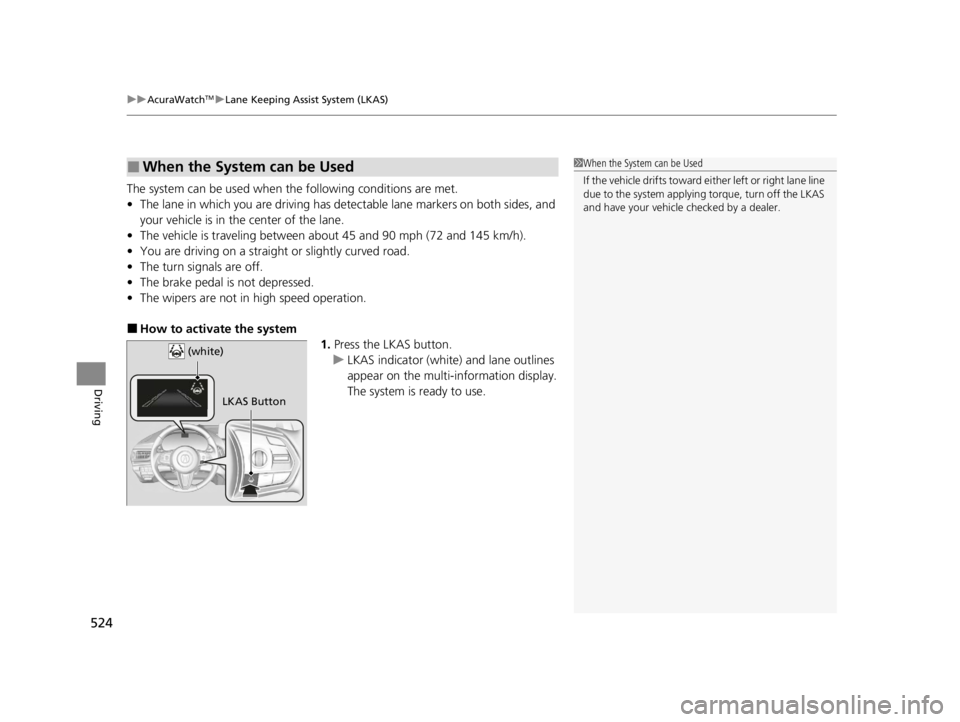
■How to activate the system
1.Press the LKAS button.
u LKAS indicator (white) and lane outlines
appear on the multi-information display.
The system is ready to use.
■When the System can be Used1When the System can be Used
If the vehicle drifts toward ei t h e r l ef t o r r ight lane line
due to the system applying torque, turn off the LKAS
and have your vehicle checked by a dealer.
LKAS Button
(white)
22 ACURA RDX-31TJB6300.book 524 ページ 2021年8月2日 月曜日 午前11時0分
Page 528 of 709

uuAcuraWatchTMuLane Keeping Assist System (LKAS)
526
Driving
■The system operation is suspended if
you:
• Set the wipers to HI.
u Turning the wipers off or setting it to LO
resumes the LKAS.
• Set the wiper switch to AUTO and the
wipers operate at high speed.
u The LKAS resumes when the wipers stop
or operate at low speed.
• Decrease the vehicle speed to about 40 mph
(64 km/h) or less.
u Increasing the vehicle speed to about
45 mph (72 km/h) or more resumes the
LKAS.
• Depress the brake pedal.
u The LKAS resumes and starts detecting
the lane lines again once you release the
brake pedal.
■The LKAS may be automa tically suspended when:
• The system fails to detect lane lines.
• The steering wheel is quickly turned.
• You fail to steer the vehicle.
• Driving through a sharp curve.
• Driving at a speed in excess of approximately 90 mph (145 km/h).
Once these conditions no longer exis t, the LKAS automatically resumes.
1The system operation is suspended if you:
You can change the setting for the LKAS.
LKAS suspended beep on and off can be selected.
2 Customized Features P. 359
When the LKAS is suspended,
the lane lines on the multi-
information display change to
lane outlines, and the beeper
sounds (if activated). (white) is on.
Models with automatic intermittent wipers
All models
22 ACURA RDX-31TJB6300.book 526 ページ 2021年8月2日 月曜日 午前11時0分
Page 533 of 709

Continued531
uuAcuraWatchTMuRoad Departure Mitigation System
Driving
The system activates when all of the following conditions are met:
• The vehicle is traveling between about 45 and 90 mph (72 and 145 km/h).
• The vehicle is on a straight or slightly curved road.
• The turn signals are off.
• The brake pedal is not depressed.
• The wipers are not in high speed operation.
• The system makes a determination that th e driver is not actively accelerating,
braking, or steering.
■How the System Activates1 How the System Activates
The Road Departure Mi tigation system may
automatically shut off a nd the indicator comes and
stays on. 2 Indicators P. 80
Road Departure Mi tigation system function can be
impacted when the vehicle is:
•Not driven within a traffic lane.
•Driven on the inside edge of a curve, or outside of
a lane.
•Driven in a narrow lane.
22 ACURA RDX-31TJB6300.book 531 ページ 2021年8月2日 月曜日 午前11時0分
Page 593 of 709

591
uuMaintenance Under the Hood uOpening the Hood
Maintenance
Opening the Hood
1. Park the vehicle on a level surface, and set
the parking brake.
2. Pull the hood release handle under the
driver’s side lower corner of the dashboard.
u The hood will pop up slightly.
3. Push the hood latch lever (located under
the front edge of the hood to the center) to
the side and raise the hood. Once you have
raised the hood slightly, you can release the
lever.
4. Lift the hood up most of the way.
u The hydraulic supports will lift it up the
rest of the way and hold it up.
When closing, lower it to approximately
12 inches (30 cm), then press down firmly with
your hands.1 Opening the Hood
NOTICE
Do not open the hood when the wiper arms are
raised. The hood will strike the wipers, resulting in
possible damage to the hood and/or the wipers.
NOTICE
Do not press the engine cover forcibly. This may
damage the engine cover and component parts.
When closing the hood, check that the hood is
securely latched.
If the hood latch lever moves stiffly, or if you can
open the hood without lifti ng the lever, the latch
mechanism should be cl eaned and lubricated.
Do not open the hood while the Auto Idle Stop
function is activated.
Hood Release Handle
Pull
Lever
22 ACURA RDX-31TJB6300.book 591 ページ 2021年8月2日 月曜日 午前11時0分
Page 630 of 709

uuCleaning uInterior Care
628
Maintenance
Wipe using a glass cleaner.
The front floor mats hook over floor anchors,
which keep them from sliding forward. To
remove a mat for cleaning, turn the anchor
knobs to the unlock position. When
reinstalling the mat after cleaning, turn the
knobs to the lock position.
Do not put additional floor mats on top of
the anchored mats.
To properly clean leather:
1. Use a vacuum or soft dry cloth first to remove any dirt or dust.
2. Clean the leather with a soft cloth dampen ed with a solution comprised of 90%
water and 10% neutral soap.
3. Wipe away any soap residu e with a clean damp cloth.
4. Wipe away residual water and allow leather to air dry in the shade.
■Cleaning the Window
■Floor Mats
1Cleaning the Window
Wires are mounted to the in side of the rear window.
Wipe along the same direct ion as the wires with a
soft cloth so as not to damage them.
Be careful not to spill flui ds, such as water or glass
cleaner, on or around the co ver of both the front
sensor camera and the rainfall/light sensor
*.
2 Automatic Operation (automatic lighting
control) P. 198
2 Automatic Intermittent Wipers
* P. 205
2 Front Sensor Camera P. 541
1Floor Mats
If you use any floor mats that were not originally
provided with your vehicle, make sure they are
designed for your specific ve hicle, fit correctly, and
are securely anchored by the floor anchors.
Position the rear seat fl oor mat properly. If not
properly positioned, the fl oor mat can interfere with
the front seat functions.
Lock
Unlock
■Maintaining Genuine Leather1
Maintaining Genuine Leather
It is important to clean or wipe away dirt or dust as
soon as possible. Spills can soak into leather resulting
in stains. Dirt or dust ca n cause abrasions in the
leather. In addition, pl ease note that some dark
colored clothing can rub onto the leather seats
resulting in discol oration or stains.
* Not available on all models
22 ACURA RDX-31TJB6300.book 628 ページ 2021年8月2日 月曜日 午前11時0分
Page 632 of 709
uuCleaning uExterior Care
630
Maintenance
• Make sure to follow the instructions indicated on the automated car wash.
• Fold in the door mirrors.
• For models equipped with automatic inte rmittent wipers, turn the wipers off.
• Do not use an automated car wash.
• Keep sufficient distance between the cleaning nozzl e and the vehicle body.
• Take particular care around the windows. Standing too close may cause water to
enter the vehicle interior.
• Do not spray high pressure water directly into the engine compartment. Instead,
use low pressure water and a mild detergent.
■Using an Automated Car Wash
■Using High Pressure Cleaners
1 Using an Automated Car Wash
When using an automated car wash that pulls the
vehicle through with a convey or, make sure vehicle is
in car wash mode. 2 If you want to keep the transmission in
(N
position [car wash mode] P. 455
NOTICE
Never run the vehicle through a conveyor-style car
wash or use any type of motorized cleaning device.
Doing so could damage the vehicle and the paint.
Always wash the vehicle by hand with a mild car
wash detergent and plenty of water.
Models with PMC emblem on the console
Models with PMC emblem on the console
22 ACURA RDX-31TJB6300.book 630 ページ 2021年8月2日 月曜日 午前11時0分
Page 700 of 709

Index
698
Index
Index
A
ABS (Anti-lock Brake System)................... 552
Accessories and Modifications ................. 633
Accessory Power Socket ........................... 239
Acura Integrated Dynamics System ......... 459
Dynamic Mode Switch ............................. 460
AcuraLink® ............................................... 419
AcuraWatch
TM........................................... 483
Adaptive Cruise Control (ACC) with Low Speed Follow ........................... 102, 502
Additives
Coolant ................................................... 598
Engine Oil ................................................ 593
Washer .................................................... 602
Additives, Engine Oil ................................ 593
Adjusting Armrest ................................................... 229
Front Seats .............................................. 216
Head Restraints........................................ 225
Mirrors .................................................... 213
Rear Seats................................................ 222
Steering Wheel ........................................ 212
Agile Handling Assist ................................ 473
Air Conditioning System (Climate Control System) .................................................... 247
Changing the Mode ................................ 247
Defrosting the Windshield and Windows ............................................... 249
Dust and Pollen Filter ............................... 626
Rear Temperature Control Dial................. 251
Recirculation/Fresh Air Mode ................... 247 Sensors ................................................... 252
Synchronized Mode................................. 250
Using Automatic Climate Control ............ 247
Air Pressure ....................................... 613, 687
Airbags ........................................................ 46
Advanced Airbags ..................................... 52
After a Collision ........................................ 49
Airbag Care............................................... 63
Front Airbags (SRS) .................................... 49
Indicator.............................................. 60, 95
Knee Airbags............................................. 54
Passenger Airbag Off Indicator .................. 61
Sensors ..................................................... 46
Side Airbags .............................................. 57
Side Curtain Airbags.................................. 59
AM/FM Radio ............................................ 293
Amazon Alexa .......................................... 289
Android Auto ........................................... 327
Anti-lock Brake System (ABS) .................. 552
Indicator.................................................... 94
Apple CarPlay ........................................... 322
Armrest ..................................................... 229
AT&T Hotspot ........................................... 321
Audio Remote Controls ........................... 258
Audio System ............................................ 254
Adjusting the Sound................................ 287
Audio/Information Screen........................ 264
Display Setup .......................................... 288
Error Messages ........................................ 332
General Information ................................ 336
Home Screen........................................... 269 How to Update Wirelessly ....................... 281
How to Update with a USB Device .......... 285
iPod ........................................................ 310
Limitations for Manual Operation ............ 288
MP3/WMA/AAC ..................................... 313
Reactivating ............................................ 257
Remote Controls ..................................... 258
Security Code ......................................... 257
Status Area ............................................. 274
System Updates ...................................... 281
Theft Protection ...................................... 257
True Touchpad Interface ......................... 261
USB Flash Drives.............................. 313, 338
USB Ports ................................................ 255
Audio/Information Screen ....................... 264
Authorized Manuals ................................ 696
Auto Door Locking/Unlocking ................ 172
Auto High-Beam ...................................... 201
Indicator ................................................... 98
Auto Idle Stop .......................................... 464
OFF Button ............................................. 466
Automatic Brake Hold ............................. 550
Indicator ........................................... 85, 550
Automatic Folding Door Mirror .............. 215
Automatic Intermittent Wipers .............. 205
Automatic Lighting .................................. 198
Automatic Transmission .......................... 450
Creeping................................................. 450
Fluid ....................................................... 600
Kickdown ............................................... 450
Operating the Shift Button ...................... 453
22 ACURA RDX-31TJB6300.book 698 ページ 2021年8月2日 月曜日 午前11時0分
Page 708 of 709

706
Index
Troubleshooting....................................... 635
Blown Fuse .............................. 674, 677, 678
Brake Pedal Vibrates .................................. 28
Buzzer Sounds When Opening Door .......... 28
Emergency Towing .................................. 681
Engine Won’t Start .................................. 660
Fuel Fill Door............................................ 682
Noise When Braking .................................. 30
Overheating............................................. 665
Puncture/Flat Tire ............................. 637, 645
Rear Door Won’t Open ...................... 28, 171
Tailgate ................................................... 683
Warning Indicators .................................... 80
True Touchpad Interface .......................... 261
Turbo Engine Vehicle ............................... 578
Turn Signals ............................................... 196
Indicators (Instrum ent Panel) ...................... 98
Turn-by-Turn Directions ........................... 151
Two-way Keyless Remote ......................... 168
U
Under-floor Storage Area ........................ 238
Unlocking the Doors ................................. 160
Unlocking the Fron t Doors from the
Inside ................................................. 15, 169
USB Flash Drives ................................ 313, 338
USB Ports ................................................... 255
V
Vanity Mirrors ............................................... 9
Vehicle Identification Number ................ 688
Vehicle Speed ........................................... 151
Vehicle Stability Assist
TM (VSA ®) .............. 471
Off Button............................................... 472
Off Indicator.............................................. 96
System Indicator ................................ 96, 471
Viscosity (Oil) .................................... 593, 687
Voice Control Operation .......................... 290
Voice Portal Screen.................................. 291
Voice Recognition ................................... 290
VSA ® (Vehicle Stability Assist
TM) .............. 471
W
Warning and Information Messages ....... 107
Warning Indicator On/Blinking ............... 667
Warning Labels ........................................... 78
Warnings ................................................... 142
Warranties (Warranty Manual provided
separately) .............................................. 693
Watts ......................................................... 686
Wear Indicators (Tire) .............................. 617
Wheel Nut Wrench (Jack Handle) ........... 641
Wi-Fi Connection ...................................... 319
Window Washers ..................................... 204
Adding/Refilling Fluid .............................. 602
Switch ..................................................... 204
Windows (Opening and Closing) ............ 186Windshield
............................................... 204
Cleaning ................................................. 631
Defrosting/Defogging ............................. 249
Washer Fluid ........................................... 602
Wiper Blades........................................... 607
Wipers and Washers ............................... 204
Winter Tires .............................................. 620
Snow Tires .............................................. 620
Tire Chains.............................................. 620
Wipers and Washers ................................ 204
Automatic Intermittent Wipers ................ 205
Checking and Replacing Wiper Blades..... 607
Front....................................................... 204
Rear ........................................................ 206
Wireless Charger ...................................... 240
WMA ......................................................... 313
Worn Tires ................................................ 612
22 ACURA RDX-31TJB6300.book 706 ページ 2021年8月2日 月曜日 午前11時0分