audio ACURA RDX 2023 Owners Manual
[x] Cancel search | Manufacturer: ACURA, Model Year: 2023, Model line: RDX, Model: ACURA RDX 2023Pages: 713, PDF Size: 21.99 MB
Page 376 of 713
374
uuCustomized Features u
Features
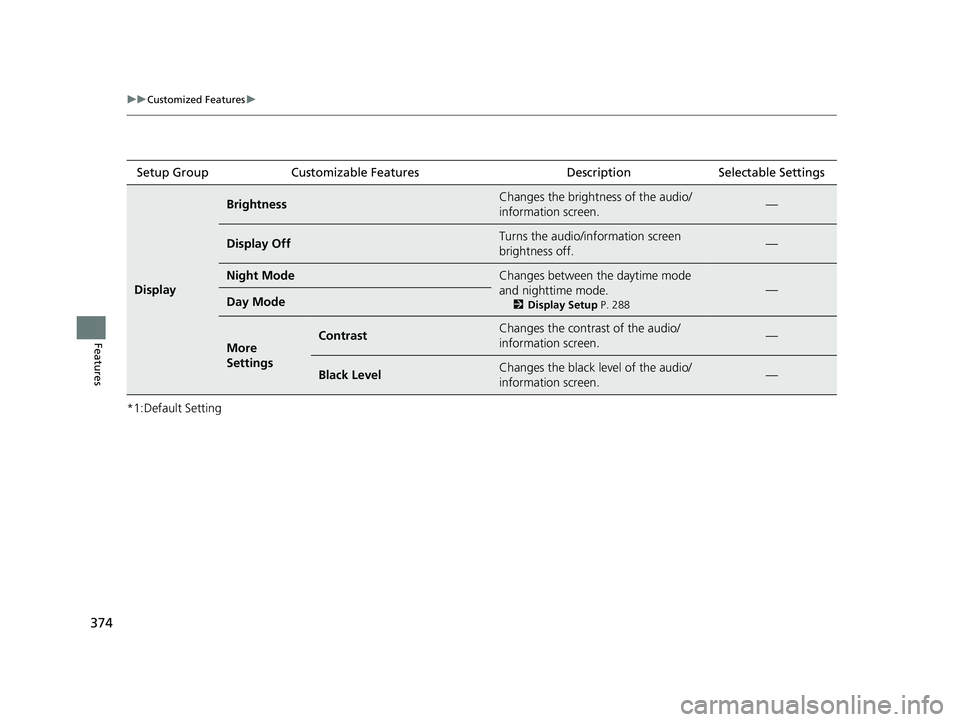
*1:Default SettingSetup Group Customizable Features Description Selectable Settings
Display
BrightnessChanges the brightness of the audio/
information screen.—
Display OffTurns the audio/information screen
brightness off.—
Night ModeChanges between the daytime mode
and nighttime mode.
2
Display Setup P. 288
—Day Mode
More
SettingsContrastChanges the contrast of the audio/
information screen.—
Black LevelChanges the black level of the audio/
information screen.—
23 ACURA RDX-31TJB6400.book 374 ページ 2022年8月4日 木曜日 午後1時51分
Page 385 of 713
383
uuCustomized Features u
Continued
Features
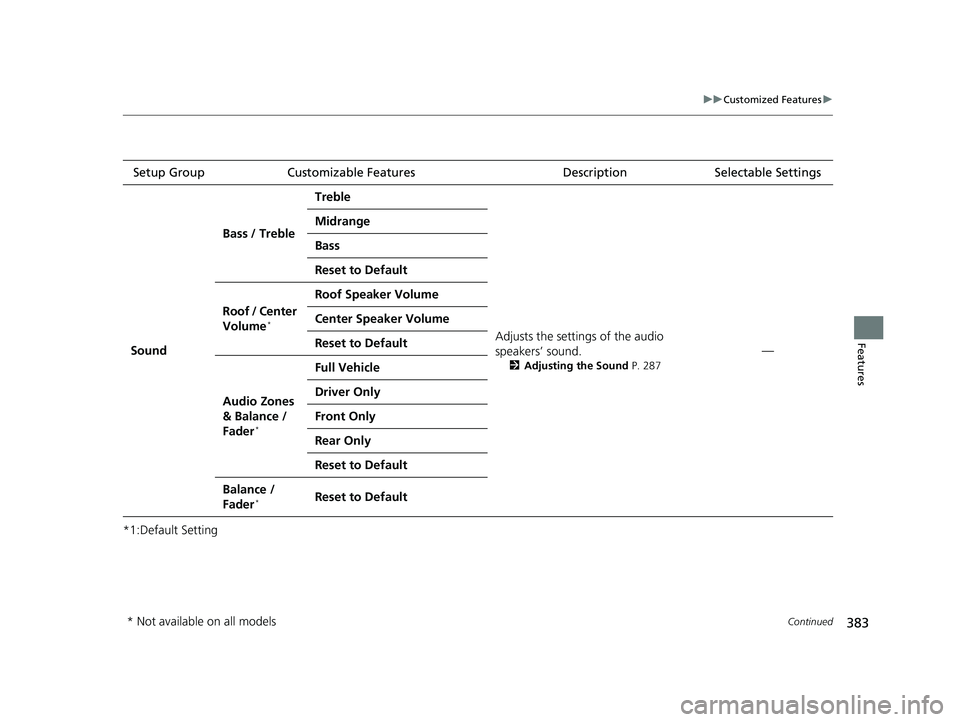
*1:Default SettingSetup Group Customizable Features
Description Selectable Settings
Sound Bass / Treble
Treble
Adjusts the settings of the audio
speakers’ sound.
2Adjusting the Sound P. 287
—
Midrange
Bass
Reset to Default
Roof / Center
Volume
*
Roof Speaker Volume
Center Speaker Volume
Reset to Default
Audio Zones
& Balance /
Fader
*
Full Vehicle
Driver Only
Front Only
Rear Only
Reset to Default
Balance /
Fader*Reset to Default
* Not available on all models
23 ACURA RDX-31TJB6400.book 383 ページ 2022年8月4日 木曜日 午後1時51分
Page 386 of 713
384
uuCustomized Features u
Features
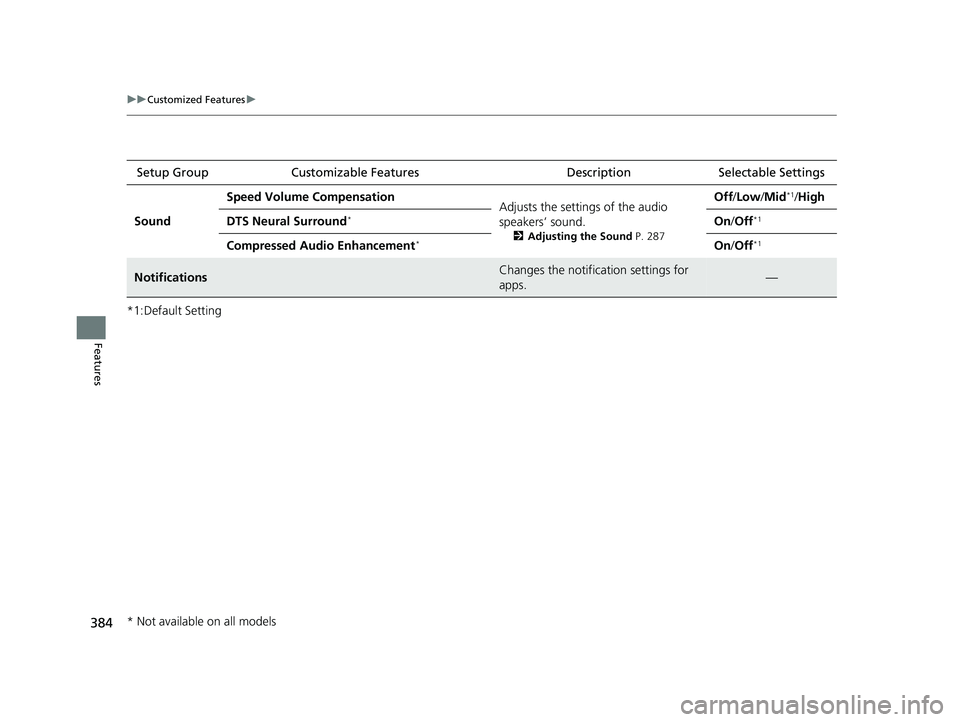
*1:Default SettingSetup Group Customizable Features Description Selectable Settings
Sound Speed Volume Compensation
Adjusts the settings of the audio
speakers’ sound.
2Adjusting the Sound P. 287
Off/Low /Mid*1/High
DTS Neural Surround
*On /Off*1
Compressed Audio Enhancement*On /Off*1
NotificationsChanges the notification settings for
apps.—
* Not available on all models
23 ACURA RDX-31TJB6400.book 384 ページ 2022年8月4日 木曜日 午後1時51分
Page 391 of 713

389Continued
Features
Bluetooth® HandsFreeLink ®
Bluetooth® HandsFreeLink ® (HFL) allows you to place and receive phone calls using
your vehicle’s audio system, without handling your cell phone.
Using HFL
■HFL Buttons
1 Bluetooth ® HandsFreeLink ®
Place your phone where y ou can get good reception.
To use HFL, you need a Bluetooth-compatible cell
phone. For a list of compatible phones, pairing
procedures, and special feature capabilities:
•U.S.: Visit www.handsfreeli nk.com/Acura, or call 1-
888-528-7876.
•Canada: For more info rmation on smartphone
compatibility, call 1-855-490-7351.
To use the system, the Bluetooth® setting must be
On .
2 Phone Setup P. 395
Voice control tips
•Aim the vents away from the ceiling and close the
windows, as noise coming from them may interfere
with the microphones.
•Press the button when you want to call a
number using a phonebook name or a number.
Speak clearly and naturally after a beep.
•If the microphone picks up vo ices other than yours,
the command may be misinterpreted.
•To change the volume level, the volume level is able
to change by the audio system’s volume.
(Talk) Button
Microphone
(Back) Button
VOL( +/VOL(- (Volume) Switch
Left Selector Wheel
APPS Button
23 ACURA RDX-31TJB6400.book 389 ページ 2022年8月4日 木曜日 午後1時51分
Page 392 of 713

uuBluetooth ® HandsFreeLink ®u Using HFL
390
Features
Left Selector Wheel:
• Incoming call: Move the selector wheel to the ri ght to answer the call. Move it
to the left to decline the call.
• During a call: Move the selector wheel to the ri ght to display the call options
menu. Move it to the left to end the call.
• (back) button: Press the button to go back to the previous screen or to
cancel a command.
• (talk) button: Press the button to start voice recognition.
To go to the phone screen of the multi-in formation display or the head-up display
*:
1. Press the APPS button on the steering wheel.
2. Using the selector wheel, scroll to Phone on the multi-information display or the
head-up display
*, and then press the left selector wheel.
u You can select Favorites or Recents by moving the selector wheel to the left
or the right.
1 Bluetooth ® HandsFreeLink ®
Bluetooth ® Wireless Technology
The Bluetooth ® word mark and logos are registered
trademarks owned by Bluetooth SIG, Inc., and any
use of such marks by Honda Motor Co., Ltd., is under
license. Other trademarks and trade names are those
of their respective owners.
HFL Limitations
An incoming call on HFL will interrupt the audio
system when it is playing. It will resume when the call
is ended.
* Not available on all models
23 ACURA RDX-31TJB6400.book 390 ページ 2022年8月4日 木曜日 午後1時51分
Page 393 of 713

Continued391
uuBluetooth ® HandsFreeLink ®u Using HFL
Features
The audio/information scr een notifies you when there is an incoming call.
Bluetooth ® connection status is displayed in the B-zone.
■HFL Status Display1HFL Status Display
The information that appears on the audio/
information screen vari es between phone models.
HFL Mode
Caller’s Name (If registered)/
Caller’s Number (If not registered)
Bluetooth
Indicator
Appears when your phone is connected to HFL.
Signal Strength
Battery Level Status
23 ACURA RDX-31TJB6400.book 391 ページ 2022年8月4日 木曜日 午後1時51分
Page 398 of 713
uuBluetooth ® HandsFreeLink ®u HFL Menus
396
Features
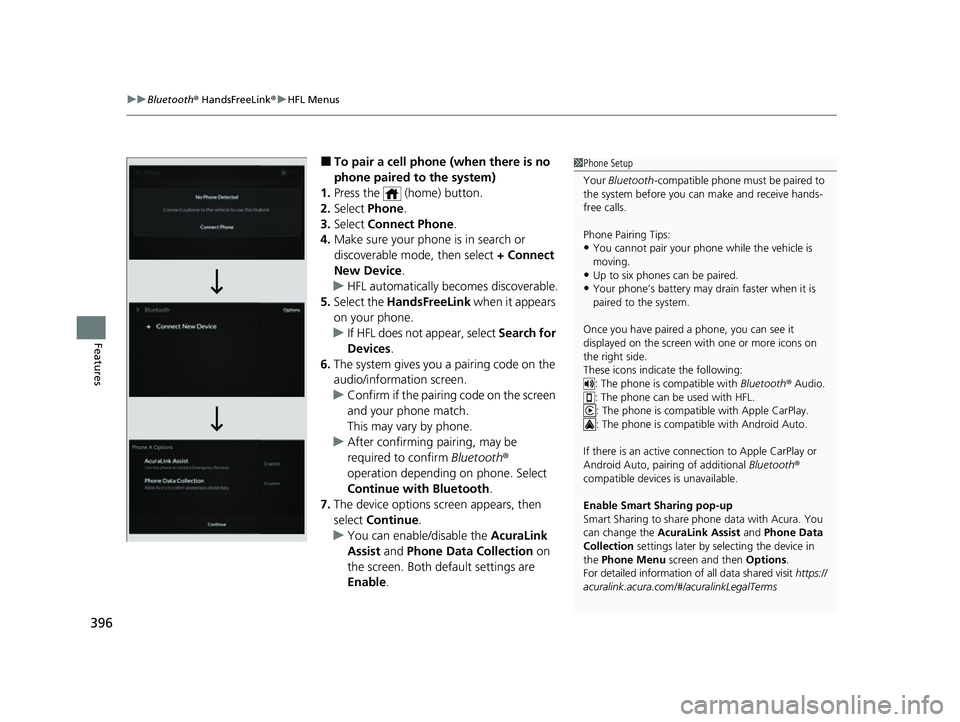
■To pair a cell phone (when there is no
phone paired to the system)
1. Press the (home) button.
2. Select Phone .
3. Select Connect Phone .
4. Make sure your phone is in search or
discoverable mode, then select + Connect
New Device .
u HFL automatically becomes discoverable.
5. Select the HandsFreeLink when it appears
on your phone.
u If HFL does not appear, select Search for
Devices.
6. The system gives you a pairing code on the
audio/information screen.
u Confirm if the pairing code on the screen
and your phone match.
This may vary by phone.
u After confirming pairing, may be
required to confirm Bluetooth®
operation depending on phone. Select
Continue with Bluetooth.
7. The device options sc reen appears, then
select Continue .
u You can enable/disable the AcuraLink
Assist and Phone Data Collection on
the screen. Both default settings are
Enable .1Phone Setup
Your Bluetooth -compatible phone must be paired to
the system before you ca n make and receive hands-
free calls.
Phone Pairing Tips:
•You cannot pair your phone while the vehicle is
moving.
•Up to six phones can be paired.
•Your phone’s battery may dr ain faster when it is
paired to the system.
Once you have paired a phone, you can see it
displayed on the screen with one or more icons on
the right side.
These icons indicate the following: : The phone is compatible with Bluetooth® Audio.
: The phone can be used with HFL.
: The phone is compatib le with Apple CarPlay.
: The phone is compatible with Android Auto.
If there is an active connection to Appl e CarPlay or
Android Auto, pairing of additional Bluetooth®
compatible devices is unavailable.
Enable Smart Sharing pop-up
Smart Sharing to share phone data with Acura. You
can change the AcuraLink Assist and Phone Data
Collection settings later by se lecting the device in
the Phone Menu screen and then Options.
For detailed information of all data shared visit https://
acuralink.acura.com/#/acuralinkLegalTerms
23 ACURA RDX-31TJB6400.book 396 ページ 2022年8月4日 木曜日 午後1時51分
Page 404 of 713
uuBluetooth ® HandsFreeLink ®u HFL Menus
402
Features
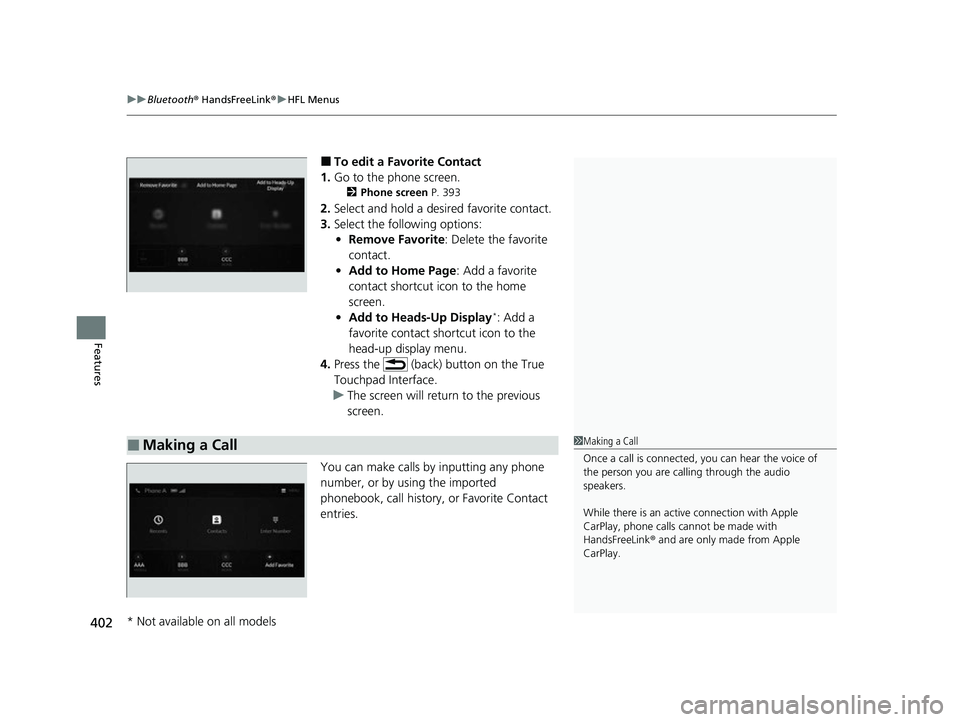
■To edit a Favorite Contact
1. Go to the phone screen.
2 Phone screen P. 393
2.Select and hold a desired favorite contact.
3. Select the following options:
• Remove Favorite : Delete the favorite
contact.
• Add to Home Page : Add a favorite
contact shortcut icon to the home
screen.
• Add to Heads-Up Display
*: Add a
favorite contact shortcut icon to the
head-up display menu.
4. Press the (back) button on the True
Touchpad Interface.
u The screen will return to the previous
screen.
You can make calls by inputting any phone
number, or by using the imported
phonebook, call history, or Favorite Contact
entries.
■Making a Call1 Making a Call
Once a call is connected, you can hear the voice of
the person you are call ing through the audio
speakers.
While there is an active connection with Apple
CarPlay, phone calls ca nnot be made with
HandsFreeLink ® and are only made from Apple
CarPlay.
* Not available on all models
23 ACURA RDX-31TJB6400.book 402 ページ 2022年8月4日 木曜日 午後1時51分
Page 407 of 713

Continued405
uuBluetooth ® HandsFreeLink ®u HFL Menus
Features
When there is an inco ming call, an audible
notification sounds (if activated) and the
Incoming Call... screen appears.
Move the left selector wheel to the right to
answer the call. Move it to the left to decline
or end the call. u You can also select Answer or Ignore
on the audio/information screen to use
hands-free calling.
■Receiving a Call1 Receiving a Call
Call Waiting
To put a call on hold so that you can answer an
incoming call, move the left selector wheel to the
right.
Move the left selector wheel to the right to resume
the call.
Select Ignore to ignore the incoming call if you do
not want to answer it.
Move the left selector wheel to the left to end a call.
Instead of using the selector wheel, you can use the
icons on the audio/informati on screen to perform the
above mentioned functions.
When a screen other than the phone screen is
displayed in the A-zone, th e incoming call screen is
displayed in the B-zone.
23 ACURA RDX-31TJB6400.book 405 ページ 2022年8月4日 木曜日 午後1時51分
Page 408 of 713

uuBluetooth ® HandsFreeLink ®u HFL Menus
406
Features
The following options are available during a call.
MUTE: Mute your voice.
TRANSFER TO MOBILE : Transfer a call from the system to your phone.
ENTER NUMBER: Send numbers during a call. This is useful when you call a menu-
driven phone system.
The available options are shown on the lower
half of the screen.
Select the option. u UNMUTE is displayed when the mute
function is on. Select UNMUTE to turn it
off.
u TRANSFER TO VEHICLE is displayed
when the hands-free mode is off. Select
TRANSFER TO VEHICLE to turn the
hands-free mode is on.
■Options During a Call1 Options During a Call
You can select the icons on the audio/information
screen.
23 ACURA RDX-31TJB6400.book 406 ページ 2022年8月4日 木曜日 午後1時51分