light ACURA RDX 2023 User Guide
[x] Cancel search | Manufacturer: ACURA, Model Year: 2023, Model line: RDX, Model: ACURA RDX 2023Pages: 713, PDF Size: 21.99 MB
Page 82 of 713
80
Instrument Panel
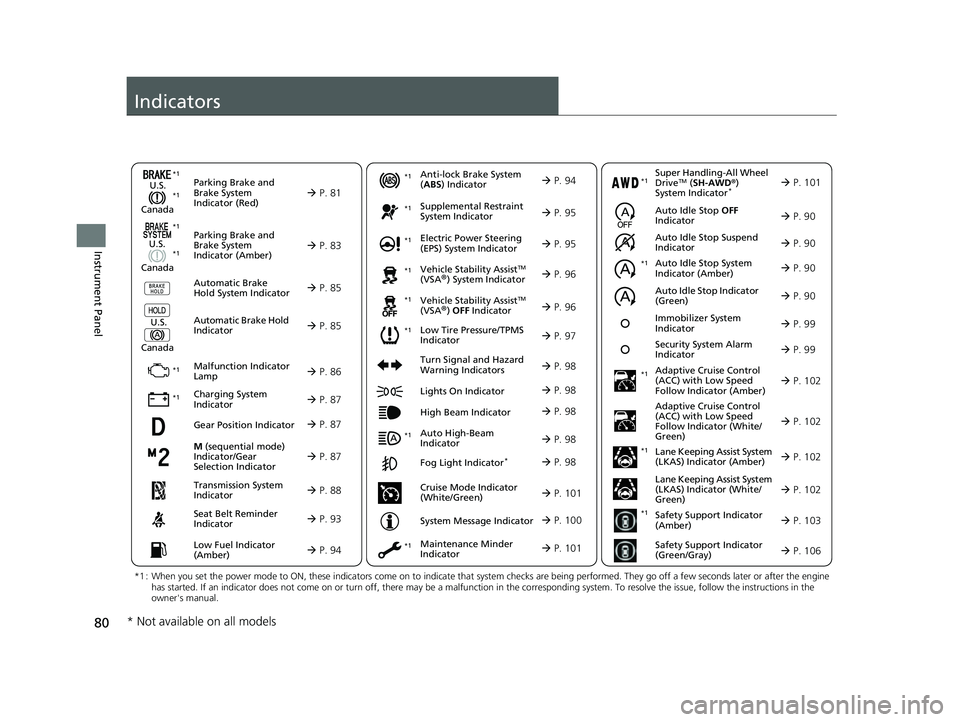
Indicators
M (sequential mode)
Indicator/Gear
Selection Indicator P. 87
Parking Brake and
Brake System
Indicator (Red)
Parking Brake and
Brake System
Indicator (Amber)
U.S.
Canada
U.S.
Canada Automatic Brake
Hold System Indicator
Automatic Brake Hold
IndicatorU.S.
Canada
*1 : When you set the power mode to ON, these indicators come on to indicate that system checks are being performed. They go off a few seconds later or after the engine
has started. If an indicator does not come on or turn off, ther e may be a malfunction in the corresponding system. To resolve the issue, follow the instructions in the
owner's manual.
P. 81*1
Malfunction Indicator
Lamp
Charging System
Indicator
Anti-lock Brake System
(ABS ) Indicator
Seat Belt Reminder
Indicator
Low Fuel Indicator
(Amber)
Vehicle Stability AssistTM
(VSA®) System Indicator
Vehicle Stability Assist
TM
(VSA®) OFF Indicator
Supplemental Restraint
System Indicator
Auto High-Beam
Indicator
Low Tire Pressure/TPMS
Indicator Electric Power Steering
(EPS) System Indicator
Turn Signal and Hazard
Warning Indicators
Lights On Indicator
High Beam Indicator
Fog Light Indicator*
Maintenance Minder
Indicator
System Message Indicator
P. 83
P. 85
P. 85
P. 86
P. 87*1 *1
P. 97
*1
*1
Gear Position Indicator P. 87
Transmission System
Indicator P. 88
P. 93
P. 94
P. 94
P. 95
P. 98
P. 96
*1
*1
*1
P. 96
*1 P. 95
P. 98
*1
P. 98
P. 98
P. 101
P. 98
Immobilizer System
Indicator P. 99
Security System Alarm
Indicator P. 99
P. 100
*1
*1 *1
Super Handling-All Wheel
DriveTM ( SH-AWD ®)
System Indicator* P. 101*1
Cruise Mode Indicator
(White/Green) P. 101
Auto Idle Stop Suspend
Indicator
Auto Idle Stop System
Indicator (Amber)
Auto Idle Stop Indicator
(Green) P. 90
P. 90
P. 90
Adaptive Cruise Control
(ACC) with Low Speed
Follow Indicator (Amber)
Auto Idle Stop OFF
Indicator P. 90
P. 102
P. 102
P. 102
P. 102
P. 103
P. 106
Adaptive Cruise Control
(ACC) with Low Speed
Follow Indicator (White/
Green)
Lane Keeping Assist System
(LKAS) Indicator (Amber)
Lane Keeping Assist System
(LKAS) Indicator (White/
Green)
Safety Support Indicator
(Amber)
Safety Support Indicator
(Green/Gray)
*1
*1
*1
*1
*1
* Not available on all models
23 ACURA RDX-31TJB6400.book 80 ページ 2022年8月4日 木曜日 午後1時51分
Page 100 of 713

98
uuIndicators u
Instrument Panel
IndicatorNameOn/BlinkingExplanationMessage
Turn Signal and
Hazard
Warning
Indicators•Blinks when you operate the turn
signal lever.
• Blinks along with all turn signals
when you press the hazard warning
button.• Does not blink or blinks rapidly
2 Replacing Light Bulbs P. 605
—
Lights On
Indicator•Comes on when the parking, tail,
and other external lights are on.2 Light Switches P. 197—
High Beam
Indicator•Comes on when the high beam
headlights are on.——
Auto High-
Beam Indicator•Comes on when all the operating
conditions of the auto high-beam
are met.
2 Auto High-Beam P. 201—
Fog Light
Indicator*
•Comes on when the fog lights are
on.2 Fog Lights* P. 200—
* Not available on all models
23 ACURA RDX-31TJB6400.book 98 ページ 2022年8月4日 木曜日 午後1時51分
Page 103 of 713

101
uuIndicators u
Continued
Instrument Panel
IndicatorNameOn/BlinkingExplanationMessage
Super
Handling-All
Wheel Drive
TM
( SH-AWD ®)
Indicator
*
●Comes on if there is a problem with
the SH-AWD ® system.●Stays on constantly - The engine drives
the front wheels only in this state. Have
your vehicle checked by a dealer.
●Blinks when the differential
temperature is too high.●Blinks while driving - Stop in a safe
place, put the transmission into
(P, and
idle the engine until the indicator goes off.
If the indicator does not stop blinking,
take your vehicle to a dealer.
2 Super Handling-All Wheel DriveTM
(SH-AWD® )* P. 474
Maintenance
Minder
Indicator
●Comes on when the scheduled
maintenance is due soon.
●Consequently, Maintenance Due
Now and Maintenance Past Due
follow.2 Maintenance MinderTM P. 585
Cruise Mode
Indicator
(White/Green)●Lights up in white when you change
to cruise mode.
●Lights up in green when you have
set a speed for cruise control.
2To Switch ACC with Low Speed
Follow to Cruise Control P. 518—
* Not available on all models
23 ACURA RDX-31TJB6400.book 101 ページ 2022年8月4日 木曜日 午後1時51分
Page 104 of 713
102
uuIndicators u
Instrument Panel
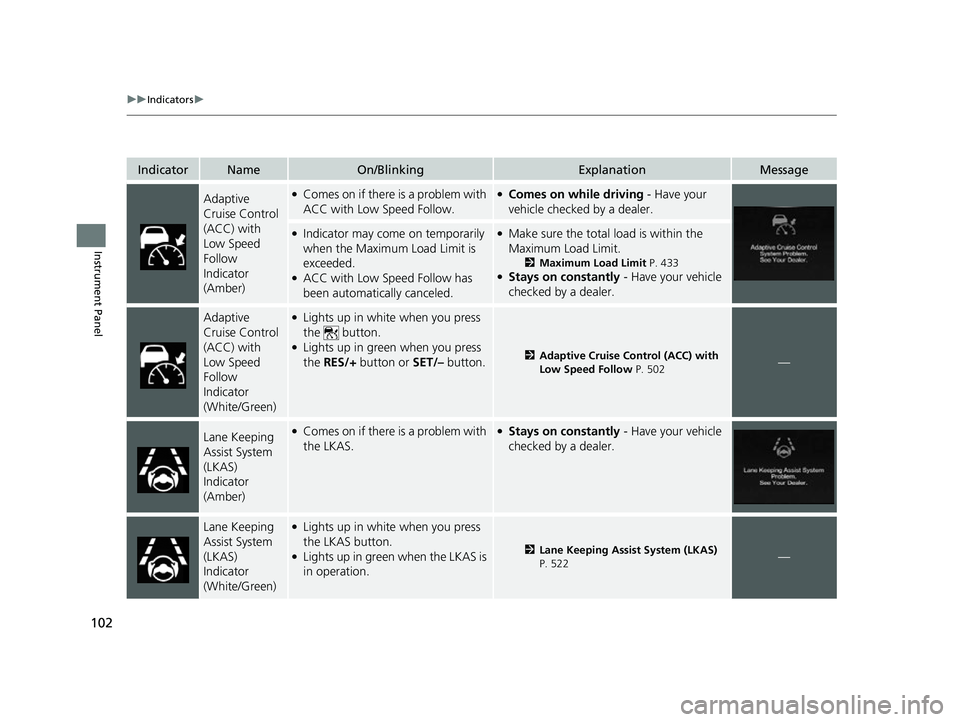
IndicatorNameOn/BlinkingExplanationMessage
Adaptive
Cruise Control
(ACC) with
Low Speed
Follow
Indicator
(Amber)●Comes on if there is a problem with
ACC with Low Speed Follow.●Comes on while driving - Have your
vehicle checked by a dealer.
●Indicator may come on temporarily
when the Maximum Load Limit is
exceeded.
●ACC with Low Speed Follow has
been automatically canceled.
●Make sure the total load is within the
Maximum Load Limit.
2 Maximum Load Limit P. 433●Stays on constantly - Have your vehicle
checked by a dealer.
Adaptive
Cruise Control
(ACC) with
Low Speed
Follow
Indicator
(White/Green)●Lights up in white when you press
the button.
●Lights up in green when you press
the RES/+ button or SET/– button.2Adaptive Cruise Control (ACC) with
Low Speed Follow P. 502—
Lane Keeping
Assist System
(LKAS)
Indicator
(Amber)●Comes on if there is a problem with
the LKAS.●Stays on constantly - Have your vehicle
checked by a dealer.
Lane Keeping
Assist System
(LKAS)
Indicator
(White/Green)●Lights up in white when you press
the LKAS button.
●Lights up in green when the LKAS is
in operation.2 Lane Keeping Assist System (LKAS)
P. 522—
23 ACURA RDX-31TJB6400.book 102 ページ 2022年8月4日 木曜日 午後1時51分
Page 108 of 713
106
uuIndicators u
Instrument Panel
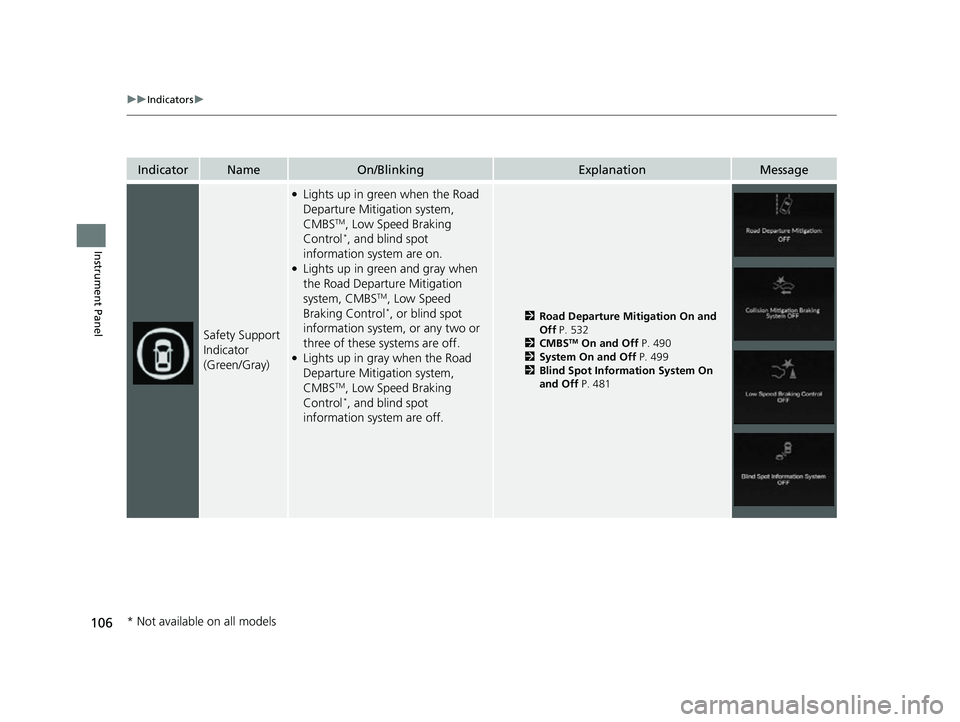
IndicatorNameOn/BlinkingExplanationMessage
Safety Support
Indicator
(Green/Gray)
●Lights up in green when the Road
Departure Mitigation system,
CMBS
TM, Low Speed Braking
Control*, and blind spot
information system are on.
●Lights up in green and gray when
the Road Departure Mitigation
system, CMBS
TM, Low Speed
Braking Control*, or blind spot
information system, or any two or
three of these systems are off.
●Lights up in gray when the Road
Departure Mitigation system,
CMBS
TM, Low Speed Braking
Control*, and blind spot
information system are off.
2 Road Departure Mitigation On and
Off P. 532
2 CMBS
TM On and Off P. 490
2 System On and Off P. 499
2 Blind Spot Information System On
and Off P. 481
* Not available on all models
23 ACURA RDX-31TJB6400.book 106 ページ 2022年8月4日 木曜日 午後1時51分
Page 113 of 713

111
uuIndicators uMulti-Information Display Warning and Information Messages
Continued
Instrument Panel
MessageConditionExplanation
• Appears if there is a pr oblem with the automatic
lighting control system.• Appears while driving - Manually turn the lights on,
and have your vehicle checked by a dealer.
• Appears if there is a pr oblem with the headlights.•Appears while driving - The headlights may not be
on. When conditions allow you to drive safely, have
your vehicle checked by a d ealer as soon as possible.
●Appears when there is a problem with the battery
charging system.●Have your vehicle checked by a dealer.
●Appears if the dynamic mode cannot be changed
due to certain situations, su ch as a system error or
adverse driving conditions.
2 Acura Integrated Dynamics System P. 459
23 ACURA RDX-31TJB6400.book 111 ページ 2022年8月4日 木曜日 午後1時51分
Page 122 of 713
120
uuIndicators uMulti-Information Display Warn ing and Information Messages
Instrument Panel
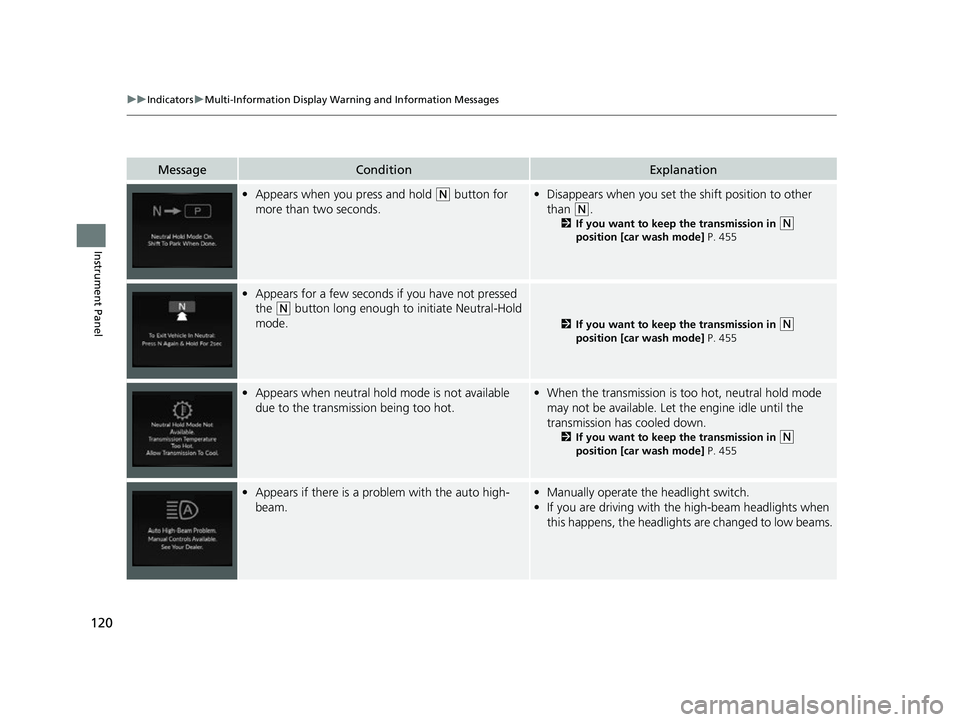
MessageConditionExplanation
•Appears when you press and hold (N button for
more than two seconds.• Disappears when you set the shift position to other
than
(N.
2 If you want to keep the transmission in (N
position [car wash mode] P. 455
• Appears for a few seconds if you have not pressed
the
(N button long enough to initiate Neutral-Hold
mode.
2 If you want to keep the transmission in (N
position [car wash mode] P. 455
• Appears when neutral hold mode is not available
due to the transmission being too hot.•When the transmission is to o hot, neutral hold mode
may not be available. Let the engine idle until the
transmission has cooled down.
2 If you want to keep the transmission in (N
position [car wash mode] P. 455
• Appears if there is a prob lem with the auto high-
beam.• Manually operate the headlight switch.
• If you are driving with the high-beam headlights when
this happens, the headlights are changed to low beams.
23 ACURA RDX-31TJB6400.book 120 ページ 2022年8月4日 木曜日 午後1時51分
Page 151 of 713

149
uuGauges and Displays uHead-Up Display*
Continued
Instrument Panel
The display also shows the following
warnings.
• Lane Departure Warning: When your
vehicle is too close to the traffic lane lines,
the lane departure warning appears.
2 Lane Keeping Assist System (LKAS)
P. 522
• Head-Up Warning Lights:
Flash when the BRAKE message appears
on the multi-information display.
2 Collision Mitigation Braking SystemTM
(CMBSTM) P. 486
2 Low Speed Braking Control
* P. 497
2 Adaptive Cruise Control (ACC) with
Low Speed Follow P. 502
Lane Departure Warning
* Not available on all models
23 ACURA RDX-31TJB6400.book 149 ページ 2022年8月4日 木曜日 午後1時51分
Page 155 of 713
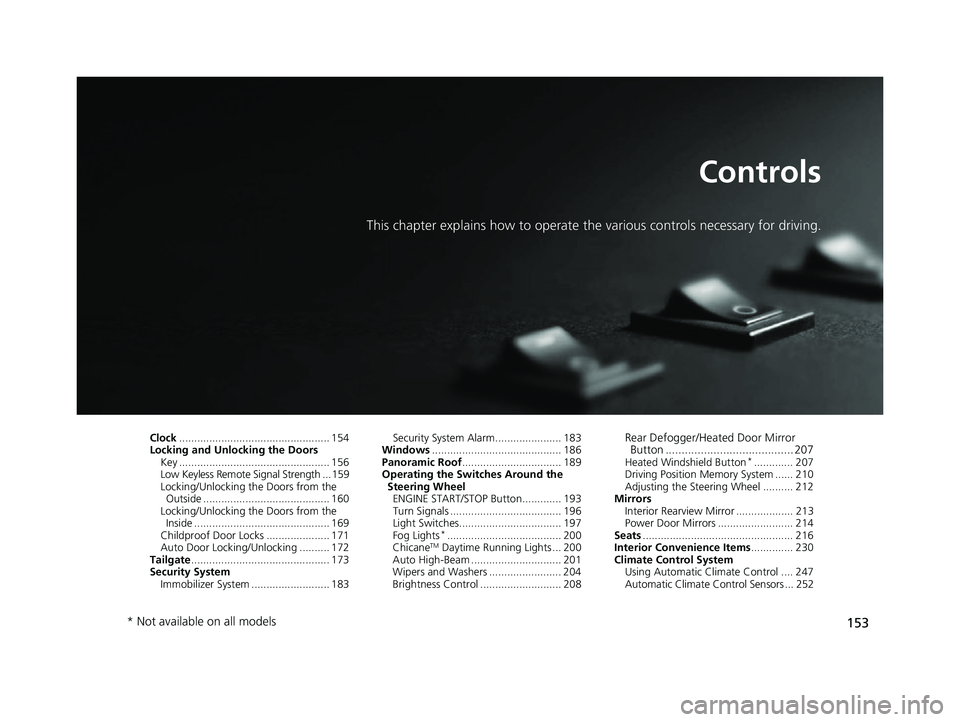
153
Controls
This chapter explains how to operate the various controls necessary for driving.
Clock.................................................. 154
Locking and Unlocking the Doors Key .................................................. 156
Low Keyless Remote Signal Strength ... 159
Locking/Unlocking the Doors from the Outside .......................................... 160
Locking/Unlocking the Doors from the Inside ............................................. 169
Childproof Door Locks ..................... 171
Auto Door Locking/Unlocking .......... 172
Tailgate .............................................. 173
Security System Immobilizer System .......................... 183 Security System Alarm...................... 183
Windows ........................................... 186
Panoramic Roof ................................. 189
Operating the Switches Around the Steering Wheel ENGINE START/STOP Button............. 193
Turn Signals ..................................... 196
Light Switches.................................. 197
Fog Lights
*...................................... 200
ChicaneTM Daytime Running Lights ... 200
Auto High-Beam .............................. 201
Wipers and Washers ........................ 204
Brightness Control ........................... 208
Rear Defogger/Heated Door Mirror Button ........................................ 207
Heated Windshield Button*............. 207
Driving Position Memory System ...... 210
Adjusting the Steering Wheel .......... 212
Mirrors Interior Rearview Mirror ................... 213
Power Door Mirrors ......................... 214
Seats .................................................. 216
Interior Convenience Items .............. 230
Climate Control System Using Automatic Climate Control .... 247
Automatic Climate Control Sensors ... 252
* Not available on all models
23 ACURA RDX-31TJB6400.book 153 ページ 2022年8月4日 木曜日 午後1時51分
Page 158 of 713

156
Controls
Locking and Unlocking the Doors
Key
This vehicle comes with the following keys:Use the keys to start and stop the engine, lock
and unlock all the doors and the fuel fill door,
and open the tailgate.1Key
All the keys have an immobilizer system. The
immobilizer system helps to protect against vehicle
theft. 2 Immobilizer System P. 183
Follow the advice below to prevent damage to the
keys:
•Do not leave the keys in direct sunlight, or in
locations with high temperature or high humidity.
•Do not drop the keys or set heavy objects on them.•Keep the keys away from liquids, dust and sand.
•Do not take the keys apart except for replacing the
battery.
If the circuits in the keys are damaged, the engine
may not start, and the remote transmitter may not
work.
If the keys do not work properly, have them
inspected by a dealer.
You can remotely start the engine using the remote
engine start. 2 Remote Engine Start
* P. 445
Models with two-way keyless remote
Models without two-way keyless
remote
Models with two-way keyless
remote
* Not available on all models
23 ACURA RDX-31TJB6400.book 156 ページ 2022年8月4日 木曜日 午後1時51分