parking brake ACURA RDX 2023 User Guide
[x] Cancel search | Manufacturer: ACURA, Model Year: 2023, Model line: RDX, Model: ACURA RDX 2023Pages: 713, PDF Size: 21.99 MB
Page 87 of 713

85
uuIndicators u
Continued
Instrument Panel
IndicatorNameOn/BlinkingExplanationMessage
Parking Brake
and Brake
System
Indicator
(Amber)
●Comes on if there is a problem with
the radar sensor.
●Indicator may come on temporarily
when the Maximum Load Limit is
exceeded.
●Make sure the total load is within the
Maximum Load Limit.
2Maximum Load Limit P. 433●Stays on constantly - Have your vehicle
checked by a dealer.
—
Automatic
Brake Hold
System
Indicator
●Comes on when the automatic
brake hold system is on.
2 Automatic Brake Hold P. 550
Automatic
Brake Hold
Indicator
●Comes on when the automatic
brake hold is activated.
2Automatic Brake Hold P. 550—
U.S.
Canada
(Amber)
U.S.
Canada
23 ACURA RDX-31TJB6400.book 85 ページ 2022年8月4日 木曜日 午後1時51分
Page 91 of 713
89
uuIndicators u
Continued
Instrument Panel
IndicatorNameOn/BlinkingExplanationMessage
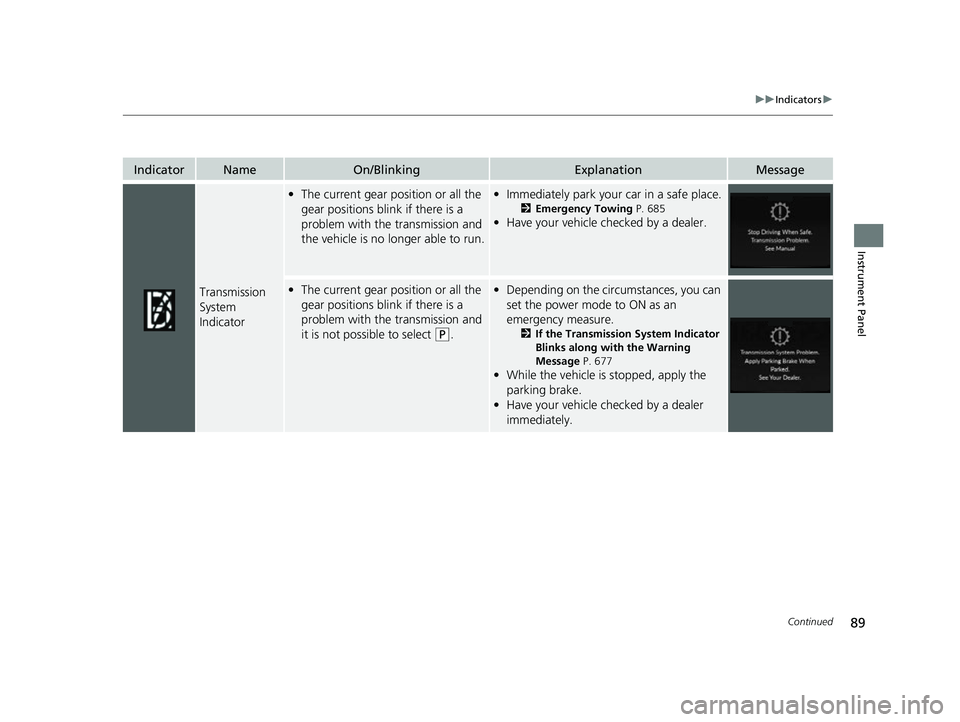
Transmission
System
Indicator
•The current gear position or all the
gear positions blink if there is a
problem with the transmission and
the vehicle is no longer able to run.•Immediately park your car in a safe place.
2 Emergency Towing P. 685
•Have your vehicle checked by a dealer.
•The current gear position or all the
gear positions blink if there is a
problem with the transmission and
it is not possible to select
(P.
•Depending on the circumstances, you can
set the power mode to ON as an
emergency measure.
2 If the Transmission System Indicator
Blinks along with the Warning
Message P. 677
•While the vehicle is stopped, apply the
parking brake.
• Have your vehicle checked by a dealer
immediately.
23 ACURA RDX-31TJB6400.book 89 ページ 2022年8月4日 木曜日 午後1時51分
Page 109 of 713
107
uuIndicators uMulti-Information Display Warning and Information Messages
Continued
Instrument Panel
Multi-Information Display Warn ing and Information Messages
The following messages appear only on the multi-information display. Roll the right selector wheel to see the message again with the
system message indicator on.
2 Switching the Display P. 139
MessageConditionExplanation
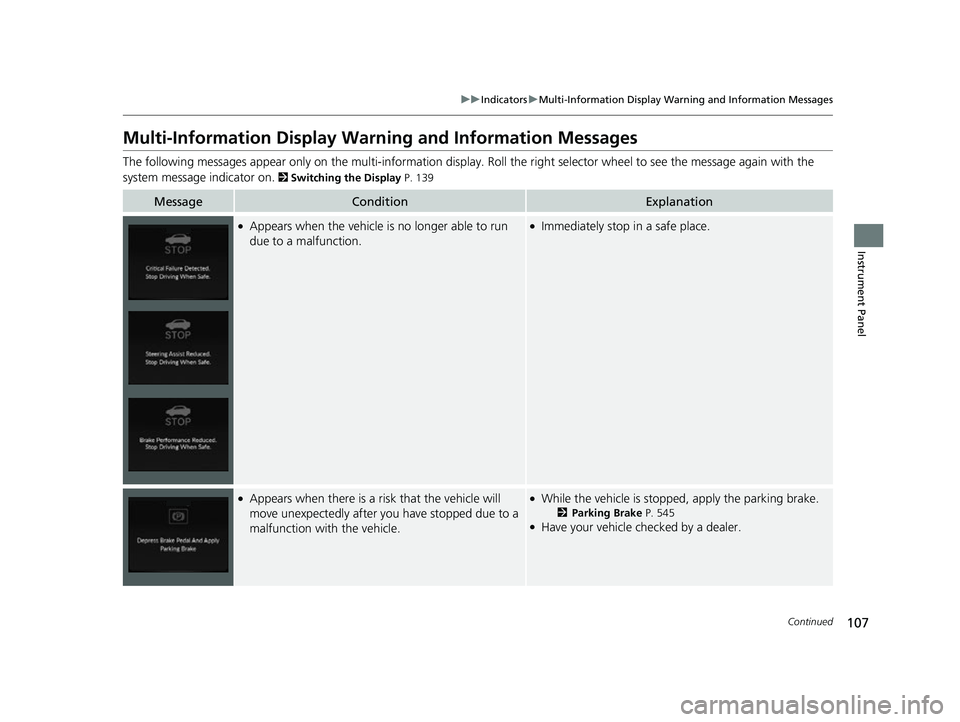
●Appears when the vehicle is no longer able to run
due to a malfunction.●Immediately stop in a safe place.
●Appears when there is a ri sk that the vehicle will
move unexpectedly after you have stopped due to a
malfunction with the vehicle.●While the vehicle is stopped, apply the parking brake.
2 Parking Brake P. 545●Have your vehicle checked by a dealer.
23 ACURA RDX-31TJB6400.book 107 ページ 2022年8月4日 木曜日 午後1時51分
Page 114 of 713
112
uuIndicators uMulti-Information Display Warn ing and Information Messages
Instrument Panel
MessageConditionExplanation
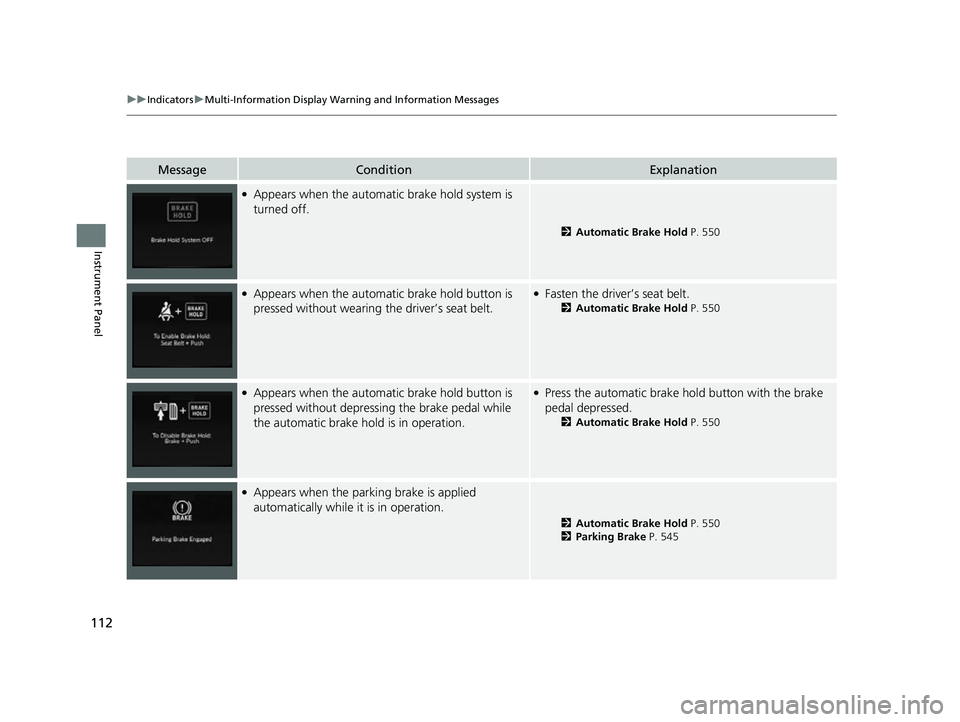
●Appears when the automatic brake hold system is
turned off.
2 Automatic Brake Hold P. 550
●Appears when the automa tic brake hold button is
pressed without wearing the driver’s seat belt.●Fasten the driver’s seat belt.
2 Automatic Brake Hold P. 550
●Appears when the automa tic brake hold button is
pressed without depressing the brake pedal while
the automatic brake hold is in operation.●Press the automatic brake hold button with the brake
pedal depressed.
2 Automatic Brake Hold P. 550
●Appears when the parking brake is applied
automatically while it is in operation.
2Automatic Brake Hold P. 550
2 Parking Brake P. 545
23 ACURA RDX-31TJB6400.book 112 ページ 2022年8月4日 木曜日 午後1時51分
Page 115 of 713

113
uuIndicators uMulti-Information Display Warning and Information Messages
Continued
Instrument Panel
MessageConditionExplanation
●Appears if the automatic br ake hold is automatically
canceled while it is in operation.●Immediately depress the brake pedal.
●Appears when the electric parking brake switch is
pulled without depressing the brake pedal while the
electric parking brake is in operation.●Pull the electric parking brake switch with the brake
pedal depressed.
2 Parking Brake P. 545
●Appears when you set the power mode to VEHICLE
OFF, if the rear doors were opened shortly before or
after the vehicle was powered on.●Check the rear seat for passengers or items before
exiting the vehicle.
2 Rear Seat Reminder P. 224
●Appears as soon as a problem is detected in the
keyless access system or keyless starting system.●Appears constantly - Have your vehicle checked by a
dealer.
23 ACURA RDX-31TJB6400.book 113 ページ 2022年8月4日 木曜日 午後1時51分
Page 120 of 713

118
uuIndicators uMulti-Information Display Warn ing and Information Messages
Instrument Panel
MessageConditionExplanation
•Appears when the (P button is pressed while the
vehicle is moving.• Make sure that the vehicl e comes to a stop before
operating the select button.
●Appears if you put the transmission into (R while the
vehicle is moving forward, or into
(D while the
vehicle is reversing.
• Appears when you set the power mode to OFF while
driving.•Immediately stop in a safe place, set the parking brake,
then restart the engine. If the message disappears,
continue driving.
•Appears when the vehicle is stopped with the
driver’s seat belt unfastened and there is a chance
that the vehicle may roll unintentionally.•Press the (P button before release the brake pedal
when idling, parking or exiting the vehicle.
2 Shift Operation P. 453
●Appears when you attempt to change to another
gear position with the transmission in
(P and the
engine OFF.
●To select another gear position while in (P, the engine
must be ON.
23 ACURA RDX-31TJB6400.book 118 ページ 2022年8月4日 木曜日 午後1時51分
Page 125 of 713

123
uuIndicators uMulti-Information Display Warning and Information Messages
Continued
Instrument Panel
MessageConditionExplanation
●Appears when the distance between your vehicle
and the vehicle ahead of you is too close while ACC
is in operation.●ACC has been automatically canceled.
2 Adaptive Cruise Control (ACC) with Low Speed
Follow P. 502
●Appears when pressing the RES/+ or SET/– button
while the distance between your vehicle and the
vehicle ahead of you is too close.●ACC cannot be set.
2 Adaptive Cruise Control (ACC) with Low Speed
Follow P. 502
●Appears when the park ing brake is applied
automatically while ACC is in operation.●ACC has been automatically canceled.
2 Adaptive Cruise Control (ACC) with Low Speed
Follow P. 502
2 Parking Brake P. 545
●Appears when pressing the RES/+ or SET/– button
while the parking brake is applied.●ACC cannot be set.
2 Adaptive Cruise Control (ACC) with Low Speed
Follow P. 502
2 Parking Brake P. 545
23 ACURA RDX-31TJB6400.book 123 ページ 2022年8月4日 木曜日 午後1時51分
Page 148 of 713

uuGauges and Displays uMulti-Information Display
146
Instrument Panel
Indicates the status of the Road Departure Mitigation system, CMBSTM, Low Speed
Braking Control* and blind spot information system, such as On, Off, or Failure, by
color and letters.
The following colors indica te the status of any of the above-mentioned systems:
• Green: The system is on.
• Gray: The system is off.
• Amber: There is a probl em with the system.
■Safety Support1Safety Support
If a system is indicated by the color amber, have your
vehicle checked by a dealer immediately.
To turn on or off each system, first press and roll the
right selector wheel to select the desired item, and
then press the right selector wheel.
2 Road Departure Mitigation On and Off
P. 532
2 CMBS
TM On and Off P. 490
2 System On and Off P. 499
2 Blind Spot Information System On and Off
P. 481
You can also confirm the st atus of each function by
the color of the safe ty support indicator.
2 Safety Support Indicator (Amber) P. 103
2 Safety Support Indicator (Green/Gray)
P. 106
Even when the Low Speed Braking Control icon is
green, if the parking sensor is turned off for the rear
only, the brake assist will not operate when reversing.
2 Turning off All Rear Sensors P. 560
Models with Low Speed Braking Control
* Not available on all models
23 ACURA RDX-31TJB6400.book 146 ページ 2022年8月4日 木曜日 午後1時51分
Page 199 of 713
197
uuOperating the Switches Around the Steering Wheel uLight Switches
Continued
Controls
Light Switches
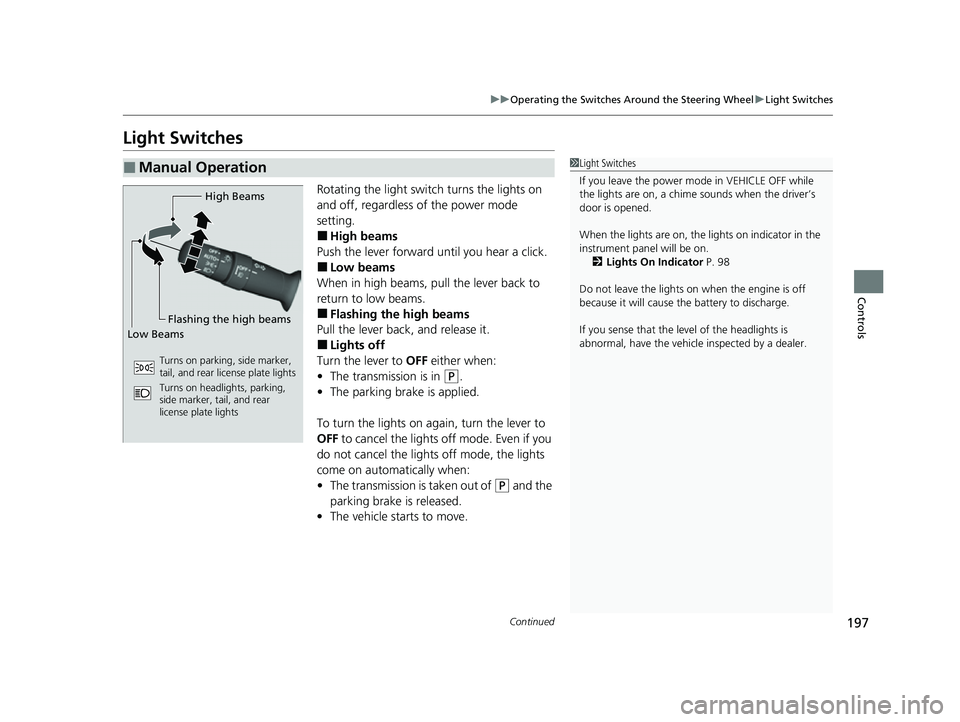
Rotating the light switch turns the lights on
and off, regardless of the power mode
setting.
■High beams
Push the lever forward until you hear a click.
■Low beams
When in high beams, pull the lever back to
return to low beams.
■Flashing the high beams
Pull the lever back, and release it.
■Lights off
Turn the lever to OFF either when:
• The transmission is in
(P.
• The parking brake is applied.
To turn the light s on again, turn the lever to
OFF to cancel the lights off mode. Even if you
do not cancel the lights off mode, the lights
come on automatically when:
• The transmission is taken out of
(P and the
parking brake is released.
• The vehicle starts to move.
■Manual Operation1Light Switches
If you leave the power mode in VEHICLE OFF while
the lights are on, a chime sounds when the driver’s
door is opened.
When the lights are on, the lights on indicator in the
instrument pane l will be on.
2 Lights On Indicator P. 98
Do not leave the lights on when the engine is off
because it will cause the battery to discharge.
If you sense that the le vel of the headlights is
abnormal, have the vehicl e inspected by a dealer.
High Beams
Flashing the high beams
Low Beams
Turns on parking, side marker,
tail, and rear license plate lights
Turns on headlights, parking,
side marker, tail, and rear
license plate lights
23 ACURA RDX-31TJB6400.book 197 ページ 2022年8月4日 木曜日 午後1時51分
Page 202 of 713
200
uuOperating the Switches Around the Steering Wheel uFog Lights*
Controls
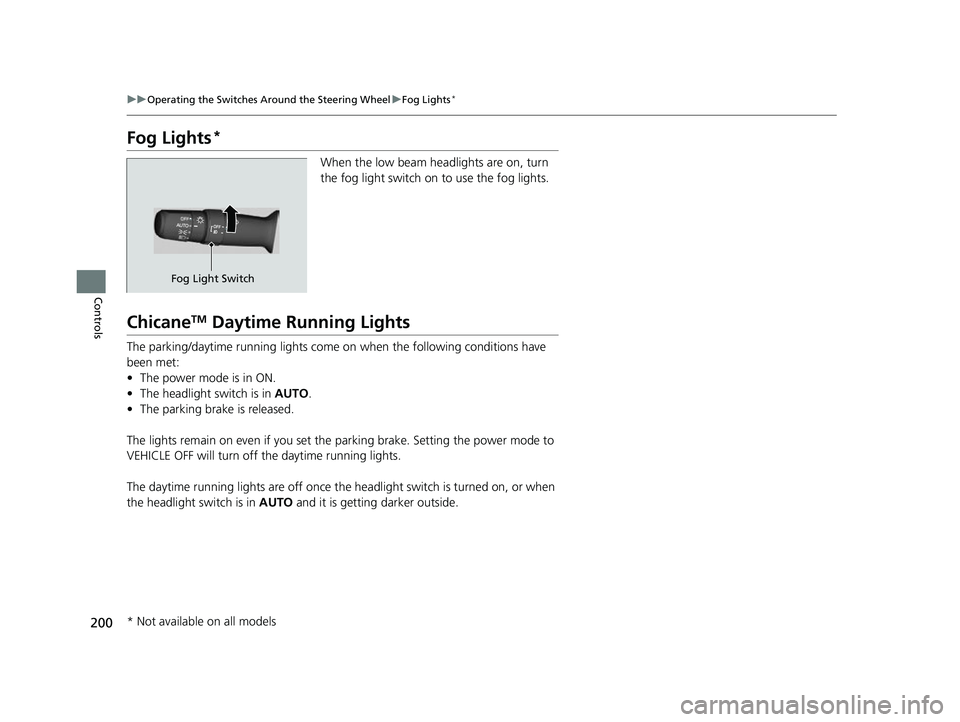
Fog Lights*
When the low beam headlights are on, turn
the fog light switch on to use the fog lights.
ChicaneTM Daytime Running Lights
The parking/daytime running lights come on when the following conditions have
been met:
• The power mode is in ON.
• The headlight switch is in AUTO.
• The parking brake is released.
The lights remain on even if you set the parking brake. Setting the power mode to
VEHICLE OFF will turn off the daytime running lights.
The daytime running lights are off once the headlight switch is turned on, or when
the headlight switch is in AUTO and it is getting darker outside.
Fog Light Switch
* Not available on all models
23 ACURA RDX-31TJB6400.book 200 ページ 2022年8月4日 木曜日 午後1時51分