towing ACURA RDX 2023 User Guide
[x] Cancel search | Manufacturer: ACURA, Model Year: 2023, Model line: RDX, Model: ACURA RDX 2023Pages: 713, PDF Size: 21.99 MB
Page 440 of 713
uuTowing a Trailer uTowing Preparation
438
Driving
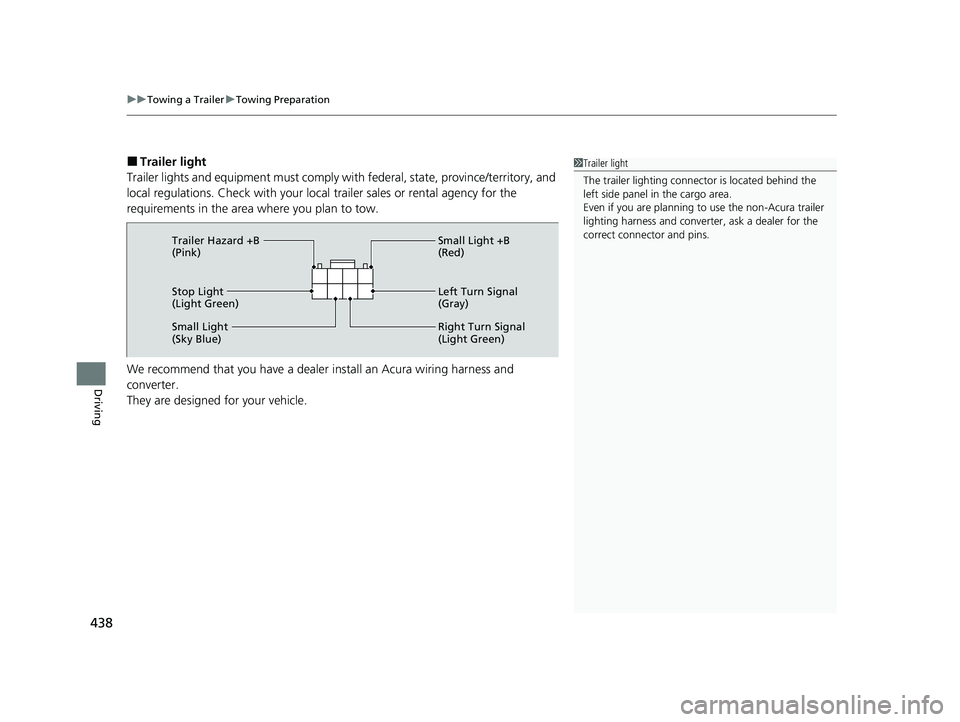
■Trailer light
Trailer lights and equipment must comply with federal, state, province/territory, and
local regulations. Check with your local trailer sales or rental agency for the
requirements in the area where you plan to tow.
We recommend that you have a dealer install an Acura wiring harness and
converter.
They are designed for your vehicle.1 Trailer light
The trailer lighting connect or is located behind the
left side panel in the cargo area.
Even if you are planning to use the non-Acura trailer
lighting harness and converte r, ask a dealer for the
correct connector and pins.
Stop Light
(Light Green) Small Light +B
(Red)
Left Turn Signal
(Gray)
Right Turn Signal
(Light Green)
Small Light
(Sky Blue) Trailer Hazard +B
(Pink)
23 ACURA RDX-31TJB6400.book 438 ページ 2022年8月4日 木曜日 午後1時51分
Page 441 of 713

439
uuTowing a Trailer uDriving Safely with a Trailer
Continued
Driving
Driving Safely with a Trailer
• Have the trailer properly servic ed and keep it in good condition.
• Make sure that all the weights and load in the vehicle and trailer are within limits.
2Towing Load Limits P. 435
•Securely attach the hitch, safety chains, and other necessary parts to the trailer.
• Securely store all the items in and on the tra iler so that they do not shift while
driving.
• Check if the lights and brakes on the trailer are working properly.
• Check the pressures of the trailer tires.
• Turn off the Auto Idle Stop syst em using the Auto Idle Stop OFF button. The
trailer weight can affect your vehicle’s brake effectiveness if Auto Idle Stop is
activated on a hill wh ile towing a trailer.
• Turn off the rear parking sensor system.
2 Turning off All Rear Sensors P. 560
•Turn off the Low Speed Braki ng Control system. It may activate if it detects the
towed object as an obstacle.
2 System On and Off P. 499
■Things You Need To Know Before Towing a Trailer1Driving Safely with a Trailer
Operating speed when towing a trailer must not
exceed 62 mph (100 km/h).
Parking
In addition to the normal precautions, place wheel
chocks at each of the trailer’s tires.
Remember to unhitch the tra iler before changing a
flat tire. Ask the trailer sales or rental agency where
and how to store the trailer’s spare tire.
Models with Parking Sensor System
Models with Low Speed Braking Control
23 ACURA RDX-31TJB6400.book 439 ページ 2022年8月4日 木曜日 午後1時51分
Page 442 of 713
uuTowing a Trailer uTowing Behind a Motorhome
440
Driving
• Drive slower than normal.
• Obey posted speed limits for vehicles with trailers.
• Use the
(D position when towing a trailer on level roads.
• Turn more slowly and with a wider turning arc than normal.
• Allow more time and distance for braking.
• Do not brake or turn suddenly.
• Monitor your temperature gauge. If it n ears the red (H) mark, turn off the climate
control system and reduce speed. Pull to the side of the road safely to cool down
the engine if necessary.
• Put the transmission into
(S if the transmission shifts frequently.
Towing Behind a Motorhome
Your vehicle is not designed to be towed behind a motor home. If your vehicle needs
to be towed in an emergency, refe r to the emergency towing information.
2Emergency Towing P. 685
■Towing Speeds and Gears
■Turning and Braking
■Driving in Hilly Terrain
1Towing Speeds and Gears
When towing a fixed-sided trailer (e.g., camper), do
not exceed 55 mph (88 km/h). At higher speeds, the
trailer may sway or af fect vehicle handling.
23 ACURA RDX-31TJB6400.book 440 ページ 2022年8月4日 木曜日 午後1時51分
Page 481 of 713

479
uuWhen Driving uBlind Spot Information System
Continued
Driving
Blind Spot Information System
When the system detects vehicles approaching from behind in adjacent lanes, the
appropriate indicator comes on, providin g assistance when you change lanes.
The system activates when your vehicle is moving forward at about 20 mph (32 km/h)
or above.
Alert zone range
A: Approx. 1.6 ~ 10 feet (0.5 ~ 3 meters) from vehicle side.
B: Approx. 10 feet (3 meters) from rear bumper.
C: Approx. 10 ~ 82 feet (3 ~ 25 meters) behind from rear bumper. (The faster the
approaching vehicle, the further away it will be detected.)
The initially set alert zone is alert zone 1. Over time, after the vehicle has been driven
on straight roads with traffic and roadside objects, the system will adapt and expand
the alert zone (alert zone 1 and 2).
■How the System works
1 Blind Spot Information System
Important Safety Reminder
Like all assistance systems, the blind spot information
system has limitations. Always look in your mirrors, to
either side of your vehicl e, and behind you for other
vehicles before changing la nes. Overreliance on the
blind spot information sy stem may result in a
collision.
Have your vehicle checked by a dealer in the
following situations:
•The rear bumper or area around the radar sensors
is strongly impacted.
•The indicator does not come on even if a vehicle in
the alert zone should have been detected.
•The rear bumper or any system components need
to be repaired.
If the rear bumper or any system components are
repaired, the system will re vert to alert zone 1 only
until it is able to adapt and expand to alert zone 1
and 2.
Turn the system off when towing a trailer.
The system may not work properly for the following
reasons:
•The added mass tilts the vehicle and changes the
radar coverage.
•The trailer itself can be detected by the radar
sensors, causing the blind spot information system
alert indicators to come on.
Radar Sensors: underneath the
rear bumper corners : Alert Zone 1
A BC : Alert Zone 2
23 ACURA RDX-31TJB6400.book 479 ページ 2022年8月4日 木曜日 午後1時51分
Page 494 of 713

492
uuAcuraWatchTMuCollision Mitigation Braking SystemTM (CMBSTM)
Driving
■Vehicle conditions
• Headlight lenses are dirty or the headlights are not properly adjusted.
• The outside of the windshie ld is blocked by dirt, mud, leaves, wet snow, etc.
• The inside of the windshield is fogged.
• An abnormal tire or wheel condition (incorre ct sizes, varied sizes or construction,
improperly inflated, compact spare tire
*, etc.).
• When tire chains are installed.
• The vehicle is tilted due to a heav y load or suspension modifications.
• The camera temperature gets too high.
• Driving with the parking brake applied.
• When the radar sensor behind the emblem gets dirty.
• The vehicle is towing a trailer.
* Not available on all models
23 ACURA RDX-31TJB6400.book 492 ページ 2022年8月4日 木曜日 午後1時51分
Page 500 of 713

uuAcuraWatchTMuLow Speed Braking Control*
498
Driving
The Low Speed Braking Control provides a visual and audible alert when the vehicle
is moving between approximately 1 and 6 mph (2 and 10 km/h) and there is the
possibility of a collision with a detected wall or other obstacle, as well as providing
assistance with braking.
If the only rear sensors are turned off using the parking sensor system, the assistive
braking will not work when reversing.
2 Turning off All Rear Sensors P. 560
■How the System Works1Low Speed Braking Control*
For directions on the prop er handling of the sonar
sensors, please refer to the following page.
2 Sonar Sensors
* P. 544
The vehicle will release the brake and start moving a
few seconds after the system is activated. To keep the
vehicle stopped, keep the brake pedal depressed or
put the transmission into
( P.
In order to prevent the sy stem from activating when
not needed, always turn it off during vehicle
maintenance, when loading on ships, trucks, and so
on, or when using a chas sis dynamometer or free
rollers for inspection or when washing the car in
conveyor type car wash machine.
If you put any accessories (such as a towing hitch or
bicycle rack) on or around the rear sensors, the Low
Speed Braking Control Syst em may activate if it
detects these accessories as an obstacle. In this case,
turn off the rear sensor. 2 Turning off All Rear Sensors P. 560
Beep Beep
The vehicle
applies brake Driver
depresses
brake pedal Remove
brake after
maintaining
stationary
position
Stop
Audible Alert
* Not available on all models
23 ACURA RDX-31TJB6400.book 498 ページ 2022年8月4日 木曜日 午後1時51分
Page 511 of 713

Continued509
uuAcuraWatchTMuAdaptive Cruise Control (ACC) with Low Speed Follow
Driving
The system may automatically shut off u nder certain conditions. Some examples of
these conditions are listed below. Othe r conditions may reduce some of the ACC
with Low Speed Follow functions.
2 Front Sensor Camera P. 541
2 Radar Sensor P. 543
■Environmental conditions
Driving in bad weather (r ain, fog, snow, etc.).
■Roadway conditions
Driving on a snowy or wet roadway (obscured lane marking, vehicle tracks, reflected
lights, road spra y, high contrast).
■Vehicle conditions
• The outside of the windshield is blocked by dirt, mud, leaves, wet snow, etc.
• An abnormal tire or wheel condition (inco rrect sizes, varied sizes or construction,
improperly inflated, compact spare tire
*, etc.).
• The camera temperature gets too high.
• The parking brake is applied.
• The radar sensor cover is dirty.
• The vehicle is tilted due to a heavy load or suspension modifications.
• Tire chains are installed.
• The vehicle is towing a trailer.
■ACC with Low Speed Follow Conditions and Limitations1ACC with Low Speed Follow Conditions and Limitations
If you need the radar sensor to be repaired, or
removed, or the radar se nsor cover is strongly
impacted, turn off the system by pressing the
button and take your vehicle to a dealer.
Have your vehicle checked by a dealer if you find any
unusual behavior of the system (e.g., the warning
message appears too frequently).
If the front of the vehicle is impacted in any of the
following situations, the ra dar sensor may not work
properly. Have your vehi cle checked by a dealer:
•The vehicle mounted onto a bump, curb, chock,
embankment, etc.
•You drive the vehicle where water is deep.
•Your vehicle has a frontal collision.
* Not available on all models
23 ACURA RDX-31TJB6400.book 509 ページ 2022年8月4日 木曜日 午後1時51分
Page 531 of 713
529
uuAcuraWatchTMuLane Keeping Assist System (LKAS)
Driving
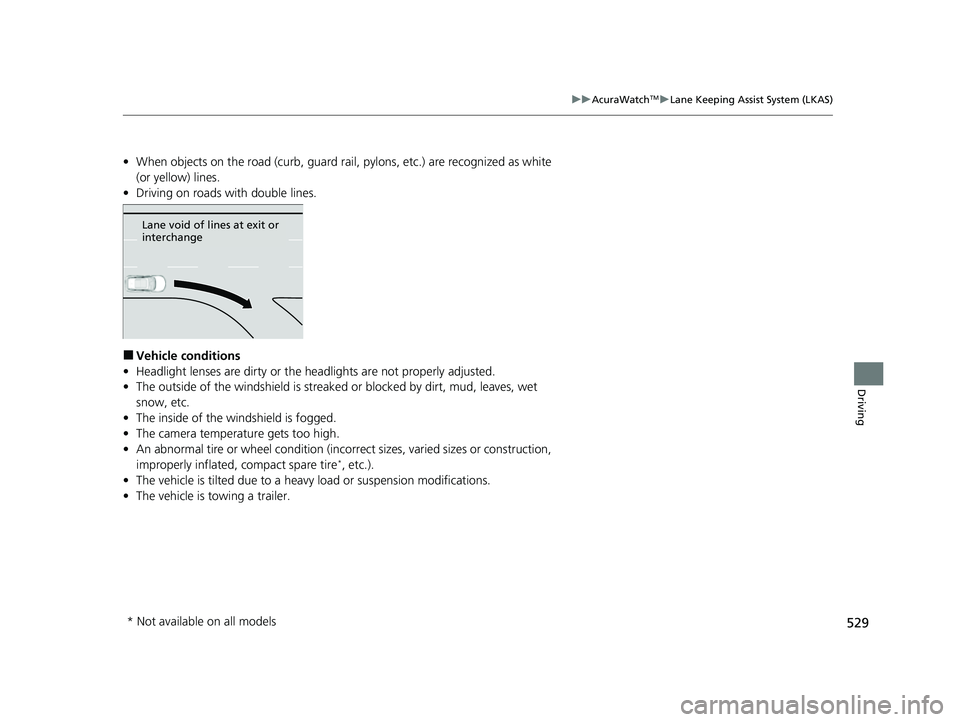
• When objects on the road (curb, guard rail, pylons, etc.) are recognized as white
(or yellow) lines.
• Driving on roads with double lines.
■Vehicle conditions
• Headlight lenses are dirty or the h eadlights are not properly adjusted.
• The outside of the windshield is streaked or blocked by dirt, mud, leaves, wet
snow, etc.
• The inside of the windshield is fogged.
• The camera temperature gets too high.
• An abnormal tire or wheel condition (inco rrect sizes, varied sizes or construction,
improperly inflated, compact spare tire
*, etc.).
• The vehicle is tilted due to a heavy load or suspension modifications.
• The vehicle is towing a trailer.
Lane void of lines at exit or
interchange
* Not available on all models
23 ACURA RDX-31TJB6400.book 529 ページ 2022年8月4日 木曜日 午後1時51分
Page 536 of 713
534
uuAcuraWatchTMuRoad Departure Mitigation System
Driving
■Roadway conditions
• Driving on a snowy or wet roadway (obs cured lane marking, vehicle tracks,
reflected lights, road spray, high contrast).
• Driving on a road with temporary lane markings.
• Faint, multiple, or varied lane markings are visible on the roadway due to road
repairs or old lane markings.
• The roadway has merging, split, or crossing lines (e.g., such as at an intersection
or crosswalk).
• The lane markings are extremely narrow, wide, or changing.
• The vehicle in front of you is driving near the lane lines.
• The road is hilly or the vehicle is approaching the crest of a hill.
• Driving on rough or unpaved roads, or over bumpy surfaces.
• When objects on the road (curb, guard rail, pylons, etc.) are recognized as white
(or yellow) lines.
• Driving on roads with double lines.
■Vehicle conditions
• Headlight lenses are dirty or the headlights are not properly adjusted.
• The outside of the windshield is streake d or blocked by dirt, mud, leaves, wet
snow, etc.
• The inside of the windshield is fogged.
• The camera temperature gets too high.
• An abnormal tire or wheel condition (incorre ct sizes, varied sizes or construction,
improperly inflated, compact spare tire
*, etc.).
• The vehicle is tilted due to a heav y load or suspension modifications.
• When tire chains are installed.
• The vehicle is towing a trailer.
* Not available on all models
23 ACURA RDX-31TJB6400.book 534 ページ 2022年8月4日 木曜日 午後1時51分
Page 560 of 713

uuParking Your Vehicle uParking Sensor System*
558
Driving
■Parking sensor system on and off
With the power mode in ON, press the
parking sensor system button to turn on or off
the system. The indicator in the button comes
on when the system is on.
The front center and front corner sensors start
to detect an obstacle wh en the transmission is
in any position other than
(Por (R, and the
vehicle speed is less than 5 mph (8 km/h).
The front corner, rear center and rear corner
sensors start to detect an obstacle when the
transmission is in
(R, and the vehicle speed is
less than 5 mph (8 km/h).
1 Parking Sensor System*
Do not put any accessories on or around the sensors.
u If you put any accessorie s (such as a towing hitch
or bicycle rack) on or around the rear sensors, the
system may activate if it detects these accessories as
an obstacle. In this case, turn off the rear sensor. 2Turning off All Rear Sensors P. 560
1Parking sensor system on and off
When you set the power mode to ON, the system will
be in the previously selected condition.
If the rear sensors are turned off when using the
parking sensor system, the Low Speed Braking
Control System will not activate while reversing. 2 Low Speed Braking Control
* P. 497
* Not available on all models
23 ACURA RDX-31TJB6400.book 558 ページ 2022年8月4日 木曜日 午後1時51分