transmission ACURA RDX 2023 Owner's Manual
[x] Cancel search | Manufacturer: ACURA, Model Year: 2023, Model line: RDX, Model: ACURA RDX 2023Pages: 713, PDF Size: 21.99 MB
Page 199 of 713
197
uuOperating the Switches Around the Steering Wheel uLight Switches
Continued
Controls
Light Switches
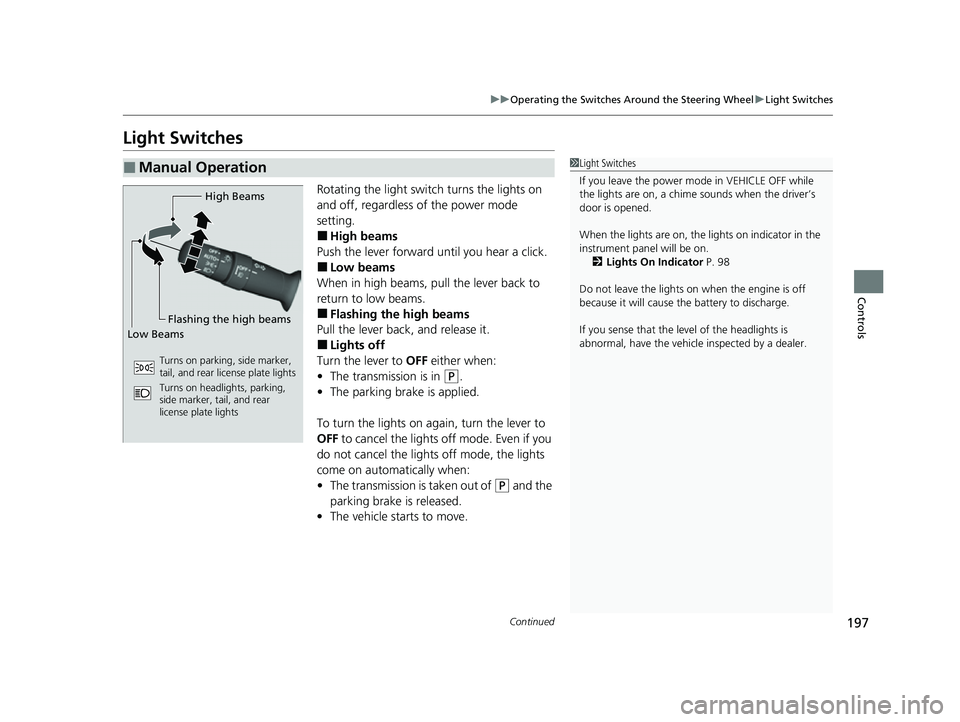
Rotating the light switch turns the lights on
and off, regardless of the power mode
setting.
■High beams
Push the lever forward until you hear a click.
■Low beams
When in high beams, pull the lever back to
return to low beams.
■Flashing the high beams
Pull the lever back, and release it.
■Lights off
Turn the lever to OFF either when:
• The transmission is in
(P.
• The parking brake is applied.
To turn the light s on again, turn the lever to
OFF to cancel the lights off mode. Even if you
do not cancel the lights off mode, the lights
come on automatically when:
• The transmission is taken out of
(P and the
parking brake is released.
• The vehicle starts to move.
■Manual Operation1Light Switches
If you leave the power mode in VEHICLE OFF while
the lights are on, a chime sounds when the driver’s
door is opened.
When the lights are on, the lights on indicator in the
instrument pane l will be on.
2 Lights On Indicator P. 98
Do not leave the lights on when the engine is off
because it will cause the battery to discharge.
If you sense that the le vel of the headlights is
abnormal, have the vehicl e inspected by a dealer.
High Beams
Flashing the high beams
Low Beams
Turns on parking, side marker,
tail, and rear license plate lights
Turns on headlights, parking,
side marker, tail, and rear
license plate lights
23 ACURA RDX-31TJB6400.book 197 ページ 2022年8月4日 木曜日 午後1時51分
Page 208 of 713
206
uuOperating the Switches Around the Steering Wheel uWipers and Washers
Controls
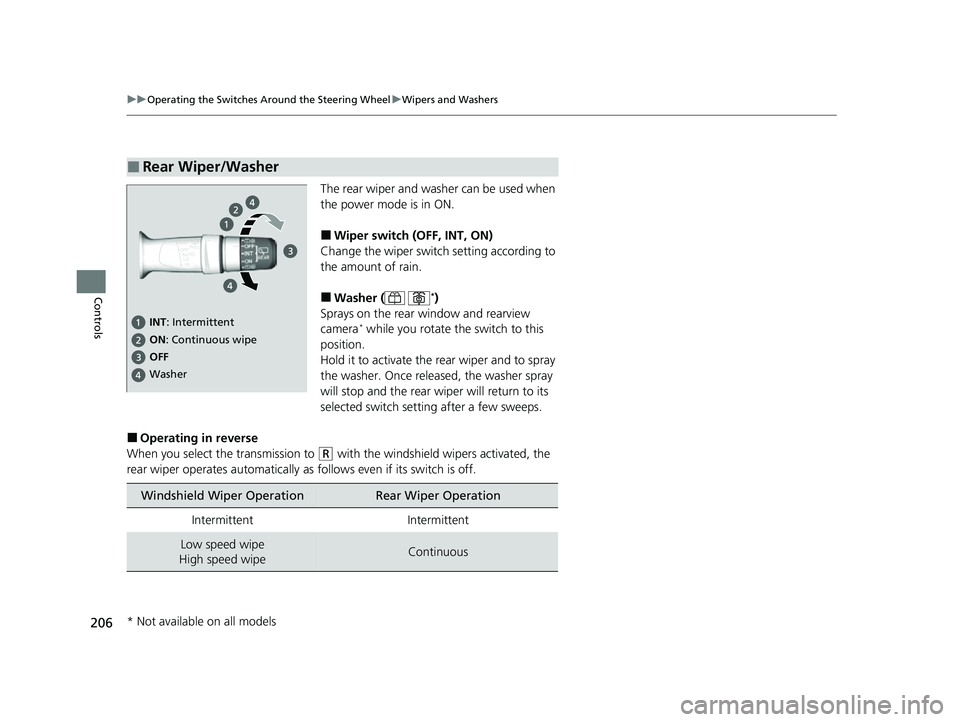
The rear wiper and washer can be used when
the power mode is in ON.
■Wiper switch (OFF, INT, ON)
Change the wiper switch setting according to
the amount of rain.
■Washer ( *)
Sprays on the rear window and rearview
camera
* while you rotate th e switch to this
position.
Hold it to activate the rear wiper and to spray
the washer. Once released, the washer spray
will stop and the rear wi per will return to its
selected switch setting after a few sweeps.
■Operating in reverse
When you select the transmission to
(R with the windshield wipers activated, the
rear wiper operates automatically as follows even if its switch is off.
■Rear Wiper/Washer
INT : Intermittent
OFF ON : Continuous wipe
Washer
Windshield Wiper OperationRear Wiper Operation
IntermittentIntermittent
Low speed wipe
High speed wipeContinuous
* Not available on all models
23 ACURA RDX-31TJB6400.book 206 ページ 2022年8月4日 木曜日 午後1時51分
Page 212 of 713

210
uuOperating the Switches Around the Steering Wheel uDriving Position Memory System
Controls
Driving Position Memory System
You can store two driver’s seat and door mirror positions with the driving position
memory system.
When you unlock and open the driver’s door with a keyless remote or keyless access
system, door mirrors adjust to one of the two preset positions and the seat adjusts
to retracted positions of one of the two preset positions automatically.
The seat will move to th e stored position when you set the power mode to
ACCESSORY.
• DRIVER 1 transmitter is linked to memory button 1.
• DRIVER 2 transmitter is linked to memory button 2.
The driver’s seat moves rearward depending
on the set seating position once you
•Stop the vehicle.
• Put the transmission in
(P.
• Turn the engine off.
• Open the driver’s door.
Once the power mode is in the ACCESSORY
position, the driver’s seat moves forward to
the DRIVER 1 or 2 preset position.
1 Driving Position Memory System
Using the audio/informati on screen, you can disable
the automatic seat adjustment function. 2 Customized Features P. 359
The driver’s seat easy exit feature can be turned ON/
OFF. 2 Customized Features P. 359
System Operation
The system will not operate if:
•Either memory button is pressed while the seat or
mirrors are in motion.
•The seat or mirrors positions are adjusted while in
operation.
•Either of the memorized positions is set fully to the
rear.
•The mode selector is pressed up or down while in
operation.
The system may not recognize a key if:
•The key is in close proximity to a cell phone or other
wireless device.
•Both keys are in the vehicle at the same time.
•The Driving Position Memory System is disabled in
customized features.
•Opening driver’s door wi thout fully grabbing door
handle.
Models with mode selector
DRIVER 1 DRIVER 2
23 ACURA RDX-31TJB6400.book 210 ページ 2022年8月4日 木曜日 午後1時51分
Page 213 of 713
211
uuOperating the Switches Around the Steering Wheel uDriving Position Memory System
Controls
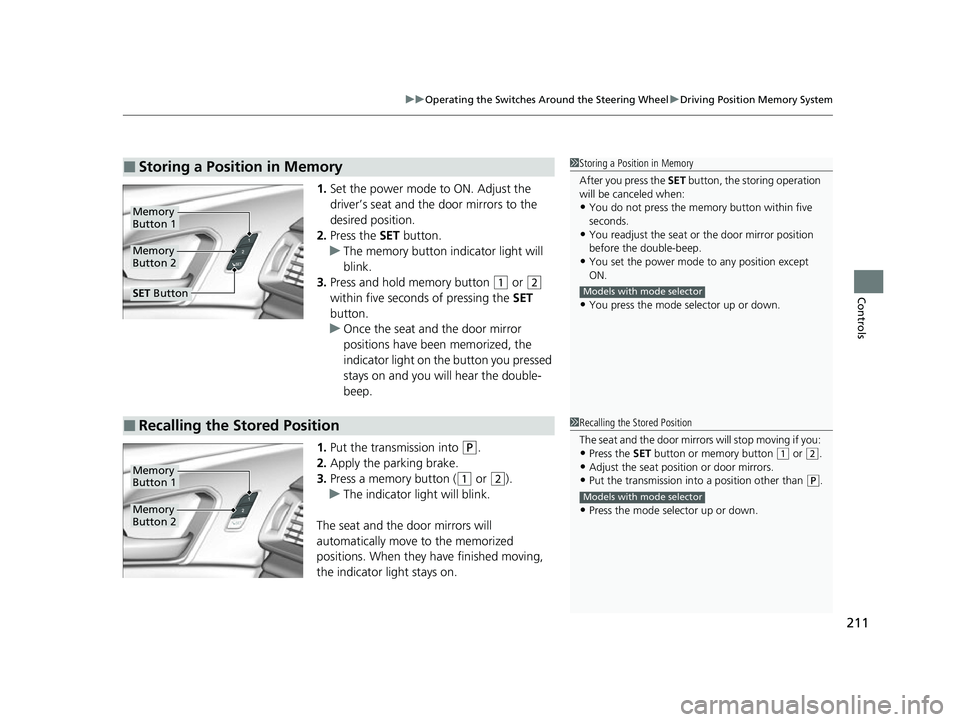
1. Set the power mode to ON. Adjust the
driver’s seat and the door mirrors to the
desired position.
2. Press the SET button.
u The memory button indicator light will
blink.
3. Press and hold memory button
(1 or (2
within five seconds of pressing the SET
button.
u Once the seat and the door mirror
positions have been memorized, the
indicator light on the button you pressed
stays on and you will hear the double-
beep.
1. Put the transmission into
(P.
2. Apply the parking brake.
3. Press a memory button (
(1 or (2).
u The indicator light will blink.
The seat and the door mirrors will
automatically move to the memorized
positions. When they have finished moving,
the indicator light stays on.
■Storing a Position in Memory1 Storing a Position in Memory
After you press the SET button, the storing operation
will be canceled when:
•You do not press the memory button within five
seconds.
•You readjust the seat or the door mirror position
before the double-beep.
•You set the power mode to any position except
ON.
•You press the mode selector up or down.
Models with mode selector
Memory
Button 1
Memory
Button 2
SET Button
■Recalling the Stored Position1Recalling the Stored Position
The seat and the door mirror s will stop moving if you:
•Press the SET button or memory button (1 or (2.
•Adjust the seat position or door mirrors.•Put the transmission into a position other than (P.
•Press the mode selector up or down.
Models with mode selector
Memory
Button 1
Memory
Button 2
23 ACURA RDX-31TJB6400.book 211 ページ 2022年8月4日 木曜日 午後1時51分
Page 215 of 713
213
Controls
Mirrors
Interior Rearview Mirror
Adjust the angle of the rearview mirror when you are sitting in the correct driving
position.
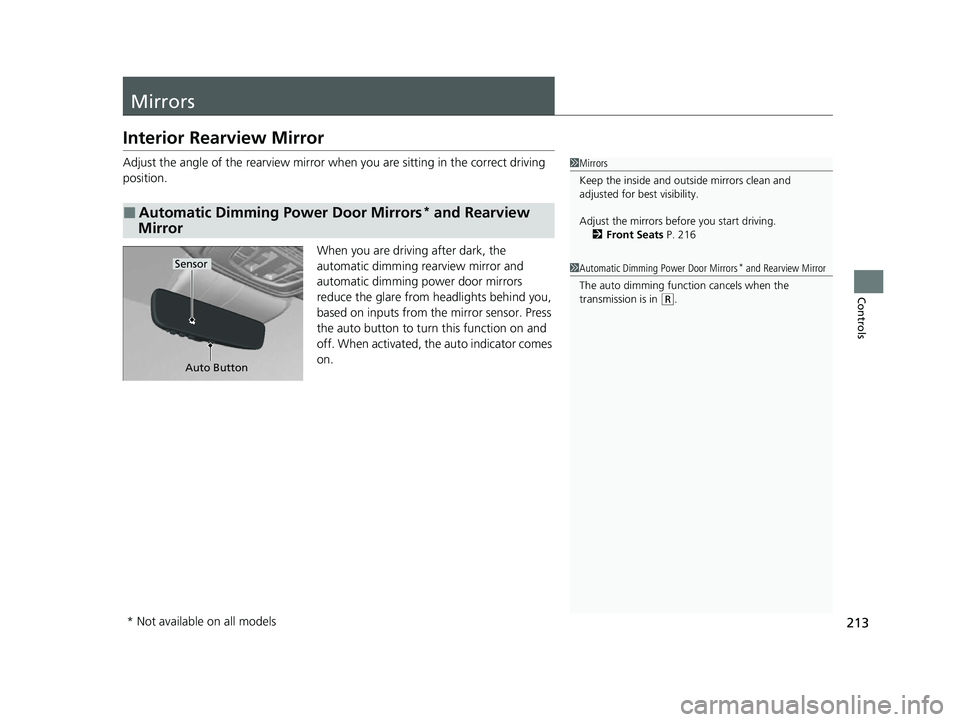
When you are driving after dark, the
automatic dimming rearview mirror and
automatic dimming power door mirrors
reduce the glare from headlights behind you,
based on inputs from the mirror sensor. Press
the auto button to turn this function on and
off. When activated, the auto indicator comes
on.
■Automatic Dimming Power Door Mirrors* and Rearview
Mirror
1 Mirrors
Keep the inside and out side mirrors clean and
adjusted for best visibility.
Adjust the mirrors before you start driving. 2 Front Seats P. 216
Auto Button
Sensor1Automatic Dimming Power Door Mirrors* and Rearview Mirror
The auto dimming function cancels when the
transmission is in
( R.
* Not available on all models
23 ACURA RDX-31TJB6400.book 213 ページ 2022年8月4日 木曜日 午後1時51分
Page 216 of 713
214
uuMirrors uPower Door Mirrors
Controls
Power Door Mirrors
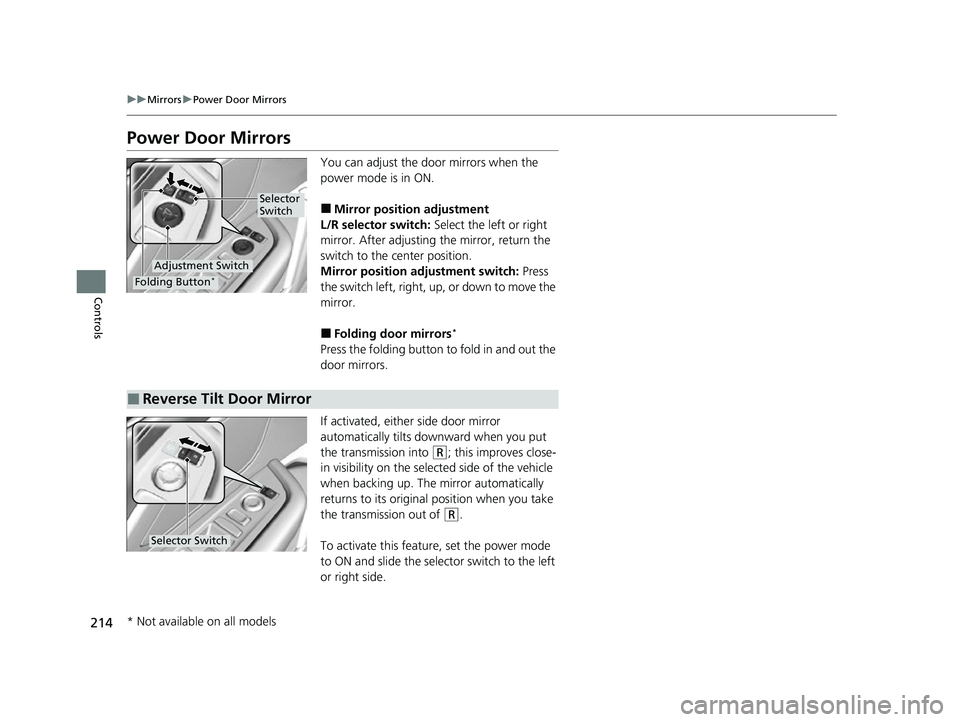
You can adjust the door mirrors when the
power mode is in ON.
■Mirror position adjustment
L/R selector switch: Select the left or right
mirror. After adjusting the mirror, return the
switch to the center position.
Mirror position adjustment switch: Press
the switch left, right, up, or down to move the
mirror.
■Folding door mirrors*
Press the folding button to fold in and out the
door mirrors.
If activated, either side door mirror
automatically tilts do wnward when you put
the transmission into
(R; this improves close-
in visibility on the selected side of the vehicle
when backing up. The mirror automatically
returns to its original position when you take
the transmission out of
(R.
To activate this feature, set the power mode
to ON and slide the selector switch to the left
or right side.
Selector
Switch
Adjustment Switch
Folding Button*
■Reverse Tilt Door Mirror
Selector Switch
* Not available on all models
23 ACURA RDX-31TJB6400.book 214 ページ 2022年8月4日 木曜日 午後1時51分
Page 321 of 713
319
uuAudio System Basic Operation uWi-Fi Connection
Continued
Features
Wi-Fi Connection
This vehicle is equipped wi th Wi-Fi connectivity. You ca n connect to an external
Wi-Fi hotspot or communication device. In a ddition, the vehicle can be used by other
communication devices as a Wi-Fi hotspot via the telematics unit (TCU).
• Connect the vehicle to a Wi-Fi hotspot
• Use Wi-Fi inside the vehicle
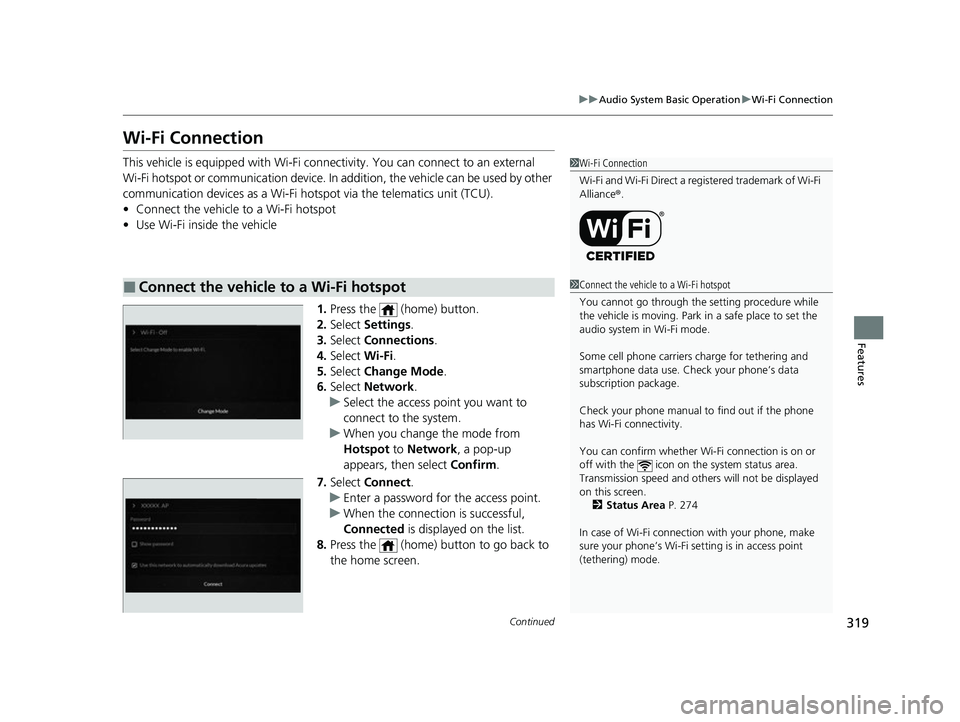
1.Press the (home) button.
2. Select Settings .
3. Select Connections .
4. Select Wi-Fi.
5. Select Change Mode .
6. Select Network .
u Select the access point you want to
connect to the system.
u When you change the mode from
Hotspot to Network, a pop-up
appears, then select Confirm.
7. Select Connect .
u Enter a password for the access point.
u When the connection is successful,
Connected is displayed on the list.
8. Press the (home) button to go back to
the home screen.
■Connect the vehicle to a Wi-Fi hotspot
1Wi-Fi Connection
Wi-Fi and Wi-Fi Direct a registered trademark of Wi-Fi
Alliance® .
1Connect the vehicle to a Wi-Fi hotspot
You cannot go through the setting procedure while
the vehicle is moving. Park in a safe place to set the
audio system in Wi-Fi mode.
Some cell phone carriers charge for tethering and
smartphone data use. Check your phone’s data
subscription package.
Check your phone manual to find out if the phone
has Wi-Fi connectivity.
You can confirm whether Wi -Fi connection is on or
off with the icon on the system status area.
Transmission speed and others will not be displayed
on this screen. 2 Status Area P. 274
In case of Wi-Fi connect ion with your phone, make
sure your phone’s Wi-Fi se tting is in access point
(tethering) mode.
23 ACURA RDX-31TJB6400.book 319 ページ 2022年8月4日 木曜日 午後1時51分
Page 324 of 713
322
uuAudio System Basic Operation uApple CarPlay
Features
Apple CarPlay
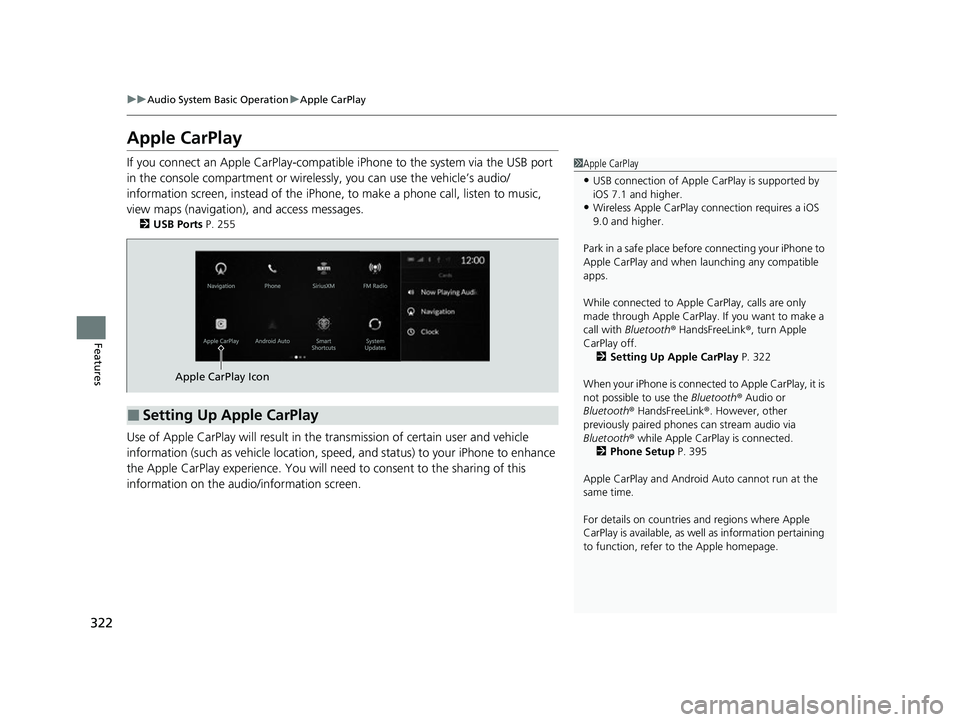
If you connect an Apple CarPlay-compatible iPhone to the system via the USB port
in the console compartment or wirele ssly, you can use the vehicle’s audio/
information screen, instead of the iPhone, to make a phone call, listen to music,
view maps (navigation), and access messages.
2 USB Ports P. 255
Use of Apple CarPlay will result in the transmission of certain user and vehicle
information (such as vehicle location, speed, and status) to your iPhone to enhance
the Apple CarPlay experience. You will need to consent to the sharing of this
information on the audi o/information screen.
1Apple CarPlay
•USB connection of Apple Ca rPlay is supported by
iOS 7.1 and higher.
•Wireless Apple CarPlay connection requires a iOS
9.0 and higher.
Park in a safe place before connecting your iPhone to
Apple CarPlay and when launching any compatible
apps.
While connected to Apple CarPlay, calls are only
made through Apple CarPlay. If you want to make a
call with Bluetooth ® HandsFreeLink ®, turn Apple
CarPlay off. 2 Setting Up Apple CarPlay P. 322
When your iPhone is connected to Apple CarPlay, it is
not possible to use the Bluetooth® Audio or
Bluetooth ® HandsFreeLink ®. However, other
previously paired phones can stream audio via
Bluetooth ® while Apple CarPlay is connected.
2 Phone Setup P. 395
Apple CarPlay and Android Auto cannot run at the
same time.
For details on c ountries and regions where Apple
CarPlay is available, as well as information pertaining
to function, refer to the Apple homepage.
■Setting Up Apple CarPlay
Apple CarPlay Icon
23 ACURA RDX-31TJB6400.book 322 ページ 2022年8月4日 木曜日 午後1時51分
Page 347 of 713

345
uuGeneral Information on the Audio System uHonda App License Agreement
Continued
Features
E. Information Collection and Storage
1. Information Collection, Use, Transmission a nd Storage of Data. Consent to Use of Data:
You agree that HONDA and PROVIDERS may
collect and use your information gathered in any manner as part of product support services related to the SOFTWARE or related services.
HONDA may share such information with third parties, including, without limitation, PR OVIDERS, third party software and service s
suppliers, their affiliates and/or their designated agents, solely to improve their products or to provide services or technolo gies to you.
HONDA, third party software and systems supplie rs, their affiliates and/or their designated agent may disclose this information to others,
but not in a form that pe rsonally identifies you.
2. Information Storage.
Depending on the type of mult imedia system you have in your VEHICLE, certain information may be stored for ease
of use of the SOFTWARE including, without limitation, search history, location history in certain applications, previous and sa ved
destinations, map locations within certain applications, and device numbers and contact information.
(a) Vehicle Health Information.
Your VEHICLE may remotely transmit information re garding the status and health of your VEHICLE
(“VEHICLE INFORMATION”) to HO NDA without notification to you. VEHICLE INFO RMATION may contain VEHICLE maintenance and
malfunction status that is derived from VEHICLE diagnostic data and includes, but is not limited to, status of powered doors and windows,
battery life data, battery charging data, VE HICLE speed, coolant temperature, air comp ressor revolution, output power, warning codes,
diagnostic trouble codes, fuel injection volume, and engine rotati ons per minute. VEHICLE HEALTH INFORMATION may be used by HON DA
for research and development, to deliver HONDA SERVICES and informat ion to you, and to contact you, and is retained only for a period
of time necessary to fulfill these goals.
(b) VEHICLE Geolocation Data (non-navigation/map based).
If you opt-in to geolocation-based SERVICES, your vehicle’s geolocation data
(latitude and longitude) will be automatically sent from your VEHICLE to HONDA and PROVIDERS.
(c) You understand that the inputting or uploading of information to your VEHICLE’s multimedia system or the SOFTWARE or SERVIC ES is
at your own risk and that HONDA is not responsible for unauthori zed access to or use of any personal or other information. All information
uploaded to the SOFTWARE and SERVICES may be stored on your VEHICLES’s multimedia system and you understand that the security and
safety of your VEHICLE’s multimedia system is your sole responsibility.
23 ACURA RDX-31TJB6400.book 345 ページ 2022年8月4日 木曜日 午後1時51分
Page 350 of 713
348
uuGeneral Information on the Audio System uHonda App License Agreement
Features
I. Availability/Interruption. The SOFTWARE and certain SERVICES are made availa ble through your VEHICLE’s compatible multimedia
system when the VEHICLE is turned on. Certain SERVICES may be avai lable only through your compatible mobile device when it is within
the operating range of the VEHICLE and a wireless carrier. The availability of the SOFTWARE and SERVICES may be subject to tran smission
limitation or interruption, including but not limited to techni cal obsolesce or sunsetting of the hardware, software or firmwar e, inside of
or external to the Vehicle, required fo r data transmission or receipt. HONDA does not guarantee that the SOFTWARE, SERVICES, or any
portion thereof will be av ailable at all times or in all ar eas. You acknowledge and agree that HONDA is not responsible for performance
degradation, interruption or delays. You acknowledge that HONDA shall not be liable to you if the SOFTWARE or SERVICES in a given
location are not available. If the SOFTWARE or SERVICES are not available within your intended location, you agree that your sole remedy
shall be to cease using the SOFTWARE and SERVICES.
J. PRODUCT SUPPORT: Product support for the SOFTWARE is provided by HONDA. For product support, please refer to HONDA
instructions provided in the DOCUMENTATION. Should you have any que stions concerning this AGREEMENT, or if you desire to contact
HONDA for any other reason, please refer to the HONDA contact information provided in the DOCUMENTATION.
K. Termination and Transfer.
1. Termination. This AGREEMENT is effective until terminated by you or US . WE may terminate this AGREEMENT for any or no reason,
and with or without notice to you. Your rights under this AGRE EMENT will terminate automatically without notice from US if you fail to
comply with any term of this AGREEMENT. Up on termination of this AGREEMENT, you shall cease all use of the SOFTWARE and SERVICE S.
2. Transfer: You may permanently transfer your rights under this AGREEMENT only as part of a sale or transfer of the VEHICLE, provided
you retain no copies, you transfer all of the SOFTWARE and HO NDA SERVICES (including all component parts, the media and printed
materials, and any upgrades), and the recipi ent agrees to the terms of this AGREEMENT. You agree to notify HONDA upon the sale or
transfer of the VEHICLE. To contact HO NDA, please refer to the HONDA contact in formation provided in the DOCUMENTATION.
23 ACURA RDX-31TJB6400.book 348 ページ 2022年8月4日 木曜日 午後1時51分