mirror ACURA RDX 2023 Owner's Guide
[x] Cancel search | Manufacturer: ACURA, Model Year: 2023, Model line: RDX, Model: ACURA RDX 2023Pages: 713, PDF Size: 21.99 MB
Page 532 of 713

530
uuAcuraWatchTMuRoad Departure Mitigation System
Driving
Road Departure Mitigation System
Alerts and helps to assist you when the sy stem detects a possibility of your vehicle
unintentionally crossing over detected la ne markings and/or leaving the roadway
altogether.
The front camera behind the rearview mirror
monitors left and right lane markings (in white
or yellow). If your vehicle is getting too close
to detected lane markings without a turn
signal activated, the system, in addition to a
visual alert, applies steering torque and alerts
you with rapid vibrations on the steering
wheel, to help you remain within the detected
lane.
2 Customized Features P. 359
As a visual alert, the Lane Departure
message appears on the multi-information
display.
If the system determines that its steering i nput is insufficient to keep your vehicle on
the roadway, it may apply braking. u Braking is applied only when the lane markings are solid continuous lines.
The system cancels assisting operations wh en you turn the steering wheel to avoid
crossing over detected lane markings.
If the system operates several times without detecting driver response, the system
beeps to alert you.
■How the System Works
1 Road Departure Mitigation System
Important Safety Reminder
Like all assistance systems, the Road Departure
Mitigation system has limitations.
Overreliance on the Road Departure Mitigation
system may result in a collision. It is always your
responsibility to keep the vehicle within your driving
lane.
The Road Departure Mitigation system only alerts you
when lane drift is detected without a turn signal in
use. The Road Departure Mitigation system may not
detect all lane markings or lane or roadway
departures; accuracy will vary based on weather,
speed and lane marker condi tion. It is always your
responsibility to sa fely operate the vehicle and avoid
collisions.
You can read about handling information for the
camera equipped with this system.
2 Front Sensor Camera P. 541
The Road Departure Mitigati on system may not work
properly or may work im properly under the certain
conditions: 2 Road Departure Mitigation Conditions and
Limitations P. 533
There are times when you may not notice the Road
Departure Mitigation functions due to your operation
of the vehicle, or road surface conditions.
23 ACURA RDX-31TJB6400.book 530 ページ 2022年8月4日 木曜日 午後1時51分
Page 543 of 713

541
uuAcuraWatchTMuFront Sensor Camera
Continued
Driving
Front Sensor Camera
The camera, used in systems such as Lane Keeping Assist System (LKAS), Road
Departure Mitigation system, Adaptive Cruise Control (ACC) with Low Speed
Follow, Traffic Sign Recognition system, and Collision Mitigation Braking System
TM
(CMBSTM), is designed to detect an object that triggers any of the systems to operate
their functions.
This camera is located behind the rearview
mirror.
To help reduce the likelihood that high interior
temperatures will cause the camera’s sensing
system to shut off, when parking, find a shady
area or face the front of the vehicle away from
the sun. If you use a reflective sun shade, do
not allow it to cover the camera housing.
Covering the camera can concentrate heat on
it.
■Camera Location and Handling Tips
1 Front Sensor Camera
Never apply a film or attach any objects to the
windshield, the hood, or th e front grille that could
obstruct the camera’s fiel d of vision and cause the
system to operate abnormally.
Scratches, nicks, and othe r damage to the windshield
within the camera’s fiel d of vision can cause the
system to operate abnormall y. If this occurs, we
recommend that you replac e the windshield with a
genuine Acura replacement windshield. Making even
minor repairs within the ca mera’s field of vision or
installing an aftermarke t replacement windshield
may also cause the system to operate abnormally.
After replacing the winds hield, have a dealer
recalibrate the camera. Pr oper calibration of the
camera is necessary for the system to operate
properly.
Do not place an object on the top of the instrument
panel. It may reflect onto the windshield and prevent
the system from detecting lane lines properly.
Front Sensor
Camera
23 ACURA RDX-31TJB6400.book 541 ページ 2022年8月4日 木曜日 午後1時51分
Page 563 of 713
561
uuParking Your Vehicle uCross Traffic Monitor
Continued
Driving
Cross Traffic Monitor
Monitors the rear corner areas using the radar sensors when reversing, and alerts
you if a vehicle approaching from a rear corner is detected.
The system is convenient when you are backing out of a parking space.1Cross Traffic Monitor
The parking sensor system’s alerting buzzer overrides
the Cross Traffic Monitor buzzer when the sensors
are detecting obstacles at the closest range.
3CAUTION
Cross Traffic Monitor cannot detect all
approaching vehicles and may not detect
an approaching vehicle at all.
Failure to visually confirm that it is safe to
back up the vehicle before doing so may
result in a collision.
Do not solely rely on the system when
reversing; always also use your mirrors, and
look behind and to the sides of your vehicle
before reversing.
Models with Parking Sensor System
23 ACURA RDX-31TJB6400.book 561 ページ 2022年8月4日 木曜日 午後1時51分
Page 569 of 713

567
Driving
Surround View Camera System*
Is a four camera system that views areas commonly known as “blind spots” from
different angles, then displa ys the images on the audio/information screen. This
system can be used to:
• Check for obstacles wh en you are moving in
(R.
2Using the Surround View Camera System P. 571
•Check the right and left sides of the vehi cle while crossing at intersections with
poor visibility (obstructed view, etc.).
2 Checking from the front wide view at intersections P. 573
•Check for obstacles in front of the vehicle when parking or maneuvering in
confined areas.
2 Checking the sides of your vehicle P. 573
1Surround View Camera System*
3WARNING
Failure to visually assess the area around
the vehicle (directly or by use of the
mirrors) may result in a crash causing
serious injury or death.
The areas shown in the surround view
camera system display are limited. The
display may not show all pedestrians or
other objects around your vehicle.
Do not solely rely only on the surround
view camera system display to assess
whether it is safe to move your vehicle.
3WARNING
Failure to pay proper attention to your
surroundings while driving may result in a
crash causing serious injury or death.
To help mitigate the ch ances of a collision,
only look at the surround view camera
system display when it is safe to do so.
* Not available on all models
23 ACURA RDX-31TJB6400.book 567 ページ 2022年8月4日 木曜日 午後1時51分
Page 573 of 713

Continued571
uuSurround View Camera System*uDisplaying an Image From the Surround View Cameras
Driving
■Checking for Obstacles at the Back of Your Vehicle
The display automatically changes to the rear view when the gear position is
changed to
(R.
■Using the Surround View Camera System1 Using the Surround View Camera System
The ground view can be displayed even with the door
mirrors folded. However, the viewable angle and
blind spot change.
Do not refer to the surround view camera system
when the door mirrors are folded.
Folded
Not folded
Rear Wide View Rear Ground View
When the
steering wheel
is turned more
than 90
degrees.
The projection lines
appear approx. 10
inches (25 cm) outside
the vehicle body.
Blind spots
appear in
black.
Press the CAMERA
button.
Approximate distances
the guidelines indicate
Approximate distances the
projection lines indicate
39 inches
(1 m)
20 inches
(50 cm)
39 inches
(1 m)
Ground View Icon
Click the ground
view icon.
1 Checking for Obstacles at the Back of Your Vehicle
When changing the gear position from/to
(R, you
may experience a delay in switching between the
audio/information screen and a rear view image.
23 ACURA RDX-31TJB6400.book 571 ページ 2022年8月4日 木曜日 午後1時51分
Page 575 of 713

Continued573
uuSurround View Camera System*uDisplaying an Image From the Surround View Cameras
Driving
■Checking from the front wide view at intersections
The front wide view screen is useful when you need to check for vehicles crossing
from either direction at an inte rsection with poor visibility.
■Checking the sides of your vehicle
The side view screens are co nvenient when you pull over at a curb or tollbooth, or
slowly pass by oncoming vehicles on a narrow road.
1 Checking from the front wide view at intersections
The front wide view image is a wide-angled view. The
displayed image will be larg ely distorted, and objects
may appear closer or more distant than they actually
are.
The angle provided
by the front wide
view screen is 180
degrees. Front Wide View Screen
When the vehicle speed is below 12 mph (20 km/h),
press the CAMERA button and touch the ground
view icon. Ground View Icon
1
Checking the sides of your vehicle
When the door mirrors are folded, the side views
cannot be displayed.
12 inches
(30 cm) Approximate distance
the projection lines
indicate is 12 inches
(30 cm) from the
vehicle.
Side Views
The images from the side cameras.
12 inches
(30 cm)
23 ACURA RDX-31TJB6400.book 573 ページ 2022年8月4日 木曜日 午後1時51分
Page 607 of 713

605
Maintenance
Replacing Light Bulbs
Headlights
Headlights are LED type. Have an authorized Acura dealer inspect and replace the
light assembly.
Front Turn Signal, Parking/ChicaneTM Daytime
Running and Front Si de Marker Lights
Front turn signal, parking/daytime running and front side marker lights are LED type.
Have an authorized Acura dealer in spect and replace the light assembly.
Fog Lights*
Fog lights are LED type. Have an authoriz ed Acura dealer inspect and replace the
light assembly.
Side Turn Signal/Emer gency Indicator Lights
Door mirror side turn lights are LED type. Have an authorized Acura dealer inspect
and replace the light assembly.
1 Headlights
The headlight aim is set by the factory, and does not
need to be adjusted. Howeve r, if you regularly carry
heavy items in the cargo area or tow a trailer, have
the aiming readjusted at a dealer or by a qualified
technician.
* Not available on all models
23 ACURA RDX-31TJB6400.book 605 ページ 2022年8月4日 木曜日 午後1時51分
Page 632 of 713
uuCleaning uInterior Care
630
Maintenance
Wipe using a glass cleaner.
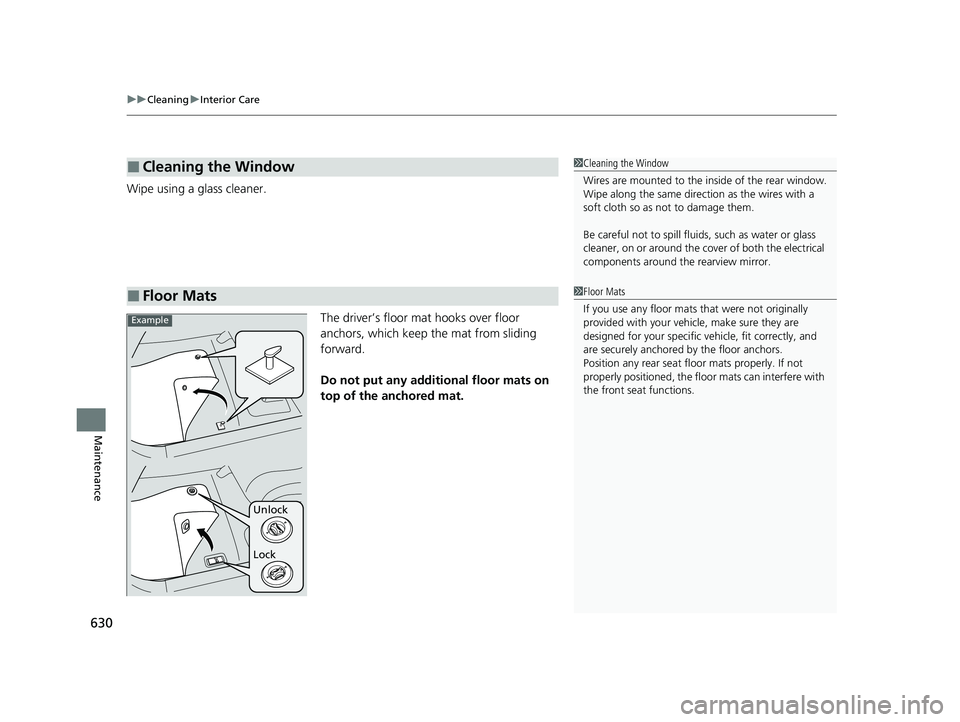
The driver’s floor mat hooks over floor
anchors, which keep the mat from sliding
forward.
Do not put any additional floor mats on
top of the anchored mat.
■Cleaning the Window
■Floor Mats
1 Cleaning the Window
Wires are mounted to the in side of the rear window.
Wipe along the same direct ion as the wires with a
soft cloth so as not to damage them.
Be careful not to spill fluids, such as water or glass
cleaner, on or around the co ver of both the electrical
components around the rearview mirror.
1Floor Mats
If you use any floor mats that were not originally
provided with your vehicle, make sure they are
designed for your specific ve hicle, fit correctly, and
are securely anchored by the floor anchors.
Position any rear seat floor mats properly. If not
properly positioned, the floor mats can interfere with
the front seat functions.
Lock Unlock
Example
23 ACURA RDX-31TJB6400.book 630 ページ 2022年8月4日 木曜日 午後1時51分
Page 635 of 713
Continued633
uuCleaning uExterior Care
Maintenance
• Make sure to follow the instructions indicated on the automated car wash.
• Fold in the door mirrors.
• For models equipped with automatic intermittent wipers, turn the wipers off.
• Keep sufficient distance between the cleaning nozzle and the vehicle body.
• Take particular care around the windows. Standing too close may cause water to
enter the vehicle interior.
• Do not spray high pressure water direct ly into the engine compartment. Instead,
use low pressure water and a mild detergent.
• Do not spray water directly onto the camera or the area around it. Water may
enter the lens and cause th e camera to malfunction.
■Using an Automated Car Wash
■Using High Pressure Cleaners
1Using an Automated Car Wash
When using an automated car wash that pulls the
vehicle through with a convey or, make sure vehicle is
in car wash mode. 2 If you want to keep the transmission in
(N
position [car wash mode] P. 455
Always wash the vehicle by hand with a mild car
wash detergent and plenty of water.
23 ACURA RDX-31TJB6400.book 633 ページ 2022年8月4日 木曜日 午後1時51分
Page 692 of 713

690
Information
Specifications
■Vehicle Specifications
■ Air Conditioning
ModelRDX
No. of Passengers:
Front 2
Rear 3
Total 5
Weights:Gross Vehicle
Weight RatingSee the certification label on the driver’s
doorjamb
Gross Axle Weight
Rating (Front)See the certification label on the driver’s
doorjamb
Gross Axle Weight
Rating (Rear)See the certification label on the driver’s
doorjamb
Gross Combined
Weight Rating U.S.: 5,975 lbs (2,710 kg)
Canada: 2,710 kg
Refrigerant TypeHFO-1234yf (R-1234yf)
Charge Quantity 17.8 – 19.6 oz (505 – 555 g)
Lubricant TypeND-OIL14 (POE)
Quantity 4.27 – 5.19 cu-in (70 – 85 cm3)
■ Engine Specifications
■ Fuel
■ Washer Fluid
Displacement121.76 cu-in (1,996 cm3)
Spark Plugs NGK DILKAR8P8SY
TypeUnleaded premium gasoline, pump octane
number 91 or higher
Fuel Tank Capacity 17.1 US gal (64.7 L)
Tank CapacityU.S.: 2.6 US qt (2.5 L)
Canada: 5.8 US qt (5.5 L)
■ Light Bulbs
Headlights (Low Beam)LED
Headlights (High Beam) LED
Fog Lights*LED
Parking/ChicaneTM Daytime Running Lights LEDFront Turn Signal LightsLED
Side Turn Signal Lights
(on Door Mirrors) LED
Front Side Marker LightsLED
Brake Lights LED
Rear Side Marker LightsLED
Brake/ChicaneTM Taillights LEDChicaneTM TaillightsLED
Back-Up Lights LED
Rear Turn Signal Lights21 W (Amber/Silver)
High-Mount Brake Light LED
Rear License Plate LightLED
Puddle Lights*LEDInterior LightsFront and Rear Map LightsLEDFront and Rear Ambient LightsLEDVanity Mirror Lights1.4 WDoor Pocket Lights*LEDCenter Pocket LightLEDDoor Courtesy Lights3.4 WGlove Box Light1.4 WCargo Area LightLEDDoor Inner Handle LightsLEDFoot LightsLED
* Not available on all models
23 ACURA RDX-31TJB6400.book 690 ページ 2022年8月4日 木曜日 午後1時51分