ad blue ACURA RDX 2023 Workshop Manual
[x] Cancel search | Manufacturer: ACURA, Model Year: 2023, Model line: RDX, Model: ACURA RDX 2023Pages: 713, PDF Size: 21.99 MB
Page 416 of 713

uuBluetooth ® HandsFreeLink ®u Text Message
414
Features
■Reply to a message
1. Display the message information.
2. Select Reply.
3. Select the reply message.
u The pop-up menu appears on the screen.
4. Select Send to send the message.
u Message sent appears on the screen
when the reply messag e was successfully
sent.1 Reply to a message
The available reply messages are as follows:
•I’m on my way.
•I’m running late.
•No•OK
•Talk to you later, I'm driving.
•Yes
The display language of th e default reply message
depends on the connected phone. 2 To edit a reply message P. 415
You can add or delete a re ply message by selecting
Saved Replies.
2 To edit a reply message P. 415
2 To delete a reply message P. 415
Only certain phones receive and send messages when
paired and connected. For a list of compatible
phones:
•U.S.: Visit www.handsfreeli nk.com/Acura, or call 1-
888-528-7876.
•Canada: For more info rmation on smartphone
compatibility, call 1-855-490-7351.
23 ACURA RDX-31TJB6400.book 414 ページ 2022年8月4日 木曜日 午後1時51分
Page 417 of 713
Continued415
uuBluetooth ® HandsFreeLink ®u Text Message
Features
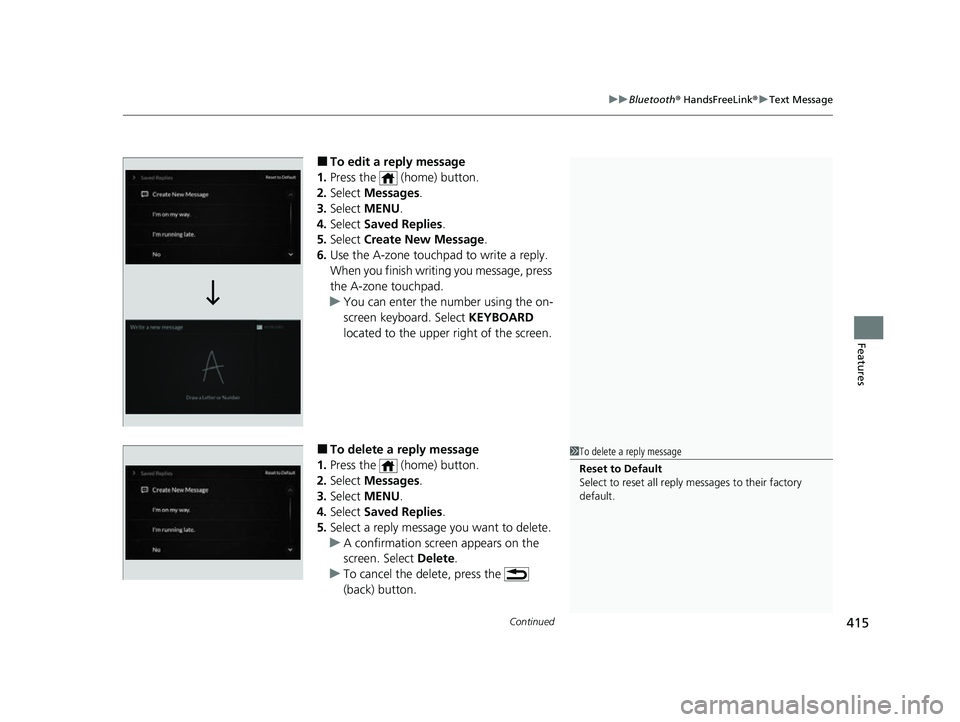
■To edit a reply message
1. Press the (home) button.
2. Select Messages.
3. Select MENU .
4. Select Saved Replies .
5. Select Create New Message .
6. Use the A-zone touchpad to write a reply.
When you finish writ ing you message, press
the A-zone touchpad.
u You can enter the number using the on-
screen keyboard. Select KEYBOARD
located to the upper right of the screen.
■To delete a reply message
1. Press the (home) button.
2. Select Messages.
3. Select MENU .
4. Select Saved Replies .
5. Select a reply message you want to delete.
u A confirmation screen appears on the
screen. Select Delete.
u To cancel the delete, press the
(back) button.1To delete a reply message
Reset to Default
Select to reset all reply messages to their factory
default.
23 ACURA RDX-31TJB6400.book 415 ページ 2022年8月4日 木曜日 午後1時51分
Page 418 of 713

416
uuBluetooth ® HandsFreeLink ®u Text Message
Features
■Making a call to a sender
1. Display the message information.
2. Select Call.
23 ACURA RDX-31TJB6400.book 416 ページ 2022年8月4日 木曜日 午後1時51分
Page 419 of 713

417
uuBluetooth ® HandsFreeLink ®u Text Message
Continued
Features
■Displaying mess age on the head-up display
You can read a text message on the head- up display only when a text message is
received.
1. Move right the left selector wheel to select Open.
2. Roll up or down the left selector wheel to select Reply, and then press the left
selector wheel.
u Select Call to dial a call.
u Select Repeat to start reading the message from the beginning.
3. Roll up or down the left selector wheel to select a message, and then press the
left selector wheel.
4. Roll up or down the left selector wheel to select Send, and then press the left
selector wheel.
u Message sent appears on the head-up display when the reply message was
successfully sent.
Models with head-up display
23 ACURA RDX-31TJB6400.book 417 ページ 2022年8月4日 木曜日 午後1時51分
Page 420 of 713

uuBluetooth ® HandsFreeLink ®u Text Message
418
Features
1. Press the (home) button.
2. Select Messages.
3. Select Send Message to Contact .
4. Select a contact name.
u You can sort by First Name or Last
Name . Select the icon on the upper right
of the screen.
5. Select a number.
6. Select the reply message.
u The pop-up menu appears on the screen.
7. Select Send to send the message.
u Message sent appears on the screen
when the reply messag e was successfully
sent.
■Send Message to Contact1 Send Message to Contact
This feature also allows y ou to send a message or set
a navigation route
* to a contact’s address.
2 Making a Call P. 402
2 Refer to Navigation System Manual
* Not available on all models
23 ACURA RDX-31TJB6400.book 418 ページ 2022年8月4日 木曜日 午後1時51分
Page 421 of 713

419Continued
Features
AcuraLink®
Is a subscription-based service that provides convenient features such as voice
communication in case of emergency, online security, one-on-one operator
assistance, and the transmission of importa nt messages regarding your vehicle’s
status.
Use the following procedure to connect to AcuraLink.
■To enable the AcuraLink
You need to allow the consent of the lo cation service to enable the AcuraLink.
1. Press the (home) button.
2. Select AcuraLink .
u The confirmation message appears on
the screen for the first time, then select
Allow .
■To Connect to AcuraLink
1AcuraLink ®
AcuraLink also provides services you can operate
from the Internet or your smartphone.
To subscribe to AcuraLink, or to get more
information about all of its features, contact an Acura
dealer, or visit owners.acura.com (U.S.) or
www.acura.ca/owners/acuralink (Canada).
1To enable the AcuraLink
You can also set up a Vehicle Data Collection by
the following procedure.
1. Press the (home) button.
2. Select AcuraLink .
3. Select MENU .
4. Select Vehicle Data Collection .
5. Select Allow or Block.
•Allow: Sends the vehicle location data, diagnostic
information, driving behavior data and phone data
when you have previously allowed it when you
connect a phone with Bluetooth®.
•Block : Does not send the ve hicle location data,
diagnostic information, driving behavior data.
For detail information of all data shared visit https://
acuralink.acura.com/#/acuralinkLegalTerms
23 ACURA RDX-31TJB6400.book 419 ページ 2022年8月4日 木曜日 午後1時51分
Page 422 of 713

uuAcuraLink ®u
420
Features
■To link with AcuraLink
You may see the connection guide screen
after launching AcuraLink when there is no
phone connecti on available.
Continue Without Connecting: Displays
the AcuraLink menu screen without phone
connection.
Connect Phone: Displays the Bluetooth®
setup screen.
2 To change the currently paired phone
P. 397
1. Press the (home) button.
2. Select AcuraLink .
1To link with AcuraLink
We recommend that you install the AcuraLink app in
your smartphone to make AcuraLink more
functional. Contact an Acura dealer, or visit
owners.acura.com (U.S.) or www.acura.ca/owners/
acuralink (Canada).
If you do not connect a phone to AcuraLink, Last Mile
function of AcuraLink app is disabled.
■AcuraLink1 AcuraLink
You can also select AcuraLink from the All Apps
screen. 2 Audio/Information Screen P. 264
AcuraLink
23 ACURA RDX-31TJB6400.book 420 ページ 2022年8月4日 木曜日 午後1時51分
Page 423 of 713

Continued421
uuAcuraLink ®u
Features
■Vehicle Notifications
Displays the diagnostic information, re call or important safety information*1, or
general information by connecting to the Acura server using HFL.
■Contact Acura
Connect to the AcuraLink operator when trying to find a destination or for roadside
assistance.
■My Acura Dealer
Calls your Acura dealer using HFL or sets a destination of the navigation* to the
dealer.
■MENU
Displays the AcuraLink menu screen.
• Vehicle Data Collection : Displays the AcuraLink connection setting screen.
2To enable the AcuraLink P. 419
•AcuraLink Su bscriptions: Displays your current AcuraLink subscription status.
• Connect Bluetooth Device: Displays the Bluetooth® setup screen.
2To change the currently paired phone P. 397
*1: When you select Roadside Assistance, the system connect to the AcuraLink operator
through the telematics control unit (TCU).
1Vehicle Notifications
Some messages can be deleted manually; some
others will automatica lly disappear when the
malfunction is fixed, cont act a dealer if necessary.
* Not available on all models
23 ACURA RDX-31TJB6400.book 421 ページ 2022年8月4日 木曜日 午後1時51分
Page 440 of 713
uuTowing a Trailer uTowing Preparation
438
Driving
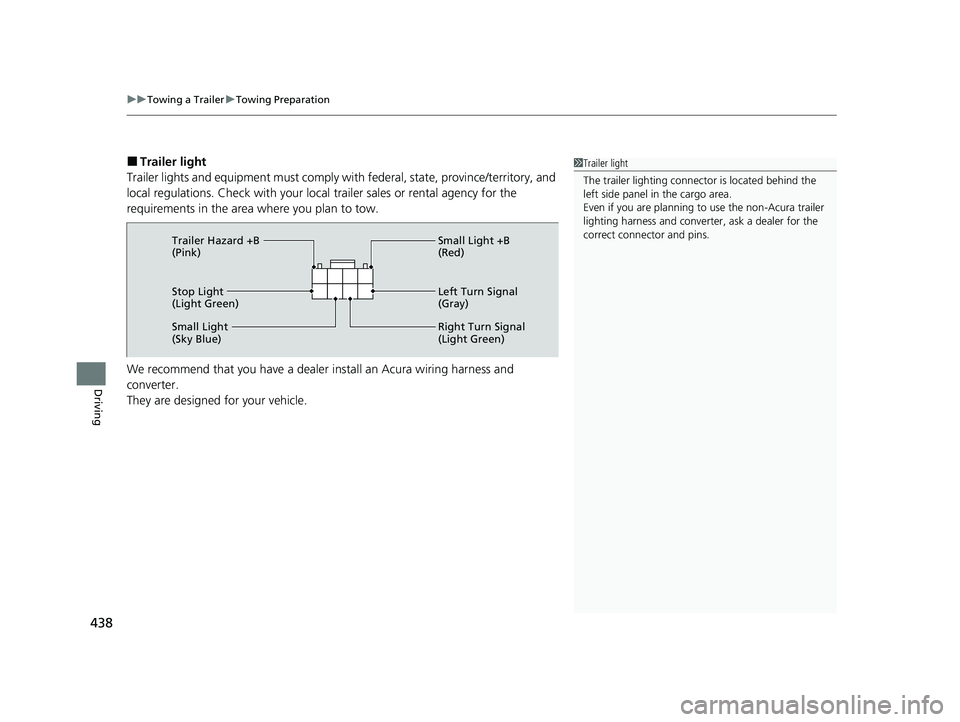
■Trailer light
Trailer lights and equipment must comply with federal, state, province/territory, and
local regulations. Check with your local trailer sales or rental agency for the
requirements in the area where you plan to tow.
We recommend that you have a dealer install an Acura wiring harness and
converter.
They are designed for your vehicle.1 Trailer light
The trailer lighting connect or is located behind the
left side panel in the cargo area.
Even if you are planning to use the non-Acura trailer
lighting harness and converte r, ask a dealer for the
correct connector and pins.
Stop Light
(Light Green) Small Light +B
(Red)
Left Turn Signal
(Gray)
Right Turn Signal
(Light Green)
Small Light
(Sky Blue) Trailer Hazard +B
(Pink)
23 ACURA RDX-31TJB6400.book 438 ページ 2022年8月4日 木曜日 午後1時51分
Page 463 of 713

461
uuWhen Driving uAcura Integrated Dynamics System
Continued
Driving
■Mode descriptions
Each mode has been crafted for different driv ing styles according to the following chart.
*1:Interior accent light only available if equipped. Interior accent light changes with Dynamic Mode only when Accent Light Theme is
set to Dynamic Mode .
2Customized Features P. 359
2 Lighting area of the accent light P. 463
ModeFunctionAccent Light Color*1
SNOWMaximizes controllability through reduced throttle response
When in SNOW, the Auto Idle Stop System will stay disabled regardless of
the Auto Idle Stop OFF button
2Auto Idle Stop P. 464
White
COMFORTMaximizes driver comfort through decreased steering effort and reduced ride
firmness (if Active Damper System is equipped)Blue
NORMALBalanced response for everyday useWhite
SPORTEnhances vehicle response through increased steering effort, heightened
throttle response, modified active sound control, and more responsive ride
and/or handling (if Active Damper System and/or SH-AWD ® is equipped)
When in SPORT, the Auto Idle Stop System w ill stay disabled regardless of
the Auto Idle Stop OFF button
2Auto Idle Stop P. 464
Red
23 ACURA RDX-31TJB6400.book 461 ページ 2022年8月4日 木曜日 午後1時51分