wheel ACURA RDX 2023 Manual Online
[x] Cancel search | Manufacturer: ACURA, Model Year: 2023, Model line: RDX, Model: ACURA RDX 2023Pages: 713, PDF Size: 21.99 MB
Page 483 of 713

Continued481
uuWhen Driving uBlind Spot Information System
Driving
When you turn the blind spot information
system on and off, do the following.
1. Press the safety support switch.
2. Roll the right selector wheel to the
symbol and push it.
u The message appears on the multi-
information display when the system
turns on or off.
u A check mark appears in the box and the
color of the symbol changes green
when the system is on. The check mark
disappears and the color of the
symbol changes gray when the system is
off.
The blind spot information system is in the
previously selected on (checked) or off
(unchecked) setting eac h time you start the
engine.
■Blind Spot Information System On and Off1 Blind Spot Information System
You can also select the sa fety support content from
the multi-information display.
2 Multi-Information Display P. 137
You can change the settings for the blind spot
information system. 2 Customized Features P. 359
Safety Support Switch
Right Selector Wheel
23 ACURA RDX-31TJB6400.book 481 ページ 2022年8月4日 木曜日 午後1時51分
Page 488 of 713

486
uuAcuraWatchTMuCollision Mitigation Braking SystemTM (CMBSTM)
Driving
Collision Mitigati on Braking SystemTM (CMBSTM)
The system can assist you when it determine s there is a possibility of your vehicle
colliding with a vehicle or a pedestrian de tected in front of your vehicle. The CMBSTM
is designed to alert you when the potential for a collision is determined, as well as to
reduce your vehicle speed to help minimize collision severity when a collision is
deemed unavoidable.
1 Collision Mitigation Braking SystemTM (CMBSTM)
Important Safety Reminder
The CMBS
TM is designed to reduce the severity of an
unavoidable collision. It does not prevent collisions
nor stop the vehicle automati cally. It is still your
responsibility to operate th e brake pedal and steering
wheel appropriately acco rding to the driving
conditions.
The CMBS
TM may not activate or may not detect a
vehicle in front of y our vehicle under certain
conditions: 2 CMBS
TM Conditions and Limitations P. 491
You can read about handling information for the
camera equipped with this system. 2 Front Sensor Camera P. 541
For directions on the prop er handling of the radar
sensor, refer to the following page. 2 Radar Sensor P. 543
When the CMBS
TM activates, it may automatically
apply the brake. It will be canceled when your vehicle
stops or a potential coll ision is not determined.
23 ACURA RDX-31TJB6400.book 486 ページ 2022年8月4日 木曜日 午後1時51分
Page 492 of 713

uuAcuraWatchTMuCollision Mitigation Braking SystemTM (CMBSTM)
490
Driving
When you turn the CMBSTM on and off, do the
following.
1. Press the safety support switch.
2. Roll the right selector wheel to the
symbol and push it.
u The message appears on the multi-
information display when the system
turns on or off.
u A check mark appears in the box and the
color of the symbol changes green
when the system is on. The check mark
disappears and the color of the
symbol changes gray when the system is
off.
The CMBS
TM is turned on every time you start
the engine, even if you turned it off the last
time you drove the vehicle.
■CMBSTM On and Off1 Collision Mitigation Braking SystemTM (CMBSTM)
The CMBS
TM may automatically shut off, and the
safety support indicator (amb er) will come and stay
on under certain conditions:
2 CMBS
TM Conditions and Limitations P. 491
You can also sele ct safety support content from the
multi-information display. 2 Multi-Information Display P. 137
When the CMBS
TM is activated, it will continue to
operate even if the accele rator pedal is partially
depressed. However, it w ill be canceled if the
accelerator pedal is fully depressed.
Safety Support Switch
Right Selector Wheel
23 ACURA RDX-31TJB6400.book 490 ページ 2022年8月4日 木曜日 午後1時51分
Page 494 of 713

492
uuAcuraWatchTMuCollision Mitigation Braking SystemTM (CMBSTM)
Driving
■Vehicle conditions
• Headlight lenses are dirty or the headlights are not properly adjusted.
• The outside of the windshie ld is blocked by dirt, mud, leaves, wet snow, etc.
• The inside of the windshield is fogged.
• An abnormal tire or wheel condition (incorre ct sizes, varied sizes or construction,
improperly inflated, compact spare tire
*, etc.).
• When tire chains are installed.
• The vehicle is tilted due to a heav y load or suspension modifications.
• The camera temperature gets too high.
• Driving with the parking brake applied.
• When the radar sensor behind the emblem gets dirty.
• The vehicle is towing a trailer.
* Not available on all models
23 ACURA RDX-31TJB6400.book 492 ページ 2022年8月4日 木曜日 午後1時51分
Page 501 of 713

Continued499
uuAcuraWatchTMuLow Speed Braking Control*
Driving
When you turn the system on and off, do the
following.
1. Press the safety support switch.
2. Roll the right selector wheel to the
symbol and push it.
u The message appears on the multi-
information display when the system
turns on or off.
u A check mark appears in the box and the
color of the symbol changes green
when the system is on. The check mark
disappears and the color of the
symbol changes gray when the system is
off.
The system is turned on every time you start
the engine, even if you turned it off the last
time you drove the vehicle.
■System On and Off 1 System On and Off
You can also sele ct safety support content from the
multi-information display.
2 Multi-Information Display P. 137
Right Selector Wheel
Safety Support Switch
23 ACURA RDX-31TJB6400.book 499 ページ 2022年8月4日 木曜日 午後1時51分
Page 503 of 713
501
uuAcuraWatchTMuLow Speed Braking Control*
Driving
■Examples of situations where the sonar sensors cannot detect obstacles
• The sonar sensors are dirty (covered by snow, water, mud, etc.).
• The vehicle is too hot or cold.
• The steering wheel is turned sharply when approaching the obstacle at an angle.
■Examples of other cases where the system may not work correctly
• The vehicle is tilted due to heavy load in the cargo area or rear seats.
• Bad weather conditions such as heav y rain, fog, snow, sandstorms, etc.
• The ambient temperature/humidity is too high or low.
• When going down a very steep slope.
• When close to other vehicles with sonar sensors or other objects that emit
ultrasonic waves.
■Situations where the system may acti vate even without risk of a collision
• When passing through short or narrow gates.
• When driving on uneven surfaces, grassy areas, or places with steps.
• When a sloped pillar or wall is protruding from a high position.
• When there are obstacles next to the road.
• When driving toward flags, curtains, tre e branches, railroad crossing bars, etc.
• When driving on flooded roads.
23 ACURA RDX-31TJB6400.book 501 ページ 2022年8月4日 木曜日 午後1時51分
Page 505 of 713
Continued503
uuAcuraWatchTMuAdaptive Cruise Control (ACC) with Low Speed Follow
Driving
■How to activate the system1Adaptive Cruise Control (ACC) with Low Speed Follow
For directions on the prop er handling of the radar
sensor, refer to the following page.
2 Radar Sensor P. 543
You can read about handling information for the
camera equipped with this system. 2 Front Sensor Camera P. 541
The radar sensor for ACC with Low Speed Follow is
shared with the Collision Mitigation Braking System
TM
(CMBSTM).
2 Collision Mitigation Braking SystemTM
(CMBSTM) P. 486
ACC with Low Speed Follow may not work properly
under certain conditions.
2 ACC with Low Speed Follow Conditions
and Limitations P. 509
When not using ACC with Low Speed Follow: Turn
off adaptive cruise by pressing the button.
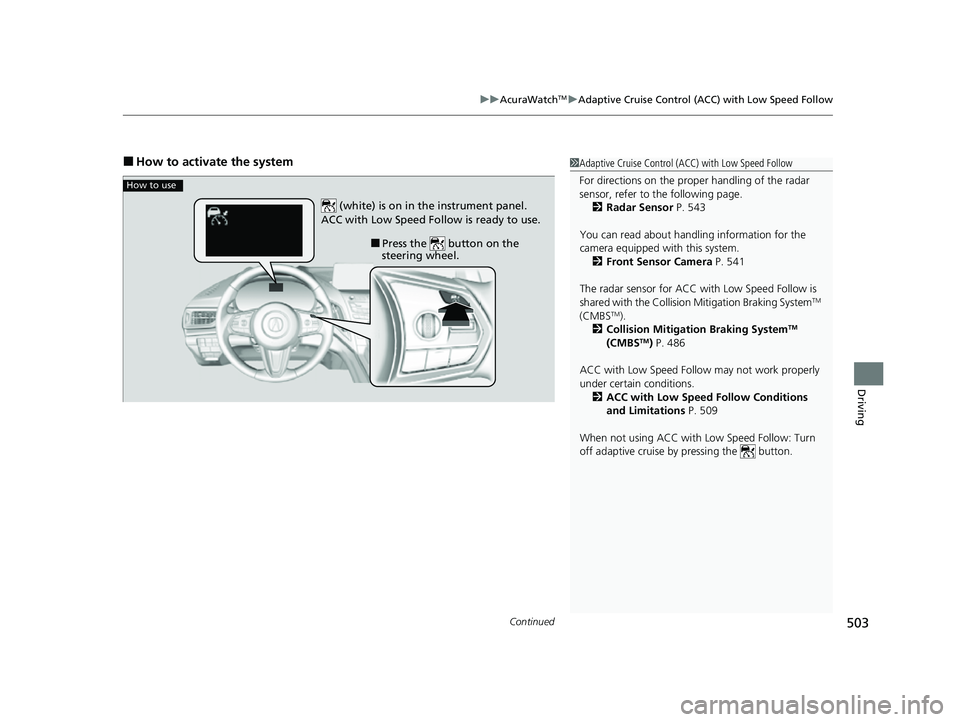
How to use
■Press the button on the
steering wheel.
(white) is on in the instrument panel.
ACC with Low Speed Follow is ready to use.
23 ACURA RDX-31TJB6400.book 503 ページ 2022年8月4日 木曜日 午後1時51分
Page 506 of 713

uuAcuraWatchTMuAdaptive Cruise Control (ACC) with Low Speed Follow
504
Driving
When driving at about 25 mph (40 km/h) or above: Take your foot off the
pedal and press down the RES/+/SET/– switch when you re ach the desired speed.
The moment you release the switch, the set speed is fixed, and ACC with Low Speed
Follow begins.
When you use ACC with Low Speed Follow, Stra ight Driving Assist (a feature of the
Electric Power Steering system) is activated.
By enabling the steering system to automa tically compensate for natural steering
pull, Straight Driving Assist makes it easier for you to keep your vehicle in a straight
line.
When driving slower than about 25 mph (40 km/h): If the vehicle is moving
and the brake pedal is not depressed, pres sing the switch fixes the set speed to
about 25 mph (40 km/h) regardless of current vehicle speed. If the vehicle is
stationary, you can set the vehicle speed even with the brake pedal depressed.
■To Set the Vehicle Speed1 Adaptive Cruise Control (ACC) with Low Speed Follow
Do not use ACC with Low Speed Follow under the
following conditions:
•On roads with frequent la ne-change or continuous
stop and go traffic, ACC with Low Speed Follow
cannot keep an appropriate distance between your
vehicle and the vehicle ahead of you.
•On roads with sharp turns.•On roads with steep downhill sections, as the set
vehicle speed can be exceeded by coasting. In such
cases, ACC with Low Speed Follow will not apply
the brakes to maintain the set speed.
•On roads with toll collection facilities or other
objects between lanes of traffic, or in parking
areas, or faci lities with driv e through access.
•On roads with bad weather (rain, fog, snow, etc.),
ACC with Low Speed Follow may not detect the
distance between your vehicle and the vehicle
ahead of you properly.
•On roads with slippery or icy surfaces. The wheels
may spin out and your vehi cle may lose the control
on the condition.
1 To Set the Vehicle Speed
You can switch the displayed set speed
measurements on the multi- information display or
audio/information screen between mph and km/h. 2 Speed/Distance Units P. 142
2 Customized Features P. 359
On when ACC with Low
Speed Follow beginsPress and release
RES/+/SET/– switch (green) is on.
23 ACURA RDX-31TJB6400.book 504 ページ 2022年8月4日 木曜日 午後1時51分
Page 511 of 713

Continued509
uuAcuraWatchTMuAdaptive Cruise Control (ACC) with Low Speed Follow
Driving
The system may automatically shut off u nder certain conditions. Some examples of
these conditions are listed below. Othe r conditions may reduce some of the ACC
with Low Speed Follow functions.
2 Front Sensor Camera P. 541
2 Radar Sensor P. 543
■Environmental conditions
Driving in bad weather (r ain, fog, snow, etc.).
■Roadway conditions
Driving on a snowy or wet roadway (obscured lane marking, vehicle tracks, reflected
lights, road spra y, high contrast).
■Vehicle conditions
• The outside of the windshield is blocked by dirt, mud, leaves, wet snow, etc.
• An abnormal tire or wheel condition (inco rrect sizes, varied sizes or construction,
improperly inflated, compact spare tire
*, etc.).
• The camera temperature gets too high.
• The parking brake is applied.
• The radar sensor cover is dirty.
• The vehicle is tilted due to a heavy load or suspension modifications.
• Tire chains are installed.
• The vehicle is towing a trailer.
■ACC with Low Speed Follow Conditions and Limitations1ACC with Low Speed Follow Conditions and Limitations
If you need the radar sensor to be repaired, or
removed, or the radar se nsor cover is strongly
impacted, turn off the system by pressing the
button and take your vehicle to a dealer.
Have your vehicle checked by a dealer if you find any
unusual behavior of the system (e.g., the warning
message appears too frequently).
If the front of the vehicle is impacted in any of the
following situations, the ra dar sensor may not work
properly. Have your vehi cle checked by a dealer:
•The vehicle mounted onto a bump, curb, chock,
embankment, etc.
•You drive the vehicle where water is deep.
•Your vehicle has a frontal collision.
* Not available on all models
23 ACURA RDX-31TJB6400.book 509 ページ 2022年8月4日 木曜日 午後1時51分
Page 514 of 713

uuAcuraWatchTMuAdaptive Cruise Control (ACC) with Low Speed Follow
512
Driving
Increase or decrease the vehicle speed using the RES/+/SET/– switch on the steering
wheel.
• Each time you press the switch up or do wn, the vehicle speed is increased or
decreased by about 1 mph or 1 km/h accordingly.
• If you keep the switch pressed up or down, the vehicle speed increases or
decreases by about 5 mph or 5 km/h accordingly.
■To Adjust the Vehicle Speed1 To Adjust the Vehicle Speed
If a vehicle detected ahead is going at a speed slower
than your increased set speed, ACC with Low Speed
Follow may not accelerate y our vehicle. This is to
maintain the set interval between your vehicle and
the vehicle ahead.
You can switch the displayed set speed
measurements on the multi- information display or
audio/information screen between mph and km/h. 2 Speedometer P. 136
2 Customized Features P. 359
When you depress the accelerator pedal and then
press down and release the SET/– switch, the current
speed of the vehicle is set.
To increase speed
To decrease speed
23 ACURA RDX-31TJB6400.book 512 ページ 2022年8月4日 木曜日 午後1時51分