service ACURA RDX 2023 Owners Manual
[x] Cancel search | Manufacturer: ACURA, Model Year: 2023, Model line: RDX, Model: ACURA RDX 2023Pages: 713, PDF Size: 21.99 MB
Page 3 of 713
Service Diagnostic Recorders
This vehicle is equipped with service-related devices that record
information about powertrain perfo rmance. The data can be used
to verify emissions law requirem ents and/or help technicians
diagnose and solve service problems . It may also be combined with
data from other sources for research purposes, but it remains
confidential. Some diagnostic and maintenance information is
uploaded to Acura upon vehicle start up.
California Perchlorate Conta mination Prevention Act
The airbags, seat belt tensioners , and CR type batteries in this
vehicle may contain perchlorate materials - special handling may
apply. See www.dtsc.ca.gov/hazardouswaste/perchlorate/
As you read this manual, you will find information that is preceded
by a symbol. This information is intended to help you avoid
damage to your vehicle, othe r property, or the environment.
NOTICE
Software End User License Agreement
Your vehicle comes equipped with software, which is governed by
the End User License Agreement in this Owner’s Manual, and
which contains a binding arbitration clause. Please refer to the End
User License Agreement for the terms and conditions governing
your use of the installed software, as well as the applications,
services, functions, and content provided through the software.
Your use of the installed software will serve as your consent to the
terms and conditions of the End User License Agreement.
You may opt out within 30 days of your initial use of the Software
by sending a signed, written notice to Acura at American Honda
Motor Co., Inc., Acura Client Relations, Mail Stop CHI-4, 1919
Torrance Blvd., Torrance, CA 90501-2746.
Privacy Notice
This vehicle may share location and usage information. To manage
this setting, visit www.acuralink.com/vehicle-data-choices .
To learn more about how we collect and use Personal
Information, please read our Privacy Policy, accessible
at www.acura.com .
23 ACURA RDX-31TJB6400.book 1 ページ 2022年8月4日 木曜日 午後1時51分
Page 4 of 713
System Updates Terms and Conditions
General
Your vehicle has an application that allows your 10.25-in. Color
Touchscreen to automatically search for Acura software updates
that are specific to your 10.25-in. Color Touchscreen and its
connected devices (initially ever y one (1) week via Wi-Fi or every
four (4) weeks via Telema tics Control Unit (TCU)
*, queries may
occur more or less frequently due to internet outages, retries, direct
user action, WAP push from the server or a change in query policy
on the Honda servers). This application periodically transmits to our
servers a limited amount of vehicl e and device information (Vehicle
Identification Number (VIN), th e Model Type (MT) Identification
Number, Hardware and Software Part Number, Serial Number,
Software Version, preferred lang uage, Internet Protocol (IP)
address, Transaction Log (alert or update viewing, update
download and installation, softw are status), etc.). When the
application finds an update from the server, the application initially
asks permission to download and install the update. Where
available, in your settings menu you may elect to automatically
download and install these updates or you may elect to manually
update the system.
When your 10.25-in. Color Touchs creen searches our servers for
updates or alerts, we will auto matically provide you with the
opportunity to update your devices or transmit the update or alert
directly to your 10.25-in. Color Touchscreen. We will also maintain
on our servers a log of the updates or alerts that are installed.
Your Personal Data
Should the aforementioned info rmation transmitted to Honda
constitute personal information in y our region, please note that this
information will be treated in stri ct accordance with the rules and
regulations outlined in this notice as well as applicable data
protection law. The terms of our privacy policy are
incorporated into these terms by
reference and your use of system updates will be subject to the
privacy policy. Our privacy polic y sets out information about how
we and any named third parties will process any personal data we
collect from you or that you provide to us, via the application.
For further details, see Acura’s connected product privacy policy at:
U.S.: www.acura.com
Canada: www.honda.ca/privacy/vehicledata
Honda collects, uses and stores your personal data for the reasons
set out below:
●to deliver the system updates and related services to you;●to allow us to improve and optimize the system updates
products and services;
●to respond to user questions an d complaints; and for internal
record keeping.
●where necessary for Honda's legitimate interests, as listed below, and
where our interests are not overridden by your data protection rights.
Protecting our legitimate business interests and legal rights
includes, but is not limited to, use in connection with compliance,
regulatory, auditing, legal claims (including disclosure of such
information in connection with legal process or litigation) and other
ethics and compliance reporting requirements.
Honda will also convert personal data into anonymous data and
use it (normally on an aggregated st atistical basis) for uses such as
market research and analysis, to improve the system updates, to
analyze trends, and to assess the success of software update
releases. Aggregated personal in formation does not personally
identify you or any other user of the system updates.
Honda may share this data with Honda's worldwide support
organization or affiliated Honda companies or other third parties
engaged by Honda for the purposes of rendering support services
in connection with system support.
* Not available on all models
23 ACURA RDX-31TJB6400.book 2 ページ 2022年8月4日 木曜日 午後1時51分
Page 7 of 713
Contents
Child Safety P. 64Exhaust Gas Hazard P. 77Safety Labels P. 78
Tailgate P. 173 Security System P. 183 Windows P. 186
Operating the Switches Around the Steering Wheel P. 193 Mirrors P. 213
Interior Convenience Items P. 230 Climate Control System P. 247
Audio Error Messages P. 332General Information on the Audio System P. 336
Bluetooth ® HandsFreeLink ® P. 389 AcuraLink ® P. 419
Off-Highway Driving Guidelines P. 441 When Driving P. 443 AcuraWatchTM P. 483
Multi-View Rear Camera* P. 565 Surround View Camera System*P. 567 Refueling P. 575
Maintenance Under the Hood P. 592 Replacing Light Bulbs P. 605
Checking and Maintaining Tires P. 614 Battery P. 623 Remote Transmitter Care P. 625
Accessories and Modifications P. 636
Handling of the Jack P. 663 Engine Does Not Start P. 664If the Battery Is Dead P. 667
Fuses P. 678 Emergency Towing P. 685
If You Cannot Open the Tailgate P. 687 Refueling P. 688
Devices that Emit Radio Waves P. 693 Reporting Safety Defects P. 694 Emissions Testing P. 695
Client Service Information P. 701
Quick Reference GuideP. 6
Safe DrivingP. 31
Instrument PanelP. 79
ControlsP. 153
FeaturesP. 253
DrivingP. 429
MaintenanceP. 581
Handling the UnexpectedP. 639
InformationP. 689
IndexP. 702
23 ACURA RDX-31TJB6400.book 5 ページ 2022年8月4日 木曜日 午後1時51分
Page 29 of 713
Quick Reference Guide
27
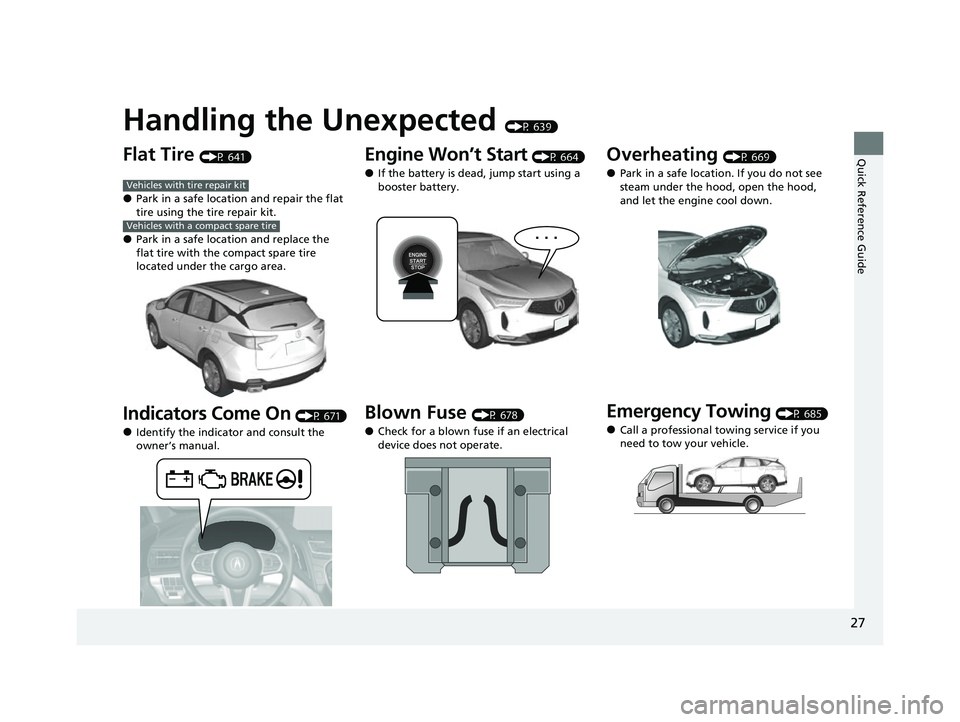
Handling the Unexpected (P 639)
Flat Tire (P 641)
●Park in a safe location and repair the flat
tire using the tire repair kit.
●Park in a safe location and replace the
flat tire with the compact spare tire
located under the cargo area.
Indicators Come On (P 671)
●Identify the indicator and consult the
owner’s manual.
Vehicles with tire repair kit
Vehicles with a compact spare tire
Engine Won’t Start (P 664)
●If the battery is dead, jump start using a
booster battery.
Blown Fuse (P 678)
●Check for a blown fuse if an electrical
device does not operate.
Overheating (P 669)
●Park in a safe location. If you do not see
steam under the hood, open the hood,
and let the engine cool down.
Emergency Towing (P 685)
●Call a professional towing service if you
need to tow your vehicle.
23 ACURA RDX-31TJB6400.book 27 ページ 2022年8月4日 木曜日 午後1時51分
Page 65 of 713

63
uuAirbags uAirbag Care
Safe Driving
Airbag Care
You do not need to, and should not, perform any maintenance on or replace any
airbag system components yourself. However, you should have your vehicle
inspected by a dealer in the following situations:
■When the airbags have deployed
If an airbag has inflated, the control unit and other related parts must be replaced.
Similarly, once an automatic seat belt te nsioner has been activated, it must be
replaced.
■When the vehicle has been in a moderate-to-severe collision
Even if the airbags did not inflate, have yo ur dealer inspect the following: the driver’s
seat position sensor, weight sensors in the passenger’s seat, seat belt tensioners for
the front seats and outer rear seats, and each seat belt that was worn during the
crash.
■Do not remove or modify a front seat without consulting a dealer
This would likely disable or affect the proper operation of the driver’s seat position
sensor or the weight sensors in the passenge r’s seat. If it is necessary to remove or
modify a front seat to accommodate a pe rson with disabilities, contact an Acura
dealer, or for U.S. vehicles, Acura Client Relations at 1-800-382-2238 and for
Canadian vehicles, Acura Client Services at 1-888-9-ACURA-9.
1Airbag Care
We recommend against the use of salvaged airbag
system components, includi ng the airbag, tensioners,
sensors, and control unit.
23 ACURA RDX-31TJB6400.book 63 ページ 2022年8月4日 木曜日 午後1時51分
Page 256 of 713

254
Features
Audio System
About Your Audio System
The audio system features AM/FM radio and SiriusXM® Radio service. It can also play
USB flash drives, and iPod, iPhone, iPad and Bluetooth® devices.
You can operate the audio system from the True Touchpad Interface, buttons and
knobs on the panel, or the remote controls on the steering wheel.1 About Your Audio System
State or local laws may pr ohibit the operation of
handheld electronic devices while operating a
vehicle.
SiriusXM ® Radio is available on a subscription basis
only. For more information on SiriusXM ® Radio,
contact a dealer. 2 General Information on the Audio System
P. 336
SiriusXM ® Radio is available in the United States and
Canada, except Ha waii, Alaska, and Puerto Rico.
SiriusXM ® is a registered trademark of SiriusXM
Radio, Inc.
After you turn the power mode to VEHICLE OFF
(LOCK) with the driver’s door closed, you can use the
audio system for up to 30 minutes per driving cycle.
However, whether you can continue using the audio
system depends on the batter y condition. Repeatedly
using this feature ma y drain the battery.
The audio system turns off when you open the
driver’s door.
Remote Controls iPod
USB Flash
Drive
23 ACURA RDX-31TJB6400.book 254 ページ 2022年8月4日 木曜日 午後1時51分
Page 269 of 713
Continued267
uuAudio System Basic Operation uAudio/Information Screen
Features
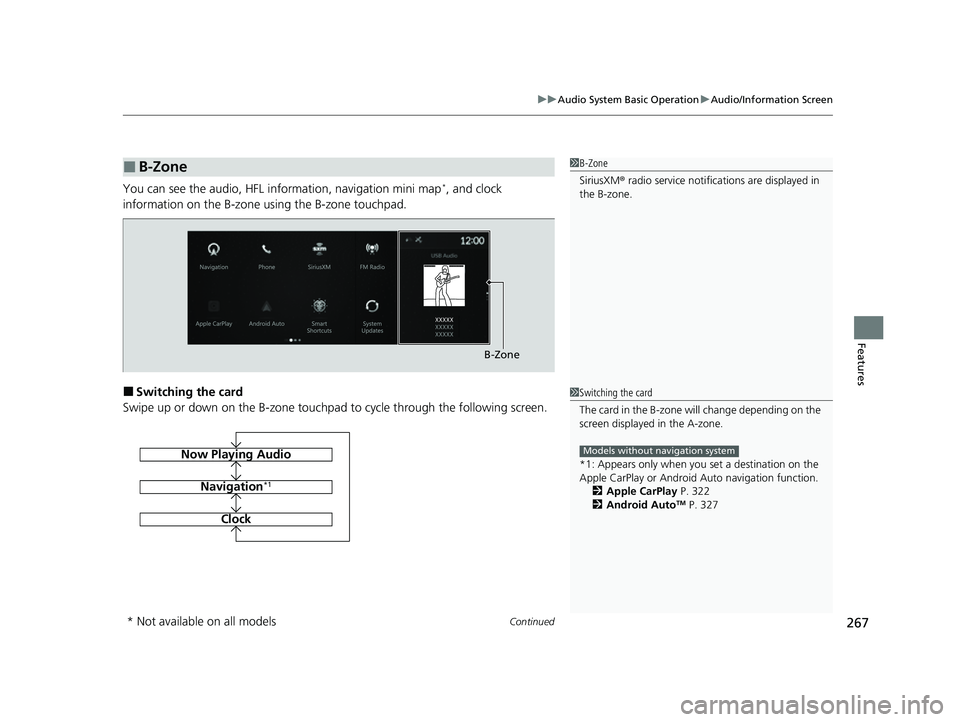
You can see the audio, HFL information, navigation mini map*, and clock
information on the B-zone using the B-zone touchpad.
■Switching the card
Swipe up or down on the B-zone touchpad to cycle through the following screen.
■B-Zone1 B-Zone
SiriusXM ® radio service notifications are displayed in
the B-zone.
B-Zone
1 Switching the card
The card in the B-zone wi ll change depending on the
screen displayed in the A-zone.
*1: Appears only when you set a destination on the
Apple CarPlay or Android Auto navigation function.
2 Apple CarPlay P. 322
2 Android Auto
TM P. 327
Models without navigation systemNow Playing Audio
Navigation*1
Clock
* Not available on all models
23 ACURA RDX-31TJB6400.book 267 ページ 2022年8月4日 木曜日 午後1時51分
Page 283 of 713
281
uuAudio System Basic Operation uSystem Updates
Continued
Features
System Updates
The audio system’s firmware can be updated with the telematics control unit (TCU)
through the subscrip tion-based service.
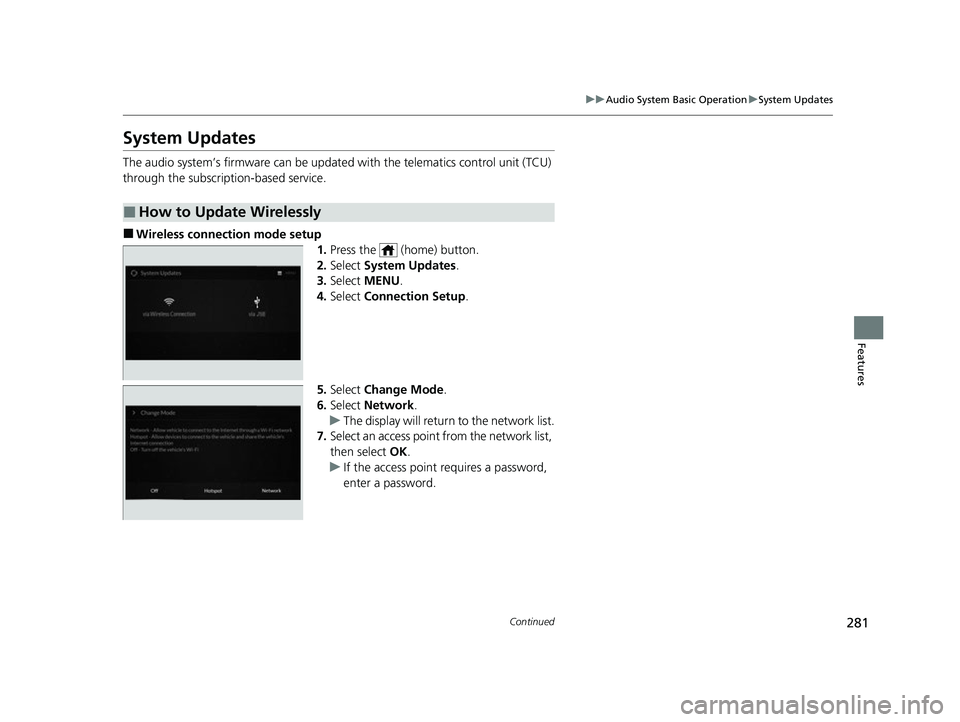
■Wireless connection mode setup
1.Press the (home) button.
2. Select System Updates .
3. Select MENU .
4. Select Connection Setup.
5. Select Change Mode .
6. Select Network .
u The display will return to the network list.
7. Select an access point from the network list,
then select OK.
u If the access point requires a password,
enter a password.
■How to Update Wirelessly
23 ACURA RDX-31TJB6400.book 281 ページ 2022年8月4日 木曜日 午後1時51分
Page 323 of 713
321
uuAudio System Basic Operation uAT&T Hotspot
Features
AT&T Hotspot
If you have subscribed to AT&T hotspot services, your vehicle will provide data to
connect your mobile devices to the Internet. You can use the AT&T Hotspot app to
turn on/off vehicle data and monitor da ta usage left on your subscription.
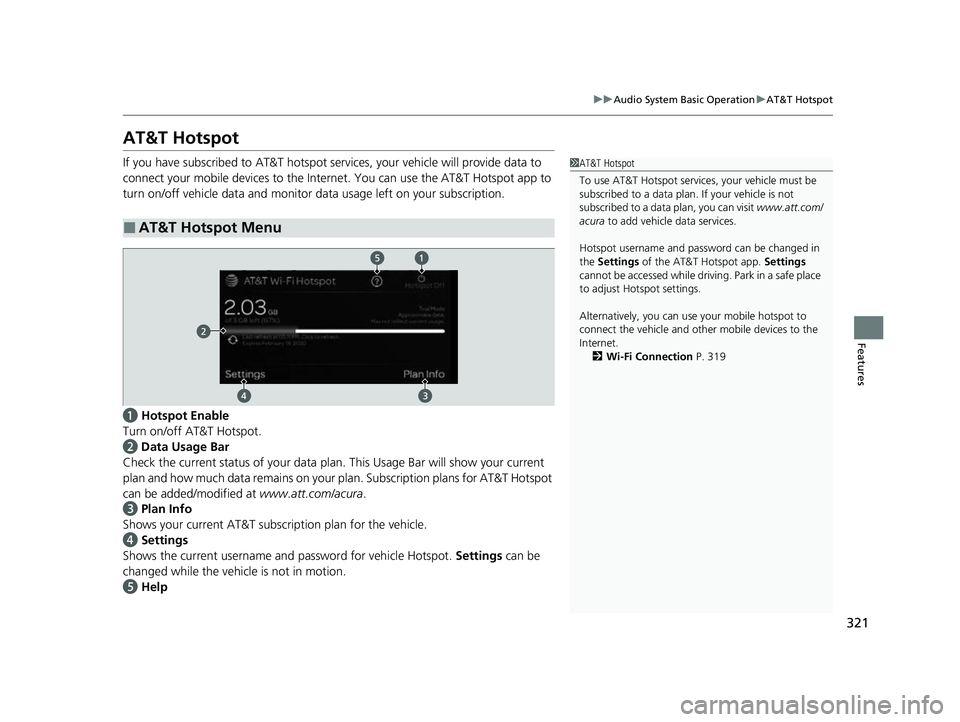
a Hotspot Enable
Turn on/off AT&T Hotspot.
b Data Usage Bar
Check the current status of your data pl an. This Usage Bar will show your current
plan and how much data remains on your plan. Subscription plans for AT&T Hotspot
can be added/modified at www.att.com/acura.
c Plan Info
Shows your current AT&T subscription plan for the vehicle.
d Settings
Shows the current username and password for vehicle Hotspot. Settings can be
changed while the vehicle is not in motion.
e Help
■AT&T Hotspot Menu
1AT&T Hotspot
To use AT&T Hotspot servic es, your vehicle must be
subscribed to a data plan . If your vehicle is not
subscribed to a data plan, you can visit www.att.com/
acura to add vehicle data services.
Hotspot username and pass word can be changed in
the Settings of the AT&T Hotspot app. Settings
cannot be accessed while driving. Park in a safe place
to adjust Hotspot settings.
Alternatively, you can use your mobile hotspot to
connect the vehicle and other mobile devices to the
Internet. 2 Wi-Fi Connection P. 319
23 ACURA RDX-31TJB6400.book 321 ページ 2022年8月4日 木曜日 午後1時51分
Page 325 of 713
Continued323
uuAudio System Basic Operation uApple CarPlay
Features
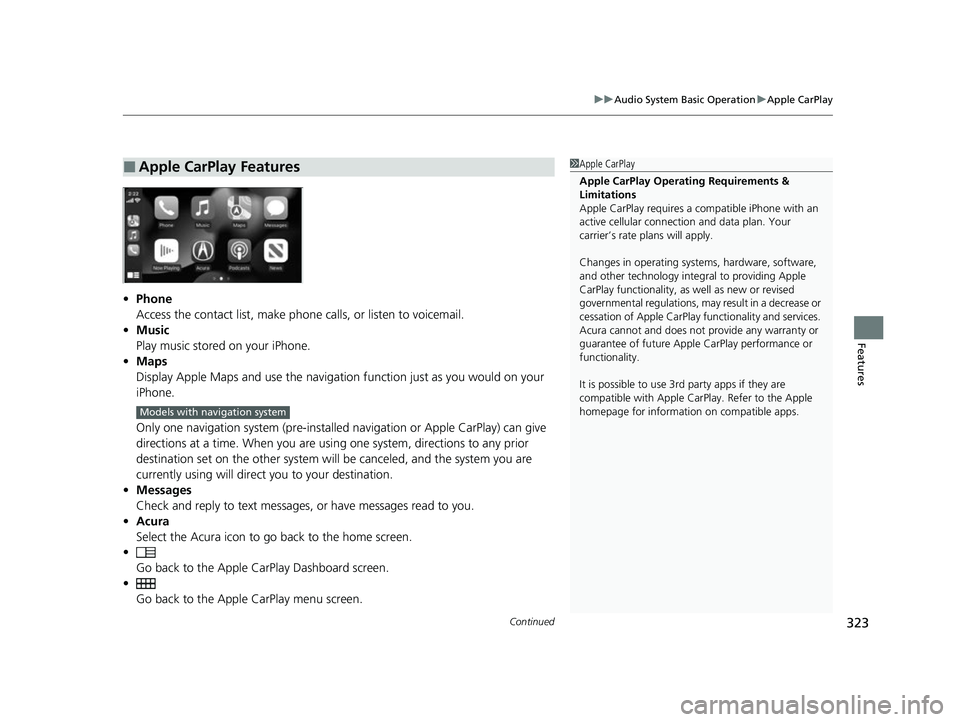
• Phone
Access the contact list, make phone calls, or listen to voicemail.
• Music
Play music stored on your iPhone.
• Maps
Display Apple Maps and use the navigation function just as you would on your
iPhone.
Only one navigation system (pre-installed navigation or Apple CarPlay) can give
directions at a time. When you are usin g one system, directions to any prior
destination set on the other system will be canceled, and the system you are
currently using will direct you to your destination.
• Messages
Check and reply to text messages, or have messages read to you.
• Acura
Select the Acura icon to go back to the home screen.
•
Go back to the Apple Ca rPlay Dashboard screen.
• Go back to the Appl e CarPlay menu screen.
■Apple CarPlay Features1Apple CarPlay
Apple CarPlay Operating Requirements &
Limitations
Apple CarPlay requi res a compatible iPhone with an
active cellular connecti on and data plan. Your
carrier’s rate plans will apply.
Changes in operating systems, hardware, software,
and other technology integral to providing Apple
CarPlay functionality, as well as new or revised
governmental regulations, may result in a decrease or
cessation of Apple CarPlay functionality and services.
Acura cannot and does not provide any warranty or
guarantee of future Appl e CarPlay performance or
functionality.
It is possible to use 3r d party apps if they are
compatible with Apple CarPlay. Refer to the Apple
homepage for information on compatible apps.
Models with navigation system
23 ACURA RDX-31TJB6400.book 323 ページ 2022年8月4日 木曜日 午後1時51分