lights Acura RL 2000 3.5 User Guide
[x] Cancel search | Manufacturer: ACURA, Model Year: 2000, Model line: RL, Model: Acura RL 2000Pages: 330, PDF Size: 4.53 MB
Page 70 of 330
Control
s Nea r th e Steerin g Whee l
To signal a lane change, push lightly on the turn signal lever in the proper
direction and hold it. The lever will
return to the center position as soon
as you release it.
Fo
g Light s
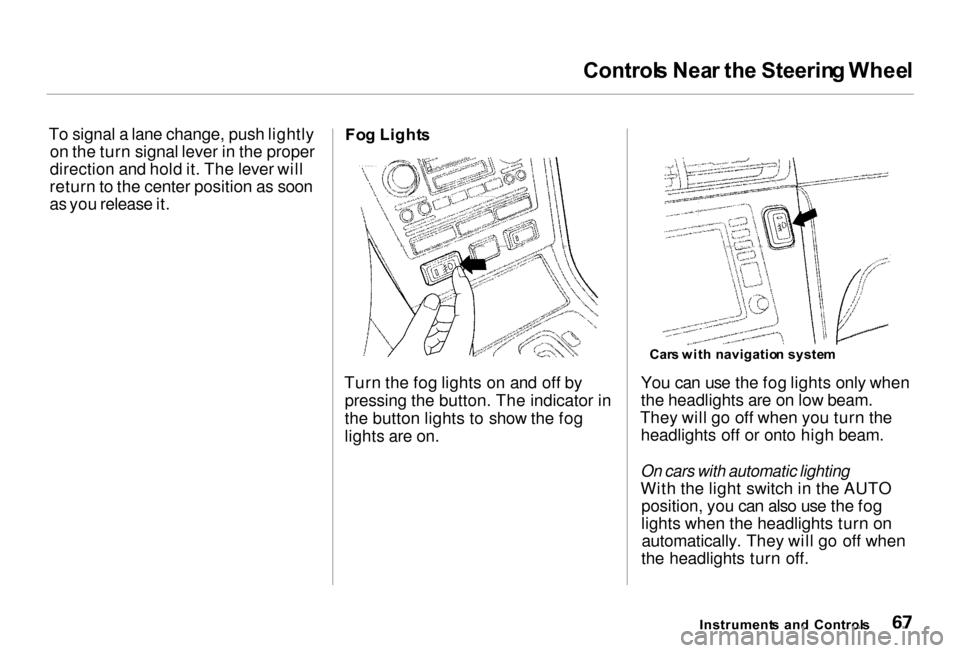
Turn the fog lights on and off by pressing the button. The indicator in
the button lights to show the fog
lights are on. You can use the fog lights only when
the headlights are on low beam.
They will go off when you turn the headlights off or onto high beam.
On cars with automatic lighting
With the light switch in the AUTO position, you can also use the fog
lights when the headlights turn onautomatically. They will go off when
the headlights turn off.
Instrument s an d Control s
Car
s wit h navigatio n syste m
Page 73 of 330
Control
s Nea r th e Steerin g Whee l
Windshiel d Washer s
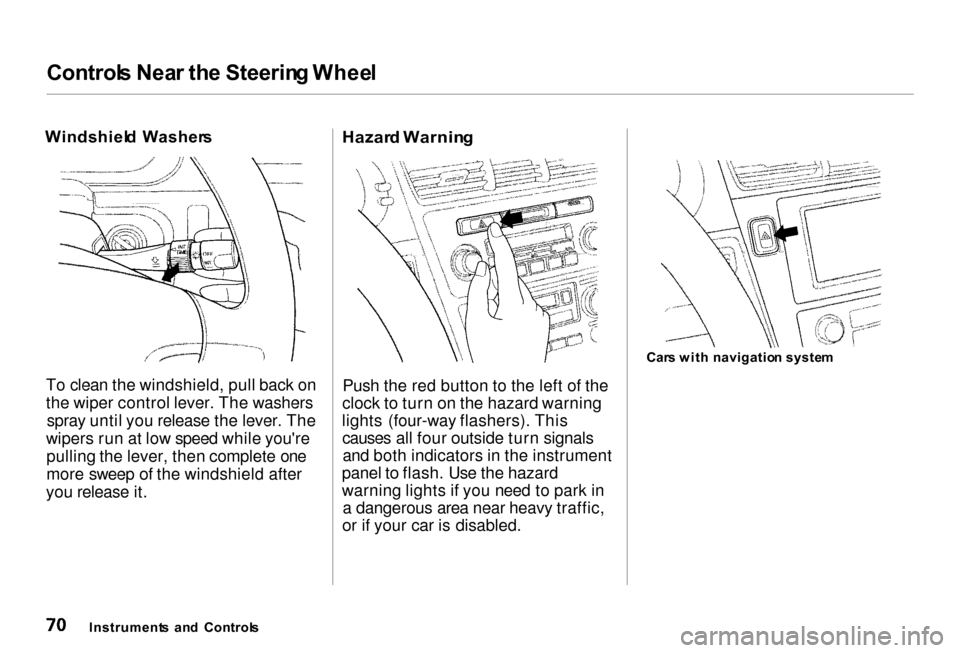
To clean the windshield, pull back on
the wiper control lever. The washers spray until you release the lever. The
wipers run at low speed while you're pulling the lever, then complete one
more sweep of the windshield after
you release it.
Hazar
d Warnin g
Push the red button to the left of the
clock to turn on the hazard warning
lights (four-way flashers). This causes all four outside turn signalsand both indicators in the instrument
panel to flash. Use the hazard
warning lights if you need to park in a dangerous area near heavy traffic,
or if your car is disabled. Car
s wit h navigatio n syste m
Instrument s an d Control s
Page 74 of 330
Control
s Nea r th e Steerin g Whee l
Rea r Windo w Defogge r
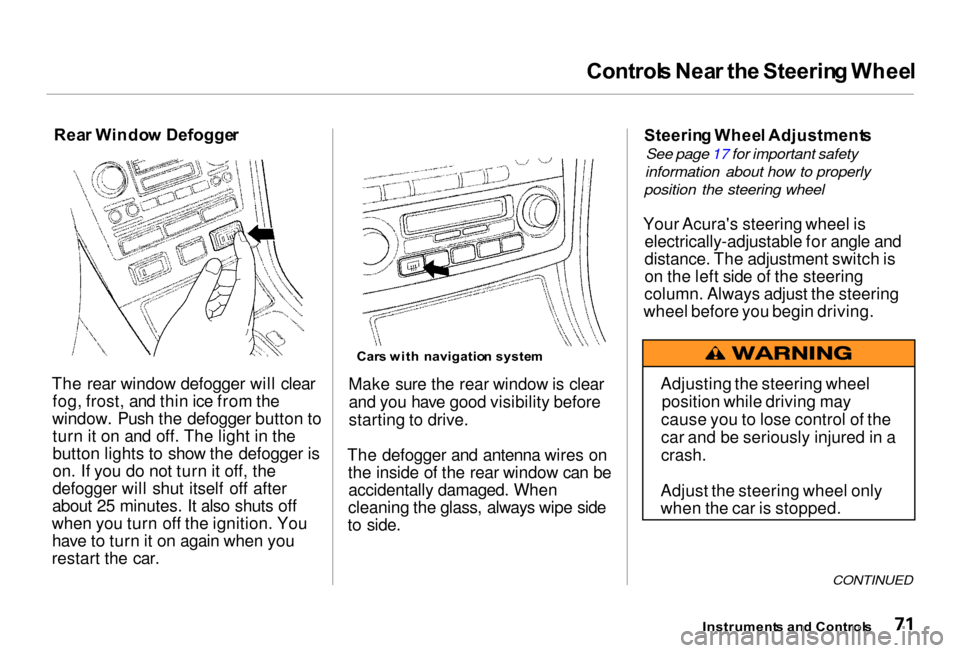
The rear window defogger will clear fog, frost, and thin ice from the
window. Push the defogger button to turn it on and off. The light in the
button lights to show the defogger is
on. If you do not turn it off, the
defogger will shut itself off after
about 25 minutes. It also shuts off
when you turn off the ignition. You have to turn it on again when you
restart the car.
Car
s wit h navigatio n syste m
Make sure the rear window is clear and you have good visibility before
starting to drive.
The defogger and antenna wires on the inside of the rear window can beaccidentally damaged. When
cleaning the glass, always wipe side
to side. Steerin
g Whee l Adjustment s
See page 17 for important safety
information about how to properly
position the steering wheel
Your Acura's steering wheel is electrically-adjustable for angle and
distance. The adjustment switch is
on the left side of the steering
column. Always adjust the steering
wheel before you begin driving.
CONTINUED
Instrument s an d Control s
Adjusting the steering wheel
position while driving may
cause you to lose control of the
car and be seriously injured in a
crash.
Adjust the steering wheel only
when the car is stopped.
Page 75 of 330
Control
s Nea r th e Steerin g Whee l
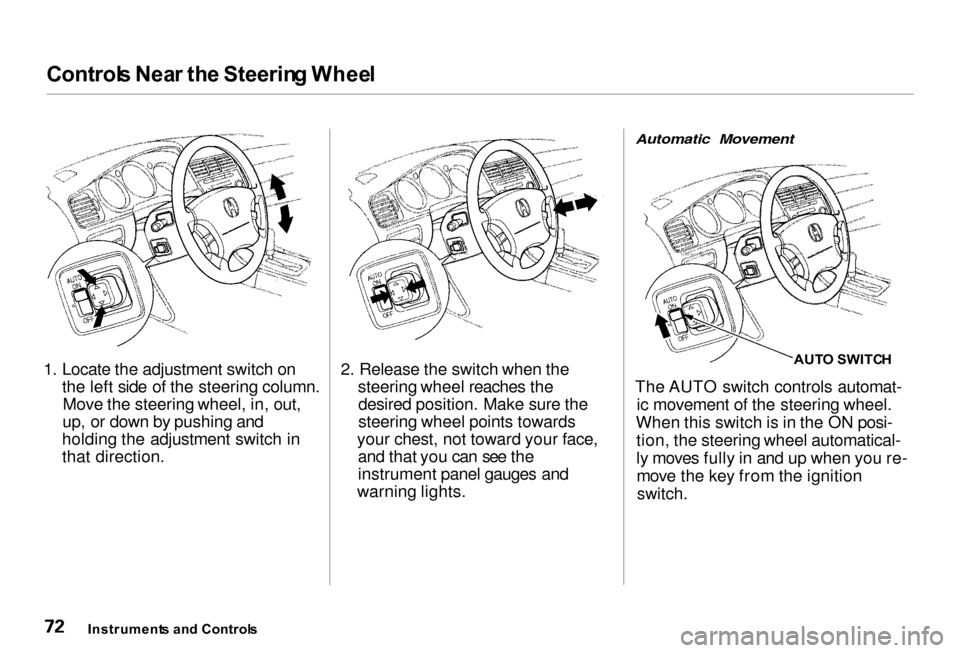
1. Locate the adjustment switch on the left side of the steering column.Move the steering wheel, in, out,
up, or down by pushing and
holding the adjustment switch in
that direction. 2. Release the switch when the
steering wheel reaches thedesired position. Make sure the
steering wheel points towards
your chest, not toward your face, and that you can see the
instrument panel gauges and
warning lights.
Automatic Movement
AUTO SWITC H
The AUTO switch controls automat- ic movement of the steering wheel.
When this switch is in the ON posi- tion, the steering wheel automatical-
ly moves fully in and up when you re-move the key from the ignition
switch.
Instrument s an d Control s
Page 83 of 330

Key
s an d Lock s
Ignitio n Switc h
The ignition switch is on the right side of the steering column. It has
four positions: LOCK (0)
ACCESSORY (I)
ON (II)
START (III) LOC
K (0 ) — You can insert or
remove the key only in this position.
To switch from ACCESSORY to LOCK, you must push the key inslightly as you turn it. The shift lever
must also be in Park. The anti-theft
lock will lock the steering column
when you remove the key.
If the front wheels are turned, the
anti-theft lock may sometimes make
it difficult to turn the key from
LOCK to ACCESSORY. Firmly turn
the steering wheel to the left or to
the right as you turn the key.
ACCESSOR Y (I ) — In this position,
you can operate the audio system and the cigarette lighter.
O N (II ) — This is the normal key
position when driving. All features
and accessories on the car are usable.
Several of the lights on the instru-
ment panel come on as a test when
you turn the ignition switch from ACCESSORY to ON.
STAR T (III ) — Use this position
only to start the engine. The switch
returns to ON (II) when you let go of
the key.
The engine will not start if the Immobilizer System does not
recognize the key's coding (see page 78).
You will hear a reminder beeper if you leave the key in the ignition switch in the LOCK (0) or
ACCESSORY (I) position and open the driver's door. Remove the key to
turn off the beeper.
Instrument s an d Control s
Page 85 of 330
Key
s an d Lock s
Lockout Prevention
If you forget and leave the key in the
ignition switch, Lockout Prevention
will not allow you to lock the driver's door. With the driver's door open
and the key in the ignition, both
master door lock switches are disabled. However, if the driver's
door is not open, the master door
lock switches are not disabled. Pushing the switch down on the
open passenger's door will lock all
doors. If you try to lock an open
driver's door by pushing in the lock
tab, the tabs on all doors pop out. Pushing in the lock tab on the
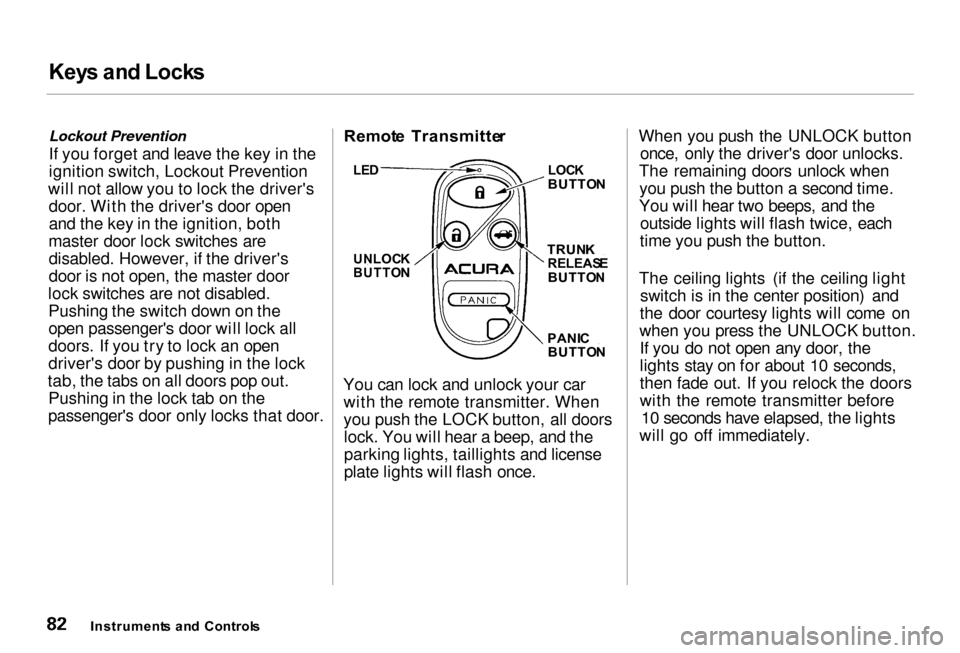
passenger's door only locks that door. Remot
e Transmitte r
You can lock and unlock your car with the remote transmitter. When
you push the LOCK button, all doorslock. You will hear a beep, and the
parking lights, taillights and license
plate lights will flash once. When you push the UNLOCK button
once, only the driver's door unlocks.
The remaining doors unlock when you push the button a second time.
You will hear two beeps, and the outside lights will flash twice, each
time you push the button.
The ceiling lights (if the ceiling light switch is in the center position) and
the door courtesy lights will come on
when you press the UNLOCK button. If you do not open any door, the
lights stay on for about 10 seconds,
then fade out. If you relock the doors
with the remote transmitter before 10 seconds have elapsed, the lights
will go off immediately.
Instrument s an d Control s
LE
D
UNLOC K
BUTTO N
LOC
K
BUTTO N
TRUN K
RELEAS E
BUTTO N
PANI C
BUTTO N
Page 86 of 330

Key
s an d Lock s
If you unlock the doors with the
remote transmitter, but do not open
any of the doors within 30 seconds,
the doors automatically relock and
the security system sets.
You cannot lock any of the doors with the remote transmitter if any door is not fully closed or the key is
in the ignition switch. You cannot
unlock any of the doors with the key
in the ignition switch.
To open the trunk, push the Trunk Release button for approximately
one second.
You can open the trunk with the remote transmitter regardless of the
position of the main switch in the
glove box. The trunk will not open if
the key is in the ignition switch.
Turning the Beep Off and On
You can program the keyless entry system so it does not beep when you
lock and unlock the doors. This
procedure only turns off the beep;
the exterior lights will still flash.
To turn this feature off, stand near the car with the remote transmitter.Press and hold the Trunk Release
button, then press the Lock button
within one second. You should see the LED on the remote transmittercome on for one second. Release the
buttons after the LED goes out.
To turn this feature on, repeat the above procedure. You should see the
LED blink twice.
After you program the remote transmitter, make sure the trunk lidis closed.
Panic Mode
Panic mode allows you to remotely activate your car's security system to
attract attention. When activated, the
horn will sound, and the exterior
lights will flash, for about 30 seconds.
To activate panic mode, press and hold the PANIC button for about two
seconds.
To cancel Panic mode before 30 seconds, press any button on the
remote transmitter. You can also
turn the ignition switch to ON (II).
Panic mode will not activate if the
ignition switch is in ON (II).
CONTINUED
Instrument s an d Control s
Page 90 of 330
Key
s an d Lock s
2. Lock the glove box with the master key.
3. Make sure the trunk pass-through cover is locked (see page 97).
4. Give the person the valet key. Even if the trunk main switch is
turned off, you can open the trunk
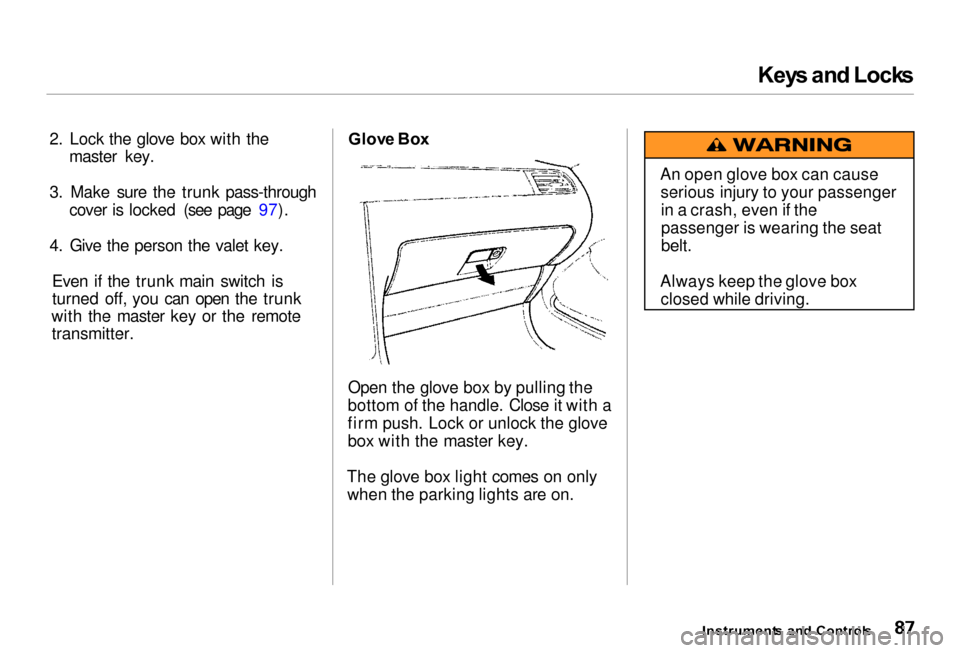
with the master key or the remote transmitter. Glov
e Bo x
Open the glove box by pulling the
bottom of the handle. Close it with a
firm push. Lock or unlock the glove
box with the master key.
The glove box light comes on only when the parking lights are on.
Instruments an d Control s
An open glove box can cause
serious injury to your passengerin a crash, even if the
passenger is wearing the seat
belt.
Always keep the glove box closed while driving.
Page 101 of 330
Mirror
s
Keep the inside and outside mirrors
clean and adjusted for best visibility. Be sure to adjust the mirrors before
you start driving.
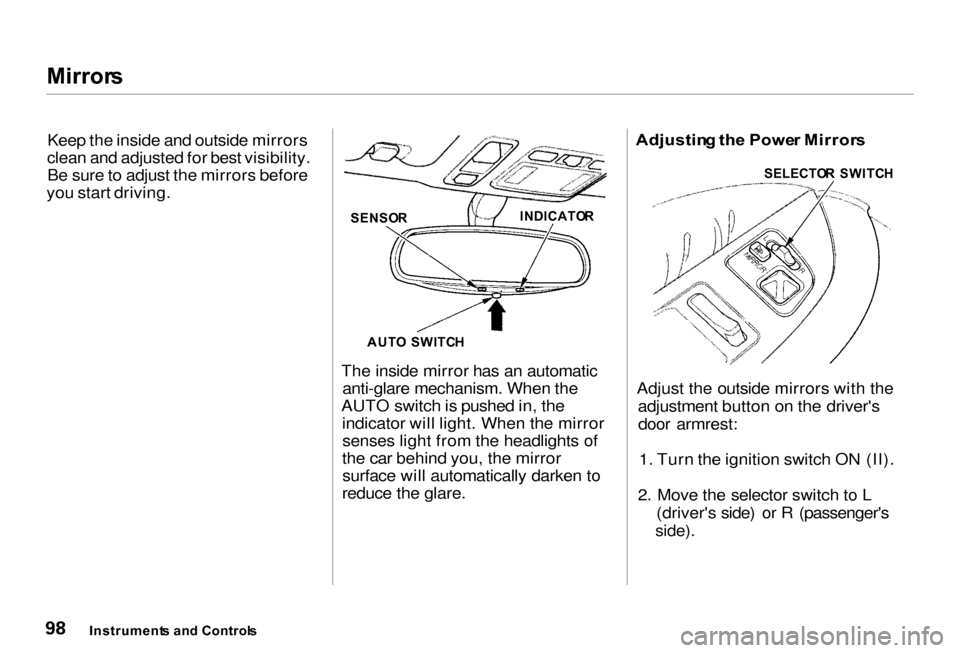
The inside mirror has an automaticanti-glare mechanism. When the
AUTO switch is pushed in, the indicator will light. When the mirrorsenses light from the headlights of
the car behind you, the mirror surface will automatically darken to
reduce the glare. Adjustin
g th e Powe r Mirror s
Adjust the outside mirrors with the adjustment button on the driver'sdoor armrest:
1. Turn the ignition switch ON (II).
2. Move the selector switch to L (driver's side) or R (passenger's
side).
Instrument s an d Control s
SENSO
R
AUT O SWITC H
INDICATO
R SELECTO
R SWITC H
Page 106 of 330
Sea
t Heaters , Sk i Sleev e
The HI or LO indicator lights and remains lit until you turn it off by
pushing the opposite side of the switch lightly. The indicator will turn
off.
In HI, the heater turns off when the
seat gets warm, and turns back on
after the seat's temperature drops. It
continues to cycle as long as you
leave it set on HI. The HI indicator
remains lit as a reminder that you
have the heater on.
In LO, the heater runs continuously.
It does not cycle with temperature
changes.
Because of the sensors for the side
airbag system, there is no heater in
the passenger's seat-back. Follow these precautions whenever
you use the seat heaters:
Use the HI setting only to heat the
seats quickly. Select the LO
setting when the seats feel warm.
The HI setting draws large amounts of current from the
battery.
Do not use the seat heaters, even
on the LO setting, if the engine is
left idling for an extended period.
They can weaken the battery, causing hard starting. Sk
i Sleev e
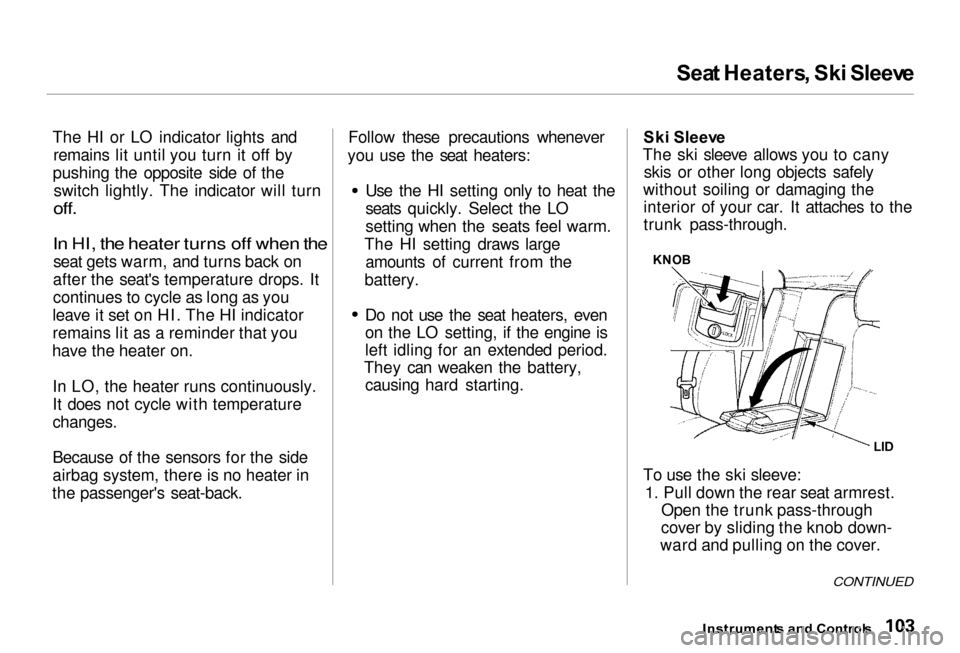
The ski sleeve allows you to cany skis or other long objects safely
without soiling or damaging the interior of your car. It attaches to the
trunk pass-through.
KNO B
To use the ski sleeve: 1. Pull down the rear seat armrest. Open the trunk pass-through
cover by sliding the knob down-
ward and pulling on the cover.
Instrument s an d Control s
LI
D
CONTINUED