radio Acura RL 2001 3.5 User Guide
[x] Cancel search | Manufacturer: ACURA, Model Year: 2001, Model line: RL, Model: Acura RL 2001Pages: 333, PDF Size: 4.28 MB
Page 160 of 333

Audio System
Operating the CD Changer
A Compact Disc changer is standard equipment. It holds up to six discs,
providing several hours of continu- ous entertainment. You operate the
CD changer with the same controls
used for the radio and cassette
player.
To load the CDs in the magazine and load the magazine into the CD
changer, refer to page 159. Play onlystandard round discs. Odd-shaped
CDs may jam in the drive or cause
other problems.
Do not play discs with disc
accessories such as protective seals
or rubbers. Using them may also
cause the audio system to
malfunction.
To operate the CD changer, the igni- tion switch must be in ACCESSORY (I) or ON (II).
PRESET BUTTONS
PWR/VOL KNOB
REPEAT BUTTON
CD/TAPE BUTTON AUTO SELECT BUTTON
Select the CD mode by pressing the CD/TAPE button. You will see "CD"
in the display. The system will start
to play the first track of the first disc
in the magazine. You will see the disc and track number displayed. When that disc ends, the next disc in
the magazine is loaded and played.
After the last disc finishes, the system returns to disc 1.
Comfort and Convenience Features
AM/FM BUTTON
SEEK BAR
CONTINUED
Page 166 of 333

Audio System
Remote Audio Controls
Two controls for the audio system are mounted in the steering wheel
hub. These let you control basic
functions without removing your
hand from the wheel. The top and bottom buttons adjust the volume up ( ) or down ( ).
Press the proper button and hold it
until the desired volume is reached,
then release it.
The AUDIO/CH button has three functions, depending on whether you are listening to the radio, or playing a
cassette or CD.
If you are listening to the radio, use
the AUDIO/CH button to change stations. Each time you press this
button, the system advances to the next preset station on the band you
are listening to. You will see the
number of the selected Preset button
in the display. To change bands,
press the AM/FM button on the audio system's front panel. If you are playing a cassette, use the
AUDIO/CH button to advance to the next selection. You will see "FF"
blinking in the display when you
press the AUDIO/CH button. The system fast forwards until it senses asilent period, then goes back to
PLAY.
If you are playing a CD, the system skips to the beginning of the next
track each time you push the
AUDIO/CH button. You will see the disc and track number in the display.
Comfort and Convenience Features
AUDIO/CH
BUTTON
Page 167 of 333

Audio System
Theft ProtectionYour car's audio system will disable itself if it is disconnected fromelectrical power for any reason. To
make it work again, the user must
enter a specific five-digit code in the Preset buttons. Because there are
hundreds of number combinations
possible from five digits, making the system work without knowing the
exact code is nearly impossible.
You should have received a card that lists your audio system's code
number and serial number. It is bestto store this card in a safe place at
home. In addition, you should write
the audio system's serial number in
this Owner's Manual. If you should
happen to lose the card, you mustobtain the code number from your
Acura dealer. To do this, you will need the system's serial number. If your car's battery is disconnected
or goes dead, or the radio fuse is
removed, the audio system will disable itself. If this happens, you
will see "Code" in the frequency display the next time you turn on thesystem. Use the Preset buttons to
enter the five-digit code. If it is
entered correctly, the radio will start
playing.
If you make a mistake entering the
code, do not start over or try to
correct your mistake. Complete the
five-digit sequence, then enter the correct code. You have three tries to
enter the correct code. If you are
unsuccessful in three attempts, you
must then leave the system on for one hour before trying again. You will have to store your favorite
stations in the Preset buttons after
the system begins working. Your original settings were lost when
power was disconnected.
Comfort and Convenience Features
Page 168 of 333
Security System
The security system helps to protect your car and valuables from theft.
The horn sounds and a combination of headlights, parking lights, side
marker lights and taillights flashes if someone attempts to break into your
car or remove the radio. This alarm
continues for two minutes, then the system resets. To reset an alarming
system before the two minutes have
elapsed, unlock either front door
with the key or the remote
transmitter.
The security system sets auto- matically fifteen seconds after you
lock the doors, hood, and trunk. For
the system to activate, you must lock
the doors from the outside with the
key, lock tab, door lock switch, or
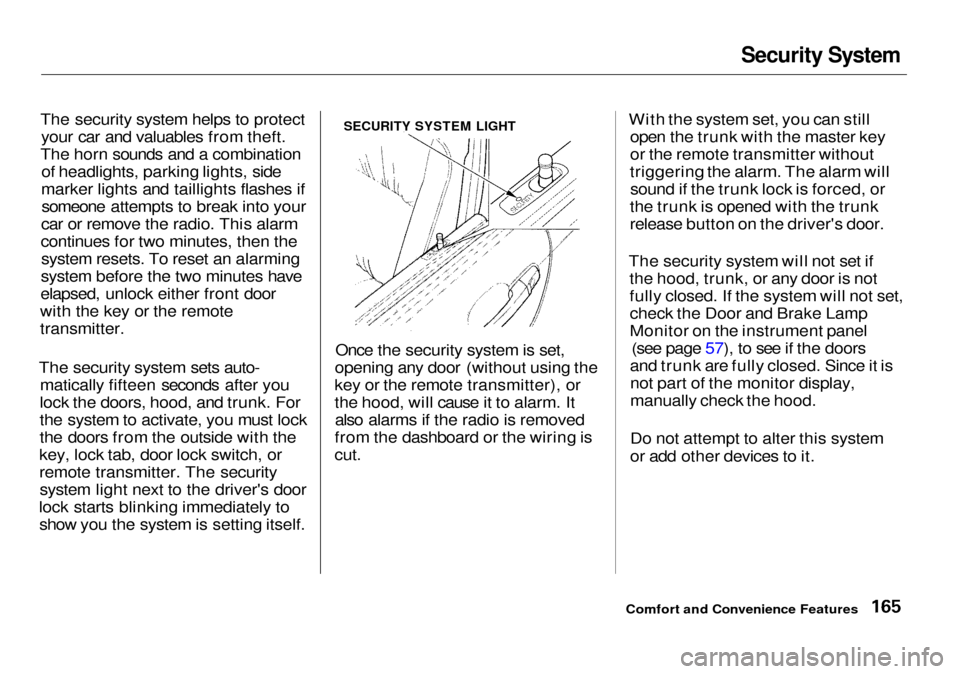
remote transmitter. The security system light next to the driver's door
lock starts blinking immediately to show you the system is setting itself. Once the security system is set,
opening any door (without using the
key or the remote transmitter), or
the hood, will cause it to alarm. It also alarms if the radio is removed
from the dashboard or the wiring is
cut.
With the system set, you can still
open the trunk with the master key
or the remote transmitter without
triggering the alarm. The alarm will sound if the trunk lock is forced, or
the trunk is opened with the trunk
release button on the driver's door.
The security system will not set if the hood, trunk, or any door is not
fully closed. If the system will not set,check the Door and Brake Lamp
Monitor on the instrument panel (see page 57), to see if the doors
and trunk are fully closed. Since it is not part of the monitor display,
manually check the hood.
Do not attempt to alter this system
or add other devices to it.
Comfort and Convenience Features
SECURITY SYSTEM LIGHT
Page 177 of 333

Accessories and Modifications
Modifying your car, or installing
some non-Acura accessories, can
make your car unsafe. Before you
make any modifications or add any
accessories, be sure to read the
following information.
Accessories
Your dealer has Genuine Acura accessories that allow you to
personalize your car. These accessories have been designed and
approved for your car, and are
covered by warranty.
Non-Acura accessories are usuallydesigned for universal applications.
Although aftermarket accessories may fit on your car, they may not
meet factory specifications, andcould adversely affect your car's
handling and stability. (See "Modifications" on the page 175 for
additional information.) When properly installed, cellular
phones, alarms, two-way radios, and
low-powered audio systems should not interfere with your car's
computer-controlled systems, such
as the SRS and anti-lock brake
system.
However, if electronic accessories
are improperly installed, or exceed
your car's electrical system capacity, they can interfere with the operationof your car, or even cause the
airbags to deploy.
Before installing any accessory:
Make sure the accessory does not
obscure any lights, or interfere
with proper car operation or
performance.
Be sure electronic accessories do
not overload electrical circuits
(see page 292 ). Have the installer contact your
Acura dealer for assistance before
installing any electronic accessory.
If possible, have your dealer inspect
the final installation.
Before Driving
Improper accessories or
modifications can affect your
car's handling, stability and performance, and cause a
crash in which you can be hurt
or killed.
Follow all instructions in this
owner's manual regarding
accessories and modifications.
Page 241 of 333
Battery
If your car's battery is disconnected
or goes dead, the engine's computer
needs to "relearn" the idle control.
After replacing or recharging the
battery:
1. Make sure the climate control sys-
tem is off.
2. Start the engine and let it run until
it warms up (the radiator cooling
fan comes on at least twice), and
let it idle for five more minutes.
Your audio system will also disable it-
self when the battery is disconnected
or goes dead. The next time you turn
on the radio you will see "Code" in
the frequency display. Use the Pre- set buttons to enter the five-digit
code (see page 164 ).
Charging the battery with the cables
connected can seriously damage your
car's electronic controls. Detach the
battery cables before connecting the
battery to a charger.
Maintenance
NOTICE
Page 289 of 333

Charging System Indicator
This indicator should come on when the ignition switch is ON (II), and goout after the engine starts. If it
comes on brightly when the engine
is running, it indicates that the charging system has stopped
charging the battery. Immediately turn off all electrical
accessories: radio, climate control,
rear defogger, cruise control, etc.
Try not to use other electrically- operated controls such as the power
windows. Keep the engine running and take extra care not to stall it.
Starting the engine will discharge
the battery rapidly. By eliminating as much of the
electrical load as possible, you can
drive several miles (kilometers)
before the battery is too discharged
to keep the engine running. Drive to a service station or garage where
you can get technical assistance.
Taking Care of the Unexpected
CHARGING SYSTEM INDICATOR
Page 296 of 333

Fuses
5. Look for a burned wire inside the fuse. If it is burned, replace it with
one of the spare fuses of the same
rating or lower. If you cannot drive the car without
fixing the problem, and you do not
have a spare fuse, take a fuse of the same rating or a lower rating from
one of the other circuits. Make sure
you can do without that circuit
temporarily (such as the cigarette
lighter or radio).
If you replace the blown fuse with aspare fuse that has a lower rating, it
might blow out again. This does not
indicate anything wrong. Replace the
fuse with one of the correct rating as soon as you can.
Replacing a fuse with one that has a
higher rating greatly increases the
chances of damaging the electrical
system. If you do not have a replace-
ment fuse with the proper rating for the circuit, install one with a lower rating.
6. If the replacement fuse of the
same rating blows in a short time,
there is probably a serious electrical problem in your car.
Leave the blown fuse in that
circuit and have your car checked
by a qualified mechanic.
If the radio fuse is removed, the audio system will disable itself. The
next time you turn on the radio you
will see "Code" in the frequency display. Use the Preset buttons to
enter the five-digit code (see page
164).
Taking Care of the Unexpected
CONTINUED
BLOWN
NOTICE
Page 300 of 333

Emergency Towing
If you decide to tow your car with all
four wheels on the ground, make sure you use a properly-designed and
attached tow bar. Prepare the car for
towing as described above, and leave
the ignition switch in Accessory (I) so the steering wheel does not lock.
Make sure the radio and any items
plugged into the accessory power socket are turned off so they do not
run down the battery.
The steering system can be damaged if
the steering wheel is locked. Leave the
ignition switch in Accessory (I), and
make sure the steering wheel turns
freely before you begin towing. Trying to lift or tow your car by the
bumpers will cause serious damage. The bumpers are not designed to
support the car's weight.
Taking Care of the Unexpected
NOTICE
NOTICE
Page 327 of 333
Index
Fan, Interior.......................... 126, 131
Features, Comfort and
Convenience............................... 121
Filling the Fuel Tank..................... 169
Filters
Air Cleaner................................. 231
Air Conditioning........................ 242
Oil................................................ 219
Flashers, Hazard Warning.............. 70
Flat Tire, Changing a.................... 273
Fluids Automatic Transmission........... 228
Brake........................................... 229
Differential................................. 229
Power Steering........................... 230
Windshield Washer................... 227
FM Stereo Radio
Reception........................... 137, 147
Fog Lights......................................... 67
Foreign Countries, Driving in...... 307
Four-way Flashers...........................
70
Front
Airbags.............................. 9,
43
Fuel..................................................
168
Fill Door and Cap....................... 169
Gauge............................................ 60
Octane Requirement................. 168
Oxygenated................................ 306
Reserve Indicator......................... 57
Tank, Filling the......................... 169
Fuel Mileage, Improving............... 173
Fuses, Checking the...................... 292
Gasohol........................................... 306
Gasoline.......................................... 168
Fuel Reserve Indicator................ 57
Gauge............................................ 60
Octane Requirement................. 168
Tank, Filling the......................... 169
Gas Station Procedures................. 169
Gauges.............................................. 58
Engine Coolant Temperature .... 60
Fuel................................................ 60
Speedometer................................ 58
Tachometer.................................. 58
GAWR (Gross Axle Weight
Rating)........................................ 197
Gearshift Lever Positions............. 182
Glass Cleaning............................... 268
Glove Box......................................... 88
GVWR (Gross Vehicle Weight
Rating)........................................ 197
Halogen Headlight Bulbs.............. 252
Hazard Warning Flashers............... 70
Headlights Automatic Lighting..................... 64
Daytime Running Lights............. 65
High Beam Indicator................... 57Lights On Indicator..................... 55
Reminder Chime.......................... 63
Replacing Halogen Bulbs......... 252
Turning on.................................... 63
Head Restraints............................... 96
Heating and Cooling...................... 122
High Altitude, Starting at.............. 181
High-Low Beam Switch .................. 63
High-mount Brake Light............... 257
HomeLink Universal
Transmitter.................................. 89
Hood Latch..................................... 231
Hood, Opening the........................ 170
Horn................................................... 62
Hydroplaning.................................. 195