lock Acura RL 2005 Workshop Manual
[x] Cancel search | Manufacturer: ACURA, Model Year: 2005, Model line: RL, Model: Acura RL 2005Pages: 394, PDF Size: 5.2 MB
Page 140 of 394

Thebatteriesintheremotenormally
lasts about 2 years. To ensure
maximum battery life, do not store
the remote close to electrical devices
such as computers or TVs. When the
multi-inf ormation display shows
‘‘KEYLESS REMOTE LOW
BATTERY,’’ replace the batteries as
soon as possible (see page ).
The engine does not restart if you
turn the ignition switch to the LOCK
(0) position when the remote is
outside the vehicle. Check where the
remote is. Make sure that you carry
the remote or built-in key with you
when you operate the ignition switch.
When the ignition switch is in the
ON (II) position, the multi-
inf ormation display shows
‘‘KEYLESS REMOTE NOT
DETECTED,’’ and the inside and
outside beepers sound.
The multi-inf ormation display
message goes away when you
bring the remote back inside the
vehicle, and close the door or
apply the parking brake. The outside beeper sounds when
the ignition switch is in the
ACCESSORY (I) or ON (II)
position.
If the engine is running and you
removetheremotefromthe
vehicle, it will continue to run.
Once turned to the LOCK (0)
position, the engine will not restart
until a remote is brought back into
the vehicle. If you pass the remote through an
open window, the system does not
respond.Also,evenwhentheremote
is inside the vehicle, the beeper may
sound when the location of the
remote is not detected due to
surrounding conditions. It is not a
f ailure. Make sure that you carry the
remote with you.
135
CONT INUED
K eyless A ccess System
K eyless Remot e L ow Bat t ery
Inst rument s and Cont rols
139
Page 141 of 394

The indicator stays on while you
are driving.
The indicator comes on with the
ignition switch in the ON (II)
position.
The indicator comes on f or several
seconds when you turn the ignition
switch to ON (II). Have your vehicle
checked by your dealer if : If you lose or drop your remote, and
the beeper sounds, contact Acura
Client Services at (800) 382-2238
(U.S. models)
The multi-inf ormation display
shows ‘‘CHECK KEYLESS
ACCESS SYSTEM.’’
In this case, use the built-in key to
lock/unlock the doors and start the
engine.
K eyless A ccess System
Check K eyless A ccess Syst em
140
KEYLESS ACCESS SYSTEM
INDICATOR
Page 142 of 394

Thebuilt-inkeycanbeinsertedinto
the remote.
As shown above, keep inserting the
built-in key until it is locked. To
remove the built-in key, pull it out
while you press the release button.
To avoid damaging the remote and
the built-in key, never pull on the
built-in key unless you are pressing
the release button.The trunk and glove box cannot be
opened when you turn the trunk
main switch of f and lock the glove
box and trunk pass-through cover
with the built-in key. Also, the trunk
cannot be opened by using the
remote.
The keyless access system uses
electric current to identify the
remote with the vehicle.
If you use medical equipment such
as a cardiac pacemaker, ask your
doctor if the electric current used by
the remote will af f ect it.
K eyless A ccess System
Built -in key and Remot eValet Function
Inst rument s and Cont rols
141
RELEASE BUTTON BUILT-IN KEY
Page 148 of 394

You can open all of the windows and
the moonroof f rom outside with the
remote.Press the UNLOCK button once
to unlock the driver’s door.
To open the windows and
moonroof f urther, press the
button again and hold it. If the
windows and the moonroof stop
bef ore the desired position, repeat
steps 1 and 2.
You cannot close the windows or the
moonroof with the remote. You can open and close the windows
and moonroof with the built-in key in
the driver’s door lock.
Insert the built-in key in the driver’s
door lock.
To open: Turn the key clockwise, then
release it.
Turn the built-in key clockwise
again, and hold it. All four
windows and the moonroof start to
open. To stop the windows and
moonroof , release the built-in key.
When the windows or moonroof
stops bef ore opening f ully, to open
the windows and moonroof f urther,
turnandholdthekeyagain
(within 15 seconds).
Press the UNLOCK button a
second time, and hold it. All the
doors unlock, and all f our windows
and moonroof start to open. To
stop the windows and moonroof ,
release the button.
1.
2.
3.
1.2.
3.
4.
CONT INUED
Opening the Windows and
Moonroof with the Remote
Opening/Closing the Windows
and Moonroof with the Built-in
Key
Power Windows, Moonroof
Inst rument s and Cont rols
147
Open
Close
UNLOCK BUTTON
Page 149 of 394

To close:Insert the built-in key in the driver’s
door lock.
NOTE: If the windows and moonroof
stop bef ore the desired position,
repeat steps 2 and 3. To close the windows and
moonroof f urther, turn and hold
the key again (within 15 seconds). Turn the key counterclockwise
again, and hold it. All four
windows and the moonroof start to
close. To stop the windows and
moonroof , release the key. Turn the key counterclockwise,
then release it.
To open the moonroof f ully, pull
back the moonroof switch f irmly.
The moonroof opens all the way. To
stop the moonroof f rom opening
f ully, push the switch f orward brief ly.
Turn the ignition switch to ON (II)
bef ore operating the moonroof
switch on the ceiling console. To
open the moonroof , pull back the
moonroof switch. To close the
moonroof , push the moonroof switch
forward. Release the switch to stop
the moonroof .
1.
2.
3.
4.
Power Windows, Moonroof
Opening/Closing the Moonroof
with the Ceiling Console Switch
148
MOONROOF SWITCH
Page 154 of 394

Your vehicle has an owner’s manual
tray inside the glove box. To open
the tray, push the release button up.
Open the glove box by pulling the
handle. Close it with a f irm push.
Lock or unlock the glove box with
the built-in key.
To close the tray, push it up.
Interior Convenience Items
Glove Box
Inst rument s and Cont rols
153
RELEASE BUTTON
An open glove box can cause
serious injury to your passenger
inacrash,evenifthe
passenger is wearing the seat
belt.
Always keep the glove box
closed while driving.
Page 161 of 394

Af ter pushing the DOOR button, all
the lights come on when you open
any door, unlock the doors with the
remote or built-in key, or turn the
ignition switch f rom the ON (II) or
ACCESSORY (I) position to the
LOCK (0) position. The indicator in
the button comes on as a reminder.
The f ront and rear of the ceiling
have ceiling lights. To change the ‘‘INTERIOR LIGHT
DIMMING TIME’’ setting, see page.
Push each ceiling light button to turn
its light on and of f .
Push the ON button to turn on all the
ceiling lights. Push the OFF button
to turn them off. 92
Ceiling L ights
Interior Lights
160
ON
BUTTON
OFF
BUTTON
DOOR
BUTTON FRONT
REAR
CEILING LIGHT
BUTTONS
CEILING LIGHT
BUTTONS
Page 164 of 394

Many climate control f unctions can
still be controlled by standard
buttons, dials, and knobs, but some
f unctions can only be accessed using
the interf ace dial. The interf ace dial
has two parts, a knob and a selector.
The knob turns lef t and right. Use it
to make selections or adjustments to
a list or menu on the screen.The selector can be pushed lef t,
right, up, down, and in. Use the
selector to scroll through lists, to
select menus, and to highlight menu
items. When you make a selection,
push the center of the selector
(ENTER)togotothatselection.
When you unlock the doors with
your remote, the driver’s ID (Driver
1orDriver2)isdetected,andthe
climate control settings are turned to
the respective mode automatically
when the ignition is turned to the
ON (II) position.
Interf ace Dial
Personalization Setting
Vents, Heating, and A/C, Climate Control
Features
163
ENTER
SELECTOR
KNOB
Page 172 of 394
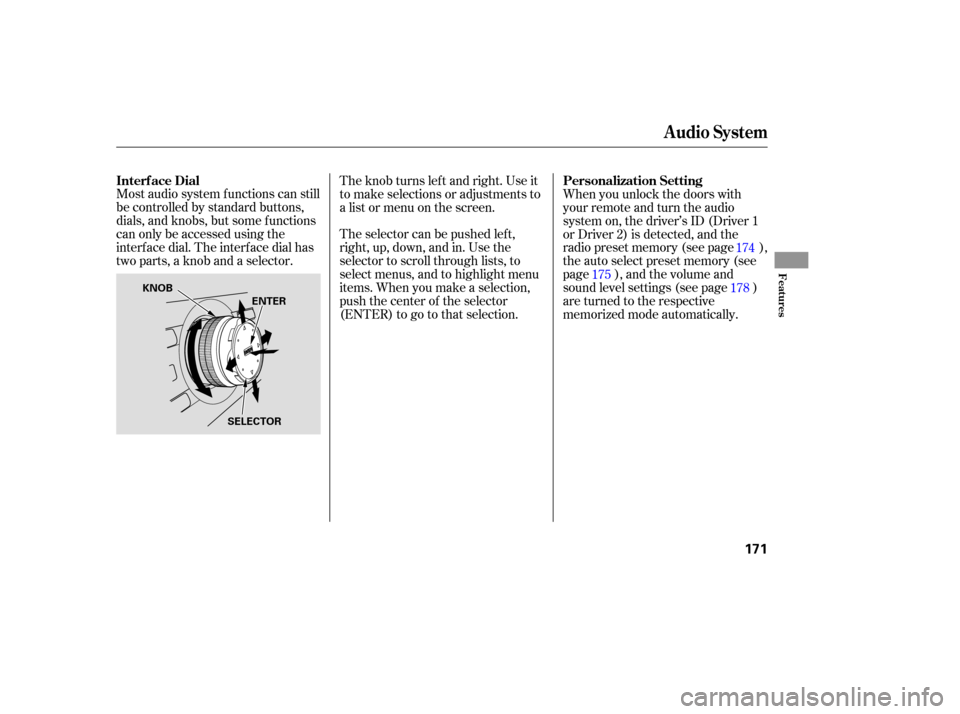
Most audio system f unctions can still
be controlled by standard buttons,
dials, and knobs, but some f unctions
can only be accessed using the
interf ace dial. The interf ace dial has
two parts, a knob and a selector.The selector can be pushed lef t,
right, up, down, and in. Use the
selector to scroll through lists, to
select menus, and to highlight menu
items. When you make a selection,
push the center of the selector
(ENTER)togotothatselection. The knob turns lef t and right. Use it
to make selections or adjustments to
a list or menu on the screen.
When you unlock the doors with
your remote and turn the audio
system on, the driver’s ID (Driver 1
or Driver 2) is detected, and the
radio preset memory (see page ),
the auto select preset memory (see
page ), and the volume and
sound level settings (see page )
are turned to the respective
memorized mode automatically.175
178174
Interf ace Dial
Personalization Setting
Audio System
Features
171
KNOB
ENTER
SELECTOR
Page 186 of 394

The XM satellites are in orbit over
the equator; therefore, objects south
of the vehicle may cause satellite
reception interruptions. To help
compensate f or this, ground-based
repeaters are placed in major
metropolitan areas.
Satellite signals are more likely to be
blocked by tall buildings and
mountains the f arther north you
travel from the equator.
CONT INUED
Playing t he XMSatellite Radio
Features
185
Signal may be blocked by
mountains or large obstacles to
the south.Signal weaker in
these areas.
SATELLITE GROUND
REPEATER