cruise control Acura RL 2009 Owner's Guide
[x] Cancel search | Manufacturer: ACURA, Model Year: 2009, Model line: RL, Model: Acura RL 2009Pages: 560, PDF Size: 11.21 MB
Page 330 of 560

The set speed can be decreased
using the SET/DECEL button or the
brake pedal.
To decrease the set speed with the
SET/DECEL button, do this:
Press and hold the SET/DECEL
button. Release the button when you
reach the speed you want.
To slow down in small amounts, tap
the SET/DECEL button repeatedly.Each time you do this, your vehicle
slows down about 1 mph (1 km/h).
When the system detects a vehicle
ahead of you, a beeper sounds once
and a solid-line vehicle icon appears
on the multi-information display.
The set cruising speed will be shown
on the multi-information display.
On a steep downhill, the vehicle
speed may exceed the set cruising
speed.
To decrease the set speed with the
brake pedal, do this:
Tap the brake pedal. When the
vehicle slows down to the speed you
want, press the SET/DECEL button.
The set speed will be shown on the
multi-inf ormation display. If you use
the brake pedal to decrease speed,
andthenpresstheRES/ACCEL
button, your vehicle will return to the
previously set speed.
CONT INUED
Decreasing the Set Speed Detecting a Vehicle A head of You
A daptive Cruise Control (A CC)
Features
327
SET/DECEL BUTTON
U.S.
CANADA
2009 RL
Page 331 of 560
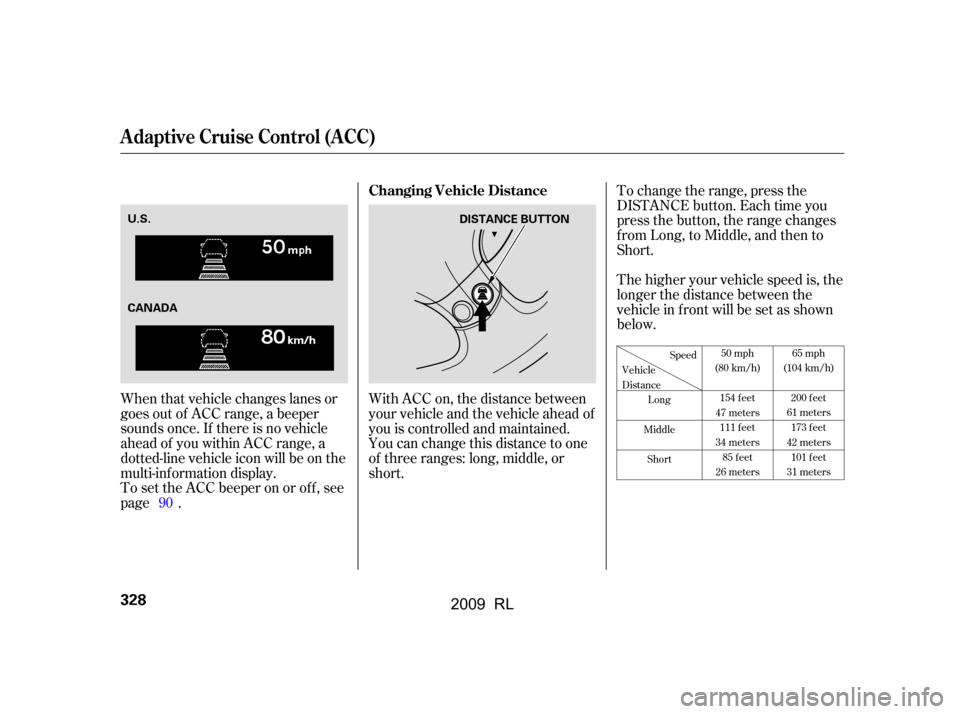
With ACC on, the distance between
your vehicle and the vehicle ahead of
you is controlled and maintained.
You can change this distance to one
of three ranges: long, middle, or
short.To change the range, press the
DISTANCE button. Each time you
press the button, the range changes
f rom Long, to Middle, and then to
Short.
The higher your vehicle speed is, the
longer the distance between the
vehicle in f ront will be set as shown
below.
When that vehicle changes lanes or
goes out of ACC range, a beeper
sounds once. If there is no vehicle
ahead of you within ACC range, a
dotted-line vehicle icon will be on the
multi-inf ormation display.
To set the ACC beeper on or of f , see
page . 90
50 mph
(80 km/h)
154 feet
47 meters 111 feet
34 meters 85 feet
26 meters 65 mph
(104 km/h)
200 feet
61 meters 173 feet
42 meters 101 feet
31 meters
Speed
Vehicle
Distance Long
Middle Short
Changing Vehicle Distance
A daptive Cruise Control (A CC)
328
DISTANCE BUTTON
U.S.
CANADA
2009 RL
Page 332 of 560

Press the ACC button. The ACC
indicator in the instrument panel
goes off.
Tap the brake pedal.
Push the CANCEL button on the
steering wheel.If you cancel ACC by pressing the
ACC button, the previously set
cruising speed is erased f rom
memory.
The distance you select is also
shown on the multi-inf ormation
display.
ACC is canceled whenever you do
any of these actions:When you push the CANCEL button
or tap the brake pedal to cancel ACC,
the set cruising speed stays in
memory. When you turn on ACC
again, the speed is shown on the
multi-inf ormation display. To return
to that speed, accelerate to over 25
mph (40 km/h), then press the RES/
ACCEL button.
Canceling the A CC
A daptive Cruise Control (A CC)
Features
329
LONG
RANGE
MIDDLE
RANGE
SHORT
RANGE CANCEL BUTTON
U.S.
CANADA
U.S. CANADA
U.S.
CANADA
2009 RL
Page 333 of 560

This indicator normally comes on f or
a f ew seconds when you turn the
ignition switch to the ON (II)
position. If it comes on at any other
time, there is a problem in the ACC
system. If this happens, take the
vehicle to your dealer to have it
checked.
The ACC system cannot be used
while this indicator is on.
The vehicle speed decreases
below22mph(35km/h).
Driving on a mountainous road, or
driving of f road f or extended
periods.
When the VSA indicator comes on.
When the ABS or VSA is activated.
Abrupt steering wheel movement.
If ACC is cancelled by any these
conditions, wait until the condition
improves, then press the RES/
ACCEL button to restore ACC.
When you do this, the vehicle will
resume its set cruising speed.
If you turn the ignition switch to the
ACCESSORY (I) or LOCK (0)
position af ter ACC was automatically
cancelled, the set speed is erased,
and you must enter it again (see
page ).
Poor weather (rain, f og, snow, etc.)
When the radar sensor in the front
grille gets dirty.
The vehicle ahead of you cannot
be detected.
An abnormal tire condition is
detected, or the tires are skidding.
When ACC is automatically canceled,
the beeper sounds about 1 second,
and an ACC OFF message appears
on the multi-inf ormation display f or 3
seconds.
Any of these conditions may cause
ACC to cancel:
324
Automatic ACC Cancellation ACC Indicator
A daptive Cruise Control (A CC)
330
ACC INDICATOR
2009 RL
Page 334 of 560

The multi-inf ormation display shows
various messages related to ACC.
For a description of each ACC
message you may see, ref er to the
chart on this and the f ollowing page.
Message
CONT INUED
Description
ACC is on.
ACC detects a vehicle ahead of you.
You will hear a beep when the vehicle
moves out of the ACC radar sensor’s
range.
ACC does not detect a vehicle ahead
of you.
You will hear a beep when ACC
detects a vehicle ahead of you.
Messages on the
Multi-Inf ormation Display
A daptive Cruise Control (A CC)
Features
331
U.S.
U.S.
CANADA
CANADA
2009 RL
Page 335 of 560

Message Message DescriptionDescription
Apply the brakes immediately.
Your vehicle is too close to the vehicle
ahead of it.
You will hear a continuous beep.
ACC needs to be checked.
Have your vehicle checked by a
dealer.
ACC has automatically cancelled
because its radar sensor in the f ront
grill is dirty.
You will hear a beep about 1 second.
ACC has automatically cancelled
because of bad weather or other
conditions.
You will hear a beep about 1 second.
A daptive Cruise Control (A CC)
332
2009 RL
Page 336 of 560

To switch f rom ACC to cruise
control, press the distance button on
the steering wheel, and hold it f or 1
second.Always be aware which mode is
selected.
When the cruise control is selected,
ACC does not sound a beeper or
display a message on the multi-
inf ormation display. Make sure to
keepasafedistancefromthevehicle
ahead of you.
When you press the button, you will
see CRUISE MODE SELECTED on
the multi-information display for 2
seconds.ToswitchbacktoACC,
press and hold the distance button
again for 1 second.
Switching to Cruise Control
A daptive Cruise Control (A CC)
Features
333
DISTANCE BUTTON
Press the distance button.
2009 RL
Page 435 of 560

When cruise control is on while
driving, the pressure reading cannot
be checked by the tire pressure
monitor on the multi-inf ormation
display.
When the TPMS is functioning
normally, you can see the tire
pressure readings of each tire in psi
(U.S. models) or kPa (Canadian
models) by pressing the SEL/
RESET button while the multi-
inf ormation display shows the tire
pressure monitor.
If the low tire pressure/TPMS
indicator and the low tire position on
the low tire pressure monitor do not
go out after inflating the tires to the
specified values, have your dealer
check the system as soon as possible.
If one or more tires have low
pressure, the low tire pressure/
TPMS indicator on the instrument
panel also comes on (see page ).429
T ire Pressure Readings
Tire Pressure Monitoring System (TPMS)
432
CANADA
U.S.
2009 RL
Page 539 of 560

Then drive in city/suburban
traffic for at least 10 minutes.
When traf f ic conditions allow, let
the vehicle coast f or several
seconds without using the
accelerator pedal or the brake
pedal.
Stop the vehicle, turn of f the
ignition switch, and leave it of f f or
30 minutes.
If the testing f acility determines the
readiness codes are still not set, see
your dealer.
Select a nearby lightly traveled
major highway where you can
maintain a speed of 50 to 60 mph
f or at least 20 minutes. Drive on
the highway in D. Do not use the
cruise control. When traf f ic allows,
drive f or 90 seconds without
moving the accelerator pedal.
(Vehicle speed may vary slightly;
this is okay.) If you cannot do this
f or a continuous 90 seconds
because of traf f ic conditions, drive
f or at least 30 seconds, then repeat
it two more times (f or a total of 90
seconds).
7. 8.
9.
Emissions T esting
536
2009 RL
Page 546 of 560
CONT INUED
BatteryCharging System ...........................
Indicator .62,506
............................
Jump Starting .500
..............................
Maintenance .489
..........................................
Cover .491
............................
Specif ications .525
..............................
Bef ore Driving .383 ..................................
Belts, Seat .10,21
.........................
Beverage Holders .194
.......
Bluetooth
HandsFreeLink.355
..................................
Booster Seats .53
Brakes
Anti-lock Brake System .....................................
(ABS) .417
.............
Break-in, New Linings .384
...........................................
Fluid .466
.......................................
Parking .191
.................
System Indicator .63,508
........................
Wear Indicators .416
.............................
Braking System .416
.................
Break-in, New Vehicle .384
Brightness Control,
...............................
Instruments .146
Bulb Replacement ..........................
Back-up Lights .475
.................................
Fog Lights .472
................
Front Parking Lights .471
........
Front Side Marker Lights .471
.................................
Headlights .469
............................
Specif ications .525
............
Turn Signal Lights .470,474
....................................
Accessories .393
ACCESSORY (Ignition Switch
.....................................
Position) .152
............
Accessory Power Sockets .197
......................................
AcuraLink .338
Adaptive Cruise Control (ACC)
.....................................
Indicator .319
...................................
Operation .321
Adaptive Front Lighting System ..........................................
(AFS) .144
....................
Additives, Engine Oil .458
.............................
Airbag (SRS) .11,27
............................
Air Conditioning .204
.......................
Air Pressure, Tires .482
.......................
Alcohol in Gasoline .385
......................................
Antif reeze .461
Anti-lock Brakes (ABS)
...............................
Indicator .64,417
...................................
Operation .417
..............
Anti-thef t, Audio System .280
Anti-thef t Steering Column
............................................
Lock .152
................................
Audio System .213 Auto Control Mode, Starting
........................................
Engine .403
..........
Automatic Climate Control .211
.......................
Automatic Lighting .141
...
Automatic Seat Belt Tensioners .23
.............
Automatic Speed Control .316
..............
Automatic Transmission .405
..........................
Capacity,Fluid.524
...............
Checking Fluid Level .464
.......................................
Shif ting .405
Shif t Lever Position
...............................
Indicators .405
................
Shif t Lever Positions .406
....................
Shif t Lock Release .407
......................
Auxiliary Input Jack .277
Index
A
B
INDEX
I
2009 RL