fuel Acura RLX 2014 User Guide
[x] Cancel search | Manufacturer: ACURA, Model Year: 2014, Model line: RLX, Model: Acura RLX 2014Pages: 518, PDF Size: 15.83 MB
Page 100 of 518
Continued
99
uuGauges and Multi-Information DisplayuMulti-Information Display
Instrument Panel
Shows the total number of miles or kilometers that your vehicle has accumulated.
Shows the total number of miles or kilometers driven since the last reset. Meters A
and B can be used to measure two separate trips.■Resetting a trip meter
To reset a trip meter, display it, then press and hold the TRIP button. The trip meter
is reset to 0.0.
Shows the outside temperature in Fahrenheit (U.S.) or Celsius (Canada).■Adjusting the outside temperature display
Adjust the temperature reading up to ± 5°F (U.S.) or ± 3°C (Canada) if the
temperature reading seems incorrect.
Shows the estimated average fuel economy of each trip meter in mpg (U.S.) or
l/100 km (Canada). The display is updated at set intervals. When a trip meter is reset,
the average fuel economy is also reset.■
Odometer
■
Trip Meter
■
Outside Temperature
■
Average Fuel Economy
1Trip Meter
Switch between trip meter A and trip meter B by
pressing the TRIP button.1Outside Temperature
The temperature sensor is in the front bumper.
Road heat and exhaust from another vehicle can
affect the temperature reading when your vehicle
speed is less than 19 mph (30 km/h).
It may take several minutes for the display to be
updated after the temperature reading has stabilized.
Use the multi-information display’s customized
features to correct the temperature.
2Customized Features P. 102, 2641Average Fuel Economy
You can change when to reset the average fuel
economy.
2Customized Features P. 102, 264
Page 101 of 518
uuGauges and Multi-Information DisplayuMulti-Information Display
100Instrument Panel
Shows the instant fuel economy as a bar graph in mpg (U.S.) or l/100 km (Canada).
Shows the estimated distance you can travel on the remaining fuel. This distance is
estimated from the fuel economy of your trips in the past.
Shows the time elapsed since the last time Trip A or Trip B was reset.
Shows the average speed in mph (U.S.) or km/h (Canada) since the last time Trip A
or Trip B was reset.
Shows the current mode for ACC with LSF.2To Switch ACC with LSF to Cruise Control P. 363Shows you turn-by-turn driving directions to your destination linked with the
navigation system.2Refer to the Navigation System Manual■
Instant Fuel Economy
■
Range
■
Elapsed Time
■
Average Speed
■
Current Mode for ACC with LSF
■
Turn-by-Turn Directions
1Elapsed Time
You can change when to reset the elapsed time.
2Customized Features P. 102, 2641Average Speed
You can change when to reset the average speed.
2Customized Features P. 102, 264
Models with ACC with LSF
1Turn-by-Turn Directions
You can select whether the turn-by-turn display
comes on or not during the route guidance.
2Customized Features P. 102, 264
Models with navigation system
Page 107 of 518

106
uuGauges and Multi-Information DisplayuMulti-Information Display
Instrument Panel
*1:Default SettingSetup Group Customizable Features Description Selectable Settings
Meter SetupLanguage SelectionChanges the displayed language.English
*1/French/Spanish
Adjust Outside Temp.
DisplayAdjusts the temperature reading by a few degrees.-5°F ~ ±0°F*1 ~ +5°F
(U.S.)
-3°C ~ ±0°C*1 ~ +3°C
(Canada)
“Trip A” Reset TimingChanges the setting of how to reset trip meter A,
average fuel economy A, average speed A, and elapsed
time A.When Refueled/IGN Off/
Manually Reset
*1
“Trip B” Reset TimingChanges the setting of how to reset trip meter B,
average fuel economy B, average speed B, and elapsed
time B.When Refueled/IGN Off/
Manually Reset
*1
Turn by Turn Display
*
Select whether the turn-by-turn display comes on during
the route guidance.On
*1/Off
* Not available on all models
Page 111 of 518
110
uuGauges and Multi-Information DisplayuMulti-Information Display
Instrument Panel
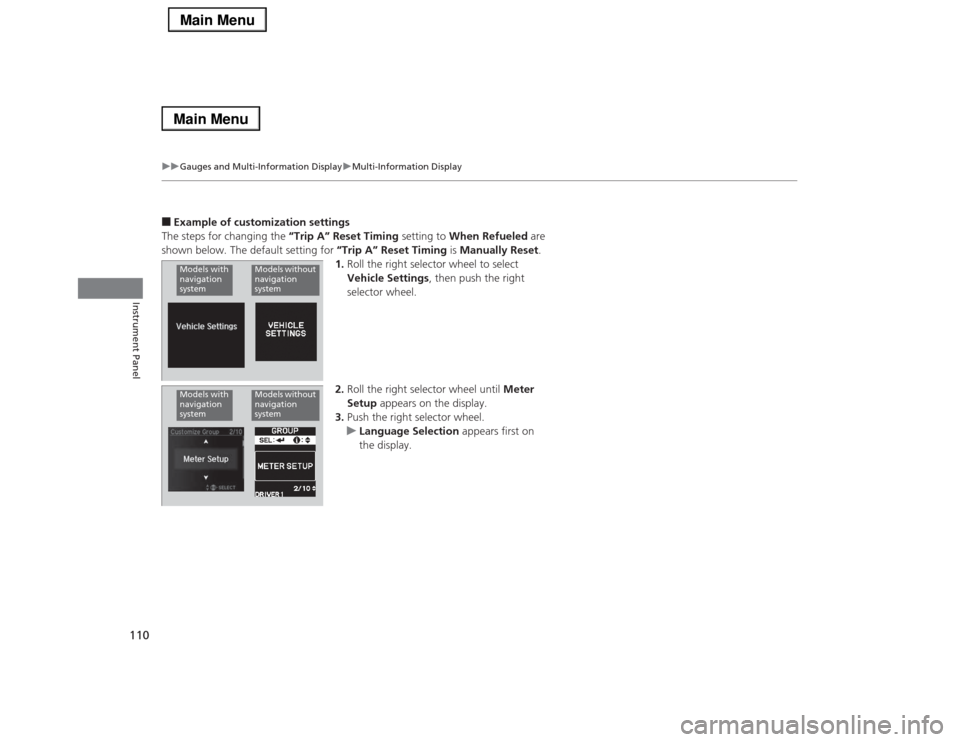
■Example of customization settings
The steps for changing the “Trip A” Reset Timing setting to When Refueled are
shown below. The default setting for “Trip A” Reset Timing is Manually Reset.
1.Roll the right selector wheel to select
Vehicle Settings, then push the right
selector wheel.
2.Roll the right selector wheel until Meter
Setup appears on the display.
3.Push the right selector wheel.
uLanguage Selection appears first on
the display.Models with
navigation
system
Models without
navigation
system
Models with
navigation
system
Models without
navigation
system
Page 112 of 518
111
uuGauges and Multi-Information DisplayuMulti-Information Display
Instrument Panel
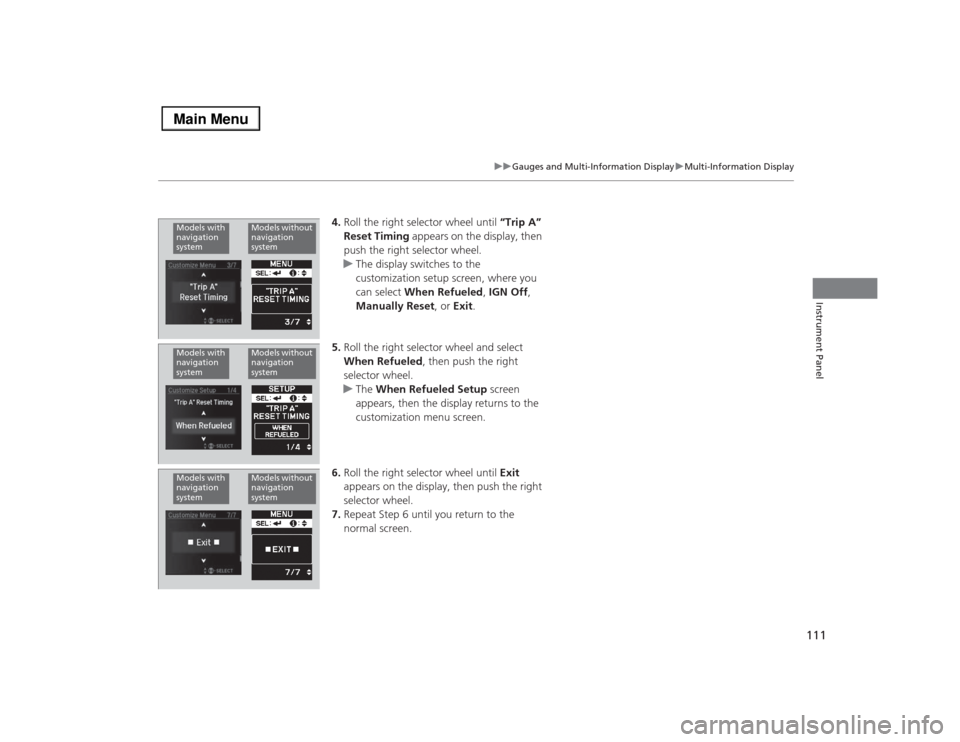
4.Roll the right selector wheel until “Trip A”
Reset Timing appears on the display, then
push the right selector wheel.
uThe display switches to the
customization setup screen, where you
can select When Refueled, IGN Off,
Manually Reset, or Exit.
5.Roll the right selector wheel and select
When Refueled, then push the right
selector wheel.
uThe When Refueled Setup screen
appears, then the display returns to the
customization menu screen.
6.Roll the right selector wheel until Exit
appears on the display, then push the right
selector wheel.
7.Repeat Step 6 until you return to the
normal screen.
Models with
navigation
system
Models without
navigation
system
Models with
navigation
system
Models without
navigation
system
Models with
navigation
system
Models without
navigation
system
Page 205 of 518
204
uuAudio System Basic OperationuAudio/Information Screen
Features
■Audio
Shows the current audio information.■Navigation
*
Shows the navigation screen.
2 Refer to the Navigation System Manual
■Phone
Shows the HFL information.
2 Bluetooth® HandsFreeLink® P. 287
■Info
Shows the Trip Computer or Clock/Wallpaper and other information. Rotate
to select an item, then press .■Trip computer (Current Drive)
Shows the range, and instant and average fuel economy of the current trip, as well
as the average fuel economy from your last trip.■Trip computer (History of Trip A)
Shows the range, average fuel economy and distances traveled for the current trip, as well
as the average fuel economy and distances traveled during the last three driving cycles.
Each time you reset the trip meter A, the information on the display updates. The
history of the previous three driving cycles is kept.■Deleting the history manually
1.Move on the History of Trip A screen to select Delete History, then press .
2.You will receive a confirmation message on the screen. Rotate to select Yes,
then press .■Clock/Wallpaper
Shows a clock screen or an image you import.* Not available on all models
Page 276 of 518
275
uuCustomized Featuresu
Continued
Features
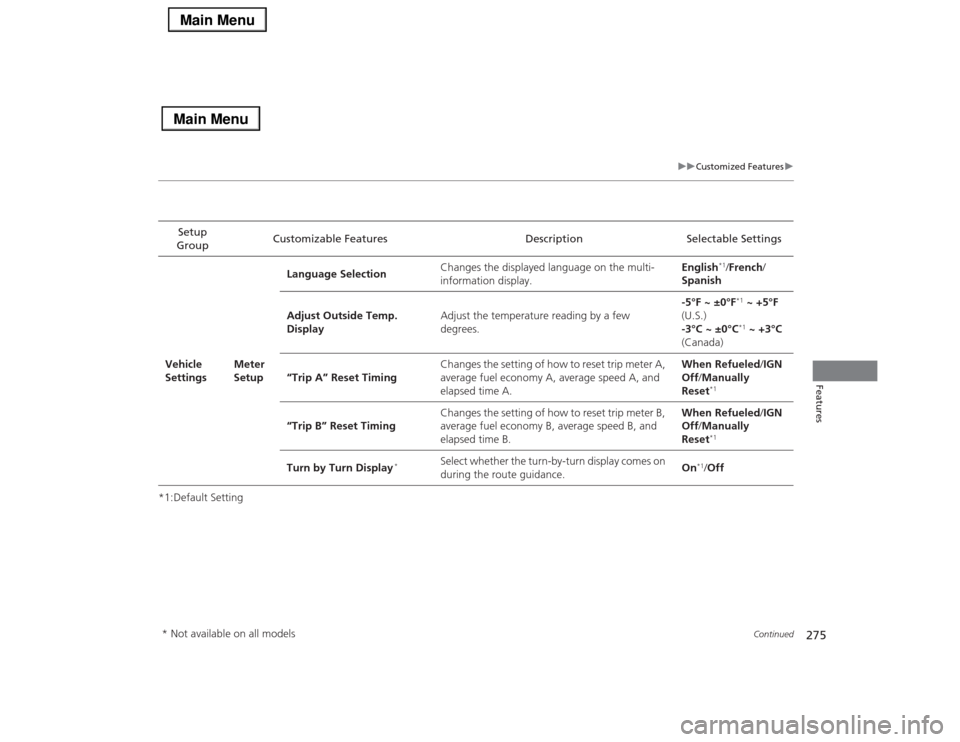
*1:Default SettingSetup
GroupCustomizable Features Description Selectable Settings
Vehicle
SettingsMeter
SetupLanguage SelectionChanges the displayed language on the multi-
information display.English
*1/French/
Spanish
Adjust Outside Temp.
DisplayAdjust the temperature reading by a few
degrees.-5°F ~ ±0°F*1 ~ +5°F
(U.S.)
-3°C ~ ±0°C*1 ~ +3°C
(Canada)
“Trip A” Reset TimingChanges the setting of how to reset trip meter A,
average fuel economy A, average speed A, and
elapsed time A.When Refueled/IGN
Off/Manually
Reset
*1
“Trip B” Reset TimingChanges the setting of how to reset trip meter B,
average fuel economy B, average speed B, and
elapsed time B.When Refueled/IGN
Off/Manually
Reset
*1
Turn by Turn Display
*
Select whether the turn-by-turn display comes on
during the route guidance.On
*1/Off
* Not available on all models
Page 336 of 518
335
Driving
This chapter discusses driving, refueling, and information on items such as accessories.
Before Driving
Driving Preparation .......................... 336
Maximum Load Limit........................ 339
Towing a Trailer
Towing Your Vehicle ........................ 341
When Driving
Starting the Engine .......................... 342
Precautions While Driving................. 345
Automatic Transmission ................... 346
Shifting ............................................ 347
SPORT Mode.................................... 351
Cruise Control
*................................ 352
Adaptive Cruise Control (ACC) with Low
Speed Follow (LSF)
*........................ 355
Forward Collision Warning (FCW)
*... 364Lane Departure Warning (LDW) ....... 367
Lane Keeping Assist System (LKAS)
*.... 370
Vehicle Stability Assist (VSA
®), aka Electronic
Stability Control (ESC), System ............... 375
Agile Handling Assist System............ 377
Precision All Wheel Steer System ...... 377Blind Spot Information (BSI) System
*.... 378
Tire Pressure Monitoring System (TPMS) ... 380Tire Pressure Monitoring System (TPMS) -
Required Federal Explanation ......... 382
Braking
Brake System ................................... 384
Anti-lock Brake System (ABS) ........... 389
Brake Assist System.......................... 390Collision Mitigation Braking System
TM
(CMBS
TM)*..................................... 391
Parking Your Vehicle
When Stopped ................................ 397
Parking Sensor System
*................... 398
Multi-View Rear Camera.................. 402
Refueling
Fuel Information .............................. 403
How to Refuel ................................. 404
Fuel Economy.................................... 405
Improving Fuel Economy .................. 405
Accessories and Modifications
Accessories ...................................... 406
Modifications................................... 406
* Not available on all models
Page 343 of 518
342Driving
When DrivingStarting the Engine
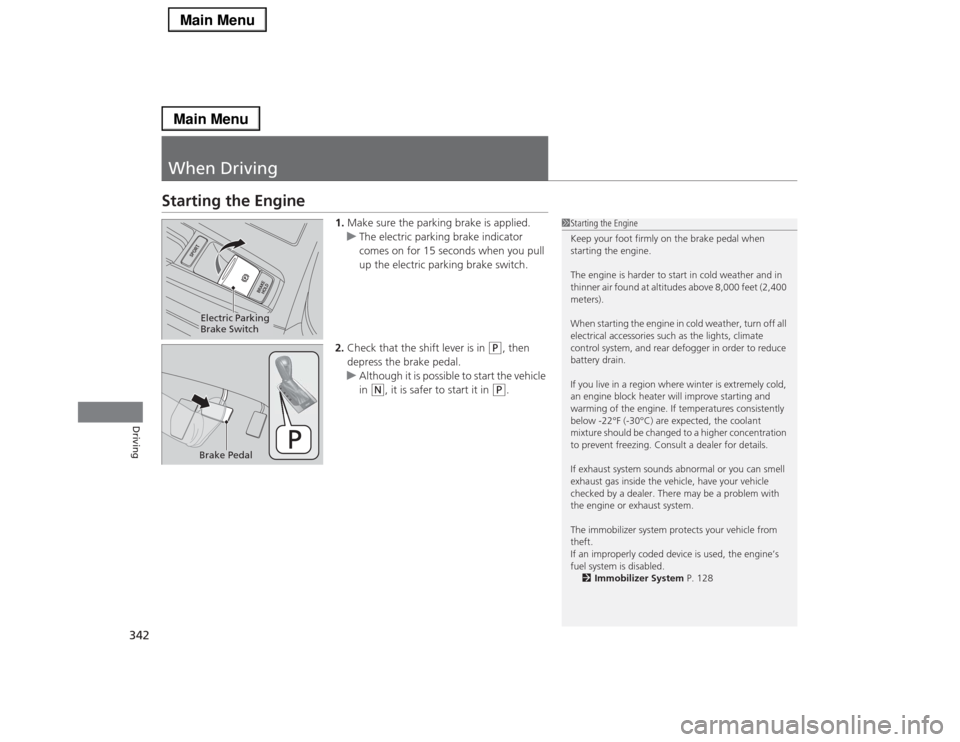
1.Make sure the parking brake is applied.
uThe electric parking brake indicator
comes on for 15 seconds when you pull
up the electric parking brake switch.
2.Check that the shift lever is in
(P
, then
depress the brake pedal.
uAlthough it is possible to start the vehicle
in
(N
, it is safer to start it in
(P
.
1Starting the Engine
Keep your foot firmly on the brake pedal when
starting the engine.
The engine is harder to start in cold weather and in
thinner air found at altitudes above 8,000 feet (2,400
meters).
When starting the engine in cold weather, turn off all
electrical accessories such as the lights, climate
control system, and rear defogger in order to reduce
battery drain.
If you live in a region where winter is extremely cold,
an engine block heater will improve starting and
warming of the engine. If temperatures consistently
below -22°F (-30°C) are expected, the coolant
mixture should be changed to a higher concentration
to prevent freezing. Consult a dealer for details.
If exhaust system sounds abnormal or you can smell
exhaust gas inside the vehicle, have your vehicle
checked by a dealer. There may be a problem with
the engine or exhaust system.
The immobilizer system protects your vehicle from
theft.
If an improperly coded device is used, the engine’s
fuel system is disabled.
2Immobilizer System P. 128
Electric Parking
Brake SwitchBrake Pedal
Page 349 of 518

uuWhen DrivinguShifting
348Driving
■
Shift Lever Operation
1Shift Lever OperationNOTICEWhen you change the shift lever from
(D to
(R and
vice versa, come to a complete stop and keep the
brake pedal depressed.
Operating the shift lever before the vehicle has come
to a complete standstill can damage the transmission.
Use the shift lever position indicator to check the
lever position before pulling away.
If the transmission indicator blinks when driving, in
any shift position, there is a problem with the
transmission.
Avoid sudden acceleration and have the transmission
checked by a dealer as soon as possible.
The fuel supply may be cut off if you drive at engine
speeds in or over the tachometer’s red zone (engine
speed limit). If this happens, you may experience a
slight jolt.
When the engine speed is increased while the shift
lever is in
(N, (P or
(R, the fuel supply may be cut
off even without the engine speed entering the
tachometer’s red zone.
It may not be possible to operate the shift lever if the
brake pedal is applied while the shift lever release
button is held down.
Depress the brake pedal first.
Shift Lever Position Indicator
Depress the brake pedal
and press the shift lever
release button to shift.
Shift without pressing the
shift lever release button. Press the shift lever
release button and
shift.Tachometer’s red zone
Models without
navigation
system