hood Acura RLX 2014 User Guide
[x] Cancel search | Manufacturer: ACURA, Model Year: 2014, Model line: RLX, Model: Acura RLX 2014Pages: 518, PDF Size: 15.83 MB
Page 130 of 518
129
uuSecurity SystemuSecurity System Alarm
Controls
■Setting the security system alarm
The security system alarm automatically sets when the following conditions have
been met:
•The power mode is set to VEHICLE OFF (LOCK).
•The hood and trunk are closed.
•All doors are locked from outside with the key, remote transmitter or keyless
access system.■When the security system alarm sets
The security system indicator in the instrument panel blinks. When the blinking
interval changes after about 15 seconds, the security system is set.■To cancel the security system alarm
The security system is canceled when the vehicle is unlocked using the key or remote
transmitter, or you grab either front door
* or any door
* handle while carrying the
keyless access remote, or the power mode is set to ON. The security system indicator
goes off at the same time.
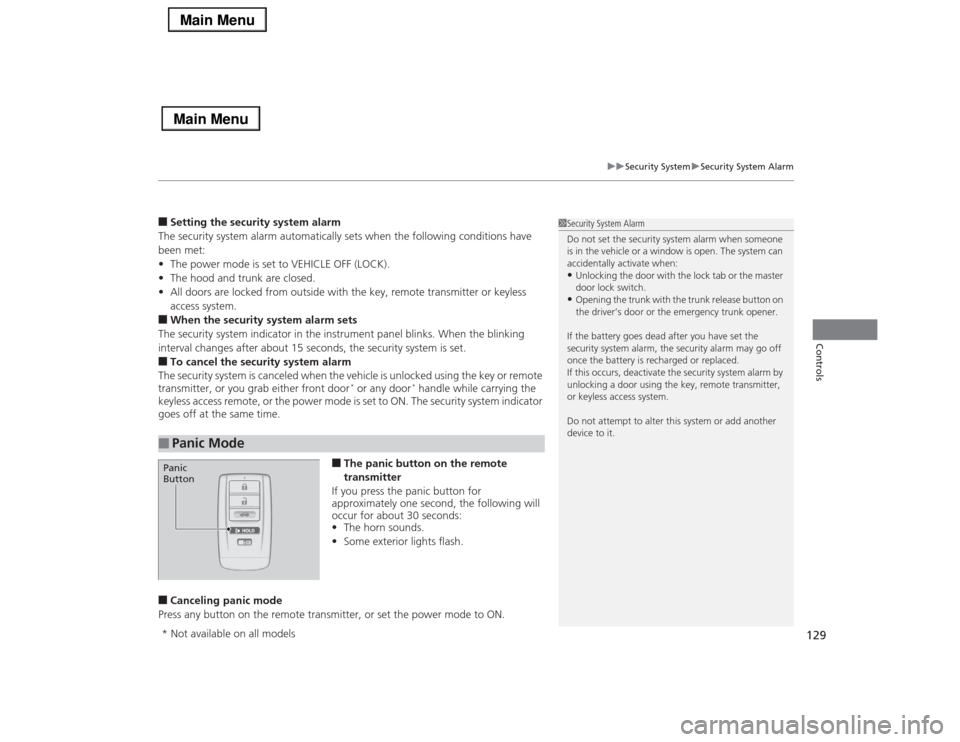
■The panic button on the remote
transmitter
If you press the panic button for
approximately one second, the following will
occur for about 30 seconds:
•The horn sounds.
•Some exterior lights flash.
■Canceling panic mode
Press any button on the remote transmitter, or set the power mode to ON.■
Panic Mode
1Security System Alarm
Do not set the security system alarm when someone
is in the vehicle or a window is open. The system can
accidentally activate when:•Unlocking the door with the lock tab or the master
door lock switch.•Opening the trunk with the trunk release button on
the driver’s door or the emergency trunk opener.
If the battery goes dead after you have set the
security system alarm, the security alarm may go off
once the battery is recharged or replaced.
If this occurs, deactivate the security system alarm by
unlocking a door using the key, remote transmitter,
or keyless access system.
Do not attempt to alter this system or add another
device to it.
Panic
Button* Not available on all models
Page 156 of 518
Continued
155
uuAdjusting the SeatsuAdjusting the Seat Positions
Controls
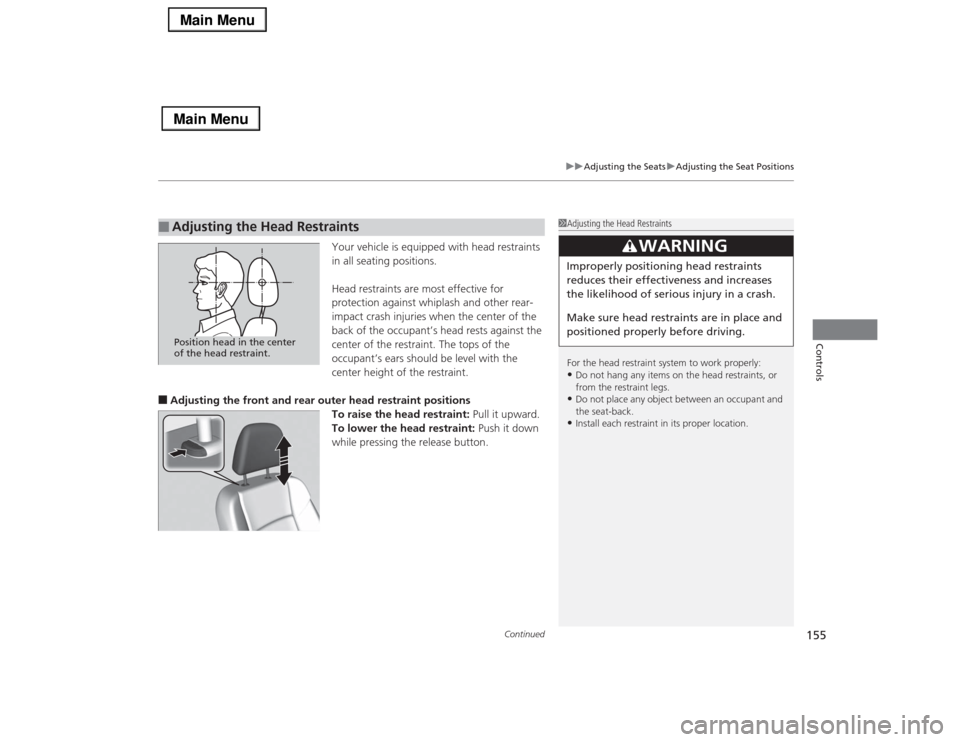
Your vehicle is equipped with head restraints
in all seating positions.
Head restraints are most effective for
protection against whiplash and other rear-
impact crash injuries when the center of the
back of the occupant’s head rests against the
center of the restraint. The tops of the
occupant’s ears should be level with the
center height of the restraint.
■Adjusting the front and rear outer head restraint positions
To raise the head restraint: Pull it upward.
To lower the head restraint: Push it down
while pressing the release button.■
Adjusting the Head Restraints
1Adjusting the Head Restraints
For the head restraint system to work properly:•Do not hang any items on the head restraints, or
from the restraint legs.•Do not place any object between an occupant and
the seat-back.•Install each restraint in its proper location.
3
WARNING
Improperly positioning head restraints
reduces their effectiveness and increases
the likelihood of serious injury in a crash.
Make sure head restraints are in place and
positioned properly before driving.
Position head in the center
of the head restraint.
Page 337 of 518

336Driving
Before DrivingDriving PreparationCheck the following items before you start driving.
•Make sure there are no obstructions on the windows, door mirrors, exterior
lights, or other parts of the vehicle.
uRemove any frost, snow, or ice.
uRemove any snow on the roof, as this can slip down and obstruct your field of
vision while driving. If frozen solid, remove ice once it has softened.
uWhen removing ice from around the wheels, be sure not to damage the wheel
or wheel components.
•Make sure the hood is securely closed.
uIf the hood opens while driving, your front view will be blocked.
•Make sure the tires are in good condition.
uCheck air pressures, and check for damage and excessive wear.
2Checking and Maintaining Tires P. 437
•Make sure there are no people or objects behind or around the vehicle.
uThere are blind spots from the inside.■
Exterior Checks
1Exterior ChecksNOTICEWhen doors are frozen shut, use warm water around
the door edges to melt any ice. Do not try to force
them open, as this can damage the rubber trim
around the doors. When done, wipe dry to avoid
further freezing.
Do not pour warm water into the key cylinder.
You will be unable to insert key if the water freezes in
the hole.
Heat from the engine and exhaust can ignite
flammable materials left under the hood, causing a
fire. If you’ve parked your vehicle for an extended
period, inspect and remove any debris that may have
collected, such as dried grass and leaves that have
fallen or have been carried in for use as a nest by a
small animal.
Also check under the hood for leftover flammable
materials after you or someone else has performed
maintenance on your vehicle.
Page 366 of 518

Continued
365
uuWhen DrivinguForward Collision Warning (FCW)
*
Driving
■Automatic shutoff
FCW may automatically shut itself off and the FCW indicator comes and stays on when:
•The temperature inside the system is high.
•The windshield is blocked by dirt, mud, leaves, wet snow, etc.
Once the conditions that caused FCW to shut off improve or are addressed (e.g.,
cleaning), the system comes back on.
1Forward Collision Warning (FCW)
*
Never apply a film or attach any objects to the
windshield that could obstruct the FCW camera’s
field of vision.
Scratches, nicks, and other damage to the windshield
within the FCW camera’s field of vision can cause the
system to operate abnormally. If this occurs, we
recommend that you replace the windshield with a
genuine Acura replacement windshield. Making even
minor repairs within the camera’s field of vision or
installing an aftermarket replacement windshield
may also cause the system to operate abnormally.
After replacing the windshield, have a dealer
recalibrate the camera. Proper calibration of the FCW
camera is necessary for the system to operate
properly.
BeepThe camera is located
behind the rearview mirror.
The beeper sounds and the BRAKE message
appears in the multi-information display until
a possible collision is avoided.
Models with
navigation system
Models without
navigation system
1Automatic shutoff
To help reduce the likelihood that high interior
temperatures will cause the camera system to shut off,
when parking, find a shady area or face the front of the
vehicle away from the sun. Also, do not use a reflective
sun shade that can concentrate heat on the camera.
If the Can Not Operate: Camera Too Hot/CAN
NOT OPERATE message appears:•Use the climate control system to cool down the
interior and, if necessary, the defroster mode when
windows are fogged.•Start driving the vehicle to lower the windshield
temperature, which cools down the area around
the FCW camera.
* Not available on all models
Page 369 of 518

uuWhen DrivinguLane Departure Warning (LDW)
368Driving
The camera is located behind the rearview
mirror.
Press the LDW button to turn the system on
and off.
uThe indicator in the button comes on
when the system is on.
■
LDW Camera
1LDW Camera
Never apply a film or attach any objects to the
windshield that could obstruct the LDW camera’s
field of vision.
Scratches, nicks, and other damage to the windshield
within the LDW camera’s field of vision can cause the
system to operate abnormally. If this occurs, we
recommend that you replace the windshield with a
genuine Acura replacement windshield. Making even
minor repairs within the camera’s field of vision or
installing an aftermarket replacement windshield
may also cause the system to operate abnormally.
After replacing the windshield, have a dealer
recalibrate the camera. Proper calibration of the LDW
camera is necessary for the system to operate properly.
Do not place an object on the top of the instrument
panel. It may reflect onto the windshield and prevent
the system from detecting lane lines properly.
To help reduce the likelihood that high interior
temperatures will cause the camera system to shut off,
when parking, find a shady area or face the front of the
vehicle away from the sun. Also, do not use a reflective
sun shade that can concentrate heat on the camera.
If the Can Not Operate: Camera Too Hot/CAN
NOT OPERATE message appears:•Use the climate control system to cool down the
interior and, if necessary, the defroster mode when
windows are fogged.•Start driving the vehicle to lower the windshield
temperature, which cools down the area around
the LDW camera.
LDW Camera■
LDW On and Off
LDW Button Indicator
Page 408 of 518
407
Maintenance
This chapter discusses basic maintenance.
Before Performing Maintenance
Inspection and Maintenance ............ 408Safety When Performing Maintenance..... 409Parts and Fluids Used in Maintenance
Service ........................................... 410
Maintenance Minder
TM..................... 411
Maintenance Under the Hood
Maintenance Items Under the Hood ..... 416Opening the Hood ........................... 417
Engine Compartment Cover ............. 418
Recommended Engine Oil ................ 419
Oil Check ......................................... 420
Adding Engine Oil ............................ 421
Changing the Engine Oil and Oil Filter ..... 422Engine Coolant ................................ 424
Transmission Fluid ............................ 426
Brake Fluid ....................................... 427
Refilling Window Washer Fluid......... 427
Replacing Light Bulbs....................... 428Checking and Maintaining Wiper
Blades.......................................... 434Checking and Maintaining Tires
Checking Tires ................................. 437Tire and Loading Information Label ...... 438Tire Labeling .................................... 438DOT Tire Quality Grading (U.S. Vehicles)....... 440
Wear Indicators ............................... 442
Tire Service Life ................................ 442
Tire and Wheel Replacement ........... 443
Tire Rotation .................................... 444
Winter Tires ..................................... 445
Battery............................................... 446
Remote Transmitter Care
Replacing the Button Battery ........... 447Climate Control System Maintenance
.... 448
Cleaning
Interior Care .................................... 449
Exterior Care.................................... 451
Page 410 of 518

409
uuBefore Performing MaintenanceuSafety When Performing Maintenance
Maintenance
Safety When Performing MaintenanceSome of the most important safety precautions are given here.
However, we cannot warn you of every conceivable hazard that can arise in
performing maintenance. Only you can decide whether or not you should perform
a given task.
•To reduce the possibility of fire or explosion, keep cigarettes, sparks, and flames
away from the battery and all fuel related parts.
•Never leave rags, towels, or other flammable objects under the hood.
uHeat from the engine and exhaust can ignite them causing a fire.
•To clean parts, use a commercially available degreaser or parts cleaner, not
gasoline.
•Wear eye protection and protective clothing when working with the battery or
compressed air.
•Engine exhaust contains carbon monoxide, which is poisonous and can kill you.
uOperate the engine only when there is sufficient ventilation.
•The vehicle must be in a stationary condition.
uMake sure your vehicle is parked on level ground, the parking brake is set, and
the engine is off.
•Be aware that hot parts can burn you.
uMake sure to let the engine and exhaust system cool thoroughly before
touching vehicle parts.
•Be aware that moving parts can injure you.
uDo not start the engine unless instructed, and keep your hands and limbs away
from moving parts.■
Maintenance Safety
■
Vehicle Safety
1Safety When Performing Maintenance
3
WARNING
Improperly maintaining this vehicle or
failing to correct a problem before driving
can cause a crash in which you can be
seriously hurt or killed.
Always follow the inspection and
maintenance recommendations according
to the schedules in this owner’s manual.
3
WARNING
Failure to properly follow maintenance
instructions and precautions can cause you
to be seriously hurt or killed.
Always follow the procedures and
precautions in this owner’s manual.
Page 417 of 518
416Maintenance
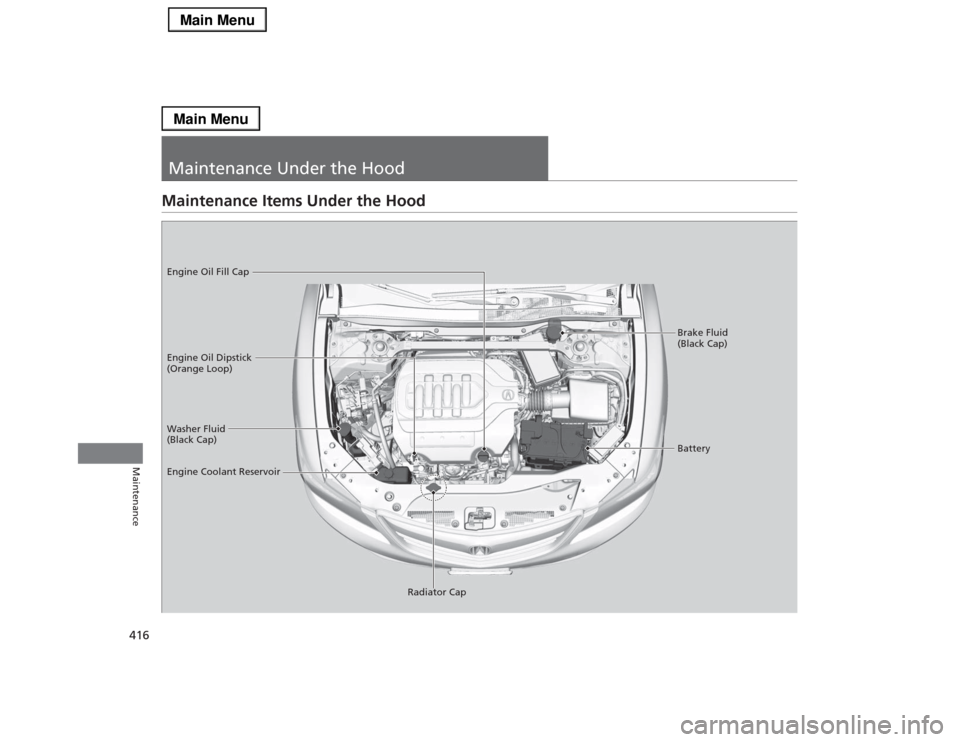
Maintenance Under the HoodMaintenance Items Under the Hood
Brake Fluid
(Black Cap)
Washer Fluid
(Black Cap) Engine Oil Dipstick
(Orange Loop) Engine Oil Fill Cap
Battery
Engine Coolant Reservoir
Radiator Cap
Page 418 of 518

417
uuMaintenance Under the HooduOpening the Hood
Maintenance
Opening the Hood
1.Park the vehicle on a level surface, and set
the parking brake.
2.Pull the hood release handle under the
lower left corner of the dashboard.
uThe hood will pop up slightly.
3.Push up the hood latch lever in the center
of the hood to release the lock mechanism,
and open the hood.
4.Lift the hood up most of the way.
uThe hydraulic supports will lift it up the
rest of the way and hold it up.
When closing, lower it to approximately 12
inches (30 cm), then press down firmly with
your hands.
1Opening the HoodNOTICEDo not open the hood when the wiper arms are
raised.
The hood will strike the wipers, and may damage
either the hood or the wipers.
When closing the hood, check that the hood is
securely latched.
If the hood latch lever moves stiffly, or if you can
open the hood without lifting the lever, the latch
mechanism should be cleaned and lubricated.
Pull
Hood Release Handle
Lever
Page 419 of 518
418
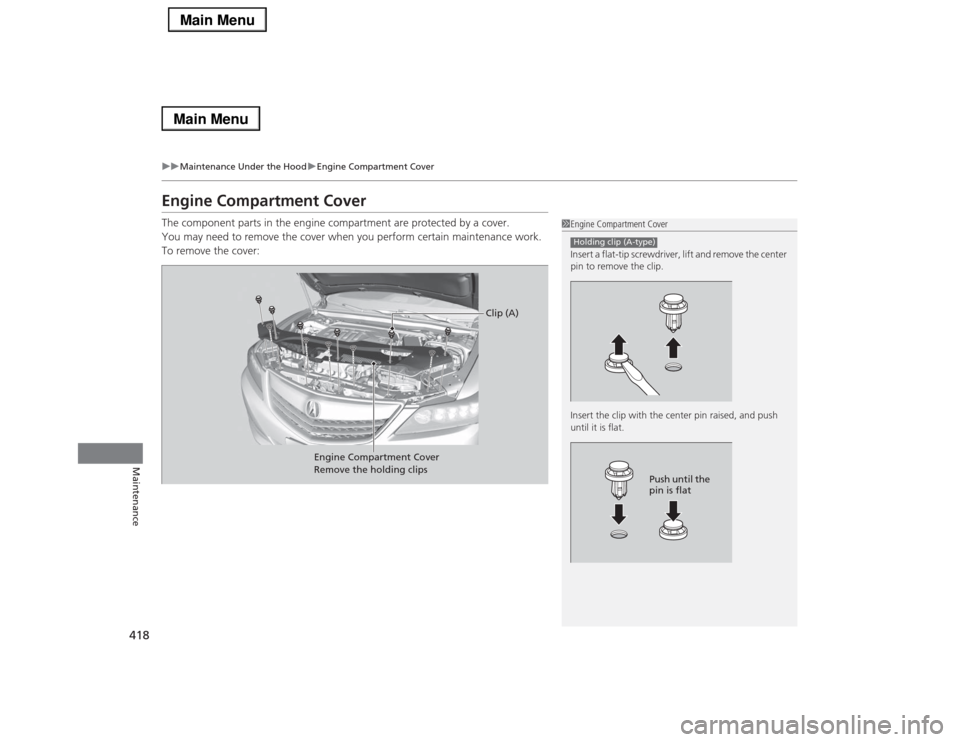
uuMaintenance Under the HooduEngine Compartment Cover
Maintenance
Engine Compartment CoverThe component parts in the engine compartment are protected by a cover.
You may need to remove the cover when you perform certain maintenance work.
To remove the cover:
1Engine Compartment Cover
Insert a flat-tip screwdriver, lift and remove the center
pin to remove the clip.
Insert the clip with the center pin raised, and push
until it is flat.Holding clip (A-type)
Push until the
pin is flat
Engine Compartment Cover
Remove the holding clips
Clip (A)