phone Acura RLX 2014 User Guide
[x] Cancel search | Manufacturer: ACURA, Model Year: 2014, Model line: RLX, Model: Acura RLX 2014Pages: 518, PDF Size: 15.83 MB
Page 204 of 518
203
uuAudio System Basic OperationuAudio/Information Screen
Continued
Features
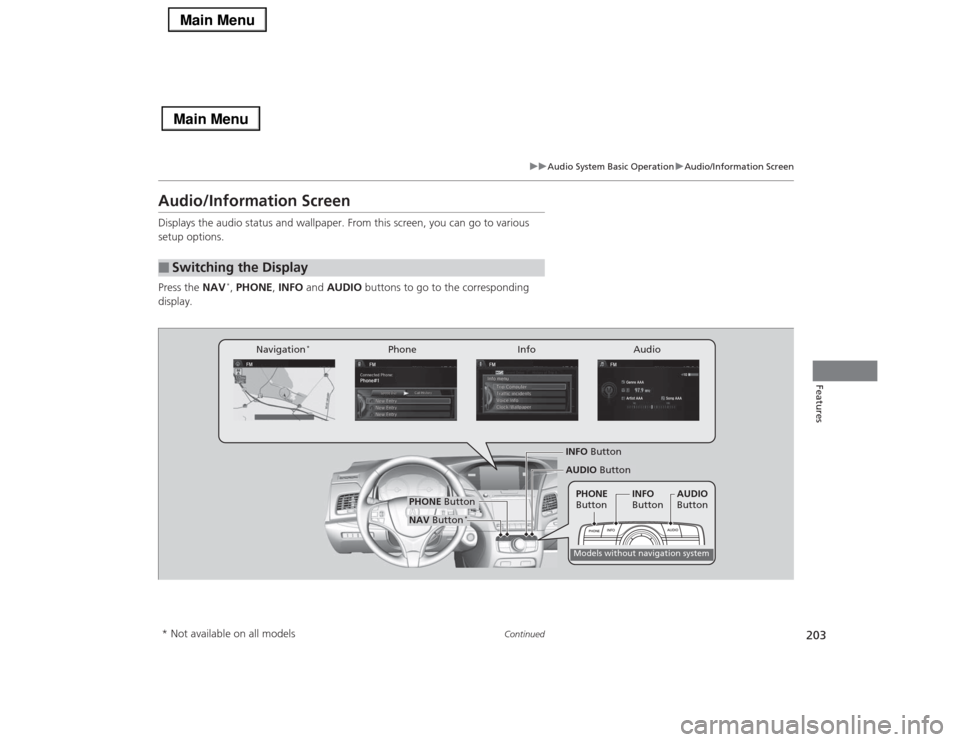
Audio/Information ScreenDisplays the audio status and wallpaper. From this screen, you can go to various
setup options.
Press the NAV
*, PHONE, INFO and AUDIO buttons to go to the corresponding
display.
■
Switching the Display
Audio Info Navigation
*
Phone
AUDIO Button
NAV Button
*
PHONE Button
INFO ButtonModels without navigation systemPHONE
ButtonINFO
ButtonAUDIO
Button
* Not available on all models
Page 205 of 518
204
uuAudio System Basic OperationuAudio/Information Screen
Features
■Audio
Shows the current audio information.■Navigation
*
Shows the navigation screen.
2 Refer to the Navigation System Manual
■Phone
Shows the HFL information.
2 Bluetooth® HandsFreeLink® P. 287
■Info
Shows the Trip Computer or Clock/Wallpaper and other information. Rotate
to select an item, then press .■Trip computer (Current Drive)
Shows the range, and instant and average fuel economy of the current trip, as well
as the average fuel economy from your last trip.■Trip computer (History of Trip A)
Shows the range, average fuel economy and distances traveled for the current trip, as well
as the average fuel economy and distances traveled during the last three driving cycles.
Each time you reset the trip meter A, the information on the display updates. The
history of the previous three driving cycles is kept.■Deleting the history manually
1.Move on the History of Trip A screen to select Delete History, then press .
2.You will receive a confirmation message on the screen. Rotate to select Yes,
then press .■Clock/Wallpaper
Shows a clock screen or an image you import.* Not available on all models
Page 210 of 518
209
uuAudio System Basic OperationuVoice Control Operation
Continued
Features
Voice Control OperationYour vehicle has a voice control system that allows hands-free operation of most of
the navigation
*/audio system functions.
The voice control system uses the (Talk) and (hang-up/back) buttons on the
steering wheel and a microphone near the map lights on the ceiling.
To achieve optimum voice recognition when using the voice control system:
•Make sure the correct screen is displayed for the voice command that you are
using.
•Close the windows and moonroof.
•Adjust the dashboard and side vents so air does not blow onto the microphone
on the ceiling.
•Speak clearly in a clear, natural speaking voice without pausing between words.
•Reduce any background noise if possible. The system may misinterpret your
command if more than one person is speaking at the same time.
•Refer to the Voice Help feature.
2Refer to the Navigation System Manual
*
■
Voice Recognition
1Voice Control Operation
When you press the button, a helpful prompt asks
what you would like to do. Press and release the
button again to bypass this prompt and give a
command.1Voice Recognition
The voice control system can only be used from the
driver’s seat because the microphone unit removes
noises from the front passenger’s side.
* Not available on all models
Page 211 of 518
210
uuAudio System Basic OperationuVoice Control Operation
Features
The system accepts these commands on the
Voice Portal screen.
•Call Your contact name
•Call Phone Number
•Find nearest POI category name
*
•Go home
*
•Route menu
*
•Cancel route
*
The system accepts these commands on any
screen.
•Call by number
•Call by name
Contacts that are imported from your
phone to the vehicle are all made available
by voice. Voice Tags can also be recorded
for each of your Speed Dial entries.■
Voice Portal Commands
■
Phone Commands
2Refer to the Navigation System ManualThe system accepts these commands on any
screen.
•Trip computer
•Traffic information
*
•Display clock
•Display wallpaper■
Navigation Commands
*
■
Info Commands
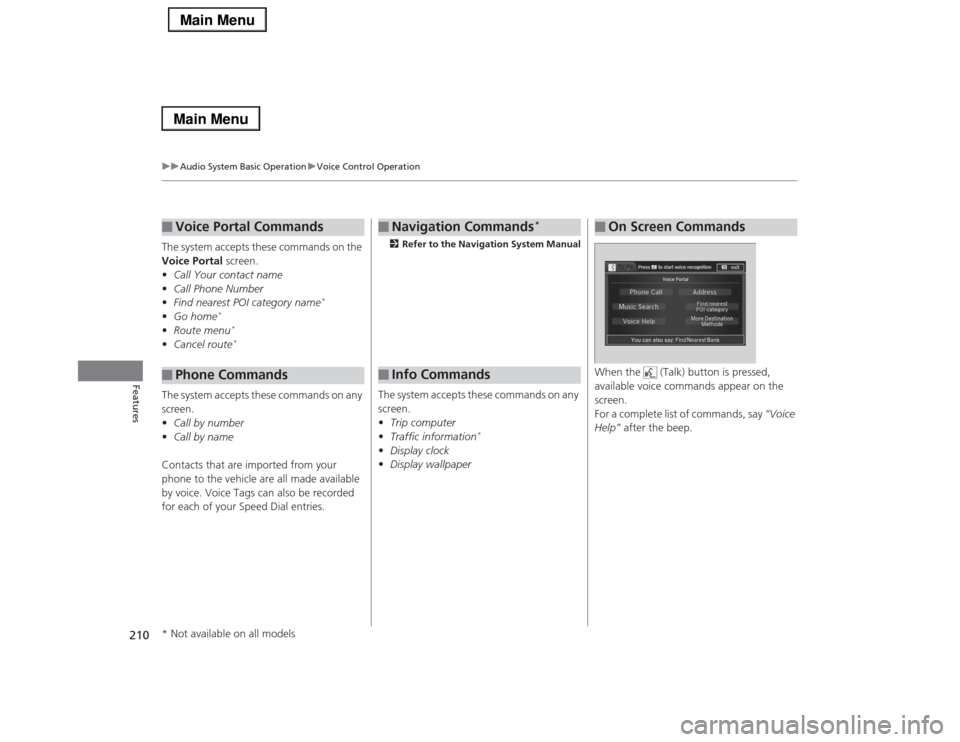
When the (Talk) button is pressed,
available voice commands appear on the
screen.
For a complete list of commands, say “Voice
Help” after the beep.■
On Screen Commands
* Not available on all models
Page 214 of 518
213
uuAudio System Basic OperationuVoice Control Operation
Continued
Features
■iPod® commands
•iPod play
•iPod play track # (#: 1 to 30)
•iPod skip forward
•iPod skip back
•iPod track shuffle
*1
•iPod album shuffle
*1
•iPod track repeat
*1
•iPod normal play
•What am I listening to?
•Who am I listening to?
•Who is this?
•What’s playing?
•Who’s playing?
•What album is this?
*1: These commands toggle the function
on and off, so the command may not match
your intended action.
■USB commands
•USB play
•USB play track # (#: 1 to 30)
•USB skip forward
•USB skip back
•USB track random
*1
•USB track repeat
*1
•USB track scan
*1
•USB folder up
•USB folder down
•USB folder random
*1
•USB folder repeat
*1
•USB folder scan
*1
•USB normal play
*1: These commands toggle the function
on and off, so the command may not match
your intended action.
■Bluetooth® Audio commands
•Bluetooth Audio play
•Bluetooth Audio skip forward
•Bluetooth Audio skip back
•Bluetooth Audio group up
•Bluetooth Audio group down
•Bluetooth Audio pause
•Bluetooth Audio resume
•Bluetooth Audio track random
•Bluetooth Audio track repeat
NOTE:
Bluetooth® Audio commands may not work
on some phones or Bluetooth® Audio
devices.■AUX commands
•Auxiliary play
Page 218 of 518
217
uuAudio System Basic OperationuPlaying AM/FM Radio
Continued
Features
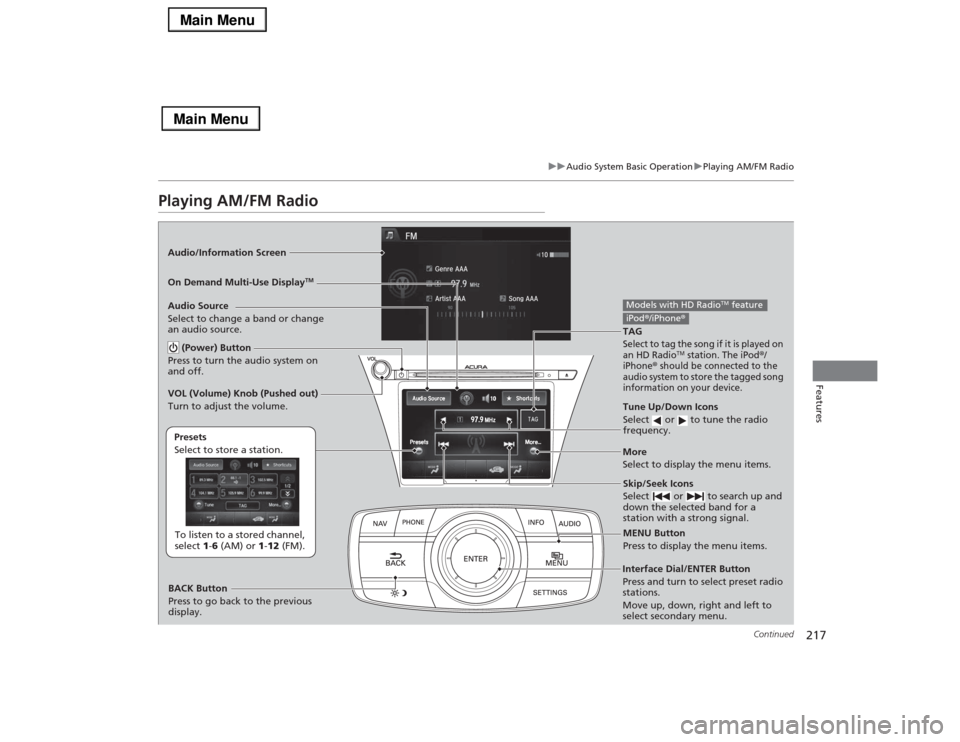
Playing AM/FM RadioAudio/Information Screen
On Demand Multi-Use Display
TM
Tune Up/Down Icons
Select or to tune the radio
frequency.MENU Button
Press to display the menu items.
(Power) Button
Press to turn the audio system on
and off.Audio Source
Select to change a band or change
an audio source.To listen to a stored channel,
select 1-6 (AM) or 1-12 (FM). Presets
Select to store a station.
Skip/Seek Icons
Select or to search up and
down the selected band for a
station with a strong signal.
More
Select to display the menu items.
BACK Button
Press to go back to the previous
display. VOL (Volume) Knob (Pushed out)
Turn to adjust the volume.Interface Dial/ENTER Button
Press and turn to select preset radio
stations.
Move up, down, right and left to
select secondary menu.TAGSelect to tag the song if it is played on
an HD Radio
TM station. The iPod
®/
iPhone
® should be connected to the
audio system to store the tagged song
information on your device.
Models with HD Radio
TM feature
iPod®/iPhone®
Page 219 of 518
uuAudio System Basic OperationuPlaying AM/FM Radio
218Features
To store a station:
1.Tune to the selected station.
2.Press the MENU button.
3.Rotate to select Save Preset, then press .
4.Rotate to select the preset number you want to store that station, then press
.
You can also store that station by the following procedure.
1.Tune to the selected station.
2.Rotate to select the preset number you want to store the station.
3.Press and hold for a few seconds.
1.Tune to the selected station.
2.Select More.
3.Select Save Preset.
4.Select the preset number you want to store that station.
You can also store that station by the following procedure.
1.Tune to the selected station.
2.Change the display to the preset screen.
3.Select and hold the preset number you want to store that station.■
Preset Memory
1Playing AM/FM Radio
You can control the AM/FM radio using voice
commands.
2Voice Control Operation P. 209
The ST indicator appears on the display indicating
stereo FM broadcasts.
Stereo reproduction in AM is not available.
Switching the Audio Mode
Press the SOURCE button on the steering wheel.
2Audio Remote Controls P. 192
You can also switch the mode by pressing the MENU
button and selecting Change Source on the Audio
menu screen.
You can store 6 AM stations and 12 FM stations into
the preset memory.
iTunes Tagging“iTunes” in “iTunes Tagging” is a trademark of Apple Inc.When an HD Radio
TM station is selected, the HD
indicator appears on the audio/information screen
and On Demand Multi-Use Display
TM.
If you want to have the information on the song
played from the HD Radio
TM station, select TAG in On
Demand Multi-Use DisplayTM or select Tag Song in
the menu with Interface dial.
If iPod®/iPhone® is connected, the tag is transferred to
the connected device immediately, otherwise the tag
will be transferred when the device will be connected
and select Tag Song in the menu with Interface dial.
Models with HD Radio
TM feature
Interface DialOn Demand Multi-Use Display
TM
Page 221 of 518

uuAudio System Basic OperationuPlaying AM/FM Radio
220Features
■Radio text
Display the radio text information of the selected RDS station.
1.Press the MENU button.
2.Rotate to select Radio Text, then press .■Scan
Samples each of the strongest stations on the selected band for 10 seconds.
1.Press the MENU button.
2.Rotate to select Scan, then press .
To turn off scan, press to select Cancel Scan, or press the BACK button.
1.Select More.
2.Select Scan.
To turn off scan, select Cancel Scan.■Tag song to device
You can store the TAG information in the connected iPod®/iPhone®.
If the iPod®/iPhone® is not connected to the audio system, the information is stored
in the audio unit temporarily, then once the device is connected to the system, data
is transferred to the iPod®/iPhone®.
To store the TAG information to the iPod®/iPhone®, or the audio system:
1.Press the MENU button.
2.Rotate to select Tag Song, then press .
3.Select the song you want to save the information.
1Radio text
The text indicator comes on when you received a text
message. The indicator stays on until you read the
message.
Interface DialOn Demand Multi-Use Display
TM
Models with HD Radio
TM feature
Page 244 of 518
Continued
243
uuAudio System Basic OperationuSong By Voice
TM (SBV)
Features
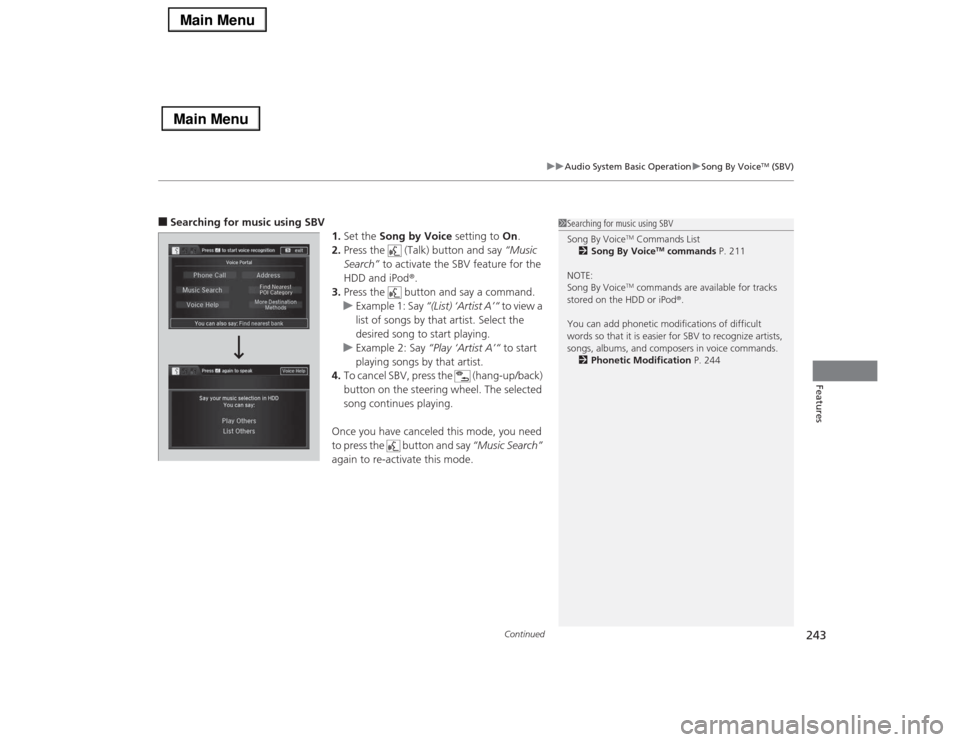
■Searching for music using SBV
1.Set the Song by Voice setting to On.
2.Press the (Talk) button and say “Music
Search” to activate the SBV feature for the
HDD and iPod®.
3.Press the button and say a command.
uExample 1: Say “(List) ‘Artist A’“ to view a
list of songs by that artist. Select the
desired song to start playing.
uExample 2: Say “Play ‘Artist A’“ to start
playing songs by that artist.
4.To cancel SBV, press the (hang-up/back)
button on the steering wheel. The selected
song continues playing.
Once you have canceled this mode, you need
to press the button and say “Music Search”
again to re-activate this mode.
1Searching for music using SBV
Song By Voice
TM Commands List
2Song By Voice
TM commands P. 211
NOTE:
Song By Voice
TM commands are available for tracks
stored on the HDD or iPod®.
You can add phonetic modifications of difficult
words so that it is easier for SBV to recognize artists,
songs, albums, and composers in voice commands.
2Phonetic Modification P. 244
Page 245 of 518
uuAudio System Basic OperationuSong By Voice
TM (SBV)
244Features
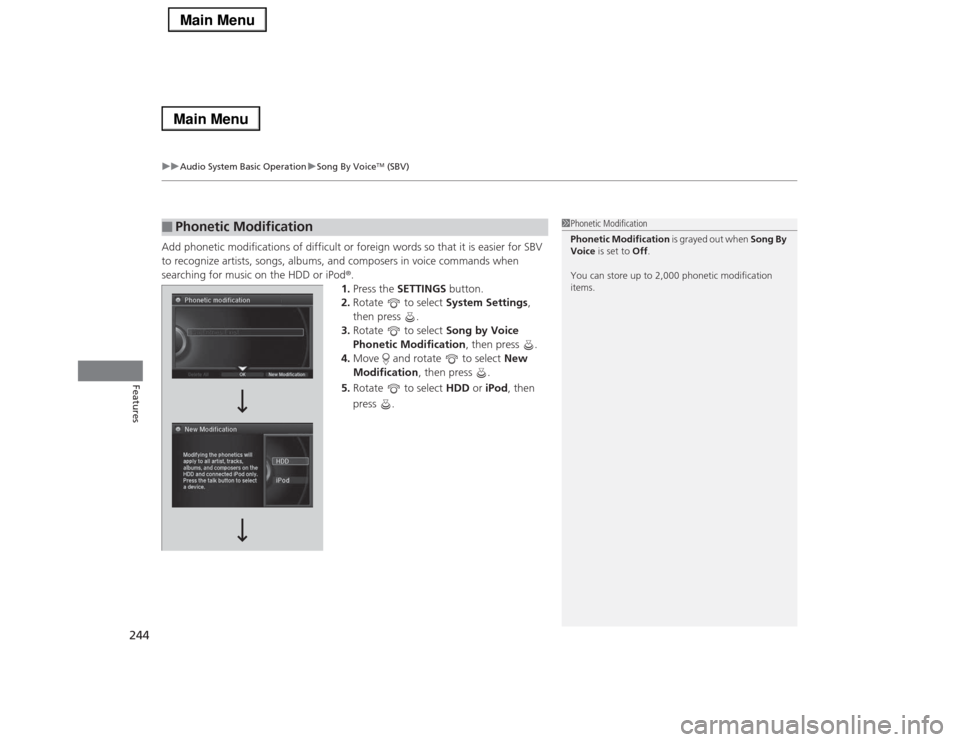
Add phonetic modifications of difficult or foreign words so that it is easier for SBV
to recognize artists, songs, albums, and composers in voice commands when
searching for music on the HDD or iPod®.
1.Press the SETTINGS button.
2.Rotate to select System Settings,
then press .
3.Rotate to select Song by Voice
Phonetic Modification, then press .
4.Move and rotate to select New
Modification, then press .
5.Rotate to select HDD or iPod, then
press .■
Phonetic Modification
1Phonetic Modification
Phonetic Modification is grayed out when Song By
Voice is set to Off.
You can store up to 2,000 phonetic modification
items.