wipers Acura RLX 2014 User Guide
[x] Cancel search | Manufacturer: ACURA, Model Year: 2014, Model line: RLX, Model: Acura RLX 2014Pages: 518, PDF Size: 15.83 MB
Page 278 of 518

277
uuCustomized Featuresu
Continued
Features
*1:Default SettingSetup
GroupCustomizable Features Description Selectable Settings
Vehicle
SettingsDoor
SetupAuto Door LockChanges the setting for the automatic locking
feature.With Vehicle Speed
*1/
Shift from P/Off
Auto Door UnlockChanges the setting for when the doors unlock
automatically.All Doors When
Driver’s Door Opens*1/
All Doors When
Shifted to Park/All
Doors When Ignition
Switched Off/Off
Key And Remote Unlock
ModeSets up either the driver’s door or all doors to
unlock on the first push of the remote.Driver Door
*1/All
Doors
Keyless Lock Answer BackLOCK/UNLOCK- The exterior lights flash.
LOCK (2nd push)- The beeper sounds.On
*1/Off
Security Relock TimerChanges the time it takes for the doors to relock
and the security system to set after you unlock
the vehicle without opening any door.90seconds/
60seconds/
30seconds
*1
Auto Folding Door Mirror
*
Changes how you can fold the door mirrors.
Auto Fold With
Keyless
*1/Manual Only
Wiper
SetupWiper Action
*
Changes the setting for the automatic
intermittent wipers in the AUTO position.Rain Sensing
*1/
Intermittent/Speed
Sensitive
Front Wiper Action
*
Changes the setting for the wipers in the INT
position.Speed Sensitive
*1/
Intermittent
* Not available on all models
Page 372 of 518
Continued
371
uuWhen DrivinguLane Keeping Assist System (LKAS)
*
Driving
The system can be used when the following conditions are met.
•The lane you are driving has detectable lane markers on both sides, and your
vehicle is in the center of the lane.
•The vehicle speed is between 45 – 90 mph (72 – 145 km/h).
•You are driving on a straight or slightly curved road.
•The turn signals are off.
•The brake pedal is not depressed.
•The wipers are not in continuous operation.■How to activate the system
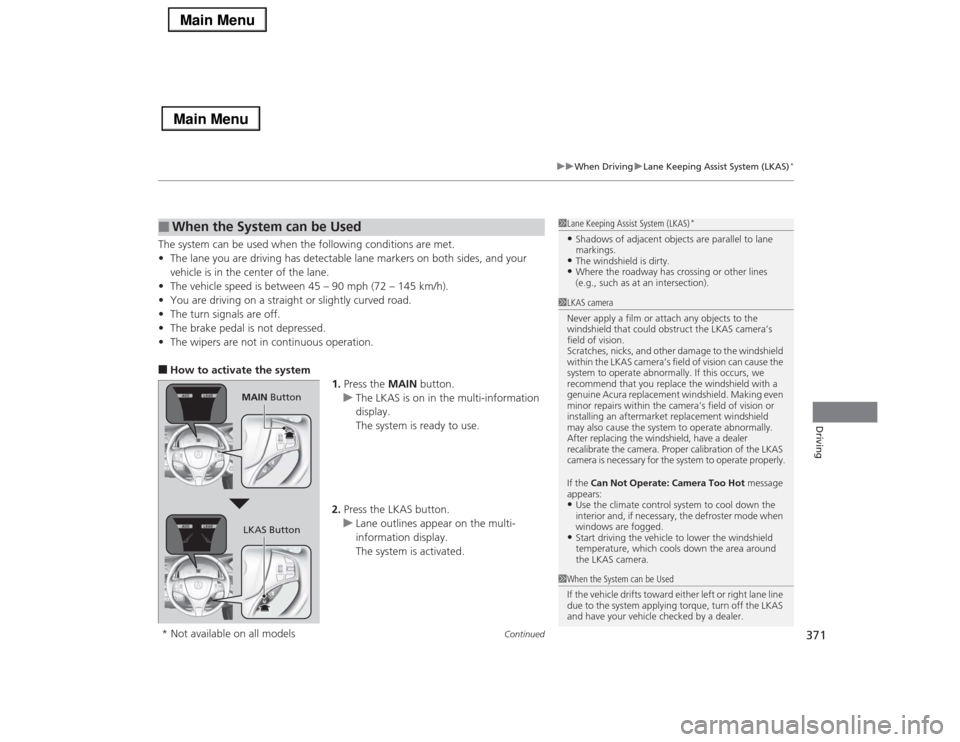
1.Press the MAIN button.
uThe LKAS is on in the multi-information
display.
The system is ready to use.
2.Press the LKAS button.
uLane outlines appear on the multi-
information display.
The system is activated.■
When the System can be Used
1Lane Keeping Assist System (LKAS)
*
•Shadows of adjacent objects are parallel to lane
markings.•The windshield is dirty.•Where the roadway has crossing or other lines
(e.g., such as at an intersection).
1LKAS camera
Never apply a film or attach any objects to the
windshield that could obstruct the LKAS camera’s
field of vision.
Scratches, nicks, and other damage to the windshield
within the LKAS camera’s field of vision can cause the
system to operate abnormally. If this occurs, we
recommend that you replace the windshield with a
genuine Acura replacement windshield. Making even
minor repairs within the camera’s field of vision or
installing an aftermarket replacement windshield
may also cause the system to operate abnormally.
After replacing the windshield, have a dealer
recalibrate the camera. Proper calibration of the LKAS
camera is necessary for the system to operate properly.
If the Can Not Operate: Camera Too Hot message
appears:•Use the climate control system to cool down the
interior and, if necessary, the defroster mode when
windows are fogged.•Start driving the vehicle to lower the windshield
temperature, which cools down the area around
the LKAS camera.
1When the System can be Used
If the vehicle drifts toward either left or right lane line
due to the system applying torque, turn off the LKAS
and have your vehicle checked by a dealer.
MAIN Button
LKAS Button
* Not available on all models
Page 374 of 518

373
uuWhen DrivinguLane Keeping Assist System (LKAS)
*
Continued
Driving
■The system operation is suspended if
you:
•Set the wipers to continuous operation.
uTurning the wipers off resumes the
LKAS.
•Decrease the vehicle speed to 40 mph (64
km/h) or less.
uIncreasing the vehicle speed to 45 mph
(72 km/h) or more resumes the LKAS.
•Depress the brake pedal.
uThe LKAS resumes and starts detecting
the lane lines again once you release the
brake pedal.
■The LKAS may automatically be suspended when:
•The system fails to detect lane lines.
•The steering wheel is quickly turned.
•You fail to steer the vehicle.
•The vehicle runs on a curved road over the speed limit.
•The camera temperature gets extremely high or low.
Once these conditions no longer exist, the LKAS automatically resumes.When the LKAS is suspended,
the lane lines on the multi-
information display change to
contour lines, and the beeper
sounds.
Page 418 of 518

417
uuMaintenance Under the HooduOpening the Hood
Maintenance
Opening the Hood
1.Park the vehicle on a level surface, and set
the parking brake.
2.Pull the hood release handle under the
lower left corner of the dashboard.
uThe hood will pop up slightly.
3.Push up the hood latch lever in the center
of the hood to release the lock mechanism,
and open the hood.
4.Lift the hood up most of the way.
uThe hydraulic supports will lift it up the
rest of the way and hold it up.
When closing, lower it to approximately 12
inches (30 cm), then press down firmly with
your hands.
1Opening the HoodNOTICEDo not open the hood when the wiper arms are
raised.
The hood will strike the wipers, and may damage
either the hood or the wipers.
When closing the hood, check that the hood is
securely latched.
If the hood latch lever moves stiffly, or if you can
open the hood without lifting the lever, the latch
mechanism should be cleaned and lubricated.
Pull
Hood Release Handle
Lever
Page 452 of 518

451
uuCleaninguExterior Care
Continued
Maintenance
Exterior CareDust off the vehicle body after you drive.
Regularly inspect your vehicle for scratches on painted surfaces. A scratch on a
painted surface can result in body rust. If you find a scratch, promptly repair it.
Wash the vehicle regularly. Wash more frequently when driving in the following
conditions:
•If driving on roads with road salt.
•If driving in coastal areas.
•If tar, soot, bird droppings, insects, or tree sap are stuck to painted surfaces.
•Make sure to follow the instructions indicated on the automated car wash.
•Fold in the door mirrors.
•Turn off the automatic intermittent wipers
*.
•Keep sufficient distance between the cleaning nozzle and the vehicle body.
•Take particular care around the windows. Standing too close may cause water to
enter the vehicle interior. Do not spray water into the engine compartment.
■
Washing the Vehicle
■
Using an Automated Car Wash
■
Using High Pressure Cleaners
1Washing the Vehicle
Do not spray water into the air intake vents or engine
compartment. It can cause a malfunction.
Air Intake Vents
* Not available on all models
Page 518 of 518
517Index
Tools......................................................... 454
Towing a Trailer....................................... 341
Towing Your Vehicle............................... 341
Emergency .............................................. 490
TPMS (Tire Pressure Monitoring
System).................................................... 380
Transmission....................................... 15, 347
Automatic................................. 15, 346, 347
Fluid ....................................................... 426
Number .................................................. 498
Sequential Shift Mode............................. 349
Shift Lever Position Indicator ............. 72, 348
TRIP Button.......................................... 96, 98
Trip Meter.................................................. 99
Troubleshooting...................................... 453
Blown Fuse ............................. 485, 487, 488
Brake Pedal Vibrates ................................. 19
Buzzer Sounds When Opening Door ......... 20
Emergency Towing ................................. 490
Engine Won’t Start ................................. 472
Flat Tire/Puncture .................................... 455
Noise When Braking ................................. 20
Overheating ............................................ 479
Premium Gasoline ........................... 403, 496
Rear Door Won’t Open ..................... 19, 123
Select Lever Won’t Move ........................ 478
Warning Indicators.................................... 68
Trunk........................................................ 125
Lid .......................................................... 125
Light Bulbs .............................................. 496
Release Handle ....................................... 492Unable to Open ....................................... 492
Trunk Pass-through Cover........................ 170
Turn Signals.............................................. 136
Indicators (Instrument Panel) ...................... 77
Turn-by-Turn Directions........................... 100
UUnlocking the Doors................................ 117
Unlocking the Front Doors from
the Inside........................................... 10, 121
USB Flash Drives........................................ 263
USB Port.................................................... 189
Using the Keyless Access System.............. 118VValet Mode............................................... 162
Vanity Mirrors............................................... 5
Vehicle Identification Number................ 498
Vehicle Stability Assist (VSA®).................. 375
Off Button ............................................... 376
Off Indicator ...................................... 75, 376
System Indicator ................................ 75, 375
Viscosity (Oil).................................... 419, 497
VSA® (Vehicle Stability Assist).................. 375WWarning and Information Messages......... 84
Warning Indicator On/Blinking............... 481
Warning Labels........................................... 65Warranties (Warranty Manual provided
separately).............................................. 503
Watts......................................................... 496
Wear Indicators (Tire).............................. 442
Wheel Nut Wrench (Jack Handle)........... 469
Window Washers..................................... 141
Adding/Refilling Fluid .............................. 427
Switch ..................................................... 141
Windows (Opening and Closing)............ 130
Windshield
Cleaning ................................................. 452
Defrosting/Defogging .............................. 183
Washer Fluid ........................................... 427
Wiper Blades ........................................... 434
Wipers and Washers................................ 141
Winter Tires.............................................. 445
Snow Tires .............................................. 445
Tire Chains .............................................. 445
Wipers and Washers................................. 141
Checking and Replacing Wiper Blades ..... 434
WMA................................................. 225, 249
Worn Tires................................................ 437
XXM® Radio................................................ 222