brake light Acura RLX 2014 Owner's Guide
[x] Cancel search | Manufacturer: ACURA, Model Year: 2014, Model line: RLX, Model: Acura RLX 2014Pages: 518, PDF Size: 15.83 MB
Page 388 of 518

Continued
387
uuBrakinguBrake System
Driving
Keeps the brake applied after releasing the brake pedal until the accelerator pedal is
pressed. You can use this system while the vehicle is temporarily stopped, such as
when you stop at a traffic light.■
Automatic Brake Hold
1Automatic Brake Hold
3
WARNING
Activating the automatic brake hold system
on steep hills or slippery roads may still
allow the vehicle to move if you remove
your foot from the brake pedal.
If a vehicle unexpectedly moves, it may
cause a crash resulting in serious injury or
death.
Never activate the automatic brake hold
system or rely on it to keep a vehicle from
moving when stopped on a steep hill or
slippery roads.
3
WARNING
Using the automatic brake hold system to
park the vehicle may result in the vehicle
unexpectedly moving.
If a vehicle moves unexpectedly, it may
cause a crash, resulting in serious injury or
death.
Never leave the vehicle when braking is
temporarily kept by automatic brake hold
and always park the vehicle by putting the
transmission in
(P and applying the
parking brake.
■Turning on the system
Fasten your seat belt
properly, then start the
engine. Press the
automatic brake hold
button.●The automatic brake
hold system indicator
comes on. The system
is turned on.
■Activating the system
Depress the brake pedal
to come to a complete
stop. The shift lever must
be in
(D or
(N.
●The automatic brake
hold indicator comes
on. Braking is kept for
up to 10 minutes.●Release the brake
pedal after the
automatic brake hold
indicator comes on.
■Canceling the system
Depress the accelerator
pedal while the shift
lever is in
(D or
(R. The
system is canceled and
the vehicle starts to
move.
●The automatic brake
hold indicator goes
off. The system
continues to be on.Accelerator Pedal
Brake Pedal
Automatic Brake
Hold Button
Goes
Off On OnOn
On
On U.S.
Canada
Page 390 of 518

389
uuBrakinguAnti-lock Brake System (ABS)
Driving
Anti-lock Brake System (ABS)Helps prevent the wheels from locking up, and helps you retain steering control by
pumping the brakes rapidly, much faster than you.
The electronic brake distribution (EBD) system, which is part of the ABS, also
balances the front-to-rear braking distribution according to vehicle loading.
You should never pump the brake pedal. Let the ABS work for you by always
keeping firm, steady pressure on the brake pedal. This is sometimes referred to as
“stomp and steer.”■ABS operation
The brake pedal may pulsate slightly when the ABS is working. Keep holding the
pedal firmly down. On dry pavement, you will need to press on the brake pedal very
hard before the ABS activates. However, you may feel the ABS activate immediately
if you are trying to stop on snow or ice.
When the vehicle speed goes under 6 mph (10 km/h), the ABS stops.■
ABS
1Anti-lock Brake System (ABS)NOTICEThe ABS may not function correctly if you use an
incorrect tire type and size.
When the ABS indicator comes on while driving,
there may be a problem with the system.
While normal braking is not affected, there is a
possibility of the ABS not operating. Have the vehicle
checked by a dealer immediately.
The ABS does not reduce the time or distance it takes
to stop the vehicle. It only helps with steering control
during hard braking.
In the following cases, your vehicle may need more
stopping distance than a vehicle without the ABS:•When driving on rough road surfaces, including
when driving on uneven surfaces, such as gravel or
snow.•When tire chains are installed.
You may hear a motor sound coming from the
engine compartment while system checks are being
performed immediately after starting the engine or
while driving. This is normal.
Page 391 of 518
390
uuBrakinguBrake Assist System
Driving
Brake Assist SystemDesigned to assist the driver by generating greater braking force when you depress
the brake pedal hard during emergency braking.■Brake assist system operation
Press the brake pedal firmly for more powerful braking.
When brake assist operates, the pedal may wiggle slightly and an operating noise
may be heard. This is normal. Keep holding the brake pedal firmly down.■
Brake Assist System
Page 393 of 518
uuBrakinguCollision Mitigation Braking System
TM (CMBS
TM)*
392Driving
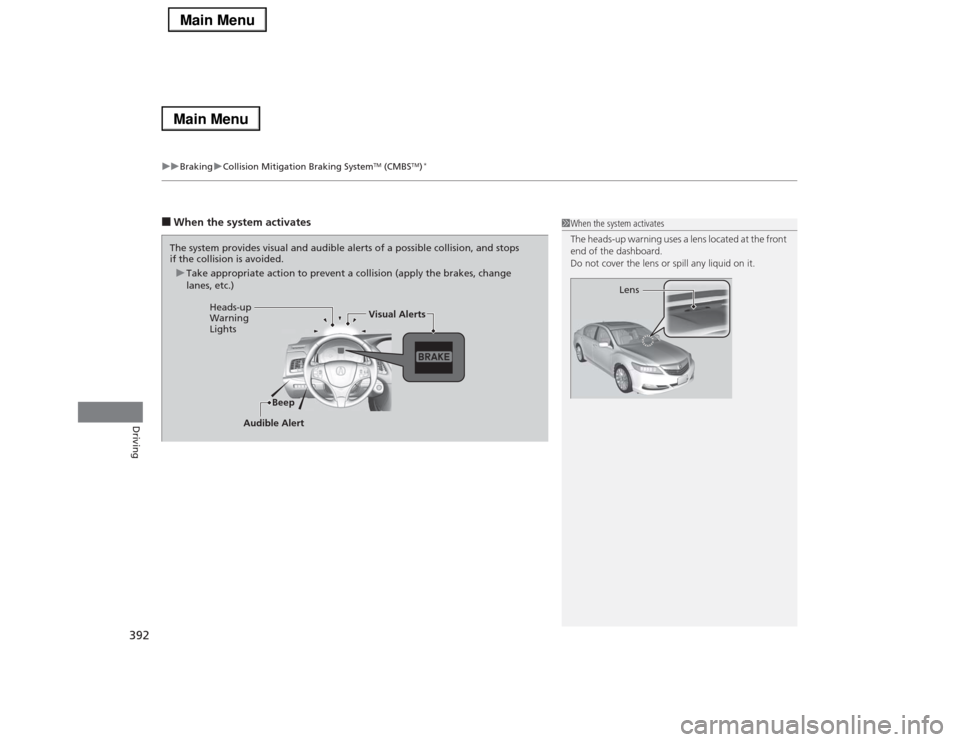
■When the system activates
1When the system activates
The heads-up warning uses a lens located at the front
end of the dashboard.
Do not cover the lens or spill any liquid on it.
Lens
The system provides visual and audible alerts of a possible collision, and stops
if the collision is avoided.
uTake appropriate action to prevent a collision (apply the brakes, change
lanes, etc.)
Beep Heads-up
Warning
LightsVisual Alerts
Audible Alert
Page 408 of 518
407
Maintenance
This chapter discusses basic maintenance.
Before Performing Maintenance
Inspection and Maintenance ............ 408Safety When Performing Maintenance..... 409Parts and Fluids Used in Maintenance
Service ........................................... 410
Maintenance Minder
TM..................... 411
Maintenance Under the Hood
Maintenance Items Under the Hood ..... 416Opening the Hood ........................... 417
Engine Compartment Cover ............. 418
Recommended Engine Oil ................ 419
Oil Check ......................................... 420
Adding Engine Oil ............................ 421
Changing the Engine Oil and Oil Filter ..... 422Engine Coolant ................................ 424
Transmission Fluid ............................ 426
Brake Fluid ....................................... 427
Refilling Window Washer Fluid......... 427
Replacing Light Bulbs....................... 428Checking and Maintaining Wiper
Blades.......................................... 434Checking and Maintaining Tires
Checking Tires ................................. 437Tire and Loading Information Label ...... 438Tire Labeling .................................... 438DOT Tire Quality Grading (U.S. Vehicles)....... 440
Wear Indicators ............................... 442
Tire Service Life ................................ 442
Tire and Wheel Replacement ........... 443
Tire Rotation .................................... 444
Winter Tires ..................................... 445
Battery............................................... 446
Remote Transmitter Care
Replacing the Button Battery ........... 447Climate Control System Maintenance
.... 448
Cleaning
Interior Care .................................... 449
Exterior Care.................................... 451
Page 409 of 518
408Maintenance
Before Performing MaintenanceInspection and MaintenanceFor your safety, perform all listed inspections and maintenance to keep your vehicle
in good condition. If you become aware of any abnormality (noise, smell, insufficient
brake fluid, oil residue on the ground, etc.), have your vehicle inspected by a dealer.
(Note, however, that service at a dealer is not mandatory to keep your warranties in
effect.) Refer to the separate maintenance booklet for detailed maintenance and
inspection information.■Daily inspections
Perform inspections before long distance trips, when washing the vehicle, or when
refueling.■Periodic inspections
•Check the brake fluid level monthly.2Brake Fluid P. 427
•Check the tire pressure monthly. Examine the tread for wear and foreign objects.
2Checking and Maintaining Tires P. 437
•Check the operation of the exterior lights monthly.
2Replacing Light Bulbs P. 428
•Check the condition of the wiper blades at least every six months.
2Checking and Maintaining Wiper Blades P. 434
■
Types of Inspection and Maintenance
1Inspection and Maintenance
Maintenance, replacement, or repair of
emissions control devices and systems may be
done by any automotive repair establishment or
individuals using parts that are “certified” to
EPA standards.
According to state and federal regulations, failure to
perform maintenance on the maintenance main
items marked with # will not void your emissions
warranties. However, all maintenance services should
be performed in accordance with the intervals
indicated by the multi-information display.
2Maintenance Service Items P. 414
If you want to perform complex maintenance tasks
that require more skills and tools, you can purchase a
subscription to the Service Express website at
www.techinfo.honda.com.
2Authorized Manuals P. 505
If you want to perform maintenance yourself, make
sure that you have the necessary tools and skills first.
After performing maintenance, update the records in
the separate maintenance booklet.U.S. models
Page 418 of 518

417
uuMaintenance Under the HooduOpening the Hood
Maintenance
Opening the Hood
1.Park the vehicle on a level surface, and set
the parking brake.
2.Pull the hood release handle under the
lower left corner of the dashboard.
uThe hood will pop up slightly.
3.Push up the hood latch lever in the center
of the hood to release the lock mechanism,
and open the hood.
4.Lift the hood up most of the way.
uThe hydraulic supports will lift it up the
rest of the way and hold it up.
When closing, lower it to approximately 12
inches (30 cm), then press down firmly with
your hands.
1Opening the HoodNOTICEDo not open the hood when the wiper arms are
raised.
The hood will strike the wipers, and may damage
either the hood or the wipers.
When closing the hood, check that the hood is
securely latched.
If the hood latch lever moves stiffly, or if you can
open the hood without lifting the lever, the latch
mechanism should be cleaned and lubricated.
Pull
Hood Release Handle
Lever
Page 429 of 518

428Maintenance
Replacing Light BulbsHeadlight BulbsHeadlight bulbs are LED type. Have an authorized Acura dealer inspect and replace
the light assembly.
1Headlight Bulbs
The headlight aim is set by the factory, and does not
need to be adjusted. However, if you regularly carry
heavy items in the trunk, have the aiming readjusted
at a dealer or by a qualified technician.
The exterior lights’ inside lenses (headlights, brake
lamps, etc.) may fog temporarily after a car wash or
while driving in the rain. This does not impact the
exterior light function.
However, if you see a large amount of water or ice
accumulated inside the lenses, have your vehicle
inspected by a dealer.
Page 432 of 518

431
uuReplacing Light BulbsuRear Turn Signal Light Bulbs
Maintenance
Rear Turn Signal Light BulbsWhen replacing, use the following bulbs.
1.Remove the cover.
2.Turn the socket to the left and remove it,
then remove the old bulb.
3.Insert a new bulb.Brake/Taillight and Rear Side Marker Light BulbsBrake/taillight and rear side marker light bulbs are LED type. Have an authorized
Acura dealer inspect and replace the light assembly.Rear Turn Signal Light: 21 W
Cover
BulbSocket
Page 434 of 518

433
uuReplacing Light BulbsuRear License Plate Light Bulbs
Maintenance
Rear License Plate Light BulbsRear license plate light bulbs are LED type. Have an authorized Acura dealer inspect
and replace the light assembly.High-Mount Brake Light BulbsHigh-mount brake light bulbs are LED type. Have an authorized Acura dealer inspect
and replace the light assembly.Door Outer Handle Ambient Light BulbsDoor outer handle ambient light bulbs are LED type. Have an authorized Acura
dealer inspect and replace the light assembly.