trunk Acura RLX 2014 Owner's Guide
[x] Cancel search | Manufacturer: ACURA, Model Year: 2014, Model line: RLX, Model: Acura RLX 2014Pages: 518, PDF Size: 15.83 MB
Page 163 of 518
uuInterior Lights/Interior Convenience ItemsuInterior Convenience Items
162Controls
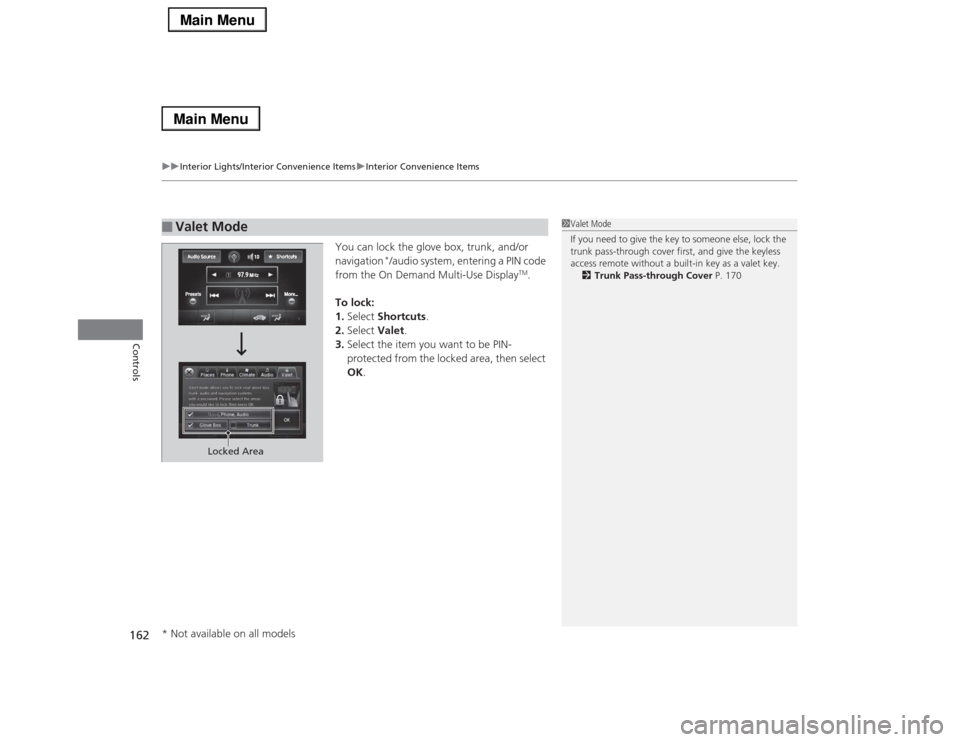
You can lock the glove box, trunk, and/or
navigation
*/audio system, entering a PIN code
from the On Demand Multi-Use Display
TM.
To lock:
1.Select Shortcuts.
2.Select Valet.
3.Select the item you want to be PIN-
protected from the locked area, then select
OK.
■
Valet Mode
1Valet Mode
If you need to give the key to someone else, lock the
trunk pass-through cover first, and give the keyless
access remote without a built-in key as a valet key.
2Trunk Pass-through Cover P. 170
Locked Area
* Not available on all models
Page 164 of 518
Continued
163
uuInterior Lights/Interior Convenience ItemsuInterior Convenience Items
Controls
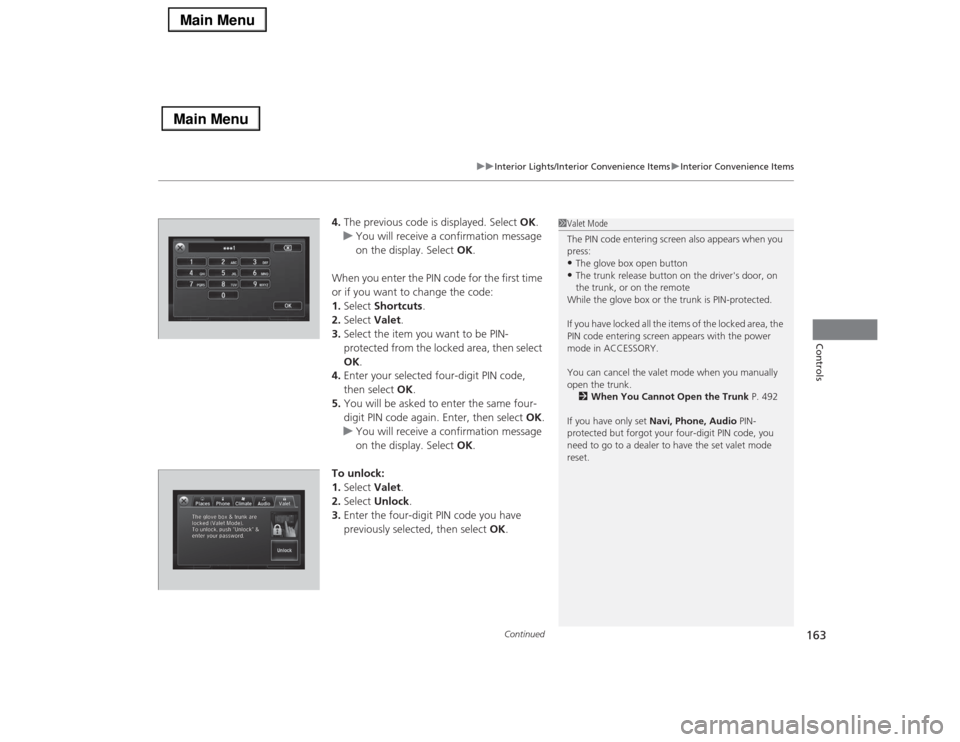
4.The previous code is displayed. Select OK.
uYou will receive a confirmation message
on the display. Select OK.
When you enter the PIN code for the first time
or if you want to change the code:
1.Select Shortcuts.
2.Select Valet.
3.Select the item you want to be PIN-
protected from the locked area, then select
OK.
4.Enter your selected four-digit PIN code,
then select OK.
5.You will be asked to enter the same four-
digit PIN code again. Enter, then select OK.
uYou will receive a confirmation message
on the display. Select OK.
To unlock:
1.Select Valet.
2.Select Unlock.
3.Enter the four-digit PIN code you have
previously selected, then select OK.
1Valet Mode
The PIN code entering screen also appears when you
press:•The glove box open button•The trunk release button on the driver's door, on
the trunk, or on the remote
While the glove box or the trunk is PIN-protected.
If you have locked all the items of the locked area, the
PIN code entering screen appears with the power
mode in ACCESSORY.
You can cancel the valet mode when you manually
open the trunk.
2When You Cannot Open the Trunk P. 492
If you have only set Navi, Phone, Audio PIN-
protected but forgot your four-digit PIN code, you
need to go to a dealer to have the set valet mode
reset.
Page 170 of 518

Continued
169
uuInterior Lights/Interior Convenience ItemsuInterior Convenience Items
Controls
The cargo hooks in the trunk can be used to
install a net for securing items.
■
Cargo Hooks
1Cargo Hooks
Distribute cargo evenly on the floor of the trunk,
placing the heaviest items on the bottom and as far
forward as possible.
2Maximum Load Limit P. 339
HookHook
Page 171 of 518

170
uuInterior Lights/Interior Convenience ItemsuInterior Convenience Items
Controls
Pull the rear seat armrest down and push the
button to open the cover.
You have access to the trunk from this
opening in the rear seat-back.
The cover latches when you push it back to
the original position.
You can lock and unlock this cover using the
built-in key.
■
Trunk Pass-through Cover
LockButton
Cover
Page 338 of 518

Continued
337
uuBefore DrivinguDriving Preparation
Driving
•Store or secure all items on board properly.
uCarrying too much cargo, or improperly storing it, can affect your vehicle’s
handling, stability, stopping distance, and tires, and make it unsafe.
2Maximum Load Limit P. 339
•Do not pile items higher than the seat height.
uThey can block your view and may be thrown forward in the event of sudden
braking.
•Do not place anything in the front seat footwells. Make sure to secure the floor
mat.
uAn object or unsecured floor mat can interfere with your brake and accelerator
pedal operation while driving.
•If you have any animals on board, do not let them move around in the vehicle.
uThey may interfere with driving and a crash could occur.
•Securely close and lock all doors and the trunk.
2Locking/Unlocking the Doors from the Inside P. 121
•Adjust your seating position properly.
uAdjust the head restraint, too.
2Adjusting the Seats P. 152
2Adjusting the Head Restraints P. 155
•Adjust the mirrors and steering wheel properly for your driving.
uAdjust them while sitting in the proper driving position.
2Adjusting the Mirrors P. 149
2Adjusting the Steering Wheel P. 148
■
Interior Checks
1Interior Checks
The headlight aim is set by the factory, and does not
need to be adjusted. However, if you regularly carry
heavy items in the trunk have the aiming readjusted
at a dealer or by a qualified technician.
Page 371 of 518
370
uuWhen DrivinguLane Keeping Assist System (LKAS)
*
Driving
Lane Keeping Assist System (LKAS)
*
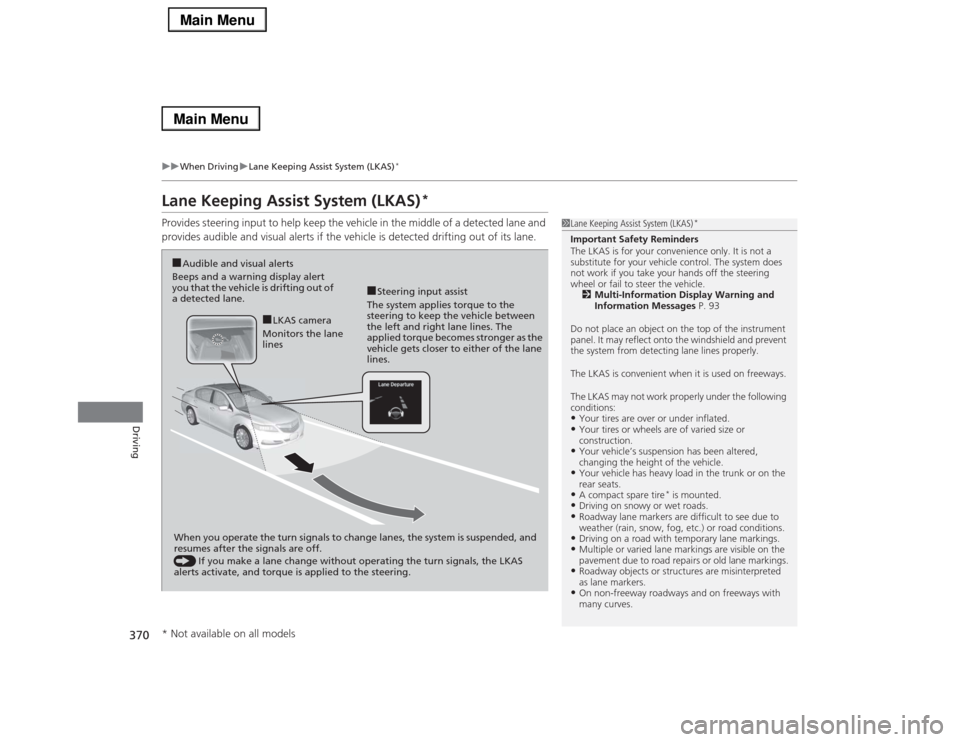
Provides steering input to help keep the vehicle in the middle of a detected lane and
provides audible and visual alerts if the vehicle is detected drifting out of its lane.
1Lane Keeping Assist System (LKAS)
*
Important Safety Reminders
The LKAS is for your convenience only. It is not a
substitute for your vehicle control. The system does
not work if you take your hands off the steering
wheel or fail to steer the vehicle.
2Multi-Information Display Warning and
Information Messages P. 93
Do not place an object on the top of the instrument
panel. It may reflect onto the windshield and prevent
the system from detecting lane lines properly.
The LKAS is convenient when it is used on freeways.
The LKAS may not work properly under the following
conditions:•Your tires are over or under inflated.•Your tires or wheels are of varied size or
construction.•Your vehicle’s suspension has been altered,
changing the height of the vehicle.•Your vehicle has heavy load in the trunk or on the
rear seats.•A compact spare tire
* is mounted.
•Driving on snowy or wet roads.•Roadway lane markers are difficult to see due to
weather (rain, snow, fog, etc.) or road conditions.•Driving on a road with temporary lane markings.•Multiple or varied lane markings are visible on the
pavement due to road repairs or old lane markings.•Roadway objects or structures are misinterpreted
as lane markers.•On non-freeway roadways and on freeways with
many curves.
■Steering input assist
The system applies torque to the
steering to keep the vehicle between
the left and right lane lines. The
applied torque becomes stronger as the
vehicle gets closer to either of the lane
lines.
■Audible and visual alerts
Beeps and a warning display alert
you that the vehicle is drifting out of
a detected lane.
When you operate the turn signals to change lanes, the system is suspended, and
resumes after the signals are off.
() If you make a lane change without operating the turn signals, the LKAS
alerts activate, and torque is applied to the steering.
■LKAS camera
Monitors the lane
lines
* Not available on all models
Page 429 of 518

428Maintenance
Replacing Light BulbsHeadlight BulbsHeadlight bulbs are LED type. Have an authorized Acura dealer inspect and replace
the light assembly.
1Headlight Bulbs
The headlight aim is set by the factory, and does not
need to be adjusted. However, if you regularly carry
heavy items in the trunk, have the aiming readjusted
at a dealer or by a qualified technician.
The exterior lights’ inside lenses (headlights, brake
lamps, etc.) may fog temporarily after a car wash or
while driving in the rain. This does not impact the
exterior light function.
However, if you see a large amount of water or ice
accumulated inside the lenses, have your vehicle
inspected by a dealer.
Page 454 of 518

453
Handling the Unexpected
This chapter explains how to handle unexpected troubles.
Tools
Types of Tools .................................. 454
If a Tire Goes Flat
Temporarily Repairing a Flat Tire....... 455
Changing a Flat Tire ......................... 466
Engine Does Not Start
Checking the Engine ........................ 472
If the Keyless Access Remote Battery is
Weak ............................................. 473
Emergency Engine Stop ................... 474
Jump Starting.................................... 475
Shift Lever Does Not Move.............. 478
Overheating
How to Handle Overheating ............. 479Indicator, Coming On/Blinking
If the Low Oil Pressure Indicator Comes
On ............................................. 481If the Charging System Indicator Comes
On ................................................. 481
If the Malfunction Indicator Lamp Comes
On or Blinks ................................... 482If the Brake System Indicator (Red) Comes On .. 482If the Electric Power Steering (EPS) System
Indicator Comes On .............................. 483
If the Electric Parking Brake System Indicator
Comes On............................................. 483
If the Low Tire Pressure/TPMS Indicator
Comes On or Blinks ....................... 484
Fuses
Fuse Locations ................................. 485
Inspecting and Changing Fuses ........ 489
Emergency Towing........................... 490
When You Cannot Unlock the Fuel Fill
Door................................................. 491When You Cannot Open the Trunk..... 492RefuelingRefueling From a Portable Fuel Container ... 493
Page 455 of 518
454Handling the Unexpected
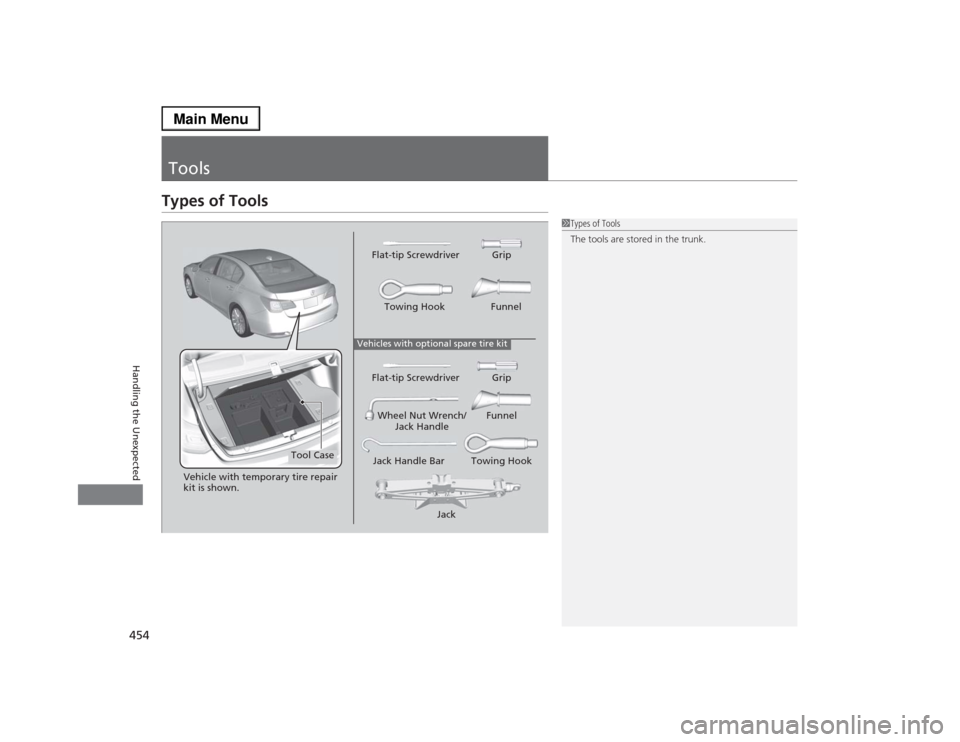
ToolsTypes of Tools
1Types of Tools
The tools are stored in the trunk.
Vehicles with optional spare tire kit
Jack Jack Handle Bar Towing HookWheel Nut Wrench/
Jack HandleFunnel Flat-tip Screwdriver GripTowing Hook Funnel Flat-tip Screwdriver Grip
Tool Case
Vehicle with temporary tire repair
kit is shown.
Page 457 of 518
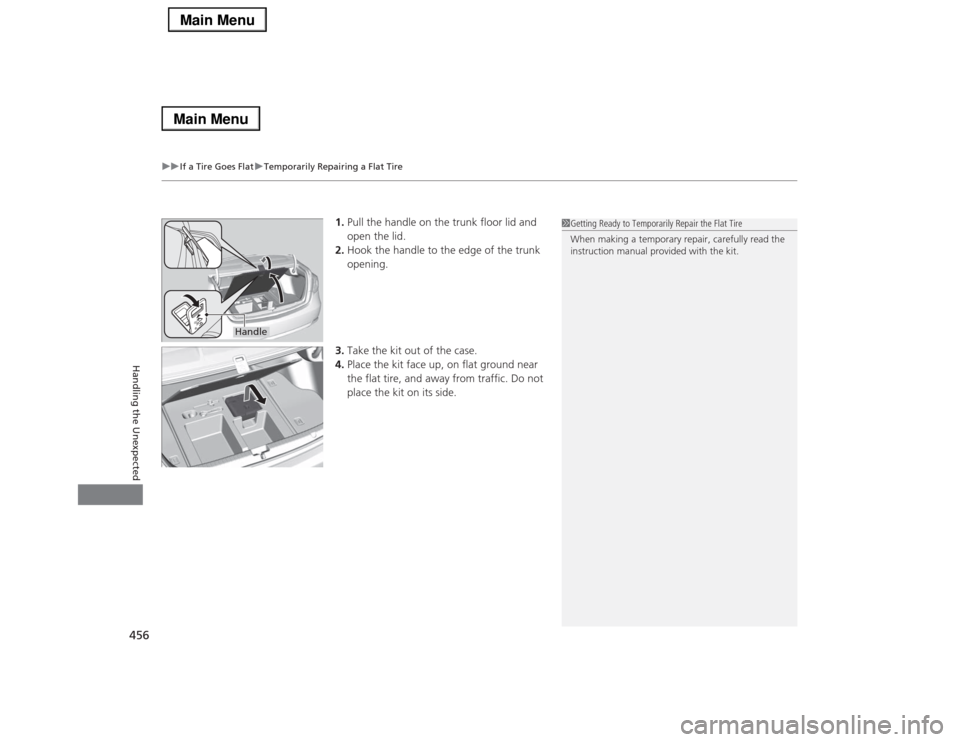
uuIf a Tire Goes FlatuTemporarily Repairing a Flat Tire
456Handling the Unexpected
1.Pull the handle on the trunk floor lid and
open the lid.
2.Hook the handle to the edge of the trunk
opening.
3.Take the kit out of the case.
4.Place the kit face up, on flat ground near
the flat tire, and away from traffic. Do not
place the kit on its side.
1Getting Ready to Temporarily Repair the Flat Tire
When making a temporary repair, carefully read the
instruction manual provided with the kit.
Handle