Power door lock Acura RLX 2014 Owner's Manual
[x] Cancel search | Manufacturer: ACURA, Model Year: 2014, Model line: RLX, Model: Acura RLX 2014Pages: 518, PDF Size: 15.83 MB
Page 5 of 518
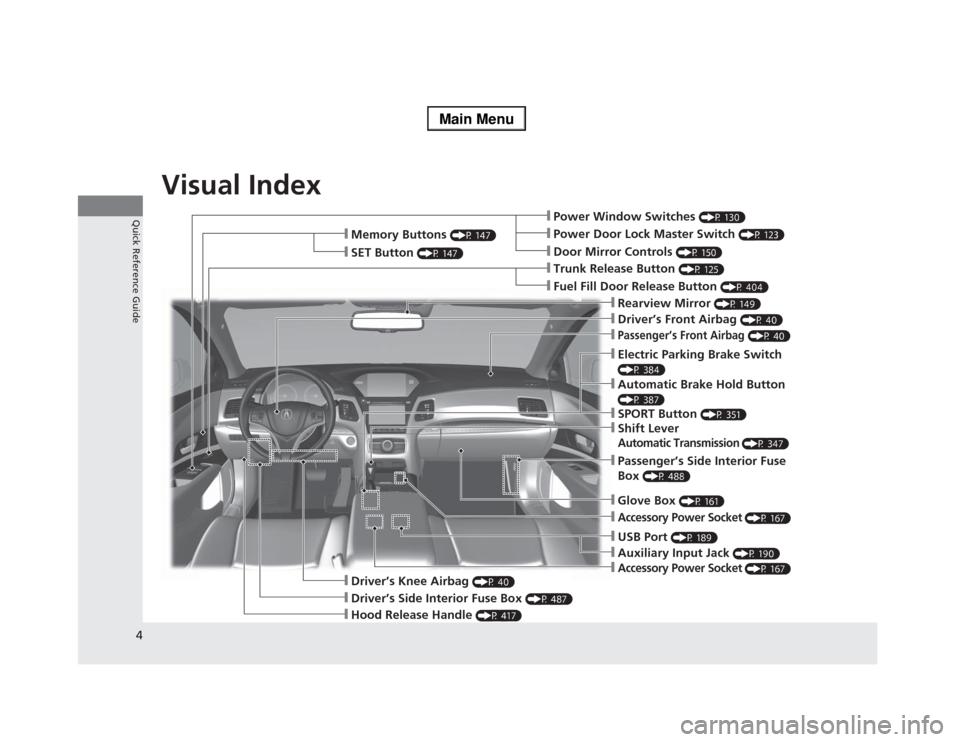
Visual Index
4Quick Reference Guide
❙Power Window Switches
(P 130)
❙Driver’s Front Airbag
(P 40)
❙Trunk Release Button
(P 125)
❙Hood Release Handle
(P 417)
❙Driver’s Side Interior Fuse Box
(P 487)
❙Passenger’s Front Airbag
(P 40)
❙Shift LeverAutomatic Transmission
(P 347)
❙Glove Box
(P 161)
❙Driver’s Knee Airbag
(P 40)
❙Door Mirror Controls
(P 150)
❙Power Door Lock Master Switch
(P 123)
❙Fuel Fill Door Release Button
(P 404)
❙Electric Parking Brake Switch (P 384)❙Passenger’s Side Interior Fuse
Box
(P 488)
❙Accessory Power Socket
(P 167)
❙Accessory Power Socket
(P 167)
❙Auxiliary Input Jack
(P 190)
❙USB Port
(P 189)
❙Memory Buttons
(P 147)
❙SET Button
(P 147)
❙Rearview Mirror
(P 149)
❙SPORT Button
(P 351)
❙Automatic Brake Hold Button (P 387)
Page 7 of 518
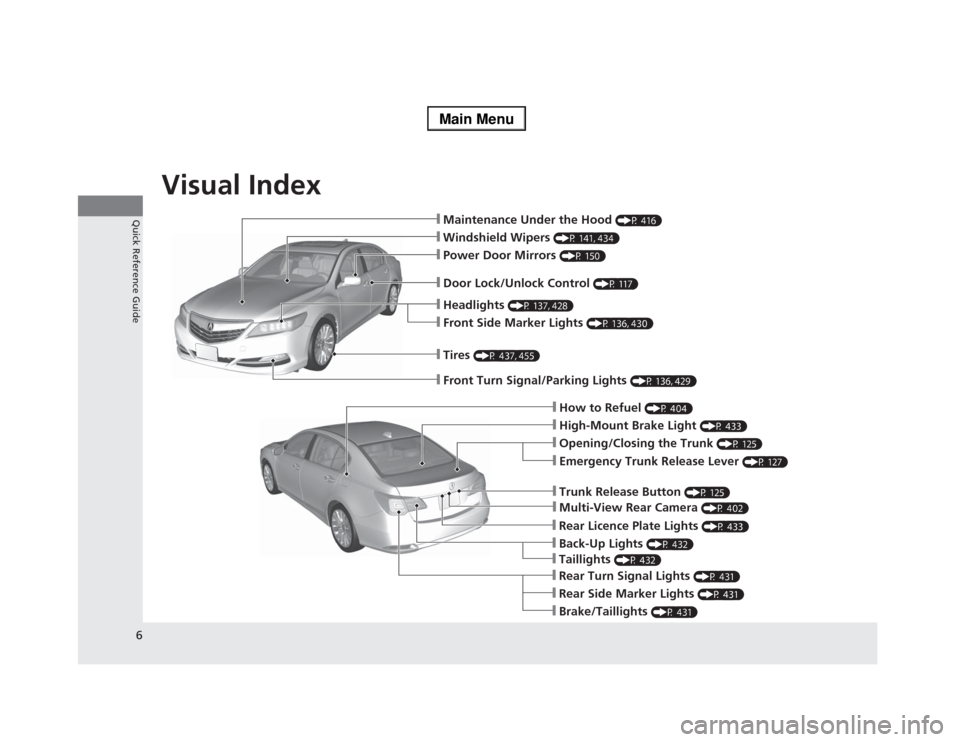
Visual Index
6Quick Reference Guide
❙Maintenance Under the Hood
(P 416)
❙Windshield Wipers
(P 141, 434)
❙Tires
(P 437, 455)
❙Door Lock/Unlock Control
(P 117)
❙Power Door Mirrors
(P 150)
❙Headlights
(P 137, 428)
❙Front Side Marker Lights
(P 136, 430)
❙How to Refuel
(P 404)
❙High-Mount Brake Light
(P 433)
❙Emergency Trunk Release Lever
(P 127)
❙Opening/Closing the Trunk
(P 125)
❙Multi-View Rear Camera
(P 402)
❙Trunk Release Button
(P 125)
❙Rear Side Marker Lights
(P 431)
❙Brake/Taillights
(P 431)
❙Rear Turn Signal Lights
(P 431)
❙Front Turn Signal/Parking Lights
(P 136, 429)
❙Back-Up Lights
(P 432)
❙Rear Licence Plate Lights
(P 433)
❙Taillights
(P 432)
Page 9 of 518
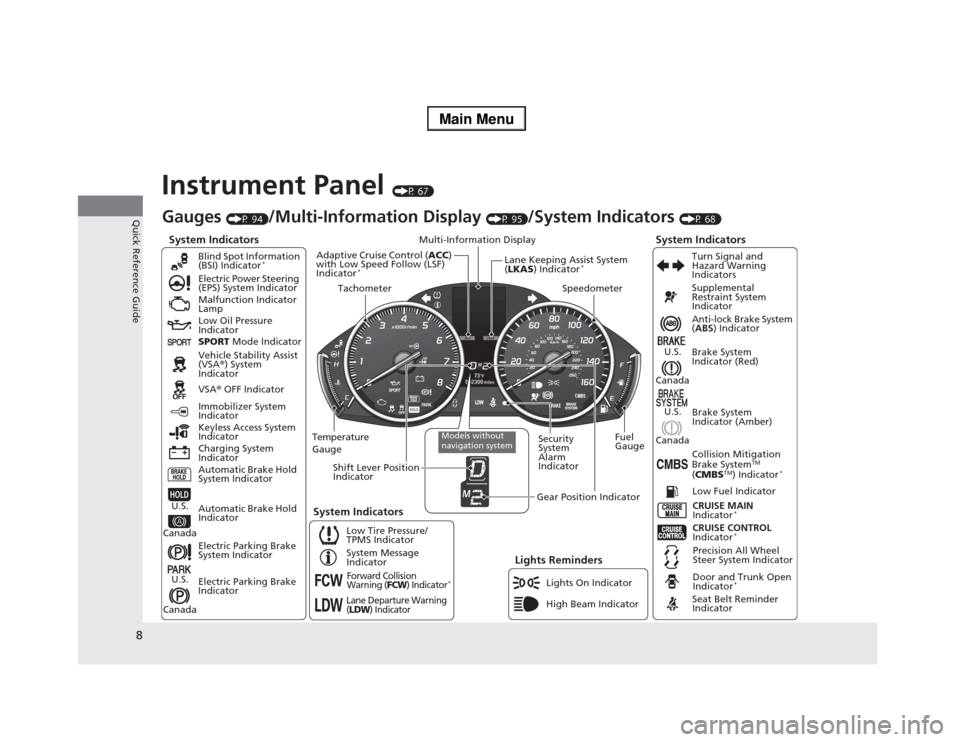
8Quick Reference Guide
Instrument Panel
(P 67)
System Indicators
Malfunction Indicator
Lamp
Low Oil Pressure
Indicator
Charging System
IndicatorAnti-lock Brake System
(ABS) Indicator
Vehicle Stability Assist
(VSA®) System
Indicator
VSA® OFF Indicator Electric Power Steering
(EPS) System Indicator
Lights Reminders
Lights On Indicator
High Beam Indicator Immobilizer System
Indicator
Seat Belt Reminder
Indicator
System Indicators
CRUISE CONTROL
Indicator
*
System Message
IndicatorBrake System
Indicator (Red)Supplemental
Restraint System
Indicator
Door and Trunk Open
Indicator
*
CRUISE MAIN
Indicator
*
Low Fuel Indicator
Gauges
(P 94)
/Multi-Information Display
(P 95)
/System Indicators
(P 68)
Low Tire Pressure/
TPMS IndicatorTurn Signal and
Hazard Warning
Indicators
Keyless Access System
Indicator
Temperature
GaugeSecurity
System
Alarm
IndicatorFuel
Gauge
Tachometer
Multi-Information Display
Speedometer
Shift Lever Position
Indicator
Gear Position Indicator
Electric Parking Brake
System Indicator
Electric Parking Brake
Indicator Automatic Brake Hold
System IndicatorBrake System
Indicator (Amber)
SPORT Mode Indicator Blind Spot Information
(BSI) Indicator
*
System Indicators
Collision Mitigation
Brake System
TM
(CMBS
TM) Indicator
*
Precision All Wheel
Steer System Indicator
Forward Collision
Warning (
FCW
) Indicator
*
Lane Departure Warning
(LDW
) Indicator
Models without
navigation system
Lane Keeping Assist System
(LKAS) Indicator
*
Adaptive Cruise Control (ACC)
with Low Speed Follow (LSF)
Indicator
*
Automatic Brake Hold
Indicator
U.S.
CanadaU.S.
Canada
U.S.
Canada
U.S.
Canada
Page 12 of 518
11Quick Reference Guide
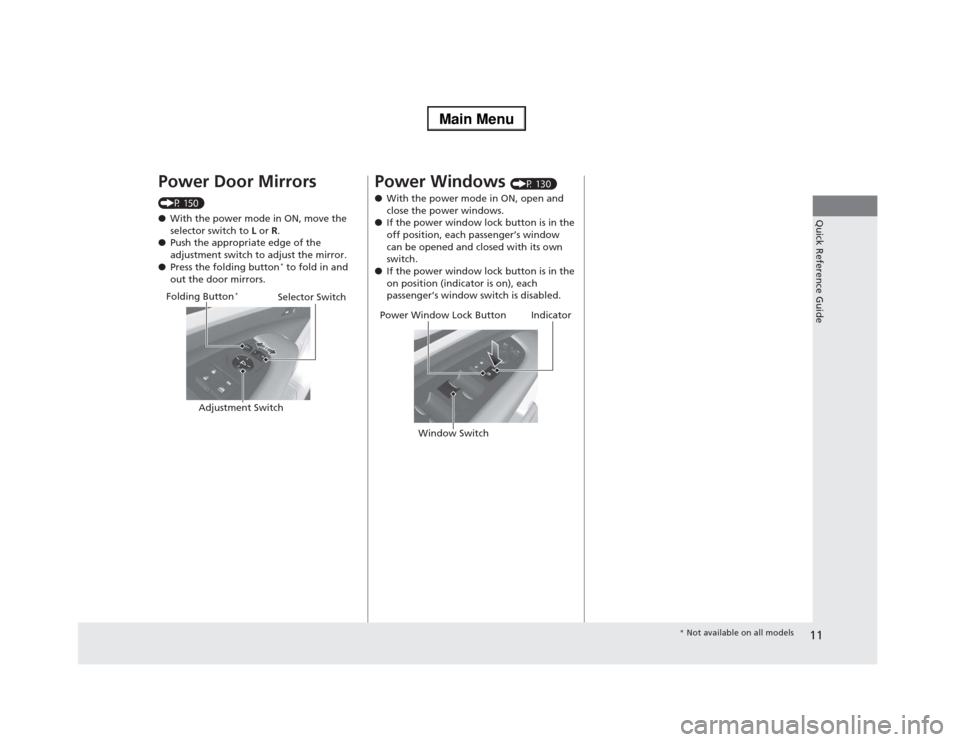
Power Door Mirrors (P 150)
●With the power mode in ON, move the
selector switch to L or R.
●Push the appropriate edge of the
adjustment switch to adjust the mirror.
●Press the folding button
* to fold in and
out the door mirrors.Selector Switch
Adjustment Switch Folding Button
*
Power Windows
(P 130)
●With the power mode in ON, open and
close the power windows.
●If the power window lock button is in the
off position, each passenger’s window
can be opened and closed with its own
switch.
●If the power window lock button is in the
on position (indicator is on), each
passenger’s window switch is disabled.
Power Window Lock Button
Window Switch
Indicator
* Not available on all models
Page 20 of 518
19Quick Reference Guide
What to Do If
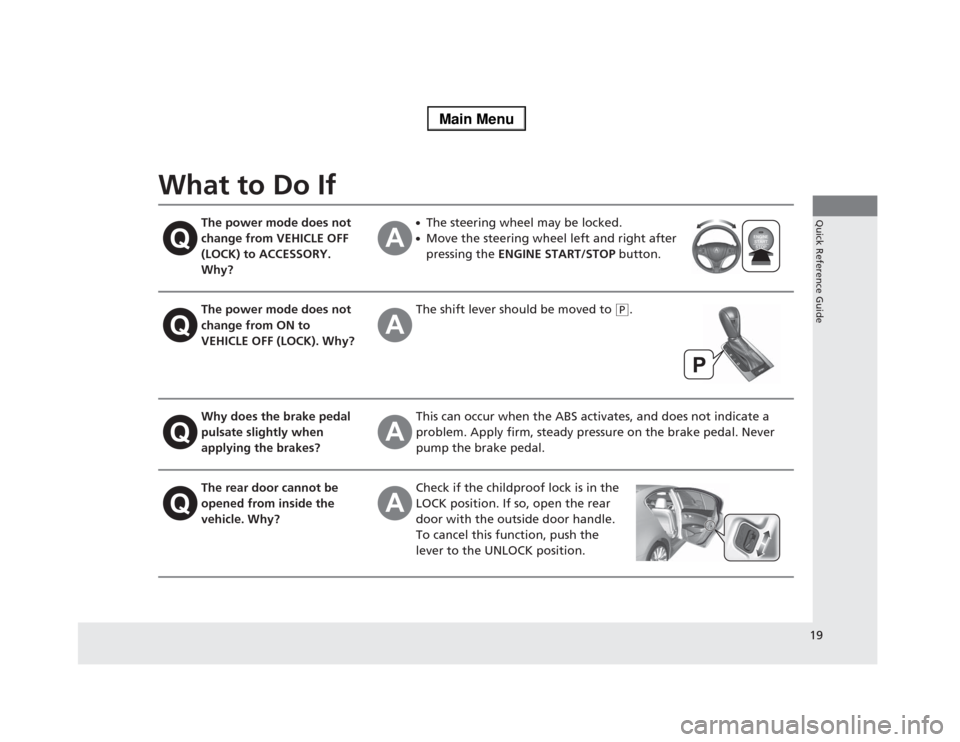
The power mode does not
change from VEHICLE OFF
(LOCK) to ACCESSORY.
Why?
●The steering wheel may be locked.●Move the steering wheel left and right after
pressing the ENGINE START/STOP button.
The power mode does not
change from ON to
VEHICLE OFF (LOCK). Why?
The shift lever should be moved to
(P
.
Why does the brake pedal
pulsate slightly when
applying the brakes?
This can occur when the ABS activates, and does not indicate a
problem. Apply firm, steady pressure on the brake pedal. Never
pump the brake pedal.
The rear door cannot be
opened from inside the
vehicle. Why?
Check if the childproof lock is in the
LOCK position. If so, open the rear
door with the outside door handle.
To cancel this function, push the
lever to the UNLOCK position.
Page 21 of 518
20Quick Reference Guide
Why do the doors lock
after I unlocked the doors
using a remote
transmitter?
If you do not open the doors within 30 seconds, the doors are
relocked automatically for security.
Why does the beeper
sound when I open the
driver’s door?
The beeper sounds when:●The power mode is in ACCESSORY.●The exterior lights are left on.
Why does the beeper
sound when I start driving?
The beeper sounds when the driver and/or front passenger are
not wearing their seat belts.
Why does the beeper
sound when I turn the
engine off?
The beeper sounds when you turn off the engine with the
driver’s door open.
Why do I hear a screeching
sound when I apply the
brake pedal?
The brake pads may need to be replaced. Have your vehicle
inspected by a dealer.
Page 78 of 518
77
uuIndicatorsu
Continued
Instrument Panel
Indicator
Name
On/Blinking
Explanation
Message
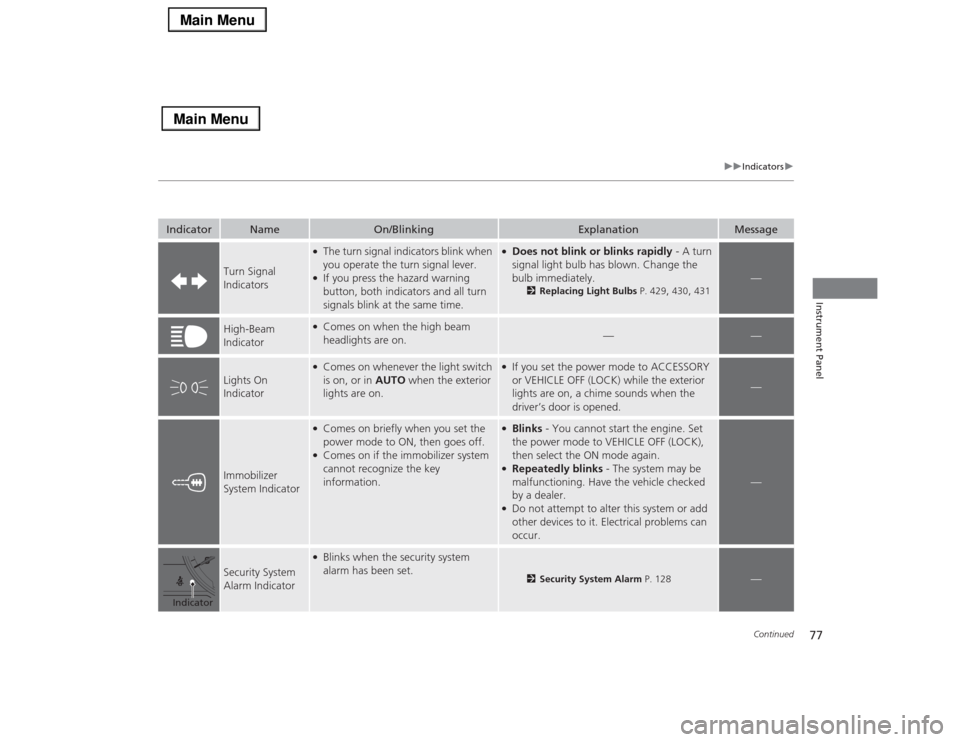
Turn Signal
Indicators
●The turn signal indicators blink when
you operate the turn signal lever.●If you press the hazard warning
button, both indicators and all turn
signals blink at the same time.
●Does not blink or blinks rapidly - A turn
signal light bulb has blown. Change the
bulb immediately.
2Replacing Light Bulbs P. 429
, 430
, 431
—
High-Beam
Indicator
●Comes on when the high beam
headlights are on.
—
—
Lights On
Indicator
●Comes on whenever the light switch
is on, or in AUTO when the exterior
lights are on.
●If you set the power mode to ACCESSORY
or VEHICLE OFF (LOCK) while the exterior
lights are on, a chime sounds when the
driver’s door is opened.
—
Immobilizer
System Indicator
●Comes on briefly when you set the
power mode to ON, then goes off.●Comes on if the immobilizer system
cannot recognize the key
information.
●Blinks - You cannot start the engine. Set
the power mode to VEHICLE OFF (LOCK),
then select the ON mode again.●Repeatedly blinks - The system may be
malfunctioning. Have the vehicle checked
by a dealer.●Do not attempt to alter this system or add
other devices to it. Electrical problems can
occur.
—
Security System
Alarm Indicator
●Blinks when the security system
alarm has been set.
2Security System Alarm P. 128
—
Indicator
Page 86 of 518
85
uuIndicatorsuMulti-Information Display Warning and Information Messages
Continued
Instrument Panel
*1:On the left: Models with navigation system
On the right: Models without navigation system
Message
*1
Condition
Explanation
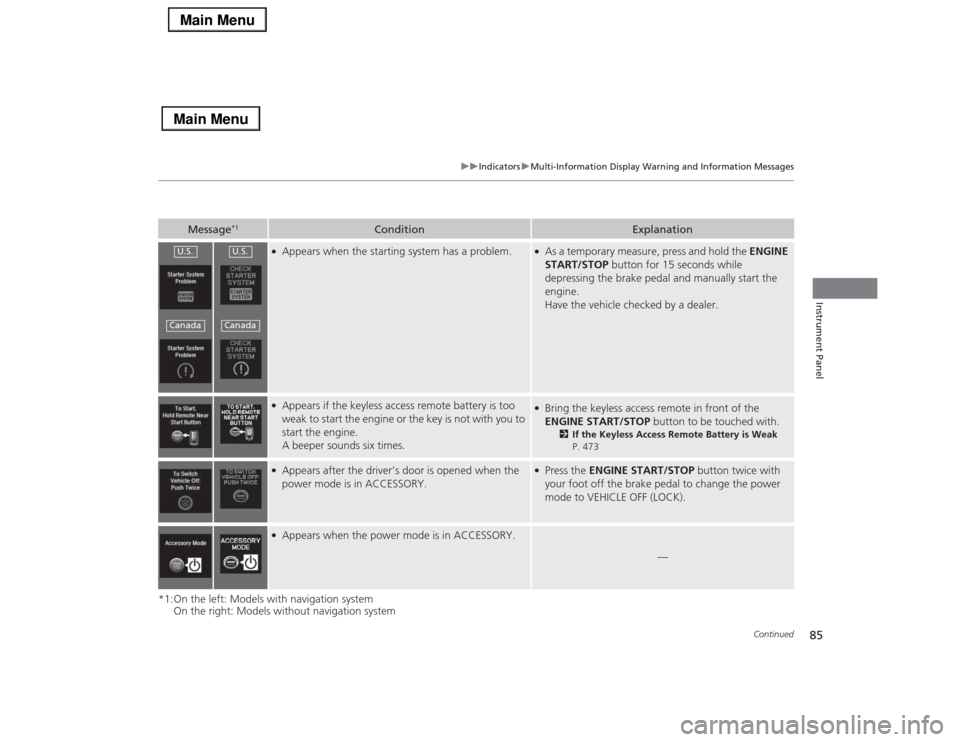
●Appears when the starting system has a problem.
●As a temporary measure, press and hold the ENGINE
START/STOP button for 15 seconds while
depressing the brake pedal and manually start the
engine.
Have the vehicle checked by a dealer.
●Appears if the keyless access remote battery is too
weak to start the engine or the key is not with you to
start the engine.
A beeper sounds six times.
●Bring the keyless access remote in front of the
ENGINE START/STOP button to be touched with.
2If the Keyless Access Remote Battery is Weak
P. 473
●Appears after the driver’s door is opened when the
power mode is in ACCESSORY.
●Press the ENGINE START/STOP button twice with
your foot off the brake pedal to change the power
mode to VEHICLE OFF (LOCK).
●Appears when the power mode is in ACCESSORY.
—
U.S.Canada
U.S.Canada
Page 87 of 518
86
uuIndicatorsuMulti-Information Display Warning and Information Messages
Instrument Panel
*1:On the left: Models with navigation system
On the right: Models without navigation system
Message
*1
Condition
Explanation
●Appears when you close the door with the power
mode in ON without the keyless access remote inside
the vehicle.
●Disappears when you bring the keyless access remote
back inside the vehicle and close the door.
2Keyless Access Remote Reminder P. 135
●Appears when the keyless access remote battery
becomes weak.
●Replace the battery as soon as possible.
2Replacing the Button Battery P. 447
●Appears three seconds after the To Start, Hold
Remote Near Start Button, then To Start Engine
messages appeared sequentially.
●Unless you bring the keyless access remote in front of
the ENGINE START/STOP button, this message does
not appear.
2If the Keyless Access Remote Battery is Weak P. 473
●Appears when you set the power mode to
ACCESSORY or ON.
2Starting the Engine P. 342
●Appears when the steering wheel is locked.
●Move the steering wheel left and right after pressing
the ENGINE START/STOP button.
●Appears if you press the ENGINE START/STOP
button to turn the engine off without the shift lever
in
(P
.
●Press the ENGINE START/STOP button twice after
moving the shift lever to
(P
.
Page 103 of 518
uuGauges and Multi-Information DisplayuMulti-Information Display
102Instrument Panel
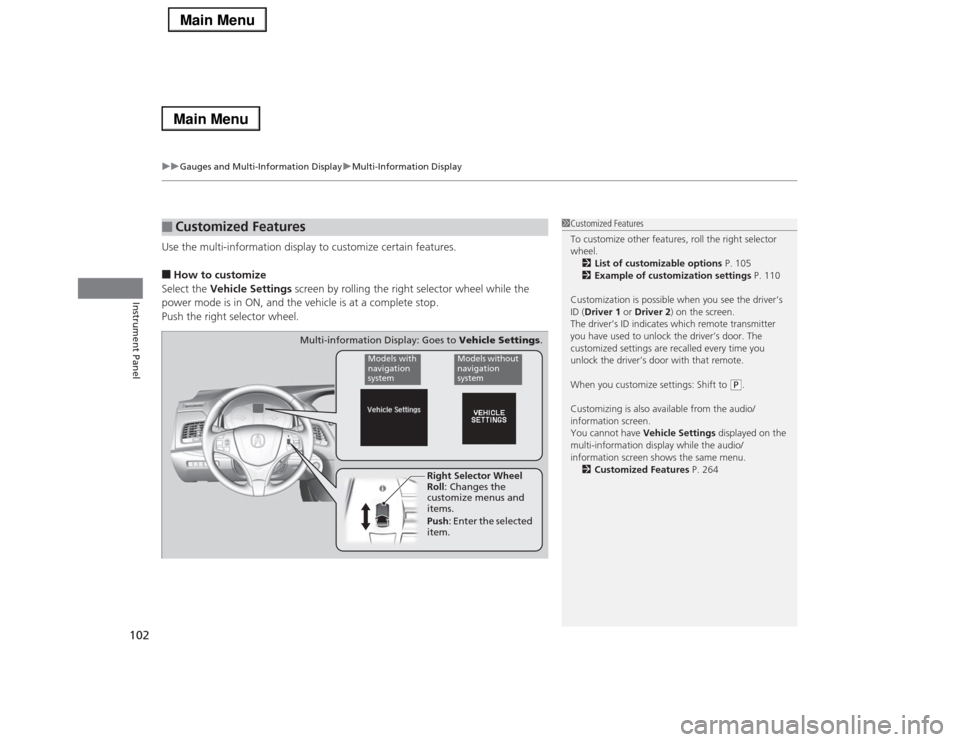
Use the multi-information display to customize certain features.■How to customize
Select the Vehicle Settings screen by rolling the right selector wheel while the
power mode is in ON, and the vehicle is at a complete stop.
Push the right selector wheel.■
Customized Features
1Customized Features
To customize other features, roll the right selector
wheel.
2List of customizable options P. 105
2Example of customization settings P. 110
Customization is possible when you see the driver’s
ID (Driver 1 or Driver 2) on the screen.
The driver’s ID indicates which remote transmitter
you have used to unlock the driver’s door. The
customized settings are recalled every time you
unlock the driver’s door with that remote.
When you customize settings: Shift to
(P.
Customizing is also available from the audio/
information screen.
You cannot have Vehicle Settings displayed on the
multi-information display while the audio/
information screen shows the same menu.
2Customized Features P. 264
Right Selector Wheel
Roll: Changes the
customize menus and
items.
Push: Enter the selected
item.
Models with
navigation
system
Models without
navigation
system
Multi-information Display: Goes to Vehicle Settings.