engine oil Acura RLX 2014 Owner's Manual
[x] Cancel search | Manufacturer: ACURA, Model Year: 2014, Model line: RLX, Model: Acura RLX 2014Pages: 518, PDF Size: 15.83 MB
Page 18 of 518
17Quick Reference Guide
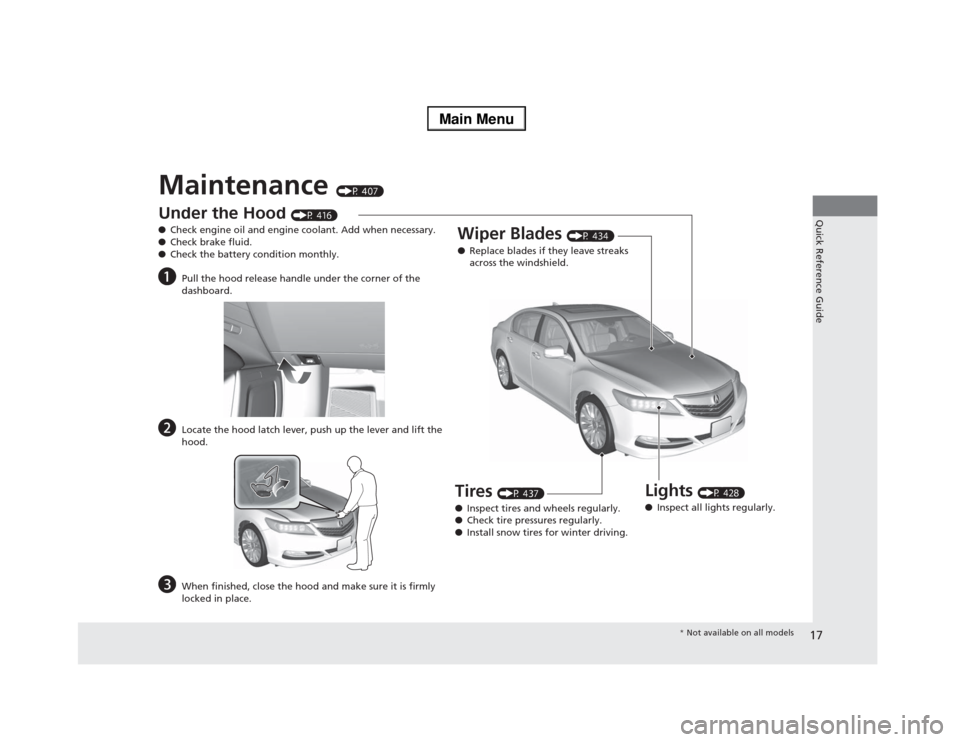
Maintenance
(P 407)
Under the Hood
(P 416)
●Check engine oil and engine coolant. Add when necessary.
●Check brake fluid.
●Check the battery condition monthly.
a
Pull the hood release handle under the corner of the
dashboard.
b
Locate the hood latch lever, push up the lever and lift the
hood.
c
When finished, close the hood and make sure it is firmly
locked in place.
Lights
(P 428)
●Inspect all lights regularly.
Wiper Blades
(P 434)
●Replace blades if they leave streaks
across the windshield.
Tires
(P 437)
●Inspect tires and wheels regularly.
●Check tire pressures regularly.
●Install snow tires for winter driving.
* Not available on all models
Page 65 of 518
64Safe Driving
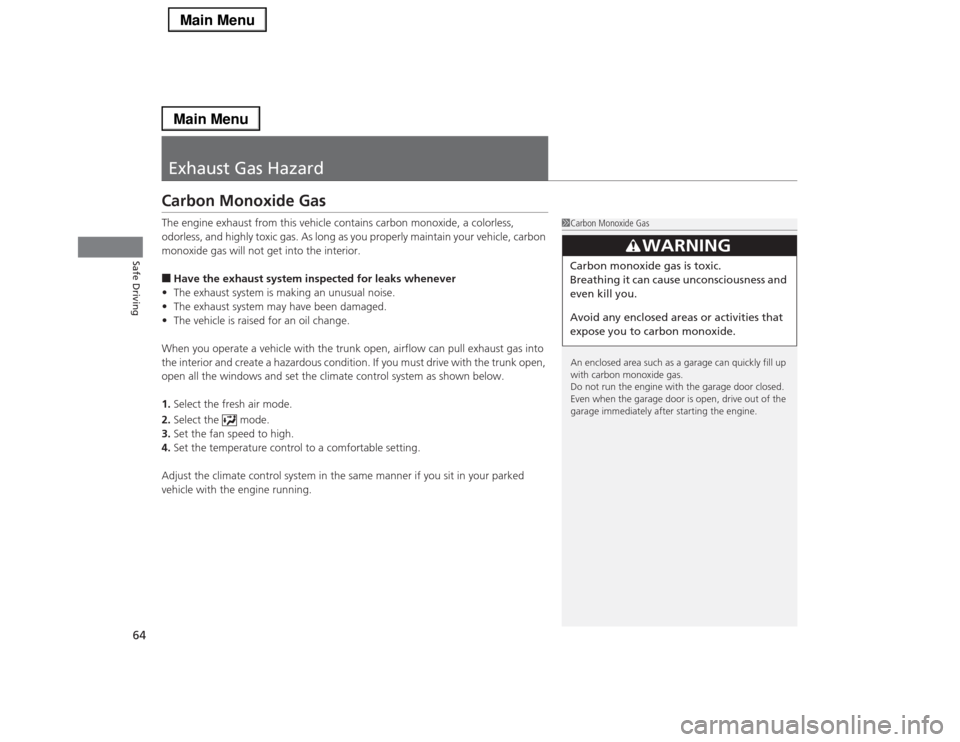
Exhaust Gas HazardCarbon Monoxide GasThe engine exhaust from this vehicle contains carbon monoxide, a colorless,
odorless, and highly toxic gas. As long as you properly maintain your vehicle, carbon
monoxide gas will not get into the interior.■Have the exhaust system inspected for leaks whenever
•The exhaust system is making an unusual noise.
•The exhaust system may have been damaged.
•The vehicle is raised for an oil change.
When you operate a vehicle with the trunk open, airflow can pull exhaust gas into
the interior and create a hazardous condition. If you must drive with the trunk open,
open all the windows and set the climate control system as shown below.
1.Select the fresh air mode.
2.Select the mode.
3.Set the fan speed to high.
4.Set the temperature control to a comfortable setting.
Adjust the climate control system in the same manner if you sit in your parked
vehicle with the engine running.
1Carbon Monoxide Gas
An enclosed area such as a garage can quickly fill up
with carbon monoxide gas.
Do not run the engine with the garage door closed.
Even when the garage door is open, drive out of the
garage immediately after starting the engine.
3
WARNING
Carbon monoxide gas is toxic.
Breathing it can cause unconsciousness and
even kill you.
Avoid any enclosed areas or activities that
expose you to carbon monoxide.
Page 69 of 518
68Instrument Panel
Indicators*1:On the left: Models with navigation system
On the right: Models without navigation systemIndicator
Name
On/Blinking
Explanation
Message
*1
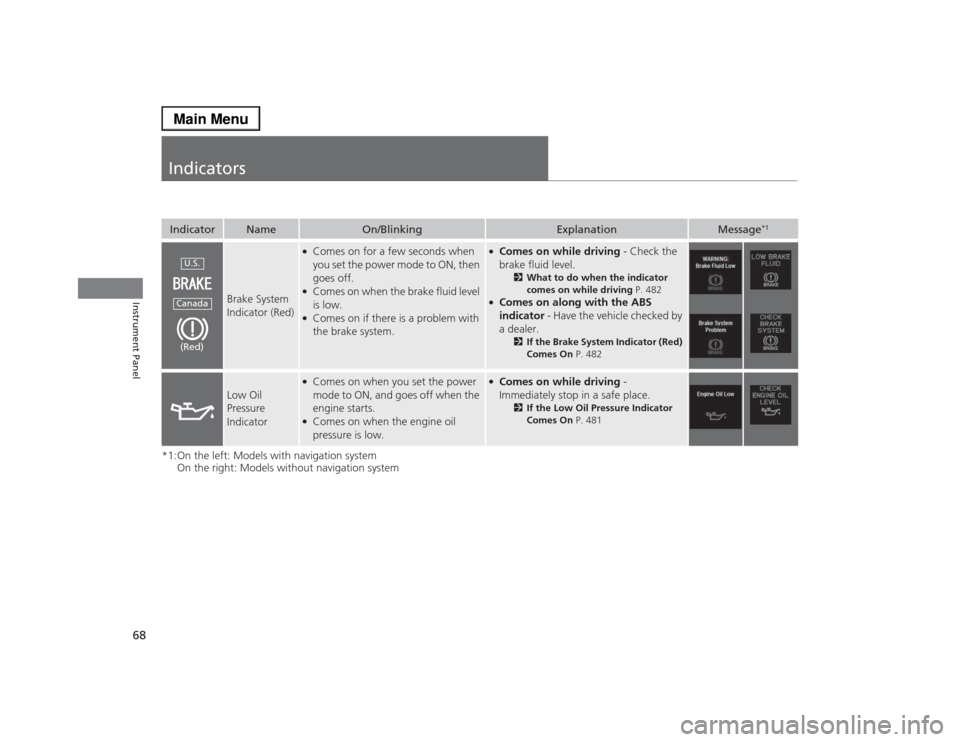
Brake System
Indicator (Red)
●Comes on for a few seconds when
you set the power mode to ON, then
goes off.●Comes on when the brake fluid level
is low.●Comes on if there is a problem with
the brake system.
●Comes on while driving - Check the
brake fluid level.
2What to do when the indicator
comes on while driving P. 482
●Comes on along with the ABS
indicator - Have the vehicle checked by
a dealer.
2If the Brake System Indicator (Red)
Comes On P. 482
Low Oil
Pressure
Indicator
●Comes on when you set the power
mode to ON, and goes off when the
engine starts.●Comes on when the engine oil
pressure is low.
●Comes on while driving -
Immediately stop in a safe place.
2If the Low Oil Pressure Indicator
Comes On P. 481
U.S.Canada(Red)
Page 96 of 518

95
uuGauges and Multi-Information DisplayuMulti-Information Display
Continued
Instrument Panel
Multi-Information DisplayThe multi-information display shows the odometer, trip meter, outside temperature
indicator, and other gauges. It also displays important messages such as warnings
and other helpful information.
Roll the right selector wheel or press the TRIP button to change the display.■
Switching the DisplayModels with navigation systemRight Selector WheelEngine Oil Life Vehicle SettingsElapsed Time
OFFAverage Speed Range Instant Fuel Economy/
Average Fuel Economy
Turn-by-Turn
Directions Tire Pressure for
Each TireCurrent Mode
for ACC with LSF
*
* Not available on all models
Page 98 of 518

97
uuGauges and Multi-Information DisplayuMulti-Information Display
Continued
Instrument Panel
Models without navigation system
Engine Oil Life
Vehicle SettingsElapsed Time
OFF
Average SpeedRange Average Fuel Economy/
Instant Fuel Economy
Tire Pressure for
Each Tire Right Selector Wheel
Page 102 of 518

101
uuGauges and Multi-Information DisplayuMulti-Information DisplayContinued
Instrument Panel
Shows the remaining oil life and Maintenance Minder
TM.
2Maintenance Minder
TM P. 411
Shows each tire’s pressure.2Tire Pressure Monitoring System (TPMS) P. 380■
Engine Oil Life
■
Tire Pressure Monitor
Page 110 of 518

109
uuGauges and Multi-Information DisplayuMulti-Information Display
Continued
Instrument Panel
*1: Default SettingSetup Group Customizable Features Description Selectable SettingsWiper Setup
Wiper Action
*
Changes the setting for the automatic intermittent
wipers in the AUTO position.
Rain Sensing
*1/Intermittent/
Speed Sensitive
Front Wiper Action
*
Changes the setting for the wipers in the INT
position.
Speed Sensitive
*1/
Intermittent
Maintenance
Info.
Maintenance Reset
Resets/Cancels the engine oil life display when you
have performed the maintenance service.
Cancel/Reset
Default All
—
Cancels/Resets all the customized settings as
default.
Cancel/Set
* Not available on all models
Page 279 of 518
278
uuCustomized Featuresu
Features
*1:Default SettingSetup
GroupCustomizable Features Description Selectable Settings
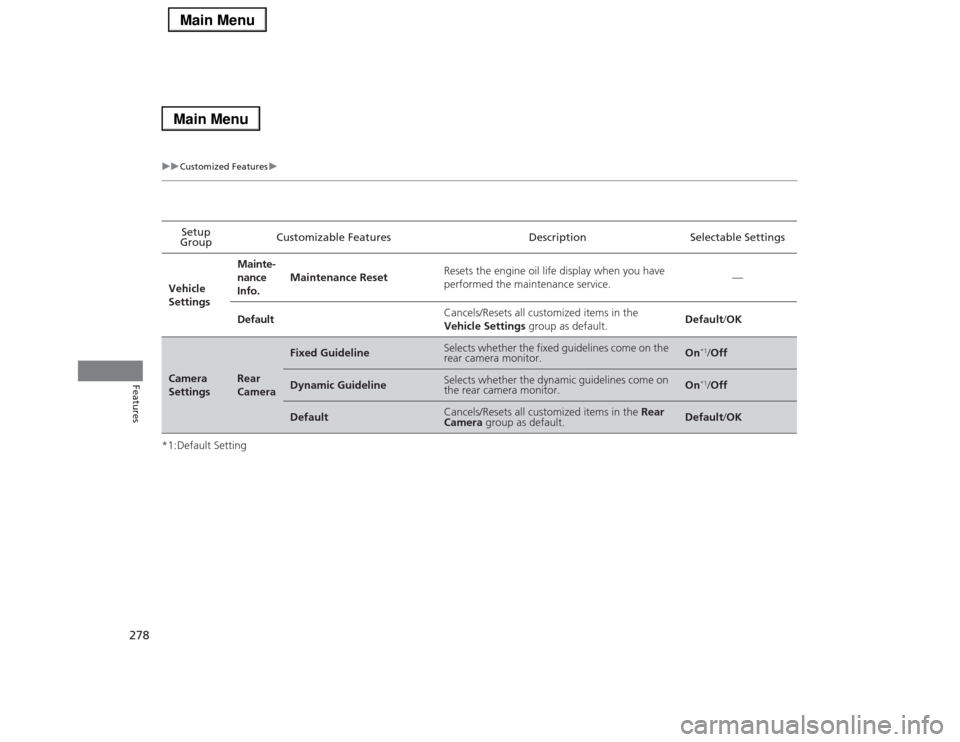
Vehicle
SettingsMainte-
nance
Info.Maintenance ResetResets the engine oil life display when you have
performed the maintenance service.—
DefaultCancels/Resets all customized items in the
Vehicle Settings group as default.Default/OKCamera
Settings
Rear
Camera
Fixed Guideline
Selects whether the fixed guidelines come on the
rear camera monitor.
On
*1/Off
Dynamic Guideline
Selects whether the dynamic guidelines come on
the rear camera monitor.
On
*1/Off
Default
Cancels/Resets all customized items in the Rear
Camera group as default.
Default/OK
Page 346 of 518
345
uuWhen DrivinguPrecautions While Driving
Continued
Driving
Precautions While DrivingAvoid driving in deep water and on flooded roads. This can damage the engine,
driveline, or cause electrical component failure.■
In Rain
1Precautions While DrivingNOTICEDo not operate the shift lever while pressing the
accelerator pedal. You could damage the
transmission.NOTICEThe following can damage the under spoiler:•Parking the vehicle by a parking block•Parallel parking along the road shoulder•Driving toward the bottom of a hill•Driving up or down to a different surface level
(such as a road shoulder)•Driving on a rutted or bumpy road•Driving on a road with potholes.NOTICEIf you repeatedly turn the steering wheel at an
extremely low speed, or hold the steering wheel on
the full left or right position for a while, the electric
power steering (EPS) system heats up. The system
goes into a protective mode, and limits its
performance. The steering wheel becomes harder
and harder to operate. Once the system cools down,
the EPS system is restored.
Repeated operation under these conditions can
eventually damage the system.
If the power mode is set to ACCESSORY or VEHICLE
OFF (LOCK) while driving, the engine will shut down
and all steering and brake power assist functions will
stop, making it difficult to control the vehicle.
Page 398 of 518
397Driving
Parking Your VehicleWhen Stopped1.Depress the brake pedal firmly.
2.With the brake pedal depressed, pull up the electric parking brake switch slowly,
but fully.
3.Move the shift lever from
(D
to
(P
.
4.Turn off the engine.
uThe electric parking brake indicator goes off in about 15 seconds.
Always set the parking brake firmly, in particular if you are parked on an incline.
1Parking Your Vehicle
Do not park your vehicle near flammable objects,
such as dry grass, oil, or timber.
Heat from the exhaust can cause a fire.1When StoppedNOTICEThe following can damage the transmission:•Depressing the accelerator and brake pedals
simultaneously.•Holding the vehicle in place when facing uphill by
depressing the accelerator pedal.•Moving the shift lever into
(P before the vehicle
stops completely.
Raise the wiper arms when snow is expected.