lane assist Acura RLX 2014 Owner's Manual
[x] Cancel search | Manufacturer: ACURA, Model Year: 2014, Model line: RLX, Model: Acura RLX 2014Pages: 518, PDF Size: 15.83 MB
Page 3 of 518
2Quick Reference Guide
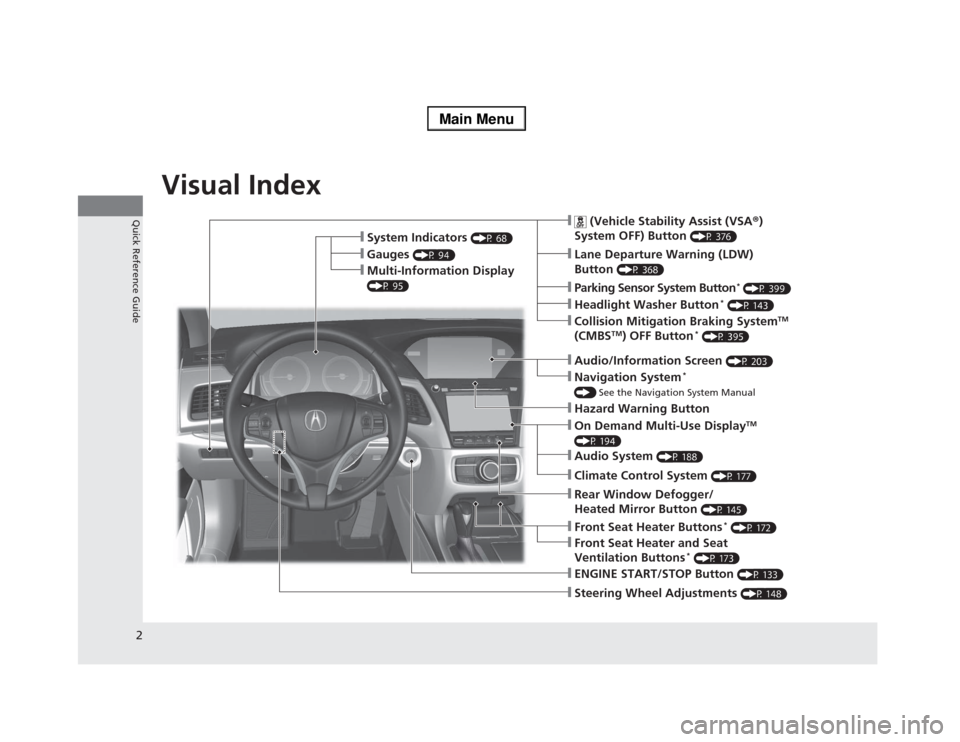
Quick Reference GuideVisual Index
❙Steering Wheel Adjustments
(P 148)
❙ENGINE START/STOP Button
(P 133)
❙
(Vehicle Stability Assist (VSA®)
System OFF) Button
(P 376)
❙Lane Departure Warning (LDW)
Button
(P 368)
❙Parking Sensor System Button
* (P 399)
❙Collision Mitigation Braking System
TM
(CMBS
TM) OFF Button
* (P 395)
❙Navigation System
*
() See the Navigation System Manual❙Audio/Information Screen
(P 203)
❙Hazard Warning Button❙On Demand Multi-Use Display
TM
(P 194)❙Audio System
(P 188)
❙System Indicators
(P 68)
❙Gauges
(P 94)
❙Multi-Information Display (P 95)
❙Climate Control System
(P 177)
❙Rear Window Defogger/
Heated Mirror Button
(P 145)
❙Front Seat Heater Buttons
* (P 172)
❙Headlight Washer Button
* (P 143)
❙Front Seat Heater and Seat
Ventilation Buttons
* (P 173)
Page 4 of 518
3Quick Reference Guide
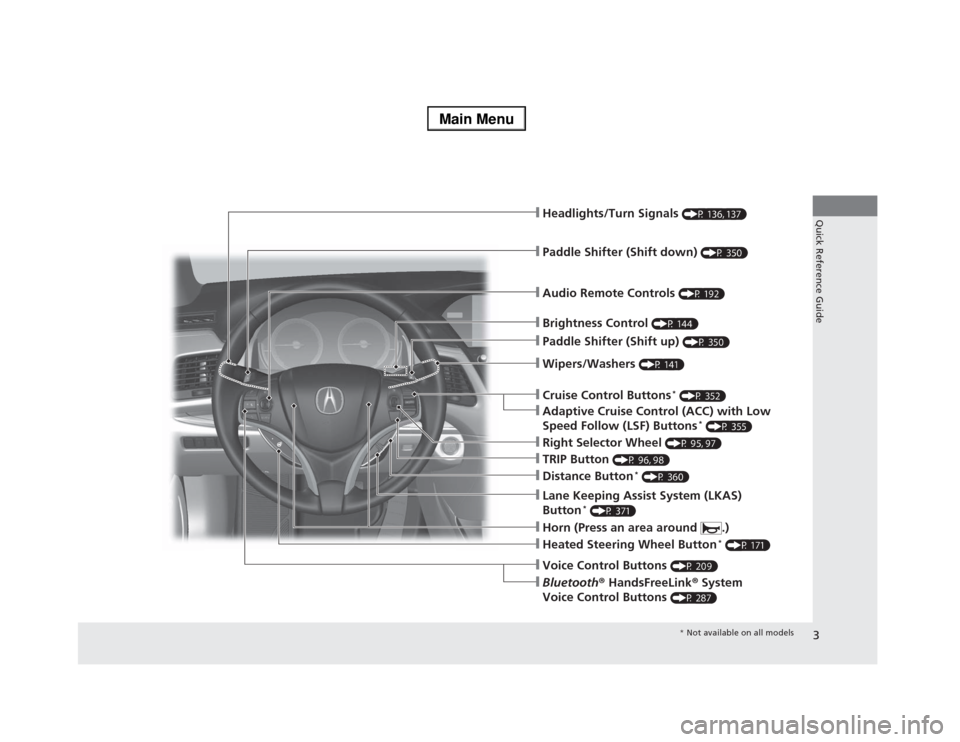
❙Wipers/Washers
(P 141)
❙Audio Remote Controls
(P 192)
❙Headlights/Turn Signals
(P 136, 137)
❙Paddle Shifter (Shift down)
(P 350)
❙Paddle Shifter (Shift up)
(P 350)
❙Horn (Press an area around .)❙Voice Control Buttons
(P 209)
❙Bluetooth® HandsFreeLink® System
Voice Control Buttons
(P 287)
❙Brightness Control
(P 144)
❙Cruise Control Buttons
* (P 352)
❙Adaptive Cruise Control (ACC) with Low
Speed Follow (LSF) Buttons
* (P 355)
❙TRIP Button
(P 96, 98)
❙Distance Button
* (P 360)
❙Lane Keeping Assist System (LKAS)
Button
* (P 371)
❙Right Selector Wheel
(P 95, 97)
❙Heated Steering Wheel Button
* (P 171)
* Not available on all models
Page 9 of 518
8Quick Reference Guide
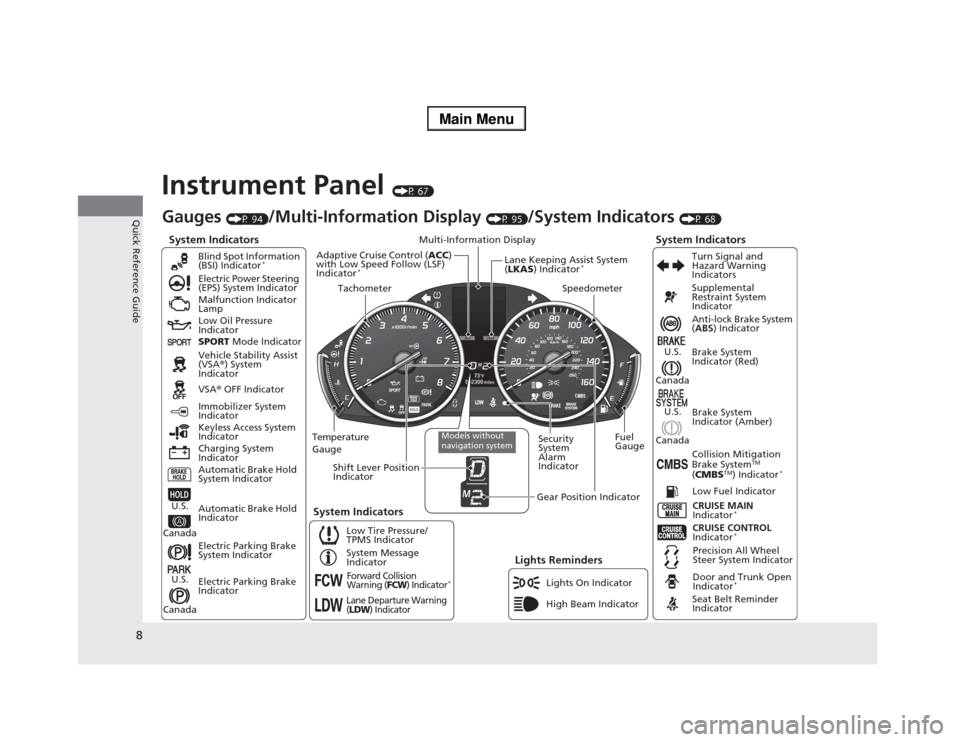
Instrument Panel
(P 67)
System Indicators
Malfunction Indicator
Lamp
Low Oil Pressure
Indicator
Charging System
IndicatorAnti-lock Brake System
(ABS) Indicator
Vehicle Stability Assist
(VSA®) System
Indicator
VSA® OFF Indicator Electric Power Steering
(EPS) System Indicator
Lights Reminders
Lights On Indicator
High Beam Indicator Immobilizer System
Indicator
Seat Belt Reminder
Indicator
System Indicators
CRUISE CONTROL
Indicator
*
System Message
IndicatorBrake System
Indicator (Red)Supplemental
Restraint System
Indicator
Door and Trunk Open
Indicator
*
CRUISE MAIN
Indicator
*
Low Fuel Indicator
Gauges
(P 94)
/Multi-Information Display
(P 95)
/System Indicators
(P 68)
Low Tire Pressure/
TPMS IndicatorTurn Signal and
Hazard Warning
Indicators
Keyless Access System
Indicator
Temperature
GaugeSecurity
System
Alarm
IndicatorFuel
Gauge
Tachometer
Multi-Information Display
Speedometer
Shift Lever Position
Indicator
Gear Position Indicator
Electric Parking Brake
System Indicator
Electric Parking Brake
Indicator Automatic Brake Hold
System IndicatorBrake System
Indicator (Amber)
SPORT Mode Indicator Blind Spot Information
(BSI) Indicator
*
System Indicators
Collision Mitigation
Brake System
TM
(CMBS
TM) Indicator
*
Precision All Wheel
Steer System Indicator
Forward Collision
Warning (
FCW
) Indicator
*
Lane Departure Warning
(LDW
) Indicator
Models without
navigation system
Lane Keeping Assist System
(LKAS) Indicator
*
Adaptive Cruise Control (ACC)
with Low Speed Follow (LSF)
Indicator
*
Automatic Brake Hold
Indicator
U.S.
CanadaU.S.
Canada
U.S.
Canada
U.S.
Canada
Page 83 of 518
82
uuIndicatorsu
Instrument Panel
Indicator
Name
On/Blinking
Explanation
Message
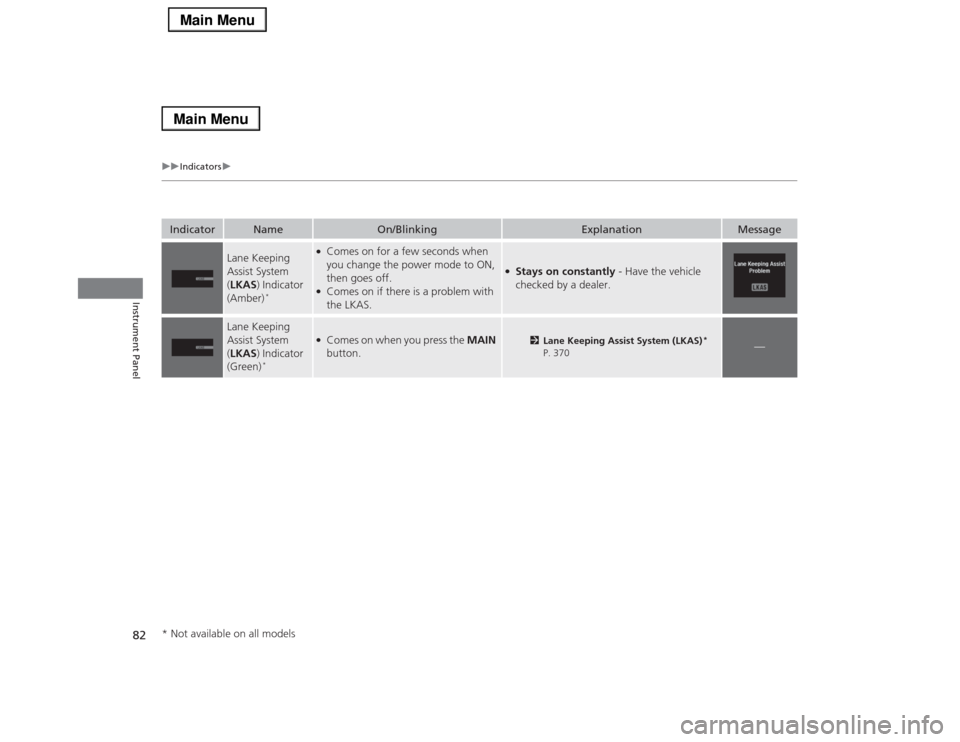
Lane Keeping
Assist System
(LKAS) Indicator
(Amber)
*
●Comes on for a few seconds when
you change the power mode to ON,
then goes off.●Comes on if there is a problem with
the LKAS.
●Stays on constantly - Have the vehicle
checked by a dealer.
Lane Keeping
Assist System
(LKAS) Indicator
(Green)
*
●Comes on when you press the MAIN
button.
2Lane Keeping Assist System (LKAS)
*
P. 370
—
* Not available on all models
Page 104 of 518
103
uuGauges and Multi-Information DisplayuMulti-Information Display
Continued
Instrument Panel
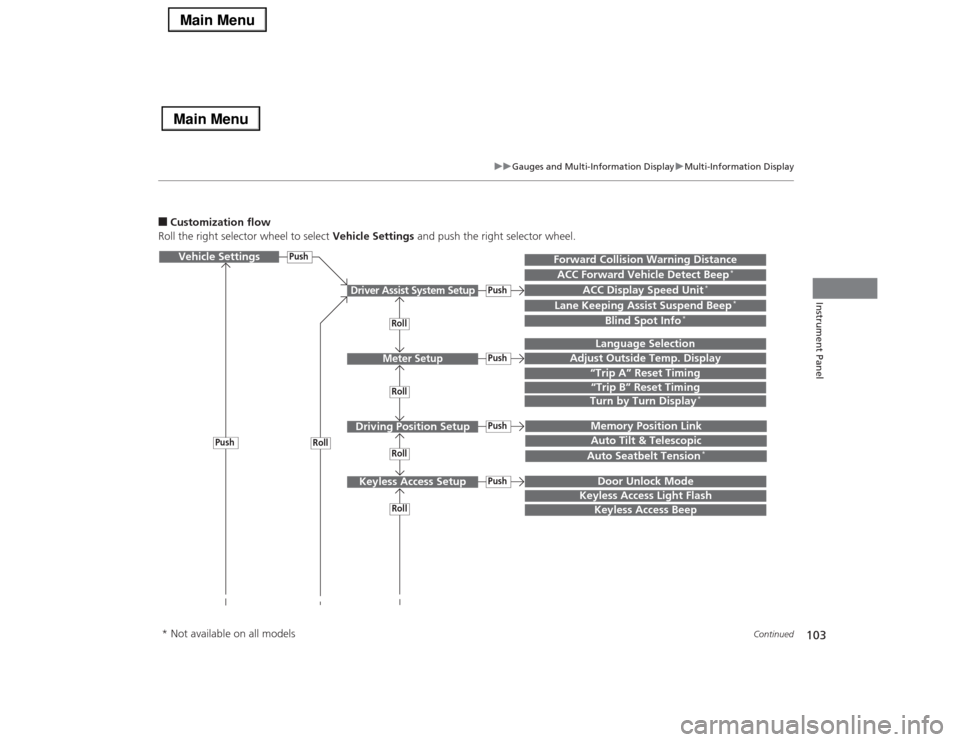
■Customization flow
Roll the right selector wheel to select Vehicle Settings and push the right selector wheel.Vehicle Settings
“Trip A” Reset TimingLanguage Selection
Adjust Outside Temp. Display
Memory Position LinkDoor Unlock Mode
Keyless Access Light Flash
Driver Assist System Setup
Meter Setup
Driving Position SetupKeyless Access Setup
“Trip B” Reset TimingTurn by Turn Display
*
Forward Collision Warning DistanceACC Forward Vehicle Detect Beep
*
ACC Display Speed Unit
*
Roll
Push
Push
PushPushPush
Roll
Lane Keeping Assist Suspend Beep
*
Blind Spot Info
*
Auto Tilt & TelescopicAuto Seatbelt Tension
*
Roll
Roll
Keyless Access Beep
Roll
Push
* Not available on all models
Page 106 of 518

105
uuGauges and Multi-Information DisplayuMulti-Information Display
Continued
Instrument Panel
■List of customizable options
*1:Default SettingSetup Group Customizable Features Description Selectable SettingsDriver Assist
System
Setup
Forward Collision
Warning Distance
Changes at which distance FCW
* or CMBS
TM *
alerts, or
turns FCW
* on and off.
Long/Normal
*1/Short/Off
ACC Forward Vehicle
Detect Beep
*
Causes the system to beep when the system detects a vehicle,
or when the vehicle goes out of the ACC with LSF range.
On
*1/Off
ACC Display Speed Unit
*
Changes the speed unit for ACC with LSF on the multi-
information display.
mph
*1/km/h
(U.S.)
mph/km/h
*1
(Canada)
Lane Keeping Assist
Suspend Beep
*
Causes the system to beep when the LKAS is suspended.
On
*1/Off
Blind Spot Info
*
Changes the setting for the blind spot information.
Audible And Visual
Alert
*1/Visual Alert/Off
* Not available on all models
Page 268 of 518
267
uuCustomized Featuresu
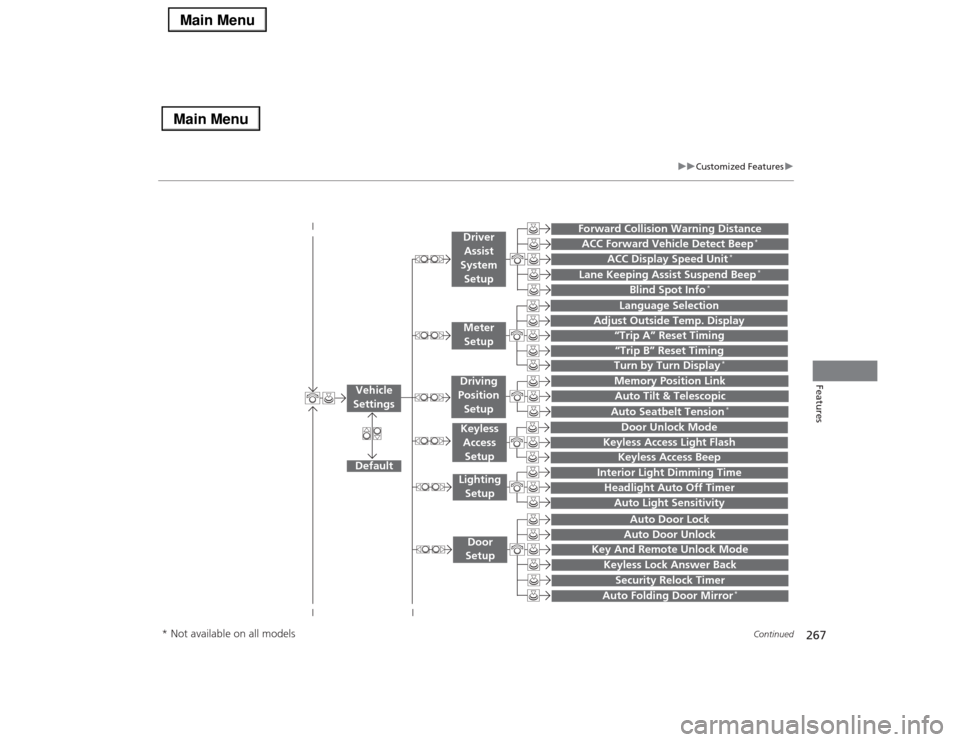
Continued
Features
“Trip A” Reset Timing“Trip B” Reset Timing
Language Selection
Adjust Outside Temp. Display
Forward Collision Warning DistanceACC Forward Vehicle Detect Beep
*
ACC Display Speed Unit
*
Turn by Turn Display
*
Default
Memory Position Link
Door Unlock Mode
Keyless Access Light Flash
Interior Light Dimming TimeHeadlight Auto Off TimerAuto Light Sensitivity
Key And Remote Unlock ModeKeyless Lock Answer BackSecurity Relock Timer
Auto Door LockAuto Door Unlock
Vehicle
Settings
Meter
SetupDriver
Assist
System
SetupKeyless
Access
SetupLighting
SetupDoor
Setup
Keyless Access Beep
Lane Keeping Assist Suspend Beep
*
Blind Spot Info
*
Auto Tilt & TelescopicAuto Seatbelt Tension
*
Auto Folding Door Mirror
*
Driving
Position
Setup
* Not available on all models
Page 275 of 518
274
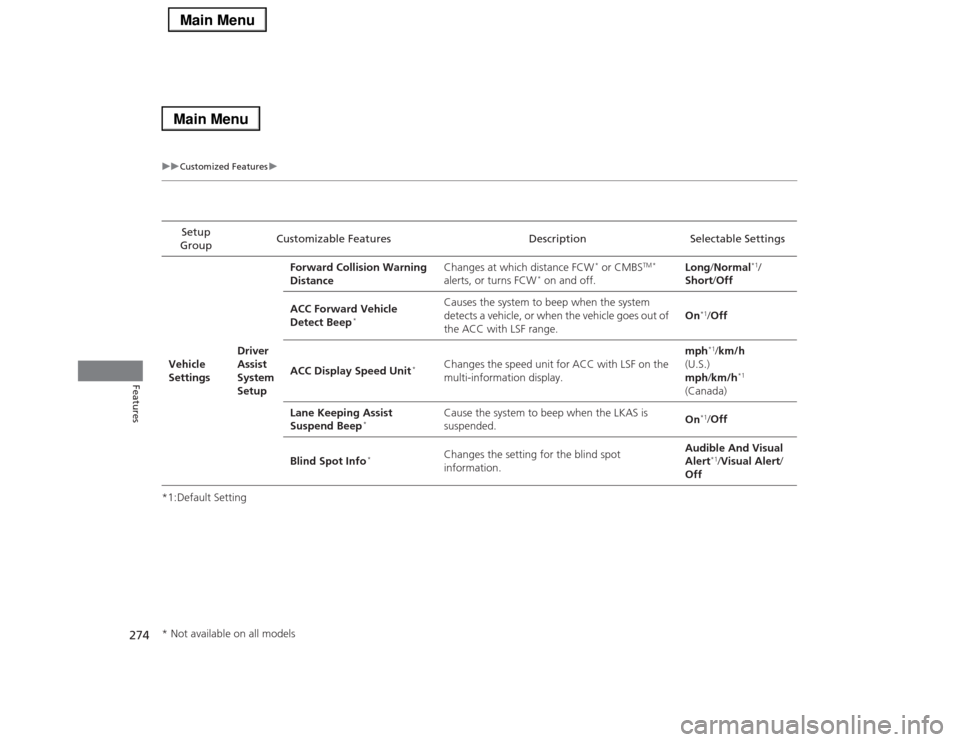
uuCustomized Featuresu
Features
*1:Default SettingSetup
GroupCustomizable Features Description Selectable Settings
Vehicle
SettingsDriver
Assist
System
SetupForward Collision Warning
DistanceChanges at which distance FCW
* or CMBS
TM *
alerts, or turns FCW
* on and off.Long/Normal
*1/
Short/Off
ACC Forward Vehicle
Detect Beep
*
Causes the system to beep when the system
detects a vehicle, or when the vehicle goes out of
the ACC with LSF range.On
*1/Off
ACC Display Speed Unit
*
Changes the speed unit for ACC with LSF on the
multi-information display.mph
*1/km/h
(U.S.)
mph/km/h
*1
(Canada)
Lane Keeping Assist
Suspend Beep
*
Cause the system to beep when the LKAS is
suspended.On
*1/Off
Blind Spot Info
*
Changes the setting for the blind spot
information.Audible And Visual
Alert
*1/Visual Alert/
Off
* Not available on all models
Page 336 of 518
335
Driving
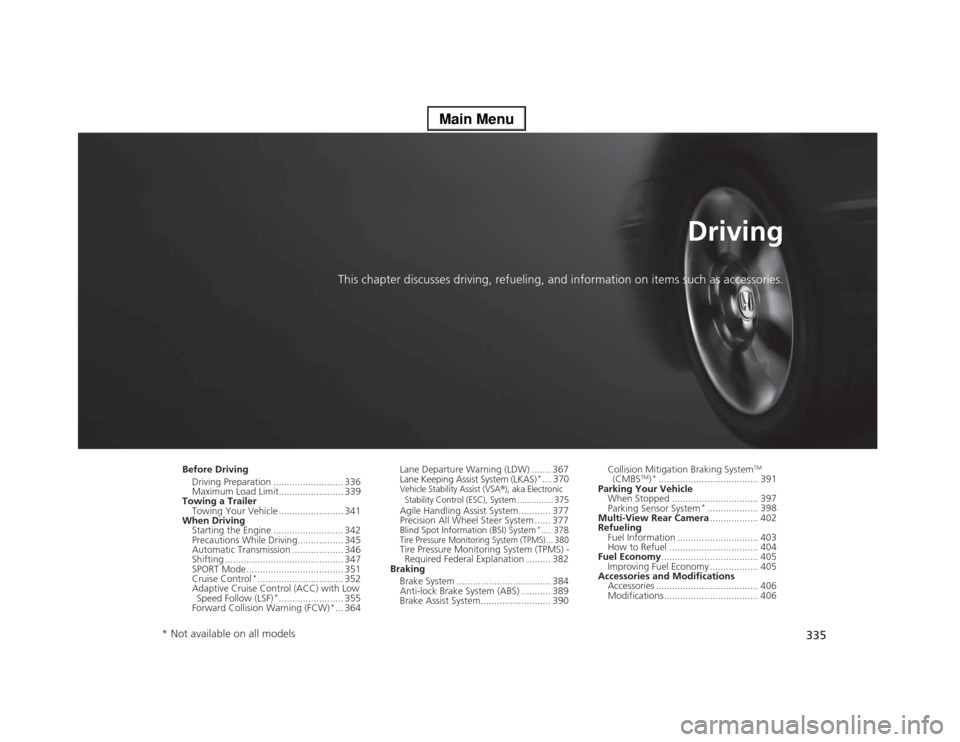
This chapter discusses driving, refueling, and information on items such as accessories.
Before Driving
Driving Preparation .......................... 336
Maximum Load Limit........................ 339
Towing a Trailer
Towing Your Vehicle ........................ 341
When Driving
Starting the Engine .......................... 342
Precautions While Driving................. 345
Automatic Transmission ................... 346
Shifting ............................................ 347
SPORT Mode.................................... 351
Cruise Control
*................................ 352
Adaptive Cruise Control (ACC) with Low
Speed Follow (LSF)
*........................ 355
Forward Collision Warning (FCW)
*... 364Lane Departure Warning (LDW) ....... 367
Lane Keeping Assist System (LKAS)
*.... 370
Vehicle Stability Assist (VSA
®), aka Electronic
Stability Control (ESC), System ............... 375
Agile Handling Assist System............ 377
Precision All Wheel Steer System ...... 377Blind Spot Information (BSI) System
*.... 378
Tire Pressure Monitoring System (TPMS) ... 380Tire Pressure Monitoring System (TPMS) -
Required Federal Explanation ......... 382
Braking
Brake System ................................... 384
Anti-lock Brake System (ABS) ........... 389
Brake Assist System.......................... 390Collision Mitigation Braking System
TM
(CMBS
TM)*..................................... 391
Parking Your Vehicle
When Stopped ................................ 397
Parking Sensor System
*................... 398
Multi-View Rear Camera.................. 402
Refueling
Fuel Information .............................. 403
How to Refuel ................................. 404
Fuel Economy.................................... 405
Improving Fuel Economy .................. 405
Accessories and Modifications
Accessories ...................................... 406
Modifications................................... 406
* Not available on all models
Page 357 of 518
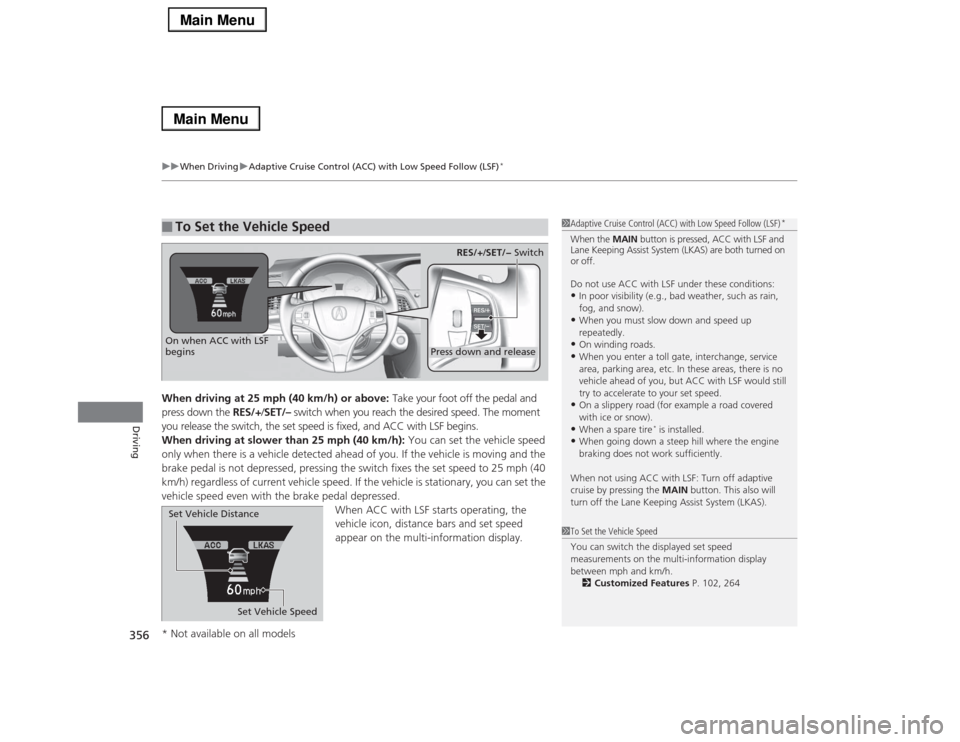
uuWhen DrivinguAdaptive Cruise Control (ACC) with Low Speed Follow (LSF)
*
356Driving
When driving at 25 mph (40 km/h) or above: Take your foot off the pedal and
press down the RES/+/SET/– switch when you reach the desired speed. The moment
you release the switch, the set speed is fixed, and ACC with LSF begins.
When driving at slower than 25 mph (40 km/h): You can set the vehicle speed
only when there is a vehicle detected ahead of you. If the vehicle is moving and the
brake pedal is not depressed, pressing the switch fixes the set speed to 25 mph (40
km/h) regardless of current vehicle speed. If the vehicle is stationary, you can set the
vehicle speed even with the brake pedal depressed.
When ACC with LSF starts operating, the
vehicle icon, distance bars and set speed
appear on the multi-information display. ■
To Set the Vehicle Speed
1Adaptive Cruise Control (ACC) with Low Speed Follow (LSF)
*
When the MAIN button is pressed, ACC with LSF and
Lane Keeping Assist System (LKAS) are both turned on
or off.
Do not use ACC with LSF under these conditions:•In poor visibility (e.g., bad weather, such as rain,
fog, and snow).•When you must slow down and speed up
repeatedly.•On winding roads.•When you enter a toll gate, interchange, service
area, parking area, etc. In these areas, there is no
vehicle ahead of you, but ACC with LSF would still
try to accelerate to your set speed.•On a slippery road (for example a road covered
with ice or snow).•When a spare tire
* is installed.
•When going down a steep hill where the engine
braking does not work sufficiently.
When not using ACC with LSF: Turn off adaptive
cruise by pressing the MAIN button. This also will
turn off the Lane Keeping Assist System (LKAS).
1To Set the Vehicle Speed
You can switch the displayed set speed
measurements on the multi-information display
between mph and km/h.
2Customized Features P. 102, 264
On when ACC with LSF
begins
Press down and release
RES/+/SET/− Switch
Set Vehicle Speed Set Vehicle Distance
* Not available on all models