wheel Acura RLX 2015 Owners Manual
[x] Cancel search | Manufacturer: ACURA, Model Year: 2015, Model line: RLX, Model: Acura RLX 2015Pages: 521, PDF Size: 22.24 MB
Page 471 of 521
470
uuIf a Tire Goes Flat uChanging a Flat Tire
Handling the Unexpected
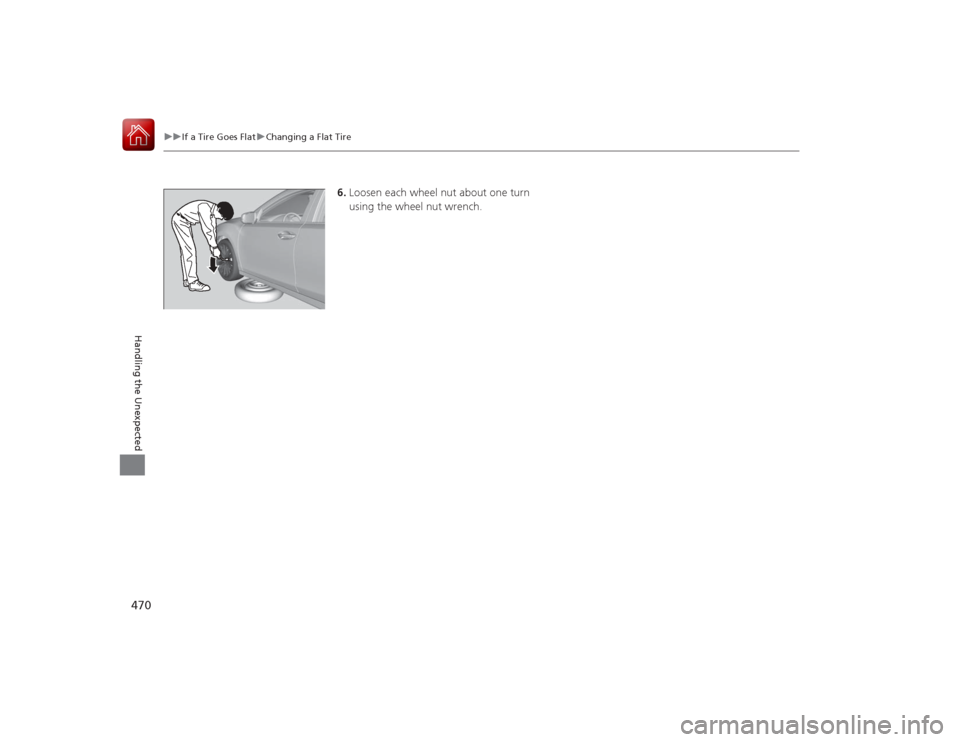
6. Loosen each wheel nut about one turn
using the wheel nut wrench.
Page 472 of 521
Continued
471
uuIf a Tire Goes Flat uChanging a Flat Tire
Handling the Unexpected
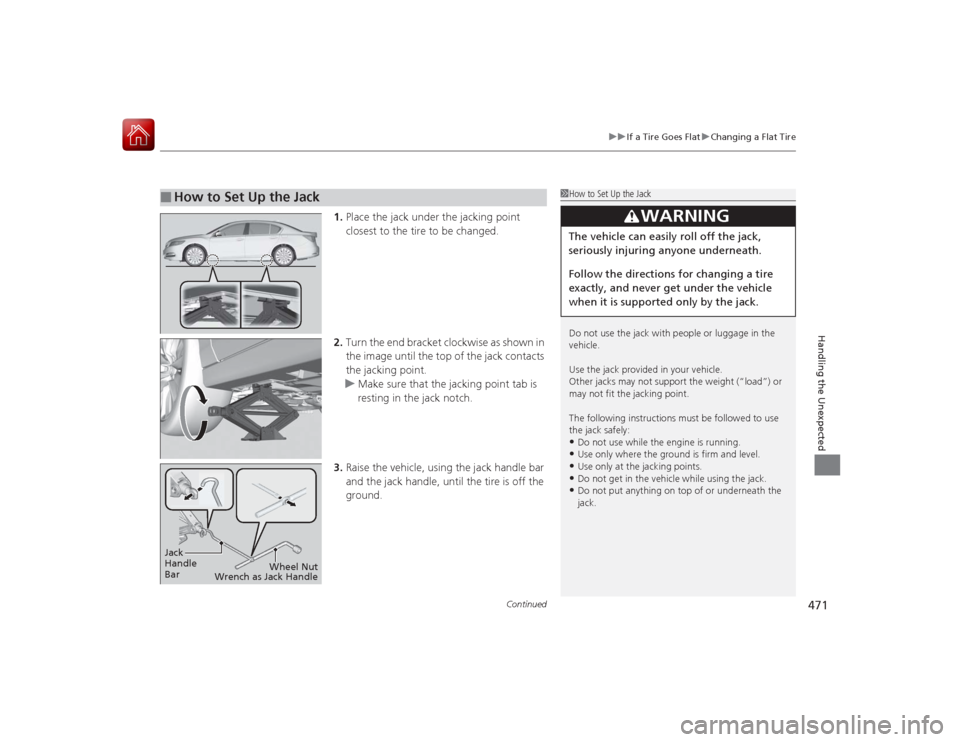
1. Place the jack under the jacking point
closest to the tire to be changed.
2. Turn the end bracket clockwise as shown in
the image until the top of the jack contacts
the jacking point.
u Make sure that the jacking point tab is
resting in the jack notch.
3. Raise the vehicle, using the jack handle bar
and the jack handle, until the tire is off the
ground.
■
How to Set Up the Jack
1How to Set Up the Jack
Do not use the jack with people or luggage in the
vehicle.
Use the jack provided in your vehicle.
Other jacks may not support the weight (“load”) or
may not fit the jacking point.
The following instructions must be followed to use
the jack safely:•Do not use while the engine is running.•Use only where the ground is firm and level.•Use only at the jacking points.•Do not get in the vehicle while using the jack.•Do not put anything on top of or underneath the
jack.
3
WARNING
The vehicle can easily roll off the jack,
seriously injuring anyone underneath.
Follow the directions for changing a tire
exactly, and never get under the vehicle
when it is supported only by the jack.
Jack
Handle
Bar Wheel Nut
Wrench as Jack Handle
Page 473 of 521
uuIf a Tire Goes Flat uChanging a Flat Tire
472Handling the Unexpected
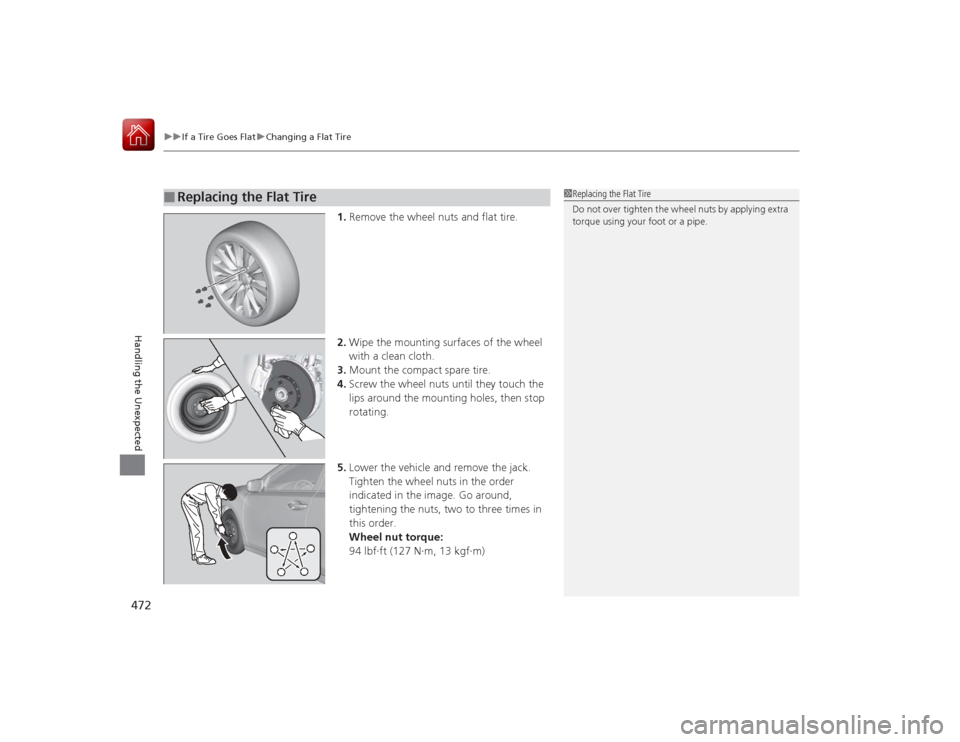
1. Remove the wheel nuts and flat tire.
2. Wipe the mounting surfaces of the wheel
with a clean cloth.
3. Mount the compact spare tire.
4. Screw the wheel nuts until they touch the
lips around the mounting holes, then stop
rotating.
5. Lower the vehicle and remove the jack.
Tighten the wheel nuts in the order
indicated in the image. Go around,
tightening the nuts, two to three times in
this order.
Wheel nut torque:
94 lbf∙ft (127 N∙m, 13 kgf∙m)
■
Replacing the Flat Tire
1Replacing the Flat Tire
Do not over tighten the wheel nuts by applying extra
torque using your foot or a pipe.
Page 474 of 521

473
uuIf a Tire Goes Flat uChanging a Flat Tire
Handling the Unexpected
1. Place the flat tire face down in the spare tire
well.
2. Wrap the spacer cone and spare tire wing
bolt with cloth or paper, and store them in
the spare tire well.
3. Store the jack and tools in the tool case.
Place the tool case on the flat tire.
4. Lower the trunk floor lid, then close the
trunk.
If you replace a flat tire with the spare tire, the low tire pressure/TPMS indicator
comes on while you are driving. After driving for a few miles (kilometers), the
indicator will start blinking for a short time and then stay on. Tire Pressure
Monitor Problem /CHECK TPMS SYSTEM appears on the multi-information
display, but this is normal.
If you replace the tire with a full-size tire, the warning message on the multi-
information display and the low tire pressure/TPMS indicator will go off after a few
miles (kilometers).
■
Storing the Flat Tire
1 Storing the Flat Tire
3
WARNING
Loose items can fly around the interior in a
crash and can seriously injure the
occupants.
Store the wheel, jack, and tools securely
before driving.
Spacer Cone
Wing Bolt
■
TPMS and the Spare Tire
1TPMS and the Spare Tire
The system cannot monitor the pressure of the spare
tire. Manually check the spare tire pressure to be sure
that it is correct.
Use the TPMS specific wheels. Each is equipped with
a tire pressure sensor mounted inside the tire behind
the valve stem.
Page 477 of 521

476
uuEngine Does Not Start uEmergency Engine Stop
Handling the Unexpected
Emergency Engine StopThe ENGINE START/STOP button may be used to stop the engine due to an
emergency situation even while driving. If you mus t stop the engine, do either of the
following operations:
• Press and hold the ENGINE START/STOP button for about two seconds.
• Firmly press the ENGINE START/STOP button twice.
The steering wheel will not lock. However, because turning off the engine disables
the power assist the engine provides to the steering and braking systems, it will
require significantly more physical effort and time to steer and slow the vehicle. Use
both feet on the brake pedal to slow down the vehicle and stop immediately in a
safe place.
The power mode is in ACCESSORY when the engine is stopped.
To change the mode to VEHICLE OFF, move the shift lever to
(P
after the vehicle
comes to a complete stop.
1 Emergency Engine Stop
Do not press the button while driving unless it is
absolutely necessary for the engine to be switched
off.
Page 486 of 521

485
uuIndicator, Coming On/Blinking uIf the Electric Power Steering (EPS) System Indicator Comes On
Handling the Unexpected
If the Electric Power Steering (EPS) System Indicator Comes On
■Reasons for the indicator to come on
• Comes on when there is a problem with the EPS system.
• If you depress the accelerator pedal repeatedly to increase the engine
speed while the engine is idling, the indicator comes on, and
sometimes the steering wheel becomes harder to operate.■What to do when the indicator comes on
Stop the vehicle in a safe place and restart the engine.
If the indicator comes on and stays on, immediately have your vehicle
inspected by a dealer.
If the Electric Parking Brake System Indicator Comes On
■Reasons for the indicator to come on
Comes on when there is a problem with the electric parking brake
system.■What to do when the indicator comes on
Avoid using the parking brake and immediately get your vehicle
inspected at a dealer.■What to do when the electric parking brake indicator comes on
or blinks at the same time.
• Release the parking brake. If you cannot release it, immediately stop
the vehicle in a safe place and call a dealer.
• If only the electric parking brake indicator goes off, immediately get
your vehicle inspected at a dealer.
• If the electric parking brake indicator remains on or blinks even after
releasing the parking brake, immediately stop the vehicle in a safe
place and call a dealer.
Page 489 of 521
488
uuFuses uFuse Locations
Handling the Unexpected
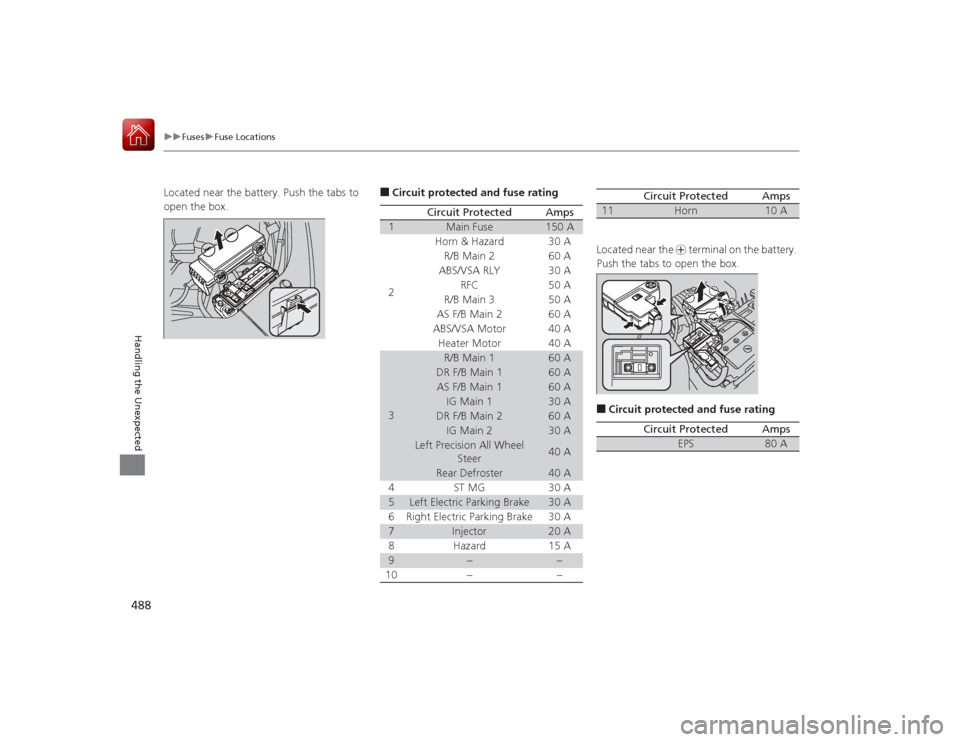
Located near the battery. Push the tabs to
open the box.
■Circuit protected and fuse rating
Circuit Protected
Amps
1
Main Fuse
150 A
2
Horn & Hazard
30 A
R/B Main 2 60 A
ABS/VSA RLY 30 A RFC 50 A
R/B Main 3 50 A
AS F/B Main 2 60 A
ABS/VSA Motor 40 A Heater Motor 40 A
3
R/B Main 1
60 A
DR F/B Main 1
60 A
AS F/B Main 1
60 A
IG Main 1
30 A
DR F/B Main 2
60 A
IG Main 2
30 A
Left Precision All Wheel Steer
40 A
Rear Defroster
40 A
4 ST MG 30 A
5
Left Electric Parking Brake
30 A
6 Right Electric Parking Brake 30 A
7
Injector
20 A
8 Hazard 15 A
9
−
−
10 − −
Located near the + terminal on the battery.
Push the tabs to open the box.■Circuit protected and fuse rating11
Horn
10 A
Circuit Protected
Amps
Circuit Protected
Amps
EPS
80 A
Page 490 of 521
489
uuFuses uFuse Locations
Continued
Handling the Unexpected
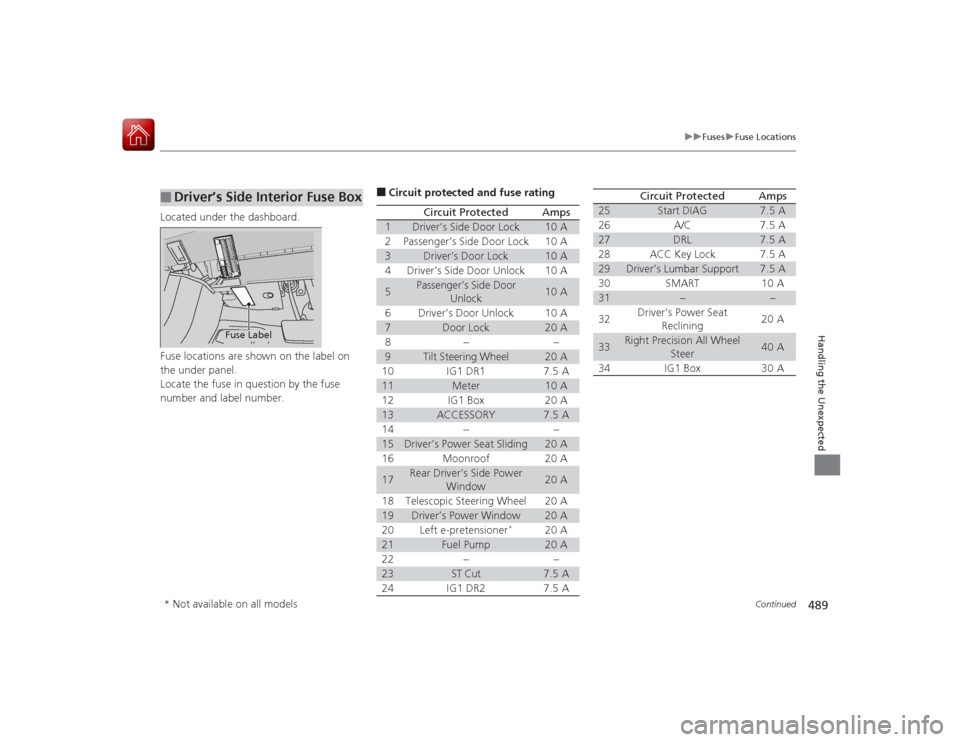
Located under the dashboard.
Fuse locations are shown on the label on
the under panel.
Locate the fuse in question by the fuse
number and label number.■
Driver’s Side Interior Fuse Box
Fuse Label
■Circuit protected and fuse rating
Circuit Protected
Amps
1
Driver’s Side Door Lock
10 A
2
Passenger’s Side Door Lock
10 A
3
Driver’s Door Lock
10 A
4
Driver’s Side Door Unlock
10 A
5
Passenger’s Side Door
Unlock
10 A
6
Driver’s Door Unlock
10 A
7
Door Lock
20 A
8
−
−
9
Tilt Steering Wheel
20 A
10
IG1 DR1
7.5 A
11
Meter
10 A
12
IG1 Box
20 A
13
ACCESSORY
7.5 A
14
−
−
15
Driver’s Power Seat Sliding
20 A
16
Moonroof
20 A
17
Rear Driver’s Side Power Window
20 A
18
Telescopic Steering Wheel
20 A
19
Driver’s Power Window
20 A
20
Left e-pretensioner
*
20 A
21
Fuel Pump
20 A
22
−
−
23
ST Cut
7.5 A
24
IG1 DR2
7.5 A
25
Start DIAG
7.5 A
26
A/C
7.5 A
27
DRL
7.5 A
28
ACC Key Lock
7.5 A
29
Driver’s Lumbar Support
7.5 A
30
SMART
10 A
31
−
−
32
Driver’s Power Seat
Reclining
20 A
33
Right Precision All Wheel Steer
40 A
34
IG1 Box
30 A
Circuit Protected
Amps
* Not available on all models
Page 491 of 521

490
uuFuses uFuse Locations
Handling the Unexpected
Located on the lower side panel. Take off
the cover to open.
Fuse locations are shown on the cover.■
Passenger’s Side Interior Fuse
BoxFuse Label
Cover
■Circuit protected and fuse rating
Circuit Protected
Amps
1
−
−
2
Front Seat Heaters/AVS
20 A
3
Rear Passenger’s Side
Power Window
20 A
4
Front Passenger’s Lumbar Support
7.5 A
5
−
−
6
−
−
7
Passenger’s Power Seat Sliding
20 A
8
Passenger’s Power Seat
Reclining
20 A
9
Rear Seat Heaters
*
(20 A)
10
−
−
11
Fly Start
15 A
12
Accessory Power Socket
(Console Compartment)
20 A
13
Accessory Power Socket (Center Pocket)
20 A
14
AS ECU
7.5 A
15
Glove Box
7.5 A
16
−
−
17
−
−
18
Front Passenger’s Power
Window
20 A
19
SRS1
10 A
*1:Except ADVANCE and U.S. TECH-AUDIO models
*2:ADVANCE and U.S. TECH-AUDIO models20
ABS/VSA
7.5 A
21
−
−
22
e-pretensioner
*
(7.5 A)
23
−
−
24
SRS2
7.5 A
25
Illumination
7.5 A
26
Right e-pretensioner
*
(20 A)
27
Heated Steering Wheel
*
10 A
28
Audio AMP
30 A
*1
40 A
*2
Circuit Protected
Amps
* Not available on all models
Page 500 of 521
499
uuSpecifications u
Information
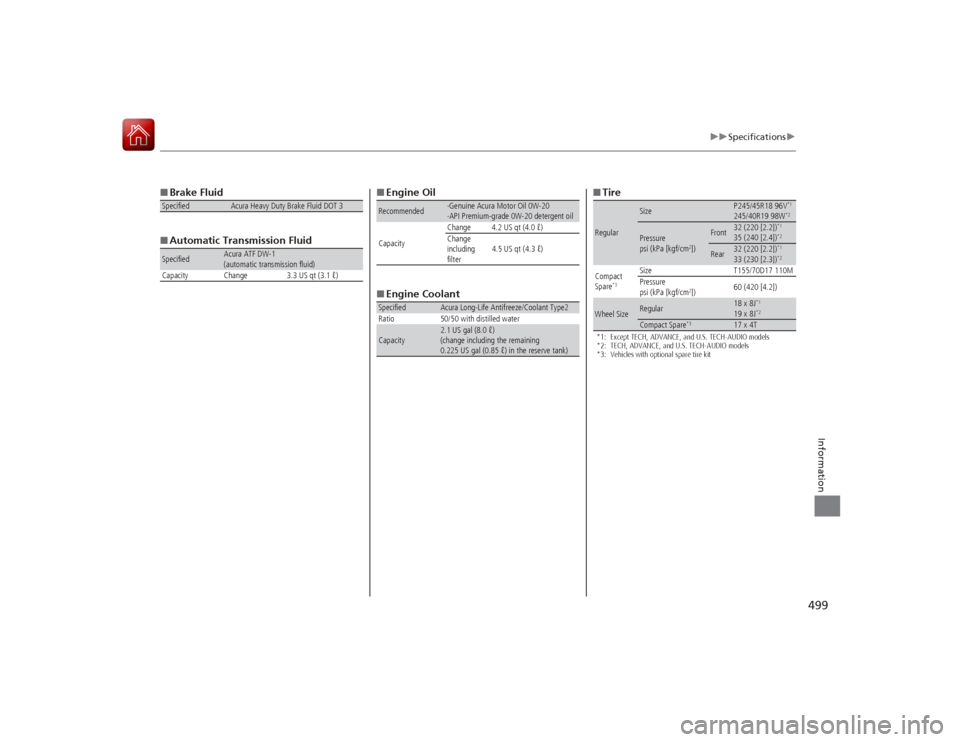
■Brake Fluid
■ Automatic Transmission FluidSpecified
Acura Heavy Duty Brake Fluid DOT 3
Specified
Acura ATF DW-1
(automatic transmission fluid)
Capacity Change 3.3 US qt (3.1 ℓ)
■ Engine Oil
■ Engine CoolantRecommended
·Genuine Acura Motor Oil 0W-20
·API Premium-grade 0W-20 detergent oil
Capacity Change 4.2 US qt (4.0 ℓ)
Change
including
filter
4.5 US qt (4.3 ℓ)
Specified
Acura Long-Life Antifreeze/Coolant Type2
Ratio 50/50 with distilled water
Capacity
2.1 US gal (8.0 ℓ)
(change including the remaining
0.225 US gal (0.85 ℓ) in the reserve tank)
■ Tire*1: Except TECH, ADVANCE, and U.S. TECH-AUDIO models
*2: TECH, ADVANCE, and U.S. TECH-AUDIO models
*3: Vehicles with optional spare tire kitRegular
Size
P245/45R18 96V
*1
245/40R19 98W
*2
Pressure
psi (kPa [kgf/cm
2])
Front
32 (220 [2.2])
*1
35 (240 [2.4])
*2
Rear
32 (220 [2.2])
*1
33 (230 [2.3])
*2
Compact
Spare
*3
Size T155/70D17 110M
Pressure
psi (kPa [kgf/cm
2]) 60 (420 [4.2])
Wheel Size
Regular
18 x 8J
*1
19 x 8J
*2
Compact Spare
*3
17 x 4T