phone Acura RLX 2015 Manual PDF
[x] Cancel search | Manufacturer: ACURA, Model Year: 2015, Model line: RLX, Model: Acura RLX 2015Pages: 521, PDF Size: 22.24 MB
Page 326 of 521
325
uuBluetooth ® HandsFreeLink ®u HFL Menus
Features
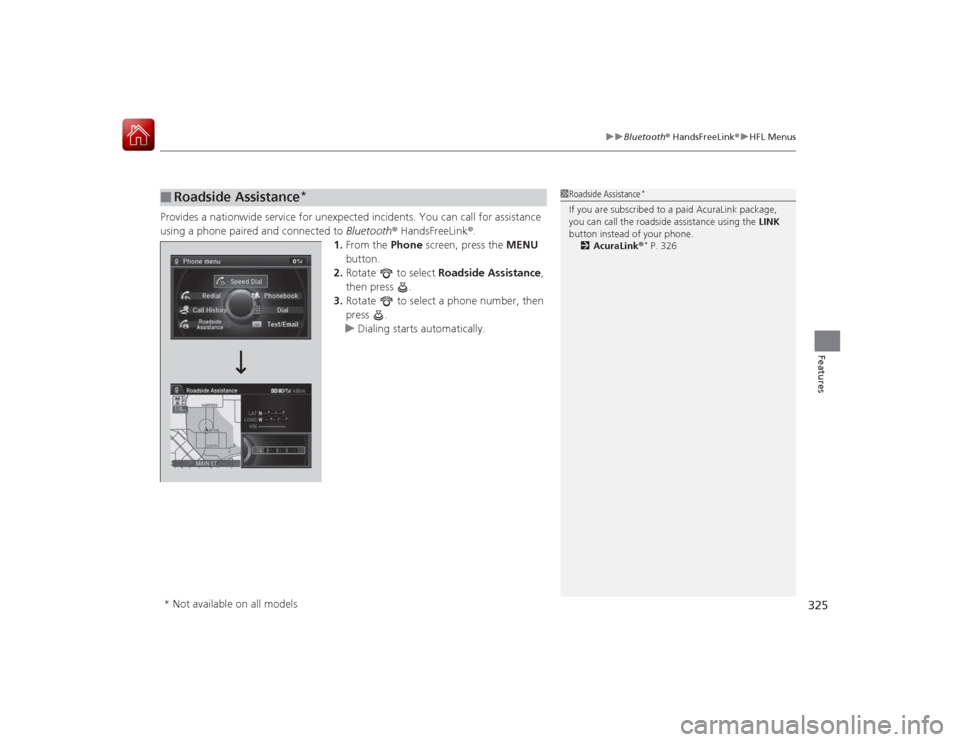
Provides a nationwide service for unexpected incidents. You can call for assistance
using a phone paired and connected to Bluetooth® HandsFreeLink ®.
1. From the Phone screen, press the MENU
button.
2. Rotate to select Roadside Assistance ,
then press .
3. Rotate to select a phone number, then
press .
u Dialing starts automatically.■
Roadside Assistance
*
1Roadside Assistance
*
If you are subscribed to a paid AcuraLink package,
you can call the roadside assistance using the LINK
button instead of your phone. 2 AcuraLink ®
* P. 326
* Not available on all models
Page 327 of 521
326Features
AcuraLink®
*
Is a subscription-based service th at provides convenient features such as voice
communication in case of emergency, online security, one-on-one operator
assistance, and the transmission of important messages regarding your vehicle’s
status.
For information on traffic rerouting and traffic information updates, provided by the
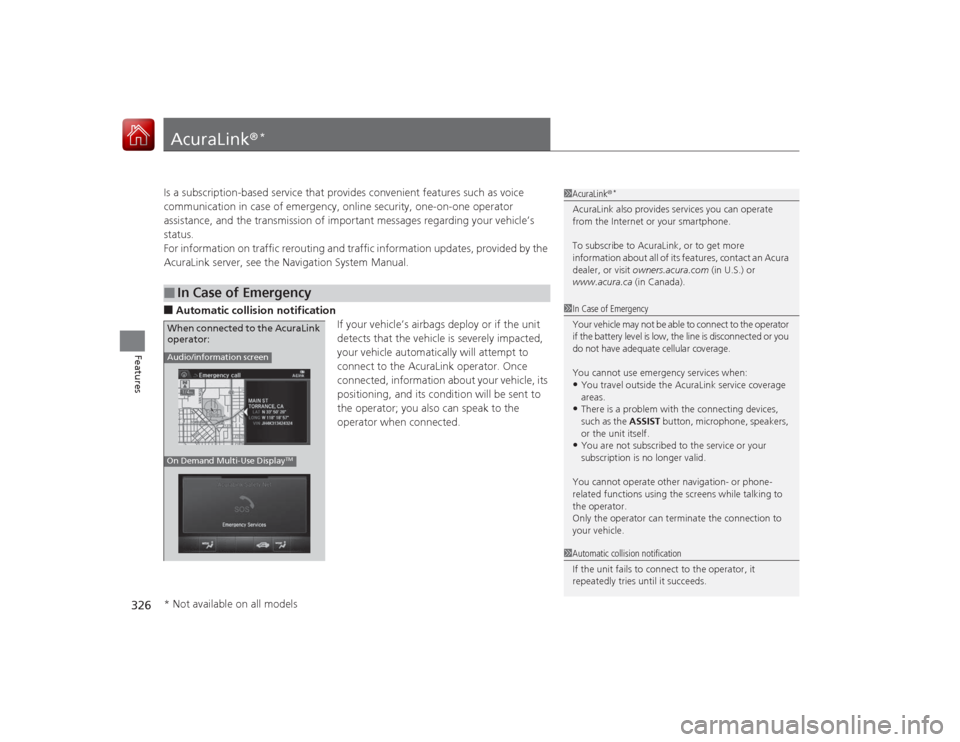
AcuraLink server, see the Navigation System Manual.■Automatic collision notification If your vehicle’s airbags deploy or if the unit
detects that the vehicle is severely impacted,
your vehicle automatically will attempt to
connect to the AcuraLink operator. Once
connected, information about your vehicle, its
positioning, and its condition will be sent to
the operator; you also can speak to the
operator when connected.■
In Case of Emergency
1AcuraLink ®
*
AcuraLink also provides services you can operate
from the Internet or your smartphone.
To subscribe to AcuraLink, or to get more
information about all of its features, contact an Acura
dealer, or visit owners.acura.com (in U.S.) or
www.acura.ca (in Canada).1In Case of Emergency
Your vehicle may not be able to connect to the operator
if the battery level is low, the line is disconnected or you
do not have adequate cellular coverage.
You cannot use emergency services when:•You travel outside the AcuraLink service coverage
areas.•There is a problem with the connecting devices,
such as the ASSIST button, microphone, speakers,
or the unit itself.•You are not subscribed to the service or your
subscription is no longer valid.
You cannot operate other navigation- or phone-
related functions using the screens while talking to
the operator.
Only the operator can terminate the connection to
your vehicle.
1 Automatic collision notification
If the unit fails to connect to the operator, it
repeatedly tries until it succeeds.
Audio/information screenOn Demand Multi-Use Display
TM
When connected to the AcuraLink
operator:* Not available on all models
Page 329 of 521
uuAcuraLink ®
*u
328Features
Your subscribed telematics service provider can track your vehicle’s location,
remotely lock or unlock doors, and help you find your vehicle.
To use these features, you need your user ID and personal identification number
(PIN).■Stolen vehicle tracking
This feature searches and tracks down your vehicle position even if it is on the move.
If you believe that your vehicle has been stolen, contact the police as well as the
provider.■Remote door lock/unlock
The provider can remotely lock or unlock doors upon your request.■Vehicle finder
This feature is convenient to use when trying to locate your vehicle in large areas,
such as a crowded parking lot. If you cannot locate your vehicle after using the
remote transmitter’s answerback function, you can contact the provider which can
then flash your vehicle’s exterior lights and sound the horn.■Security alarm notification
If the security system in your vehicle detects an abnormal condition, such as
someone tampering with the lock on your vehicle, the provider notifies you by email.■
Security Features
1 Security Features
The contact information of your provider, your user
ID and PIN will be given when you subscribe to
AcuraLink. If you forget any of the above, contact a
dealer, or go to owners.acura.com (in U.S.) or
www.acura.ca (in Canada).
You can also activate the remote door lock/unlock
and vehicle finder features from the Internet or using
your smartphone app. Ask a dealer, or visit
owners.acura.com (in U.S.) or www.acura.ca (in
Canada) for details.1 Vehicle finder
The lights will stop flashing and horn will stop
sounding under the following conditions:•When 30 seconds have elapsed.•You unlock the doors using the remote transmitter.•You unlock the doors using the keyless access
system.•You unlock the doors using the built-in key.•The power mode is set to ACCESSORY or ON.
Page 333 of 521

uuAcuraLink ®
*u
332Features
•Schedule Dealer Appointment (U.S. models only): Automatically sets an
appointment date at your dealer.
• Phone number : Dials a number displayed in the message via HFL.
• Diagnostic Info : Updates the current diagnostic message by connecting to the
Acura server using HFL.■Dealer Appointments
You can confirm the scheduled appointment date when you receive a
Maintenance Minder or Recalls/Campaigns message, or reschedule any existing
appointments. 1.Select a Maintenance Minder , Recalls/
Campaigns , or Scheduled Dealer
Appointment message.
2. Rotate to select Scheduled Dealer
Appointment or Reschedule
Appointment (depending on the screen).
Press .
u A suggested time and date are displayed.
3. Rotate to select Confirm
Appointment . Press to accept the time
and date.
4. Press to select OK.
1Dealer Appointments
To set up an automated dealer appointment when a
regular maintenance is due, visit the Acura Owners
website at www.owners.acura.com (in U.S.) or
www.acura.ca (in Canada), and set the required
option. A reminder message will be sent as the date
for the dealer appointment approaches. A reminder
message will also be sent if you schedule an
appointment online using Acura Owners’ Schedule
Service Appointment function.
If you are not satisfied with the proposed
appointment date and time, call your dealer directly.
To cancel the scheduled appointment, select Cancel
Appointment when a message is displayed.
U.S. models only
Page 508 of 521
507Information
Authorized Manuals■Service Express
For electronic copies of service publication s, you can purchase a subscription to
Service Express. Visit www.techinfo.honda.com for pricing and options.■For U.S. Owners:
Manuals can be purchased from Helm Incorporated. You can order a manual by
phone at (800) 782-4356 (credit card orders only), or online at www.helminc.com .
1Authorized Manuals
For Canadian Owners:
Please contact a dealer to order any manuals that you
may require.
Page 509 of 521

508Information
Client Service InformationAcura dealership personnel are trained professionals.
They should be able to answer all your questions. If you encounter a problem that
your dealership does not solve to your satisfaction, please discuss it with the
dealership’s service manager or general manager. If you are dissatisfied with the
decision made by the dealership’s management, contact Acura Client Relations/
Services.
U.S. Owners:
American Honda Motor Co., Inc.
Acura Client Relations
Mail Stop 500-2N-7E 1919 Torrance Blvd.
Torrance, CA 90501-2746
Tel: (800) 382-2238Canadian Owners:
Honda Canada Inc.
Acura Client Services
180 Honda Boulevard Markham, ON
L6C 0H9
Tel: 1-866-78-ACURA
Fax: 1-877-939-0909
E-mail: [email protected]
In Puerto Rico and the U.S. Virgin Islands:
Bella International
P.O. Box 190816
San Juan, PR 00919-0816
Tel: (787) 620-7546
1 Client Service Information
When you call or write, please give us the following
information:•Vehicle Identification Number
2Vehicle Identification Number (VIN),
Engine Number and Transmission
Number P. 500•Date of purchase•Odometer reading of your vehicle•Your name, address, and telephone number•A detailed description of the problem
Page 511 of 521
510
uuClient Service Information u
Information
Gracenote reserves all rights in Gracenote
Data, the Gracenote Software, and the
Gracenote Servers, including all ownership
rights. Under no circumstances will
Gracenote become liable for any payment
to you for any information that you provide.
You agree that Gracenote, Inc. may enforce
its rights under this Agreement against you
directly in its own name.
The Gracenote service uses a unique
identifier to track queries for statistical
purposes. The purpose of a randomly
assigned numeric identifier is to allow the
Gracenote service to count queries without
knowing anything about who you are. For
more information, see the web page for the
Gracenote Privacy Policy for the Gracenote
service.
The Gracenote Software and each item of
Gracenote Data are licensed to you “AS IS.”
Gracenote makes no representations or
warranties, express or implied, regarding
the accuracy of any Gracenote Data from in
the Gracenote Servers. Gracenote reserves
the right to delete data from the Gracenote
Servers or to change data categories for any cause that Gracenote deems sufficient. No
warranty is made that the Gracenote
Software or Gracenote Servers are error-
free or that functioning of Gracenote
Software or Gracenote Servers will be
uninterrupted.
Gracenote is not obligated to provide you
with new enhanced or
additional data types
or categories that Gracenote may provide in
the future and is free to discontinue its
services at any time.
GRACENOTE DISCLAIMS ALL WARRANTIES
EXPRESS OR IMPLIED, INCLUDING, BUT
NOT LIMITED TO, IMPLIED WARRANTIES OF
MERCHANTABILITY, FITNESS FOR A
PARTICULAR PURPOSE, TITLE, AND
NONINFRINGEMENT. GRACENOTE DOES
NOT WARRANT THE RESULTS THAT WILL BE
OBTAINED BY YOUR USE OF THE
GRACENOTE SOFTWARE OR ANY
GRACENOTE SERVER. IN NO CASE WILL
GRACENOTE BE LIABLE FOR ANY
CONSEQUENTIAL OR INCIDENTAL
DAMAGES OR FOR ANY LOST PROFITS OR
LOST REVENUES.
© Gracenote 2009 Requirements to access Pandora
®
• Latest version of the Pandora app
installed on your Android, Blackberry, or
iPhone.
• Registered Pandora account (you can
create a free account at
www.pandora.com
smartphone)
• Connection to the internet via WiFi or
cellular data network.
■
Disclaimer of Pandora ®
Page 512 of 521
511
uuClient Service Information u
Information
Limitations
•Access to Pandora requires an active
internet connection
• Ability to access Pandora through this
system is subject to change without
notice
• Certain functionality of Pandora service is
not available when accessing the service
through this system including, but not
limited to, creating new stations, deleting
stations, emailing current stations,
buying songs, viewing additional text
information, logging in to Pandora, and
adjusting Cell Network Audio Quality.
Pandora internet radio is a music service
not affiliated with HONDA. More
information is available at http://
www.pandora.com
Pandora logo, and the Pandora trade
dress are trademarks or registered
trademarks of Pandora Media, Inc., used
with permission.
• Mobile access requires a smartphone
with an active data plan. Standard data
rates may apply.
• Pandora is only available in the United
States.
Page 516 of 521
515Index
Low Fuel Indicator..................................... 73
Range ..................................................... 100
Recommendation............................ 404, 498
Refueling ................................................ 404
Fuel Economy ........................................... 406
Fuel Fill Door ...................................... 18, 405
Fuses ......................................................... 487
Inspecting and Changing ........................ 491
Locations ................................ 487, 489, 490GGasoline (Fuel)
Economy................................................. 406
Gauge ...................................................... 94
Information............................................. 404
Instant Fuel Economy .............................. 100
Low Fuel Indicator..................................... 73
Refueling ................................................ 404
Gauges ........................................................ 94
Gear Shift Lever Positions
Automatic Transmission .......................... 345
Glass (care) ............................................... 454
Glove Box ................................................. 161HHandling the Unexpected ....................... 455
HandsFreeLink ® (HFL) .............................. 286
Auto Answer .......................................... 301 Automatic Import of Cellular Phonebook and
Call History ............................................ 303
Automatic Transferring ............................ 301
Displaying Messages ................................ 321
Editing User Name ................................... 300
HFL Buttons ............................................. 286
HFL Menus .............................................. 288
HFL Status Display ................................... 287
Limitations for Manual Operation ............ 287
Making a Call .......................................... 312
Options During a Call .............................. 318
Phone Setup ............................................ 292
Phonebook Phonetic Modification ........... 307
Receiving a Call ....................................... 317
Receiving a Text Message/E-mail .............. 319
Ring Tone ................................................ 302
Roadside Assistance ................................. 325
Selecting a Mail Account ......................... 320
Speed Dial ............................................... 304
To Create a Security PIN .......................... 299
To Set Up a Text/E-mail Message Options ................................................. 297
Use Contact Photo .................................. 302
Hard Disc Drive (HDD) Audio ................... 227
Hazard Warning Button ............................... 4
Head Restraints ......................................... 155
Headlight Washers ................................... 143
Headlights ................................................. 137
Aiming .................................................... 430
Automatic Operation ............................... 138
Dimming ......................................... 137, 140 Operating................................................ 137
Heated Steering Wheel ............................ 171
Heaters (Seat) ........................... 172, 173, 174
HFL (HandsFreeLink ®)............................... 286
High-Beam Indicator .................................. 77
Hill Start Assist System ............................. 342
HomeLink ® Universal Transceiver ............ 284
IIdentification Numbers ............................ 500
Engine and Transmission ......................... 500
Vehicle Identification ............................... 500
Illumination Control Buttons ................................................... 144
Immobilizer System .................................. 128
Indicator.................................................... 77
Indicators .................................................... 68
Adaptive Cruise Control (ACC) with Low Speed Follow (LSF) ..................................... 81, 353
Anti-lock Brake System (ABS)..................... 74
Automatic Brake Hold ....................... 70, 388
Automatic Brake Hold System ........... 69, 388
Blind Spot Information (BSI) ............... 83, 380
Brake System (Amber) ............................... 70
Brake System (Red) ............................ 68, 484
Charging System ............................... 71, 483
Collision Mitigation Brake System
TM
(CMBS
TM) ................................................. 83
CRUISE CONTROL ............................. 78, 351
CRUISE MAIN .................................... 78, 350