charging Acura RLX 2015 Owner's Manual
[x] Cancel search | Manufacturer: ACURA, Model Year: 2015, Model line: RLX, Model: Acura RLX 2015Pages: 521, PDF Size: 22.24 MB
Page 11 of 521
10Quick Reference Guide
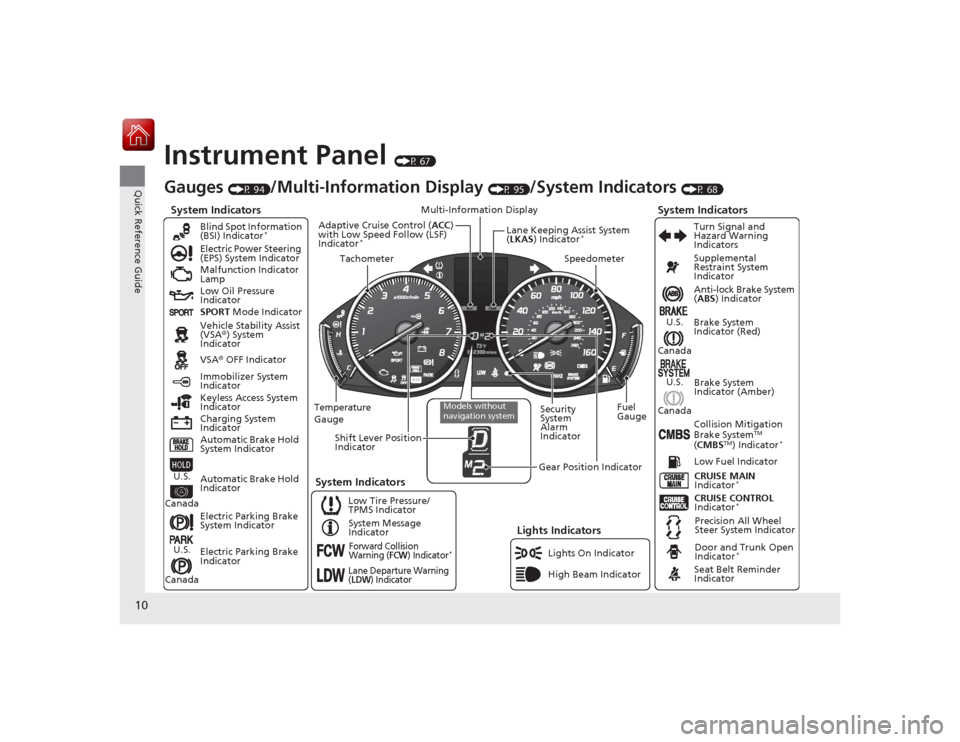
Instrument Panel
(P 67)
System Indicators
Malfunction Indicator
Lamp
Low Oil Pressure
Indicator
Charging System
IndicatorAnti-lock Brake System
(
ABS ) Indicator
Vehicle Stability Assist
(VSA ®) System
Indicator
VSA ® OFF Indicator
Electric Power Steering
(EPS) System Indicator
Lights Indicators
Lights On Indicator
High Beam Indicator
Immobilizer System
Indicator
Seat Belt Reminder
Indicator
System Indicators
CRUISE CONTROL
Indicator
*
System Message
Indicator Brake System
Indicator (Red)
Supplemental
Restraint System
Indicator
Door and Trunk Open
Indicator
*
CRUISE MAIN
Indicator
*
Low Fuel Indicator
Gauges
(P 94)
/Multi-Information Display
(P 95)
/System Indicators
(P 68)
Low Tire Pressure/
TPMS Indicator Turn Signal and
Hazard Warning
Indicators
Keyless Access System
Indicator
Temperature
Gauge Security
System
Alarm
IndicatorFuel
Gauge
Tachometer
Multi-Information Display
Speedometer
Shift Lever Position
Indicator
Gear Position Indicator
Electric Parking Brake
System Indicator
Electric Parking Brake
Indicator Automatic Brake Hold
System Indicator Brake System
Indicator (Amber)
SPORT
Mode Indicator
Blind Spot Information
(BSI) Indicator
*
System Indicators
Collision Mitigation
Brake System
TM
( CMBS
TM) Indicator
*
Precision All Wheel
Steer System Indicator
Forward Collision
Warning (
FCW
) Indicator
*
Lane Departure Warning
(LDW
) Indicator
Models without
navigation system
Lane Keeping Assist System
(LKAS ) Indicator
*
Adaptive Cruise Control ( ACC)
with Low Speed Follow (LSF)
Indicator
*
Automatic Brake Hold
Indicator
U.S.
CanadaU.S.
Canada
U.S.
Canada
U.S.
Canada
Page 72 of 521

71
uuIndicators u
Continued
Instrument Panel
*1:On the left: Models with navigation system
On the right: Models without navigation systemIndicator
Name
On/Blinking
Explanation
Message
*1
Malfunction
Indicator Lamp
●Comes on when you set the power
mode to ON, and goes off either
when the engine starts or after
several seconds if the engine did not
start. If “readiness codes” have not
been set, it blinks five times before it
goes off.●Comes on if there is a problem with
the emissions control system.●Blinks when a misfire in the engine’s
cylinders is detected.
●Readiness codes are part of the on
board diagnostics for the emissions
control systems.
2Testing of Readiness Codes P. 503
●Comes on while driving - Have the
vehicle checked by a dealer.●Blinks while driving - Stop in a safe
place where there are no flammable
objects. Stop the engine for 10 minutes
or more, and wait for it to cool down.
Then, take the vehicle to a dealer.
2 If the Malfunction Indicator Lamp
Comes On or Blinks P. 484
Charging
System
Indicator
●Comes on when you set the power
mode to ON, and goes off when the
engine starts.●Comes on when the battery is not
charging.
●Comes on while driving - Turn off the
climate control system and rear
defogger in order to reduce electricity
consumption.
2 If the Charging System Indicator
Comes On P. 483
Page 85 of 521

84
uuIndicators uMulti-Information Display Warn ing and Information Messages
Instrument Panel
Multi-Information Display Warning and Information MessagesThe following messages appear only on the multi-information display. Roll the right selector wheel to see the message again wit h the
system message indicator on.
*1:On the left: Models with navigation system On the right: Models without navigation system
Message
*1
Condition
Explanation
●Appears when the washer fluid is low.
●Refill washer fluid.
2Refilling Window Washer Fluid P. 429
●Appears when the scheduled maintenance is due soon.●Consequently, Maintenance Due Now /SERVICE
DUE NOW and Maintenance Past Due /SERVICE
PAST DUE follow.
2Maintenance Minder Messages on the Multi-
Information Display P. 415
●Appears when the engine coolant temperature gets
abnormally high.
2Overheating P. 481
●Appears when the transmission fluid temperature is
too high.
●Stop in a safe place in
(P
. Let the engine idle until the
message disappears.
●Appears when there is a problem with the sensor on
the battery.
●Have your vehicle checked by a dealer.
2 Checking the Battery P. 448
●Appears along with the battery charging system
indicator when the battery is not charging.
●Turn off the climate control system and rear defogger
to reduce electricity consumption.
2If the Charging Syste m Indicator Comes On P. 483
Page 449 of 521
448Maintenance
BatteryChecking the Battery
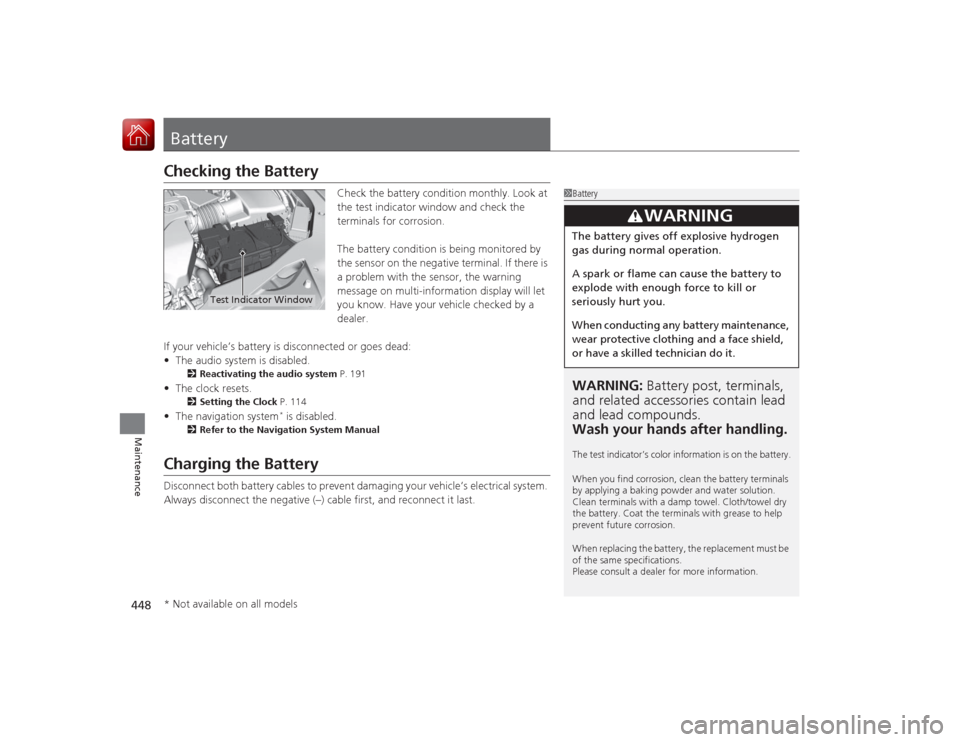
Check the battery condition monthly. Look at
the test indicator window and check the
terminals for corrosion.
The battery condition is being monitored by
the sensor on the negative terminal. If there is
a problem with the sensor, the warning
message on multi-information display will let
you know. Have your vehicle checked by a
dealer.
If your vehicle’s battery is disconnected or goes dead:
• The audio system is disabled.
2 Reactivating the audio system P. 191
•The clock resets.
2 Setting the Clock P. 114
•The navigation system
* is disabled.
2 Refer to the Navigation System Manual
Charging the BatteryDisconnect both battery cables to prevent damaging your vehicle’s electrical system.
Always disconnect the negative (–) cable first, and reconnect it last.
1BatteryWARNING: Battery post, terminals,
and related accessori es contain lead
and lead compounds.
Wash your hands after handling.The test indicator’s color information is on the battery.
When you find corrosion, clean the battery terminals
by applying a baking powder and water solution.
Clean terminals with a damp towel. Cloth/towel dry
the battery. Coat the termina ls with grease to help
prevent future corrosion.
When replacing the battery, the replacement must be
of the same specifications.
Please consult a dealer for more information.
3
WARNING
The battery gives off explosive hydrogen
gas during normal operation.
A spark or flame can cause the battery to
explode with enough force to kill or
seriously hurt you.
When conducting any battery maintenance,
wear protective clothing and a face shield,
or have a skilled technician do it.
Test Indicator Window
* Not available on all models
Page 456 of 521
455
Handling the Unexpected
This chapter explains how to handle unexpected troubles.
Tools
Types of Tools .................................. 456
If a Tire Goes Flat Temporarily Repairing a Flat Tire....... 457
Changing a Flat Tire ......................... 468
Engine Does Not Start Checking the Engine ........................ 474
If the Keyless Access Remote Battery is Weak ............................................. 475
Emergency Engine Stop ................... 476
Jump Starting .................................... 477
Shift Lever Does Not Move .............. 480
Overheating How to Handle Overheating ............. 481 Indicator, Coming On/Blinking
If the Low Oil Pressure Indicator Comes
On ............................................. 483If the Charging System Indicator Comes
On ................................................. 483
If the Malfunction Indicator Lamp Comes On or Blinks ................................... 484If the Brake System Indicator (Red) Comes On .. 484If the Electric Power Steering (EPS) System Indicator Comes On .............................. 485
If the Electric Parking Brake System Indicator Comes On............................................. 485
If the Low Tire Pressure/TPMS Indicator Comes On or Blinks ....................... 486
Fuses Fuse Locations ................................. 487
Inspecting and Changing Fuses ........ 491
Emergency Towing ........................... 492
When You Cannot Unlock the Fuel Fill Door ................................................. 493When You Cannot Open the Trunk ..... 494RefuelingRefueling From a Portable Fuel Container ... 495
Page 478 of 521
477
Continued
Handling the Unexpected
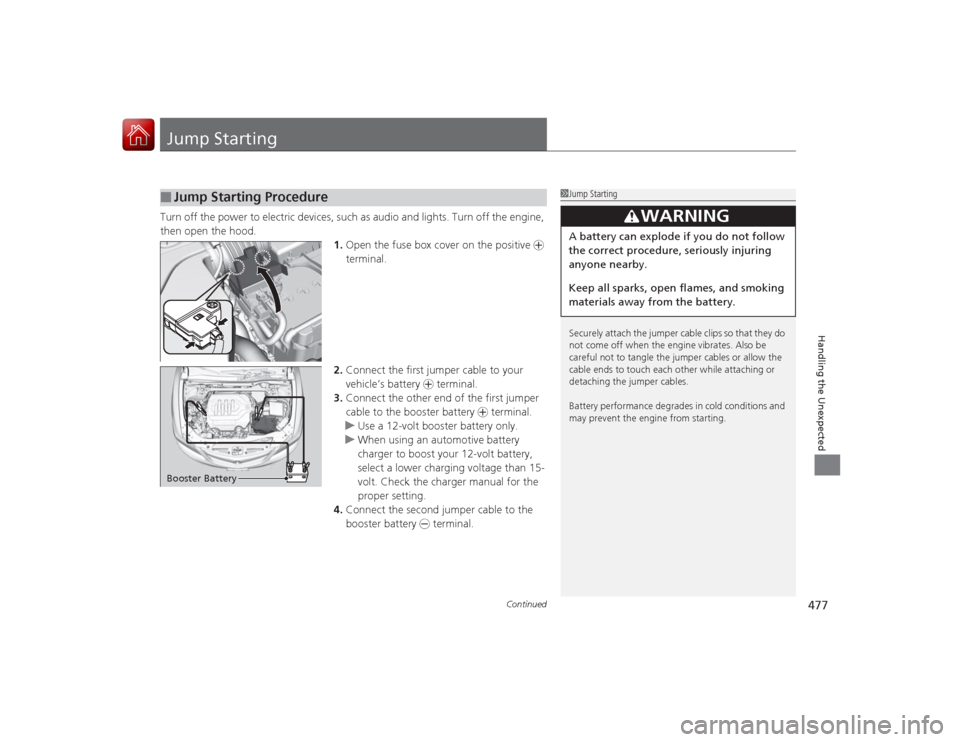
Jump StartingTurn off the power to electric devices, such as audio and lights. Turn off the engine,
then open the hood. 1.Open the fuse box cover on the positive +
terminal.
2. Connect the first jumper cable to your
vehicle’s battery + terminal.
3. Connect the other end of the first jumper
cable to the booster battery + terminal.
u Use a 12-volt booster battery only.
u When using an automotive battery
charger to boost your 12-volt battery,
select a lower charging voltage than 15-
volt. Check the charger manual for the
proper setting.
4. Connect the second jumper cable to the
booster battery - terminal.■
Jump Starting Procedure
1Jump Starting
Securely attach the jumper cable clips so that they do
not come off when the engine vibrates. Also be
careful not to tangle the jumper cables or allow the
cable ends to touch each other while attaching or
detaching the jumper cables.
Battery performance degrades in cold conditions and
may prevent the engine from starting.
3
WARNING
A battery can explode if you do not follow
the correct procedure, seriously injuring
anyone nearby.
Keep all sparks, open flames, and smoking
materials away from the battery.
Booster Battery
Page 484 of 521

483Handling the Unexpected
Indicator, Coming On/BlinkingIf the Low Oil Pressure Indicator Comes On
■Reasons for the indicator to come on
Comes on when the engine oil pressure is low.■What to do as soon as the indicator comes on
1. Immediately park the vehicle on level ground in a safe place.
2. If necessary, turn the hazard warning lights on.■What to do after parking the vehicle
1. Stop the engine and let it sit for about three minutes.
2. Open the hood and check the oil level.2 Oil Check P. 422
3.Start the engine and check the low oil pressure indicator.
u The indicator goes off: Start driving again.
u The indicator does not go off within 10 seconds: Stop the engine
and contact a dealer for repairs immediately.
If the Charging System Indicator Comes On
■Reasons for the indicator to come on
Comes on when the battery is not being charged.■What to do when the indicator comes on
Turn off the climate control system, rear defogger, and other electrical
systems, and immediately contact a dealer for repairs.
1 If the Low Oil Pressure Indicator Comes OnNOTICERunning the engine with low oil pressure can cause
serious mechanical damage almost immediately.1If the Charging System Indicator Comes On
If you need to stop temporarily, do not turn off the
engine. Restarting the engine may rapidly discharge
the battery.
Page 513 of 521
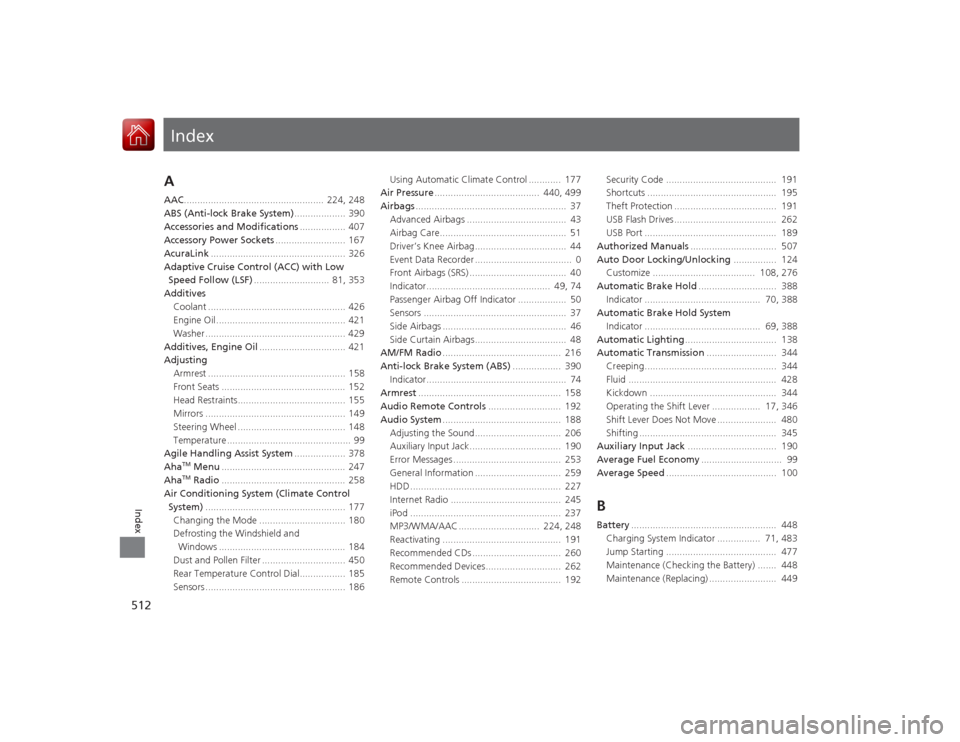
Index
512Index
Index
AAAC.................................................... 224, 248
ABS (Anti-lock Brake System) ................... 390
Accessories and Modifications ................. 407
Accessory Power Sockets .......................... 167
AcuraLink .................................................. 326
Adaptive Cruise Control (ACC) with Low Speed Follow (LSF) ............................ 81, 353
Additives Coolant ................................................... 426
Engine Oil ................................................ 421
Washer .................................................... 429
Additives, Engine Oil ................................ 421
Adjusting
Armrest ................................................... 158
Front Seats .............................................. 152
Head Restraints........................................ 155
Mirrors .................................................... 149
Steering Wheel ........................................ 148
Temperature .............................................. 99
Agile Handling Assist System ................... 378
Aha
TM Menu .............................................. 247
AhaTM Radio .............................................. 258
Air Conditioning System (Climate Control System) .................................................... 177
Changing the Mode ................................ 180
Defrosting the Windshield and Windows ............................................... 184
Dust and Pollen Filter ............................... 450
Rear Temperature Control Dial................. 185
Sensors .................................................... 186 Using Automatic Climate Control ............ 177
Air Pressure ....................................... 440, 499
Airbags ........................................................ 37
Advanced Airbags ..................................... 43
Airbag Care............................................... 51
Driver’s Knee Airbag.................................. 44
Event Data Recorder .................................... 0
Front Airbags (SRS) .................................... 40
Indicator.............................................. 49, 74
Passenger Airbag Off Indicator .................. 50
Sensors ..................................................... 37
Side Airbags .............................................. 46
Side Curtain Airbags.................................. 48
AM/FM Radio ............................................ 216
Anti-lock Brake System (ABS) .................. 390
Indicator.................................................... 74
Armrest ..................................................... 158
Audio Remote Controls ........................... 192
Audio System ............................................ 188
Adjusting the Sound................................ 206
Auxiliary Input Jack.................................. 190
Error Messages ........................................ 253
General Information ................................ 259
HDD ........................................................ 227
Internet Radio ......................................... 245
iPod ........................................................ 237
MP3/WMA/AAC .............................. 224, 248
Reactivating ............................................ 191
Recommended CDs ................................. 260
Recommended Devices............................ 262
Remote Controls ..................................... 192 Security Code ......................................... 191
Shortcuts ................................................ 195
Theft Protection ...................................... 191
USB Flash Drives...................................... 262
USB Port ................................................. 189
Authorized Manuals ................................ 507
Auto Door Locking/Unlocking ................ 124
Customize ...................................... 108, 276
Automatic Brake Hold ............................. 388
Indicator ........................................... 70, 388
Automatic Brake Hold System
Indicator ........................................... 69, 388
Automatic Lighting .................................. 138
Automatic Transmission .......................... 344
Creeping................................................. 344
Fluid ....................................................... 428
Kickdown ............................................... 344
Operating the Shift Lever .................. 17, 346
Shift Lever Does Not Move ...................... 480
Shifting ................................................... 345
Auxiliary Input Jack ................................. 190
Average Fuel Economy .............................. 99
Average Speed ......................................... 100
BBattery...................................................... 448
Charging System Indicator ................ 71, 483
Jump Starting ......................................... 477
Maintenance (Checking the Battery) ....... 448
Maintenance (Replacing) ......................... 449
Page 514 of 521
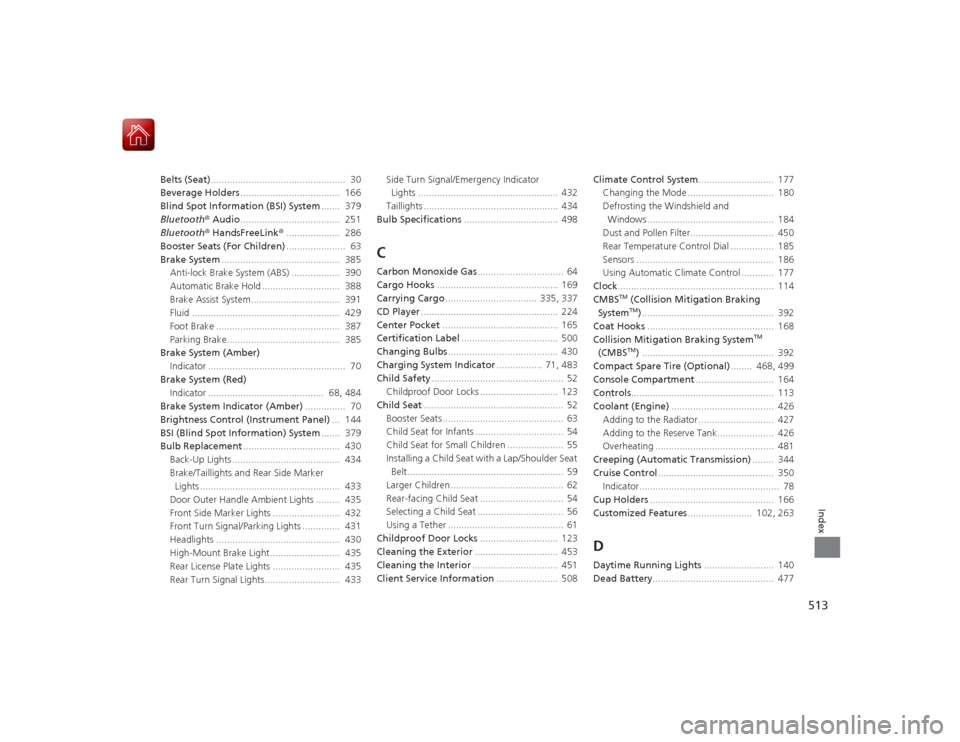
513Index
Belts (Seat).................................................. 30
Beverage Holders ..................................... 166
Blind Spot Information (BSI) System ....... 379
Bluetooth® Audio..................................... 251
Bluetooth® HandsFreeLink® .................... 286
Booster Seats (For Children) ...................... 63
Brake System ............................................ 385
Anti-lock Brake System (ABS) .................. 390
Automatic Brake Hold ............................. 388
Brake Assist System................................. 391
Fluid ....................................................... 429
Foot Brake .............................................. 387
Parking Brake.......................................... 385
Brake System (Amber)
Indicator ................................................... 70
Brake System (Red) Indicator ........................................... 68, 484
Brake System Indicator (Amber) ............... 70
Brightness Control (Instrument Panel) ... 144
BSI (Blind Spot Information) System ....... 379
Bulb Replacement .................................... 430
Back-Up Lights ........................................ 434
Brake/Taillights and Rear Side Marker Lights .................................................... 433
Door Outer Handle Ambient Lights ......... 435
Front Side Marker Lights ......................... 432
Front Turn Signal/Parking Lights .............. 431
Headlights .............................................. 430
High-Mount Brake Light.......................... 435
Rear License Plate Lights ......................... 435
Rear Turn Signal Lights............................ 433 Side Turn Signal/Emergency Indicator
Lights .................................................... 432
Taillights .................................................. 434
Bulb Specifications ................................... 498
CCarbon Monoxide Gas ................................ 64
Cargo Hooks ............................................. 169
Carrying Cargo .................................. 335, 337
CD Player ................................................... 224
Center Pocket ........................................... 165
Certification Label .................................... 500
Changing Bulbs ......................................... 430
Charging System Indicator ................. 71, 483
Child Safety ................................................. 52
Childproof Door Locks ............................. 123
Child Seat .................................................... 52
Booster Seats ............................................. 63
Child Seat for Infants ................................. 54
Child Seat for Small Children ..................... 55
Installing a Child Seat with a Lap/Shoulder Seat Belt.......................................................... 59
Larger Children .......................................... 62
Rear-facing Child Seat ............................... 54
Selecting a Child Seat ................................ 56
Using a Tether ........................................... 61
Childproof Door Locks ............................. 123
Cleaning the Exterior ............................... 453
Cleaning the Interior ................................ 451
Client Service Information ....................... 508Climate Control System
............................ 177
Changing the Mode ................................ 180
Defrosting the Windshield and Windows ............................................... 184
Dust and Pollen Filter............................... 450
Rear Temperature Control Dial ................ 185
Sensors ................................................... 186
Using Automatic Climate Control ............ 177
Clock .......................................................... 114
CMBS
TM (Collision Mitigation Braking
SystemTM) ................................................. 392
Coat Hooks ............................................... 168
Collision Mitigation Braking System
TM
(CMBS
TM) ................................................. 392
Compact Spare Tire (Optional) ........ 468, 499
Console Compartment ............................. 164
Controls ..................................................... 113
Coolant (Engine) ...................................... 426
Adding to the Radiator ............................ 427
Adding to the Reserve Tank..................... 426
Overheating ............................................ 481
Creeping (Automatic Transmission) ........ 344
Cruise Control ........................................... 350
Indicator.................................................... 78
Cup Holders .............................................. 166
Customized Features ........................ 102, 263
DDaytime Running Lights .......................... 140
Dead Battery ............................................. 477
Page 516 of 521
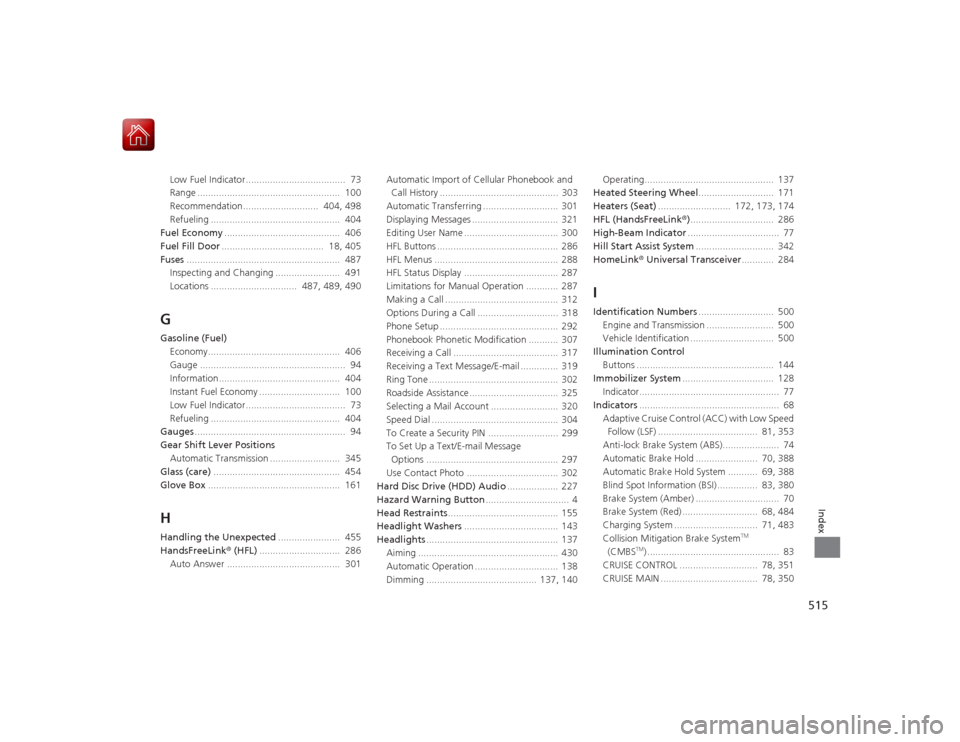
515Index
Low Fuel Indicator..................................... 73
Range ..................................................... 100
Recommendation............................ 404, 498
Refueling ................................................ 404
Fuel Economy ........................................... 406
Fuel Fill Door ...................................... 18, 405
Fuses ......................................................... 487
Inspecting and Changing ........................ 491
Locations ................................ 487, 489, 490GGasoline (Fuel)
Economy................................................. 406
Gauge ...................................................... 94
Information............................................. 404
Instant Fuel Economy .............................. 100
Low Fuel Indicator..................................... 73
Refueling ................................................ 404
Gauges ........................................................ 94
Gear Shift Lever Positions
Automatic Transmission .......................... 345
Glass (care) ............................................... 454
Glove Box ................................................. 161HHandling the Unexpected ....................... 455
HandsFreeLink ® (HFL) .............................. 286
Auto Answer .......................................... 301 Automatic Import of Cellular Phonebook and
Call History ............................................ 303
Automatic Transferring ............................ 301
Displaying Messages ................................ 321
Editing User Name ................................... 300
HFL Buttons ............................................. 286
HFL Menus .............................................. 288
HFL Status Display ................................... 287
Limitations for Manual Operation ............ 287
Making a Call .......................................... 312
Options During a Call .............................. 318
Phone Setup ............................................ 292
Phonebook Phonetic Modification ........... 307
Receiving a Call ....................................... 317
Receiving a Text Message/E-mail .............. 319
Ring Tone ................................................ 302
Roadside Assistance ................................. 325
Selecting a Mail Account ......................... 320
Speed Dial ............................................... 304
To Create a Security PIN .......................... 299
To Set Up a Text/E-mail Message Options ................................................. 297
Use Contact Photo .................................. 302
Hard Disc Drive (HDD) Audio ................... 227
Hazard Warning Button ............................... 4
Head Restraints ......................................... 155
Headlight Washers ................................... 143
Headlights ................................................. 137
Aiming .................................................... 430
Automatic Operation ............................... 138
Dimming ......................................... 137, 140 Operating................................................ 137
Heated Steering Wheel ............................ 171
Heaters (Seat) ........................... 172, 173, 174
HFL (HandsFreeLink ®)............................... 286
High-Beam Indicator .................................. 77
Hill Start Assist System ............................. 342
HomeLink ® Universal Transceiver ............ 284
IIdentification Numbers ............................ 500
Engine and Transmission ......................... 500
Vehicle Identification ............................... 500
Illumination Control Buttons ................................................... 144
Immobilizer System .................................. 128
Indicator.................................................... 77
Indicators .................................................... 68
Adaptive Cruise Control (ACC) with Low Speed Follow (LSF) ..................................... 81, 353
Anti-lock Brake System (ABS)..................... 74
Automatic Brake Hold ....................... 70, 388
Automatic Brake Hold System ........... 69, 388
Blind Spot Information (BSI) ............... 83, 380
Brake System (Amber) ............................... 70
Brake System (Red) ............................ 68, 484
Charging System ............................... 71, 483
Collision Mitigation Brake System
TM
(CMBS
TM) ................................................. 83
CRUISE CONTROL ............................. 78, 351
CRUISE MAIN .................................... 78, 350