instrument panel Acura RLX 2015 Owner's Manual
[x] Cancel search | Manufacturer: ACURA, Model Year: 2015, Model line: RLX, Model: Acura RLX 2015Pages: 521, PDF Size: 22.24 MB
Page 3 of 521
ContentsThis owner’s manual should be considered a permanent part of the
vehicle and should remain with the vehicle when it is sold.
This owner’s manual covers all models of your vehicle. You may find
descriptions of equipment and features that are not on your
particular model.
Images throughout this owner’s manual (including the front cover)
represent features and equipment that are available on some, but
not all, models. Your particular model may not have some of these
features.
This owner’s manual is for vehicles sold in the United States and
Canada.
The information and specifications included in this publication were
in effect at the time of approval for printing. Honda Motor Co., Ltd.
reserves the right, however, to discontinue or change specifications
or design at any time without notice and without incurring any
obligation.
2Safe Driving P. 25For Safe Driving P. 26 Seat Belts P. 30 Airbags P. 372Instrument Panel P. 67Indicators P. 68 Gauges and Multi-Information Display P. 942Controls P. 113Setting the Clock P. 114 Locking and Unlocking the Doors P. 115
Opening and Closing the Moonroof P. 132
Adjusting the Seats P. 1522Features P. 187Audio System P. 188 Audio System Basic Operation P. 193
Customized Features P. 263 HomeLink® Universal Transceiver P. 2842 Driving P. 333Before Driving P. 334 Towing a Trailer P. 339
Multi-View Rear Camera P. 403 Refueling P. 4042Maintenance P. 409Before Performing Maintenance P. 410 Maintenance Minder
TM P. 413
Checking and Maintaining Wiper Blades P. 436
Climate Control System Maintenance P. 450
2 Handling the Unexpected P. 455Tools P. 456 If a Tire Goes Flat P. 457
Overheating P. 481 Indicator, Coming On/Blinking P. 483
When You Cannot Open the Trunk P. 4942 Information P. 497Specifications P. 498 Identification Numbers P. 500
Emissions Testing P. 503 Warranty Coverages P. 505
Page 4 of 521
Contents
Child Safety P. 52Exhaust Gas Hazard P. 64Safety Labels P. 65Opening and Closing the Trunk P. 125 Security System P. 128 Opening and Closing the Windows P. 130
Operating the Switches Around the Steering Wheel P. 133 Adjusting the Mirrors P. 149
Interior Lights/Interior Convenience Items P. 159 Climate Control System P. 177Audio Error Messages P. 253General Information on the Audio System P. 259
Bluetooth® HandsFreeLink ® P. 286 AcuraLink ®
* P. 326
When Driving P. 340 Braking P. 385Parking Your Vehicle P. 398
Fuel Economy P. 406 Accessories and Modifications P. 407Maintenance Under the Hood P. 418 Replacing Light Bulbs P. 430
Checking and Maintaining Tires P. 439 Battery P. 448 Remote Transmitter Care P. 449
Cleaning P. 451Engine Does Not Start P. 474 Jump Starting P. 477 Shift Lever Does Not Move P. 480
Fuses P. 487 Emergency Towing P. 492 When You Cannot Unlock the Fuel Fill Door P. 493
Refueling P. 495Devices that Emit Radio Waves P. 501 Reporting Safety Defects P. 502
Authorized Manuals P. 507 Client Service Information P. 508
Quick Reference Guide
P. 4
Safe Driving
P. 25
Instrument Panel
P. 67
Controls
P. 113
Features
P. 187
Driving
P. 333
Maintenance
P. 409
Handling the Unexpected
P. 455
Information
P. 497
Index
P. 512
Page 11 of 521
10Quick Reference Guide
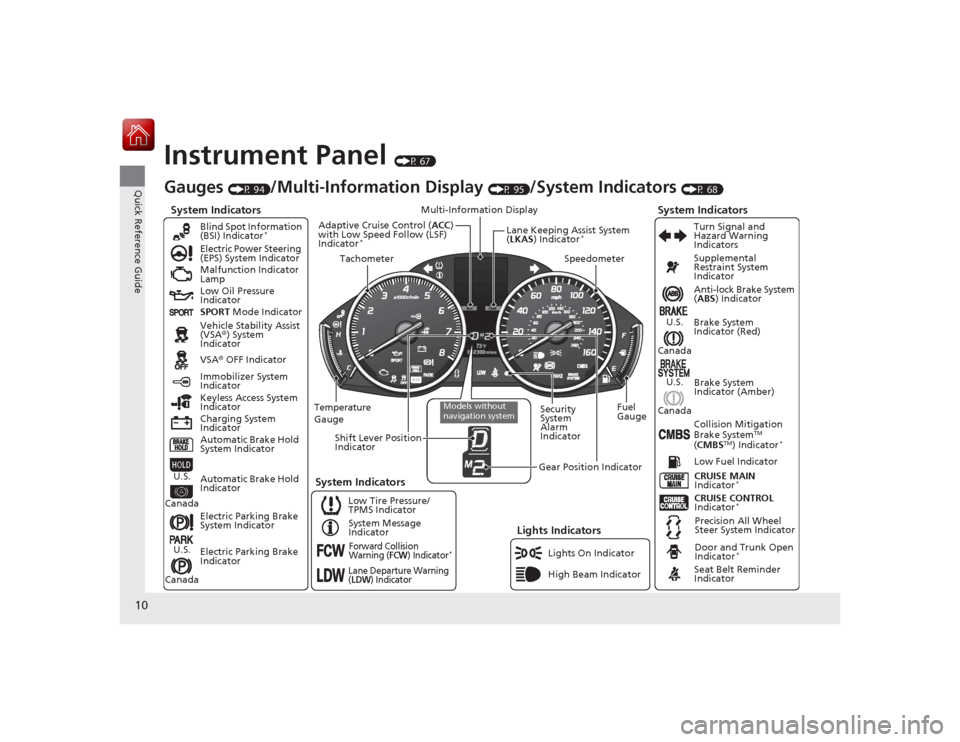
Instrument Panel
(P 67)
System Indicators
Malfunction Indicator
Lamp
Low Oil Pressure
Indicator
Charging System
IndicatorAnti-lock Brake System
(
ABS ) Indicator
Vehicle Stability Assist
(VSA ®) System
Indicator
VSA ® OFF Indicator
Electric Power Steering
(EPS) System Indicator
Lights Indicators
Lights On Indicator
High Beam Indicator
Immobilizer System
Indicator
Seat Belt Reminder
Indicator
System Indicators
CRUISE CONTROL
Indicator
*
System Message
Indicator Brake System
Indicator (Red)
Supplemental
Restraint System
Indicator
Door and Trunk Open
Indicator
*
CRUISE MAIN
Indicator
*
Low Fuel Indicator
Gauges
(P 94)
/Multi-Information Display
(P 95)
/System Indicators
(P 68)
Low Tire Pressure/
TPMS Indicator Turn Signal and
Hazard Warning
Indicators
Keyless Access System
Indicator
Temperature
Gauge Security
System
Alarm
IndicatorFuel
Gauge
Tachometer
Multi-Information Display
Speedometer
Shift Lever Position
Indicator
Gear Position Indicator
Electric Parking Brake
System Indicator
Electric Parking Brake
Indicator Automatic Brake Hold
System Indicator Brake System
Indicator (Amber)
SPORT
Mode Indicator
Blind Spot Information
(BSI) Indicator
*
System Indicators
Collision Mitigation
Brake System
TM
( CMBS
TM) Indicator
*
Precision All Wheel
Steer System Indicator
Forward Collision
Warning (
FCW
) Indicator
*
Lane Departure Warning
(LDW
) Indicator
Models without
navigation system
Lane Keeping Assist System
(LKAS ) Indicator
*
Adaptive Cruise Control ( ACC)
with Low Speed Follow (LSF)
Indicator
*
Automatic Brake Hold
Indicator
U.S.
CanadaU.S.
Canada
U.S.
Canada
U.S.
Canada
Page 18 of 521
17Quick Reference Guide
Driving
(P 333)
Release Button
Depress the brake pedal and press the
release button to move out of
( P.
Move the shift lever without pressing
the release button. Press the release button to move the
shift lever.
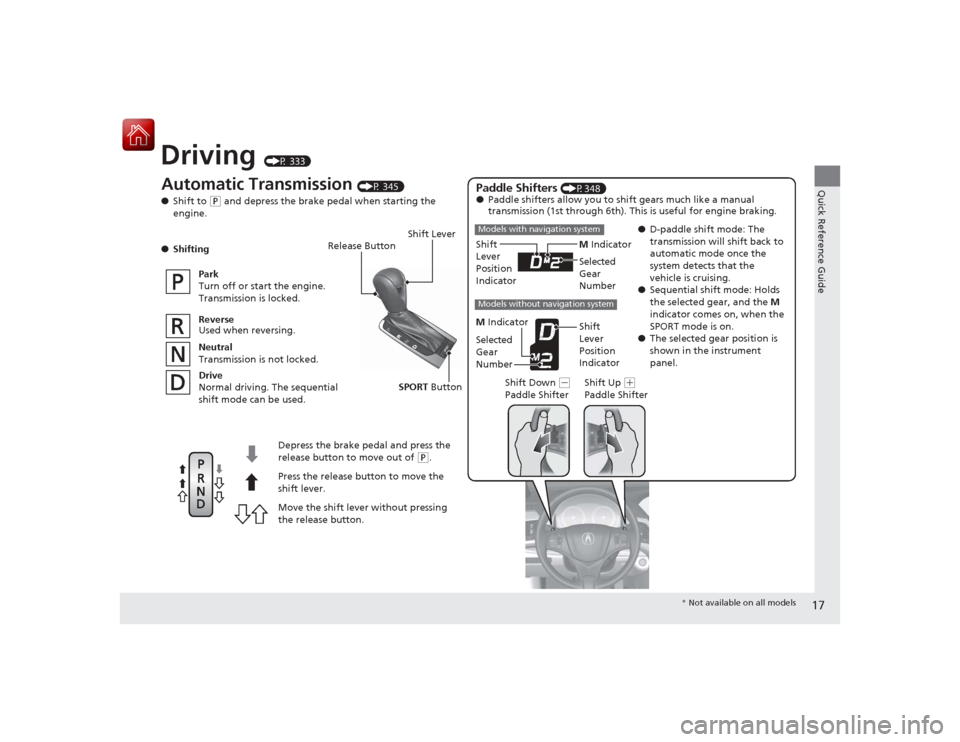
Automatic Transmission
(P 345)
● Shift to
(P and depress the brake pedal when starting the
engine.
● Shifting
Park
Turn off or start the engine.
Transmission is locked.
Reverse
Used when reversing.
Neutral
Transmission is not locked.
Drive
Normal driving. The sequential
shift mode can be used.
Paddle Shifters
(P348)
● Paddle shifters allow you to shift gears much like a manual
transmission (1st through 6th). This is useful for engine braking.
●D-paddle shift mode: The
transmission will shift back to
automatic mode once the
system detects that the
vehicle is cruising.
● Sequential shift mode: Holds
the selected gear, and the M
indicator comes on, when the
SPORT mode is on.
● The selected gear position is
shown in the instrument
panel.
M
Indicator
Shift
Lever
Position
Indicator
Shift Lever
Shift Down
(-
Paddle Shifter Shift Up
(
+
Paddle Shifter
Models with navigation systemModels without navigation system
Selected
Gear
Number
M Indicator
Shift
Lever
Position
Indicator
Selected
Gear
Number
SPORT
Button
* Not available on all models
Page 39 of 521
38
uuAirbags uAirbag System Components
Safe Driving
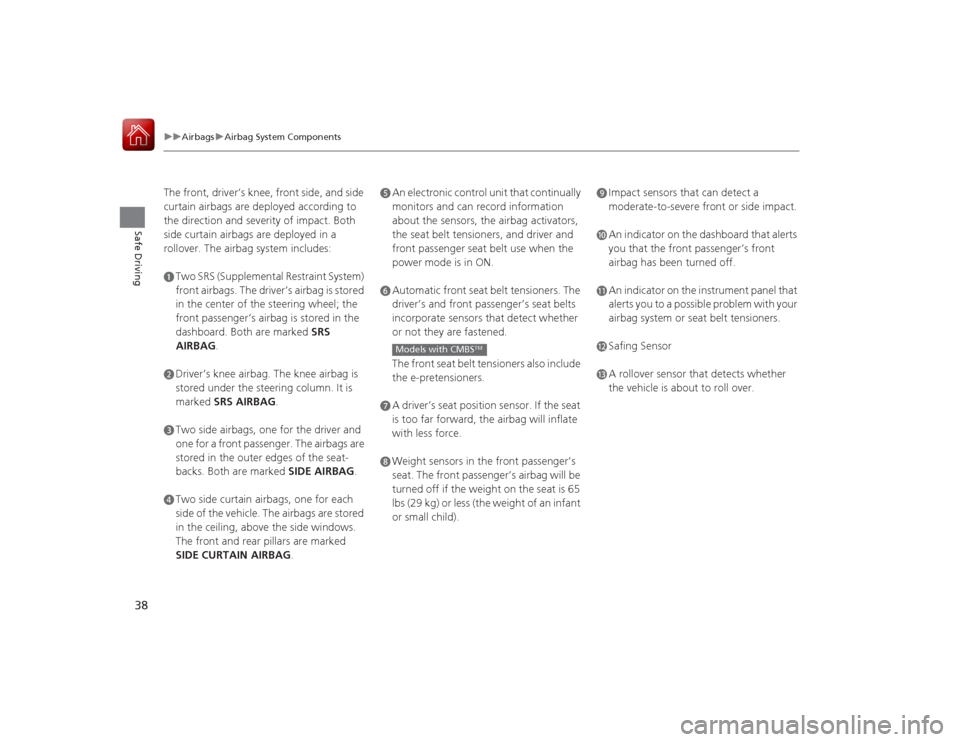
The front, driver’s knee, front side, and side
curtain airbags are deployed according to
the direction and severity of impact. Both
side curtain airbags are deployed in a
rollover. The airbag system includes:aTwo SRS (Supplemental Restraint System)
front airbags. The driver’s airbag is stored
in the center of the steering wheel; the
front passenger’s airbag is stored in the
dashboard. Both are marked SRS
AIRBAG.bDriver’s knee airbag. The knee airbag is
stored under the steering column. It is
marked SRS AIRBAG .cTwo side airbags, one for the driver and
one for a front passenger. The airbags are
stored in the outer edges of the seat-
backs. Both are marked SIDE AIRBAG .dTwo side curtain airbags, one for each
side of the vehicle. The airbags are stored
in the ceiling, above the side windows.
The front and rear pillars are marked
SIDE CURTAIN AIRBAG.
eAn electronic control unit that continually
monitors and can record information
about the sensors, the airbag activators,
the seat belt tensioners, and driver and
front passenger seat belt use when the
power mode is in ON.fAutomatic front seat belt tensioners. The
driver’s and front passenger’s seat belts
incorporate sensors that detect whether
or not they are fastened.
The front seat belt tensioners also include
the e-pretensioners.gA driver’s seat position sensor. If the seat
is too far forward, the airbag will inflate
with less force.hWeight sensors in the front passenger’s
seat. The front passenger’s airbag will be
turned off if the weight on the seat is 65
lbs (29 kg) or less (the weight of an infant
or small child).Models with CMBS
TM
iImpact sensors that can detect a
moderate-to-severe front or side impact.jAn indicator on the dashboard that alerts
you that the front passenger’s front
airbag has been turned off.kAn indicator on the instrument panel that
alerts you to a possible problem with your
airbag system or seat belt tensioners.lSafing SensormA rollover sensor that detects whether
the vehicle is about to roll over.
Page 68 of 521

67
Instrument Panel
This chapter describes the buttons, indicators, and gauges that are used while driving.
Indicators............................................ 68
Multi-Information Display Warning and Information Messages ...................... 84
Gauges and Multi-Information Display ... 94
Gauges .............................................. 94
Multi-Information Display .................. 95
Page 69 of 521
68Instrument Panel
Indicators*1:On the left: Models with navigation systemOn the right: Models without navigation systemIndicator
Name
On/Blinking
Explanation
Message
*1
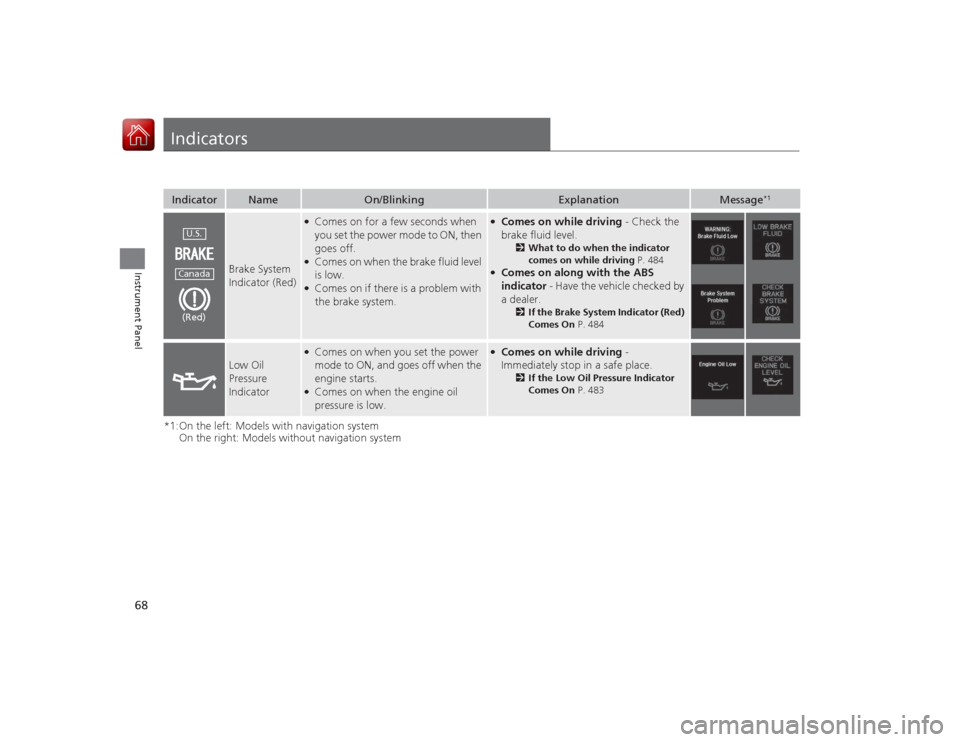
Brake System
Indicator (Red)
●Comes on for a few seconds when
you set the power mode to ON, then
goes off.●Comes on when the brake fluid level
is low.●Comes on if there is a problem with
the brake system.
●Comes on while driving - Check the
brake fluid level.
2 What to do when the indicator
comes on while driving P. 484
●Comes on along with the ABS
indicator - Have the vehicle checked by
a dealer.
2 If the Brake System Indicator (Red)
Comes On P. 484
Low Oil
Pressure
Indicator
●Comes on when you set the power
mode to ON, and goes off when the
engine starts.●Comes on when the engine oil
pressure is low.
●Comes on while driving -
Immediately stop in a safe place.
2 If the Low Oil Pressure Indicator
Comes On P. 483
U.S.Canada(Red)
Page 70 of 521
69
uuIndicators u
Continued
Instrument Panel
*1:On the left: Models with navigation system
On the right: Models without navigation systemIndicator
Name
On/Blinking
Explanation
Message
*1
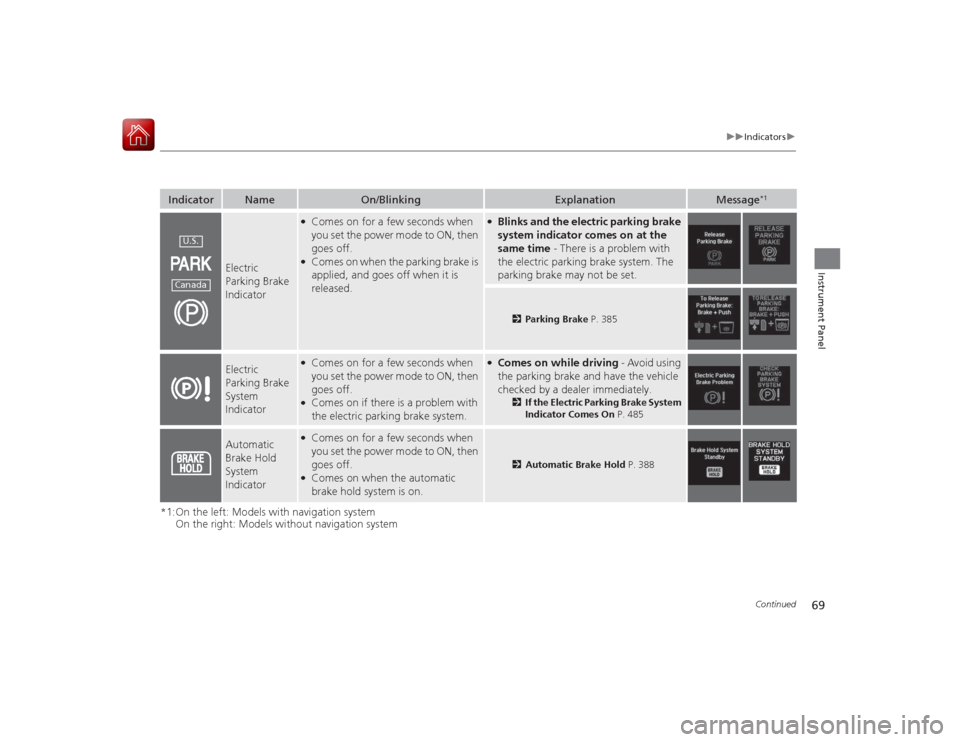
Electric
Parking Brake
Indicator
●Comes on for a few seconds when
you set the power mode to ON, then
goes off.●Comes on when the parking brake is
applied, and goes off when it is
released.
●Blinks and the electric parking brake
system indicator comes on at the
same time - There is a problem with
the electric parking brake system. The
parking brake may not be set.
2 Parking Brake P. 385
Electric
Parking Brake
System
Indicator
●Comes on for a few seconds when
you set the power mode to ON, then
goes off.●Comes on if there is a problem with
the electric parking brake system.
●Comes on while driving - Avoid using
the parking brake and have the vehicle
checked by a dealer immediately.
2 If the Electric Parking Brake System
Indicator Comes On P. 485
Automatic
Brake Hold
System
Indicator
●Comes on for a few seconds when
you set the power mode to ON, then
goes off.●Comes on when the automatic
brake hold system is on.
2Automatic Brake Hold P. 388
U.S.Canada
Page 71 of 521
70
uuIndicators u
Instrument Panel
*1:On the left: Models with navigation system
On the right: Models without navigation systemIndicator
Name
On/Blinking
Explanation
Message
*1
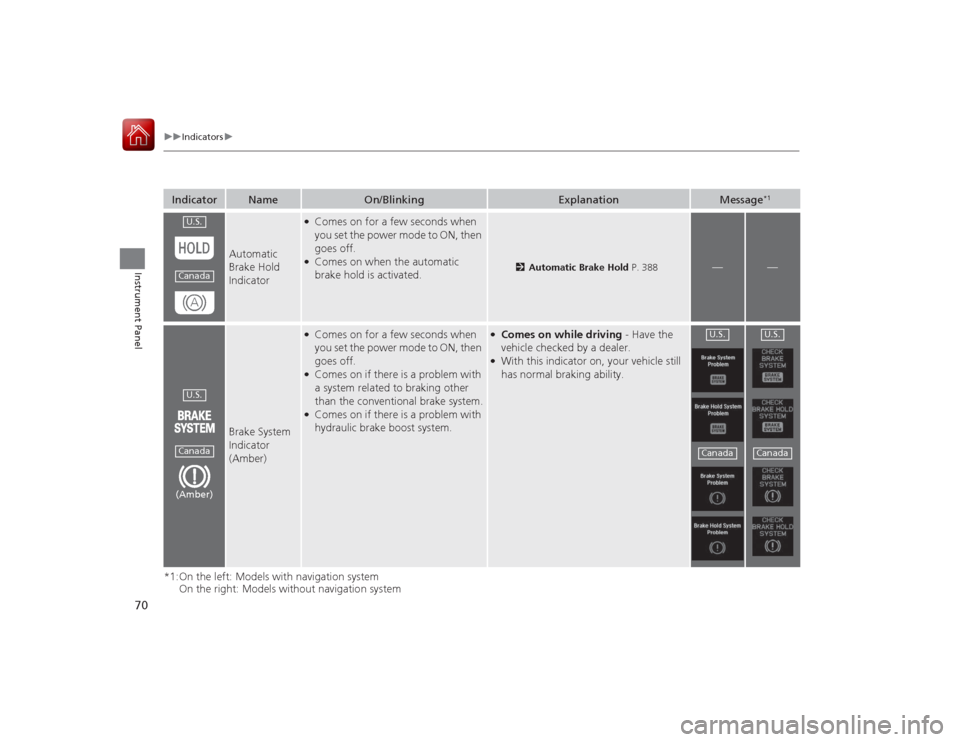
Automatic
Brake Hold
Indicator
●Comes on for a few seconds when
you set the power mode to ON, then
goes off.●Comes on when the automatic
brake hold is activated.
2Automatic Brake Hold P. 388
—
—
Brake System
Indicator
(Amber)
●Comes on for a few seconds when
you set the power mode to ON, then
goes off.●Comes on if there is a problem with
a system related to braking other
than the conventional brake system.●Comes on if there is a problem with
hydraulic brake boost system.
●Comes on while driving - Have the
vehicle checked by a dealer.●With this indicator on, your vehicle still
has normal braking ability.
U.S.CanadaU.S.Canada(Amber)
U.S.Canada
U.S.Canada
Page 72 of 521

71
uuIndicators u
Continued
Instrument Panel
*1:On the left: Models with navigation system
On the right: Models without navigation systemIndicator
Name
On/Blinking
Explanation
Message
*1
Malfunction
Indicator Lamp
●Comes on when you set the power
mode to ON, and goes off either
when the engine starts or after
several seconds if the engine did not
start. If “readiness codes” have not
been set, it blinks five times before it
goes off.●Comes on if there is a problem with
the emissions control system.●Blinks when a misfire in the engine’s
cylinders is detected.
●Readiness codes are part of the on
board diagnostics for the emissions
control systems.
2Testing of Readiness Codes P. 503
●Comes on while driving - Have the
vehicle checked by a dealer.●Blinks while driving - Stop in a safe
place where there are no flammable
objects. Stop the engine for 10 minutes
or more, and wait for it to cool down.
Then, take the vehicle to a dealer.
2 If the Malfunction Indicator Lamp
Comes On or Blinks P. 484
Charging
System
Indicator
●Comes on when you set the power
mode to ON, and goes off when the
engine starts.●Comes on when the battery is not
charging.
●Comes on while driving - Turn off the
climate control system and rear
defogger in order to reduce electricity
consumption.
2 If the Charging System Indicator
Comes On P. 483