ad blue Acura RLX 2016 User Guide
[x] Cancel search | Manufacturer: ACURA, Model Year: 2016, Model line: RLX, Model: Acura RLX 2016Pages: 581, PDF Size: 31.43 MB
Page 237 of 581

236
uuAudio System Basic Operation uVoice Control Operation
Features
■iPod commands
• iPod play
• iPod play track # (#: 1 to 30)
• iPod skip forward
• iPod skip back
• iPod track shuffle
*1
•iPod album shuffle*1
•iPod track repeat*1
•iPod normal play
• What am I listening to?
• Who am I listening to?
• Who is this?
• What’s playing?
• Who’s playing?
• What album is this?
*1: These commands toggle the function
on and off, so the command may not match
your intended action.
■USB commands
• USB play
• USB play track # (#: 1 to 30)
• USB skip forward
• USB skip back
• USB track random
*1
•USB track repeat*1
•USB track scan*1
•USB folder up
• USB folder down
• USB folder random
*1
•USB folder repeat*1
•USB folder scan*1
•USB normal play
*1: These commands toggle the function
on and off, so the command may not match
your intended action.
■Bluetooth ® Audio commands
• Bluetooth Audio play
• Bluetooth Audio skip forward
• Bluetooth Audio skip back
• Bluetooth Audio group up
• Bluetooth Audio group down
• Bluetooth Audio pause
• Bluetooth Audio resume
• Bluetooth Audio track random
• Bluetooth Audio track repeat
NOTE:
Bluetooth ® Audio commands may not work
on some phones or Bluetooth ® Audio
devices.
■AUX commands
• Auxiliary play
16 ACURA RLX E-AWD-31TY36200.book 236 ページ 2015年5月22日 金曜日 午後3時 50分
Page 270 of 581
269
uuAudio System Basic Operation uPlaying Internet Radio
Continued
Features
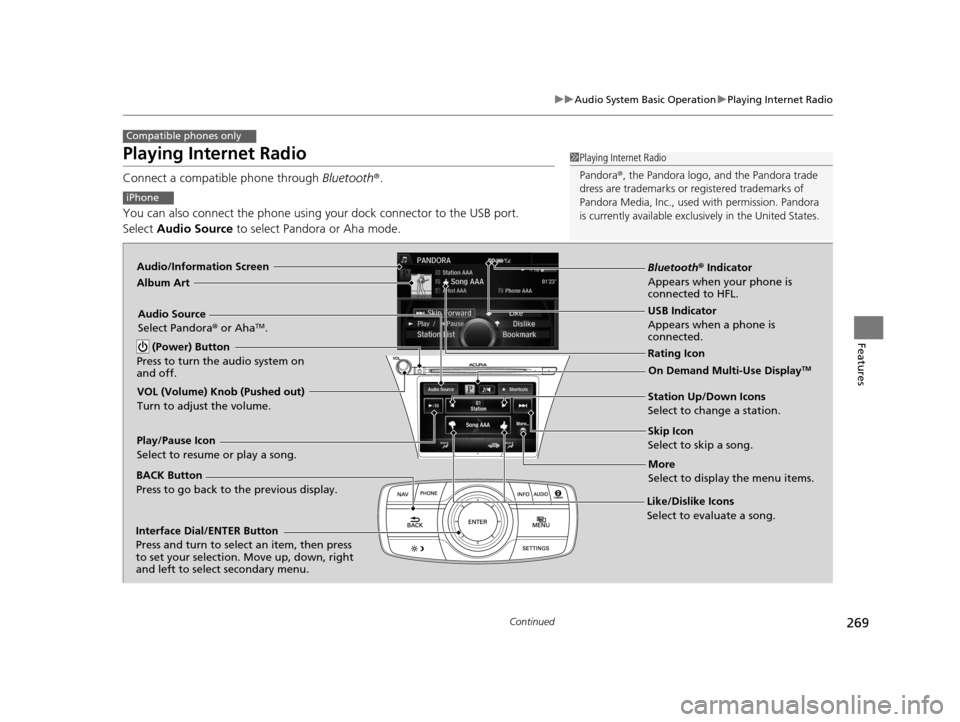
Playing Internet Radio
Connect a compatible phone through Bluetooth®.
You can also connect the phone using your dock connector to the USB port.
Select Audio Source to select Pandora or Aha mode.
Compatible phones only
1Playing Internet Radio
Pandora ®, the Pandora logo, and the Pandora trade
dress are trademarks or registered trademarks of
Pandora Media, Inc., used with permission. Pandora
is currently available exclusively in the United States.
iPhone
Audio/Information Screen
Album Art
USB Indicator
Appears when a phone is
connected.
Rating Icon
BACK Button
Press to go back to the previous display.
Skip Icon
Select to skip a song.
More
Select to display the menu items.
Station Up/Down Icons
Select to change a station.
Audio Source
Select Pandora
® or Aha
TM.
Play/Pause Icon
Select to resume or play a song.
Like/Dislike Icons
Select to evaluate a song.
(Power) Button
Press to turn the audio system on
and off.
Interface Dial/ENTER Button
Press and turn to select an item, then press
to set your selection. Move up, down, right
and left to select secondary menu.
On Demand Multi-Use DisplayTM
VOL (Volume) Knob (Pushed out)
Turn to adjust the volume.
Bluetooth ® Indicator
Appears when your phone is
connected to HFL.
16 ACURA RLX E-AWD-31TY36200.book 269 ページ 2015年5月22日 金曜日 午後3時 50分
Page 271 of 581

uuAudio System Basic Operation uPlaying Internet Radio
270
Features
You can operate some of the Pandora ® menu items from your vehicle’s audio
system. The available items are:
■Operating a menu item The menu items are shown in the lower half of
the audio/information screen.
Rotate to select an item and press .
To select Change Source or Sound , press the
MENU button, then press .
■Pandora® Menu
•Skip Forward •Bookmark Track
• Play/Pause •Bookmark Artist
• Station List •Change Source
• Like •Sound
• Dislike
U.S. models1Playing Internet Radio
To find out if your phone is compatible with this
feature, visit www.acura.com/handsfreelink , or call
1-888-528-7876.
Pandora ® is a personalized Internet radio service that
selects music based on an artist, song, or genre a user
enters, and streams what is likely to be of interest.
To use this service in your vehicle, the Pandora ® app
must first be installed on your phone. Visit
www.pandora.com . for more information.
If you cannot operate Pandora® through the audio system,
it may be streaming through Bluetooth® Audio. Make sure
Pandora
® mode on your audio system is selected.
1 Pandora ® Menu
You can control Pandora ® using voice commands.
2 Voice Control Operation P. 232
Available operating functi ons vary on software
versions. Some functions ma y not be available on the
vehicle’s audio system.
If there is a problem, you may see an error message
on the audio/information screen. 2 Pandora ® P. 280
There are restrictions on the number of songs you
can skip or dislike in a given hour.
16 ACURA RLX E-AWD-31TY36200.book 270 ページ 2015年5月22日 金曜日 午後3時 50分
Page 276 of 581
275
uuAudio System Basic Operation uPlaying Bluetooth ® Audio
Continued
Features
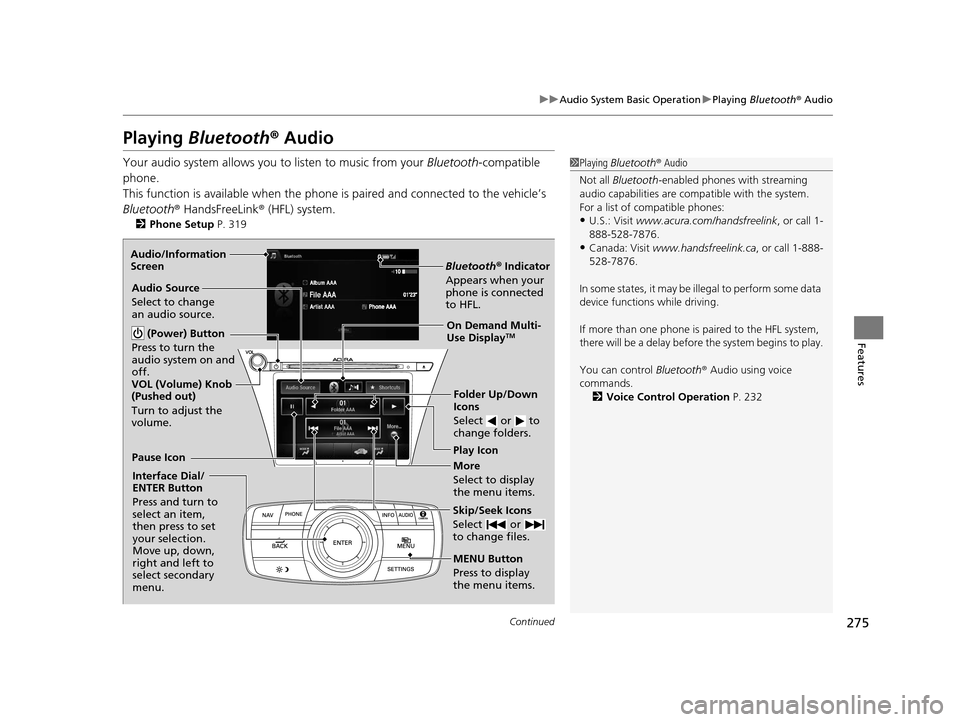
Playing Bluetooth ® Audio
Your audio system allows you to listen to music from your Bluetooth-compatible
phone.
This function is available when the phone is paired an d connected to the vehicle’s
Bluetooth ® HandsFreeLink ® (HFL) system.
2Phone Setup P. 319
1Playing Bluetooth ® Audio
Not all Bluetooth -enabled phones with streaming
audio capabilities are comp atible with the system.
For a list of compatible phones:
•U.S.: Visit www.acura.com/handsfreelink , or call 1-
888-528-7876.
•Canada: Visit www.handsfreelink.ca , or call 1-888-
528-7876.
In some states, it may be il legal to perform some data
device functions while driving.
If more than one phone is paired to the HFL system,
there will be a delay before the system begins to play.
You can control Bluetooth® Audio using voice
commands.
2 Voice Control Operation P. 232
Bluetooth® Indicator
Appears when your
phone is connected
to HFL.
Play Icon
Pause Icon
More
Select to display
the menu items.
Audio Source
Select to change
an audio source.
(Power) Button
Press to turn the
audio system on and
off.
Interface Dial/
ENTER Button
Press and turn to
select an item,
then press to set
your selection.
Move up, down,
right and left to
select secondary
menu.
Skip/Seek Icons
Select or
to change files.
MENU Button
Press to display
the menu items. Folder Up/Down
Icons
Select or to
change folders.
On Demand Multi-
Use DisplayTM
VOL (Volume) Knob
(Pushed out)
Turn to adjust the
volume.
Audio/Information
Screen
16 ACURA RLX E-AWD-31TY36200.book 275 ページ 2015年5月22日 金曜日 午後3時
50分
Page 277 of 581
uuAudio System Basic Operation uPlaying Bluetooth ® Audio
276
Features
1. Make sure that your phone is paired and
connected to HFL.
2. Select the Bluetooth® Audio mode.
If the phone is not recognized, another HFL-
compatible phone, which is not compatible
for Bluetooth ® Audio, may already be
connected.
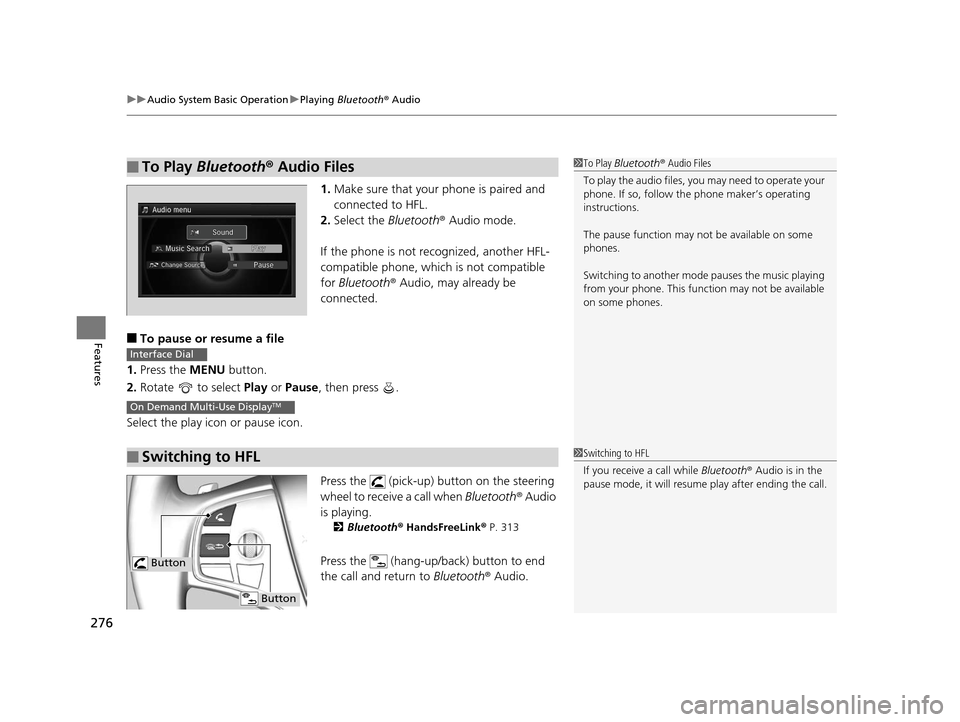
■To pause or resume a file
1. Press the MENU button.
2. Rotate to select Play or Pause , then press .
Select the play icon or pause icon.
Press the (pick-up) button on the steering
wheel to receive a call when Bluetooth® Audio
is playing.
2 Bluetooth ® HandsFreeLink ® P. 313
Press the (hang-up/back) button to end
the call and return to Bluetooth® Audio.
■To Play Bluetooth® Audio Files1To Play Bluetooth ® Audio Files
To play the audio files, y ou may need to operate your
phone. If so, follow the phone maker’s operating
instructions.
The pause function may no t be available on some
phones.
Switching to another mode pauses the music playing
from your phone. This functi on may not be available
on some phones.
■Switching to HFL
Interface Dial
On Demand Multi-Use DisplayTM
1 Switching to HFL
If you receive a call while Bluetooth® Audio is in the
pause mode, it will resume play after ending the call.
Button
Button
16 ACURA RLX E-AWD-31TY36200.book 276 ページ 2015年5月22日 金曜日 午後3時 50分
Page 288 of 581
287
uuCustomized Features u
Continued
Features
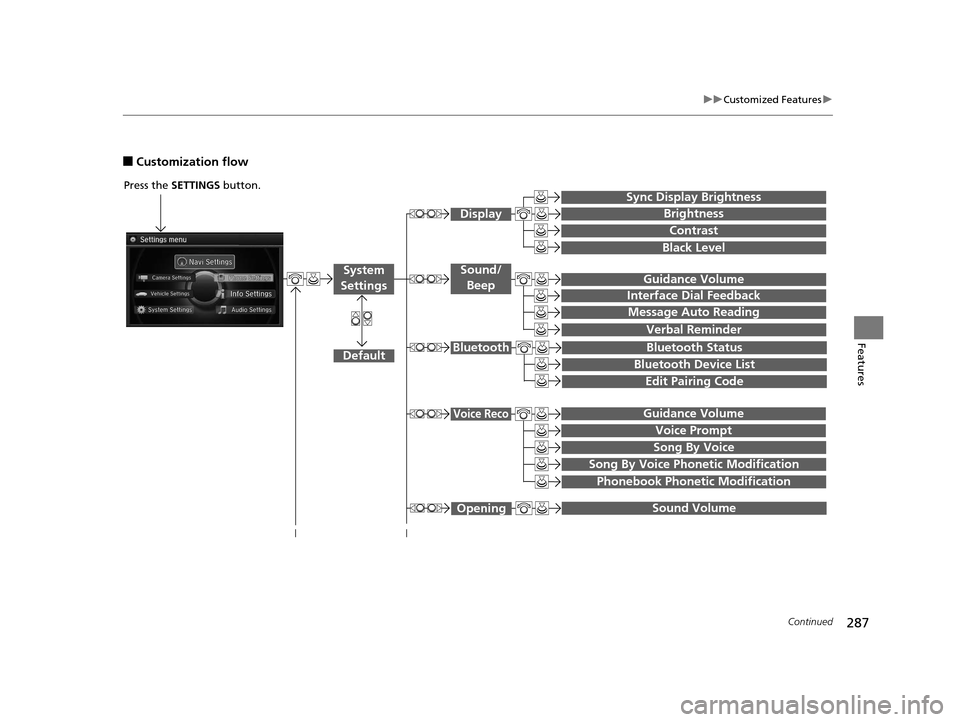
■Customization flow
Song By Voice
Song By Voice Phonetic Modification
Phonebook Phonetic Modification
Press the SETTINGS button.
Guidance Volume
Voice Prompt
Message Auto Reading
Guidance Volume
Interface Dial Feedback
Verbal Reminder
Brightness
Contrast
Black Level
Bluetooth Status
Bluetooth Device List
Edit Pairing Code
Default
Sound/Beep
Display
System
Settings
Bluetooth
Voice Reco
Sync Display Brightness
Sound Volume Opening
16 ACURA RLX E-AWD-31TY36200.book 287 ページ 2015年5月22日 金曜日 午後3時 50分
Page 293 of 581

292
uuCustomized Features u
Features
Default
Source Select Popup
HD Radio Mode*, *1
Cover Art*1
Connect Bluetooth Audio Device*1
Bluetooth Device List*1
Recording from CD*1
Recording Quality*1
HDD Info*1
Update Gracenote Album Info*1
Delete all HDD Data*1
*1: May change depending on your currently selected source.
CD/HDD
Bluetooth
Other
Audio
Settings
* Not available on all models
16 ACURA RLX E-AWD-31TY36200.book 292 ページ 2015年5月22日 金曜日 午後3時 50分
Page 294 of 581

293
uuCustomized Features u
Continued
Features
Add Bluetooth
Device
Disconnect
Default
PhoneConnect Phone
Edit Bluetooth Device
Add Bluetooth Device
Bluetooth Device
List
Edit Speed Dial
Auto Transfer
Auto Answer
Ring Tone
Automatic Phone Sync
Use Contact Photo
Default
Default
Enable Text/Email
Select Account
New Text/Email Alert
Text/Email
Phone
Settings
16 ACURA RLX E-AWD-31TY36200.book 293 ページ 2015年5月22日 金曜日 午後3時 50分
Page 296 of 581

295
uuCustomized Features u
Continued
Features
■List of customizable options
*1:Default Setting Setup
Group Customizable Features Description Selectable Settings
System
Settings
Display
Sync Display BrightnessSelects whether the display brightness synchronizes
with the instrument panel brightness.On*1/
Off
BrightnessChanges the brightness of the audio/information
screen.—
ContrastChanges the contrast of th e audio/information screen.—
Black LevelChanges the black level of the audio/information
screen.—
Sound/
Beep
Guidance VolumeChanges the volume of the audio speakers.—
Interface Dial FeedbackSets if and when the system reads aloud a
selection made using the Interface Dial.On /Off /Auto*1
Message Auto ReadingSelects whether the syst em automatically reads
out messages, and, if selected, whether only
when driving.On /Off /Auto*1
Verbal ReminderTurns the verbal reminders on and off.On*1/Off
Blue-
tooth
Bluetooth StatusTurns the Bluetooth® on and off.On*1/Off
Bluetooth Device ListPairs a new phone to HFL, edits and deletes a
paired phone, and creates a security PIN.
2 Phone Setup P. 319—
Edit Pairing CodeChanges a pairing code.
2To change the pairing code setting P. 321Random/Fixed*1
16 ACURA RLX E-AWD-31TY36200.book 295 ページ 2015年5月22日 金曜日 午後3時 50分
Page 298 of 581

297
uuCustomized Features u
Continued
Features
*1:Default SettingSetup
Group Customizable Features Description Selectable Settings
System
Settings
ClockAuto Daylight
Sets the navigation system to automatically adjust
the clock (“spring ahead”
or “fall back” by one
hour) when a daylight saving time change occurs.
On*1/ Off
Clock ResetResets the settings of all items in the Clock group.—
Others
UnitsChanges the distance unit on the navigation map
screen.mile*1/km (U.S.)
mile /km*1 (Canada)
LanguageChanges the display language.English*1/ French /
Spanish
Voice Command Tips
Alerts you when manual co ntrol of the system is
disabled to prevent distraction while driving. Only
voice commands are available.
On*1/ Off
Background Color
Changes the background color of the audio/
information screen an d the On Demand Multi-
Use Display
TM.
Blue*1/ Amber /Red /
Green
Header Clock DisplaySelects whether the cl ock display comes on.On/Off*1
System Device InformationDisplays the system /device information.—
Factory Data ResetResets all the settings to their factory default.
2Defaulting All the Settings P. 309—
DefaultCancels /Resets all cust omized items in the
System Settings group as default.Default/OK
16 ACURA RLX E-AWD-31TY36200.book 297 ページ 2015年5月22日 金曜日 午後3時 50分