ipod Acura RLX 2016 User Guide
[x] Cancel search | Manufacturer: ACURA, Model Year: 2016, Model line: RLX, Model: Acura RLX 2016Pages: 581, PDF Size: 31.43 MB
Page 262 of 581
261
uuAudio System Basic Operation uPlaying an iPod
Continued
Features
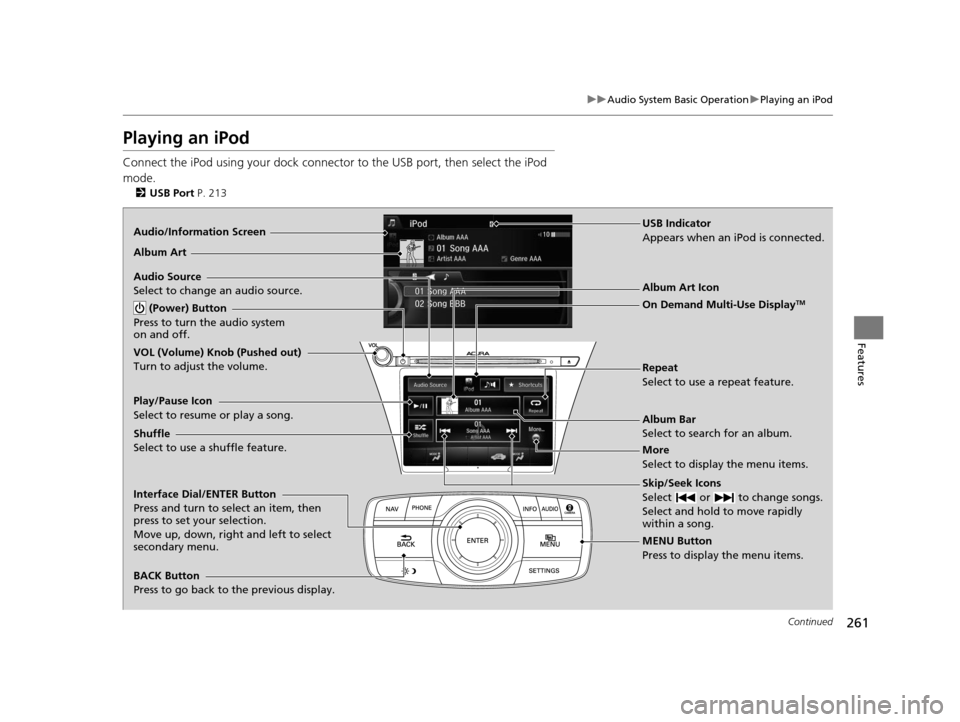
Playing an iPod
Connect the iPod using your dock connector to the USB port, then select the iPod
mode.
2 USB Port P. 213
Audio/Information Screen
MENU Button
Press to display the menu items. Album Bar
Select to search for an album.
Audio Source
Select to change an audio source.
Skip/Seek Icons
Select or to change songs.
Select and hold to move rapidly
within a song.
More
Select to display the menu items.
(Power) Button
Press to turn the audio system
on and off.
BACK Button
Press to go back to the previous display. Interface Dial/ENTER Button
Press and turn to select an item, then
press to set your selection.
Move up, down, right and left to select
secondary menu. USB Indicator
Appears when an iPod is connected.
Album Art
On Demand Multi-Use Display
TM
VOL (Volume) Knob (Pushed out)
Turn to adjust the volume.Album Art Icon
Repeat
Select to use a repeat feature.
Play/Pause Icon
Select to resume or play a song.
Shuffle
Select to use a shuffle feature.
16 ACURA RLX E-AWD-31TY36200.book 261 ページ 2015年5月22日 金曜日 午後3時
50分
Page 263 of 581
uuAudio System Basic Operation uPlaying an iPod
262
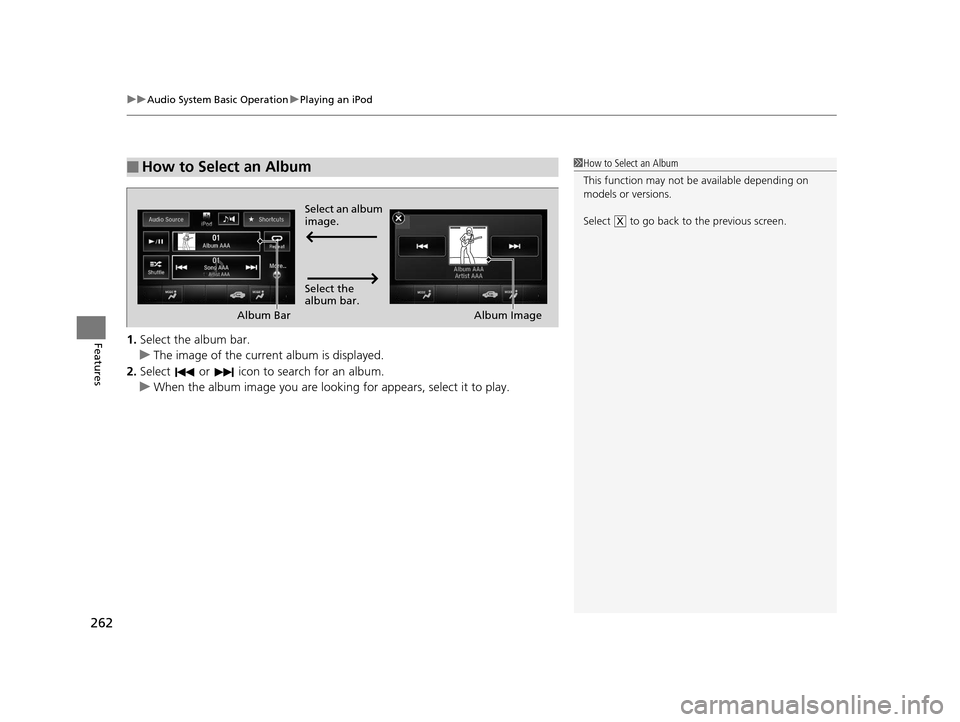
Features1. Select the album bar.
u The image of the current album is displayed.
2. Select or icon to search for an album.
u When the album image you are looking for appears, select it to play.
■How to Select an Album1How to Select an Album
This function may not be available depending on
models or versions.
Select to go back to the previous screen.
XSelect an album
image.
Select the
album bar.
Album Bar
Album Image
16 ACURA RLX E-AWD-31TY36200.book 262 ページ 2015年5月22日 金曜日 午後3時 50分
Page 264 of 581
Continued263
uuAudio System Basic Operation uPlaying an iPod
Features
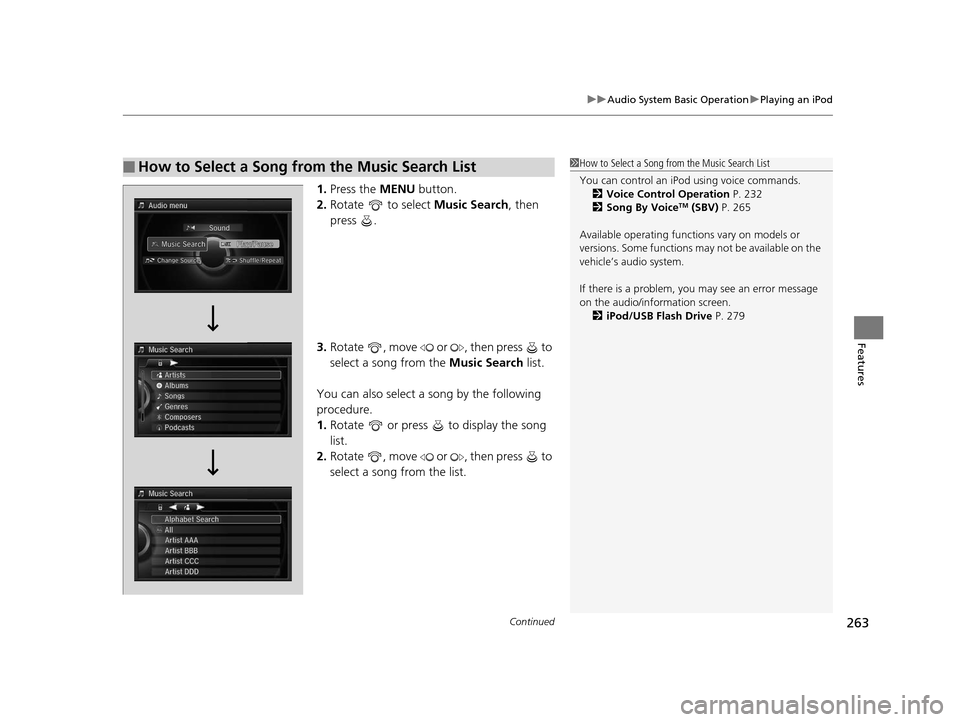
1. Press the MENU button.
2. Rotate to select Music Search, then
press .
3. Rotate , move or , then press to
select a song from the Music Search list.
You can also select a song by the following
procedure.
1. Rotate or press to display the song
list.
2. Rotate , move or , then press to
select a song from the list.
■How to Select a Song from the Music Search List1How to Select a Song from the Music Search List
You can control an iPod using voice commands.
2 Voice Control Operation P. 232
2 Song By Voice
TM (SBV) P. 265
Available operating functi ons vary on models or
versions. Some functions ma y not be available on the
vehicle’s audio system.
If there is a problem, you may see an error message
on the audio/information screen. 2 iPod/USB Flash Drive P. 279
16 ACURA RLX E-AWD-31TY36200.book 263 ページ 2015年5月22日 金曜日 午後3時 50分
Page 265 of 581
uuAudio System Basic Operation uPlaying an iPod
264
Features
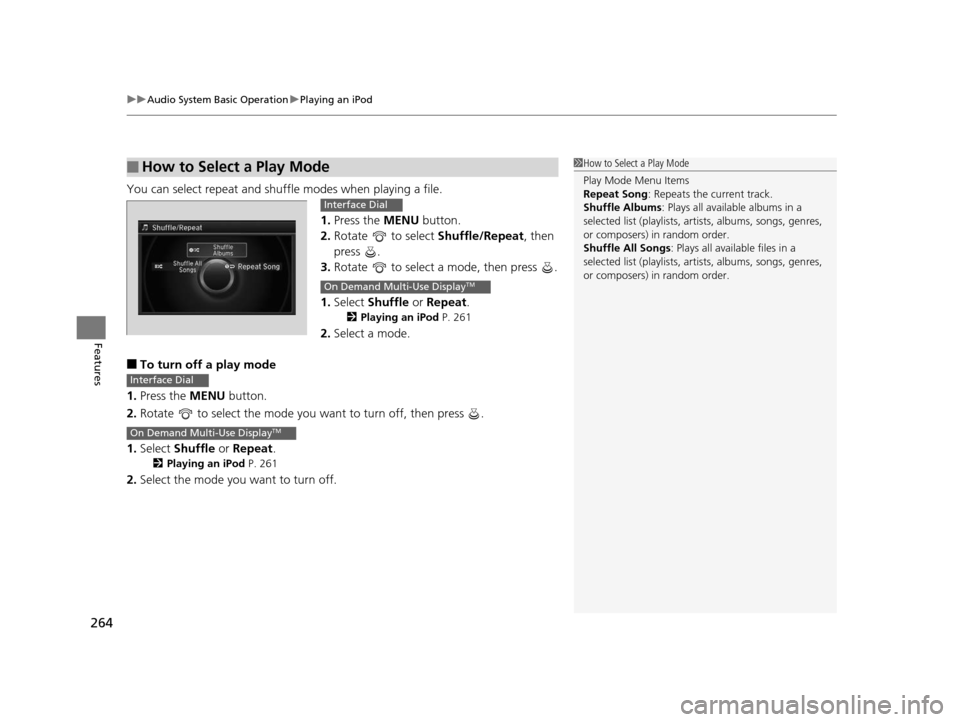
You can select repeat and shu ffle modes when playing a file.
1.Press the MENU button.
2. Rotate to select Shuffle/Repeat, then
press .
3. Rotate to select a mode, then press .
1. Select Shuffle or Repeat .
2Playing an iPod P. 261
2.Select a mode.
■To turn off a play mode
1. Press the MENU button.
2. Rotate to select the mode you want to turn off, then press .
1. Select Shuffle or Repeat .
2Playing an iPod P. 261
2.Select the mode you want to turn off.
■How to Select a Play Mode1How to Select a Play Mode
Play Mode Menu Items
Repeat Song : Repeats the current track.
Shuffle Albums : Plays all available albums in a
selected list (playlists, ar tists, albums, songs, genres,
or composers) in random order.
Shuffle All Songs : Plays all available files in a
selected list (playlists, ar tists, albums, songs, genres,
or composers) in random order.
Interface Dial
On Demand Multi-Use DisplayTM
Interface Dial
On Demand Multi-Use DisplayTM
16 ACURA RLX E-AWD-31TY36200.book 264 ページ 2015年5月22日 金曜日 午後3時 50分
Page 266 of 581
265
uuAudio System Basic Operation uSong By VoiceTM (SBV)
Continued
Features
Song By VoiceTM (SBV)
Use SBV to search for and play music from your HDD or iPod using voice commands.
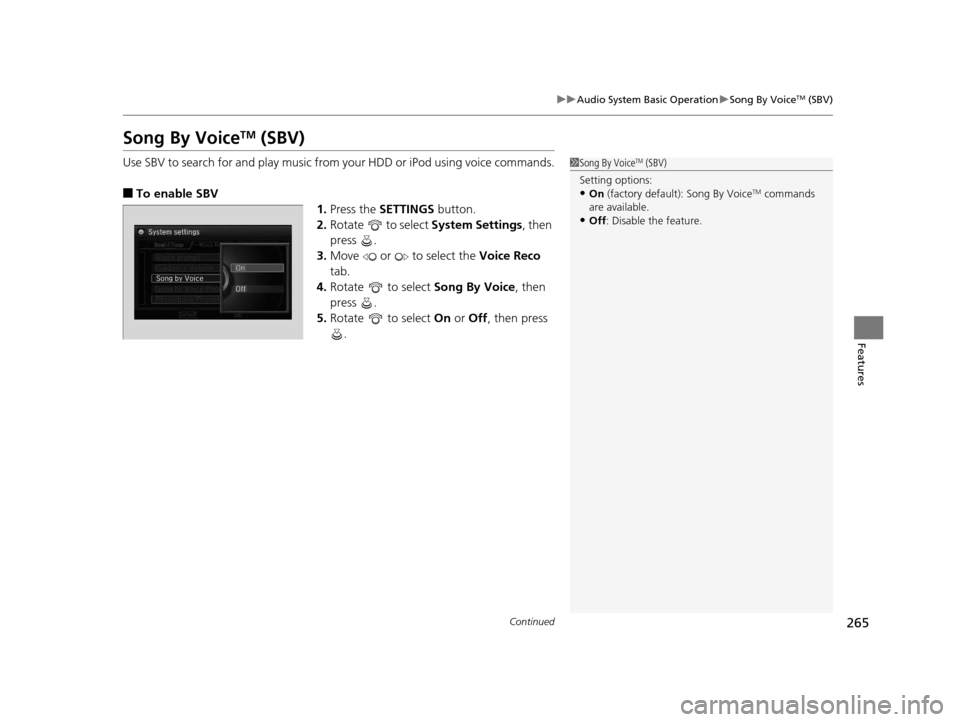
■To enable SBV
1.Press the SETTINGS button.
2. Rotate to select System Settings, then
press .
3. Move or to select the Voice Reco
tab.
4. Rotate to select Song By Voice, then
press .
5. Rotate to select On or Off , then press
.
1 Song By VoiceTM (SBV)
Setting options:
•On (factory default): Song By VoiceTM commands
are available.
•Off : Disable the feature.
16 ACURA RLX E-AWD-31TY36200.book 265 ページ 2015年5月22日 金曜日 午後3時 50分
Page 267 of 581

uuAudio System Basic Operation uSong By VoiceTM (SBV)
266
Features
■Searching for music using SBV
1.Set the Song By Voice setting to On.
2. Press the (Talk) button and say “Music
Search” to activate the SBV feature for the
HDD and iPod.
3. Press the button and say a command.
u Example 1: Say “(List) ‘Artist A’“ to view a
list of songs by that artist. Select the
desired song to start playing.
u Example 2: Say “Play ‘Artist A’“ to start
playing songs by that artist.
4. To cancel SBV, press the (hang-up/back)
button on the steering wheel. The selected
song continues playing.
Once you have canceled this mode, you need
to press the button and say “Music Search”
again to re-activate this mode.1 Searching for music using SBV
Song By Voice
TM Commands List
2 Song By VoiceTM commands P. 234
NOTE:
Song By Voice
TM commands are available for tracks
stored on the HDD or iPod.
You can add phonetic modi fications of difficult
words so that it is easier for SBV to recognize artists,
songs, albums, and composers in voice commands. 2 Phonetic Modification P. 267
16 ACURA RLX E-AWD-31TY36200.book 266 ページ 2015年5月22日 金曜日 午後3時 50分
Page 268 of 581
Continued267
uuAudio System Basic Operation uSong By VoiceTM (SBV)
Features
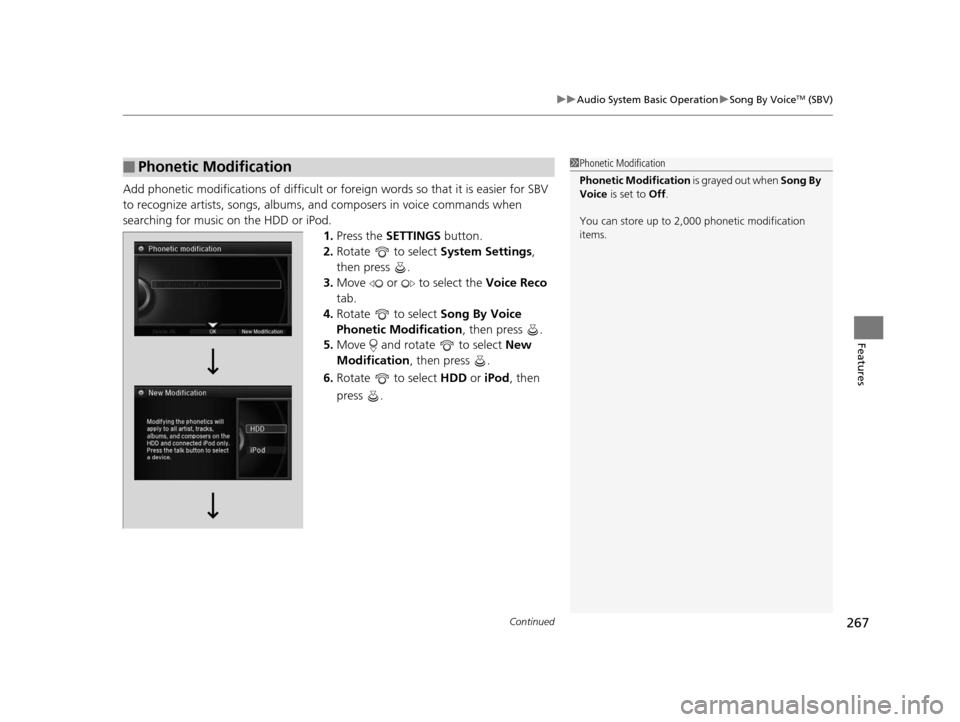
Add phonetic modifications of difficult or fo reign words so that it is easier for SBV
to recognize artists, songs, albums, and composers in voice commands when
searching for music on the HDD or iPod. 1.Press the SETTINGS button.
2. Rotate to select System Settings,
then press .
3. Move or to select the Voice Reco
tab.
4. Rotate to select Song By Voice
Phonetic Modification , then press .
5. Move and rotate to select New
Modification , then press .
6. Rotate to select HDD or iPod , then
press .
■Phonetic Modification1 Phonetic Modification
Phonetic Modification is grayed out when Song By
Voice is set to Off.
You can store up to 2, 000 phonetic modification
items.
16 ACURA RLX E-AWD-31TY36200.book 267 ページ 2015年5月22日 金曜日 午後3時 50分
Page 274 of 581
Continued273
uuAudio System Basic Operation uPlaying a USB Flash Drive
Features
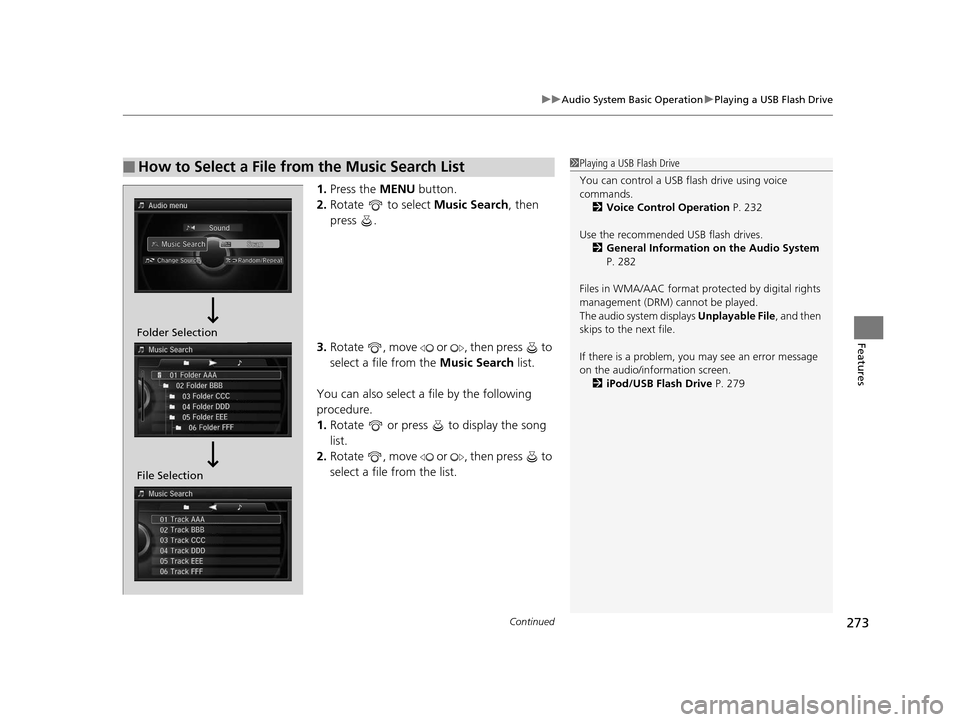
1. Press the MENU button.
2. Rotate to select Music Search, then
press .
3. Rotate , move or , then press to
select a file from the Music Search list.
You can also select a file by the following
procedure.
1. Rotate or press to display the song
list.
2. Rotate , move or , then press to
select a file from the list.
■How to Select a File from the Music Search List1Playing a USB Flash Drive
You can control a USB flash drive using voice
commands.
2 Voice Control Operation P. 232
Use the recommended USB flash drives. 2 General Information on the Audio System
P. 282
Files in WMA/AAC format protected by digital rights
management (DRM) cannot be played.
The audio system displays Unplayable File, and then
skips to the next file.
If there is a problem, you may see an error message
on the audio/information screen. 2 iPod/USB Flash Drive P. 279
Folder Selection
File Selection
16 ACURA RLX E-AWD-31TY36200.book 273 ページ 2015年5月22日 金曜日 午後3時 50分
Page 280 of 581
279
uuAudio Error Messages uiPod/USB Flash Drive
Features
iPod/USB Flash Drive
If an error occurs while playing an iPod or USB flash drive, you may see the following
error messages. If you cannot clear the error message, contact a dealer.
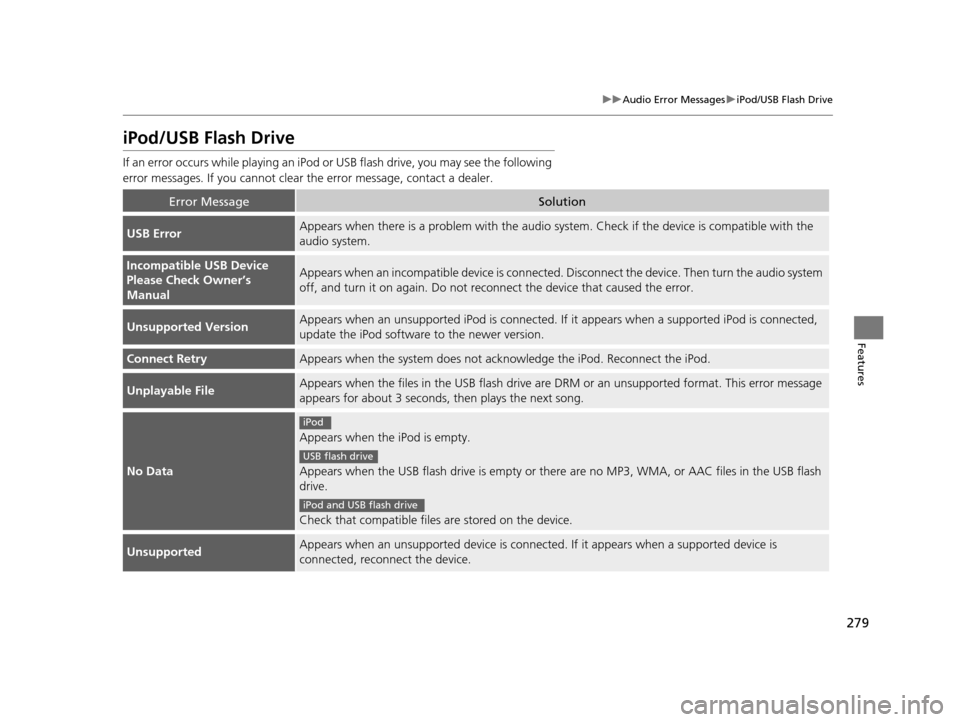
Error MessageSolution
USB ErrorAppears when there is a problem wi th the audio system. Check if the device is compatible with the
audio system.
Incompatible USB Device
Please Check Owner’s
ManualAppears when an incompatib le device is connected. Disconnect th e device. Then turn the audio system
off, and turn it on again. Do not reco nnect the device that caused the error.
Unsupported VersionAppears when an unsupported iPod is connected. If it appears when a supported iPod is connected,
update the iPod software to the newer version.
Connect RetryAppears when the system does not acknowledge the iPod. Reconnect the iPod.
Unplayable FileAppears when the files in the USB flash drive are DRM or an unsupported format. This error message
appears for about 3 seconds, then plays the next song.
No Data
Appears when the iPod is empty.
Appears when the USB flash drive is empty or there are no MP3, WMA, or AAC files in the USB flash
drive.
Check that compatible files are stored on the device.
UnsupportedAppears when an unsupported device is connected . If it appears when a supported device is
connected, reconnect the device.
iPod
USB flash drive
iPod and USB flash drive
16 ACURA RLX E-AWD-31TY36200.book 279 ページ 2015年5月22日 金曜日 午後3時 50分
Page 286 of 581
285
uuGeneral Information on the Audio System uCompatible iPod, iPhone, and USB Flash Drives
Features
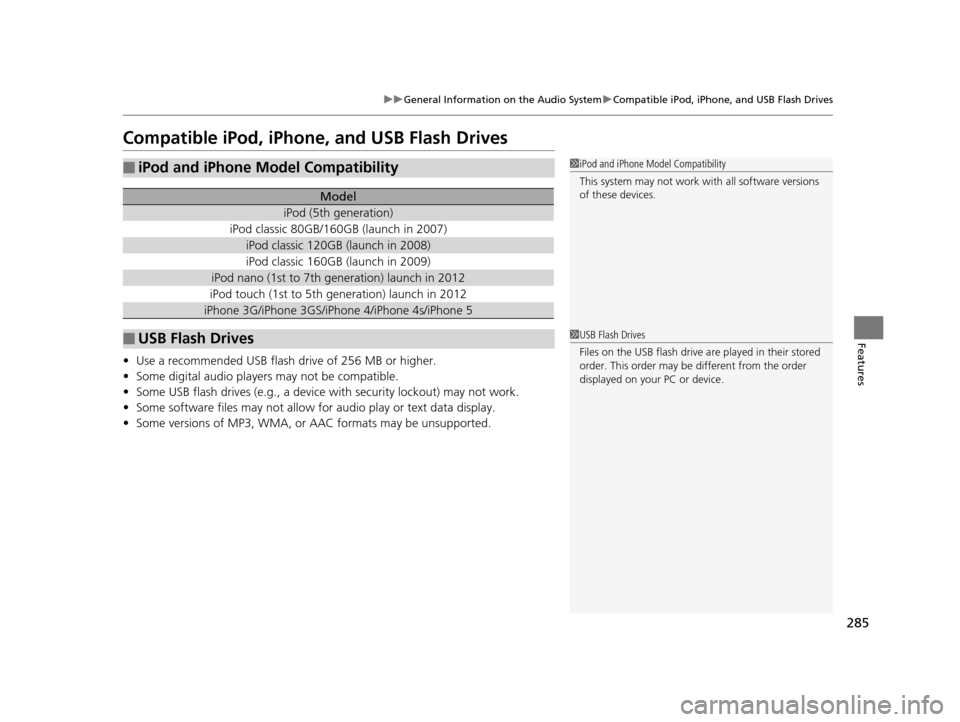
Compatible iPod, iPhone , and USB Flash Drives
•Use a recommended USB flash drive of 256 MB or higher.
• Some digital audio players may not be compatible.
• Some USB flash drives (e.g., a device with security lockout) may not work.
• Some software files may not allow for audio play or text data display.
• Some versions of MP3, WMA, or AAC formats may be unsupported.
■iPod and iPhone Model Compatibility
Model
iPod (5th generation)
iPod classic 80GB/160GB (launch in 2007)
iPod classic 120GB (launch in 2008)
iPod classic 160GB (launch in 2009)
iPod nano (1st to 7th generation) launch in 2012
iPod touch (1st to 5th generation) launch in 2012
iPhone 3G/iPhone 3GS/iPhone 4/iPhone 4s/iPhone 5
■USB Flash Drives
1iPod and iPhone Model Compatibility
This system may not work with all software versions
of these devices.
1USB Flash Drives
Files on the USB flash drive are played in their stored
order. This order may be different from the order
displayed on your PC or device.
16 ACURA RLX E-AWD-31TY36200.book 285 ページ 2015年5月22日 金曜日 午後3時 50分