wiper Acura RLX 2016 User Guide
[x] Cancel search | Manufacturer: ACURA, Model Year: 2016, Model line: RLX, Model: Acura RLX 2016Pages: 581, PDF Size: 31.43 MB
Page 165 of 581

uuOperating the Switches Around the Steering Wheel uWipers and Washers
164
Controls
When you push the lever down to AUTO, the
windshield wipers sweep once, and go into
the automatic mode.
The wipers operate intermittently, at low
speed, or at high speed and stops in
accordance with the am ount of rainfall the
rainfall sensor detects.
■AUTO sensitivity adjustment
When in AUTO, you can also adjust the
rainfall sensor sensitivity using the adjustment
ring.
Sensor sensitivity
■Automatic Intermittent Wipers1 Wipers and Washers
If the wipers stop operating due to any obstacle such
as the build-up of snow, park the vehicle in a safe
place.
Rotate the wiper switch to OFF, and set the power
mode to ACCESSORY or VEHICLE OFF (LOCK), then
remove the obstacle.
1 Automatic Intermittent Wipers
The rainfall sensor is in the location shown below.
Do not put the wiper lever in AUTO when cleaning
the windshield or driving through a car wash. If the
wiper lever is in AUTO , and the power mode is in ON,
the rainfall sensor may re spond to your hand or car
wash liquids, and th e wipers may operate
automatically.
Rainfall Sensor
Adjustment Ring
Low sensitivity:
Lower speed, fewer sweeps
High sensitivity:
Higher speed, more sweeps
16 ACURA RLX E-AWD-31TY36200.book 164 ページ 2015年5月22日 金曜日 午後3時 50分
Page 166 of 581
165
uuOperating the Switches Around the Steering Wheel uWipers and Washers
Controls
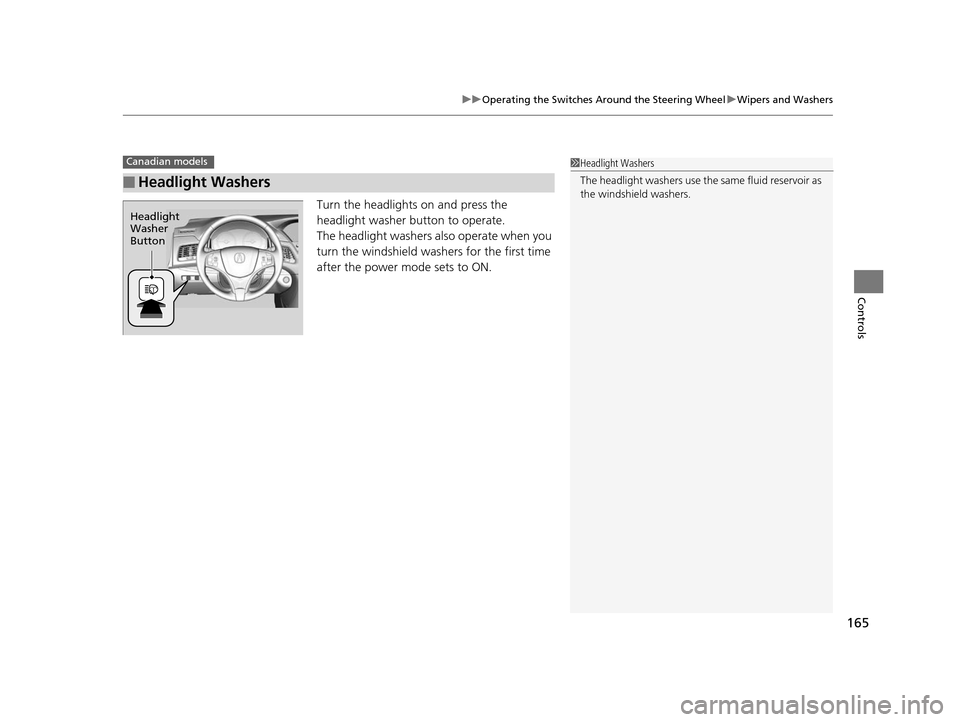
Turn the headlights on and press the
headlight washer button to operate.
The headlight washers also operate when you
turn the windshield washers for the first time
after the power mode sets to ON.
■Headlight Washers
Canadian models1Headlight Washers
The headlight washers use th e same fluid reservoir as
the windshield washers.
Headlight
Washer
Button
16 ACURA RLX E-AWD-31TY36200.book 165 ページ 2015年5月22日 金曜日 午後3時 50分
Page 167 of 581

166
uuOperating the Switches Around the Steering Wheel uBrightness Control
Controls
Brightness Control
When the power mode is in ON, you can use
the
(+ or (- button to adjust instrument
panel brightness.
To brighten: Press the
(+ button.
To dim: Press the
(- button.
You will hear a beep when the brightness
reaches minimum or maximum. The multi-
information display will return to its original
state several seconds after you adjust the
brightness.
■Brightness level indicator
The brightness level is shown on the multi-
information display while you are adjusting it.
■Adjusting the Instrument Panel Brightness1 Adjusting the Instrument Panel Brightness
Instrument panel brightne ss varies, depending on
whether the exterior lights are on or off. The
instrument panel dims to reduce glare when they are
on.
When it is bright out side and the headlight
integration with the wiper
* is activated, the
instrument panel bri ghtness does not change.
Pushing or rolling the right selector wheel changes to
a different display.
If you press the
( + button until the brightness display
is up to max, the beeper sounds. This cancels the
reduced instrument panel brightness when the
parking lights are on.
The brightness can be set differently for when the
exterior lights are on, and when they are off.
( + Button
(- Button
* Not available on all models
16 ACURA RLX E-AWD-31TY36200.book 166 ページ 2015年5月22日 金曜日 午後3時 50分
Page 291 of 581

290
uuCustomized Features u
Features
Fixed Guideline
Dynamic Guideline
Default
Rear
Camera
Cross Traffic Monitor
*1: Models with multi-view rear camera
Maintenance ResetMaintenance Info.
Wiper ActionWiper Setup
Key And Remote Unlock Mode
Keyless Lock Answer Back
Security Relock Timer
Auto Door Lock
Auto Door Unlock
Door
Setup
Auto Folding Door Mirror
Camera
Settings*1
16 ACURA RLX E-AWD-31TY36200.book 290 ページ 2015年5月22日 金曜日 午後3時 50分
Page 302 of 581

301
uuCustomized Features u
Continued
Features
*1:Default SettingSetup
Group Customizable Features Description Selectable Settings
Vehicle
Settings Door
SetupAuto Door Lock
Changes the setting
for when the doors
automatically lock. With Vehicle Speed
*1/
Shift from P /Off
Auto Door Unlock Changes the setting
for when the doors
automatically unlock. All Doors When
Driver’s Door Opens
*1/
All Doors When
Shifted to Park /All
Doors When Ignition
Switched Off /Off
Key And Remote Unlock
Mode Sets up either the driver’s door or all doors to
unlock on the first push of the remote. Driver Door
*1/
All
Doors
Keyless Lock Answer Back LOCK/UNLOCK- The exterior lights flash.
LOCK (2nd push)- The beeper sounds.
On
*1/
Off
Security Relock Timer Changes the time it takes for the doors to relock
and the security system to set after you unlock
the vehicle without opening any door. 90seconds
/
60seconds /
30seconds
*1
Auto Folding Door Mirror Changes how you can fold the door mirrors.Auto Fold With
Keyless*1/Manual Only
Wiper
SetupWiper Action Changes the setting for the automatic
intermittent wipers in the
AUTO position. Rain Sensing*1/
Intermittent /Speed
Sensitive
16 ACURA RLX E-AWD-31TY36200.book 301 ページ 2015年5月22日 金曜日 午後3時 50分
Page 403 of 581

uuWhen Driving uRoad Departure Mitigation (RDM) System
402
Driving
The system becomes ready to start sear ching for lane markings when all the
following conditions are met:
• The vehicle is traveling between about 45 and 90 mph (72 and 145 km/h).
• The vehicle is on a straight or slightly curved road.
• The turn signals are off.
• The brake pedal is not depressed.
• The wipers are not in continuous operation.
• The system makes a determination that the driver is not actively accelerating,
braking or steering.
Press the RDM button to turn the system on
and off.u The indicator in the button comes on and
the message appears on the multi-
information display when the system is
on.
■How the System Activates
■RDM On and Off
1How the System Activates
The RDM system may automa tically shut off and the
indicator comes and stays on.
2 Indicators P. 74
RDM system function can be impacted when the
vehicle is:
•Not driven within a traffic lane.•Driven on the inside edge of a curve, or outside of
a lane.
•Driven in a narrow lane.
1 RDM On and Off
When you have selected Warning Only from the
customized options usi ng the multi-information
display, the system does not operate the steering
wheel and braking.
RDM ButtonIndicator
16 ACURA RLX E-AWD-31TY36200.book 402 ページ 2015年5月22日 金曜日 午後3時 50分
Page 408 of 581

Continued407
uuWhen Driving uLane Keeping Assist System (LKAS)
Driving
The system can be used when th e following conditions are met.
• The lane in which you are driving has detectable lane markers on both sides, and
your vehicle is in the center of the lane.
• The vehicle speed is between 45 and 90 mph (72 and 145 km/h).
• You are driving on a straight or slightly curved road.
• The turn signals are off.
• The brake pedal is not depressed.
• The wipers are not in continuous operation.
■How to activate the system
1.Press the MAIN button.
u The LKAS is on in the multi-information
display.
The system is ready to use.
2. Press the LKAS button.
u Lane outlines appear on the multi-
information display.
The system is activated.
■When the System can be Used1When the System can be Used
If the vehicle drifts toward ei ther left or right lane line
due to the system applying torque, turn off the LKAS
and have your vehicle checked by a dealer.
MAIN Button
LKAS Button
16 ACURA RLX E-AWD-31TY36200.book 407 ページ 2015年5月22日 金曜日 午後3時 50分
Page 410 of 581

409
uuWhen Driving uLane Keeping Assist System (LKAS)
Continued
Driving
■The system operation is suspended if
you:
• Set the wipers to continuous operation.
u Turning the wipers off resumes the
LKAS.
• Decrease the vehicle speed to about 40
mph (64 km/h) or less.
u Increasing the vehicle speed to about 45
mph (72 km/h) or more resumes the
LKAS.
• Depress the brake pedal.
u The LKAS resumes and starts detecting
the lane lines again once you release the
brake pedal.
■The LKAS may automatica lly be suspended when:
• The system fails to detect lane lines.
• The steering wheel is quickly turned.
• You fail to steer the vehicle.
• The vehicle runs on a curved road over the speed limit.
Once these conditions no longer exist, the LKAS automatically resumes.
■The LKAS may automatically be canceled when:
• The camera temperature gets extremely high or low.
• The camera behind the rearview mirror, or the area around the camera, including
the windshield, gets dirty.
• Driving through a sharp curve.
• Driving at a speed in excess of approximately 90 mph (145 km/h).
• The ABS or VSA system engages.
The beeper sounds if the LKAS is automatically canceled.
When the LKAS is suspended,
the lane lines on the multi-
information display change to
contour lines, and the beeper
sounds.
16 ACURA RLX E-AWD-31TY36200.book 409 ページ 2015年5月22日 金曜日 午後3時 50分
Page 439 of 581

438
Driving
Parking Your Vehicle
When Stopped
1.Depress the brake pedal firmly.
2. With the brake pedal depressed, pull up th e electric parking brake switch slowly,
but fully.
3. Change the gear position to
(P.
4. Turn off the power system.
u The electric parking brake indicator goes off in about 15 seconds.
Always confirm the electric parking brake is se t, in particular if you are parked on an
incline.
If during in Auto Engine Stop, the gear position changes to
(P and the engine
restarts automatica lly under the following conditions:
• The power system is on.
• The gear position is not in
(P.
• You unfasten the driver side seat belt and open the door.
1Parking Your Vehicle
Do not park your vehicle near flammable objects,
such as dry grass, oil, or timber.
Heat from the exhaust can cause a fire.
3WARNING
The vehicle can roll aw ay if left unattended
without confirming that Park is engaged.
Always keep your foot on the brake pedal
until you have confirmed that
( P is shown
on the gear position indicator.
1 When Stopped
NOTICE
The following can damage the driveline:
•Depressing the accelera tor and brake pedals
simultaneously.
•Changing into ( P before the vehicle stops
completely.
When facing uphill, do not hold the vehicle by
depressing the accelerator pedal.
Doing so may cause the power system to overheat
and fail.
Raise the wiper arms when snow is expected.
16 ACURA RLX E-AWD-31TY36200.book 438 ページ 2015年5月22日 金曜日 午後3時 50分
Page 464 of 581
463
Maintenance
This chapter discusses basic maintenance.
Before Performing MaintenanceInspection and Maintenance ............ 464
Safety When Performing Maintenance..... 465Parts and Fluids Used in Maintenance Service ........................................... 466
Maintenance Minder
TM..................... 467
Maintenance Under the Hood
Maintenance Items Under the Hood ..... 472Opening the Hood ........................... 473
Engine Compartment Cover ............. 474
Recommended Engine Oil ................ 475
Oil Check ......................................... 476
Adding Engine Oil ............................ 477
Changing the Engine Oil and Oil Filter ..... 478Engine Coolant ................................ 480
Inverter Coolant ............................... 482
Transmission Fluid ............................ 482
Brake Fluid ....................................... 483
Refilling Window Washer Fluid......... 483
Replacing Light Bulbs ....................... 484
Checking and Maintaining Wiper
Blades .......................................... 489
Checking and Maintaining Tires
Checking Tires ................................. 492
Tire and Loading Information Label ...... 493Tire Labeling .................................... 493
DOT Tire Quality Grading (U.S. Vehicles) ...... 495Wear Indicators ............................... 497
Tire Service Life ................................ 497
Tire and Wheel Replacement ........... 498
Tire Rotation .................................... 499
Winter Tires ..................................... 500
12-Volt Battery ................................. 501
Remote Transmitter Care Replacing the Button Battery ........... 502
Climate Control System Maintenance.... 504Cleaning
Interior Care .................................... 505
Exterior Care.................................... 507
16 ACURA RLX E-AWD-31TY36200.book 463 ページ 2015年5月22日 金曜日 午後3時 50分