brake Acura RLX 2016 Owner's Guide
[x] Cancel search | Manufacturer: ACURA, Model Year: 2016, Model line: RLX, Model: Acura RLX 2016Pages: 581, PDF Size: 31.43 MB
Page 99 of 581

98
uuIndicators uMulti-Information Display Warn ing and Information Messages
Instrument Panel
MessageConditionExplanation
●Appears if the automatic brake hold is automatically
canceled while it is in operation.●Immediately depress the brake pedal.
●Appears when the automati c brake hold system is
turned off.
2 Automatic Brake Hold P. 426
●Appears when the automatic brake hold button is
pressed without wearing the driver’s seat belt.●Fasten the driver’s seat belt.
2Automatic Brake Hold P. 426
●Appears when the automatic brake hold button is
pressed without depressing the brake pedal while the
automatic brake hold is in operation.●Press the automatic brake hold button with the brake
pedal depressed.
2Automatic Brake Hold P. 426
●Appears when the parking brake is applied
automatically while it is in operation.2Automatic Brake Hold P. 426
2 Parking Brake P. 423
16 ACURA RLX E-AWD-31TY36200.book 98 ページ 2015年5月22日 金曜日 午後3時5 0分
Page 102 of 581

101
uuIndicators uMulti-Information Display Warning and Information Messages
Continued
Instrument Panel
MessageConditionExplanation
●Flashes when the system sens es a likely collision with a
vehicle in front of you.●Take the appropriate means to prevent a collision (apply
the brakes, change lanes, etc.)
2 Collision Mitigation Braking SystemTM (CMBSTM)
P. 430
2 Adaptive Cruise Control (ACC) with Low Speed
Follow (LSF) P. 385
●Appears when ACC with LSF has been automatically
canceled.●You can resume the set speed after the condition that
caused ACC with LSF to cancel improves. Press the RES/
+ /SET/– switch up.
2Adaptive Cruise Control (ACC) with Low Speed
Follow (LSF) P. 385
●Appears when the distance between your vehicle and
the vehicle ahead of you is too close while ACC with LSF
is in operation.●ACC with LSF has been automatically canceled.
2 Adaptive Cruise Control (ACC) with Low Speed
Follow (LSF) P. 385
●Appears when pressing the RES/+/SET/– switch down
while the distance between yo ur vehicle and the vehicle
ahead of you is too close.●ACC with LSF cannot be set.
2 Adaptive Cruise Control (ACC) with Low Speed
Follow (LSF) P. 385
●Appears when pressing the RES/+/SET/– switch down
while the driver’s seat belt is unfastened.●ACC with LSF cannot be set.
2 Adaptive Cruise Control (ACC) with Low Speed
Follow (LSF) P. 385
16 ACURA RLX E-AWD-31TY36200.book 101 ページ 2015年5月22日 金曜日 午後3時 50分
Page 104 of 581

103
uuIndicators uMulti-Information Display Warning and Information Messages
Continued
Instrument Panel
MessageConditionExplanation
●Appears when pressing the RES/+/SET/– switch down
while the parking brake is applied.●ACC with LSF cannot be set.
2Adaptive Cruise Control (ACC) with Low Speed
Follow (LSF) P. 385
2 Parking Brake P. 423
●Appears when pressing the RES/+/SET/– switch down
while the vehicle is moving and the brake pedal is
depressed.●ACC with LSF cannot be set.
2 Adaptive Cruise Control (ACC) with Low Speed
Follow (LSF) P. 385
●Appears if ACC with LSF is ca nceled while your vehicle
is automatically stopped by ACC with LSF.●Immediately depress the brake pedal.
16 ACURA RLX E-AWD-31TY36200.book 103 ページ 2015年5月22日 金曜日 午後3時 50分
Page 105 of 581

104
uuIndicators uMulti-Information Display Warn ing and Information Messages
Instrument Panel
MessageConditionExplanation
●Appears when the vehicle is driving out of a detected
line. The steering wheel vibrates rapidly.
●Keep the vehicle within the lane you are driving.●The color of either line changes from white to amber as
the vehicle gets closer to that side of the lane line.
2Lane Keeping Assist System (LKAS) P. 405
●Appears when the vehicle is driving out of a detected
line.
-The steering wheel vibrates ra pidly when the vehicle is
drifting out of a detected line.
- The steering wheel vibrates ra pidly when the vehicle is
drifting out of a detected line. The system also steers
the vehicle to help you remain within your driving lane.
●Keep the vehicle within the lane you are driving.●The color of either line changes from white to amber as
the vehicle gets closer to that side of the lane line.
2Road Departure Mitigation (RDM) System P. 401●You can change the setting for the road departure
mitigation system. Normal, Wide , and Warning Only
can be selected.
2 Customized Features P. 113, 286
●Blinks when you fail to steer the vehicle. The beeper
sounds simultaneously.●Operate the steering wheel to resume the LKAS.
●Appears when the LKAS is in operation, or the LKAS
button is pressed, but there is a problem with a system
related to the LKAS. The LK AS cancels automatically.
The beeper sounds simultaneously.●If any other system indicators come on, such as the
VSA ®, ABS and brake system, take appropriate action.
2Indicators P. 74
Lane Keeping Assist System (LKAS)
Road Departure Mitigation (RDM) System
When you selected Warning Only
When you selected Normal or Wide
16 ACURA RLX E-AWD-31TY36200.book 104 ページ 2015年5月22日 金曜日 午後3時 50分
Page 125 of 581

124
uuGauges and Displays uHead-Up Display
Instrument Panel
The display also sh ows the following
warnings.
• System Message Indicator: Appears
when a problem is detected. A system
message on the multi-information display
appears at the same time.
2 Multi-Information Display Warning
and Information Messages P. 92
•Lane Departure Warning: When your
vehicle is too close to the traffic lane lines,
the lane departure warning appears.
2 Lane Keeping Assist System (LKAS)
P. 405
• Head-up Warning Lights:
Flash when the BRAKE message appears
on the multi-information display.
2 Collision Mitigation Braking SystemTM
(CMBSTM) P. 430
Come on when the BRAKE message
appears on the multi- information display.
2Adaptive Cruise Control (ACC) with
Low Speed Follow (LSF) P. 385
Lane Departure Warning
System Message Indicator
16 ACURA RLX E-AWD-31TY36200.book 124 ページ 2015年5月22日 金曜日 午後3時 50分
Page 156 of 581
155Continued
Controls
Operating the Switches Around the Steering Wheel
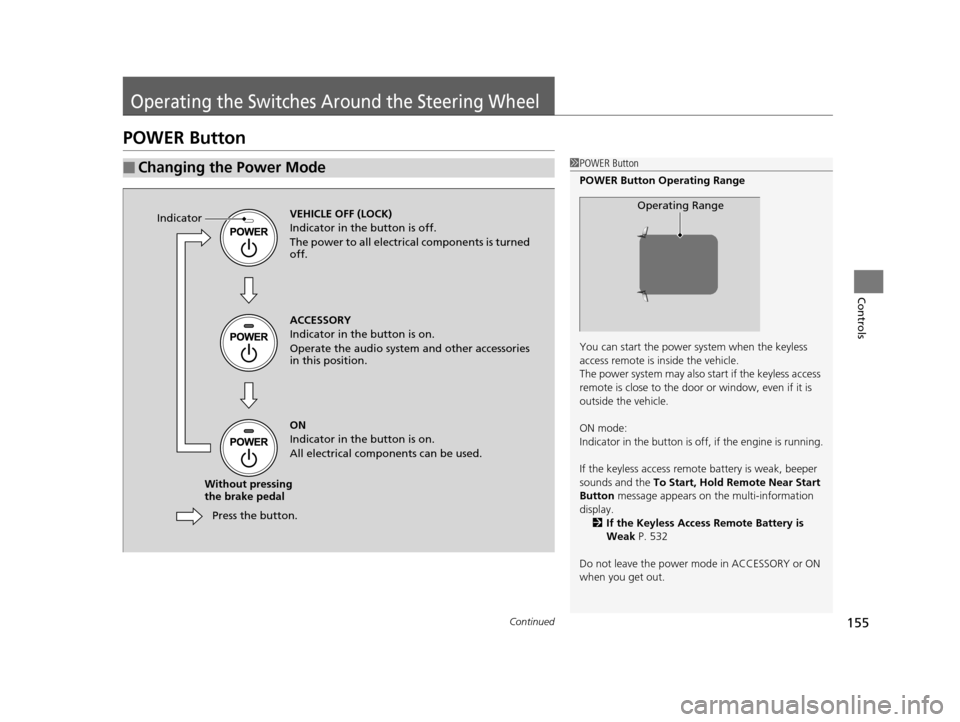
POWER Button
■Changing the Power Mode1POWER Button
POWER Button Operating Range
You can start the power system when the keyless
access remote is inside the vehicle.
The power system may also start if the keyless access
remote is close to the door or window, even if it is
outside the vehicle.
ON mode:
Indicator in the button is of f, if the engine is running.
If the keyless access remote battery is weak, beeper
sounds and the To Start, Hold Remote Near Start
Button message appears on the multi-information
display. 2 If the Keyless Access Remote Battery is
Weak P. 532
Do not leave the power mode in ACCESSORY or ON
when you get out.
Operating RangeVEHICLE OFF (LOCK)
Indicator in th e button is off.
The power to all electrical components is turned
off.
Press the button.
Without pressing
the brake pedal ACCESSORY
Indicator in the button is on.
Operate the audio system and other accessories
in this position.
ON
Indicator in the button is on.
All electrical components can be used.
Indicator
16 ACURA RLX E-AWD-31TY36200.book 155 ページ 2015年5月22日 金曜日 午後3時
50分
Page 160 of 581

159
uuOperating the Switches Around the Steering Wheel uLight Switches
Continued
Controls
Light Switches
Rotating the light switch turns the lights on
and off, regardless of the power mode
setting.
■High beams
Push the lever forward until you hear a click.
■Low beams
When in high beams, pull the lever back to
return to low beams.
■Flashing the high beams
Pull the lever back, and release it.
■Lights off
Turn the lever to OFF either when:
• The transmission is in
(P.
• The parking brake is applied.
To turn the light s on again, turn the lever to
OFF to cancel the lights off mode. Even if you
do not cancel the lights off mode, the lights
come on automatically when:
• The gear position is changed out of
(P.
• The parking brake is released.
• The vehicle starts to move.
■Manual Operation1Light Switches
If you leave the power mode in VEHICLE OFF (LOCK)
with the lights on, a light on reminder chime will
sound when you open the driver’s door.
When the lights are on, the lights on indicator in the
instrument pane l will be on.
2 Lights On Indicator P. 85
If you sense that the le vel of the headlights is
abnormal, have your vehicle inspected by a dealer.
Do not leave the lights on when the power system is
off because it will caus e the 12-volt battery to
discharge.
Your vehicle is equipped with the automatic
headlight adjusting system that automatically adjusts
the vertical angle of the headlights. If you find a
significant change in th e vertical angle of the
headlights, there may be a problem with the system.
Have your vehicle checked by a dealer.
High Beams
Flashing the high beams
Low Beams
Turns on parking, side marker,
tail, and rear license plate lights
Turns on headlights, parking, side
marker, tail, and rear license plate
lights
16 ACURA RLX E-AWD-31TY36200.book 159 ページ 2015年5月22日 金曜日 午後3時 50分
Page 163 of 581
162
uuOperating the Switches Around the Steering Wheel uFog Lights
Controls
Fog Lights
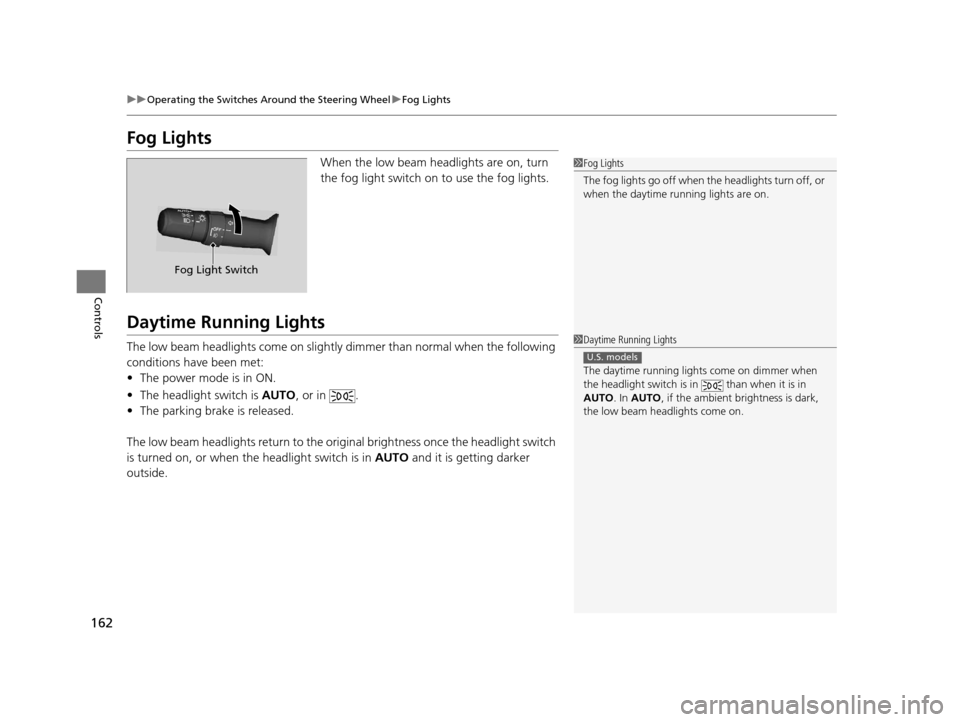
When the low beam headlights are on, turn
the fog light switch on to use the fog lights.
Daytime Running Lights
The low beam headlights come on slightly dimmer than normal when the following
conditions have been met:
• The power mode is in ON.
• The headlight switch is AUTO, or in .
• The parking brake is released.
The low beam headlights return to the original brightness once the headlight switch
is turned on, or when the headlight switch is in AUTO and it is getting darker
outside.
1 Fog Lights
The fog lights go off when th e headlights turn off, or
when the daytime running lights are on.
Fog Light Switch
1 Daytime Running Lights
The daytime running lights come on dimmer when
the headlight switch is in than when it is in
AUTO . In AUTO , if the ambient brightness is dark,
the low beam headlights come on.
U.S. models
16 ACURA RLX E-AWD-31TY36200.book 162 ページ 2015年5月22日 金曜日 午後3時 50分
Page 171 of 581

uuOperating the Switches Around the Steering Wheel uDriving Position Memory System
170
Controls
1. Set the power mode to ON. Adjust the
driver’s seat, the steering wheel and the
door mirrors to the desired position.
2. Press the SET button.
u You will hear the beep, and the memory
button indicator light will blink.
3. Press memory button
(1 or (2 within five
seconds of pressing the SET button.
u Once the seat, the steering wheel and
the outside mirror positions have been
memorized, the indicator light on the
button you pressed stays on.
1. Change to
(P.
2. Apply the parking brake.
3. Press a memory button (
(1 or (2).
u You will hear the beep, and the indicator
light will blink.
The seat, the steering wheel and the door
mirrors will automatically move to the
memorized positions. When it has finished
moving, you will hear the beep, and the
indicator light stays on.
■Storing a Position in Memory1 Storing a Position in Memory
After you press the SET button, the storing operation
will be canceled when:
•You do not press the memory button within five
seconds.
•You readjust the seat, the steering wheel or the
outside mirror position before the double-beep.
•You set the power mode to any position except
ON.
SET Button
Memory Button 1
Memory Button 2
■Recalling the Stored Position1
Recalling the Stored Position
The seat will st op moving if you:
•Press the SET button, or a memory button ((1 or
(2).
•Adjust the seat, the st eering wheel or the door
mirror position.
•Shift into any position except ( P.
Memory Buttons
16 ACURA RLX E-AWD-31TY36200.book 170 ページ 2015年5月22日 金曜日 午後3時 50分
Page 360 of 581

359
Driving
This chapter discusses driving, refueling, and information on items such as accessories.
Before Driving
Driving Preparation .......................... 360
Maximum Load Limit........................ 363
Towing a Trailer Towing Your Vehicle ........................ 365
When Driving Turning on the Power ...................... 366
Precautions While Driving................. 371
Dual Clutch Transmission ................. 372
Shifting ............................................ 373
SPORT Mode.................................... 380
Reactive Force Pedal......................... 381
Acoustic Vehicle Al erting System ...... 382
Front Sensor Camera ....................... 383
Adaptive Cruise Control (ACC) with Low Speed Follow (LSF) ......................... 385Cruise Control ............................................. 398
Road Departure Mitigation (RDM) System.... 401
Lane Keeping Assist System (LKAS)...... 405Vehicle Stability Assist (VSA ®), aka Electronic
Stability Control (ESC), System ........... 412
Agile Handling Assist System............ 414SPORT HYBRID Super Handling-All Wheel DriveTM (SPORT HYBRID SH-AWD®) .... 415Blind Spot Information (BSI) System ..... 416Tire Pressure Monitoring System (TPMS) ... 418Tire Pressure Monitoring System (TPMS) - Required Federal Explanation ......... 420
High Voltage Battery ........................ 422
Braking Brake System ................................... 423 Anti-lock Brake System (ABS) ........... 428
Brake Assist System ......................... 429
Collision Mitigation Braking System
TM
(CMBSTM) ....................................... 430
Parking Your Vehicle When Stopped ................................ 438
Parking Sensor System
*................... 439
Cross Traffic Monitor ....................... 443
Multi-View Rear Camera
*................ 447
Surround View Camera System*..... 448
Refueling Fuel Information .............................. 458
How to Refuel ................................. 459
Fuel Economy .................................... 460
Improving Fuel Economy .................. 460
Accessories and Modifications ........ 461
* Not available on all models
16 ACURA RLX E-AWD-31TY36200.book 359 ページ 2015年5月22日 金曜日 午後3時 50分