climate control Acura RLX 2017 User Guide
[x] Cancel search | Manufacturer: ACURA, Model Year: 2017, Model line: RLX, Model: Acura RLX 2017Pages: 557, PDF Size: 37.97 MB
Page 86 of 557

85
uuIndicators u
Instrument Panel
IndicatorNameOn/BlinkingExplanationMessage
Collision
Mitigation
Braking System
TM
(CMBSTM)
Indicator*
●Comes on when the CMBSTM system
shuts itself off.●Stays on - The area around the camera is
blocked by dirt, mud, etc. Stop your vehicle
in a safe place, and wipe it off with a soft
cloth.
2 Front Sensor Camera* P. 359
●When the radar sensor gets dirty, stop your
vehicle in a safe place, and wipe off dirt
using a soft cloth.
●Have your vehicle checked by a dealer if the
message does not disappear even after you
clean the sensor cover.
2Collision Mitigation Braking SystemTM
(CMBSTM)* P. 409
●Stays on - The temperature inside the
camera is too high. Us e the climate control
system to cool down the camera. The
system activates wh en the temperature
inside the camera cools down.
2 Front Sensor Camera* P. 359
* Not available on all models
17 ACURA RLX-31TY26300.book 85 ページ 2016年6月17日 金曜日 午前8時12分
Page 88 of 557
87
uuIndicators uMulti-Information Display Warning and Information Messages
Continued
Instrument Panel
MessageConditionExplanation
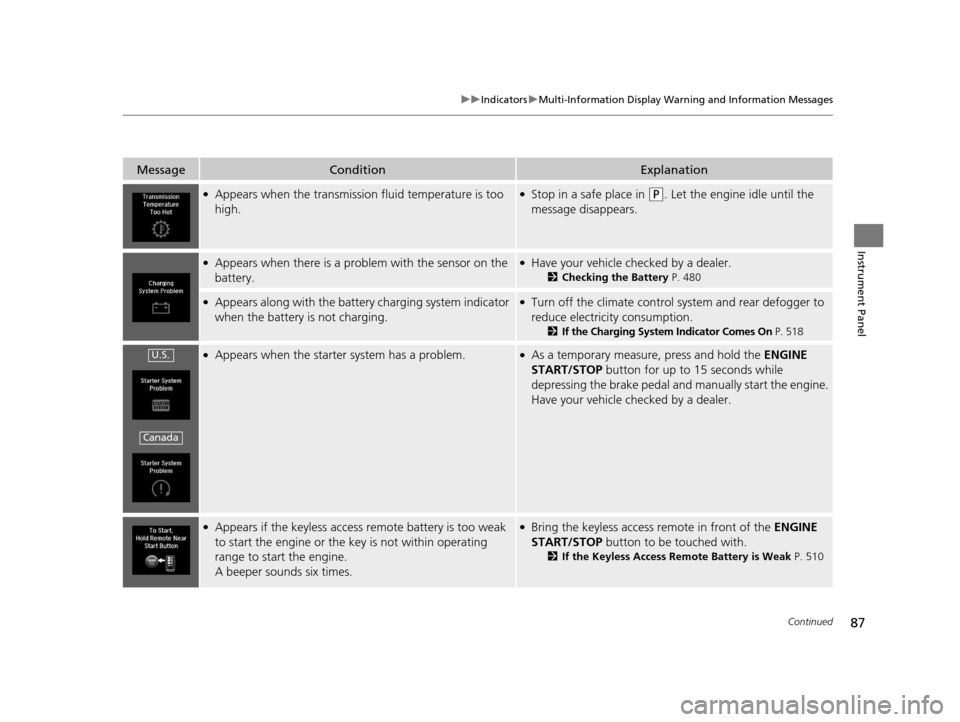
●Appears when the transmission fluid temperature is too
high.●Stop in a safe place in (P. Let the engine idle until the
message disappears.
●Appears when there is a prob lem with the sensor on the
battery.●Have your vehicle checked by a dealer.
2 Checking the Battery P. 480
●Appears along with the battery charging system indicator
when the battery is not charging.●Turn off the climate control sy stem and rear defogger to
reduce electricity consumption.
2 If the Charging System Indicator Comes On P. 518
●Appears when the starter system has a problem.●As a temporary measure, press and hold the ENGINE
START/STOP button for up to 15 seconds while
depressing the brake pedal and manually start the engine.
Have your vehicle checked by a dealer.
●Appears if the keyless access remote battery is too weak
to start the engine or the key is not within operating
range to start the engine.
A beeper sounds six times.●Bring the keyless access remote in front of the ENGINE
START/STOP button to be touched with.
2 If the Keyless Access Remote Battery is Weak P. 510
U.S.
Canada
17 ACURA RLX-31TY26300.book 87 ページ 2016年6月17日 金曜日 午前8時12分
Page 114 of 557
113
Controls
This chapter explains how to operate the various controls necessary for driving.
Clock.................................................. 114
Locking and Unlocking the Doors
Key Types and Functions .................. 115
Low Keyless Access Remote Signal Strength ......................................... 117
Locking/Unlocking the Doors from the Outside .......................................... 118
Locking/Unlocking the Doors from the
Inside ............................................. 124
Childproof Door Locks ..................... 126
Auto Door Locking/Unlocking .......... 127
Opening and Closing the Trunk ....... 128
Security System ................................ 131
Immobilizer System .......................... 131 Security System Alarm...................... 131Opening and Closing the Windows
.... 134Opening and Closing the Moonroof....... 136Operating the Switches Around the
Steering Wheel
ENGINE START/STOP Button............. 137
Turn Signals ..................................... 140
Light Switches.................................. 141
Daytime Running Lights ................... 144
Wipers and Washers ........................ 145
Brightness Control ........................... 148
Rear Defogger/Heated Door Mirror Button...149
Driving Position Memory System ...... 150
Adjusting the Steering Wheel........... 152 Adjusting the Mirrors
....................... 153
Interior Rearview Mirror ................... 153
Power Door Mirrors ......................... 154
Adjusting the Seats .......................... 156
Front Seats ...................................... 156
Interior Lights/Interior Convenience Items ................................................ 163
Interior Lights .................................. 163
Interior Convenience Items .............. 165
Climate Control System ................... 181
Using Automatic Climate Control .... 181
Automatic Climate Control Sensors......190
17 ACURA RLX-31TY26300.book 113 ページ 2016年6月17日 金曜日 午前8時12分
Page 182 of 557
181Continued
Controls
Climate Control System
Using Automatic Climate Control
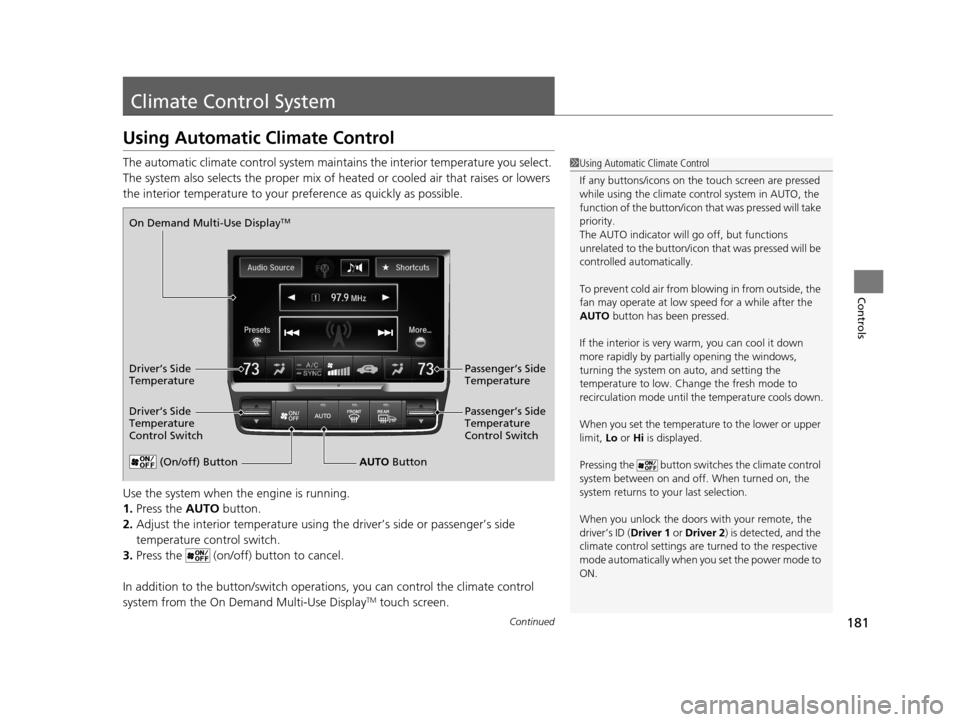
The automatic climate control system maintains the interior temperature you select.
The system also selects the proper mix of heat ed or cooled air that raises or lowers
the interior temperature to your pr eference as quickly as possible.
Use the system when the engine is running.
1. Press the AUTO button.
2. Adjust the interior temperature using the driver’s side or passenger’s side
temperature control switch.
3. Press the (on/off) button to cancel.
In addition to the button/switch operati ons, you can control the climate control
system from the On Demand Multi-Use Display
TM touch screen.
1 Using Automatic Climate Control
If any buttons/icons on the touch screen are pressed
while using the climate control system in AUTO, the
function of the button/icon th at was pressed will take
priority.
The AUTO indicator will go off, but functions
unrelated to the button/icon that was pressed will be
controlled automatically.
To prevent cold air from bl owing in from outside, the
fan may operate at low speed for a while after the
AUTO button has been pressed.
If the interior is very warm, you can cool it down
more rapidly by partial ly opening the windows,
turning the system on auto, and setting the
temperature to low. Change the fresh mode to
recirculation mode until the temperature cools down.
When you set the temperature to the lower or upper
limit, Lo or Hi is displayed.
Pressing the button switches the climate control
system between on and off. When turned on, the
system returns to your last selection.
When you unlock the doors with your remote, the
driver’s ID ( Driver 1 or Driver 2) is detected, and the
climate control settings are turned to the respective
mode automatically when you set the power mode to
ON.
(On/off) ButtonAUTO Button
On Demand Multi-Use Display
TM
Driver’s Side
Temperature
Control Switch
Passenger’s Side
Temperature
Control Switch Passenger’s Side
Temperature
Driver’s Side
Temperature
17 ACURA RLX-31TY26300.book 181 ページ 2016年6月17日 金曜日 午前8時12分
Page 183 of 557
uuClimate Control System uUsing Automatic Climate Control
182
Controls
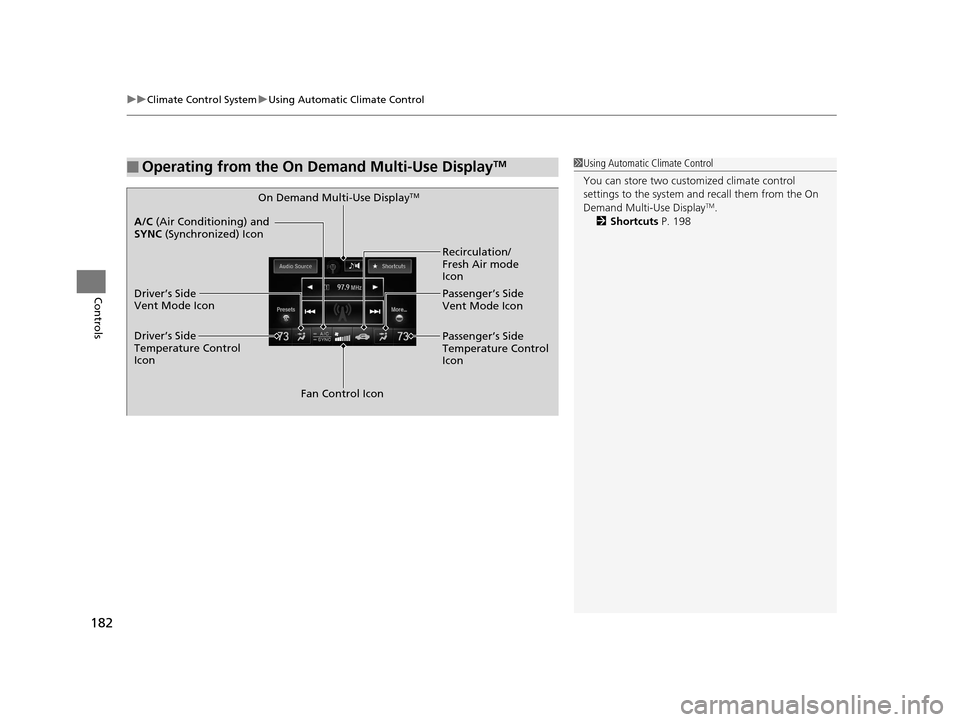
■Operating from the On Demand Multi-Use DisplayTM1Using Automatic Climate Control
You can store two customized climate control
settings to the system and recall them from the On
Demand Multi-Use Display
TM.
2 Shortcuts P. 198On Demand Multi-Use DisplayTM
A/C (Air Conditioning) and
SYNC (Synchronized) Icon
Driver’s Side
Vent Mode Icon
Driver’s Side
Temperature Control
Icon Recirculation/
Fresh Air mode
Icon
Passenger’s Side
Vent Mode Icon
Fan Control Icon Passenger’s Side
Temperature Control
Icon
17 ACURA RLX-31TY26300.book 182 ページ 2016年6月17日 金曜日 午前8時12分
Page 184 of 557
Continued183
uuClimate Control System uUsing Automatic Climate Control
Controls
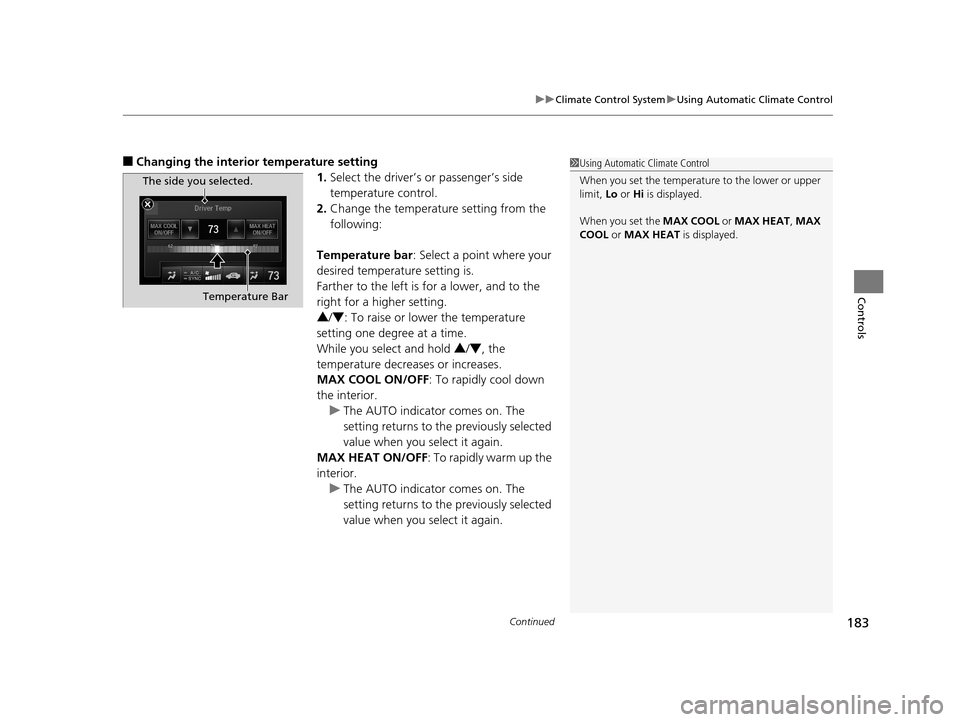
■Changing the interior temperature setting
1.Select the driver’s or passenger’s side
temperature control.
2. Change the temperature setting from the
following:
Temperature bar : Select a point where your
desired temperature setting is.
Farther to the left is for a lower, and to the
right for a higher setting.
3 /4 : To raise or lower the temperature
setting one degree at a time.
While you select and hold 3 /4 , the
temperature decreases or increases.
MAX COOL ON/OFF : To rapidly cool down
the interior. u The AUTO indicator comes on. The
setting returns to the previously selected
value when you select it again.
MAX HEAT ON/OFF : To rapidly warm up the
interior.
u The AUTO indicator comes on. The
setting returns to the previously selected
value when you select it again.1Using Automatic Climate Control
When you set the temperature to the lower or upper
limit, Lo or Hi is displayed.
When you set the MAX COOL or MAX HEAT , MAX
COOL or MAX HEAT is displayed.
The side you selected.
Temperature Bar
17 ACURA RLX-31TY26300.book 183 ページ 2016年6月17日 金曜日 午前8時12分
Page 185 of 557

uuClimate Control System uUsing Automatic Climate Control
184
Controls
■Switching the vent mode
1.Select the driver’s or passenger’s side vent
mode.
2. Select a desired vent mode icon, or Driver
Mode Auto (driver’s side)/Passenger
Mode Auto (passenger’s side): The system
automatically selects the vent mode most
suitable to the ambient environment.
Vent mode : Dashboard vents and back of the center
console
: Dashboard and floor vents, and back of
the center console : Floor vents
: Floor and defroster vents (driver’s side
only)
■A/C on and off 1.Select A/C.
2. Select ON or OFF .
1Switching the vent mode
While the climate control system is in AUTO, Driver
Mode Auto or Passenger Mode Auto is
highlighted.
The side you selected.
17 ACURA RLX-31TY26300.book 184 ページ 2016年6月17日 金曜日 午前8時12分
Page 186 of 557
Continued185
uuClimate Control System uUsing Automatic Climate Control
Controls
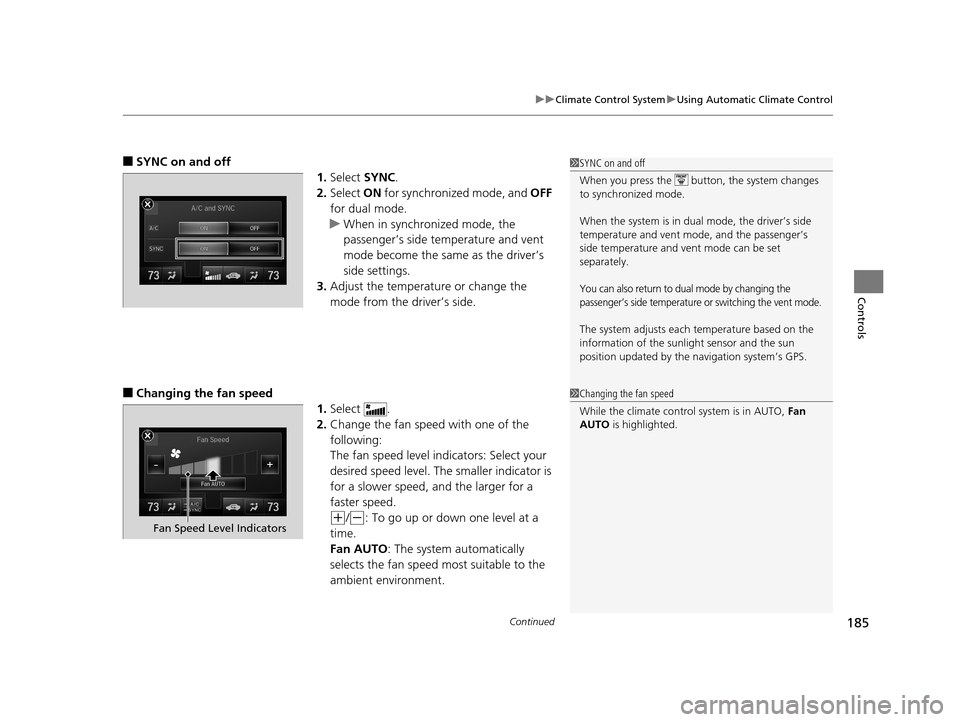
■SYNC on and off
1.Select SYNC.
2. Select ON for synchronized mode, and OFF
for dual mode.
u When in synchronized mode, the
passenger’s side temperature and vent
mode become the same as the driver’s
side settings.
3. Adjust the temperature or change the
mode from the driver’s side.
■Changing the fan speed
1.Select .
2. Change the fan speed with one of the
following:
The fan speed level indicators: Select your
desired speed level. The smaller indicator is
for a slower speed, and the larger for a
faster speed.
(+/(-: To go up or down one level at a
time.
Fan AUTO : The system automatically
selects the fan speed most suitable to the
ambient environment.
1 SYNC on and off
When you press the button, the system changes
to synchronized mode.
When the system is in dua l mode, the driver’s side
temperature and vent mo de, and the passenger’s
side temperature and ve nt mode can be set
separately.
You can also return to dual mode by changing the
passenger’s side temperature or switching the vent mode.
The system adjusts each temperature based on the
information of the sunli ght sensor and the sun
position updated by the na vigation system’s GPS.
1Changing the fan speed
While the climate control system is in AUTO, Fan
AUTO is highlighted.
Fan Speed Level Indicators
17 ACURA RLX-31TY26300.book 185 ページ 2016年6月17日 金曜日 午前8時12分
Page 187 of 557
uuClimate Control System uUsing Automatic Climate Control
186
Controls
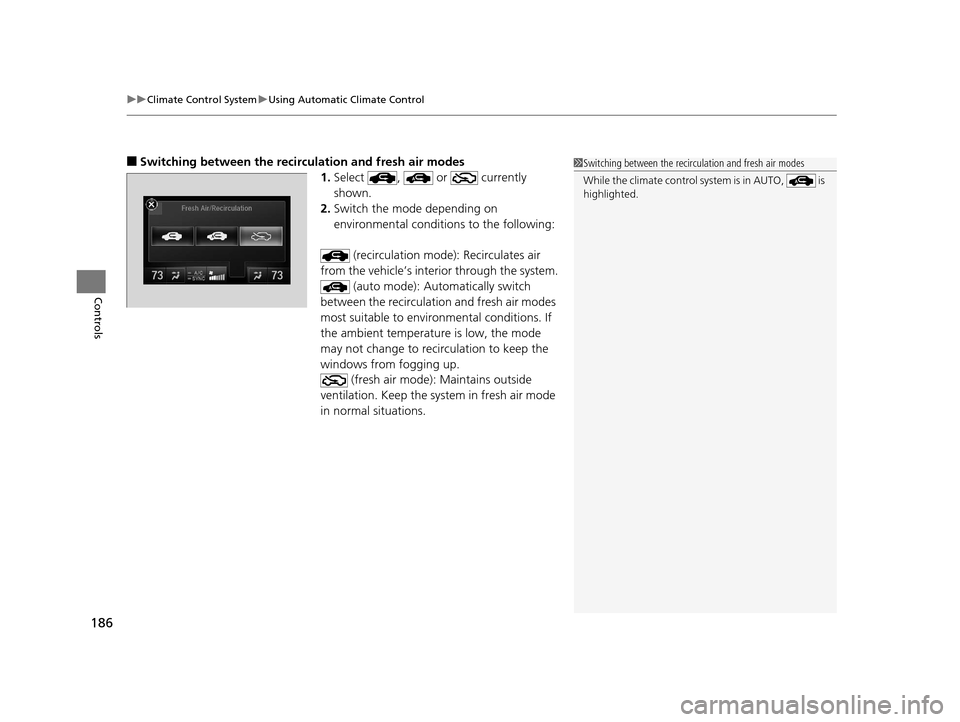
■Switching between the recirculation and fresh air modes
1.Select , or currently
shown.
2. Switch the mode depending on
environmental conditions to the following:
(recirculation mode): Recirculates air
from the vehicle’s interi or through the system.
(auto mode): Automatically switch
between the recirculation and fresh air modes
most suitable to environmental conditions. If
the ambient temperature is low, the mode
may not change to recirculation to keep the
windows from fogging up. (fresh air mode): Maintains outside
ventilation. Keep the sy stem in fresh air mode
in normal situations.1 Switching between the recirc ulation and fresh air modes
While the climate control system is in AUTO, is
highlighted.
17 ACURA RLX-31TY26300.book 186 ページ 2016年6月17日 金曜日 午前8時12分
Page 188 of 557
Continued187
uuClimate Control System uUsing Automatic Climate Control
Controls
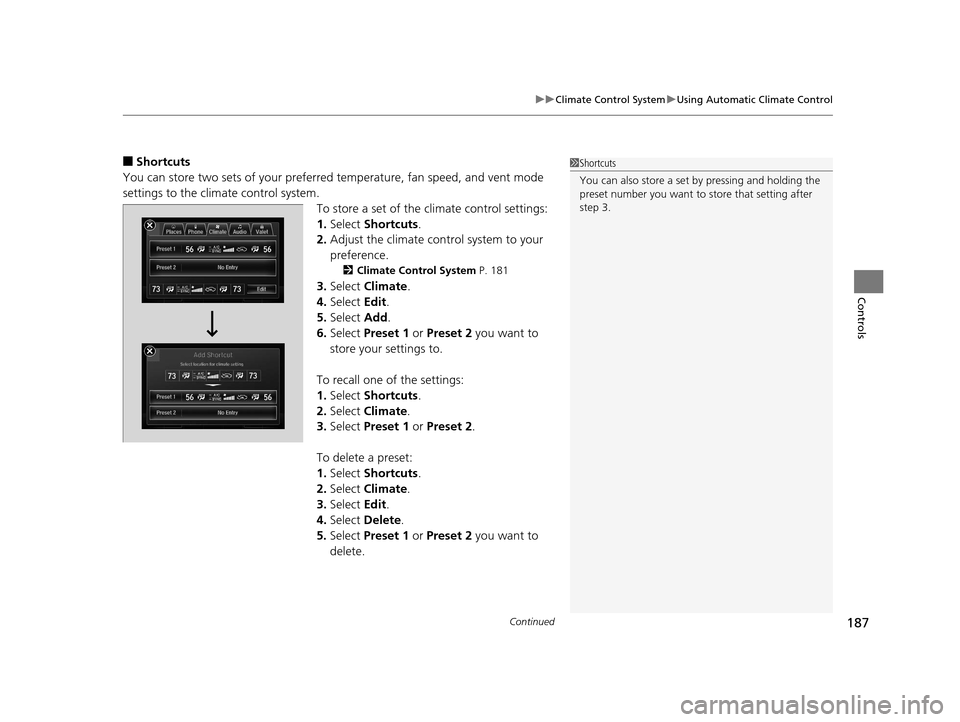
■Shortcuts
You can store two sets of your preferred temperature, fan speed, and vent mode
settings to the clim ate control system.
To store a set of the climate control settings:
1.Select Shortcuts .
2. Adjust the climate control system to your
preference.
2 Climate Control System P. 181
3.Select Climate .
4. Select Edit.
5. Select Add.
6. Select Preset 1 or Preset 2 you want to
store your settings to.
To recall one of the settings:
1. Select Shortcuts .
2. Select Climate .
3. Select Preset 1 or Preset 2 .
To delete a preset:
1. Select Shortcuts .
2. Select Climate .
3. Select Edit.
4. Select Delete .
5. Select Preset 1 or Preset 2 you want to
delete.
1 Shortcuts
You can also store a set by pressing and holding the
preset number you want to store that setting after
step 3.
17 ACURA RLX-31TY26300.book 187 ページ 2016年6月17日 金曜日 午前8時12分