fuel Acura RLX 2017 User Guide
[x] Cancel search | Manufacturer: ACURA, Model Year: 2017, Model line: RLX, Model: Acura RLX 2017Pages: 557, PDF Size: 37.97 MB
Page 108 of 557
107
uuGauges and Multi-Information Display uMulti-Information Display
Continued
Instrument Panel
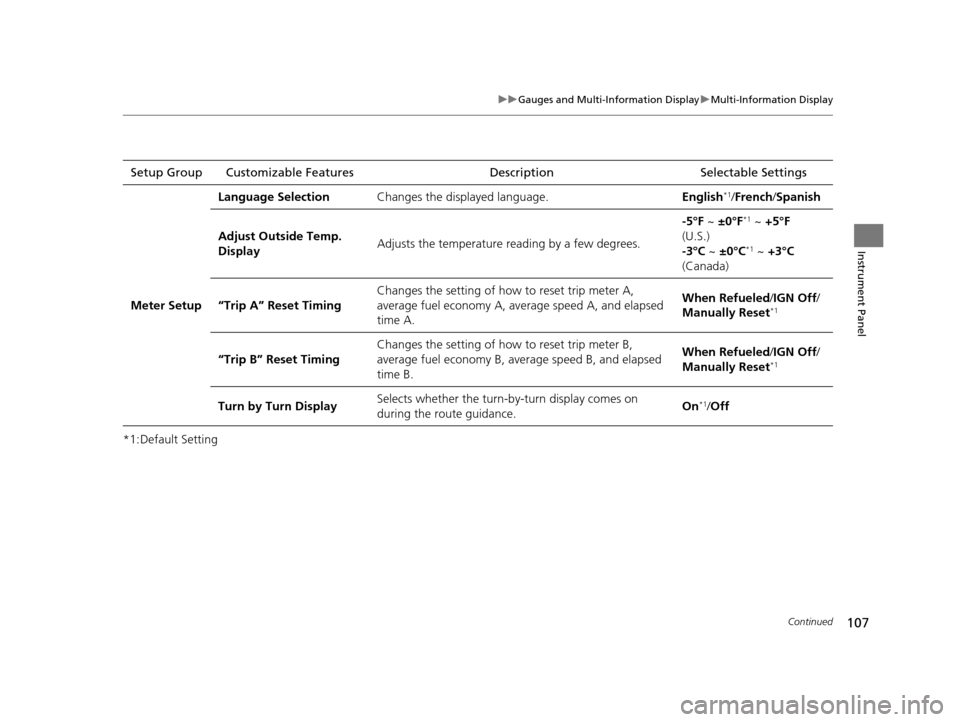
*1:Default SettingSetup Group Customizable Features
Description Selectable Settings
Meter Setup Language Selection
Changes the displayed language. English
*1/French /Spanish
Adjust Outside Temp.
Display Adjusts the temperature r
eading by a few degrees. -5°F ~
±0°F
*1 ~ +5°F
(U.S.)
-3°C ~ ±0°C
*1 ~ +3°C
(Canada)
“Trip A” Reset Timing Changes the setting of how to reset trip meter A,
average fuel economy A, av
erage speed A, and elapsed
time A. When Refueled
/IGN Off /
Manually Reset
*1
“Trip B” Reset Timing Changes the setting of ho
w to reset trip meter B,
average fuel economy B, av erage speed B, and elapsed
time B. When Refueled
/IGN Off /
Manually Reset*1
Turn by Turn Display Selects whether the turn-b
y-turn display comes on
during the route guidance. On*1/
Off
17 ACURA RLX-31TY26300.book 107 ページ 2016年6月17日 金曜日 午前8時12分
Page 112 of 557
111
uuGauges and Multi-Information Display uMulti-Information Display
Continued
Instrument Panel
■Example of customization settings
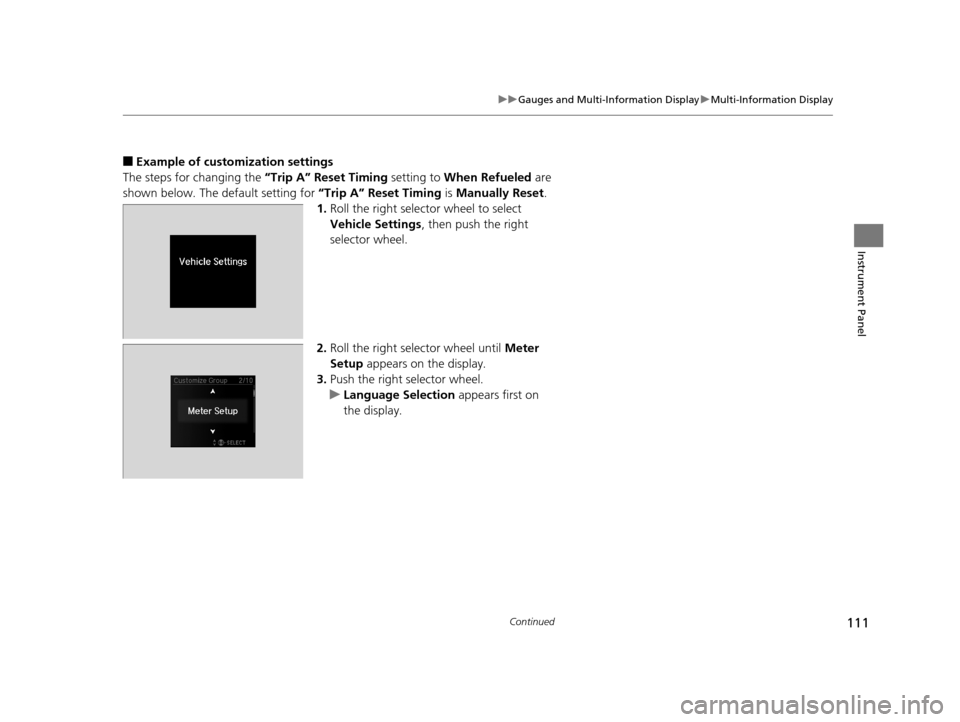
The steps for changing the “Trip A” Reset Timing setting to When Refueled are
shown below. The default setting for “Trip A” Reset Timing is Manually Reset.
1. Roll the right selector wheel to select
Vehicle Settings , then push the right
selector wheel.
2. Roll the right selector wheel until Meter
Setup appears on the display.
3. Push the right selector wheel.
u Language Selection appears first on
the display.
17 ACURA RLX-31TY26300.book 111 ページ 2016年6月17日 金曜日 午前8時12分
Page 113 of 557

112
uuGauges and Multi-Information Display uMulti-Information Display
Instrument Panel
4. Roll the right selector wheel until “Trip A”
Reset Timing appears on the display, then
push the right selector wheel.
u The display switches to the
customization setup screen, where you
can select When Refueled , IGN Off,
Manually Reset , or Exit .
5. Roll the right selector wheel and select
When Refueled , then push the right
selector wheel.
u The When Refueled Setup screen
appears, then the di splay returns to the
customization menu screen.
6. Roll the right selector wheel until Exit
appears on the display, then push the right
selector wheel.
7. Repeat Step 6 until you return to the
normal screen.
17 ACURA RLX-31TY26300.book 112 ページ 2016年6月17日 金曜日 午前8時12分
Page 207 of 557
206
uuAudio System Basic Operation uAudio/Information Screen
Features
■Audio
Shows the current audio information.
■Navigation
Shows the navigation screen.
2 Refer to the Navigation System Manual
■Phone
Shows the HFL information.
2 Bluetooth ® HandsFreeLink® P. 290
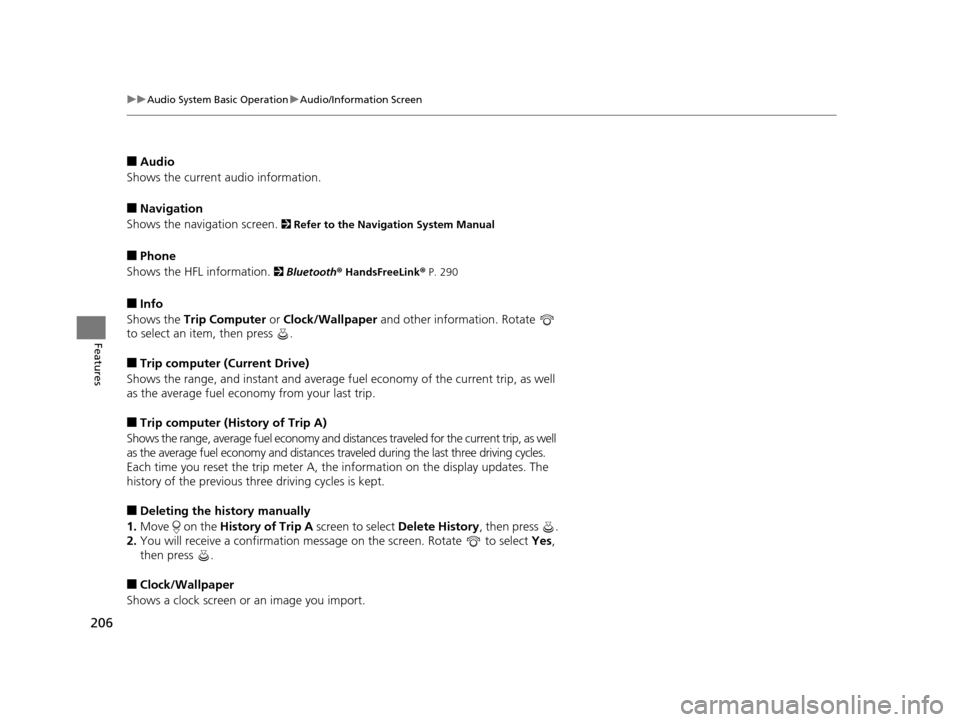
■Info
Shows the Trip Computer or Clock/Wallpaper and other information. Rotate
to select an item, then press .
■Trip computer (Current Drive)
Shows the range, and instant and average fu el economy of the current trip, as well
as the average fuel economy from your last trip.
■Trip computer (History of Trip A)
Shows the range, average fuel economy and distances traveled for the current trip, as well
as the average fuel economy and distances tr aveled during the last three driving cycles.
Each time you reset the trip meter A, the information on the display updates. The
history of the previous th ree driving cycles is kept.
■Deleting the history manually
1. Move on the History of Trip A screen to select Delete History, then press .
2. You will receive a confirmation message on the screen. Rotate to select Yes,
then press .
■Clock/Wallpaper
Shows a clock screen or an image you import.
17 ACURA RLX-31TY26300.book 206 ページ 2016年6月17日 金曜日 午前8時12分
Page 277 of 557
276
uuCustomized Features u
Features
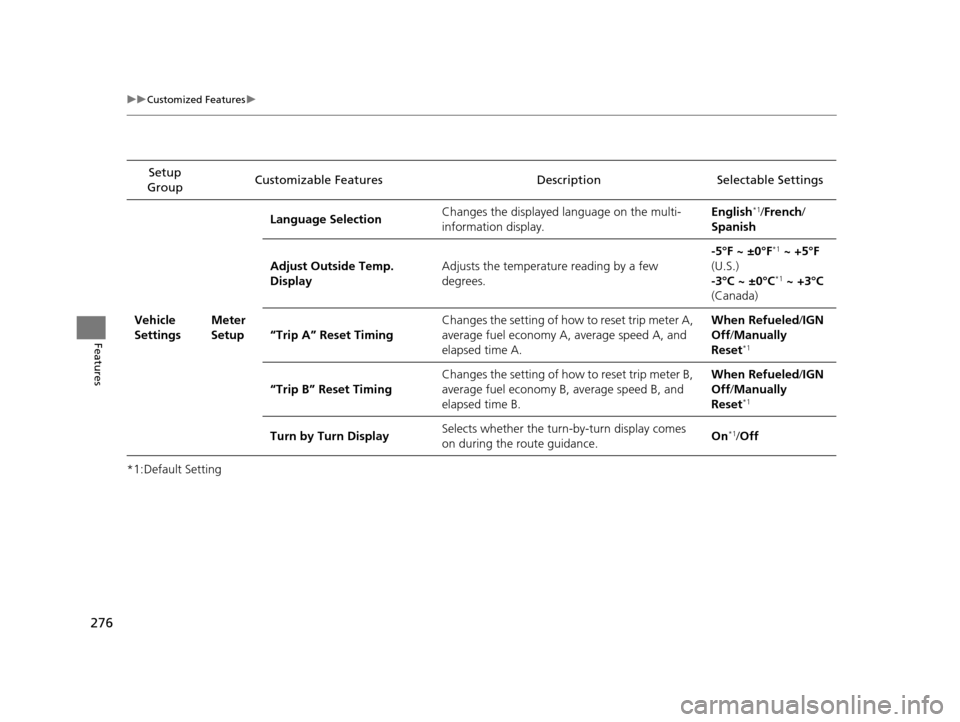
*1:Default SettingSetup
Group Customizable Features Descri
ption Selectable Settings
Vehicle
Settings Meter
SetupLanguage Selection
Changes the displayed language on the multi-
information display. English
*1/
French /
Spanish
Adjust Outside Temp.
Display Adjusts the temperature reading by a few
degrees. -5°F ~ ±0°F
*1
~ +5°F
(U.S.)
-3°C ~ ±0°C
*1 ~ +3°C
(Canada)
“Trip A” Reset Timing Changes the setting of how to reset trip meter A,
average fuel economy A,
average speed A, and
elapsed time A. When Refueled
/IGN
Off /Manually
Reset
*1
“Trip B” Reset Timing Changes the setting of how to reset trip meter B,
average fuel economy B,
average speed B, and
elapsed time B. When Refueled
/IGN
Off /Manually
Reset*1
Turn by Turn Display Selects whether the turn-by-turn display comes
on during the route guidance. On*1/
Off
17 ACURA RLX-31TY26300.book 276 ページ 2016年6月17日 金曜日 午前8時12分
Page 338 of 557
337
Driving
This chapter discusses driving, refueling, and information on items such as accessories.
Before Driving
Driving Preparation .......................... 338
Maximum Load Limit........................ 341
Towing a Trailer Towing Your Vehicle ........................ 343
When Driving
Starting the Engine .......................... 344
Precautions While Driving................. 349
Automatic Transmission ................... 350
Shifting ............................................ 351
SPORT Mode.................................... 355
Cruise Control
*................................ 356
Front Sensor Camera*...................... 359
Adaptive Cruise Control (ACC) with Low Speed Follow (LSF)
*........................ 361 Forward Collision Warning (FCW) .... 375
Lane Departure Warning (LDW) ....... 378
Road Departure Mitigation (RDM) System*... 382Lane Keeping Assist System (LKAS)*.... 386Vehicle Stability Assist (VSA®), aka Electronic
Stability Control (ESC), System ............... 393
Agile Handling Assist ....................... 395
Precision All-Wheel SteerTM (P-AWS ®)
System ........................................... 395
Blind Spot Information (BSI) System*.... 396Tire Pressure Monitoring System (TPMS) ... 398Tire Pressure Monitoring System (TPMS) -
Required Federal Explanation ............. 400
Braking Brake System ....................................... 402
Anti-lock Brake System (ABS) ............... 407 Brake Assist System .............................. 408
Collision Mitigation Braking SystemTM (CMBSTM)*.....409Parking Your Vehicle
When Stopped ..................................... 417
Parking Sensor System
*........................ 418
Cross Traffic Monitor*.......................... 422
Multi-View Rear Camera*..................... 426
Surround View Camera System*.......... 427
Refueling Fuel Information ................................... 437
How to Refuel ...................................... 438
Fuel Economy and CO
2 Emissions ......... 439
Improving Fuel Economy and Reducing CO2
Emissions............................................ 439
* Not available on all models
17 ACURA RLX-31TY26300.book 337 ページ 2016年6月17日 金曜日 午前8時12分
Page 345 of 557
344
Driving
When Driving
Starting the Engine
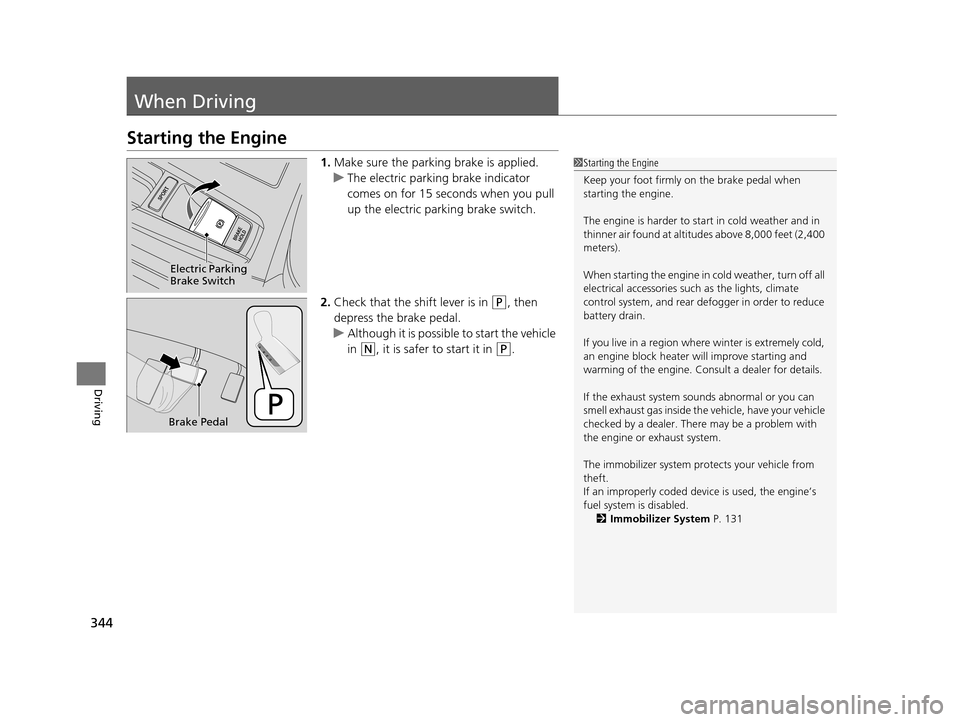
1.Make sure the parking brake is applied.
u The electric parking brake indicator
comes on for 15 seconds when you pull
up the electric parking brake switch.
2. Check that the shift lever is in
(P, then
depress the brake pedal.
u Although it is possibl e to start the vehicle
in
(N, it is safer to start it in (P.
1 Starting the Engine
Keep your foot firmly on the brake pedal when
starting the engine.
The engine is harder to st art in cold weather and in
thinner air found at altitudes above 8,000 feet (2,400
meters).
When starting the engine in cold weather, turn off all
electrical accessories such as the lights, climate
control system, and rear de fogger in order to reduce
battery drain.
If you live in a region where winter is extremely cold,
an engine block heater will improve starting and
warming of the engine. Cons ult a dealer for details.
If the exhaust system sounds abnormal or you can
smell exhaust gas inside the vehicle, have your vehicle
checked by a dealer. There may be a problem with
the engine or exhaust system.
The immobilizer system pr otects your vehicle from
theft.
If an improperly c oded device is used, the engine’s
fuel system is disabled.
2 Immobilizer System P. 131
Electric Parking
Brake Switch
Brake Pedal
17 ACURA RLX-31TY26300.book 344 ページ 2016年6月17日 金曜日 午前8時12分
Page 353 of 557
uuWhen Driving uShifting
352
Driving
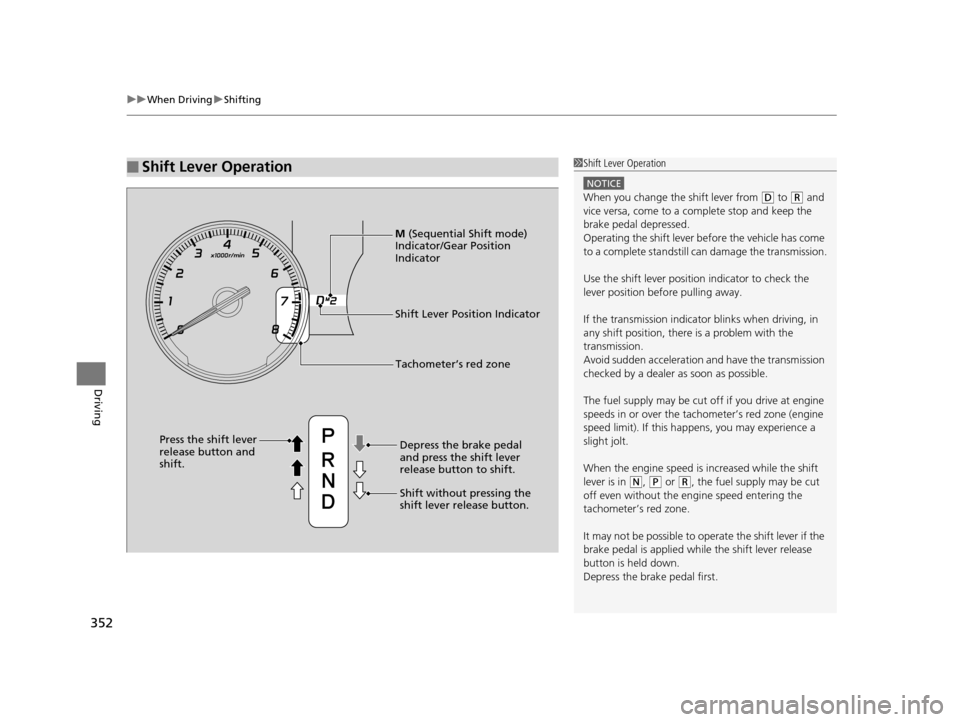
■Shift Lever Operation1Shift Lever Operation
NOTICE
When you change the shift lever from (D to (R and
vice versa, come to a complete stop and keep the
brake pedal depressed.
Operating the shift lever be fore the vehicle has come
to a complete standstill can damage the transmission.
Use the shift lever positi on indicator to check the
lever position befo re pulling away.
If the transmission indicator blinks when driving, in
any shift position, there is a problem with the
transmission.
Avoid sudden acceleration and have the transmission
checked by a dealer as soon as possible.
The fuel supply may be cut of f if you drive at engine
speeds in or over the tachometer’s red zone (engine
speed limit). If this happe ns, you may experience a
slight jolt.
When the engine speed is increased while the shift
lever is in
( N, (P or (R, the fuel supply may be cut
off even without the engine speed entering the
tachometer’s red zone.
It may not be possible to operate the shift lever if the
brake pedal is applied while the shift lever release
button is held down.
Depress the brake pedal first.
Shift Lever Position Indicator
Depress the brake pedal
and press the shift lever
release button to shift.
Shift without pressing the
shift lever release button.
Press the shift lever
release button and
shift.
Tachometer’s red zone
M
(Sequential Shift mode)
Indicator/Gear Position
Indicator
17 ACURA RLX-31TY26300.book 352 ページ 2016年6月17日 金曜日 午前8時12分
Page 355 of 557

uuWhen Driving uShifting
354
Driving
■Second gear lock mode
If you pull the
(+ paddle shifter while stopped or dr iving at 6 mph (10 km/h) or less,
the gear position will be locked in 2nd g ear. This makes it easier to pull away on
slippery surfaces such as snow covered roads.
To cancel the 2nd gear lock mode, pull the
(- paddle shifter.
■Sequential Shift Mode Operation
1 Sequential Shift Mode Operation
Each paddle shift operation makes a single gear
change.
To change gears continuously, release the paddle
shifter before pulling it again for the next gear.
Recommended Shift Points
Use this table as a guideline for efficient fuel
economy and effectiv e emission control.
If the gear positio n indicator blinks when you try to
shift up or down, this means your vehicle speed is not
in its allowabl e gear range.
Slightly accelerate to shift up and decelerate to shift
down while the indi cator is blinking.
In sport mode, to prioriti ze the engine performance
enhancement, the transmission may not allow for
shifting up while the engine speed is low. Shift Up Normal Acceleration
1st to 2nd17 mph (28 km/h)
2nd to 3rd 27 mph (44 km/h)
3rd to 4th36 mph (57 km/h)
4th to 5th 41 mph (66 km/h)
5th to 6th44 mph (71 km/h)
Downshifting when pulling
the paddle shifter.
(Changes to a lower gear)Upshifting when pulling
the paddle shifter.
(Changes to a higher gear)
Paddle Shifter
(Shift down) Paddle Shifter
(Shift up)
17 ACURA RLX-31TY26300.book 354 ページ 2016年6月17日 金曜日 午前8時12分
Page 401 of 557
400
uuWhen Driving uTire Pressure Monitoring System (TPMS) - Required Federal Explanation
Driving
Tire Pressure Monitoring System (TPMS) - Required
Federal Explanation
Each tire, including the spare (i f provided), should be checked
monthly when cold and inflated to the inflation pressure
recommended by the vehicle manufacturer on the vehicle placard
or tire inflation pressure label.
(If your vehicle has tires of a different size than the size indicated
on the vehicle placard or tire infl ation pressure label, you should
determine the proper tire inflat ion pressure for those tires.)
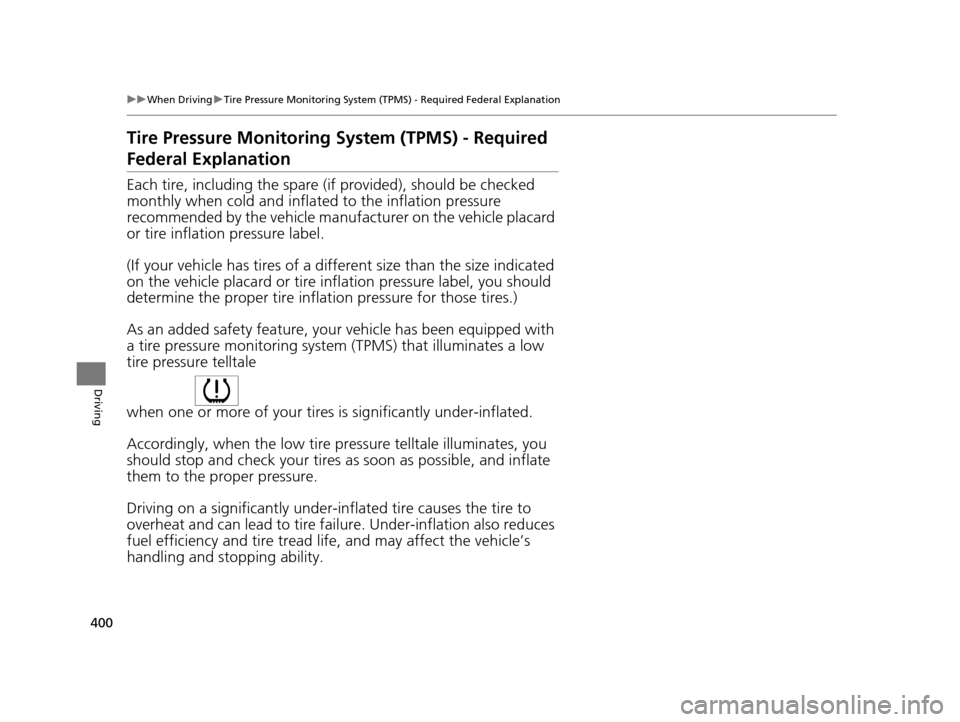
As an added safety feature, your vehicle has been equipped with
a tire pressure monitoring system (TPMS) that illuminates a low
tire pressure telltale
when one or more of your tire s is significantly under-inflated.
Accordingly, when the low tire pr essure telltale illuminates, you
should stop and check your tires as soon as possible, and inflate
them to the proper pressure.
Driving on a significantly under-in flated tire causes the tire to
overheat and can lead to tire fail ure. Under-inflation also reduces
fuel efficiency and tire tread li fe, and may affect the vehicle’s
handling and stopping ability.
17 ACURA RLX-31TY26300.book 400 ページ 2016年6月17日 金曜日 午前8時12分