warning light Acura RLX 2017 User Guide
[x] Cancel search | Manufacturer: ACURA, Model Year: 2017, Model line: RLX, Model: Acura RLX 2017Pages: 557, PDF Size: 37.97 MB
Page 178 of 557

Continued177
uuInterior Lights/Interior Convenience Items uInterior Convenience Items
Controls
The power mode must be in ON to use the
seat heaters and ventilation.
Press the seat heater or the seat ventilation
button:
Once - The HI setting (three indicators on)
Twice - The MID setting (two indicators on)
Three times - The LO setting
Four times - The OFF setting (no indicators on)
■Front Seat Heaters and Seat Ventilation*1Front Seat Heaters and Seat Ventilation*
Do not use the seat heater s and the seat ventilation
even in LO when the engine is OFF. Under such
conditions, the battery ma y be weakened, making
the engine difficult to start.
3WARNING
Heat induced burns are possible when
using seat heaters.
Persons with a diminished ability to sense
temperature (e.g., persons with diabetes,
lower-limb nerve damage, or paralysis) or
with sensitive skin should not use seat
heaters.
* Not available on all models
17 ACURA RLX-31TY26300.book 177 ページ 2016年6月17日 金曜日 午前8時12分
Page 179 of 557

uuInterior Lights/Interior Convenience Items uInterior Convenience Items
178
Controls
The power mode must be in ON to use the
seat heaters.
There is no heater in the rear center seating
position.
Press the seat heater button:
Once - The HI setting (three indicators on)
Twice - The MID setting (two indicators on)
Three times - The LO setting
Four times - The OFF se tting (no indicators on)
To open the sunglasses holder, push and
release the indent. To clos e, push it again until
it latches.
You can store eyeglasses and other small
items in this holder.
■Rear Seat Heaters*1 Rear Seat Heaters*
Do not use the seat heaters even in LO when the
engine is off. Under such conditions, the battery may
be weakened, making the engine difficult to start.
3WARNING
Heat induced burns are possible when
using seat heaters.
Persons with a diminished ability to sense
temperature (e.g., persons with diabetes,
lower-limb nerve damage, or paralysis) or
with sensitive skin should not use seat
heaters.
■Sunglasses Holder1Sunglasses Holder
Keep the holder closed wh ile driving except when
accessing stored items.
Push
* Not available on all models
17 ACURA RLX-31TY26300.book 178 ページ 2016年6月17日 金曜日 午前8時12分
Page 180 of 557
Continued179
uuInterior Lights/Interior Convenience Items uInterior Convenience Items
Controls
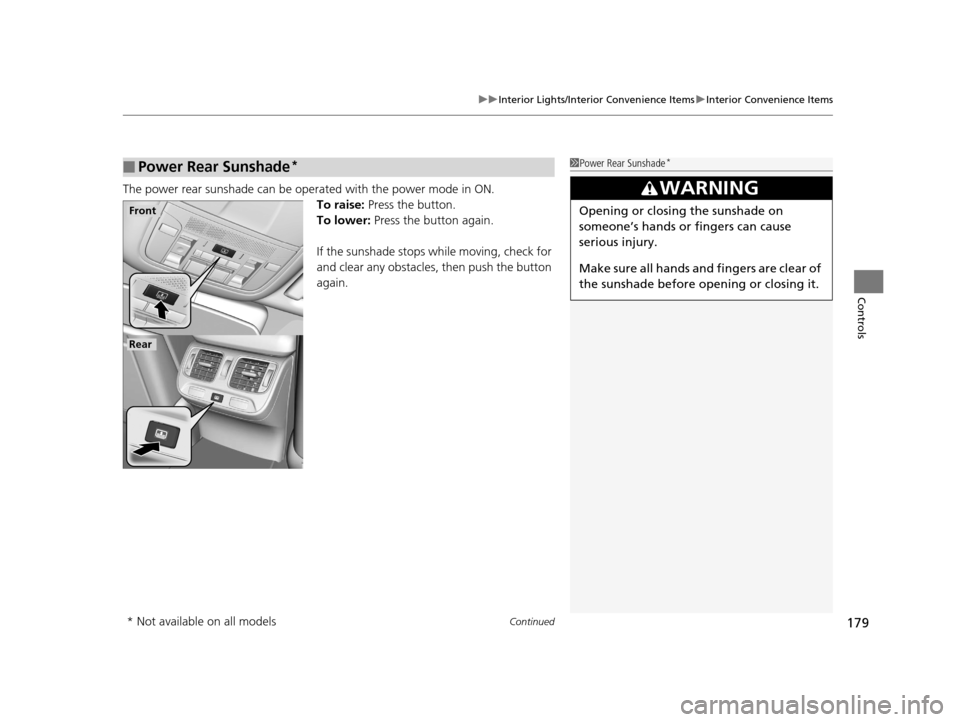
The power rear sunshade can be oper ated with the power mode in ON.
To raise: Press the button.
To lower: Press the button again.
If the sunshade stops while moving, check for
and clear any obstacles, then push the button
again.
■Power Rear Sunshade*1 Power Rear Sunshade*
3WARNING
Opening or closing the sunshade on
someone’s hands or fingers can cause
serious injury.
Make sure all hands and fingers are clear of
the sunshade before opening or closing it.Front
Rear
* Not available on all models
17 ACURA RLX-31TY26300.book 179 ページ 2016年6月17日 金曜日 午前8時12分
Page 266 of 557
265
uuCustomized Features u
Continued
Features
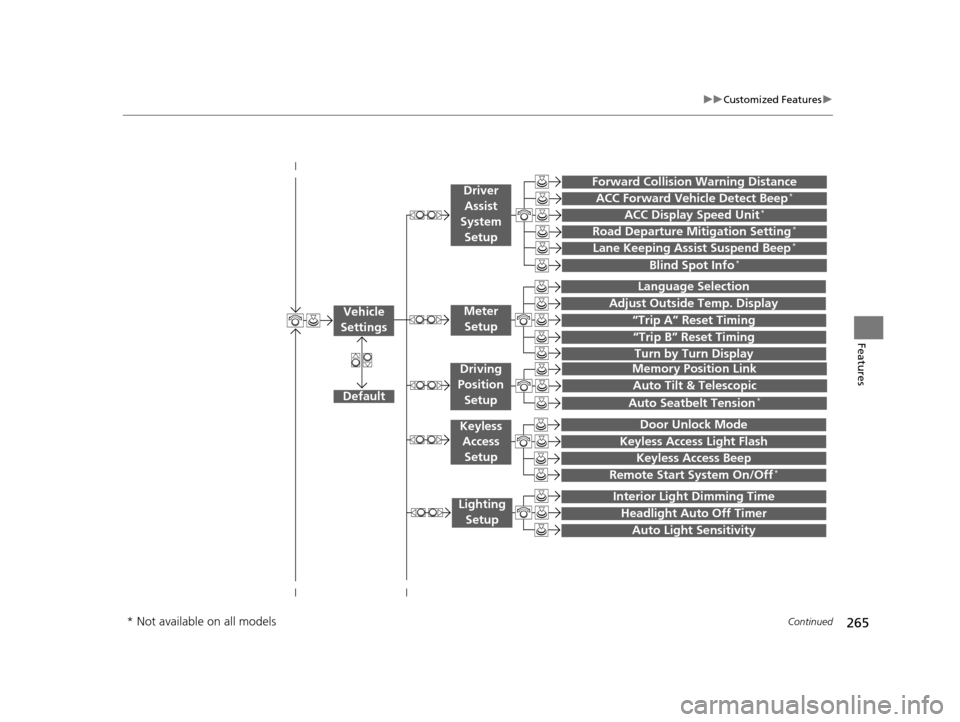
“Trip A” Reset Timing
“Trip B” Reset Timing
Language Selection
Adjust Outside Temp. Display
Forward Collision Warning Distance
ACC Forward Vehicle Detect Beep*
ACC Display Speed Unit*
Turn by Turn Display
Default
Memory Position Link
Door Unlock Mode
Keyless Access Light Flash
Interior Light Dimming Time
Headlight Auto Off Timer
Auto Light Sensitivity
Vehicle
SettingsMeter Setup
Driver Assist
System Setup
Keyless Access
Setup
Lighting Setup
Keyless Access Beep
Lane Keeping Assist Suspend Beep*
Blind Spot Info*
Auto Tilt & Telescopic
Auto Seatbelt Tension*
Driving
Position Setup
Road Departure Mitigation Setting*
Remote Start System On/Off*
* Not available on all models
17 ACURA RLX-31TY26300.book 265 ページ 2016年6月17日 金曜日 午前8時12分
Page 362 of 557
361
uuWhen Driving uAdaptive Cruise Control (ACC) with Low Speed Follow (LSF)*
Continued
Driving
Adaptive Cruise Control (ACC) with Low Speed Follow (LSF)*
Helps maintain a constant vehicle speed an d a set following-interval behind a vehicle
detected ahead of yours and, if the detect ed vehicle slows to a stop, decelerates and
stops your vehicle, without you having to keep your foot on the brake or the
accelerator.
When ACC with LSF slows your vehicle by applying the brakes, your vehicle's brake
lights will illuminate.1 Adaptive Cruise Control (ACC) with Low Speed Follow (LSF)*
Important Reminder
As with any system, there are limits to ACC with LSF.
Use the brake pedal whenever necessary, and always
keep a safe distance between your vehicle and other
vehicles.
3WARNING
Improper use of ACC with LSF can lead to a
crash.
Use ACC with LSF only when driving on
expressways or freeways and in good
weather conditions.
3WARNING
ACC with LSF has limited braking
capability and may not stop your vehicle
in time to avoid a co llision with a vehicle
that quickly stops in front of you.
Always be prepared to apply the brake
pedal if the cond itions require.
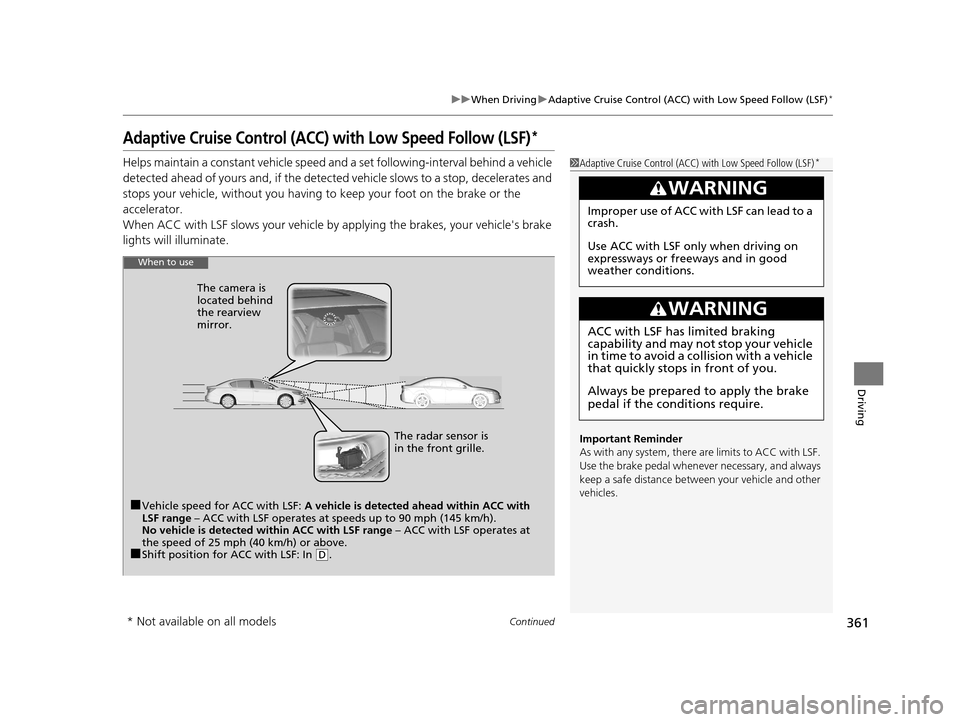
When to use
■Vehicle speed for ACC with LSF: A vehicle is detected ahead within ACC with
LSF range – ACC with LSF operates at speeds up to 90 mph (145 km/h).
No vehicle is detected within ACC with LSF range – ACC with LSF operates at
the speed of 25 mph (40 km/h) or above.
■Shift position for ACC with LSF: In (D. The radar sensor is
in the front grille.
The camera is
located behind
the rearview
mirror.
* Not available on all models
17 ACURA RLX-31TY26300.book 361 ページ 2016年6月17日 金曜日 午前8時12分
Page 366 of 557

Continued365
uuWhen Driving uAdaptive Cruise Control (ACC) with Low Speed Follow (LSF)*
Driving
■There is no vehicle ahead
Your vehicle maintains the set speed without
having to keep your foot on the brake or
accelerator pedal.
If there previously was a vehicle detected
ahead that kept your vehicle from traveling at
the set speed, ACC with LSF accelerates your
vehicle to the set speed, and then maintains it.
■When you depress the accelerator pedal
You can temporarily increase the vehicle speed . In this case, there is no audible or
visual alert even if a vehicl e is in the ACC with LSF range.
ACC with LSF stays on unless you cancel it . Once you release the accelerator pedal,
the system resumes the set speed.
There are times when the vehicle speed will decrease when the accelerator pedal is
lightly applied.
■A vehicle detected ahead is within AC C with LSF range and slows to a stops
Your vehicle also stops, automatically. The
Stopped message appears on the multi-
information display.
When the vehicle ahead of you starts again,
the vehicle icon on the multi-information
display blinks. If you press the RES/+/SET/–
switch up or down, or depress the accelerator
pedal, ACC with LSF operates again within the
prior set speed.
1 When in Operation
Limitations
You may need to use the brake to maintain a safe
distance when using ACC with LSF. Additionally,
ACC with LSF may not work properly under certain
conditions. 2 ACC with LSF Conditions and Limitations
P. 366
A vehicle icon with dotted-line
contour appears on the multi-
information display
1 A vehicle detected ahead is with in ACC with LSF range and slows
to a stops
3WARNING
Exiting a vehicle that has been stopped
while the ACC with LSF system is operating
can result in the vehicle moving without
operator control.
A vehicle that moves without operator
control can cause a crash, resulting in
serious injury or death.
Never exit a vehicle when the vehicle is
stopped by ACC with LSF.
17 ACURA RLX-31TY26300.book 365 ページ 2016年6月17日 金曜日 午前8時12分
Page 378 of 557
377
uuWhen Driving uForward Collision Warning (FCW)
Driving
FCW may not activate or may not detect a ve hicle in front of your vehicle, and may
activate even when you are aware of a ve hicle ahead of you, or when there is no
vehicle ahead, under the following conditions.
■FCW Limitations
Condition
●The distance between your vehicle and the vehicle ahead of you is too short.●A vehicle cuts in front of you at a slow speed, and it brakes suddenly.●A vehicle suddenly crosses in front of you.●When either your vehicle or the vehicle ahead of you a ccelerates rapidly.●The vehicle ahead of you is a motorcycle, a small vehicle, or a unique vehicle such as a tractor.●When you drive off-road or on a mountain road, or curved and wi nding road for an extended period that makes it difficult for the sensor/camera to
properly detect a vehicle in front of you.
●When there are pedestrians or an imals in front of your vehicle.●When you drive in bad weather (rain, fog, etc.).●A heavy load in the rear or modificati ons to the suspension tilts your vehicle.●An abnormal tire condition is detected (wrong tire size, flat tire, etc.).●When the windshield is blocked by dirt, mud, leaves, wet snow, etc.●When the temperature inside the system is high.●A sudden change between light and dark such as an entrance or exit of a tunnel.●You drive into the sunlight (e.g. at dawn or dusk).●When the windshield is dirty or cloudy.●When streetlights are perceived as the ta illight of a vehicle in front of yours.●When driving at night, the vehicle ahead of you is running with either taillight bulb burned out.●When you drive in the shadows of trees, buildings, etc.
17 ACURA RLX-31TY26300.book 377 ページ 2016年6月17日 金曜日 午前8時12分
Page 379 of 557

378
uuWhen Driving uLane Departure Warning (LDW)
Driving
Lane Departure Warning (LDW)
Alerts you when the system detects a possibility of your vehicle unintentionally
crossing over detected lane markings.
If your vehicle is getting too close to detected
left or right side lane markings without a turn
signal activated, LDW will give audible and
visual alerts.
The beeper sounds and the Lane Departure
message appears on the multi-information
display, letting you know that you need to
take appropriate action.
The system begins to search for lane mark ings when all the following conditions are
met:
• The vehicle is traveling between 45 and 90 mph (72 and 145 km/h).
• The vehicle is on a straight or slightly curved road.
• The turn signals are off.
• The brake pedal is not depressed.
■How the System Works
Models without Road Departure Mitigation (RDM) System
1Lane Departure Warning (LDW)
Important Safety Reminder
Like all assistance systems, LDW has limitations.
Over-reliance on LDW may result in a collision. It is
always your respons ibility to keep the vehicle within
your driving lane.
LDW only alerts you when lane drift is detected
without a turn signal in us e. LDW may not detect all
lane markings or lane departures; a ccuracy will vary
based on weather, speed and lane marker condition.
It is always your responsibility to safely operate the
vehicle and avoid collisions.
■How the System Activates1 How the System Activates
LDW may automatically shut off and the LDW
indicator comes and stays on.
2 Indicators P. 68
17 ACURA RLX-31TY26300.book 378 ページ 2016年6月17日 金曜日 午前8時12分
Page 382 of 557
381
uuWhen Driving uLane Departure Warning (LDW)
Driving
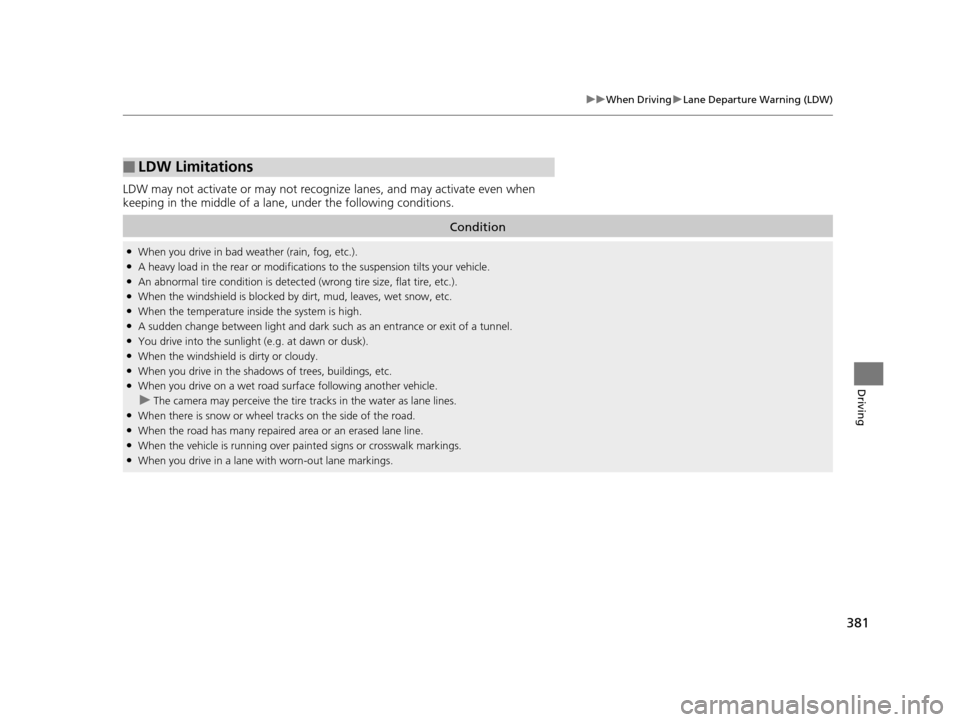
LDW may not activate or may not recognize lanes, and may activate even when
keeping in the middle of a lane, under the following conditions.
■LDW Limitations
Condition
●When you drive in bad weather (rain, fog, etc.).●A heavy load in the rear or modificati ons to the suspension tilts your vehicle.●An abnormal tire condition is detected (wrong tire size, flat tire, etc.).●When the windshield is blocked by dirt, mud, leaves, wet snow, etc.●When the temperature inside the system is high.●A sudden change between light and dark such as an entrance or exit of a tunnel.●You drive into the sunlight (e.g. at dawn or dusk).●When the windshield is dirty or cloudy.●When you drive in the shadows of trees, buildings, etc.●When you drive on a wet road su rface following another vehicle.
uThe camera may perceive the tire tracks in the water as lane lines.●When there is snow or wheel tracks on the side of the road.●When the road has many repaired area or an erased lane line.●When the vehicle is running over pa inted signs or crosswalk markings.●When you drive in a lane with worn-out lane markings.
17 ACURA RLX-31TY26300.book 381 ページ 2016年6月17日 金曜日 午前8時12分
Page 384 of 557

Continued383
uuWhen Driving uRoad Departure Mitigation (RDM) System*
Driving
The system becomes ready to start sear ching for lane markings when all the
following conditions are met:
• The vehicle is traveling between about 45 and 90 mph (72 and 145 km/h).
• The vehicle is on a straight or slightly curved road.
• The turn signals are off.
• The brake pedal is not depressed.
• The wipers are not in continuous operation.
• The system makes a determination that th e driver is not actively accelerating,
braking or steering.
Press the RDM button to turn the system on
and off.u The indicator in the button comes on and
the message appears on the multi-
information display when the system is
on.
■How the System Activates
■RDM On and Off
1 How the System Activates
The RDM system may automa tically shut off and the
indicator comes and stays on.
2 Indicators P. 68
RDM system function can be impacted when the
vehicle is:
•Not driven within a traffic lane.•Driven on the inside edge of a curve, or outside of
a lane.
•Driven in a narrow lane.
1 RDM On and Off
When you have selected Warning Only from the
customized options usi ng the multi-information
display, the system does not operate the steering
wheel and braking.
RDM Button
Indicator
17 ACURA RLX-31TY26300.book 383 ページ 2016年6月17日 金曜日 午前8時12分