air condition Acura RLX 2017 Owner's Guide
[x] Cancel search | Manufacturer: ACURA, Model Year: 2017, Model line: RLX, Model: Acura RLX 2017Pages: 557, PDF Size: 37.97 MB
Page 449 of 557
448
uuMaintenance MinderTMuTo Use Maintenance MinderTM
Maintenance
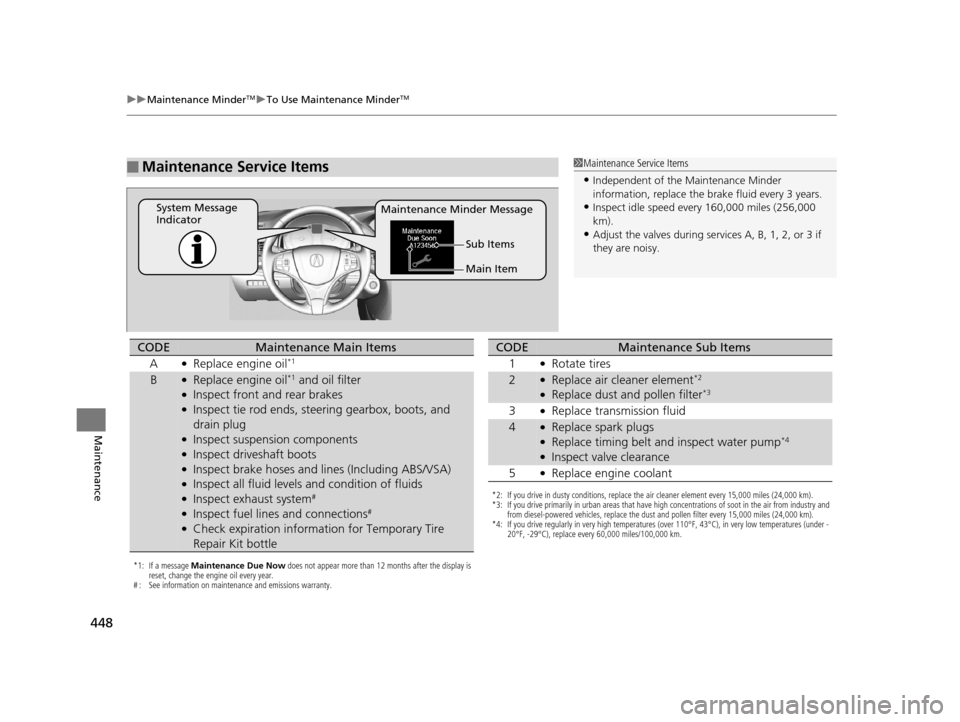
■Maintenance Service Items1Maintenance Service Items
•Independent of the Maintenance Minder
information, replace the brake fluid every 3 years.
•Inspect idle speed every 160,000 miles (256,000
km).
•Adjust the valves during services A, B, 1, 2, or 3 if
they are noisy.
Maintenance Minder Message
System Message
Indicator
Main Item Sub Items
*1: If a message Maintenance Due Now does not appear more than 12 months after the display is
reset, change the engine oil every year.
# : See information on maintenance and emissions warranty.
CODEMaintenance Main Items
A
●Replace engine oil*1
B●Replace engine oil*1 and oil filter●Inspect front and rear brakes●Inspect tie rod ends, steering gearbox, boots, and
drain plug
●Inspect suspension components●Inspect driveshaft boots●Inspect brake hoses and li nes (Including ABS/VSA)●Inspect all fluid levels and condition of fluids●Inspect exhaust system#
●Inspect fuel lines and connections#
●Check expiration informat ion for Temporary Tire
Repair Kit bottle
*2: If you drive in dusty conditions, replace the air cleaner element every 15,000 miles (24,000 km).
*3: If you drive primarily in urban areas that have high concentrations of soot in the air from industry and from diesel-powered vehicles, replace the dust and pollen filter every 15,000 miles (24,000 km).
*4: If you drive regularly in very high temperatures (over 110°F, 43°C), in very low temperatures (under - 20°F, -29°C), replace every 60,000 miles/100,000 km.
CODEMaintenance Sub Items
1
●Rotate tires
2●Replace air cleaner element*2
●Replace dust and pollen filter*3
3●Replace transmission fluid
4●Replace spark plugs●Replace timing belt and inspect water pump*4
●Inspect valve clearance
5
●Replace engine coolant
17 ACURA RLX-31TY26300.book 448 ページ 2016年6月17日 金曜日 午前8時12分
Page 472 of 557
471
Maintenance
Checking and Maintaining Tires
Checking Tires
To safely operate your vehicle, your tires must be of the proper type and size, in
good condition with adequate tread, and properly inflated.
■Inflation guidelines
Properly inflated tires provid e the best combination of hand ling, tread life, and comfort.
Refer to the driver’s doorjamb label or spec ification’s page for the specified pressure.
Underinflated tires wear unev enly, adversely affect handling and fuel economy, and
are more likely to fail from overheating.
Overinflated tires make your vehicle ride ha rshly, are more prone to road hazards,
and wear unevenly.
Every day before you drive, look at each of the tires. If one looks lower than the
others, check the pressure with a tire gauge.
At least once a month or before long trips, use a gauge to measure the pressure in all
tires. Even tires in good condition can lose 1 to 2 psi (10 to 20 kPa, 0.1 to 0.2 kgf/cm
2)
per month.
■Inspection guidelines
Every time you check inflation, also examine the tires and valve stems.
Look for:
• Bumps or bulges on the side or in the tr ead. Replace the tire if you find any cuts,
splits, or cracks in the side of the tire . Replace it if you see fabric or cord.
• Remove any foreign objects and inspect for air leaks.
• Uneven tread wear. Have a deal er check the wheel alignment.
• Excessive tread wear.
2 Wear Indicators P. 476
•Cracks or other damage around valve stem.
1Checking Tires
Measure the air pressure when tires are cold. This
means the vehicle has been parked for at least three
hours, or driven less than 1 mile (1.6 km). If
necessary, add or releas e air until the specified
pressure is reached.
If checked when hot, tire pressure can be as much as
4 – 6 psi (30 – 40 kPa, 0.3 – 0.4 kgf/cm
2) higher than
if checked when cold.
Have a dealer check the tires if you feel a consistent
vibration while driving. Ne w tires and any that have
been removed and reinst alled should be properly
balanced.
Measure the spare tire pressure once a month or
before long trips.
3WARNING
Using tires that are excessively worn or
improperly inflated can cause a crash in
which you can be seriously hurt or killed.
Follow all instruction s in this owner’s
manual regarding tire inflation and
maintenance.
Vehicles with optional spare tire kit
17 ACURA RLX-31TY26300.book 471 ページ 2016年6月17日 金曜日 午前8時12分
Page 487 of 557
486
uuCleaning uExterior Care
Maintenance
Exterior Care
Dust off the vehicle body after you drive.
Regularly inspect your vehi cle for scratches on painted surfaces. A scratch on a
painted surface can result in body rust. If you find a scratch, promptly repair it.
Wash the vehicle regularly. Wash more frequently when driving in the following
conditions:
• If driving on roads with road salt.
• If driving in coastal areas.
• If tar, soot, bird droppings, insects, or tree sap are stuck to painted surfaces.
• Make sure to follow the instructions indicated on the automated car wash.
• Fold in the door mirrors.
• Turn off the automatic intermittent wipers
*.
• Keep sufficient distance between the cleaning nozzl e and the vehicle body.
• Take particular care around the windows. Standing too close may cause water to
enter the vehicle interior.
• Do not spray high pressure water directly into the engine compartment. Instead,
use low pressure water and a mild detergent.
A good coat of automotive body wax helps protect your vehicle’s paint from the
elements. Wax will wear off over time and expose your vehicle’s paint to the
elements, so reapply as necessary.
■Washing the Vehicle
■Using an Automated Car Wash
■Using High Pressure Cleaners
■Applying Wax
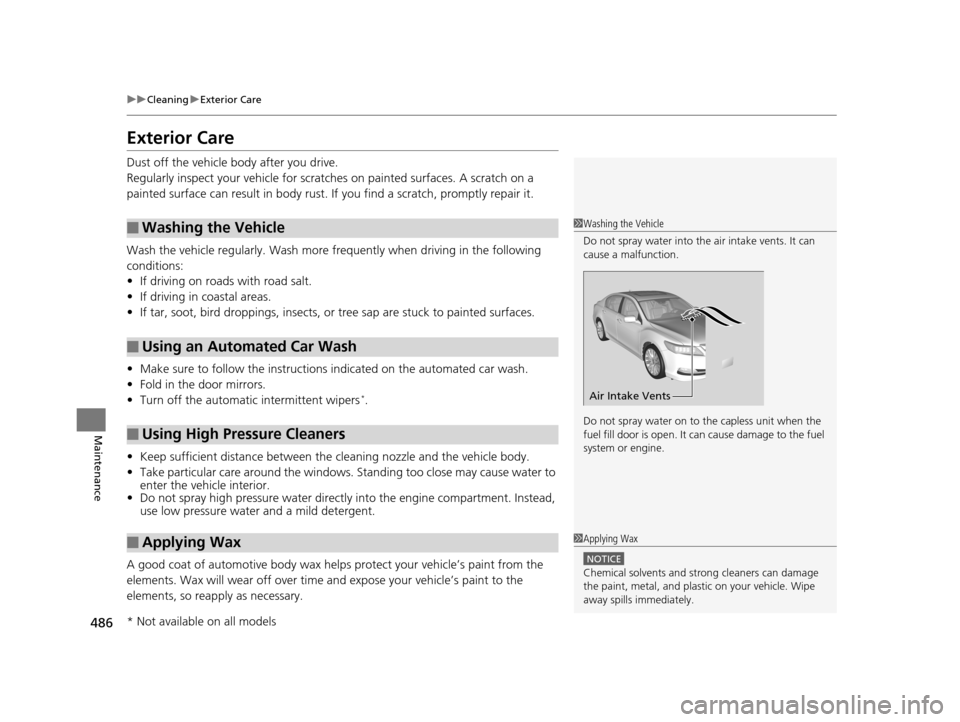
1 Washing the Vehicle
Do not spray water into the air intake vents. It can
cause a malfunction.
Do not spray water on to the capless unit when the
fuel fill door is open. It ca n cause damage to the fuel
system or engine.
Air Intake Vents
1 Applying Wax
NOTICE
Chemical solvents and st rong cleaners can damage
the paint, metal, and plasti c on your vehicle. Wipe
away spills immediately.
* Not available on all models
17 ACURA RLX-31TY26300.book 486 ページ 2016年6月17日 金曜日 午前8時12分
Page 488 of 557
487
uuCleaning uExterior Care
Maintenance
If you get gasoline, oil, engine coolant, or battery fluid on resin coated parts, they
may be stained or the coating may peel. Prom ptly wipe it away using a soft cloth and
clean water.
Wipe using a glass cleaner.
Aluminum is susceptible to deterioration caused by salt and other road
contaminants. Use a sponge and mild detergent to wipe away promptly.
Be careful not to use harsh chemicals (inc luding some commercial wheel cleaners) or
a stiff brush. They can damage the clear coat of the aluminum alloy wheels that
helps keep the aluminum from corroding and tarnishing.
The inside lenses of exterior lights (headlights, brake light s, etc.) may fog temporarily
if you have driven in the rain, or after the vehicle has been run through a car wash.
Dew condensation also may build up inside the lenses when there is a significant
enough difference between the ambient and inside lens temperatures (similar to
vehicle windows fogging up in rainy conditions). These conditions are natural
processes, not structural design problems in the exterior lights.
Lens design characteristics ma y result in moisture developing on the light lens frame
surfaces. This also is not a malfunction.
However, if you see large amounts of wa ter accumulation, or large water drops
building up inside the lenses, have your vehicle inspected by a dealer.
■Maintaining the Bumpers and Other Resin Coated Parts
■Cleaning the Window
■Maintaining Aluminum Wheels
■Fogged Exterior Light Lenses
1 Maintaining the Bumpers an d Other Resin Coated Parts
Ask a dealer about the correct coating material when
you want to repair the pa inted surface of the parts
made of resin.
17 ACURA RLX-31TY26300.book 487 ページ 2016年6月17日 金曜日 午前8時12分
Page 489 of 557
488
Maintenance
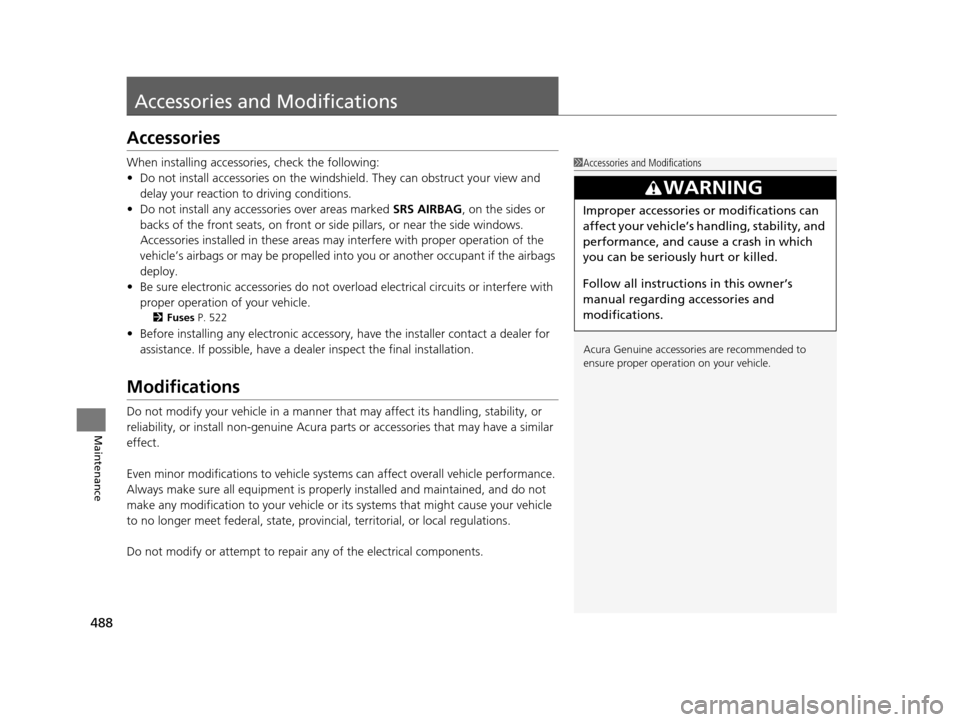
Accessories and Modifications
Accessories
When installing accessories, check the following:
• Do not install accessories on the windshie ld. They can obstruct your view and
delay your reaction to driving conditions.
• Do not install any access ories over areas marked SRS AIRBAG, on the sides or
backs of the front seats, on front or side pillars, or near the side windows.
Accessories installed in these areas may interfere with proper operation of the
vehicle’s airbags or may be propelled into you or another occupant if the airbags
deploy.
• Be sure electronic accessories do not over load electrical circuits or interfere with
proper operation of your vehicle.
2 Fuses P. 522
•Before installing any electronic accessory, have the inst aller contact a dealer for
assistance. If possible, have a d ealer inspect the final installation.
Modifications
Do not modify your vehicle in a manner that may affect its handling, stability, or
reliability, or install non-genuine Acura parts or accessories that may have a similar
effect.
Even minor modifications to vehicle system s can affect overall vehicle performance.
Always make sure all equipment is prop erly installed and maintained, and do not
make any modification to your vehicle or its systems that might cause your vehicle
to no longer meet federal, state, provin cial, territorial, or local regulations.
Do not modify or attempt to repair any of the electrical components.
1 Accessories and Modifications
Acura Genuine accessori es are recommended to
ensure proper operati on on your vehicle.
3WARNING
Improper accessories or modifications can
affect your vehicle’s handling, stability, and
performance, and cause a crash in which
you can be seriously hurt or killed.
Follow all instruction s in this owner’s
manual regarding accessories and
modifications.
17 ACURA RLX-31TY26300.book 488 ページ 2016年6月17日 金曜日 午前8時12分
Page 533 of 557
532
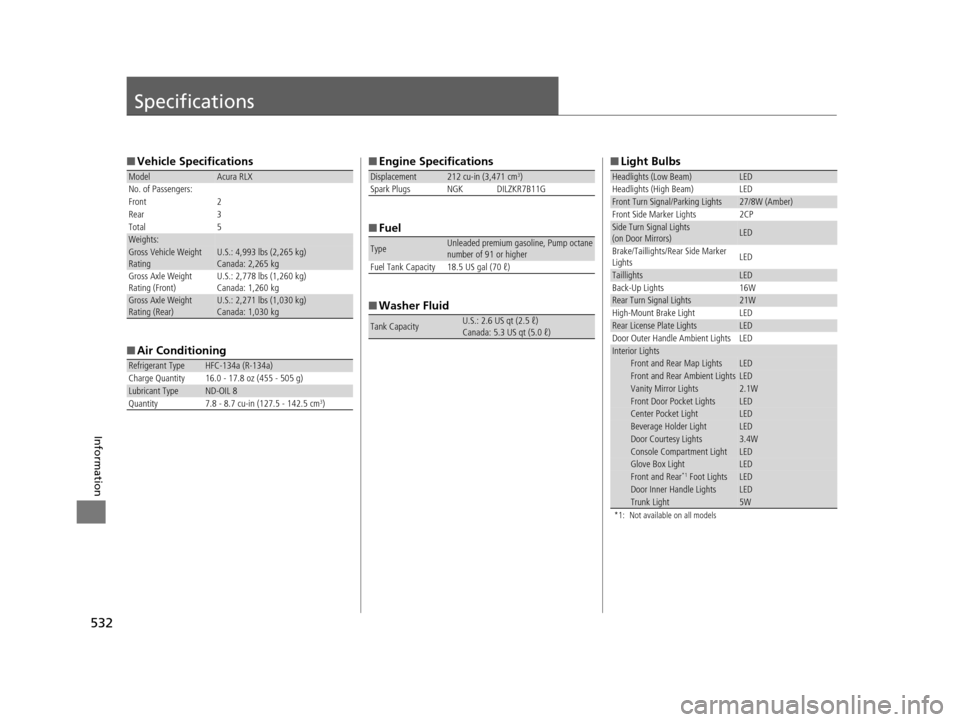
Information
Specifications
■Vehicle Specifications
■ Air Conditioning
ModelAcura RLX
No. of Passengers:
Front 2
Rear 3
Total 5
Weights:Gross Vehicle Weight
Rating U.S.: 4,993 lbs (2,265 kg)
Canada: 2,265 kg
Gross Axle Weight
Rating (Front)U.S.: 2,778 lbs (1,260 kg)
Canada: 1,260 kg
Gross Axle Weight
Rating (Rear)U.S.: 2,271 lbs (1,030 kg)
Canada: 1,030 kg
Refrigerant Type HFC-134a (R-134a)
Charge Quantity 16.0 - 17.8 oz (455 - 505 g)
Lubricant TypeND-OIL 8
Quantity 7.8 - 8.7 cu-in (127.5 - 142.5 cm3)
■ Engine Specifications
■ Fuel
■ Washer Fluid
Displacement212 cu-in (3,471 cm3)
Spark Plugs NGK DILZKR7B11G
TypeUnleaded premium gasoline, Pump octane
number of 91 or higher
Fuel Tank Capacity 18.5 US gal (70 ℓ)
Tank CapacityU.S.: 2.6 US qt (2.5 ℓ)
Canada: 5.3 US qt (5.0 ℓ)
■ Light Bulbs
*1: Not available on all models
Headlights (Low Beam)LED
Headlights (High Beam) LED
Front Turn Signal/Parking Lights27/8W (Amber)
Front Side Marker Lights 2CP
Side Turn Signal Lights
(on Door Mirrors)LED
Brake/Taillights/Rear Side Marker
Lights LED
TaillightsLED
Back-Up Lights 16W
Rear Turn Signal Lights21W
High-Mount Brake Light LED
Rear License Plate LightsLED
Door Outer Handle Ambient Lights LED
Interior LightsFront and Rear Map LightsLEDFront and Rear Ambient LightsLEDVanity Mirror Lights2.1WFront Door Pocket LightsLEDCenter Pocket LightLEDBeverage Holder LightLEDDoor Courtesy Lights3.4WConsole Compartment LightLEDGlove Box LightLEDFront and Rear*1 Foot LightsLEDDoor Inner Handle LightsLEDTrunk Light5W
17 ACURA RLX-31TY26300.book 532 ページ 2016年6月17日 金曜日 午前8時12分
Page 547 of 557
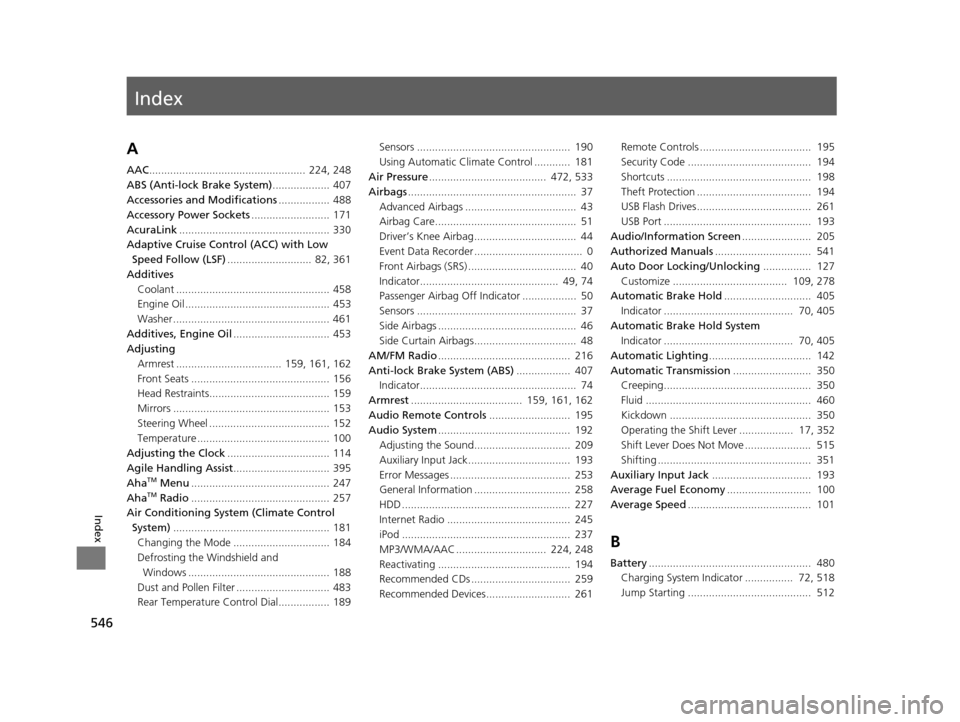
Index
546
Index
Index
A
AAC.................................................... 224, 248
ABS (Anti-lock Brake System) ................... 407
Accessories and Modifications ................. 488
Accessory Power Sockets .......................... 171
AcuraLink .................................................. 330
Adaptive Cruise Control (ACC) with Low Speed Follow (LSF) ............................ 82, 361
Additives Coolant ................................................... 458
Engine Oil ................................................ 453
Washer .................................................... 461
Additives, Engine Oil ................................ 453
Adjusting
Armrest ................................... 159, 161, 162
Front Seats .............................................. 156
Head Restraints........................................ 159
Mirrors .................................................... 153
Steering Wheel ........................................ 152
Temperature ............................................ 100
Adjusting the Clock .................................. 114
Agile Handling Assist ................................ 395
Aha
TM Menu .............................................. 247
AhaTM Radio .............................................. 257
Air Conditioning System (Climate Control
System) .................................................... 181
Changing the Mode ................................ 184
Defrosting the Windshield and
Windows ............................................... 188
Dust and Pollen Filter ............................... 483
Rear Temperature Control Dial................. 189 Sensors ................................................... 190
Using Automatic Climate Control ............ 181
Air Pressure ....................................... 472, 533
Airbags ........................................................ 37
Advanced Airbags ..................................... 43
Airbag Care............................................... 51
Driver’s Knee Airbag.................................. 44
Event Data Recorder .................................... 0
Front Airbags (SRS) .................................... 40
Indicator.............................................. 49, 74
Passenger Airbag Off Indicator .................. 50
Sensors ..................................................... 37
Side Airbags .............................................. 46
Side Curtain Airbags.................................. 48
AM/FM Radio ............................................ 216
Anti-lock Brake System (ABS) .................. 407
Indicator.................................................... 74
Armrest ..................................... 159, 161, 162
Audio Remote Controls ........................... 195
Audio System ............................................ 192
Adjusting the Sound................................ 209
Auxiliary Input Jack.................................. 193
Error Messages ........................................ 253
General Information ................................ 258
HDD ........................................................ 227
Internet Radio ......................................... 245
iPod ........................................................ 237
MP3/WMA/AAC .............................. 224, 248
Reactivating ............................................ 194
Recommended CDs ................................. 259
Recommended Devices............................ 261 Remote Controls ..................................... 195
Security Code ......................................... 194
Shortcuts ................................................ 198
Theft Protection ...................................... 194
USB Flash Drives...................................... 261
USB Port ................................................. 193
Audio/Information Screen ....................... 205
Authorized Manuals ................................ 541
Auto Door Locking/Unlocking ................ 127
Customize ...................................... 109, 278
Automatic Brake Hold ............................. 405
Indicator ........................................... 70, 405
Automatic Brake Hold System Indicator ........................................... 70, 405
Automatic Lighting .................................. 142
Automatic Transmission .......................... 350
Creeping................................................. 350
Fluid ....................................................... 460
Kickdown ............................................... 350
Operating the Shift Lever .................. 17, 352
Shift Lever Does Not Move ...................... 515
Shifting ................................................... 351
Auxiliary Input Jack ................................. 193
Average Fuel Economy ............................ 100
Average Speed ......................................... 101
B
Battery...................................................... 480
Charging System Indicator ................ 72, 518
Jump Starting ......................................... 512
17 ACURA RLX-31TY26300.book 546 ページ 2016年6月17日 金曜日 午前8時12分