cruise control Acura RLX 2017 Owner's Guide
[x] Cancel search | Manufacturer: ACURA, Model Year: 2017, Model line: RLX, Model: Acura RLX 2017Pages: 557, PDF Size: 37.97 MB
Page 368 of 557
367
uuWhen Driving uAdaptive Cruise Control (ACC) with Low Speed Follow (LSF)*
Continued
Driving
■Detection limitations
• A vehicle or pedestrian suddenly crosses in front of you.
• The distance between your vehicle and the vehicle or pedestrian ahead of you is
too short.
• A vehicle cuts in front of you at a slow speed, and it brakes suddenly.
• When you accelerate rapidly and approach the vehicle or pedestrian ahead of you
at high speed.
• The vehicle ahead of you is a motorcycle, bicycle, mobility scooter, or other small
vehicle.
• When there are animals in front of your vehicle.
• When you drive on a curved or winding or undulating road that makes it difficult
for the sensor to properly detect a vehicle or a pedestrian in front of you.
• The speed difference between your vehicle an d a vehicle or pedestrian in front of
you is significantly large.
• An oncoming vehicle suddenly comes in front of you.
• Your vehicle abruptly crosses over in front of an oncoming vehicle.
• When driving through a narrow iron bridge.
• When the vehicle ahead of you brakes suddenly.
• When the vehicle ahead of you has a unique shape.
• When your vehicle or the vehicle ahead of you is driving on one edge of the lane.
17 ACURA RLX-31TY26300.book 367 ページ 2016年6月17日 金曜日 午前8時12分
Page 369 of 557
uuWhen Driving uAdaptive Cruise Control (ACC) with Low Speed Follow (LSF)*
368
Driving
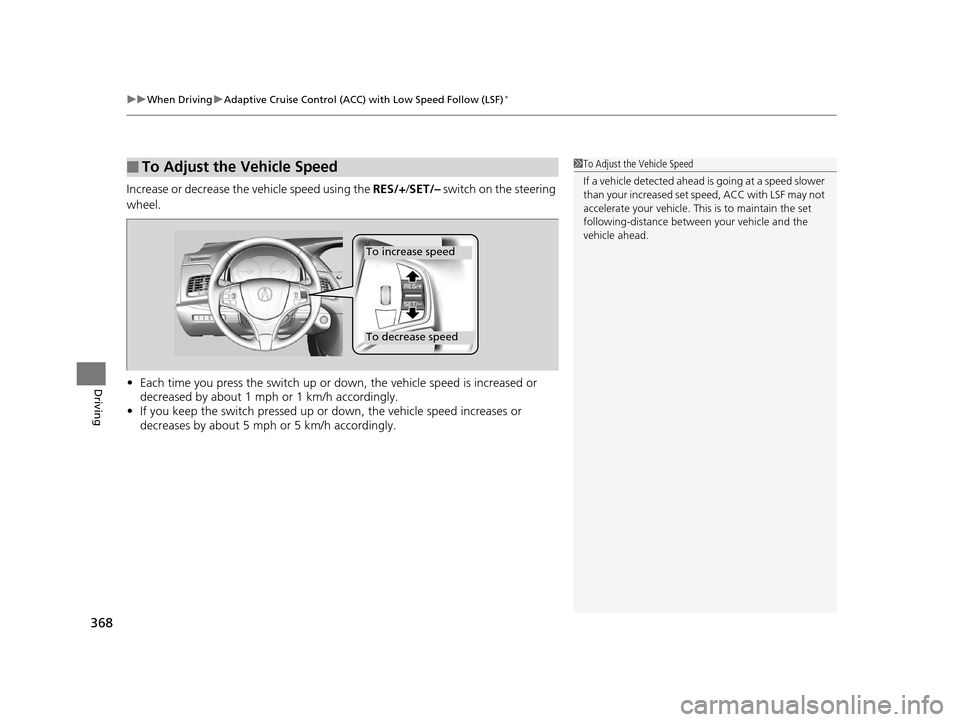
Increase or decrease the vehicle speed using the RES/+/SET/– switch on the steering
wheel.
• Each time you press the switch up or do wn, the vehicle speed is increased or
decreased by about 1 mph or 1 km/h accordingly.
• If you keep the switch pressed up or down, the vehicle speed increases or
decreases by about 5 mph or 5 km/h accordingly.
■To Adjust the Vehicle Speed1 To Adjust the Vehicle Speed
If a vehicle detected ahead is going at a speed slower
than your increased set speed, ACC with LSF may not
accelerate your vehicle. This is to maintain the set
following-distance betwee n your vehicle and the
vehicle ahead.
To increase speed
To decrease speed
17 ACURA RLX-31TY26300.book 368 ページ 2016年6月17日 金曜日 午前8時12分
Page 370 of 557
369
uuWhen Driving uAdaptive Cruise Control (ACC) with Low Speed Follow (LSF)*
Continued
Driving
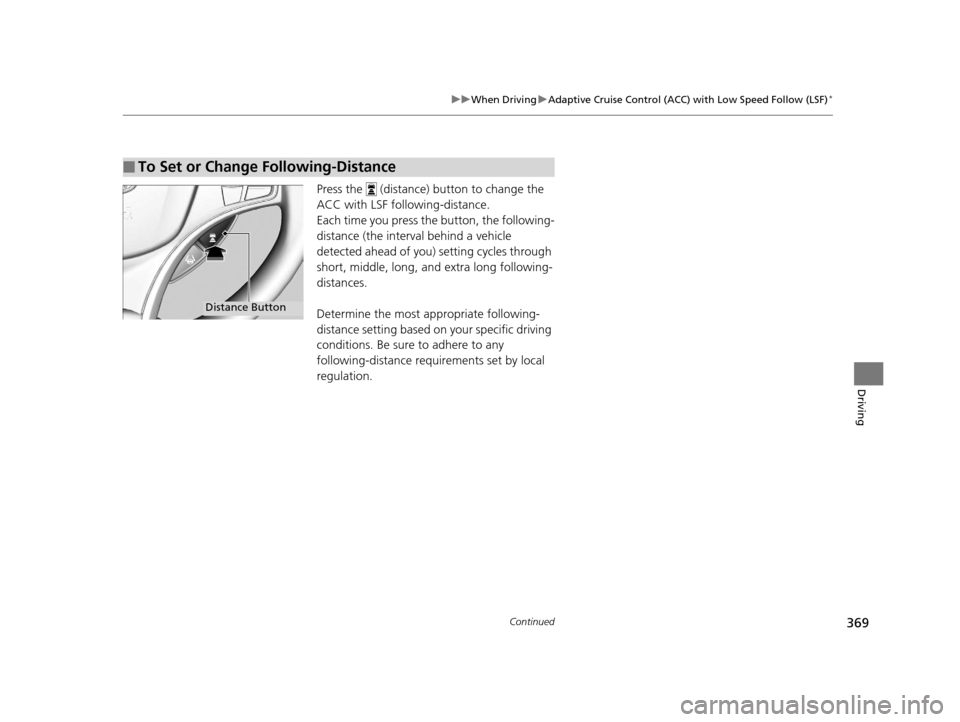
Press the (distance) button to change the
ACC with LSF following-distance.
Each time you press th e button, the following-
distance (the interv al behind a vehicle
detected ahead of you) setting cycles through
short, middle, long, and extra long following-
distances.
Determine the most appropriate following-
distance setting based on your specific driving
conditions. Be sure to adhere to any
following-distance requir ements set by local
regulation.
■To Set or Change Following-Distance
Distance Button
17 ACURA RLX-31TY26300.book 369 ページ 2016年6月17日 金曜日 午前8時12分
Page 371 of 557
370
uuWhen Driving uAdaptive Cruise Control (ACC) with Low Speed Follow (LSF)*
Driving
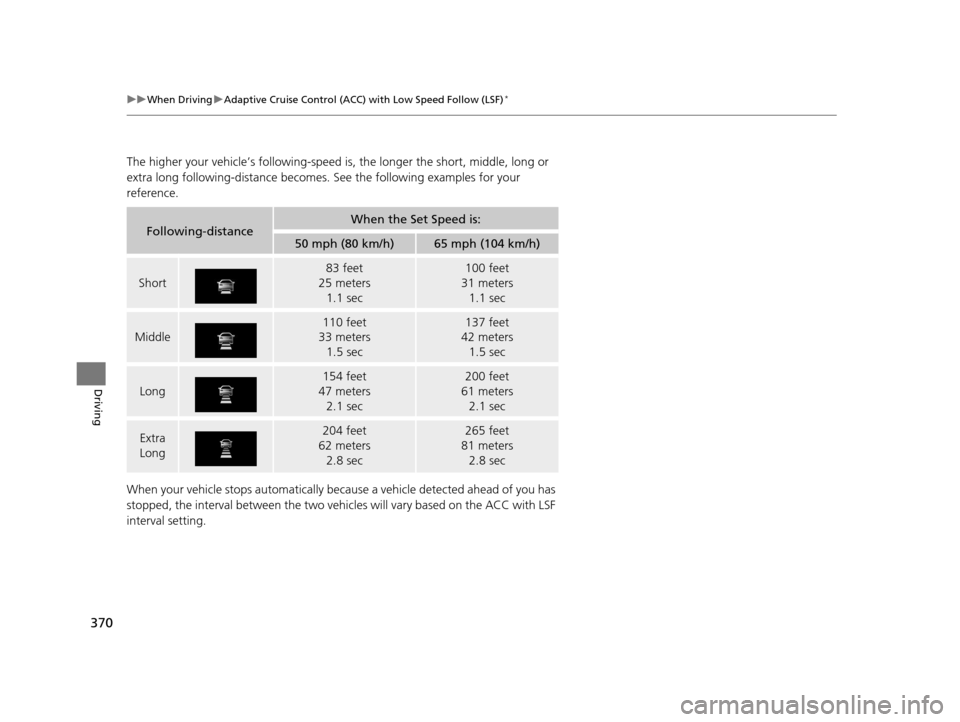
The higher your vehicle’s following-speed is, the longer the short, middle, long or
extra long following-dista nce becomes. See the following examples for your
reference.
When your vehicle stops automatically beca use a vehicle detected ahead of you has
stopped, the interval between the two vehi cles will vary based on the ACC with LSF
interval setting.
Following-distanceWhen the Set Speed is:
50 mph (80 km/h)65 mph (104 km/h)
Short
83 feet
25 meters 1.1 sec100 feet
31 meters 1.1 sec
Middle
110 feet
33 meters
1.5 sec137 feet
42 meters
1.5 sec
Long
154 feet
47 meters 2.1 sec200 feet
61 meters 2.1 sec
Extra
Long204 feet
62 meters 2.8 sec265 feet
81 meters 2.8 sec
17 ACURA RLX-31TY26300.book 370 ページ 2016年6月17日 金曜日 午前8時12分
Page 372 of 557

Continued371
uuWhen Driving uAdaptive Cruise Control (ACC) with Low Speed Follow (LSF)*
Driving
To cancel ACC with LSF, do any of the
following:
• Press the CANCEL button.
• Press the MAIN button.
u ACC with LSF indicator goes off.
• Depress the brake pedal.
u When the LSF function has stopped the
vehicle, you cannot cancel ACC with LSF
by depressing the brake pedal.
■To Cancel1 To Cancel
Resuming the prior set speed: After you have
canceled ACC with LSF, you can resume the prior set
speed while it is still displayed. Press the RES/+ /SET/
– switch up.
The set speed cannot be set or resumed when ACC
with LSF has been turned off using the MAIN button.
Press the MAIN button to activate the system, then
set the desired speed.
CANCEL
Button
MAIN
Button
17 ACURA RLX-31TY26300.book 371 ページ 2016年6月17日 金曜日 午前8時12分
Page 373 of 557
uuWhen Driving uAdaptive Cruise Control (ACC) with Low Speed Follow (LSF)*
372
Driving
■Automatic cancellation
The beeper sounds and a message appears on the multi-information display when
ACC with LSF is automatically canceled. An y of these conditions may cause the ACC
with LSF to automatically cancel:
• Bad weather (rain, fog, snow, etc.)
• When the radar sensor in the front grille gets dirty.
• The vehicle ahead of you cannot be detected.
• An abnormal tire condition is detected, or the tires are skidding.
• Driving on a mountainous road, or driving off road for extended periods.
• Abrupt steering wheel movement.
• When the ABS, VSA ® or CMBS
TM is activated.
• When the ABS or VSA ® system indicator comes on.
• When the vehicle is stopped on a very steep slope.
• When you manually apply the parking brake.
• When the detected vehicle within the ACC with LSF range is too close to your
vehicle.
• The camera behind the rearview mirror, or the area around the camera, including
the windshield, gets dirty.
The ACC with LSF automatic cancellation can be also triggered by the following
causes. In these cases, the parking brake will be automatically applied.
• The driver’s seat belt is unfastened when the vehicl e is stationary.
• The vehicle stops for mo re than 10 minutes.
• The engine is turned off.
1Automatic cancellation
Even though ACC with LSF has been automatically
canceled, you can still resu me the prior set speed.
Wait until the condition that caused ACC with LSF to
cancel improves, then press the RES/+/SET/– switch
down.
17 ACURA RLX-31TY26300.book 372 ページ 2016年6月17日 金曜日 午前8時12分
Page 374 of 557

Continued373
uuWhen Driving uAdaptive Cruise Control (ACC) with Low Speed Follow (LSF)*
Driving
Press and hold the (dis tance) button for one
second. Cruise Mode Selected appears on
the multi-information di splay for two seconds,
and then the mode switches to Cruise.
To switch back to ACC with LSF, press and
hold the button again for one second. ACC
Mode Selected appears on the multi-
information display for two seconds.
■When to use
Desired speed in a range above roughly 25 mph (40 km/h) ~.
Take your foot off the pedal and press the RES/+/SET/- switch down when you
reach the desired speed.
The moment you release the RES/+/SET/- switch, the set speed is fixed, and cruise
control begins. The CRUISE CONTROL indicator comes on.
Each time you press the RES/+/SET/- switch up or down, the vehicle speed is
increased or decreased by about 1 mph (1.6 km/h).
If you keep the RES/+/SET/- switch pressed up or down, the vehicle speed increases
or decreases until you release it. This speed is then set.
■To Switch ACC with LSF to Cruise Control1To Switch ACC with LSF to Cruise Control
Always be aware which mode you are in. When you
are driving in Cruise mode, the system will not assist
you to maintain a followi ng-distance from a vehicle
ahead of you.
ACC with
LSF ON Cruise
Control ON
■To Set the Vehicle Speed
■To Adjust the Vehicle Speed
17 ACURA RLX-31TY26300.book 373 ページ 2016年6月17日 金曜日 午前8時12分
Page 375 of 557
uuWhen Driving uAdaptive Cruise Control (ACC) with Low Speed Follow (LSF)*
374
Driving
To cancel cruise control, do any of the following:
• Press the CANCEL button.
• Press the MAIN button.
• Depress the brake pedal.
The CRUISE CONTROL indicator goes off.
■To Cancel1To Cancel
Resuming the prior set speed:
After cruise control has be en canceled, you can still
resume the prior set speed by pressing the RES/+/
SET/- switch up while driving at a speed of at least 25
mph (40 km/h) or more.
You cannot set or resume in the following situations:
•When vehicle speed is less than 25 mph (40 km/h)
•When the MAIN button is turned off.
At vehicle speeds of 22 m ph (35 km/h) or less, cruise
control canceled automatically.
17 ACURA RLX-31TY26300.book 374 ページ 2016年6月17日 金曜日 午前8時12分
Page 539 of 557
538
uuEmissions Testing uTesting of Readiness Codes
Information
7. Select a nearby, lightly traveled major hi ghway where you can maintain a speed
of 50 to 60 mph (80 to 97 km/h) for at least 20 minutes. Drive on the highway in
(D. Do not use cruise control. When tra ffic allows, drive for 90 seconds without
moving the accelerator pedal. (Vehicle spee d may vary slightly; this is okay.) If you
cannot do this for a continuous 90 seconds because of traffic conditions, drive for
at least 30 seconds, then repeat it two mo re times (for a total of 90 seconds).
8. Drive in city or suburban traffic for at le ast 10 minutes. When traffic conditions
allow, let the vehicle coast for several se conds without using the accelerator pedal
or the brake pedal.
9. Park the vehicle and leave the engine off for 30 minutes.
17 ACURA RLX-31TY26300.book 538 ページ 2016年6月17日 金曜日 午前8時12分
Page 547 of 557
Index
546
Index
Index
A
AAC.................................................... 224, 248
ABS (Anti-lock Brake System) ................... 407
Accessories and Modifications ................. 488
Accessory Power Sockets .......................... 171
AcuraLink .................................................. 330
Adaptive Cruise Control (ACC) with Low Speed Follow (LSF) ............................ 82, 361
Additives Coolant ................................................... 458
Engine Oil ................................................ 453
Washer .................................................... 461
Additives, Engine Oil ................................ 453
Adjusting
Armrest ................................... 159, 161, 162
Front Seats .............................................. 156
Head Restraints........................................ 159
Mirrors .................................................... 153
Steering Wheel ........................................ 152
Temperature ............................................ 100
Adjusting the Clock .................................. 114
Agile Handling Assist ................................ 395
Aha
TM Menu .............................................. 247
AhaTM Radio .............................................. 257
Air Conditioning System (Climate Control
System) .................................................... 181
Changing the Mode ................................ 184
Defrosting the Windshield and
Windows ............................................... 188
Dust and Pollen Filter ............................... 483
Rear Temperature Control Dial................. 189 Sensors ................................................... 190
Using Automatic Climate Control ............ 181
Air Pressure ....................................... 472, 533
Airbags ........................................................ 37
Advanced Airbags ..................................... 43
Airbag Care............................................... 51
Driver’s Knee Airbag.................................. 44
Event Data Recorder .................................... 0
Front Airbags (SRS) .................................... 40
Indicator.............................................. 49, 74
Passenger Airbag Off Indicator .................. 50
Sensors ..................................................... 37
Side Airbags .............................................. 46
Side Curtain Airbags.................................. 48
AM/FM Radio ............................................ 216
Anti-lock Brake System (ABS) .................. 407
Indicator.................................................... 74
Armrest ..................................... 159, 161, 162
Audio Remote Controls ........................... 195
Audio System ............................................ 192
Adjusting the Sound................................ 209
Auxiliary Input Jack.................................. 193
Error Messages ........................................ 253
General Information ................................ 258
HDD ........................................................ 227
Internet Radio ......................................... 245
iPod ........................................................ 237
MP3/WMA/AAC .............................. 224, 248
Reactivating ............................................ 194
Recommended CDs ................................. 259
Recommended Devices............................ 261 Remote Controls ..................................... 195
Security Code ......................................... 194
Shortcuts ................................................ 198
Theft Protection ...................................... 194
USB Flash Drives...................................... 261
USB Port ................................................. 193
Audio/Information Screen ....................... 205
Authorized Manuals ................................ 541
Auto Door Locking/Unlocking ................ 127
Customize ...................................... 109, 278
Automatic Brake Hold ............................. 405
Indicator ........................................... 70, 405
Automatic Brake Hold System Indicator ........................................... 70, 405
Automatic Lighting .................................. 142
Automatic Transmission .......................... 350
Creeping................................................. 350
Fluid ....................................................... 460
Kickdown ............................................... 350
Operating the Shift Lever .................. 17, 352
Shift Lever Does Not Move ...................... 515
Shifting ................................................... 351
Auxiliary Input Jack ................................. 193
Average Fuel Economy ............................ 100
Average Speed ......................................... 101
B
Battery...................................................... 480
Charging System Indicator ................ 72, 518
Jump Starting ......................................... 512
17 ACURA RLX-31TY26300.book 546 ページ 2016年6月17日 金曜日 午前8時12分