ECO mode Acura RLX 2017 Repair Manual
[x] Cancel search | Manufacturer: ACURA, Model Year: 2017, Model line: RLX, Model: Acura RLX 2017Pages: 557, PDF Size: 37.97 MB
Page 227 of 557

uuAudio System Basic Operation uPlaying a CD
226
Features
You can select scan, repeat, and random modes when playing a track or file.
1. Press the MENU button.
2. Rotate to select Scan or Random/
Repeat, then press .
3. Rotate to select a mode, then press .
1. Select Scan, Random , or Repeat .
2Playing a CD P. 224
2.Select a mode.
■To turn off a play mode
1. Press the MENU button.
2. Rotate to select the mode you want to turn off, then press .
1. Select Scan, Random , or Repeat .
2Playing a CD P. 224
2.Select the mode you want to turn off.
■How to Select a Play Mode1How to Select a Play Mode
Play Mode Menu Items
Scan
Scan Folders (MP3/WMA/AAC): Provides 10-second
sampling of the first file in each of the main folders.
Scan Tracks: Provides 10-second sampling of all
tracks on the CD (all files in the current folder in MP3,
WMA, or AAC).
Random/Repeat
Repeat Folder (MP3/WMA/AAC): Repeats all files in
the current folder.
Repeat Track: Repeats the current track/file.
Random in Folder (MP3/WMA/AAC): Plays all files
in the current folder in random order.
Random All Tracks : Plays all tracks/files in random
order.
Random/Repeat is selected.
Interface Dial
On Demand Multi-Use DisplayTM
Interface Dial
On Demand Multi-Use DisplayTM
17 ACURA RLX-31TY26300.book 226 ページ 2016年6月17日 金曜日 午前8時12分
Page 231 of 557

uuAudio System Basic Operation uPlaying Hard Disk Drive (HDD) Audio
230
Features
You can select scan, repeat, and ra ndom modes when playing a track.
1. Press the MENU button.
2. Rotate to select Scan or Random/
Repeat, then press .
3. Rotate to select a mode, then press .
1. Select Scan, Random , or Repeat .
2Playing Hard Disk Drive (HDD) Audio
P. 227
2. Select a mode.
■To turn off a play mode
1. Press the MENU button.
2. Rotate to select the mode you want to turn off, then press .
1. Select Scan, Random , or Repeat .
2Playing Hard Disk Drive (HDD) Audio P. 227
2.Select the mode you want to turn off.
■How to Select a Play Mode1How to Select a Play Mode
Play Mode Menu Items
Scan
Scan Albums : Provides 10-second sampling of the
first track in each album.
Scan Tracks: Provides 10-second sampling of all
tracks on HDD.
Random/Repeat
The following menu item s vary depending on the
category you selected by the Music Search list.
Repeat Artist : Repeats all tracks in the current artist.
Repeat Album : Repeats all tracks in the current
album.
Repeat Track: Repeats the current track.
Random in Artist : Plays all tracks in the current artist
in random order.
Random in Album: Plays all tracks in the current
album in random order.
Random All Tracks: Plays all tracks in random order.
Random/Repeat is selected.
Interface Dial
On Demand Multi-Use DisplayTM
Interface Dial
On Demand Multi-Use DisplayTM
17 ACURA RLX-31TY26300.book 230 ページ 2016年6月17日 金曜日 午前8時12分
Page 238 of 557

237
uuAudio System Basic Operation uPlaying an iPod
Continued
Features
Playing an iPod
Connect the iPod using your dock connector to the USB port, then select the iPod
mode.
2 USB Port P. 193
Audio/Information Screen
MENU Button
Press to display the menu items. Album Bar
Select to search for an album.
Audio Source
Select to change an audio source.
Skip/Seek Icons
Select or to change songs.
Select and hold to move rapidly
within a song.
More
Select to display the menu items.
(Power) Button
Press to turn the audio system
on and off.
BACK Button
Press to go back to the previous display. Interface Dial/ENTER Button
Press and turn to select an item, then
press to set your selection.
Move up, down, right and left to select
secondary menu. USB Indicator
Appears when an iPod is connected.
Album Art
On Demand Multi-Use Display
TM
VOL (Volume) Knob (Pushed out)
Turn to adjust the volume.Album Art Icon
Repeat
Select to use a repeat feature.
Play/Pause Icon
Select to resume or play a song.
Shuffle
Select to use a shuffle feature.
17 ACURA RLX-31TY26300.book 237 ページ 2016年6月17日 金曜日 午前8時12分
Page 243 of 557
uuAudio System Basic Operation uSong By VoiceTM (SBV)
242
Features
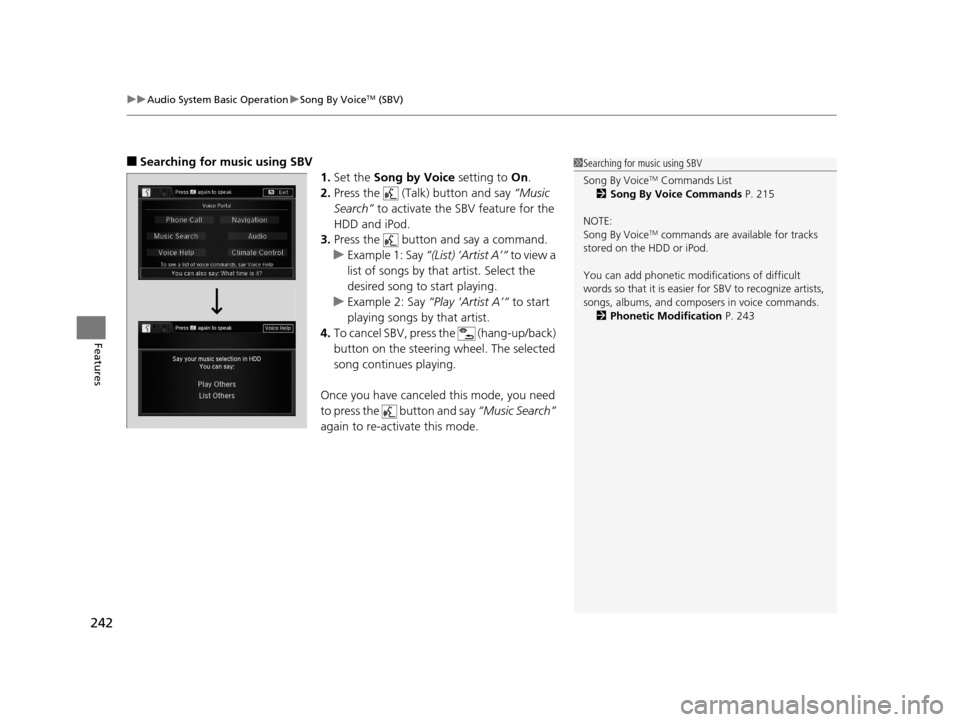
■Searching for music using SBV
1.Set the Song by Voice setting to On.
2. Press the (Talk) button and say “Music
Search” to activate the SBV feature for the
HDD and iPod.
3. Press the button and say a command.
u Example 1: Say “(List) ‘Artist A’“ to view a
list of songs by that artist. Select the
desired song to start playing.
u Example 2: Say “Play ‘Artist A’“ to start
playing songs by that artist.
4. To cancel SBV, press the (hang-up/back)
button on the steering wheel. The selected
song continues playing.
Once you have canceled this mode, you need
to press the button and say “Music Search”
again to re-activate this mode.1 Searching for music using SBV
Song By Voice
TM Commands List
2 Song By Voice Commands P. 215
NOTE:
Song By Voice
TM commands are available for tracks
stored on the HDD or iPod.
You can add phonetic modi fications of difficult
words so that it is easier for SBV to recognize artists,
songs, albums, and composers in voice commands. 2 Phonetic Modification P. 243
17 ACURA RLX-31TY26300.book 242 ページ 2016年6月17日 金曜日 午前8時12分
Page 246 of 557
245
uuAudio System Basic Operation uPlaying Internet Radio
Continued
Features
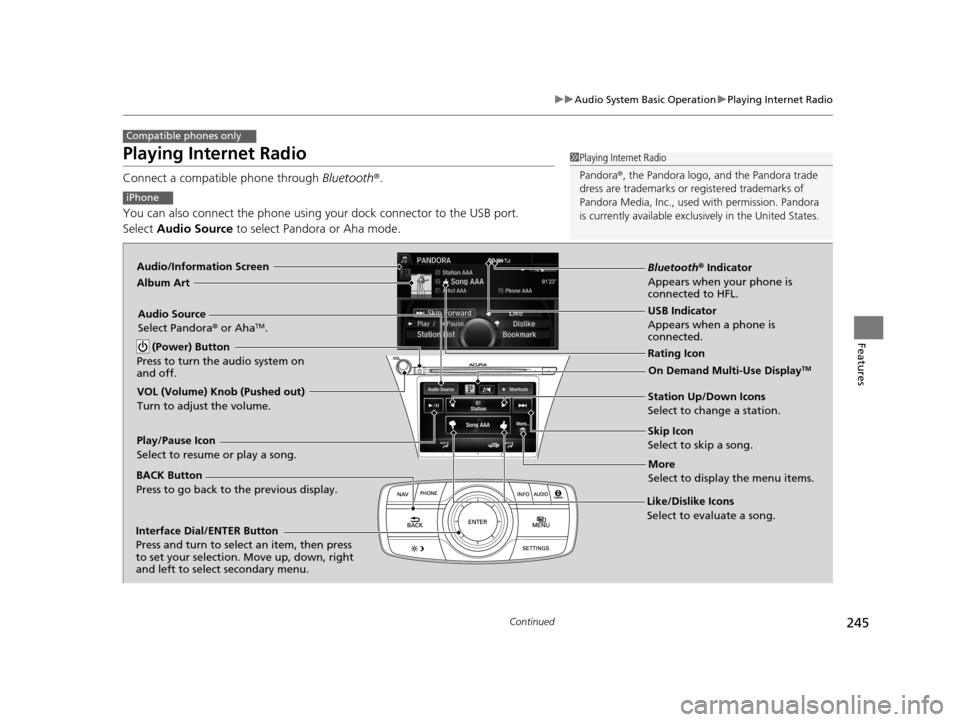
Playing Internet Radio
Connect a compatible phone through Bluetooth®.
You can also connect the phone using your dock connector to the USB port.
Select Audio Source to select Pandora or Aha mode.
Compatible phones only
1Playing Internet Radio
Pandora ®, the Pandora logo, and the Pandora trade
dress are trademarks or registered trademarks of
Pandora Media, Inc., used with permission. Pandora
is currently available exclusively in the United States.
iPhone
Audio/Information Screen
Album Art
USB Indicator
Appears when a phone is
connected.
Rating Icon
BACK Button
Press to go back to the previous display.
Skip Icon
Select to skip a song.
More
Select to display the menu items.
Station Up/Down Icons
Select to change a station.
Audio Source
Select Pandora
® or Aha
TM.
Play/Pause Icon
Select to resume or play a song.
Like/Dislike Icons
Select to evaluate a song.
(Power) Button
Press to turn the audio system on
and off.
Interface Dial/ENTER Button
Press and turn to select an item, then press
to set your selection. Move up, down, right
and left to select secondary menu.
On Demand Multi-Use DisplayTM
VOL (Volume) Knob (Pushed out)
Turn to adjust the volume.
Bluetooth ® Indicator
Appears when your phone is
connected to HFL.
17 ACURA RLX-31TY26300.book 245 ページ 2016年6月17日 金曜日 午前8時12分
Page 249 of 557
248
uuAudio System Basic Operation uPlaying a USB Flash Drive
Features
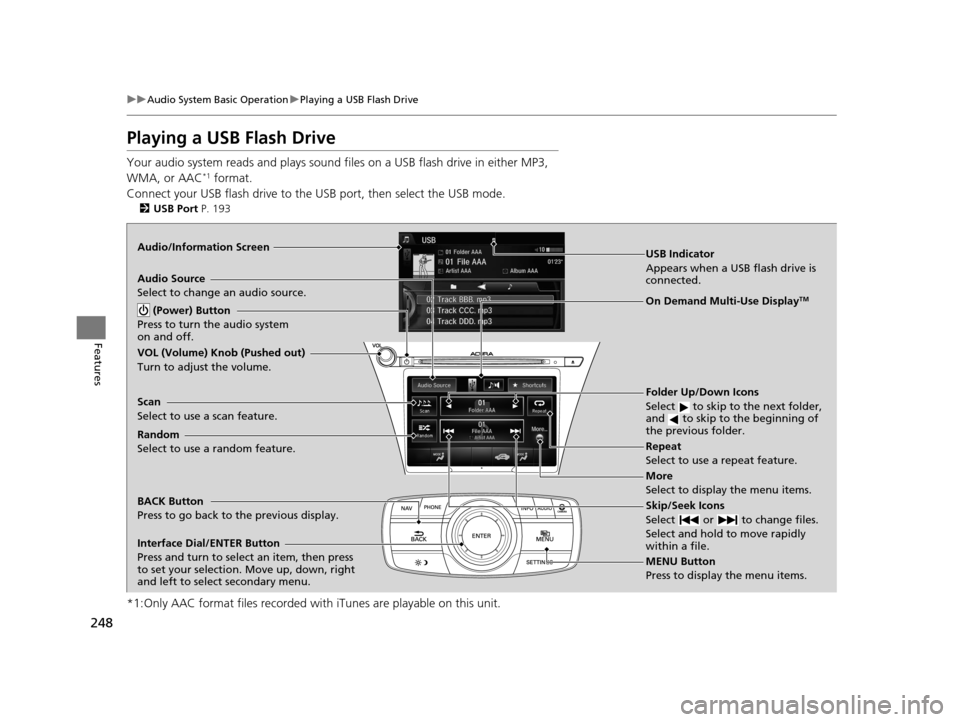
Playing a USB Flash Drive
Your audio system reads and plays sound fi les on a USB flash drive in either MP3,
WMA, or AAC*1 format.
Connect your USB flash drive to the USB port, then select the USB mode.
2USB Port P. 193
*1:Only AAC format files recorded with iTunes are playable on this unit.
Audio/Information Screen
BACK Button
Press to go back to the previous display.
More
Select to display the menu items.
Audio Source
Select to change an audio source.
USB Indicator
Appears when a USB flash drive is
connected.
Folder Up/Down Icons
Select to skip to the next folder,
and to skip to the beginning of
the previous folder.
Skip/Seek Icons
Select or to change files.
Select and hold to move rapidly
within a file.
(Power) Button
Press to turn the audio system
on and off.
Interface Dial/ENTER Button
Press and turn to select an item, then press
to set your selection. Move up, down, right
and left to select secondary menu.
MENU Button
Press to display the menu items.
On Demand Multi-Use DisplayTM
VOL (Volume) Knob (Pushed out)
Turn to adjust the volume.
Random
Select to use a random feature. Scan
Select to use a scan feature.Repeat
Select to use a repeat feature.
17 ACURA RLX-31TY26300.book 248 ページ 2016年6月17日 金曜日 午前8時12分
Page 251 of 557
uuAudio System Basic Operation uPlaying a USB Flash Drive
250
Features
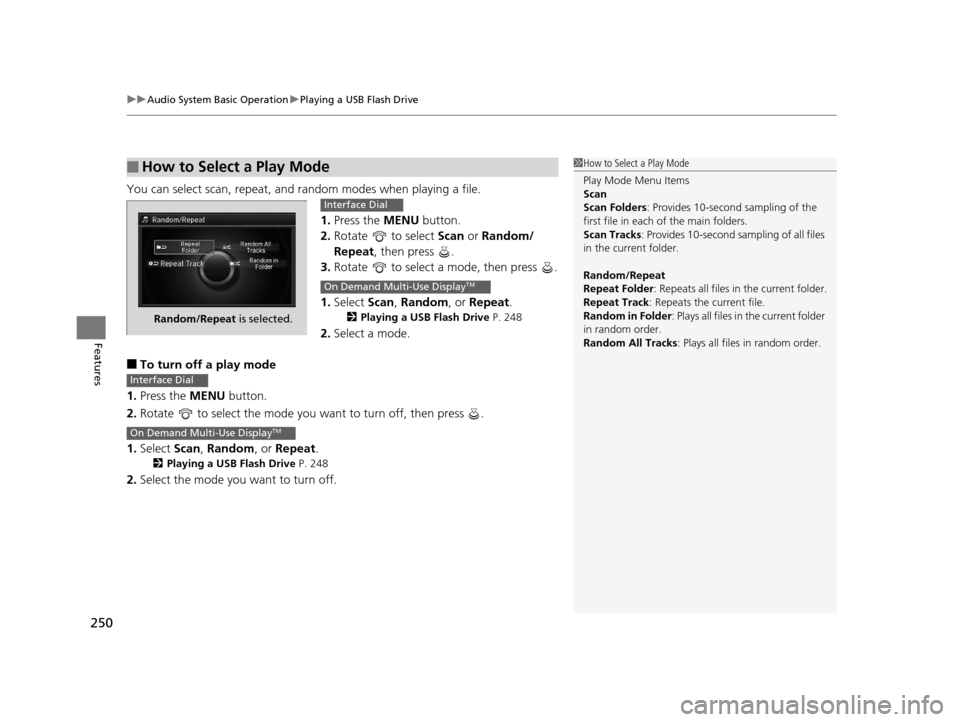
You can select scan, repeat, and random modes when playing a file.
1.Press the MENU button.
2. Rotate to select Scan or Random/
Repeat, then press .
3. Rotate to select a mode, then press .
1. Select Scan, Random , or Repeat .
2Playing a USB Flash Drive P. 248
2.Select a mode.
■To turn off a play mode
1. Press the MENU button.
2. Rotate to select the mode you want to turn off, then press .
1. Select Scan, Random , or Repeat .
2Playing a USB Flash Drive P. 248
2.Select the mode you want to turn off.
■How to Select a Play Mode1How to Select a Play Mode
Play Mode Menu Items
Scan
Scan Folders : Provides 10-second sampling of the
first file in each of the main folders.
Scan Tracks : Provides 10-second sa mpling of all files
in the current folder.
Random/Repeat
Repeat Folder : Repeats all files in the current folder.
Repeat Track: Repeats the current file.
Random in Folder : Plays all files in the current folder
in random order.
Random All Tracks : Plays all files in random order.
Random/Repeat is selected.
Interface Dial
On Demand Multi-Use DisplayTM
Interface Dial
On Demand Multi-Use DisplayTM
17 ACURA RLX-31TY26300.book 250 ページ 2016年6月17日 金曜日 午前8時12分
Page 253 of 557
uuAudio System Basic Operation uPlaying Bluetooth ® Audio
252
Features
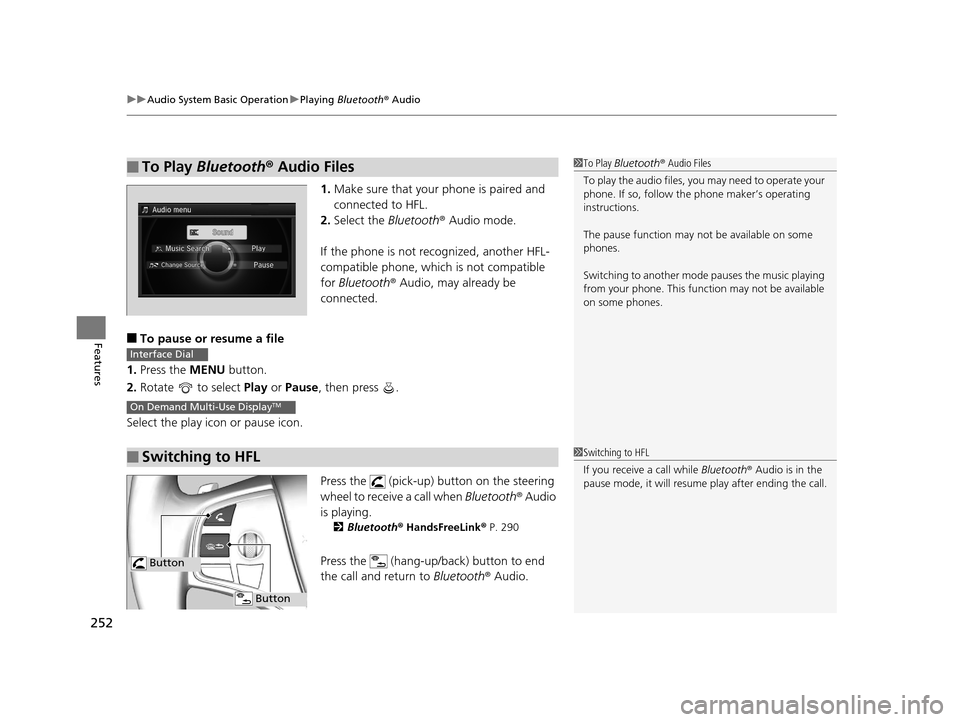
1. Make sure that your phone is paired and
connected to HFL.
2. Select the Bluetooth® Audio mode.
If the phone is not recognized, another HFL-
compatible phone, which is not compatible
for Bluetooth ® Audio, may already be
connected.
■To pause or resume a file
1. Press the MENU button.
2. Rotate to select Play or Pause , then press .
Select the play icon or pause icon.
Press the (pick-up) button on the steering
wheel to receive a call when Bluetooth® Audio
is playing.
2 Bluetooth® HandsFreeLink ® P. 290
Press the (hang-up/back) button to end
the call and return to Bluetooth® Audio.
■To Play Bluetooth® Audio Files1To Play Bluetooth ® Audio Files
To play the audio files, y ou may need to operate your
phone. If so, follow the phone maker’s operating
instructions.
The pause function may no t be available on some
phones.
Switching to another mode pauses the music playing
from your phone. This functi on may not be available
on some phones.
■Switching to HFL
Interface Dial
On Demand Multi-Use DisplayTM
1 Switching to HFL
If you receive a call while Bluetooth® Audio is in the
pause mode, it will resume play after ending the call.
Button
Button
17 ACURA RLX-31TY26300.book 252 ページ 2016年6月17日 金曜日 午前8時12分
Page 257 of 557

256
uuAudio Error Messages uPandora®
Features
Pandora ®
If an error occurs while playing Pandora ®, you may see the following error messages.
If you cannot clear the error message, contact a dealer.
Error MessageSolution
Incompatible USB Device
Please Check Owner’s ManualAppears when an incompatible device is connected. Disconnect
the device. Then turn the audio system off, and turn it again. Do
not reconnect the device that caused the error.
No stations have been created.
Please create a station on the device.Appears when there is no station list on the device. Use the device
to create a station.
Music licenses force us to limi t the number of tracks you may
skip each hour.Appears when you try to skip a song or select Dislike over the
predetermined number of times in an hour.
Unable to save rating.
Unable to save bookmark
or
Unable to skip
Appears when the commanded operation is failed. Try again later.
No dataAppears when no data is available with Pandora® activated.
Reboot the app and reconnect the device.
PANDORA UnsupportedAppears when Pandora ® version is not supported. Update
Pandora® to the latest version.
PANDORA system maintenanceAppears when the Pandora ® server is in maintenance. Try again
later.
Cannot connect to PANDORA. When stopped, make sure
PANDORA is running on the phone. For iPhone, set
connection priority to USB and reconnect.Appears when Pandora ® is unable to play music. Check your
device.
U.S. models
17 ACURA RLX-31TY26300.book 256 ページ 2016年6月17日 金曜日 午前8時12分
Page 262 of 557

261
uuGeneral Information on the Audio System uCompatible iPod, iPhone, and USB Flash Drives
Features
Compatible iPod, iPhone , and USB Flash Drives
•Use a recommended USB flash drive of 256 MB or higher.
• Some digital audio players may not be compatible.
• Some USB flash drives (e.g., a device with security lockout) may not work.
• Some software files may not allow for audio play or text data display.
• Some versions of MP3, WMA, or AAC formats may be unsupported.
■iPod and iPhone Model Compatibility
Model
iPod (5th generation)
iPod classic 80GB/160GB (launch in 2007)
iPod classic 120GB (launch in 2008)
iPod classic 160GB (launch in 2009)
iPod nano (1st to 7th generation) released between 2005 and 2012
iPod touch (1st to 5th generation) released between 2007 and 2012
iPhone 3G/iPhone 3GS/iPhone 4/iPhone 4s/iPhone 5/iPhone 5c/iPhone 5s/iPhone 6/
iPhone 6 Plus/iPhone 6s/iPhone 6s Plus
■USB Flash Drives
1iPod and iPhone Model Compatibility
This system may not work with all software versions
of these devices.
1USB Flash Drives
Files on the USB flash drive are played in their stored
order. This order may be different from the order
displayed on your PC or device.
17 ACURA RLX-31TY26300.book 261 ページ 2016年6月17日 金曜日 午前8時12分