light Acura RLX 2017 Repair Manual
[x] Cancel search | Manufacturer: ACURA, Model Year: 2017, Model line: RLX, Model: Acura RLX 2017Pages: 557, PDF Size: 37.97 MB
Page 230 of 557
Continued229
uuAudio System Basic Operation uPlaying Hard Disk Drive (HDD) Audio
Features
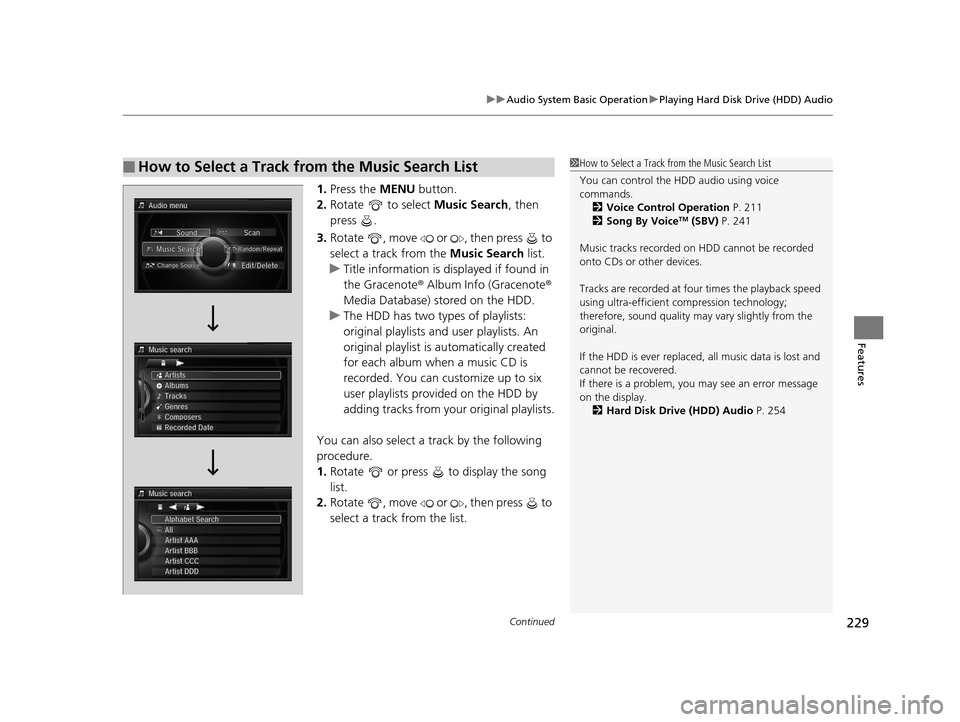
1. Press the MENU button.
2. Rotate to select Music Search, then
press .
3. Rotate , move or , then press to
select a track from the Music Search list.
u Title information is displayed if found in
the Gracenote ® Album Info (Gracenote ®
Media Database) stored on the HDD.
u The HDD has two types of playlists:
original playlists and user playlists. An
original playlist is automatically created
for each album when a music CD is
recorded. You can customize up to six
user playlists prov ided on the HDD by
adding tracks from your original playlists.
You can also select a track by the following
procedure.
1. Rotate or press to display the song
list.
2. Rotate , move or , then press to
select a track from the list.
■How to Select a Track from the Music Search List1How to Select a Track from the Music Search List
You can control the HDD audio using voice
commands.
2 Voice Control Operation P. 211
2 Song By Voice
TM (SBV) P. 241
Music tracks recorded on HDD cannot be recorded
onto CDs or other devices.
Tracks are recorded at four times the playback speed
using ultra-efficient compression technology;
therefore, sound quality ma y vary slightly from the
original.
If the HDD is ever replaced, all music data is lost and
cannot be recovered.
If there is a problem, you may see an error message
on the display. 2 Hard Disk Drive (HDD) Audio P. 254
17 ACURA RLX-31TY26300.book 229 ページ 2016年6月17日 金曜日 午前8時12分
Page 261 of 557
uuGeneral Information on the Audio System uRecommended CDs
260
Features
■Protecting CDs
Follow these precautions when handling or storing CDs:
• Store a CD in its case when it is not being played.
• When wiping a CD, use a soft clean clot h from the center to the outside edge.
• Handle a CD by its edge. Never touch either surface.
• Never insert foreign objects into the CD player.
• Keep CDs out of direct sunlight and extreme heat.
• Do not place stabilizer ri ngs or labels on the CD.
• Avoid fingerprints, liquids, and felt-tip pens on the CD.1Protecting CDs
NOTICE
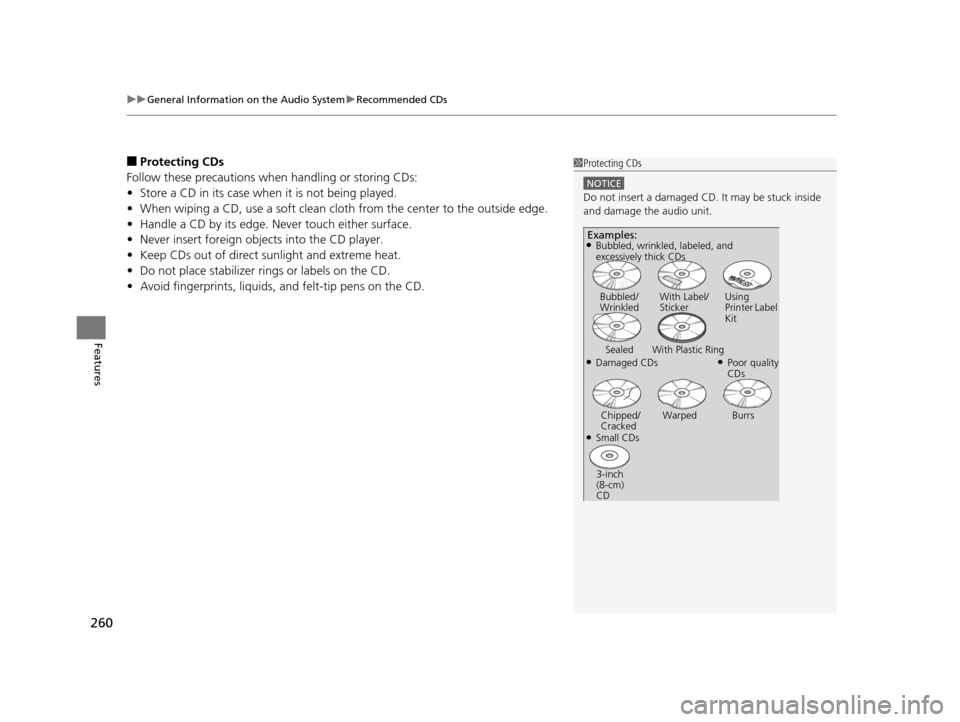
Do not insert a damaged CD. It may be stuck inside
and damage the audio unit.
Examples:
●Damaged CDs Bubbled/
Wrinkled
With Label/
Sticker Using
Printer Label
Kit
Sealed With Plastic Ring●Poor quality
CDs
Chipped/
Cracked Warped Burrs
●Small CDs
3-inch
(8-cm)
CD
●Bubbled, wrinkled, labeled, and
excessively thick CDs
17 ACURA RLX-31TY26300.book 260 ページ 2016年6月17日 金曜日 午前8時12分
Page 265 of 557
264
uuCustomized Features u
Features
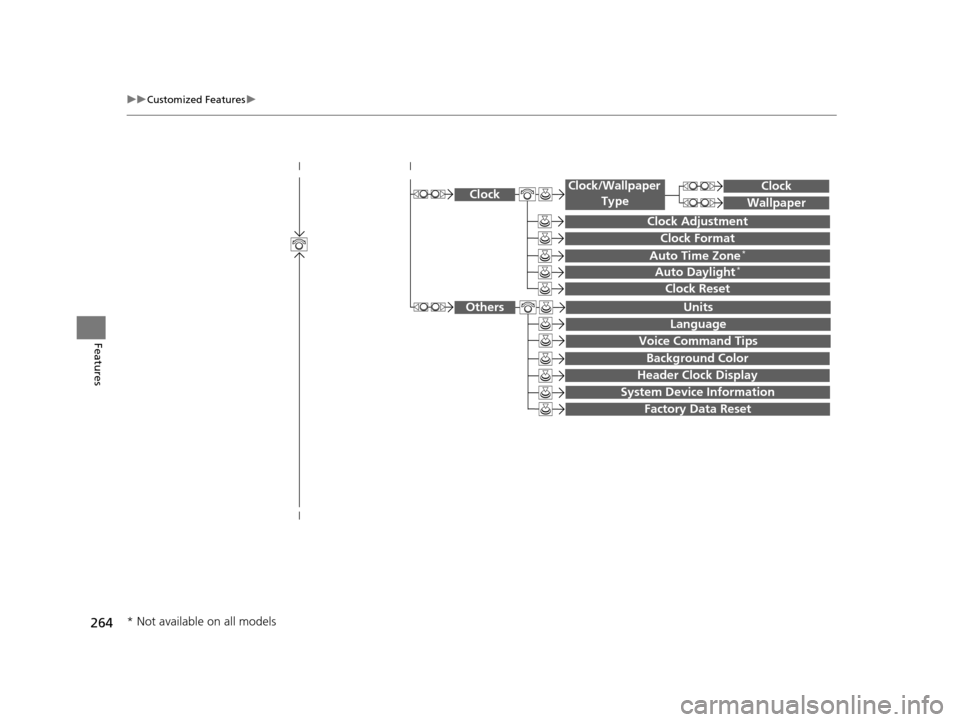
System Device Information
Factory Data Reset
Background Color
Header Clock Display
Clock Reset
Auto Time Zone*
Auto Daylight*
Clock
Clock Adjustment
Clock Format
Clock
Units
Language
Voice Command Tips
Others
Wallpaper
Clock/Wallpaper
Type
* Not available on all models
17 ACURA RLX-31TY26300.book 264 ページ 2016年6月17日 金曜日 午前8時12分
Page 266 of 557
265
uuCustomized Features u
Continued
Features
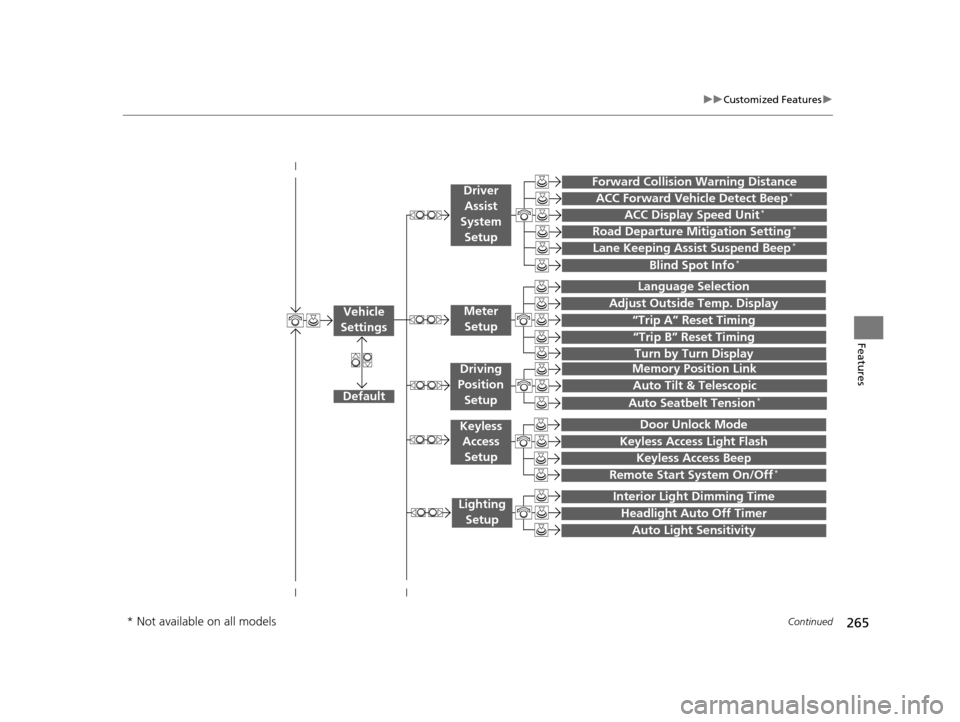
“Trip A” Reset Timing
“Trip B” Reset Timing
Language Selection
Adjust Outside Temp. Display
Forward Collision Warning Distance
ACC Forward Vehicle Detect Beep*
ACC Display Speed Unit*
Turn by Turn Display
Default
Memory Position Link
Door Unlock Mode
Keyless Access Light Flash
Interior Light Dimming Time
Headlight Auto Off Timer
Auto Light Sensitivity
Vehicle
SettingsMeter Setup
Driver Assist
System Setup
Keyless Access
Setup
Lighting Setup
Keyless Access Beep
Lane Keeping Assist Suspend Beep*
Blind Spot Info*
Auto Tilt & Telescopic
Auto Seatbelt Tension*
Driving
Position Setup
Road Departure Mitigation Setting*
Remote Start System On/Off*
* Not available on all models
17 ACURA RLX-31TY26300.book 265 ページ 2016年6月17日 金曜日 午前8時12分
Page 272 of 557
271
uuCustomized Features u
Continued
Features
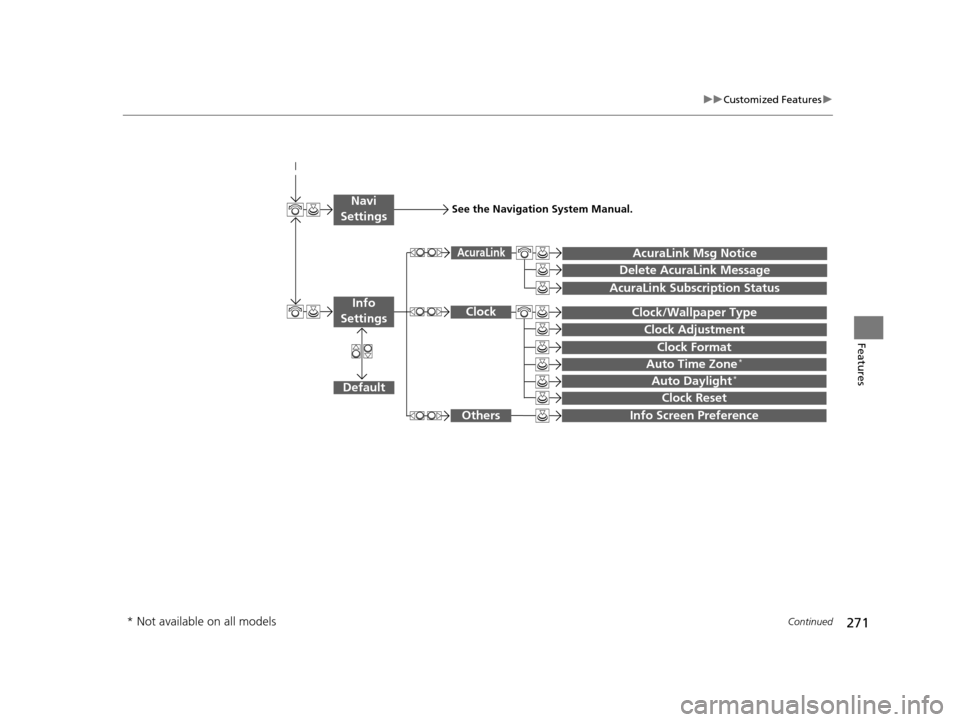
Auto Daylight*
Clock Reset
Info Screen Preference
Clock Format
Auto Time Zone*
Clock/Wallpaper Type
Clock Adjustment
Clock
Default
Others
Info
Settings
Navi
SettingsSee the Navigation System Manual.
AcuraLink Subscription Status
AcuraLink Msg Notice
Delete AcuraLink Message
AcuraLink
* Not available on all models
17 ACURA RLX-31TY26300.book 271 ページ 2016年6月17日 金曜日 午前8時12分
Page 275 of 557
274
uuCustomized Features u
Features
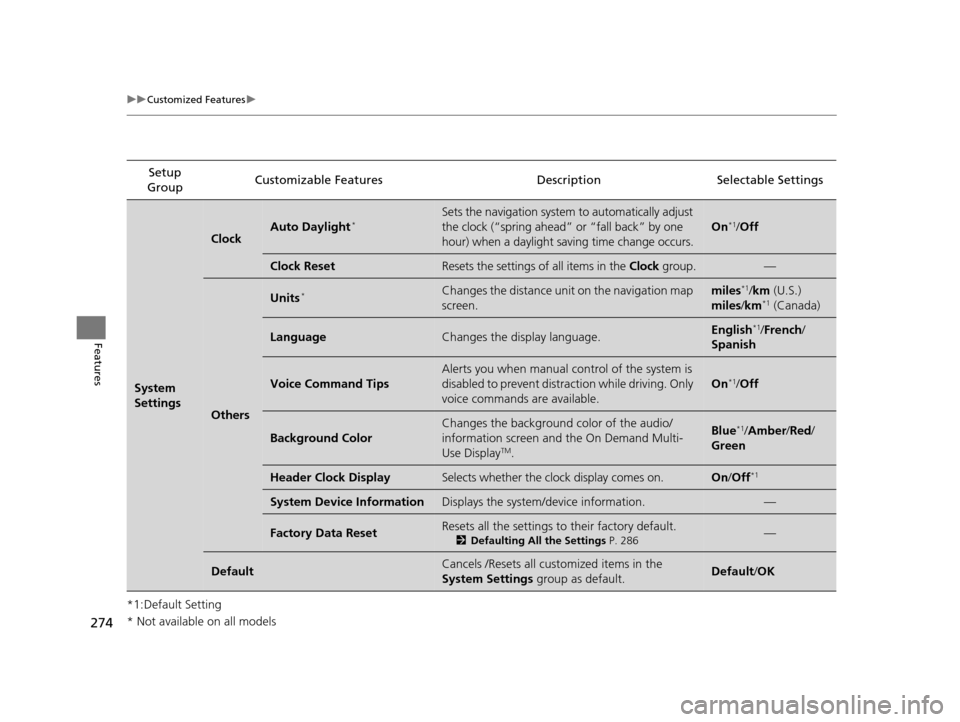
*1:Default SettingSetup
Group Customizable Features Descri
ption Selectable Settings
System
Settings
ClockAuto Daylight*Sets the navigation system to automatically adjust
the clock (“spring ahead” or “fall back” by one
hour) when a daylight saving time change occurs.
On*1/Off
Clock ResetResets the settings of all items in the Clock group.—
Others
Units*Changes the distance unit on the navigation map
screen.miles*1/km (U.S.)
miles /km*1 (Canada)
LanguageChanges the display language.English*1/French /
Spanish
Voice Command Tips
Alerts you when manual control of the system is
disabled to prevent distraction while driving. Only
voice commands are available.
On*1/ Off
Background Color
Changes the background color of the audio/
information screen and the On Demand Multi-
Use Display
TM.
Blue*1/Amber /Red/
Green
Header Clock DisplaySelects whether the clock display comes on.On /Off*1
System Device InformationDisplays the system /device information.—
Factory Data ResetResets all the settings to their factory default.
2Defaulting All the Settings P. 286—
DefaultCancels /Resets all customized items in the
System Settings group as default.Default/OK
* Not available on all models
17 ACURA RLX-31TY26300.book 274 ページ 2016年6月17日 金曜日 午前8時12分
Page 278 of 557

277
uuCustomized Features u
Continued
Features
*1:Default SettingSetup
Group Customizable Features
DescriptionSelectable Settings
Vehicle
Settings Driving
Position
Setup
Memory Position Link
Turns the driving position memory system on and off.On*1/
Off
Auto Tilt & Telescopic Moves the steering wheel fully up when you get
in/get out of the vehicle. On
*1/
Off
Auto Seatbelt Tension
*Turns the auto seatbelt tension setting for the
seat belt e-pretensioner on and off. On*1/
Off
Keyless
Access
Setup Door Unlock Mode
Changes which doors unlock when you grab the
driver’s door handle. Driver Door Only
*1/
All Doors
Keyless Access Light Flash Causes some exterior lights to flash when you
unlock/lock the doors.
On
*1/
Off
Keyless Access Beep Causes the beeper to
sound when you unlock/
lock the doors. On
*1/
Off
Remote Start System On/
Off
*Turns the remote engine start feature on and off. On*1/Off
Lighting
Setup Interior Light Dimming
Time
Changes the length of time the interior lights stay
on after you close the doors.
60seconds/30seconds*1/
15seconds
Headlight Auto Off Timer
Changes the length of time the exterior lights
stay on after you close the driver’s door.60seconds/30seconds/
15seconds*1/0seconds
Auto Light Sensitivity
Changes the timing for the headlights to come
on. Max
/High /Mid*1/
Low /Min
* Not available on all models
17 ACURA RLX-31TY26300.book 277 ページ 2016年6月17日 金曜日 午前8時12分
Page 279 of 557

278
uuCustomized Features u
Features
*1:Default SettingSetup
Group Customizable Features Descri
ption Selectable Settings
Vehicle
Settings Door
SetupAuto Door Lock
Changes the setting for when the doors
automatically lock. With Vehicle Speed
*1/
Shift from P/ Off
Auto Door Unlock Changes the setting for when the doors
automatically unlock. All Doors When
Driver’s Door Opens
*1/
All Doors When
Shifted to Park /All
Doors When Ignition
Switched Off /Off
Key And Remote Unlock
Mode Sets up either the driver
’s door or all doors to
unlock on the first push of the remote. Driver Door
*1/
All
Doors
Keyless Lock Answer Back LOCK/UNLOCK- The exterior lights flash.
LOCK (2nd push)- The beeper sounds. On
*1/
Off
Security Relock Timer Changes the time it takes for the doors to relock
and the security system to set after you unlock
the vehicle without opening any door. 90seconds/
60seconds/
30seconds
*1
Auto Folding Door Mirror*Changes how you can fold the door mirrors.Auto Fold With
Keyless*1/Manual Only
Wiper
SetupWiper Action
*Changes the setting for the automatic
intermittent wipers in the
AUTO position. Rain Sensing*1/
Intermittent /Speed
Sensitive
Front Wiper Action
*Changes the setting for the wipers in the INT
position. Speed Sensitive*1/
Intermittent
* Not available on all models
17 ACURA RLX-31TY26300.book 278 ページ 2016年6月17日 金曜日 午前8時12分
Page 286 of 557
285
uuCustomized Features u
Features
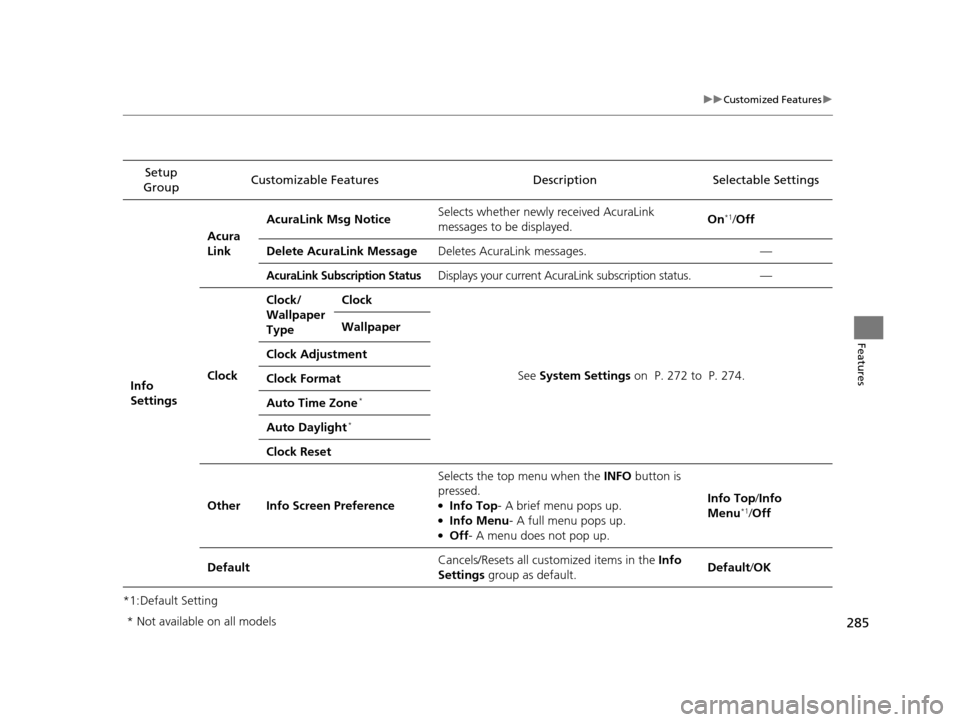
*1:Default SettingSetup
Group Customizable Features Description Selectable Settings
Info
Settings Acura
Link
AcuraLink Msg Notice
Selects whether newly received AcuraLink
messages to be displayed. On
*1/
Off
Delete AcuraLink Message Deletes AcuraLink messages. —
AcuraLink Subscription StatusDisplays your current AcuraLink subscription status. —
Clock Clock/
Wallpaper
Type
Clock
See System Settings on P. 272 to P. 274.
Wallpaper
Clock Adjustment
Clock Format
Auto Time Zone
*
Auto Daylight*
Clock Reset
Other Info Screen Preference Selects the top menu when the
INFO button is
pressed.
●Info Top- A brief menu pops up.●Info Menu - A full menu pops up.●Off- A menu does not pop up. Info Top/
Info
Menu
*1/ Off
Default Cancels/Resets all customized items in the
Info
Settings group as default. Default/
OK
* Not available on all models
17 ACURA RLX-31TY26300.book 285 ページ 2016年6月17日 金曜日 午前8時12分
Page 289 of 557
288
Features
HomeLink® Universal Transceiver
The HomeLink ® Universal Transceiver can be pr ogrammed to operate up to three
remote controlled devices around your home, such as garage doors, lighting, or
home security systems.
Refer to the safety information that came wi th your garage door opener to test that
the safety features are functioning properly. If you do not have the safety
information, contact the manufacturer.
Before programming HomeLink, make sure that people and objects are out of the
way of the garage or gate to prevent potential injury or damage.
When programming a garage door opener, park just outside the garage door’s
path.
Training HomeLink
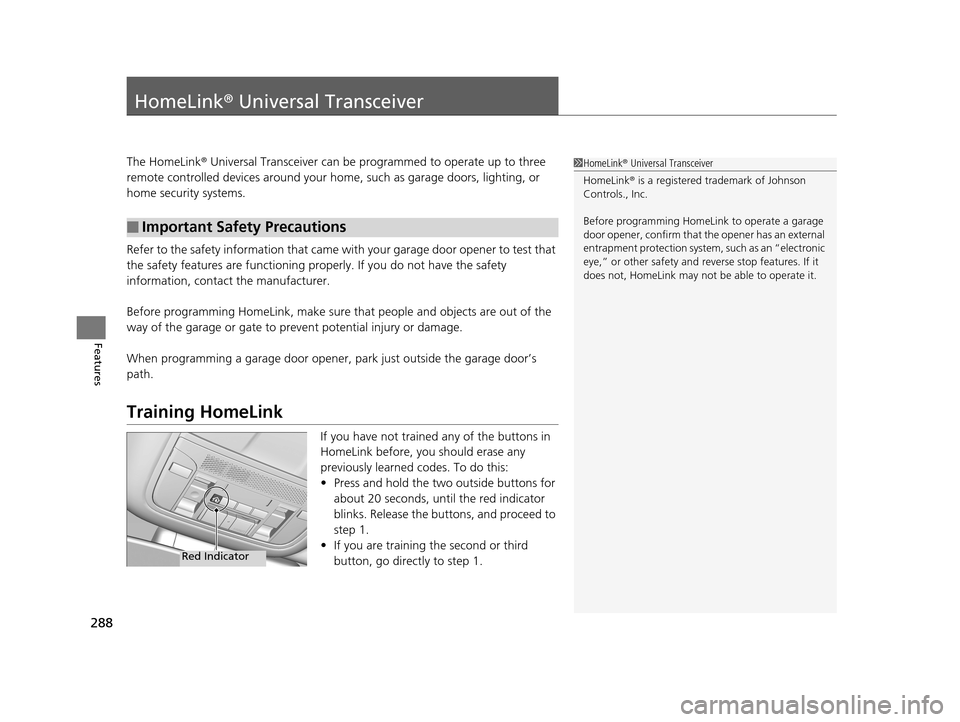
If you have not trained any of the buttons in
HomeLink before, you should erase any
previously learned codes. To do this:
• Press and hold the two outside buttons for
about 20 seconds, until the red indicator
blinks. Release the bu ttons, and proceed to
step 1.
• If you are training the second or third
button, go directly to step 1.
■Important Safety Precautions
1HomeLink ® Universal Transceiver
HomeLink® is a registered tra demark of Johnson
Controls., Inc.
Before programming HomeLi nk to operate a garage
door opener, confirm that the opener has an external
entrapment protection system, such as an “electronic
eye,” or other safety and reverse stop features. If it
does not, HomeLink may not be able to operate it.
Red Indicator
17 ACURA RLX-31TY26300.book 288 ページ 2016年6月17日 金曜日 午前8時12分