steering Acura RLX 2017 Repair Manual
[x] Cancel search | Manufacturer: ACURA, Model Year: 2017, Model line: RLX, Model: Acura RLX 2017Pages: 557, PDF Size: 37.97 MB
Page 412 of 557

411
uuBraking uCollision Mitigation Braking SystemTM (CMBSTM)*
Continued
Driving
The system has three alert stages for a possible collis ion. However, depending on circumstances, the CMBSTM may not go through all of
the stages before initiating the last stage.
■Collision Alert Stages
Distance between vehicles
CMBSTM
The radar sensor detects a vehicleE-pretensionerAudible & Visual WARNINGSSteering WheelBraking
Stage one
There is a risk of a
collision with the
vehicle ahead of
you.
—
When in Long, visual and
audible alerts come on at a
longer distance from a vehicle
ahead than in Normal setting,
and in Short, at a shorter
distance than in Normal.In case of an
oncoming
vehicle
detected, rapid
vibration is
provided.
—
Stage
two
The risk of a
collision has
increased, time to
respond is
reduced.
Retracts the
driver’s seat belt
gently a few times,
providing a
physical warning.
Visual and audible alerts.—
Lightly
applied
Stage three
The CMBSTM
determines that a
collision is
unavoidable.
Forcefully tightens
driver and front
passenger seat
belts.
Forcefully applied
Your Vehicle Vehicle
Ahead
Normal
Short
Long
Your
Vehicle Vehicle
Ahead
Your
VehicleVehicle
Ahead
17 ACURA RLX-31TY26300.book 411 ページ 2016年6月17日 金曜日 午前8時12分
Page 427 of 557

426
Driving
Multi-View Rear Camera*
About Your Multi-View Rear Camera
The audio/information screen can display your vehicle’s rear view. The display
automatically changes to the rear view when the shift lever is moved to
(R.
You can view three different camera angl es on the rearview display. Press the
interface dial to switch the angle.
If Top View is last used before you turn the power mode to OFF, Wide mode is
selected next time you turn the pow er on and move the shift lever to
(R.
■Multi-View Rear Camera Display Area
1About Your Multi-View Rear Camera
The rear camera view is restricted. You cannot see
the corner ends of the bum per or what is underneath
the bumper. Its unique le ns also makes objects
appear closer or farther than they actually are.
Visually confirm that it is safe to drive before backing
up. Certain conditions (such as weather, lighting, and
high temperatures) may also re strict the rear view. Do
not rely on the rearview display which does not give
you all information about conditions at the back of
your vehicle.
If the camera lens is cove red with dirt or moisture,
use a soft, moist cloth to keep the lens clean and free
of debris.
You can change the Fixed Guideline and Dynamic
Guideline settings. 2 Customized Features P. 262
Fixed Guideline
On : Guidelines appear when you shift into
(R.
Off : Guidelines do not appear when the dynamic
guideline is off.
Dynamic Guideline
On : Guidelines move according to the steering wheel
direction.
Off : Guidelines do not move.
Top Down View Mode Normal View Mode Wide View Mode
Guidelines
Bumper
Camera
Approx. 118 inches (3 m)Approx. 79 inches (2 m)Approx. 39 inches (1 m)
Approx. 20 inches (50 cm)
* Not available on all models
17 ACURA RLX-31TY26300.book 426 ページ 2016年6月17日 金曜日 午前8時12分
Page 431 of 557
uuSurround View Camera System*uDisplaying an Image From the Surround View Cameras
430
Driving
Following can be displayed when the system is on.
Guide lines: Help you to get a sense of a distance between your vehicle and the
rear surroundings. The distan ce may appear differently than the actual distance.
Projection lines: Indicate vehicle direction while the steering wheel is in the current
position.
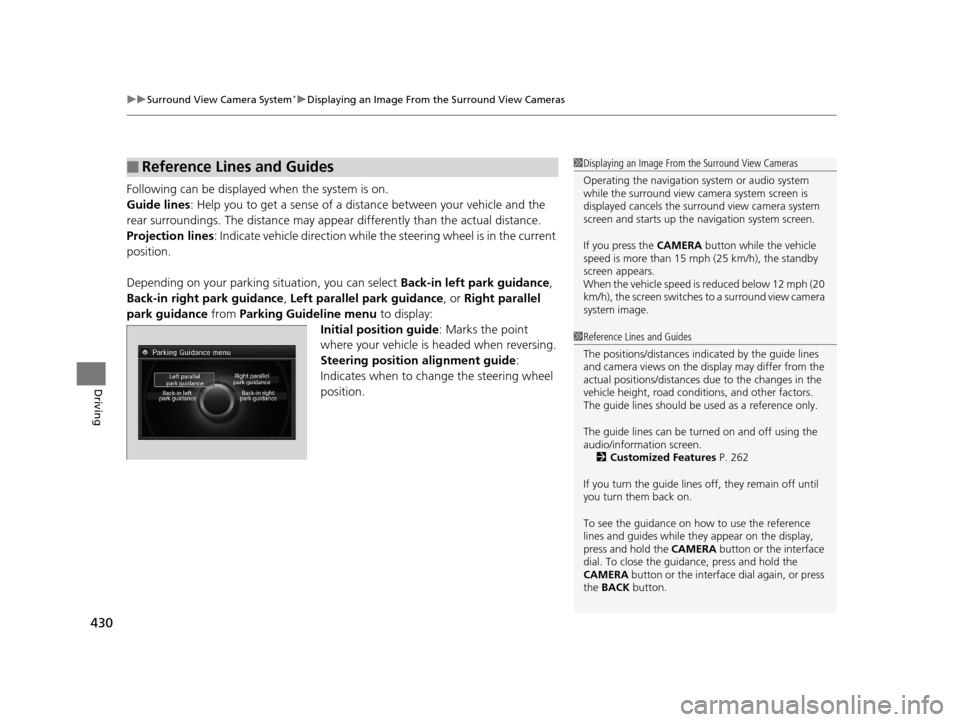
Depending on your parking situation, you can select Back-in left park guidance,
Back-in right park guidance , Left parallel park guidance , or Right parallel
park guidance from Parking Guideline menu to display:
Initial position guide : Marks the point
where your vehicle is headed when reversing.
Steering position alignment guide :
Indicates when to change the steering wheel
position.
■Reference Lines and Guides1 Displaying an Image From the Surround View Cameras
Operating the navigation system or audio system
while the surround view camera system screen is
displayed cancels the surr ound view camera system
screen and starts up the navigation system screen.
If you press the CAMERA button while the vehicle
speed is more than 15 mph (25 km/h), the standby
screen appears.
When the vehicle speed is reduced below 12 mph (20
km/h), the screen switches to a surround view camera
system image.
1 Reference Lines and Guides
The positions/distances indi cated by the guide lines
and camera views on the display may differ from the
actual positions/distances due to the changes in the
vehicle height, road conditions, and other factors.
The guide lines should be used as a reference only.
The guide lines can be tu rned on and off using the
audio/information screen. 2 Customized Features P. 262
If you turn the guide lines off, they remain off until
you turn them back on.
To see the guidance on how to use the reference
lines and guides while they appear on the display,
press and hold the CAMERA button or the interface
dial. To close the guidance, press and hold the
CAMERA button or the interface dial again, or press
the BACK button.
17 ACURA RLX-31TY26300.book 430 ページ 2016年6月17日 金曜日 午前8時12分
Page 432 of 557

431
uuSurround View Camera System*uWhen Parking Your Vehicle
Continued
Driving
When Parking Your Vehicle
The display automatically changes to the rear view when the shift lever is moved to
(R.
■Checking for Obstacles at the Back of Your Vehicle1When Parking Your Vehicle
The ground view can be disp layed even with the door
mirrors folded. However, the viewable angle and
blind spot change.
Do not refer to the surround view camera system
when the door mirrors are folded.
Folded
Not folded
Rear Wide View
Rear Normal View Rear Ground View
When the
steering wheel is
turned more
than 90 degrees.
The projection lines
appear approx. 10
inches (25 cm) outside
the vehicle body.
Blind spots
appear in
black.
Press the CAMERA
button.
Approximate distances
the guide lines indicate
Approximate distances the
projection lines indicate 39 inches (1 m)
79 inches (2 m)
118 inches
(3 m)
20 inches
(50 cm)
118 inches
(3 m)
1
Checking for Obstacles at the Back of Your Vehicle
When moving the shift lever from/to
(R, you may
experience a delay in sw itching between the audio/
information screen and a rear view image.
17 ACURA RLX-31TY26300.book 431 ページ 2016年6月17日 金曜日 午前8時12分
Page 433 of 557

uuSurround View Camera System*uWhen Parking Your Vehicle
432
Driving1. With your vehicle at a complete stop, press the CAMERA button, then press the
MENU button. Rotate to select Back- in left park guidance or Back-in right
park guidance . Press .
2. Move the vehicle forward perpendicular to the parking space and stop where the
initial positioning guide in the display is at the center of the parking space.
3. Turn the steering wheel fully to the left (if the parking space is on the passenger
side) at a stop.
u The steering position alignment guide is displayed.
4. Slowly move the vehicle forward.
u
Stop the vehicle when the steering position alignment guide enters the parking space.
5. Turn the steering wheel fully to the right (if the parking space is on the passenger
side) at a stop. Start reve rsing the vehicle slowly.
6. Stop the vehicle when it is parallel to the parking lines.
7. Return the steering wheel to its center po sition, then reverse the vehicle slowly
until it is parked within the space.
■Reversing into a Parking Space Marked with Parking Lines1 Reversing into a Parking Space Marked with Parking Lines
If the steering position ali gnment guide does not fit in
the parking lines, the parking space is too small for
the vehicle.
Reference lines can be usef ul only when the parking
space is in a rectangular shape with straight parking
marks and when vehicles in the next parking spaces
are within the spaces.
Must be wider than approx. 8 feet (2.5 m)
The initial positioning
guide must come here.
Must be wider than approx. 20 feet (6 m) Make sure the guides
are within the parking
space when reversing.Initial
Positioning
Guide
Steering Position
Alignment Guide
A
B
C
Steering position alignment
guide enters the parking
space. (Step 4)
17 ACURA RLX-31TY26300.book 432 ページ 2016年6月17日 金曜日 午前8時12分
Page 434 of 557

Continued433
uuSurround View Camera System*uWhen Parking Your Vehicle
Driving1. Press the CAMERA button, then press the MENU button. Rotate to select
Left parallel park guidance or Right Parallel park guidance. Press .
2. Move the vehicle forward parallel to the parking space and stop when the initial
positioning guide shown in the display overlaps the front corner of the space.
3. Turn the steering wheel fully to the right (if the parking space is on the passenger
side) at a stop.
u The steering position alig nment guide is displayed.
4. Slowly reverse the vehicle.
u Stop the vehicle when the steering position alignment guide overlaps the
sideline of the parking space.
5. Turn the steering wheel fully to the left (if the parking space is on the passenger
side) at a stop. Revers e the vehicle slowly.
6. Stop the vehicle when it is parallel to the parking lines.
7. Return the steering wheel to its center pos ition, then reverse the vehicle slowly
until it is parked within the space.
■Parallel Parking into a Parking Space Marked with Parking Lines1Parallel Parking into a Parking Space Marked with Parking Lines
Reference lines can be usef ul only when the parking
space is in a rectangular shape with straight parking
marks and when vehicles in the next parking spaces
are within the spaces.
Initial
Positioning
Guide
Steering Position
Alignment Guide
Must be wider than approx. 20 feet (6 m)
Must be
wider than
approx. 8
feet (2.5 m)
Must be longer than approx. 21 feet (6.5 m)
A B
C
Initial
positioning
guide
overlaps the
front corner
of the space.
(Step 2)
17 ACURA RLX-31TY26300.book 433 ページ 2016年6月17日 金曜日 午前8時12分
Page 435 of 557

uuSurround View Camera System*uWhen Parking Your Vehicle
434
Driving
You can display the front ground view screen using all the four cameras for the
system. Pressing the CAMERA button when the vehicle speed is at below 12 mph
(20 km/h) changes the image as follows.
■Checking for the Sides of Your Vehicle1 Checking for the Sides of Your Vehicle
When the vehicle speed exceeds 15 mph (25 km/h),
the front or side view on the screen automatically
switches to the audio information screen. The front
or side view screen resumes when the vehicle speed
is reduced below 12 mph (20 km/h).
0 mph (0 km/h)
Down Up Camera
Screen
Camera
Screen
Audio/information
Screen
Audio/information
Screen 15 mph (25 km/h)
0 mph (0 km/h) 12 mph (20 km/h)
Side
View Front Wide View Front Ground View
Press and hold the
CAMERA button.
A Combined Image of
Both Side Views
Approximate distance
the reference line
indicates. Blind spots
appear in black.
Projection lines
appear.
Press the CAMERA
button.
When the
steering wheel
is turned.
approx. 3 feet (1 m)
17 ACURA RLX-31TY26300.book 434 ページ 2016年6月17日 金曜日 午前8時12分
Page 449 of 557
448
uuMaintenance MinderTMuTo Use Maintenance MinderTM
Maintenance
■Maintenance Service Items1Maintenance Service Items
•Independent of the Maintenance Minder
information, replace the brake fluid every 3 years.
•Inspect idle speed every 160,000 miles (256,000
km).
•Adjust the valves during services A, B, 1, 2, or 3 if
they are noisy.
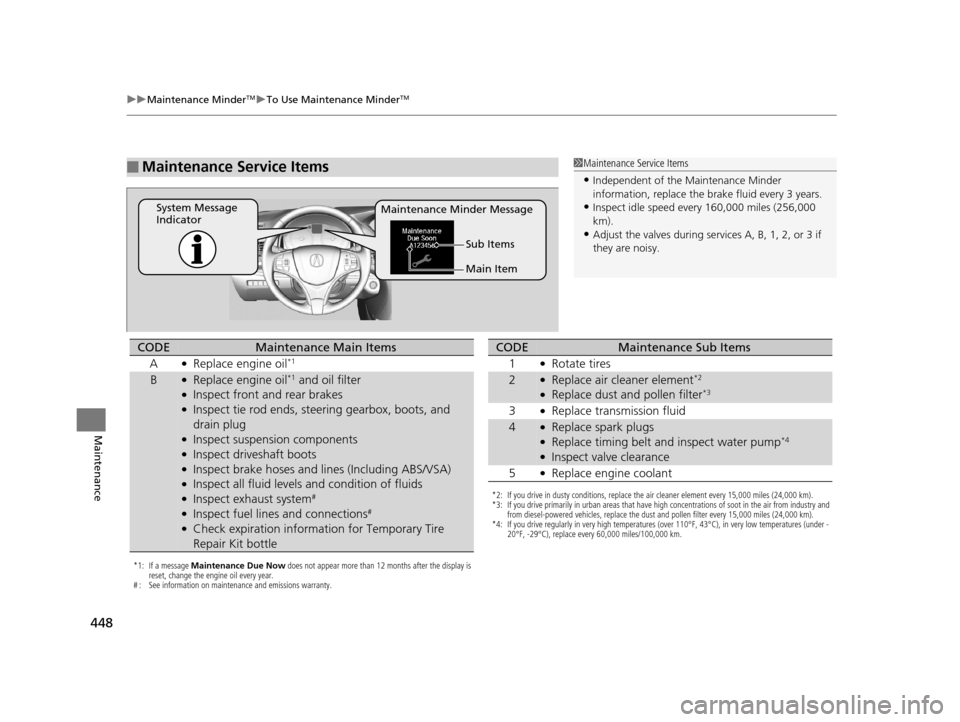
Maintenance Minder Message
System Message
Indicator
Main Item Sub Items
*1: If a message Maintenance Due Now does not appear more than 12 months after the display is
reset, change the engine oil every year.
# : See information on maintenance and emissions warranty.
CODEMaintenance Main Items
A
●Replace engine oil*1
B●Replace engine oil*1 and oil filter●Inspect front and rear brakes●Inspect tie rod ends, steering gearbox, boots, and
drain plug
●Inspect suspension components●Inspect driveshaft boots●Inspect brake hoses and li nes (Including ABS/VSA)●Inspect all fluid levels and condition of fluids●Inspect exhaust system#
●Inspect fuel lines and connections#
●Check expiration informat ion for Temporary Tire
Repair Kit bottle
*2: If you drive in dusty conditions, replace the air cleaner element every 15,000 miles (24,000 km).
*3: If you drive primarily in urban areas that have high concentrations of soot in the air from industry and from diesel-powered vehicles, replace the dust and pollen filter every 15,000 miles (24,000 km).
*4: If you drive regularly in very high temperatures (over 110°F, 43°C), in very low temperatures (under - 20°F, -29°C), replace every 60,000 miles/100,000 km.
CODEMaintenance Sub Items
1
●Rotate tires
2●Replace air cleaner element*2
●Replace dust and pollen filter*3
3●Replace transmission fluid
4●Replace spark plugs●Replace timing belt and inspect water pump*4
●Inspect valve clearance
5
●Replace engine coolant
17 ACURA RLX-31TY26300.book 448 ページ 2016年6月17日 金曜日 午前8時12分
Page 465 of 557
464
uuReplacing Light Bulbs uFront Side Marker Light Bulbs
Maintenance
Front Side Marker Light Bulbs
When replacing, use the following bulbs.
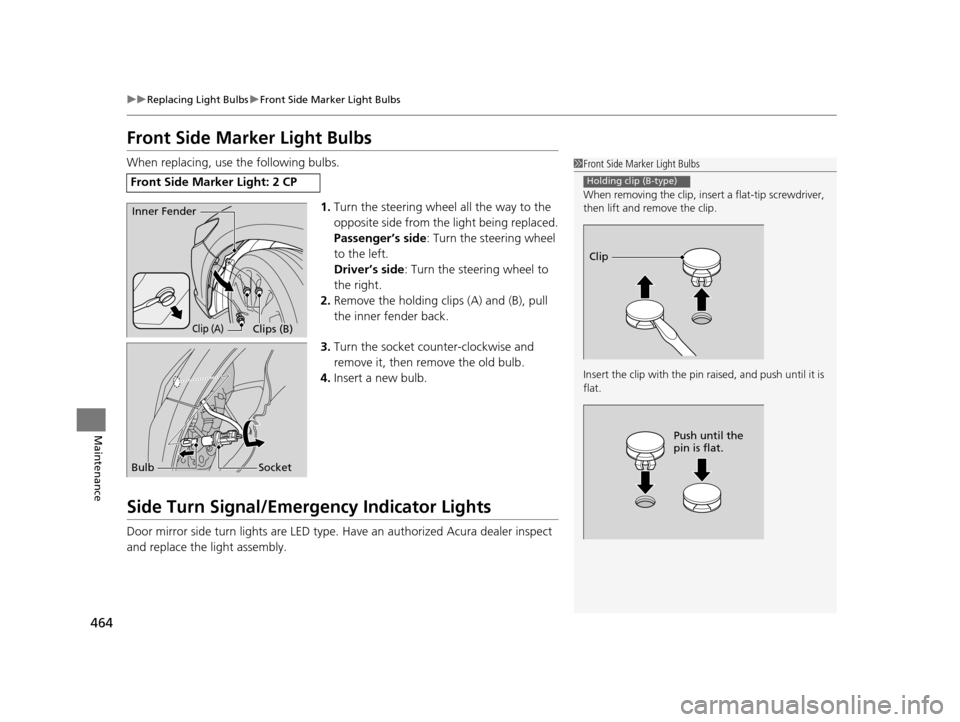
1.Turn the steering wheel all the way to the
opposite side from the light being replaced.
Passenger’s side : Turn the steering wheel
to the left.
Driver’s side : Turn the steering wheel to
the right.
2. Remove the holding clips (A) and (B), pull
the inner fender back.
3. Turn the socket counter-clockwise and
remove it, then remove the old bulb.
4. Insert a new bulb.
Side Turn Signal/Emergency Indicator Lights
Door mirror side turn lights are LED type. Have an authorized Acura dealer inspect
and replace the light assembly.
Front Side Marker Light: 2 CP
1 Front Side Marker Light Bulbs
When removing the clip, insert a flat-tip screwdriver,
then lift and remove the clip.
Insert the clip with the pin raised, and push until it is
flat.
Holding clip (B-type)
Clip
Push until the
pin is flat.
Inner Fender
Clip (A)Clips (B)
Bulb Socket
17 ACURA RLX-31TY26300.book 464 ページ 2016年6月17日 金曜日 午前8時12分
Page 480 of 557
479
uuChecking and Maintaining Tires uWinter Tires
Maintenance
Winter Tires
If driving on snowy or frozen roads, mount all season marked M+S tires, snow tires,
or tire chains; reduce speed; and maintain sufficient distance between vehicles when
driving.
Be particularly careful wh en operating the steering wheel or brakes to prevent
skidding.
Use tire chains, snow tires, or all season tires when necessary or according to the law.
When mounting, refer to the following points.
For winter tires:
• Select the size and load ranges that are the same as the original tires.
• Mount the tires to all four wheels.
For tire chains:
• Install them on the front tires only.
• Because your vehicle has limited tire clea rance, we strongly recommend using the
chains listed below:
• Follow the chain manufactur er’s instruction when installing. Mount them as
tightly as you can.
• Check that the chains do not touch the brake lines or suspension.
• Drive slowly.
Cable-type: SCC Radial Chain SC1040
1Winter Tires
NOTICE
Traction devices that are th e wrong size or improperly
installed can damage your vehicle’s brake lines,
suspension, body, and wheels. Stop driving if they are
hitting any part of the vehicle.
When tire chains are mounted, follow the chain
manufacturer’s instructi ons regarding vehicle
operational limits.
If your vehicle is equipped with summer tires, be
aware that these tires are not designed for winter
driving conditions. For more information, contact a
dealer.
3WARNING
Using the wrong chains, or not properly
installing chains, can damage the brake
lines and cause a crash in which you can be
seriously injured or killed.
Follow all instruction s in this owner’s
manual regarding the selection and use of
tire chains.
17 ACURA RLX-31TY26300.book 479 ページ 2016年6月17日 金曜日 午前8時12分