lock Acura RLX 2017 Manual Online
[x] Cancel search | Manufacturer: ACURA, Model Year: 2017, Model line: RLX, Model: Acura RLX 2017Pages: 557, PDF Size: 37.97 MB
Page 275 of 557
274
uuCustomized Features u
Features
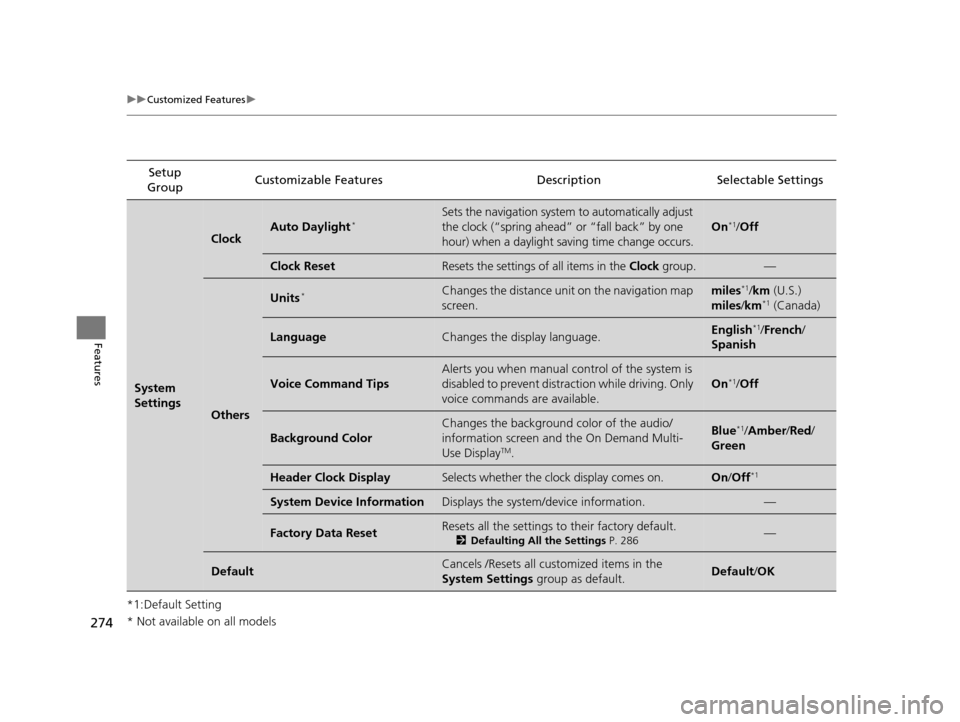
*1:Default SettingSetup
Group Customizable Features Descri
ption Selectable Settings
System
Settings
ClockAuto Daylight*Sets the navigation system to automatically adjust
the clock (“spring ahead” or “fall back” by one
hour) when a daylight saving time change occurs.
On*1/Off
Clock ResetResets the settings of all items in the Clock group.—
Others
Units*Changes the distance unit on the navigation map
screen.miles*1/km (U.S.)
miles /km*1 (Canada)
LanguageChanges the display language.English*1/French /
Spanish
Voice Command Tips
Alerts you when manual control of the system is
disabled to prevent distraction while driving. Only
voice commands are available.
On*1/ Off
Background Color
Changes the background color of the audio/
information screen and the On Demand Multi-
Use Display
TM.
Blue*1/Amber /Red/
Green
Header Clock DisplaySelects whether the clock display comes on.On /Off*1
System Device InformationDisplays the system /device information.—
Factory Data ResetResets all the settings to their factory default.
2Defaulting All the Settings P. 286—
DefaultCancels /Resets all customized items in the
System Settings group as default.Default/OK
* Not available on all models
17 ACURA RLX-31TY26300.book 274 ページ 2016年6月17日 金曜日 午前8時12分
Page 278 of 557

277
uuCustomized Features u
Continued
Features
*1:Default SettingSetup
Group Customizable Features
DescriptionSelectable Settings
Vehicle
Settings Driving
Position
Setup
Memory Position Link
Turns the driving position memory system on and off.On*1/
Off
Auto Tilt & Telescopic Moves the steering wheel fully up when you get
in/get out of the vehicle. On
*1/
Off
Auto Seatbelt Tension
*Turns the auto seatbelt tension setting for the
seat belt e-pretensioner on and off. On*1/
Off
Keyless
Access
Setup Door Unlock Mode
Changes which doors unlock when you grab the
driver’s door handle. Driver Door Only
*1/
All Doors
Keyless Access Light Flash Causes some exterior lights to flash when you
unlock/lock the doors.
On
*1/
Off
Keyless Access Beep Causes the beeper to
sound when you unlock/
lock the doors. On
*1/
Off
Remote Start System On/
Off
*Turns the remote engine start feature on and off. On*1/Off
Lighting
Setup Interior Light Dimming
Time
Changes the length of time the interior lights stay
on after you close the doors.
60seconds/30seconds*1/
15seconds
Headlight Auto Off Timer
Changes the length of time the exterior lights
stay on after you close the driver’s door.60seconds/30seconds/
15seconds*1/0seconds
Auto Light Sensitivity
Changes the timing for the headlights to come
on. Max
/High /Mid*1/
Low /Min
* Not available on all models
17 ACURA RLX-31TY26300.book 277 ページ 2016年6月17日 金曜日 午前8時12分
Page 279 of 557

278
uuCustomized Features u
Features
*1:Default SettingSetup
Group Customizable Features Descri
ption Selectable Settings
Vehicle
Settings Door
SetupAuto Door Lock
Changes the setting for when the doors
automatically lock. With Vehicle Speed
*1/
Shift from P/ Off
Auto Door Unlock Changes the setting for when the doors
automatically unlock. All Doors When
Driver’s Door Opens
*1/
All Doors When
Shifted to Park /All
Doors When Ignition
Switched Off /Off
Key And Remote Unlock
Mode Sets up either the driver
’s door or all doors to
unlock on the first push of the remote. Driver Door
*1/
All
Doors
Keyless Lock Answer Back LOCK/UNLOCK- The exterior lights flash.
LOCK (2nd push)- The beeper sounds. On
*1/
Off
Security Relock Timer Changes the time it takes for the doors to relock
and the security system to set after you unlock
the vehicle without opening any door. 90seconds/
60seconds/
30seconds
*1
Auto Folding Door Mirror*Changes how you can fold the door mirrors.Auto Fold With
Keyless*1/Manual Only
Wiper
SetupWiper Action
*Changes the setting for the automatic
intermittent wipers in the
AUTO position. Rain Sensing*1/
Intermittent /Speed
Sensitive
Front Wiper Action
*Changes the setting for the wipers in the INT
position. Speed Sensitive*1/
Intermittent
* Not available on all models
17 ACURA RLX-31TY26300.book 278 ページ 2016年6月17日 金曜日 午前8時12分
Page 286 of 557
285
uuCustomized Features u
Features
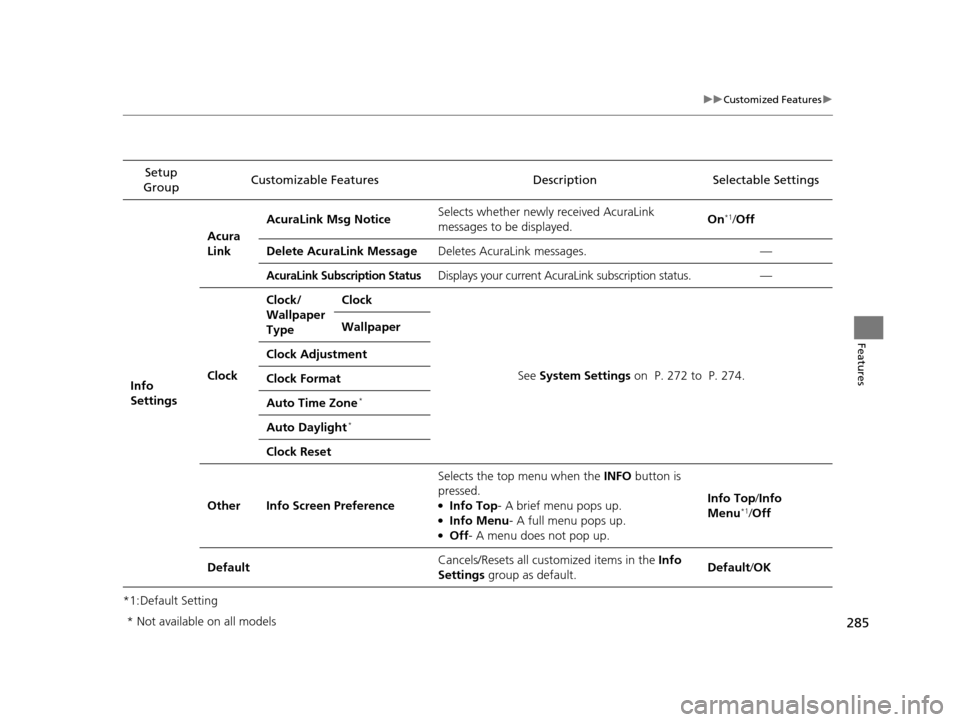
*1:Default SettingSetup
Group Customizable Features Description Selectable Settings
Info
Settings Acura
Link
AcuraLink Msg Notice
Selects whether newly received AcuraLink
messages to be displayed. On
*1/
Off
Delete AcuraLink Message Deletes AcuraLink messages. —
AcuraLink Subscription StatusDisplays your current AcuraLink subscription status. —
Clock Clock/
Wallpaper
Type
Clock
See System Settings on P. 272 to P. 274.
Wallpaper
Clock Adjustment
Clock Format
Auto Time Zone
*
Auto Daylight*
Clock Reset
Other Info Screen Preference Selects the top menu when the
INFO button is
pressed.
●Info Top- A brief menu pops up.●Info Menu - A full menu pops up.●Off- A menu does not pop up. Info Top/
Info
Menu
*1/ Off
Default Cancels/Resets all customized items in the
Info
Settings group as default. Default/
OK
* Not available on all models
17 ACURA RLX-31TY26300.book 285 ページ 2016年6月17日 金曜日 午前8時12分
Page 333 of 557

uuAcuraLink ®u
332
Features
Your subscribed telematics service provider can track your vehicle’s location,
remotely lock or unlock doors, and help you find your vehicle.
To use these features, you need your us er ID and personal identification number
(PIN).
■Stolen vehicle tracking
This feature searches and tracks down your ve hicle position even if it is on the move.
If you believe that your vehicle has been stolen, contact the police as well as the
provider.
■Remote door lock/unlock
The provider can remotely lock or unlock doors upon your request.
■Vehicle finder
This feature is convenient to use when trying to locate yo ur vehicle in large areas,
such as a crowded parking lot. If you cannot locate your vehicle after using the
remote transmitter’s answerba ck function, you can contact the provider which can
then flash your vehicle’s exterior lights and sound the horn.
■Security alarm notification
If the security system in your vehicle detects an abnormal condition, such as
someone tampering with the lock on your ve hicle, the provider notifies you by email.
■Security Features1Security Features
The contact information of your provider, your user
ID and PIN will be given when you subscribe to
AcuraLink. If you forget any of the above, contact a
dealer, or go to owners.acura.com (in U.S.) or
www.acura.ca (in Canada).
You can also activate the remote door lock/unlock
and vehicle finder features from the Internet or using
your smartphone app. As k a dealer, or visit
owners.acura.com (in U.S.) or www.acura.ca (in
Canada) for details.
1 Vehicle finder
The lights will stop flas hing and horn will stop
sounding under the foll owing conditions:
•When 30 seconds have elapsed.
•You unlock the doors using the remote transmitter.
•You unlock the doors using the keyless access
system.
•You unlock the doors using the built-in key.
•The power mode is set to ACCESSORY or ON.
17 ACURA RLX-31TY26300.book 332 ページ 2016年6月17日 金曜日 午前8時12分
Page 338 of 557
337
Driving
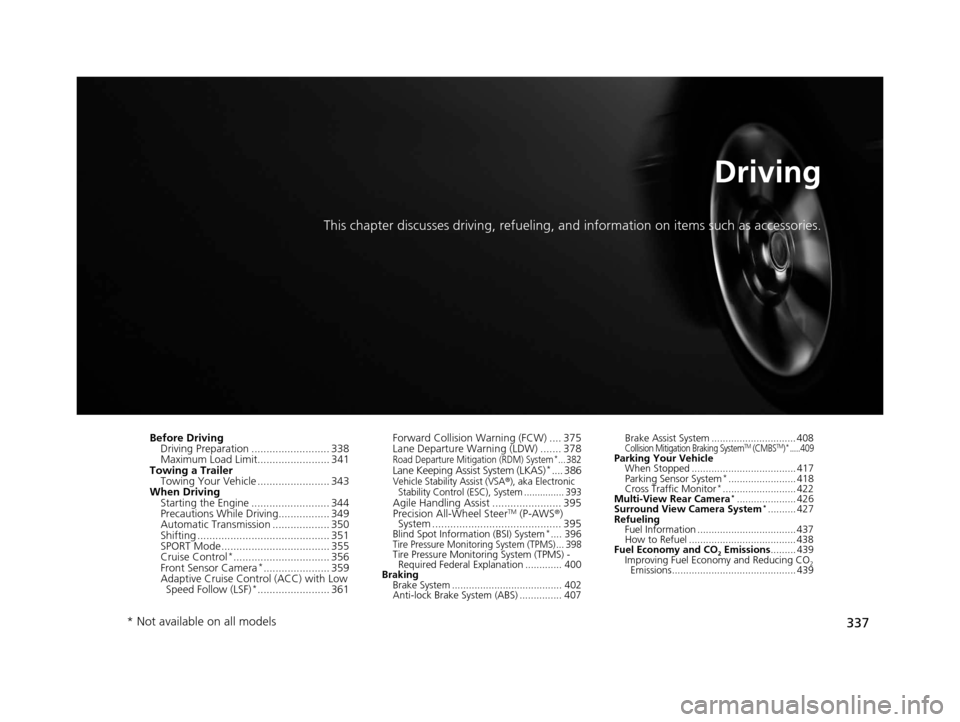
This chapter discusses driving, refueling, and information on items such as accessories.
Before Driving
Driving Preparation .......................... 338
Maximum Load Limit........................ 341
Towing a Trailer Towing Your Vehicle ........................ 343
When Driving
Starting the Engine .......................... 344
Precautions While Driving................. 349
Automatic Transmission ................... 350
Shifting ............................................ 351
SPORT Mode.................................... 355
Cruise Control
*................................ 356
Front Sensor Camera*...................... 359
Adaptive Cruise Control (ACC) with Low Speed Follow (LSF)
*........................ 361 Forward Collision Warning (FCW) .... 375
Lane Departure Warning (LDW) ....... 378
Road Departure Mitigation (RDM) System*... 382Lane Keeping Assist System (LKAS)*.... 386Vehicle Stability Assist (VSA®), aka Electronic
Stability Control (ESC), System ............... 393
Agile Handling Assist ....................... 395
Precision All-Wheel SteerTM (P-AWS ®)
System ........................................... 395
Blind Spot Information (BSI) System*.... 396Tire Pressure Monitoring System (TPMS) ... 398Tire Pressure Monitoring System (TPMS) -
Required Federal Explanation ............. 400
Braking Brake System ....................................... 402
Anti-lock Brake System (ABS) ............... 407 Brake Assist System .............................. 408
Collision Mitigation Braking SystemTM (CMBSTM)*.....409Parking Your Vehicle
When Stopped ..................................... 417
Parking Sensor System
*........................ 418
Cross Traffic Monitor*.......................... 422
Multi-View Rear Camera*..................... 426
Surround View Camera System*.......... 427
Refueling Fuel Information ................................... 437
How to Refuel ...................................... 438
Fuel Economy and CO
2 Emissions ......... 439
Improving Fuel Economy and Reducing CO2
Emissions............................................ 439
* Not available on all models
17 ACURA RLX-31TY26300.book 337 ページ 2016年6月17日 金曜日 午前8時12分
Page 339 of 557
338
Driving
Before Driving
Driving Preparation
Check the following items before you start driving.
• Make sure there are no obstructions on th e windows, door mirrors, exterior
lights, or other parts of the vehicle.
u Remove any frost, snow, or ice.
u Remove any snow on the roof, as this can slip down and obstruct your field of
vision while driving. If frozen solid , remove ice once it has softened.
u When removing ice from around the wheel s, be sure not to damage the wheel
or wheel components.
• Make sure the hood is securely closed.
u If the hood opens while driving, your front view will be blocked.
• Make sure the tires are in good condition.
u Check air pressures, and check for damage and excessive wear.
2Checking and Maintaining Tires P. 471
•Make sure there are no people or ob jects behind or around the vehicle.
u There are blind spots from the inside.
■Exterior Checks1Exterior Checks
NOTICE
When doors are frozen s hut, use warm water around
the door edges to melt any ice. Do not try to force
them open, as this can damage the rubber trim
around the doors. When done, wipe dry to avoid
further freezing.
Do not pour warm water into the key cylinder.
You will be unable to insert the key if the water
freezes in the hole.
Heat from the engine and exhaust can ignite
flammable material s left under the hood, causing a
fire. If you’ve parked y our vehicle for an extended
period, inspect and remove any debris that may have
collected, such as dried grass and leaves that have
fallen or have been carried in for use as a nest by a
small animal. Also check under the hood for leftover
flammable materials after you or someone else has
performed maintenance on your vehicle.
17 ACURA RLX-31TY26300.book 338 ページ 2016年6月17日 金曜日 午前8時12分
Page 340 of 557
Continued339
uuBefore Driving uDriving Preparation
Driving
• Store or secure all items on board properly.
u Carrying too much cargo, or improperly storing it, can affect your vehicle’s
handling, stability, sto pping distance, and tires, and make it unsafe.
2Maximum Load Limit P. 341
•Do not pile items higher than the seat height.
u They can block your view and may be thrown forward in the event of sudden
braking.
• Do not place anything in the front seat footwells. Make sure to secure the floor
mat.
u An object or unsecured floor mat can in terfere with your brake and accelerator
pedal operation while driving.
• If you have any animals on board, do not let them move around in the vehicle.
u They may interfere with driv ing and a crash could occur.
• Securely close and lock all doors and the trunk.
2 Locking/Unlocking the Doors from the Inside P. 124
•Adjust your seating position properly.
u Adjust the head restraint, too.
2Adjusting the Seats P. 156
2 Adjusting the Head Restraints P. 159
•Adjust the mirrors and steering wh eel properly for your driving.
u Adjust them while sitting in the proper driving position.
2 Adjusting the Mirrors P. 153
2 Adjusting the Steering Wheel P. 152
■Interior Checks1Interior Checks
The headlight aim is set by the factory, and does not
need to be adjusted. Howeve r, if you regularly carry
heavy items in the trunk ha ve the aiming readjusted
at a dealer or by a qualified technician.
17 ACURA RLX-31TY26300.book 339 ページ 2016年6月17日 金曜日 午前8時12分
Page 345 of 557
344
Driving
When Driving
Starting the Engine
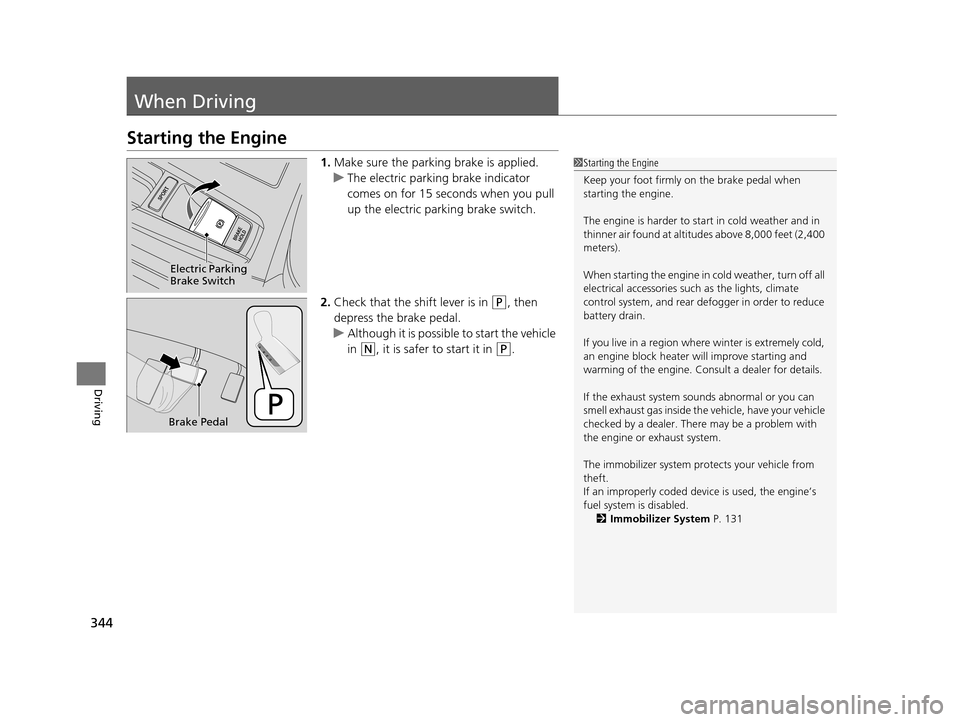
1.Make sure the parking brake is applied.
u The electric parking brake indicator
comes on for 15 seconds when you pull
up the electric parking brake switch.
2. Check that the shift lever is in
(P, then
depress the brake pedal.
u Although it is possibl e to start the vehicle
in
(N, it is safer to start it in (P.
1 Starting the Engine
Keep your foot firmly on the brake pedal when
starting the engine.
The engine is harder to st art in cold weather and in
thinner air found at altitudes above 8,000 feet (2,400
meters).
When starting the engine in cold weather, turn off all
electrical accessories such as the lights, climate
control system, and rear de fogger in order to reduce
battery drain.
If you live in a region where winter is extremely cold,
an engine block heater will improve starting and
warming of the engine. Cons ult a dealer for details.
If the exhaust system sounds abnormal or you can
smell exhaust gas inside the vehicle, have your vehicle
checked by a dealer. There may be a problem with
the engine or exhaust system.
The immobilizer system pr otects your vehicle from
theft.
If an improperly c oded device is used, the engine’s
fuel system is disabled.
2 Immobilizer System P. 131
Electric Parking
Brake Switch
Brake Pedal
17 ACURA RLX-31TY26300.book 344 ページ 2016年6月17日 金曜日 午前8時12分
Page 347 of 557
uuWhen Driving uStarting the Engine
346
Driving
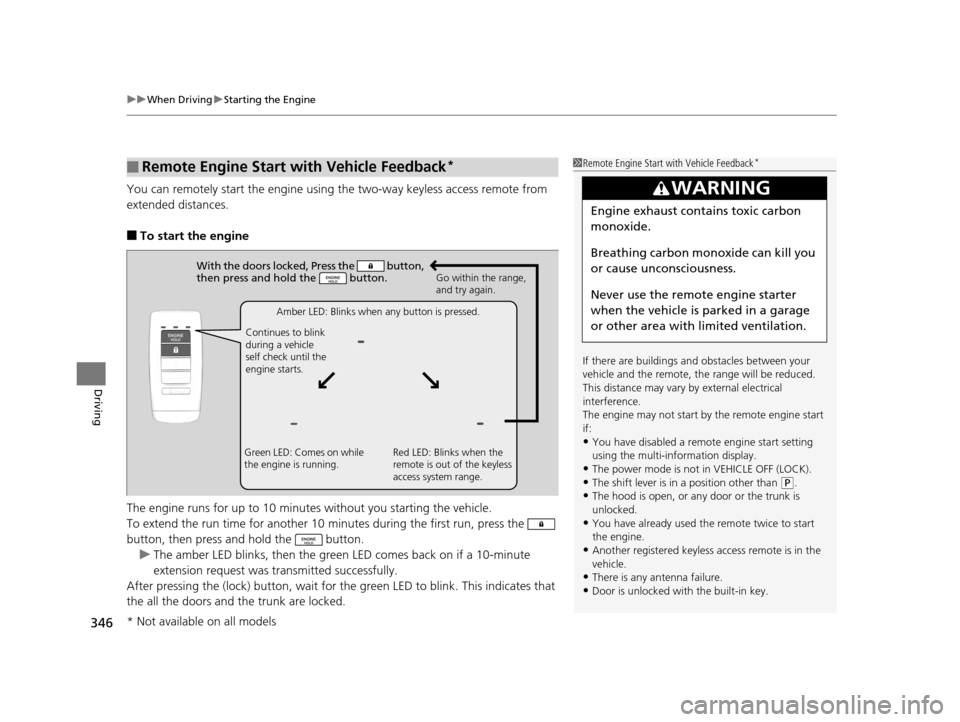
You can remotely start the engine using the two-way keyless access remote from
extended distances.
■To start the engine
The engine runs for up to 10 minu tes without you starting the vehicle.
To extend the run time for another 10 minutes during the first run, press the
button, then press and hold the button. u The amber LED blinks, then the green LED comes back on if a 10-minute
extension request was tra nsmitted successfully.
After pressing the (lock) button, wait for th e green LED to blink. This indicates that
the all the doors and the trunk are locked.
■Remote Engine Start with Vehicle Feedback*1 Remote Engine Start with Vehicle Feedback*
If there are buildings an d obstacles between your
vehicle and the remote, th e range will be reduced.
This distance may vary by external electrical
interference.
The engine may not start by the remote engine start
if:
•You have disabled a remo te engine start setting
using the multi-information display.
•The power mode is not in VEHICLE OFF (LOCK).
•The shift lever is in a position other than ( P.
•The hood is open, or any door or the trunk is
unlocked.
•You have already used the remote twice to start
the engine.
•Another registered keyless access remote is in the
vehicle.
•There is any antenna failure.•Door is unlocked with the built-in key.
3WARNING
Engine exhaust contains toxic carbon
monoxide.
Breathing carbon monoxide can kill you
or cause unconsciousness.
Never use the remote engine starter
when the vehicle is parked in a garage
or other area with limited ventilation.
With the doors locked, Press the button,
then press and hold the button.
Amber LED: Blinks when any button is pressed.
Continues to blink
during a vehicle
self check until the
engine starts. Go within the range,
and try again.
Green LED: Comes on while
the engine is running. Red LED: Blinks when the
remote is out of the keyless
access system range.
* Not available on all models
17 ACURA RLX-31TY26300.book 346 ページ 2016年6月17日 金曜日 午前8時12分