fuel pressure Acura RLX 2017 Owner's Manual
[x] Cancel search | Manufacturer: ACURA, Model Year: 2017, Model line: RLX, Model: Acura RLX 2017Pages: 557, PDF Size: 37.97 MB
Page 11 of 557
10
Quick Reference Guide
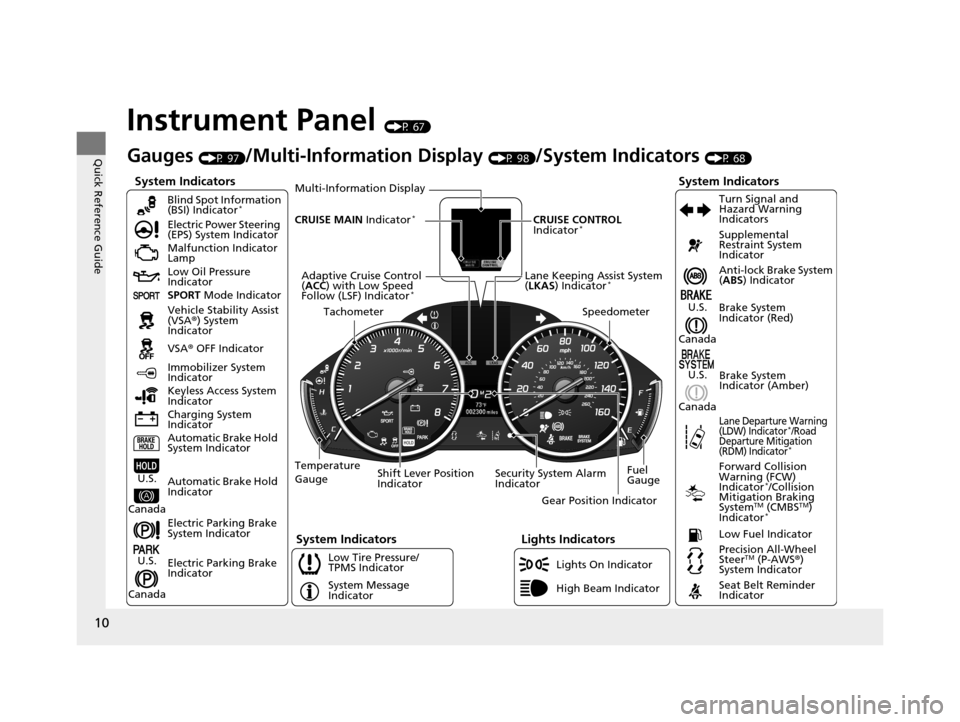
Instrument Panel (P 67)
System Indicators
Malfunction Indicator
Lamp
Low Oil Pressure
Indicator
Charging System
IndicatorAnti-lock Brake System
(
ABS ) Indicator
Vehicle Stability Assist
(VSA ®) System
Indicator
VSA ® OFF Indicator
Electric Power Steering
(EPS) System Indicator
Lights Indicators
Lights On Indicator
High Beam Indicator
Immobilizer System
Indicator
Seat Belt Reminder
Indicator
System Indicators
System Message
IndicatorBrake System
Indicator (Red) Supplemental
Restraint System
Indicator
Low Fuel Indicator
Gauges (P 97)/Multi-Information Display (P 98)/System Indicators (P 68)
Low Tire Pressure/
TPMS Indicator Turn Signal and
Hazard Warning
Indicators
Keyless Access System
Indicator
Temperature
Gauge Security System Alarm
IndicatorFuel
Gauge
Tachometer
Multi-Information Display
Speedometer
Shift Lever Position
Indicator Gear Position Indicator
Electric Parking Brake
System Indicator
Electric Parking Brake
Indicator Automatic Brake Hold
System Indicator Brake System
Indicator (Amber)
SPORT
Mode Indicator
Blind Spot Information
(BSI) Indicator
*
System Indicators
Forward Collision
Warning (FCW)
Indicator
*/Collision
Mitigation Braking
System
TM (CMBSTM)
Indicator*
Precision All-Wheel
SteerTM (P-AWS ®)
System Indicator
Lane Departure Warning
(LDW) Indicator*/Road
Departure Mitigation
(RDM) Indicator
*
Lane Keeping Assist System
( LKAS ) Indicator*Adaptive Cruise Control
(ACC ) with Low Speed
Follow (LSF) Indicator
*
Automatic Brake Hold
IndicatorU.S.
Canada
U.S.
Canada
U.S.
Canada
U.S.
Canada
CRUISE MAIN Indicator*CRUISE CONTROL
Indicator*
17 ACURA RLX-31TY26300.book 10 ページ 2016年6月17日 金曜日 午前8時12分
Page 19 of 557
18
Quick Reference Guide
VSA® OFF Button (P 394)
● The vehicle stability assist (VSA® ) system
helps stabilize the vehicle during
cornering, and helps maintain traction
while accelerating on loose or slippery
road surfaces.
● VSA ® comes on automatically every time
you start the engine.
● To turn VSA ® on or off, press and hold
the button until you hear a beep.
Cruise Control* (P 356)
● Cruise control allows you to maintain a
set speed without keeping your foot on
the accelerator pedal.
● To use cruise control, press the CRUISE
button, then press the RES/+/SET/– switch
down once you have achieved the desired
speed (above 25 mph or 40 km/h).
Collision Mitigation
Braking System
TM (CMBSTM)
OFF Button
* (P 412)
● When a possible collision is likely
unavoidable, the CMBS
TM can help you to
reduce the vehicle sp eed and the severity
of the collision.
● To turn the CMBS
TM on or off, press and
hold the button until you hear a beep.
Tire Pressure Monitoring
System (TPMS)
(P 398)
● The TPMS monitors tire pressure.
● The TPMS is turned on automatically
every time you start the engine.
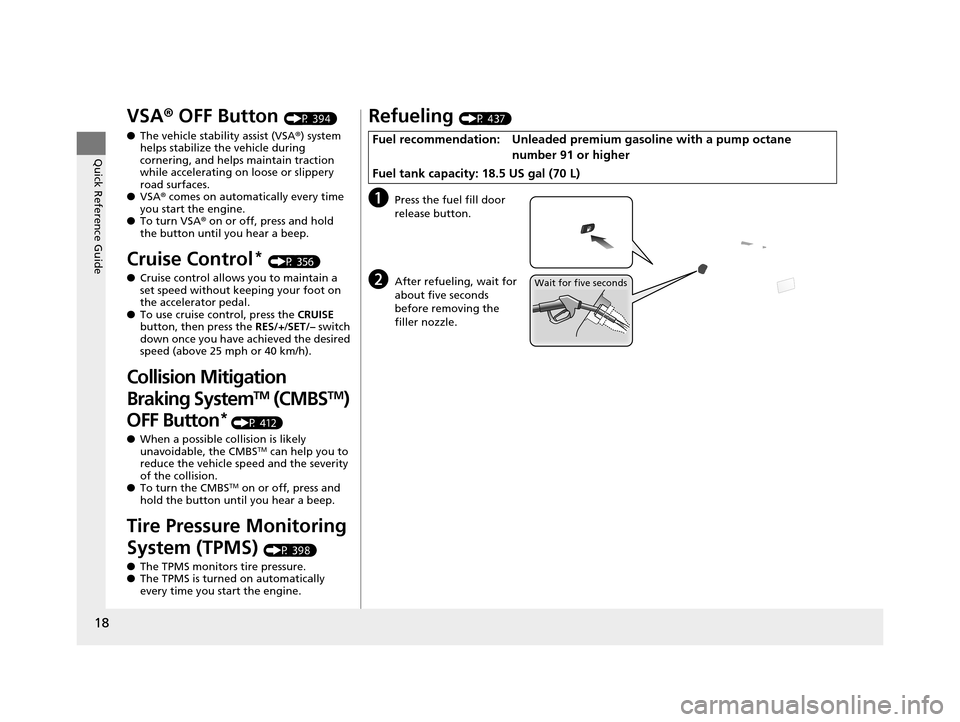
Refueling (P 437)
aPress the fuel fill door
release button.
bAfter refueling, wait for
about five seconds
before removing the
filler nozzle.
Fuel recommendation: Unleaded premiu m gasoline with a pump octane
number 91 or higher
Fuel tank capacity: 18.5 US gal (70 L)
Wait for five seconds
17 ACURA RLX-31TY26300.book 18 ページ 2016年6月17日 金曜日 午前8時12分
Page 99 of 557
98
uuGauges and Multi-Information Display uMulti-Information Display
Instrument Panel
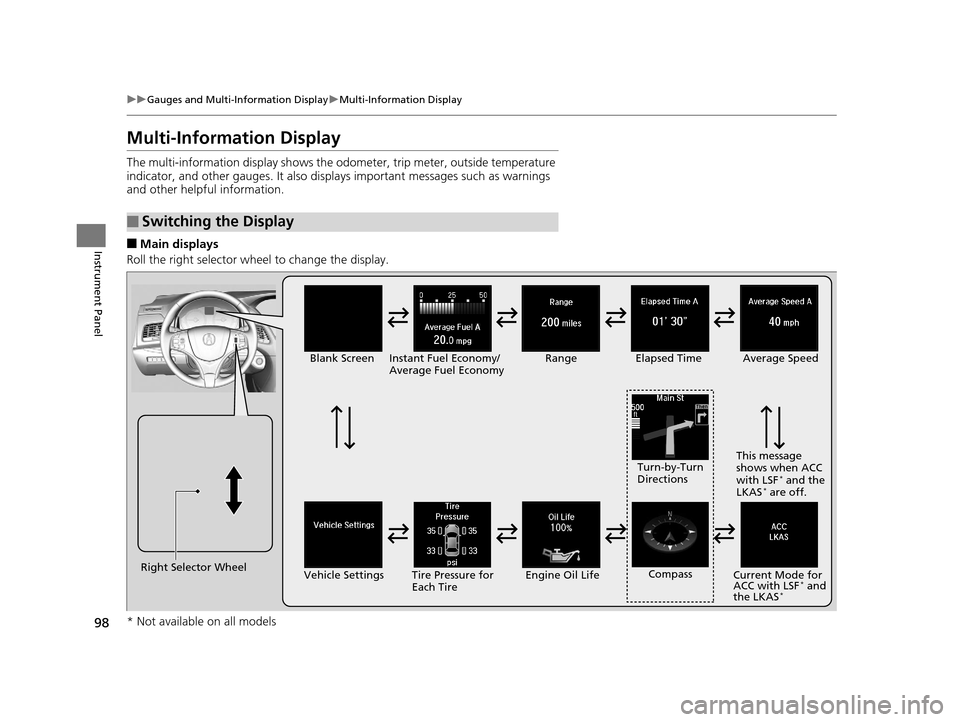
Multi-Information Display
The multi-information display shows the od ometer, trip meter, outside temperature
indicator, and other gauges. It also disp lays important messages such as warnings
and other helpful information.
■Main displays
Roll the right selector wheel to change the display.
■Switching the Display
Right Selector Wheel Engine Oil Life
Vehicle Settings Elapsed Time
Blank Screen
Average Speed
Range
Instant Fuel Economy/
Average Fuel Economy
Turn-by-Turn
Directions
Tire Pressure for
Each Tire Current Mode for
ACC with LSF
* and
the LKAS*
Compass This message
shows when ACC
with LSF
* and the
LKAS* are off.
* Not available on all models
17 ACURA RLX-31TY26300.book 98 ページ 2016年6月17日 金曜日 午前8時12分
Page 338 of 557
337
Driving
This chapter discusses driving, refueling, and information on items such as accessories.
Before Driving
Driving Preparation .......................... 338
Maximum Load Limit........................ 341
Towing a Trailer Towing Your Vehicle ........................ 343
When Driving
Starting the Engine .......................... 344
Precautions While Driving................. 349
Automatic Transmission ................... 350
Shifting ............................................ 351
SPORT Mode.................................... 355
Cruise Control
*................................ 356
Front Sensor Camera*...................... 359
Adaptive Cruise Control (ACC) with Low Speed Follow (LSF)
*........................ 361 Forward Collision Warning (FCW) .... 375
Lane Departure Warning (LDW) ....... 378
Road Departure Mitigation (RDM) System*... 382Lane Keeping Assist System (LKAS)*.... 386Vehicle Stability Assist (VSA®), aka Electronic
Stability Control (ESC), System ............... 393
Agile Handling Assist ....................... 395
Precision All-Wheel SteerTM (P-AWS ®)
System ........................................... 395
Blind Spot Information (BSI) System*.... 396Tire Pressure Monitoring System (TPMS) ... 398Tire Pressure Monitoring System (TPMS) -
Required Federal Explanation ............. 400
Braking Brake System ....................................... 402
Anti-lock Brake System (ABS) ............... 407 Brake Assist System .............................. 408
Collision Mitigation Braking SystemTM (CMBSTM)*.....409Parking Your Vehicle
When Stopped ..................................... 417
Parking Sensor System
*........................ 418
Cross Traffic Monitor*.......................... 422
Multi-View Rear Camera*..................... 426
Surround View Camera System*.......... 427
Refueling Fuel Information ................................... 437
How to Refuel ...................................... 438
Fuel Economy and CO
2 Emissions ......... 439
Improving Fuel Economy and Reducing CO2
Emissions............................................ 439
* Not available on all models
17 ACURA RLX-31TY26300.book 337 ページ 2016年6月17日 金曜日 午前8時12分
Page 401 of 557
400
uuWhen Driving uTire Pressure Monitoring System (TPMS) - Required Federal Explanation
Driving
Tire Pressure Monitoring System (TPMS) - Required
Federal Explanation
Each tire, including the spare (i f provided), should be checked
monthly when cold and inflated to the inflation pressure
recommended by the vehicle manufacturer on the vehicle placard
or tire inflation pressure label.
(If your vehicle has tires of a different size than the size indicated
on the vehicle placard or tire infl ation pressure label, you should
determine the proper tire inflat ion pressure for those tires.)
As an added safety feature, your vehicle has been equipped with
a tire pressure monitoring system (TPMS) that illuminates a low
tire pressure telltale
when one or more of your tire s is significantly under-inflated.
Accordingly, when the low tire pr essure telltale illuminates, you
should stop and check your tires as soon as possible, and inflate
them to the proper pressure.
Driving on a significantly under-in flated tire causes the tire to
overheat and can lead to tire fail ure. Under-inflation also reduces
fuel efficiency and tire tread li fe, and may affect the vehicle’s
handling and stopping ability.
17 ACURA RLX-31TY26300.book 400 ページ 2016年6月17日 金曜日 午前8時12分
Page 440 of 557
439
Driving
Fuel Economy and CO2 Emissions
Improving Fuel Economy and Reducing CO2 Emissions
Achieving fuel economy and reducing CO2 emissions is dependent on several
factors, including driving conditions, load weight, idling time, driving habits, and
vehicle condition. Depending on these and other factors, you may not achieve the
rated fuel economy of this vehicle.
You can optimize your fuel economy with proper maintenance of your vehicle.
Always maintain your vehicle in accord ance with the messages displayed on the
multi-information display.
• Use the recommended viscosit y engine oil, displaying the API Certification Seal.
• Maintain the specified tire pressure.
• Do not load the vehicle with excess cargo.
• Keep your vehicle clean. A buildup of snow or mud on your vehicle’s underside
adds weight and increases wind resistance.
■Maintenance and Fuel Economy
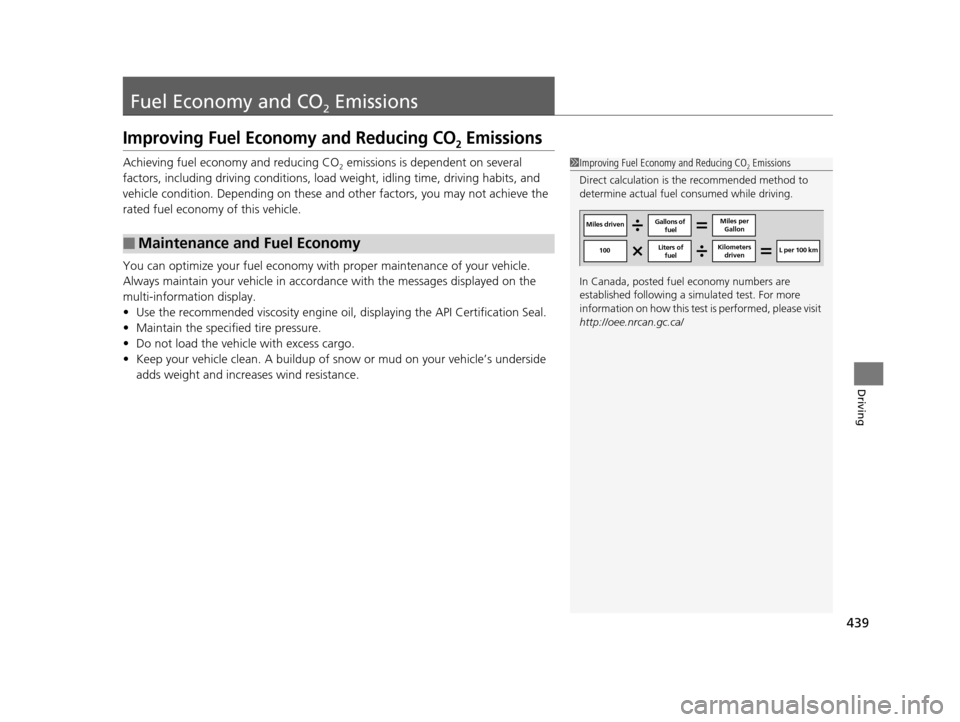
1Improving Fuel Economy and Reducing CO2 Emissions
Direct calculation is the recommended method to
determine actual fuel consumed while driving.
In Canada, posted fuel economy numbers are
established following a simulated test. For more
information on how this test is performed, please visit
http://oee.nrcan.gc.ca/
Miles driven Gallons of
fuel Miles per
Gallon
100 L per 100 km
Liters of
fuel Kilometers
driven
17 ACURA RLX-31TY26300.book 439 ページ 2016年6月17日 金曜日 午前8時12分
Page 443 of 557
442
Maintenance
Before Performing Maintenance
Inspection and Maintenance
For your safety, perform all listed inspections and maintenance to keep your vehicle
in good condition. If you become aware of any abnormality (noise, smell, insufficient
brake fluid, oil residue on the ground, etc.), have your vehicle inspected by a dealer.
(Note, however, that service at a dealer is not mandatory to keep your warranties in
effect.)
■Daily inspections
Perform inspections before long distance trips, when washing the vehicle, or when
refueling.
■Periodic inspections
• Check the brake fluid level monthly.
2 Brake Fluid P. 461
•Check the tire pressure monthly. Examin e the tread for wear and foreign objects.
2Checking and Maintaining Tires P. 471
•Check the operation of the exterior lights monthly.
2 Replacing Light Bulbs P. 462
•Check the condition of the wiper bl ades at least every six months.
2Checking and Maintaining Wiper Blades P. 468
■Types of Inspection and Maintenance
1Inspection and Maintenance
Maintenance, replacement, or repair of
emissions control devices and systems may be
done by any automotive repair establishment or
individuals using parts that are “certified” to
EPA standards.
According to state and fede ral regulations, failure to
perform maintenance on the maintenance main
items marked with # will not void your emissions
warranties. However, all maintenance services should
be performed in accordan ce with the intervals
indicated by the mult i-information display.
2 Maintenance Service Items P. 448
If you want to perform complex maintenance tasks
that require more skills a nd tools, you can purchase a
subscription to the Service Express website at
www.techinfo.honda.com .
2 Authorized Manuals P. 541
If you want to perform ma intenance yourself, make
sure that you have the necessary tools and skills first.
After performing ma intenance, update the records in
the separate maintenance booklet.
U.S. models
17 ACURA RLX-31TY26300.book 442 ページ 2016年6月17日 金曜日 午前8時12分
Page 472 of 557
471
Maintenance
Checking and Maintaining Tires
Checking Tires
To safely operate your vehicle, your tires must be of the proper type and size, in
good condition with adequate tread, and properly inflated.
■Inflation guidelines
Properly inflated tires provid e the best combination of hand ling, tread life, and comfort.
Refer to the driver’s doorjamb label or spec ification’s page for the specified pressure.
Underinflated tires wear unev enly, adversely affect handling and fuel economy, and
are more likely to fail from overheating.
Overinflated tires make your vehicle ride ha rshly, are more prone to road hazards,
and wear unevenly.
Every day before you drive, look at each of the tires. If one looks lower than the
others, check the pressure with a tire gauge.
At least once a month or before long trips, use a gauge to measure the pressure in all
tires. Even tires in good condition can lose 1 to 2 psi (10 to 20 kPa, 0.1 to 0.2 kgf/cm
2)
per month.
■Inspection guidelines
Every time you check inflation, also examine the tires and valve stems.
Look for:
• Bumps or bulges on the side or in the tr ead. Replace the tire if you find any cuts,
splits, or cracks in the side of the tire . Replace it if you see fabric or cord.
• Remove any foreign objects and inspect for air leaks.
• Uneven tread wear. Have a deal er check the wheel alignment.
• Excessive tread wear.
2 Wear Indicators P. 476
•Cracks or other damage around valve stem.
1Checking Tires
Measure the air pressure when tires are cold. This
means the vehicle has been parked for at least three
hours, or driven less than 1 mile (1.6 km). If
necessary, add or releas e air until the specified
pressure is reached.
If checked when hot, tire pressure can be as much as
4 – 6 psi (30 – 40 kPa, 0.3 – 0.4 kgf/cm
2) higher than
if checked when cold.
Have a dealer check the tires if you feel a consistent
vibration while driving. Ne w tires and any that have
been removed and reinst alled should be properly
balanced.
Measure the spare tire pressure once a month or
before long trips.
3WARNING
Using tires that are excessively worn or
improperly inflated can cause a crash in
which you can be seriously hurt or killed.
Follow all instruction s in this owner’s
manual regarding tire inflation and
maintenance.
Vehicles with optional spare tire kit
17 ACURA RLX-31TY26300.book 471 ページ 2016年6月17日 金曜日 午前8時12分
Page 487 of 557
486
uuCleaning uExterior Care
Maintenance
Exterior Care
Dust off the vehicle body after you drive.
Regularly inspect your vehi cle for scratches on painted surfaces. A scratch on a
painted surface can result in body rust. If you find a scratch, promptly repair it.
Wash the vehicle regularly. Wash more frequently when driving in the following
conditions:
• If driving on roads with road salt.
• If driving in coastal areas.
• If tar, soot, bird droppings, insects, or tree sap are stuck to painted surfaces.
• Make sure to follow the instructions indicated on the automated car wash.
• Fold in the door mirrors.
• Turn off the automatic intermittent wipers
*.
• Keep sufficient distance between the cleaning nozzl e and the vehicle body.
• Take particular care around the windows. Standing too close may cause water to
enter the vehicle interior.
• Do not spray high pressure water directly into the engine compartment. Instead,
use low pressure water and a mild detergent.
A good coat of automotive body wax helps protect your vehicle’s paint from the
elements. Wax will wear off over time and expose your vehicle’s paint to the
elements, so reapply as necessary.
■Washing the Vehicle
■Using an Automated Car Wash
■Using High Pressure Cleaners
■Applying Wax
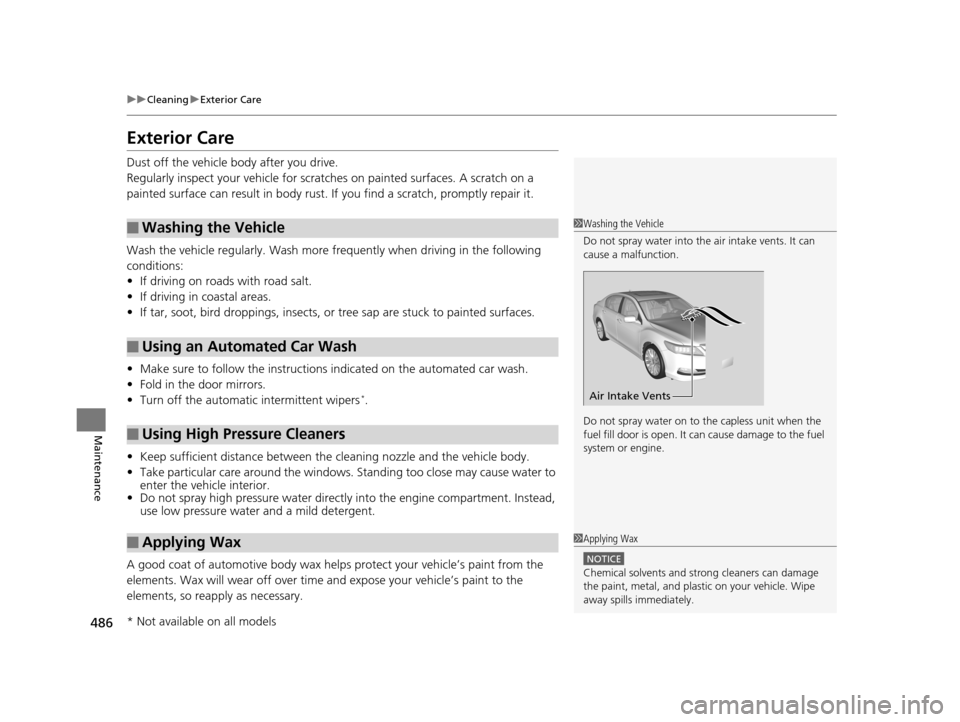
1 Washing the Vehicle
Do not spray water into the air intake vents. It can
cause a malfunction.
Do not spray water on to the capless unit when the
fuel fill door is open. It ca n cause damage to the fuel
system or engine.
Air Intake Vents
1 Applying Wax
NOTICE
Chemical solvents and st rong cleaners can damage
the paint, metal, and plasti c on your vehicle. Wipe
away spills immediately.
* Not available on all models
17 ACURA RLX-31TY26300.book 486 ページ 2016年6月17日 金曜日 午前8時12分
Page 490 of 557
489
Handling the Unexpected
This chapter explains how to handle unexpected troubles.
ToolsTypes of Tools .................................. 490
If a Tire Goes Flat Temporarily Repairi ng a Flat Tire....... 491
Changing a Flat Tire ......................... 503
Engine Does Not Start Checking the Engine ........................ 509
If the Keyless Access Remote Battery is Weak ............................................. 510
Emergency Engine Stop ................... 511
Jump Starting .................................... 512
Shift Lever Does Not Move .............. 515
Overheating How to Handle Overheating ............. 516 Indicator, Coming On/Blinking
If the Low Oil Pressure Indicator Comes
On ............................................. 518
If the Charging System Indicator Comes
On ................................................. 518
If the Malfunction Indicator Lamp Comes On or Blinks ................................... 519
If the Brake System Indicator (Red) Comes On .. 519
If the Electric Power Steering (EPS) System Indicator Comes On .............................. 520
If the Electric Parking Brake System Indicator Comes On............................................. 520
If the Low Tire Pressure/TPMS Indicator Comes On or Blinks ....................... 521
Fuses Fuse Locations ................................. 522
Inspecting and Changing Fuses ........ 526
Emergency Towing ........................... 527
When You Cannot Unlock the Fuel Fill Door ................................................. 528
When You Cannot Open the Trunk ..... 529
Refueling
Refueling From a Portable Fuel Container ... 530
17 ACURA RLX-31TY26300.book 489 ページ 2016年6月17日 金曜日 午前8時12分