park assist Acura RLX 2017 Quick Guide
[x] Cancel search | Manufacturer: ACURA, Model Year: 2017, Model line: RLX, Model: Acura RLX 2017Pages: 73, PDF Size: 7.37 MB
Page 4 of 73
| 1
V
ISUAL
I
NDEX
INDEX
VOICE COMMAND
INDEX
CLIENT
INFORMATION
SPECIFICATIONS
MAINTENANCE
HANDLING THE UNEXPECTED
DRIVING
NAVIGATION
TABLE OF
CONTENTS
VISUAL INDEX
SAFETY
INFORMATION
INSTRUMENT PANEL
VEHICLE
CONTROLS
AUDIO AND
CONNECTIVITY
BLUETOOTH®
HANDSFREELINK®
ACURALINK®
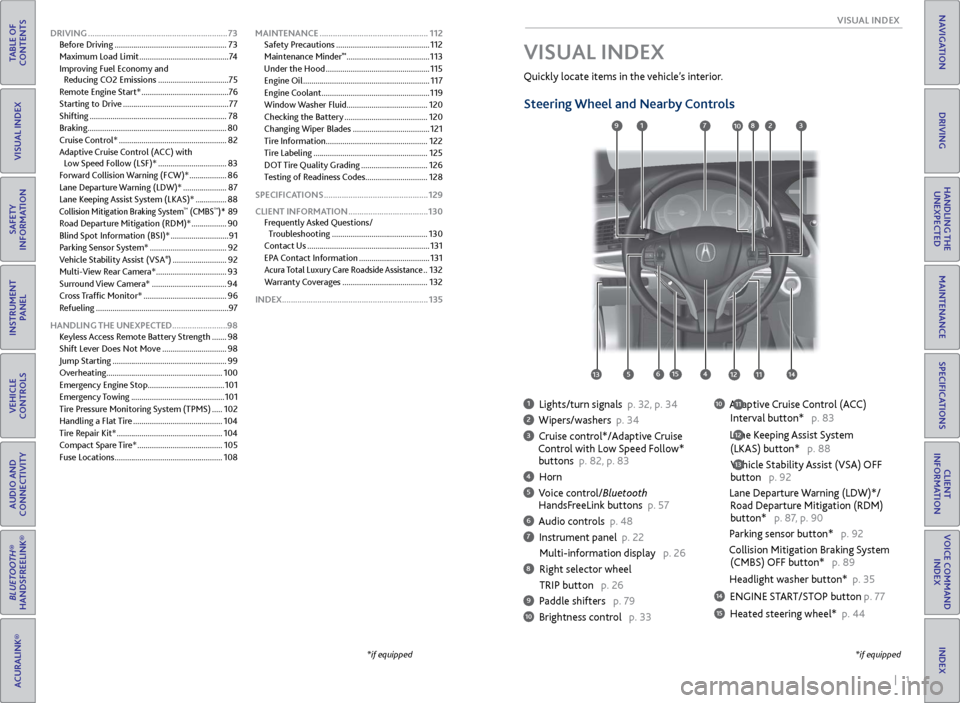
1 Lights/turn signals p. 32, p. 34
2 Wipers/washers p. 34
3 Cruise control*/Adaptive Cruise
Control with Low Speed Follow*
buttons p. 82, p. 83
4 Horn
5 Voice control/Bluetooth HandsF reeLink buttons p. 57
6 Audio controls p. 48
7 Instrument panel p. 22
Multi-information
display p. 26
8 Right selector wheel
TRIP button
p. 26
9 Paddle shifters p. 79
10 Brightness control p. 33
Quickly locate items in the vehicle’s interior.
Steering Wheel and Nearby Controls
10 Adaptive Cruise Control (ACC)
Interval button*
p. 83
Lane Keeping Assist System
(LKAS) button*
p. 88
Vehicle Stability Assist (VSA) OFF
button
p. 92
Lane Departure Warning (LDW)*/
R
oad Departure Mitigation (RDM)
button*
p. 87, p. 90
Parking sensor button* p. 92
Collision Mitigation Braking System
(CMBS)
OFF button* p. 89
Headlight washer button* p. 35
14 ENGINE START/STOP button p. 77
15 Heated steering wheel* p. 44
VISUAL INDEX
*if equipped
12
*if equipped
11
13
127
4
8
135615
9310
111214
DRIVING ............................................................... 73
Befor e Driving ...................................................... 73
Maximum Load Limit
........................................... 74
Improving Fuel Economy and Reducing CO2 Emissions
..................................75
Remote Engine Start*
..........................................76
Starting to Drive
................................................... 77
Shifting
.................................................................. 78
Braking
................................................................... 80
Cruise Control*
.................................................... 82
Adaptive Cruise Control (ACC)
with
Low Speed Follow (LSF)*
.................................83
Forward Collision Warning (FCW)*
..................86
Lane Departure Warning (LDW)*
.....................87
Lane Keeping Assist System (LKAS)*
...............88
Collision Mitigation Braking System™ (CMBS™)* 89
R
oad Departure Mitigation (RDM)*
................. 90
Blind Spot Information (BSI)*
............................ 91
Parking Sensor System*
..................................... 92
Vehicle Stability Assist (VSA
®) .......................... 92
Multi-
View Rear Camera*
.................................. 93
Surround View Camera*
.................................... 94
Cross Traffic Monitor*
........................................ 96
Refueling
................................................................ 97
HANDLING THE UNEXPECTED .........................98
Keyless Access Remote Battery Strength
.......98
Shift Lever Does Not Move
............................... 98
Jump Starting
....................................................... 99
Overheating........................................................ 100
Emergency Engine Stop
..................................... 101
Emergency Towing
............................................. 101
Tire Pressure Monitoring System (TPMS)
.....102
Handling a Flat Tire
........................................... 104
Tire Repair Kit*
................................................... 104
Compact Spare Tire*
......................................... 105
Fuse Locations
.................................................... 108MAINTENANCE
.................................................
112
Safety Precautions .............................................
112
Maintenance Minder
™ ........................................ 113
Under the
Hood
.................................................. 115
Engine Oil
............................................................. 117
Engine Coolant
.................................................... 119
Window Washer Fluid ....................................... 120
Checking the Battery
........................................ 120
Changing Wiper Blades
..................................... 121
Tire Information
................................................. 122
Tire Labeling
....................................................... 125
DOT Tire Quality Grading
................................ 126
Testing of Readiness Codes .............................. 128
SPECIFICATIONS
............................................... 129
CLIENT INFORMATION
.................................... 130
Frequently Asked Questions/ Troubleshooting
.............................................. 130
Contact Us
........................................................... 131
EPA Contact Information
.................................. 131
Acura Total Luxury Care Roadside Assistance ..132
Warranty Coverages
......................................... 132
INDEX.................................................................. 135
Page 6 of 73
4 || 5
S AFETY
S
AFETY
TABLE OF
CONTENTS
INDEX
VISUAL INDEX
VOICE COMMAND INDEX
SAFETY
INFORMATION
CLIENT
INFORMATION
INSTRUMENT PANEL
SPECIFICATIONS
VEHICLE
CONTROLS
MAINTENANCE
AUDIO AND
CONNECTIVITY
HANDLING THE UNEXPECTED
BLUETOOTH®
HANDSFREELINK®
DRIVING
ACURALINK®
NAVIGATION
Carbon Monoxide Gas
The engine exhaust from this vehicle contains carbon monoxide, a colorless,
odorless, and highly toxic gas. As long as you properly maintain your vehicle and
follow the instructions set forth below, you will not accumulate dangerous levels
of carbon monoxide gas in the vehicle interior.
Have the exhaust system inspected for leaks whenever:
•
The exhaust system is making an unusual noise.
•
The exhaust system may hav
e been damaged.
•
The
vehicle is raised for an oil change.
When you operate a vehicle with the trunk open, airflow can pull exhaust gas into
the interior and create a hazardous condition. If you must drive with the trunk
open, open all the windows and set the climate control system as shown below.
1.
Select
the fresh air mode.
2.
Select the mode.
3.
Set the
fan speed to high.
4.
Set
the temperature control to a comfortable setting.
A
djust the climate control system in the same manner if you sit in your parked
vehicle with the engine running.
Carbon monoxide gas is toxic. Breathing it can cause unconsciousness and
even kill you.
Avoid any enclosed areas or activities that expose you to carbon monoxide.
WARNING
An enclosed area such as a garage can quickly fill up with carbon monoxide gas.
Do not run the engine with the garage door closed. Even when the garage door is
open, drive out of the garage immediately after starting the engine.
Seat Belts
A seat belt is your best protection in all types of collisions. Airbags are designed to
supplement seat belts, not replace them. So even though your vehicle is equipped
with airbags, make sure you and your passengers always wear your seat belts and
wear them properly.
Lap/Shoulder Seat BeltsAll five seating positions are equipped with lap/shoulder seat belts with
emergency locking retractors. In normal driving, the retractor lets you move
freely while keeping some tension on the belt. During a collision or sudden stop,
the retractor locks to restrain your body. The front passenger’s and rear seat belts
also have a lockable retractor for use with child seats.
The front seats are equipped with automatic seat belt tensioners to enhance
safety. The tensioners automatically tighten the front seat belts during a
moderate-to-severe front collision, sometimes even if the collision is not severe
enough to inflate the front airbags or the driver’s knee airbag.
Seat belt e-pretensioners* are motor-powered and start to retract the front seat
belts when the CMBS*, brake assist system, or VSA system is in operation. They
may also activate when you steer the vehicle hard, or the vehicle is impacted.
After retracting, the seat belts are slackened to their original positions.
Proper Use of Seat BeltsFollow these guidelines for proper use:
•
All
occupants should sit upright, well back in the seat, and remain in that
position for the duration of the trip. Slouching and leaning reduces the
effectiveness of the belt and can increase the chance of serious injury in a crash.
•
Nev
er place the shoulder part of a lap/shoulder seat belt under your arm or
behind your back. This could cause very serious injuries in a crash.
•
T
wo people should never use the same seat belt. If they do, they could be very
seriously injured in a crash.
•
Do not put an
y accessories on the seat belts. Devices intended to improve
comfort or reposition the shoulder part of a seat belt can reduce the protective
capability and increase the chance of serious injury in a crash.
•
No
one should sit in a seat with an inoperative seat belt or one that does not
appear to be working correctly. Using a seat belt that is not working properly
may not protect the occupant in a crash. Have a dealer check the belt as soon
as possible.
*if equipped
Page 15 of 73
22 || 23
I NSTRUMENT P
ANELI
NSTRUMENT P
ANEL
TABLE OF
CONTENTS
INDEX
VISUAL INDEX
VOICE COMMAND INDEX
SAFETY
INFORMATION
CLIENT
INFORMATION
INSTRUMENT PANEL
SPECIFICATIONS
VEHICLE
CONTROLS
MAINTENANCE
AUDIO AND
CONNECTIVITY
HANDLING THE UNEXPECTED
BLUETOOTH®
HANDSFREELINK®
DRIVING
ACURALINK®
NAVIGATION
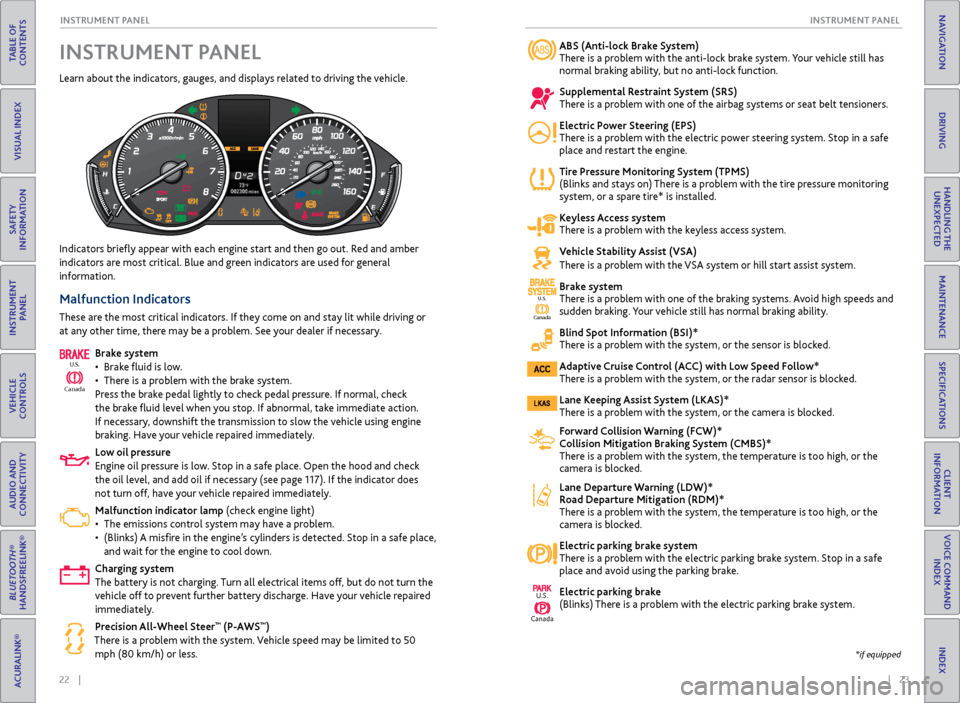
ABS (Anti-lock Brake System)
There is a problem with the anti-lock brake system. Your vehicle still has
normal braking ability, but no anti-lock function.
Supplemental Restraint System (SRS)
There is a problem with one of the airbag systems or seat belt tensioners.
Electric Power Steering (EPS)
There is a problem with the electric power steering system. Stop in a safe
place and restart the engine.
Tire Pressure Monitoring System (TPMS)
(Blinks and stays on) There is a problem with the tire pressure monitoring
system, or a spare tire* is installed.
Keyless Access system
There is a problem with the keyless access system.
Vehicle Stability Assist (VSA)
There is a problem with the VSA system or hill start assist system.
Brake system
There is a problem with one of the braking systems. Avoid high speeds and
sudden braking.
Your vehicle still has normal braking ability.
Blind Spot Information (BSI)*
There is a problem with the system, or the sensor is blocked.
Adaptive Cruise Control (ACC) with Low Speed Follow*
There is a problem with the system, or the radar sensor is blocked.
Lane Keeping Assist System (LKAS)*
There is a problem with the system, or the camera is blocked.
Forward Collision Warning (FCW)*
Collision Mitigation Braking System (CMBS)*
There is a problem with the system, the temperature is too high, or the
camera is blocked.
Lane Departure Warning (LDW)*
Road Departure Mitigation (RDM)*
There is a problem with the system, the temperature is too high, or the
camera is block
ed.
Electric parking brake system
There is a problem with the electric parking brake system. Stop in a safe
place and av
oid using the parking brake.
Electric parking brake
(Blinks) There is a problem with the electric parking brake system.
Indicators briefly appear with each engine start and then go out. Red and amber
indicators are most critical. Blue and green indicators are used for general
information.
Malfunction Indicators
These are the most critical indicators. If they come on and stay lit while driving or
at any other time, there may be a problem. See your dealer if necessary.
Brake system
•
Brak
e fluid is low.
•
Ther
e is a problem with the brake system.
Press the brake pedal lightly to check pedal pressure. If normal, check
the brake fluid level when you stop. If abnormal, take immediate action.
If necessary, downshift the transmission to slow the vehicle using engine
braking. Have your vehicle repaired immediately.
Low oil pressure
Engine oil pressure is low. Stop in a safe place. Open the hood and check
the oil level, and add oil if necessary (see page 117). If the indicator does
not turn off, have your vehicle repaired immediately.
Malfunction indicator lamp (check engine light)
•
The emissions contr
ol system may have a problem.
•
(Blinks)
A misfire in the engine’s cylinders is detected. Stop in a safe place,
and wait for the engine to cool down.
Charging system
The battery is not charging. Turn all electrical items off, but do not turn the
vehicle off to prevent further battery discharge. Have your vehicle repaired
immediately.
Precision All-Wheel Steer
™ (P-AWS™)
There is a problem with the system. Vehicle speed may be limited to 50 mph (80 km/h) or less.
Ca nada
U.S.
INSTRUMENT PANEL
Learn about the indicators, gauges, and displays related to driving the vehicle.
Canada
U.S.
U.S.
Canada
*if equipped
Page 36 of 73
64 || 65
TABLE OF
CONTENTS
INDEX
VISUAL INDEX
VOICE COMMAND INDEX
SAFETY
INFORMATION
CLIENT
INFORMATION
INSTRUMENT PANEL
SPECIFICATIONS
VEHICLE
CONTROLS
MAINTENANCE
AUDIO AND
CONNECTIVITY
HANDLING THE UNEXPECTED
BLUETOOTH®
HANDSFREELINK®
DRIVING
ACURALINK®
NAVIGATION
Subscription Features
A subscription-based service that provides convenient features, such as collision
notification, emergency assistance, online security, and important messages about
your vehicle. Requires enrollment and privacy agreement. To subscribe or get more
information, contact a dealer or visit owners.acura.com (U.S.) or www.myacura.ca
(Canada).
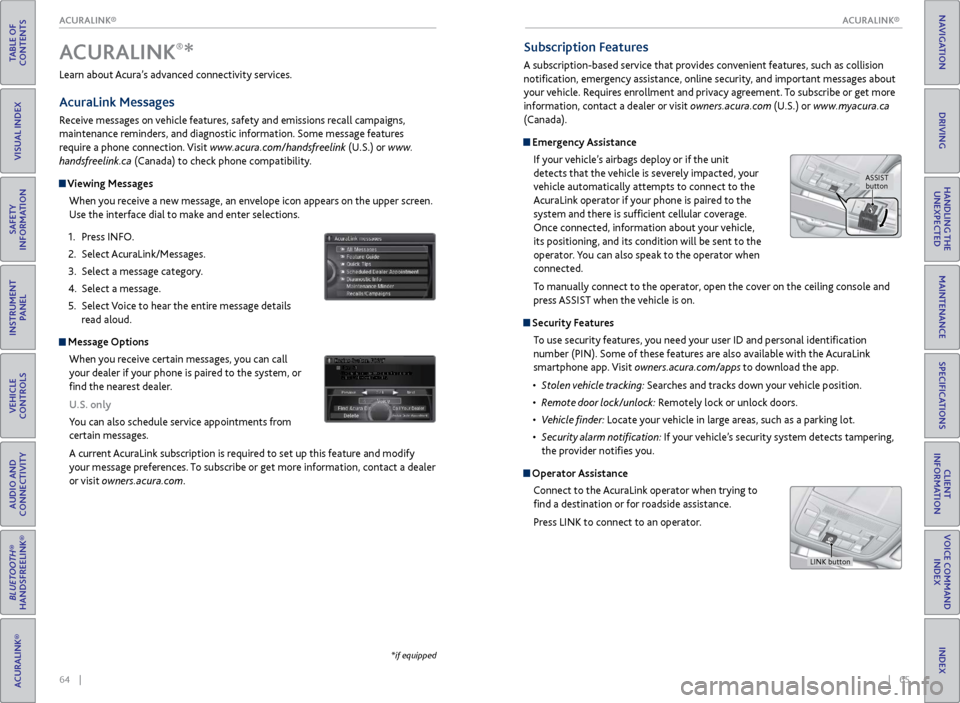
Emergency Assistance
If your vehicle’s airbags deploy or if the unit
detects that the vehicle is severely impacted, your
vehicle automatically attempts to connect to the
AcuraLink operator if your phone is paired to the
system and there is sufficient cellular coverage.
Once connected, information about your vehicle,
its positioning, and its condition will be sent to the
operator. You can also speak to the operator when
connected.
To manually connect to the operator, open the cover on the ceiling console and
press ASSIST when the vehicle is on.
Security Features
To use security features, you need your user ID and personal identification
number (PIN). Some of these features are also available with the AcuraLink
smartphone app. Visit owners.acura.com/apps to download the app.
•
S
tolen vehicle tracking: Searches and tracks down your vehicle position.
•
R
emote door lock/unlock: Remotely lock or unlock doors.
•
V
ehicle finder: Locate your vehicle in large areas, such as a parking lot.
•
S
ecurity alarm notification: If your vehicle’s security system detects tampering,
the provider notifies you.
Operator Assistance
Connect to the AcuraLink operator when trying to
find a destination or for roadside assistance.
Press LINK to connect to an operator.
Learn about Acura’s advanced connectivity services.
AcuraLink Messages
Receive messages on vehicle features, safety and emissions recall campaigns,
maintenance reminders, and diagnostic information. Some message features
require a phone connection. Visit www.acura.com/handsfreelink (U.S.) or
www.
handsfreelink.ca (Canada) to check phone compatibility.
Viewing Messages
When you receive a new message, an envelope icon appears on the upper screen.
Use the interface dial to make and enter selections.
1.
Pr
ess INFO.
2.
Select A
curaLink/Messages.
3.
Select a message category
.
4.
Select a message.
5.
Select
Voice to hear the entire message details
read aloud.
Message Options
When you receive certain messages, you can call
your dealer if your phone is paired to the system, or
find the nearest dealer.
U.S. only
You can also schedule service appointments from
certain messages.
A current AcuraLink subscription is required to set up this feature and modify
your message preferences. To subscribe or get more information, contact a dealer
or visit owners.acura.com.
Dec. 31, 2011
ACURALINK®*
*if equipped
ASSIST
button
LINK button
ACURALINK®
ACURALINK®
Page 44 of 73
80 || 81
DRIVING
DRIVING
TABLE OF
CONTENTS
INDEX
VISUAL INDEX
VOICE COMMAND INDEX
SAFETY
INFORMATION
CLIENT
INFORMATION
INSTRUMENT PANEL
SPECIFICATIONS
VEHICLE
CONTROLS
MAINTENANCE
AUDIO AND
CONNECTIVITY
HANDLING THE UNEXPECTED
BLUETOOTH®
HANDSFREELINK®
DRIVING
ACURALINK®
NAVIGATION
Braking
Slow down or stop your vehicle, and keep it from moving when parked.
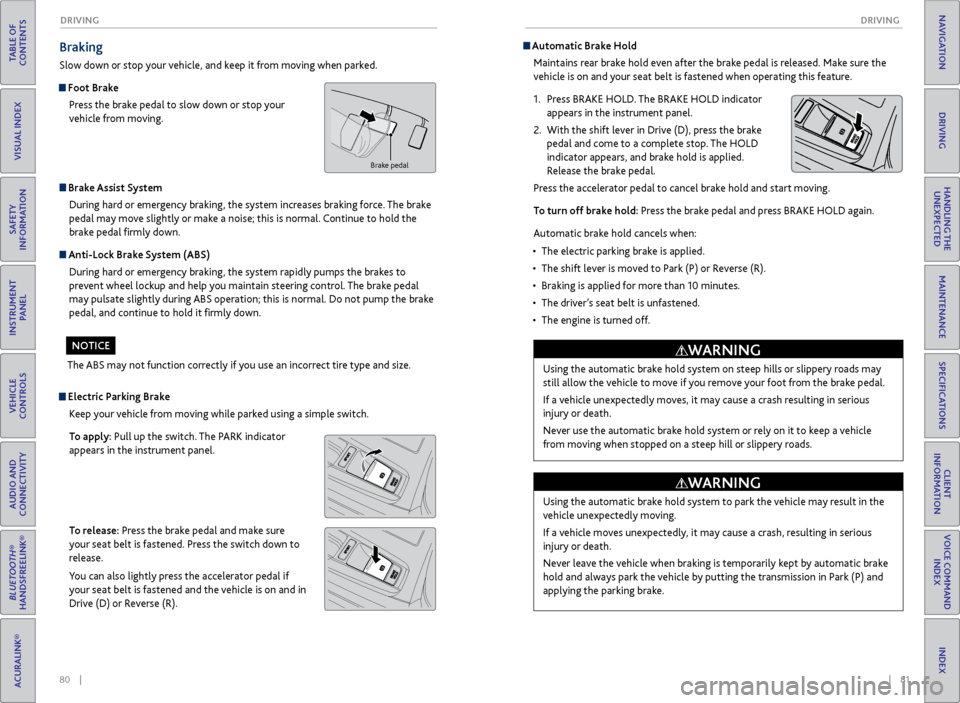
Foot Brake
Press the brake pedal to slow down or stop your
vehicle from moving.
Brake Assist System During hard or emergency braking, the system increases braking force. The brake
pedal may move slightly or make a noise; this is normal. Continue to hold the
brake pedal firmly down.
Anti-Lock Brake System (ABS) During hard or emergency braking, the system rapidly pumps the brakes to
prevent wheel lockup and help you maintain steering control. The brake pedal
may pulsate slightly during ABS operation; this is normal. Do not pump the brake
pedal, and continue to hold it firmly down.
The ABS may not function correctly if you use an incorrect tire type and size.
NOTICE
Electric Parking Brake Keep your vehicle from moving while parked using a simple switch.
To apply: Pull up the switch. The PARK indicator
appears in the instrument panel.
To release: Press the brake pedal and make sure
your seat belt is fastened. Press the switch down to
release.
You can also lightly press the accelerator pedal if
your seat belt is fastened and the vehicle is on and in
Drive (D) or Reverse (R).
Automatic Brake HoldMaintains rear brake hold even after the brake pedal is released. Make sure the
vehicle is on and your seat belt is fastened when operating this feature.
1.
Pr
ess BRAKE HOLD. The BRAKE HOLD indicator
appears in the instrument panel.
2.
With
the shift lever in Drive (D), press the brake
pedal and come to a complete stop. The HOLD
indicator appears, and brake hold is applied.
Release the brake pedal.
Press the accelerator pedal to cancel brake hold and start moving.
To turn off brake hold: Press the brake pedal and press BRAKE HOLD again.
Automatic brake hold cancels when:
•
The electric parking brak
e is applied.
•
The shift lev
er is moved to Park (P) or Reverse (R).
•
Braking is applied
for more than 10 minutes.
•
The
driver’s seat belt is unfastened.
•
The
engine is turned off.
Brake pedal
Using the automatic brake hold system on steep hills or slippery roads may
still allow the vehicle to move if you remove your foot from the brake pedal.
If a vehicle unexpectedly moves, it may cause a crash resulting in serious
injury or death.
Never use the automatic brake hold system or rely on it to keep a vehicle
from moving when stopped on a steep hill or slippery roads.
WARNING
Using the automatic brake hold system to park the vehicle may result in the
vehicle unexpectedly moving.
If a vehicle moves unexpectedly, it may cause a crash, resulting in serious
injury or death.
Never leave the vehicle when braking is temporarily kept by automatic brake
hold and always park the vehicle by putting the transmission in Park (P) and
applying the parking brake.
WARNING
Page 47 of 73
86 || 87
DRIVING
DRIVING
TABLE OF
CONTENTS
INDEX
VISUAL INDEX
VOICE COMMAND INDEX
SAFETY
INFORMATION
CLIENT
INFORMATION
INSTRUMENT PANEL
SPECIFICATIONS
VEHICLE
CONTROLS
MAINTENANCE
AUDIO AND
CONNECTIVITY
HANDLING THE UNEXPECTED
BLUETOOTH®
HANDSFREELINK®
DRIVING
ACURALINK®
NAVIGATION
Forward Collision Warning (FCW)*
Alerts you if the system determines the possibility of your vehicle colliding with a
vehicle detected in front of you when your vehicle speed is 10 mph (15 km/h) or
higher.
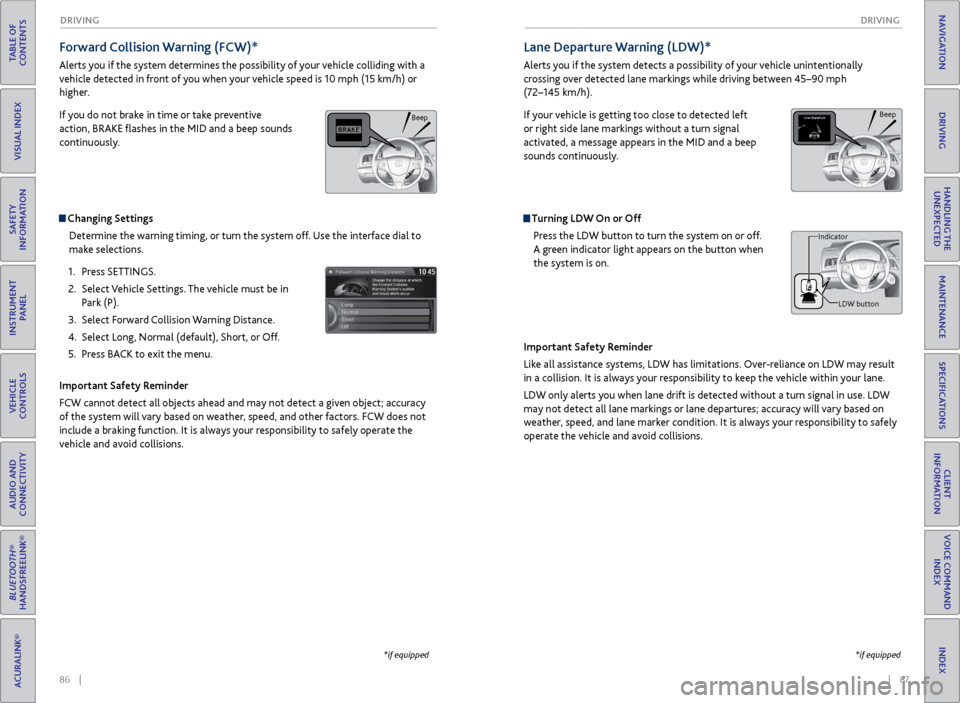
If you do not brake in time or take preventive
action, BRAKE flashes in the MID and a beep sounds
continuously.
Changing Settings
Determine the warning timing, or turn the system off. Use the interface dial to
make selections.
1.
Pr
ess SETTINGS.
2.
Select
Vehicle Settings. The vehicle must be in
Park (P).
3.
Select F
orward Collision Warning Distance.
4.
Select Long
, Normal (default), Short, or Off.
5.
Pr
ess BACK to exit the menu.
Important Safety Reminder
FCW cannot detect all objects ahead and may not detect a given object; accuracy
of the system will vary based on weather, speed, and other factors. FCW does not
include a braking function. It is always your responsibility to safely operate the
vehicle and avoid collisions.
*if equipped
Lane Departure Warning (LDW)*
Alerts you if the system detects a possibility of your vehicle unintentionally
crossing over detected lane markings while driving between 45–90 mph
(72–145 km/h).
If your vehicle is getting too close to detected left
or right side lane markings without a turn signal
activated, a message appears in the MID and a beep
sounds continuously.
Turning LDW On or Off Press the LDW button to turn the system on or off.
A green indicator light appears on the button when
the system is on.
Important Safety Reminder
Like all assistance systems, LDW has limitations. Over-reliance on LDW may result
in a collision. It is always your responsibility to keep the vehicle within your lane.
LDW only alerts you when lane drift is detected without a turn signal in use. LDW
may not detect all lane markings or lane departures; accuracy will vary based on
weather, speed, and lane marker condition. It is always your responsibility to safely
operate the vehicle and avoid collisions.
Beep
LDW button
Indicator
*if equipped
Beep
Page 49 of 73
90 || 91
DRIVING
DRIVING
TABLE OF
CONTENTS
INDEX
VISUAL INDEX
VOICE COMMAND INDEX
SAFETY
INFORMATION
CLIENT
INFORMATION
INSTRUMENT PANEL
SPECIFICATIONS
VEHICLE
CONTROLS
MAINTENANCE
AUDIO AND
CONNECTIVITY
HANDLING THE UNEXPECTED
BLUETOOTH®
HANDSFREELINK®
DRIVING
ACURALINK®
NAVIGATION
Road Departure Mitigation (RDM)*
Alerts and helps to assist you if the system determines a possibility of your vehicle
unintentionally crossing over detected lane markings while driving between 45–90
mph (72–145 km/h).
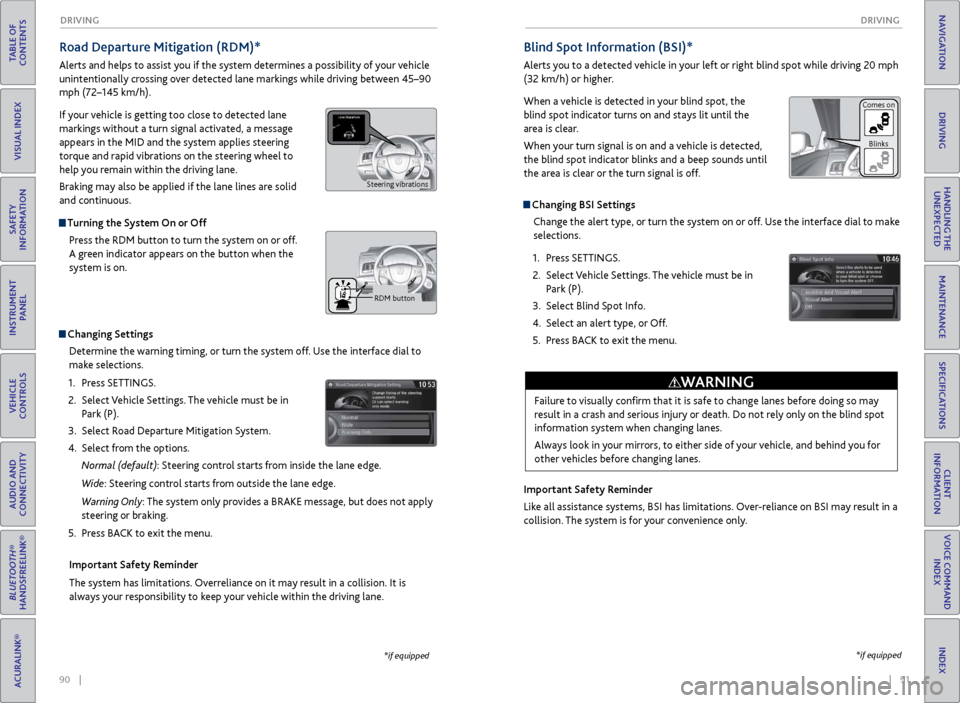
If your vehicle is getting too close to detected lane
markings without a turn signal activated, a message
appears in the MID and the system applies steering
torque and rapid vibrations on the steering wheel to
help you remain within the driving lane.
Braking may also be applied if the lane lines are solid
and continuous.
Turning the System On or Off
Press the RDM button to turn the system on or off.
A green indicator appears on the button when the
system is on.
Indicator
Changing SettingsDetermine the warning timing, or turn the system off. Use the interface dial to
make selections.
1.
Pr
ess SETTINGS.
2.
Select
Vehicle Settings. The vehicle must be in
Park (P).
3.
Select R
oad Departure Mitigation System.
4.
Select
from the options.
Normal (default): Steering control starts from inside the lane edge.
Wide: Steering control starts from outside the lane edge.
Warning Only: The system only provides a BRAKE message, but does not apply
steering or braking.
5.
Pr
ess BACK to exit the menu.
Important Safety Reminder
The system has limitations. Overreliance on it may result in a collision. It is
always your responsibility to keep your vehicle within the driving lane.
*if equipped
Blind Spot Information (BSI)*
Alerts you to a detected vehicle in your left or right blind spot while driving 20 mph
(32 km/h) or higher.
When a vehicle is detected in your blind spot, the
blind spot indicator turns on and stays lit until the
area is clear.
When your turn signal is on and a vehicle is detected,
the blind spot indicator blinks and a beep sounds until
the area is clear or the turn signal is off.
Changing BSI Settings Change the alert type, or turn the system on or off. Use the interface dial to make
selections.
1.
Pr
ess SETTINGS.
2.
Select
Vehicle Settings. The vehicle must be in
Park (P).
3.
Select Blind
Spot Info.
4.
Select
an alert type, or Off.
5.
Pr
ess BACK to exit the menu.
Important Safety Reminder
Like all assistance systems, BSI has limitations. Over-reliance on BSI may result in a
collision. The system is for your convenience only.
*if equipped
Failure to visually confirm that it is safe to change lanes before doing so may
result in a crash and serious injury or death. Do not rely only on the blind spot
information system when changing lanes.
Always look in your mirrors, to either side of your vehicle, and behind you for
other vehicles before changing lanes.
WARNING
Comes on Blinks
Steering vibrations
RDM button
Page 50 of 73
92 || 93
DRIVING
DRIVING
TABLE OF
CONTENTS
INDEX
VISUAL INDEX
VOICE COMMAND INDEX
SAFETY
INFORMATION
CLIENT
INFORMATION
INSTRUMENT PANEL
SPECIFICATIONS
VEHICLE
CONTROLS
MAINTENANCE
AUDIO AND
CONNECTIVITY
HANDLING THE UNEXPECTED
BLUETOOTH®
HANDSFREELINK®
DRIVING
ACURALINK®
NAVIGATION
Parking Sensor System*
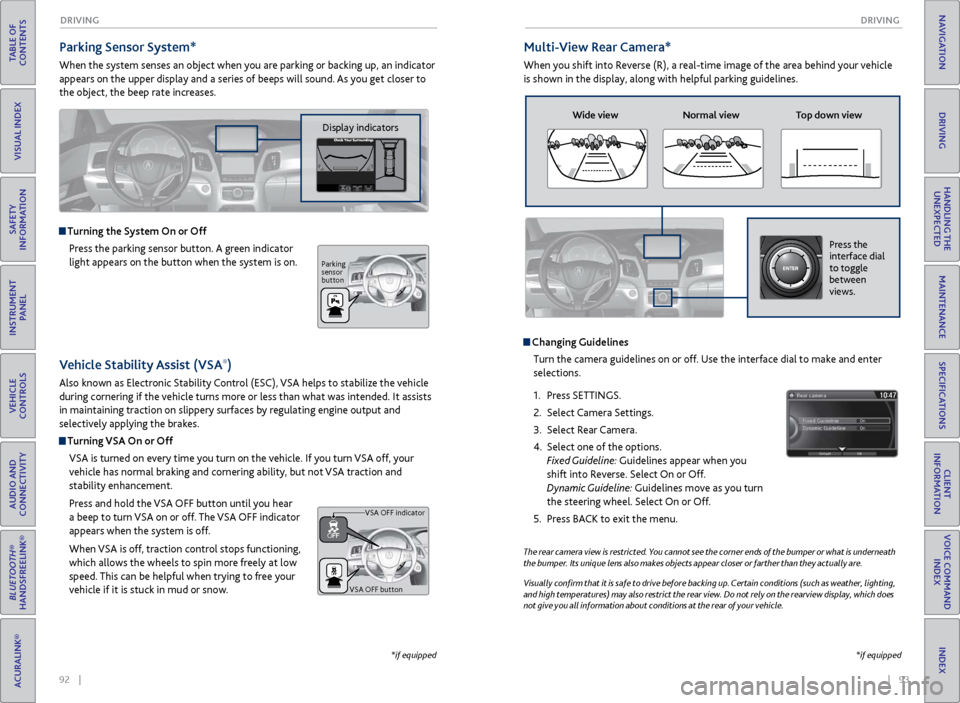
When the system senses an object when you are parking or backing up, an indicator
appears on the upper display and a series of beeps will sound. As you get closer to
the object, the beep rate increases.
Turning the System On or Off
Press the parking sensor button. A green indicator
light appears on the button when the system is on.
*if equipped
Multi-View Rear Camera*
When you shift into Reverse (R), a real-time image of the area behind your vehicle
is shown in the display, along with helpful parking guidelines.
The rear camera view is restricted. You cannot see the corner ends of the bumper or what is underneath
the bumper. Its unique lens also makes objects appear closer or farther than they actually are.
Visually confirm that it is safe to drive before backing up. Certain conditions (such as weather, lighting,
and high temperatures) may also restrict the rear view. Do not rely on the rearview display, which does
not give you all information about conditions at the rear of your vehicle.
Changing GuidelinesTurn the camera guidelines on or off. Use the interface dial to make and enter
selections.
1.
Pr
ess SETTINGS.
2.
Select Camera
Settings.
3.
Select
Rear Camera.
4.
Select one of the options.
Fixed Guideline: Guidelines appear when you
shift into Reverse. Select On or Off.
Dynamic Guideline: Guidelines move as you turn
the steering wheel. Select On or Off.
5.
Pr
ess BACK to exit the menu.
Wide view Normal view Top down view
Press the
interface dial
to toggle
between
views.
*if equipped
Vehicle Stability Assist (VSA®)
Also known as Electronic Stability Control (ESC), VSA helps to stabilize the vehicle
during cornering if the vehicle turns more or less than what was intended. It assists
in maintaining traction on slippery surfaces by regulating engine output and
selectively applying the brakes.
Turning VSA On or Off
VSA is turned on every time you turn on the vehicle. If you turn VSA off, your
vehicle has normal braking and cornering ability, but not VSA traction and
stability enhancement.
Press and hold the VSA
OFF button until
you hear
a beep to turn VSA on or off. The VSA OFF indicator
appears when the system is off.
When VSA is off, traction control stops functioning,
which allows the wheels to spin more freely at low
speed. This can be helpful when trying to free your
vehicle if it is stuck in mud or snow.
VSA OFF button VSA OFF indicator
Display indicators
Parking
sensor
button
Page 53 of 73
98 || 99
HANDLING THE UNEXPECTED
HANDLING THE UNEXPECTED
TABLE OF
CONTENTS
INDEX
VISUAL INDEX
VOICE COMMAND INDEX
SAFETY
INFORMATION
CLIENT
INFORMATION
INSTRUMENT PANEL
SPECIFICATIONS
VEHICLE
CONTROLS
MAINTENANCE
AUDIO AND
CONNECTIVITY
HANDLING THE UNEXPECTED
BLUETOOTH®
HANDSFREELINK®
DRIVING
ACURALINK®
NAVIGATION
HANDLING THE UNEXPECTED
Learn about what to do in critical or emergency situations.
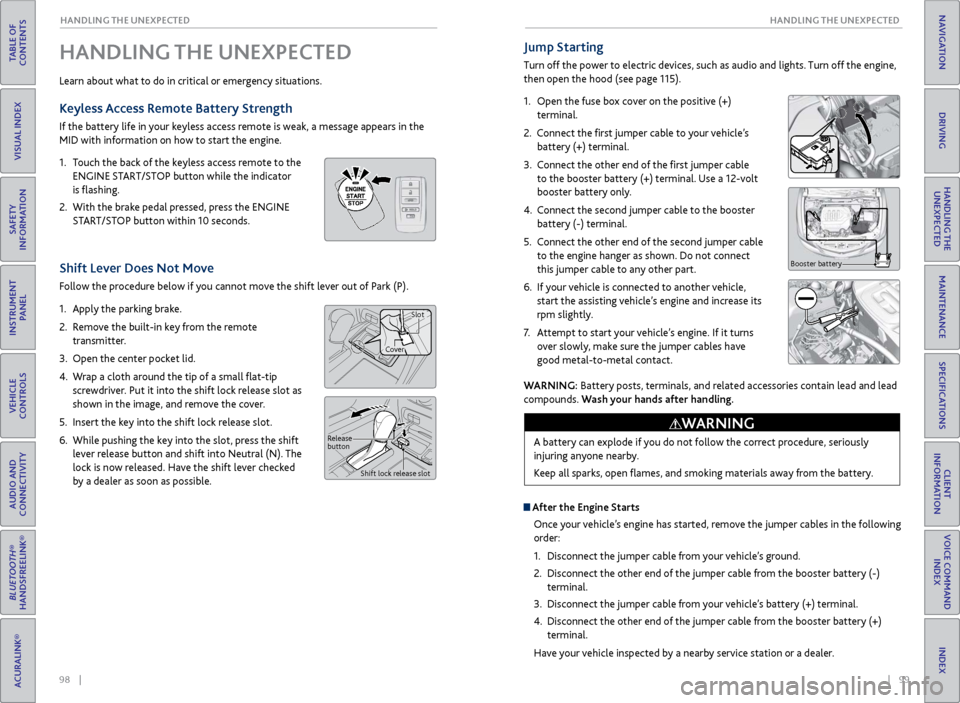
Keyless Access Remote Battery Strength
If the battery life in your keyless access remote is weak, a message appears in the
MID with information on how to start the engine.
1.
T
ouch the back of the keyless access remote to the
ENGINE START/STOP button while the indicator
is flashing.
2.
With
the brake pedal pressed, press the ENGINE
START/STOP button within 10 seconds.
Shift Lever Does Not Move
Follow the procedure below if you cannot move the shift lever out of Park (P).
1.
Appl
y the parking brake.
2.
R
emove the built-in key from the remote
transmitter.
3.
Open
the center pocket lid.
4.
W
rap a cloth around the tip of a small flat-tip
screwdriver. Put it into the shift lock release slot as
shown in the image, and remove the cover.
5.
Insert
the key into the shift lock release slot.
6.
While pushing
the key into the slot, press the shift
lever release button and shift into Neutral (N). The
lock is now released. Have the shift lever checked
by a dealer as soon as possible.
Jump Starting
Turn off the power to electric devices, such as audio and lights. Turn off the engine,
then open the hood (see page 115).
1.
Open the fuse box cover on the positive (+)
terminal.
2.
Connect the first jumper cable to your vehicle’s battery (+) terminal.
3.
C
onnect the other end of the first jumper cable
to the booster battery (+) terminal. Use a 12-volt
booster battery only.
4.
C
onnect the second jumper cable to the booster
battery (-) terminal.
5.
C
onnect the other end of the second jumper cable
to the engine hanger as shown. Do not connect
this jumper cable to any other part.
6.
If
your vehicle is connected to another vehicle,
start the assisting vehicle’s engine and increase its
rpm slightly.
7.
A
ttempt to start your vehicle’s engine. If it turns
over slowly, make sure the jumper cables have
good metal-to-metal contact.
Booster battery
WARNING: Battery posts, terminals, and related accessories contain lead and lead
compounds. Wash your hands after handling.
A battery can explode if you do not follow the correct procedure, seriously
injuring anyone nearby.
Keep all sparks, open flames, and smoking materials away from the battery.
WARNING
Release
button Shift lock release slot
CoverSlot
After the Engine Starts
Once your vehicle’s engine has started, remove the jumper cables in the following
order:
1.
Disconnect
the jumper cable from your vehicle’s ground.
2.
Disconnect
the other end of the jumper cable from the booster battery (-)
terminal.
3.
Disconnect
the jumper cable from your vehicle’s battery (+) terminal.
4.
Disconnect
the other end of the jumper cable from the booster battery (+)
terminal.
Have your vehicle inspected by a nearby service station or a dealer.
Page 54 of 73
100 || 101
HANDLING THE UNEXPECTED
HANDLING THE UNEXPECTED
TABLE OF
CONTENTS
INDEX
VISUAL INDEX
VOICE COMMAND INDEX
SAFETY
INFORMATION
CLIENT
INFORMATION
INSTRUMENT PANEL
SPECIFICATIONS
VEHICLE
CONTROLS
MAINTENANCE
AUDIO AND
CONNECTIVITY
HANDLING THE UNEXPECTED
BLUETOOTH®
HANDSFREELINK®
DRIVING
ACURALINK®
NAVIGATION
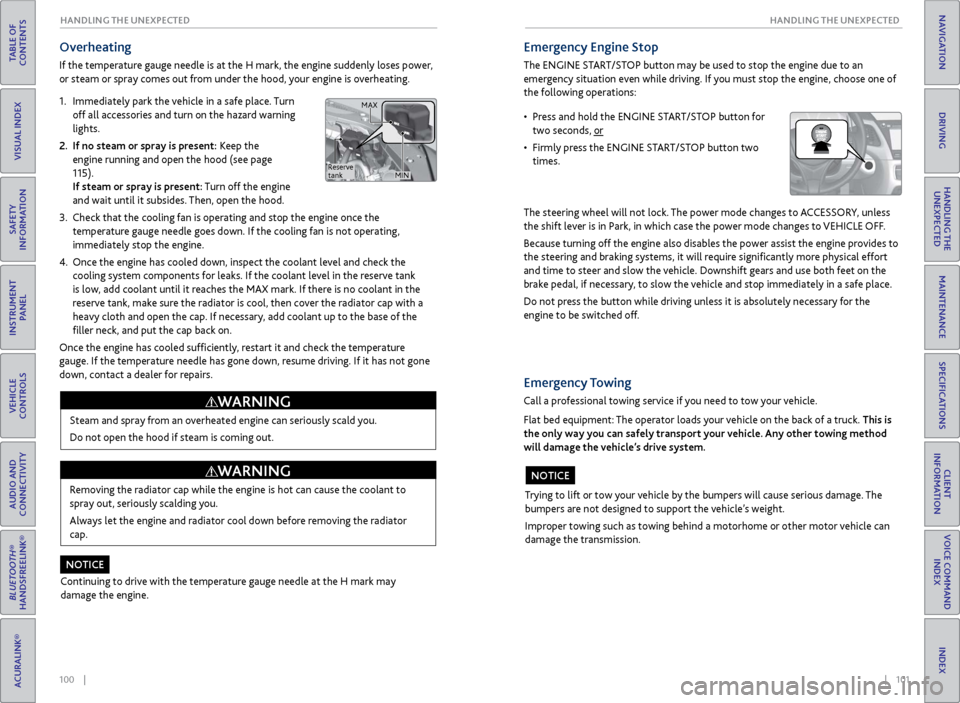
Overheating
If the temperature gauge needle is at the H mark, the engine suddenly loses power,
or steam or spray comes out from under the hood, your engine is overheating.
1.
Immediatel
y park the vehicle in a safe place. Turn
off all accessories and turn on the hazard warning
lights.
2.
If no steam
or spray is present: Keep the
engine running and open the hood (see page
115).
If steam or spray is present: Turn off the engine
and wait until it subsides. Then, open the hood.
3.
Check that the
cooling fan is operating and stop the engine once the
temperature gauge needle goes down. If the cooling fan is not operating,
immediately stop the engine.
4.
Once
the engine has cooled down, inspect the coolant level and check the
cooling system components for leaks. If the coolant level in the reserve tank
is low, add coolant until it reaches the MAX mark. If there is no coolant in the
reserve tank, make sure the radiator is cool, then cover the radiator cap with a
heavy cloth and open the cap. If necessary, add coolant up to the base of the
filler neck, and put the cap back on.
Once the engine has cooled sufficiently, restart it and check the temperature
gauge. If the temperature needle has gone down, resume driving. If it has not gone
down, contact a dealer for repairs.
Steam and spray from an overheated engine can seriously scald you.
Do not open the hood if steam is coming out.
WARNING
Removing the radiator cap while the engine is hot can cause the coolant to
spray out, seriously scalding you.
Always let the engine and radiator cool down before removing the radiator
cap.
WARNING
Continuing to drive with the temperature gauge needle at the H mark may
damage the engine.
NOTICE
Emergency Engine Stop
The ENGINE START/STOP button may be used to stop the engine due to an
emergency situation even while driving. If you must stop the engine, choose one of
the following operations:
The steering wheel will not lock. The power mode changes to ACCESSORY, unless
the shift lever is in Park, in which case the power mode changes to VEHICLE OFF.
Because turning off the engine also disables the power assist the engine provides to
the steering and braking systems, it will require significantly more physical effort
and time to steer and slow the vehicle. Downshift gears and use both feet on the
brake pedal, if necessary, to slow the vehicle and stop immediately in a safe place.
Do not press the button while driving unless it is absolutely necessary for the
engine to be switched off.
• Press and hold the ENGINE START/STOP button for two seconds, or
•
Firml
y press the ENGINE START/STOP button two
times.
Trying to lift or tow your vehicle by the bumpers will cause serious damage. The
bumpers are not designed to support the vehicle’s weight.
Improper towing such as towing behind a motorhome or other motor vehicle can
damage the transmission.
NOTICE
Emergency Towing
Call a professional towing service if you need to tow your vehicle.
Flat bed equipment: The operator loads your vehicle on the back of a truck. This is
the only way you can safely transport your vehicle. Any other towing method
will damage the vehicle’s drive system.
Reserve
tank MAX
MIN