panel Acura RLX Hybrid 2016 Repair Manual
[x] Cancel search | Manufacturer: ACURA, Model Year: 2016, Model line: RLX Hybrid, Model: Acura RLX Hybrid 2016Pages: 577, PDF Size: 30.04 MB
Page 129 of 577

uuGauges and Displays uHead-Up Display
128
Instrument Panel
Consists of two monitoring displays, one that indicates the vehicle’s power flow,
and the other, the torque distribution.
■Power flow monitor
Shows motor and engine power flow, indicating what supplies power to the vehicle,
or if the battery is being charged.
■Power Distribution Monitor
Head-up displayColor of
indicators
Power is
supplied by the
motors and the
engine.Blue
Power is only
supplied by the
motors.Blue
Power is only
supplied by the
engine.Blue
The motors
charge the High
Voltage battery.Green
1 Power Distribution Monitor
The power distribution monito r can be also displayed
on the audio/information display.
2 Audio/Information Screen P. 225
While the vehicle is stat ionary with the engine
running, the following may appear on the display.
Engine Icon
(Engine on)
Power Flow
Indicator
Engine Icon
(Engine off)
Power Flow
Indicator
Engine Icon
(Engine on)
Power Flow
Indicator
Engine Icon
(Engine on)
Power Flow
Indicator
16 ACURA RLX E-AWD-31TY36200.book 128 ページ 2015年3月11日 水曜日 午後1時30分
Page 130 of 577

129
uuGauges and Displays uHead-Up Display
Instrument Panel
■SPORT HYBRID SH-AWD ® torque distribution monitor
The indicators on the displa y show the amount of torque being transferred to each
wheel or regenerative energy being supplied to the High Voltage battery.
2 SPORT HYBRID Super Handling-All Wheel DriveTM (SPORT HYBRID SH-AWD® )
P. 412
Torque Indicator
How much torque is being
transferred is shown in
four scales. The indicators
appear in blue. How much regenerative
braking is being supplied to
the High Voltage battery is
shown in three scales. The
indicators appear in green.
16 ACURA RLX E-AWD-31TY36200.book 129 ページ 2015年3月11日 水曜日 午後1時30分
Page 151 of 577

uuSecurity System uSecurity System Alarm
150
Controls
■Setting the security system alarm
The security system alarm automatically sets when the following conditions have
been met:
• The power mode is set to VEHICLE OFF (LOCK).
• The hood and trunk are closed.
• All doors are locked from outside with the key, remote transmitter or keyless
access system.
■When the security system alarm sets
The security system indicator in the in strument panel blinks. When the blinking
interval changes after about 15 seconds, the security system is set.
■To cancel the security system alarm
The security system is canceled when th e vehicle is unlocked using the remote
transmitter, or you grab any door handle while carrying the keyless access remote,
or the power mode is set to ON. The securi ty system indicator goes off at the same
time.
1 Security System Alarm
Do not set the security system alarm when someone
is in the vehicle or a window is open. The system can
accidentally activate when:
•Unlocking the door with the lock tab.•Opening the trunk with th e trunk release button on
the driver’s door or th e emergency trunk opener.
•Selecting other than (P.•Opening the hood with the hood release.
If the 12-volt battery goes dead after you have set the
security system alarm, the security alarm may go off
once the 12-volt battery is recharged or replaced.
If this occurs, deactivate the security system alarm by
unlocking a door using the remote transmitter or
keyless access system.
Do not attempt to alter th is system or add another
device to it.
16 ACURA RLX E-AWD-31TY36200.book 150 ページ 2015年3月11日 水曜日 午後1時30分
Page 155 of 577
154
Controls
Opening and Closing the Moonroof
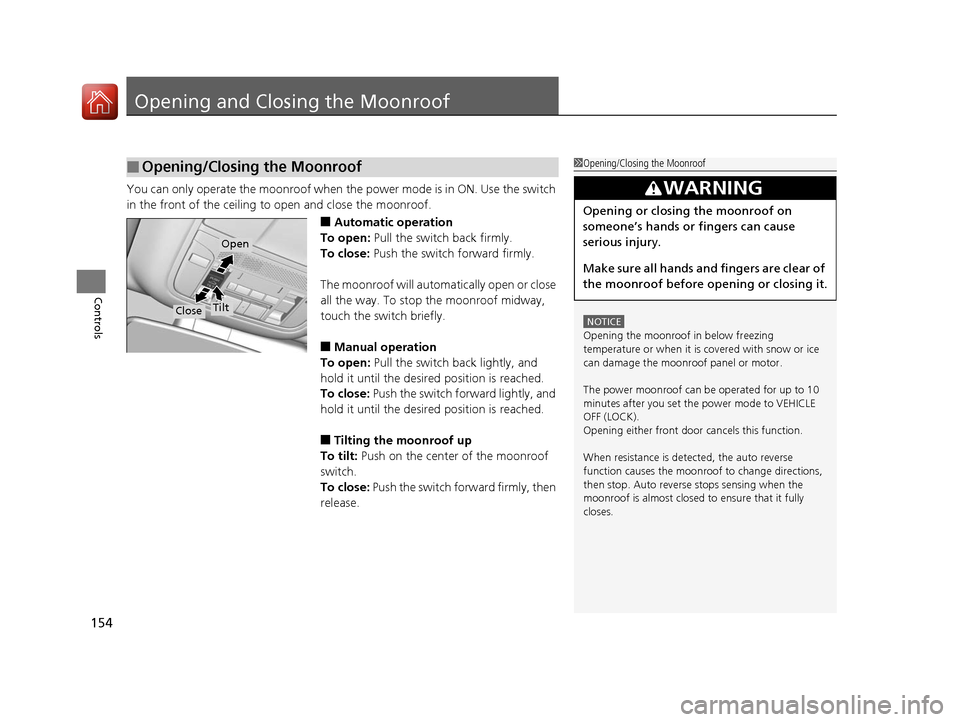
You can only operate the moonroof when the power mode is in ON. Use the switch
in the front of the ceiling to open and close the moonroof.
■Automatic operation
To open: Pull the switch back firmly.
To close: Push the switch forward firmly.
The moonroof will automatically open or close
all the way. To stop the moonroof midway,
touch the switch briefly.
■Manual operation
To open: Pull the switch back lightly, and
hold it until the desired position is reached.
To close: Push the switch forward lightly, and
hold it until the desired position is reached.
■Tilting the moonroof up
To tilt: Push on the center of the moonroof
switch.
To close: Push the switch fo rward firmly, then
release.
■Opening/Closing the Moonroof1 Opening/Closing the Moonroof
NOTICE
Opening the moonroof in below freezing
temperature or when it is covered with snow or ice
can damage the moonr oof panel or motor.
The power moonroof can be operated for up to 10
minutes after you set the power mode to VEHICLE
OFF (LOCK).
Opening either front door cancels this function.
When resistance is detected, the auto reverse
function causes the moonroof to change directions,
then stop. Auto reverse stops sensing when the
moonroof is almost closed to ensure that it fully
closes.
3WARNING
Opening or closing the moonroof on
someone’s hands or fingers can cause
serious injury.
Make sure all hands and fingers are clear of
the moonroof before opening or closing it.
Close
Open
Tilt
16 ACURA RLX E-AWD-31TY36200.book 154 ページ 2015年3月11日 水曜日 午後1時30分
Page 162 of 577
161
uuOperating the Switches Around the Steering Wheel uLight Switches
Controls
The headlights automatically come on when the wipers are used several times within
a certain intervals with the headlight switch in AUTO.
The headlights automatically go off a few mi nutes later if the wipers are stopped.
The headlights, all other exterior lights, and the instrument panel lights turn off 15
seconds after you set the po wer mode to VEHICLE OFF (LOCK), take the remote with
you, and close the driver's door.
If you set the power mode to VEHICLE OFF (LOCK) with the headlight switch on, but
do not open the door, the lights turn off after 10 minutes (three minutes, if the
switch is in the AUTO position).
The lights turn on again when you unlock or open the driver’s door. If you unlock
the door, but do not open it within 15 seconds, the lights go off. If you open the
driver’s door, you will hear a lights on reminder chime.
■Headlight Integration with Wipers*
■Automatic Lighting Off Feature
1 Headlight Integration with Wipers*
This feature activates when the headlights are off in
AUTO .
The instrument panel brightness does not change
when the headlights come on.
At dark ambient light leve ls, the automatic lighting
control feature turns on the headlights, regardless of
the number of wiper sweeps.
1 Automatic Lighting Off Feature
You can change the headli ght auto off timer setting.
2 Customized Features P. 113, 286
* Not available on all models
16 ACURA RLX E-AWD-31TY36200.book 161 ページ 2015年3月11日 水曜日 午後1時30分
Page 167 of 577

166
uuOperating the Switches Around the Steering Wheel uBrightness Control
Controls
Brightness Control
When the power mode is in ON, you can use
the
(+ or (- button to adjust instrument
panel brightness.
To brighten: Press the
(+ button.
To dim: Press the
(- button.
You will hear a beep when the brightness
reaches minimum or maximum. The multi-
information display will return to its original
state several seconds after you adjust the
brightness.
■Brightness level indicator
The brightness level is shown on the multi-
information display while you are adjusting it.
■Adjusting the Instrument Panel Brightness1 Adjusting the Instrument Panel Brightness
Instrument panel brightne ss varies, depending on
whether the exterior lights are on or off. The
instrument panel dims to reduce glare when they are
on.
When it is bright out side and the headlight
integration with the wiper
* is activated, the
instrument panel bri ghtness does not change.
Pushing or rolling the right selector wheel changes to
a different display.
If you press the
( + button until the brightness display
is up to max, the beeper sounds. This cancels the
reduced instrument panel brightness when the
parking lights are on.
The brightness can be set differently for when the
exterior lights are on, and when they are off.
( + Button
(- Button
* Not available on all models
16 ACURA RLX E-AWD-31TY36200.book 166 ページ 2015年3月11日 水曜日 午後1時30分
Page 172 of 577
171
uuOperating the Switches Around the Steering Wheel uAdjusting the Steering Wheel
Controls
Adjusting the Steering Wheel
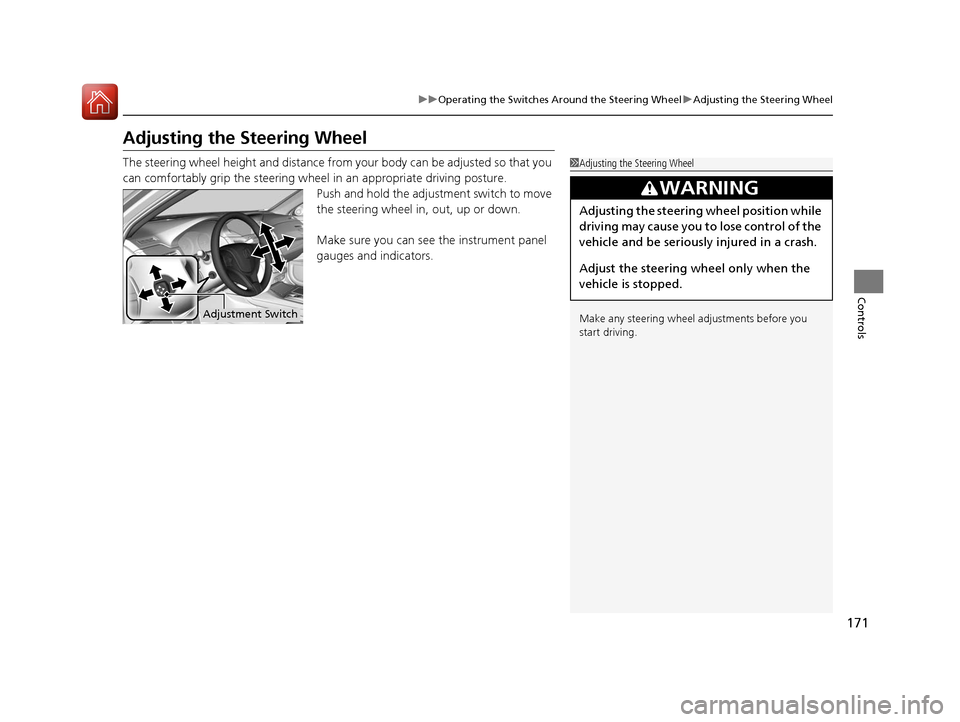
The steering wheel height and distance from your body can be adjusted so that you
can comfortably grip the steering wheel in an appropriate driving posture.
Push and hold the adjustment switch to move
the steering wheel in, out, up or down.
Make sure you can see the instrument panel
gauges and indicators.1 Adjusting the Steering Wheel
Make any steering wheel adjustments before you
start driving.
3WARNING
Adjusting the steering wheel position while
driving may cause you to lose control of the
vehicle and be seriously injured in a crash.
Adjust the steering wheel only when the
vehicle is stopped.
Adjustment Switch
16 ACURA RLX E-AWD-31TY36200.book 171 ページ 2015年3月11日 水曜日 午後1時30分
Page 213 of 577
212
Features
Audio System
About Your Audio System
See the Navigation System Manual for information on the navigation system.
The audio system features AM/FM radio and the SiriusXM ® Radio service. It can also
play audio CDs, WMA/MP3/AAC files, Hard Di sk Drive (HDD) audio, USB flash drives,
and iPod, iPhone and Bluetooth® devices.
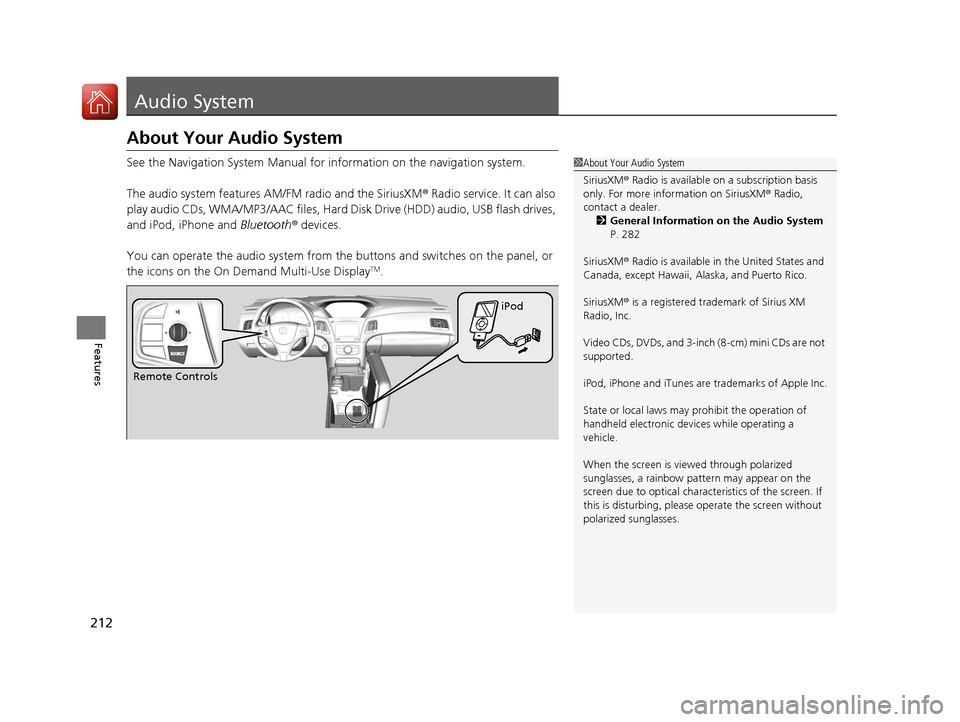
You can operate the audio system from the buttons and switches on the panel, or
the icons on the On Demand Multi-Use Display
TM.
1 About Your Audio System
SiriusXM ® Radio is available on a subscription basis
only. For more information on SiriusXM ® Radio,
contact a dealer.
2 General Information on the Audio System
P. 282
SiriusXM ® Radio is available in the United States and
Canada, except Ha waii, Alaska, and Puerto Rico.
SiriusXM ® is a registered trademark of Sirius XM
Radio, Inc.
Video CDs, DVDs, and 3-inch (8-cm) mini CDs are not
supported.
iPod, iPhone and iTunes are trademarks of Apple Inc.
State or local laws may prohibit the operation of
handheld electronic devices while operating a
vehicle.
When the screen is vi ewed through polarized
sunglasses, a rainbow pa ttern may appear on the
screen due to optical characteristics of the screen. If
this is disturbing, please operate the screen without
polarized sunglasses.
Remote Controls iPod
16 ACURA RLX E-AWD-31TY36200.book 212 ページ 2015年3月11日 水曜日 午後1時30分
Page 225 of 577
uuAudio System Basic Operation uOn Demand Multi-Use DisplayTM
224
Features
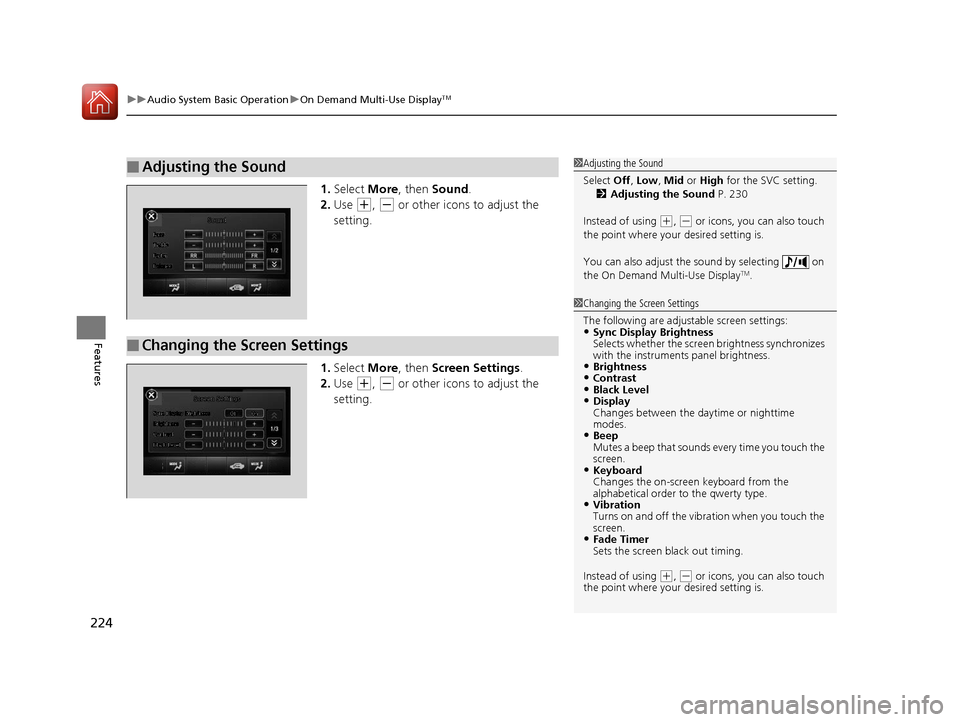
1. Select More, then Sound .
2. Use
(+, (- or other icons to adjust the
setting.
1. Select More, then Screen Settings .
2. Use
(+, (- or other icons to adjust the
setting.
■Adjusting the Sound1 Adjusting the Sound
Select Off, Low , Mid or High for the SVC setting.
2 Adjusting the Sound P. 230
Instead of using
( +, (- or icons, you can also touch
the point where your desired setting is.
You can also adjust the sound by selecting on
the On Demand Multi-Use Display
TM.
■Changing the Screen Settings
1 Changing the Screen Settings
The following are adjustable screen settings:
•Sync Display Brightness
Selects whether the screen brightness synchronizes
with the instruments panel brightness.
•Brightness•Contrast•Black Level•Display
Changes between the da ytime or nighttime
modes.
•Beep
Mutes a beep that sounds every time you touch the
screen.
•Keyboard
Changes the on-screen keyboard from the
alphabetical order to the qwerty type.
•Vibration
Turns on and off the vibration when you touch the
screen.
•Fade Timer
Sets the screen black out timing.
Instead of using
( +, (- or icons, you can also touch
the point where your desired setting is.
16 ACURA RLX E-AWD-31TY36200.book 224 ページ 2015年3月11日 水曜日 午後1時30分
Page 228 of 577

Continued227
uuAudio System Basic Operation uAudio/Information Screen
Features
■Power Distribution Monitor
Consists of two monitoring displays, one that
indicates the vehicle’s power flow, and the
other, the torque distribution.1Power Distribution Monitor
The power distribution moni tor is also displayed on
the head-up display. See Power Distribution
Monitor on P. 128 for details.
While the vehicle is stat ionary with the engine
running, the following may appear on the display.
The High Voltage battery ch arge level gauge shows
the current High Voltage battery charge level.
The amount shown here is the same level as the
gauge amount shown in the instrument panel.
2 High Voltage Battery Charge Level Gauge
P. 107
High Voltage
Battery
Charge Level
Gauge
Engine Icon
Torque
Indicator Torque
Indicator
Power Flow Indicator
16 ACURA RLX E-AWD-31TY36200.book 227 ページ 2015年3月11日 水曜日 午後1時30分