reset Acura RLX Hybrid 2017 Owner's Guide
[x] Cancel search | Manufacturer: ACURA, Model Year: 2017, Model line: RLX Hybrid, Model: Acura RLX Hybrid 2017Pages: 577, PDF Size: 38.63 MB
Page 287 of 577
286
uuCustomized Features u
Features
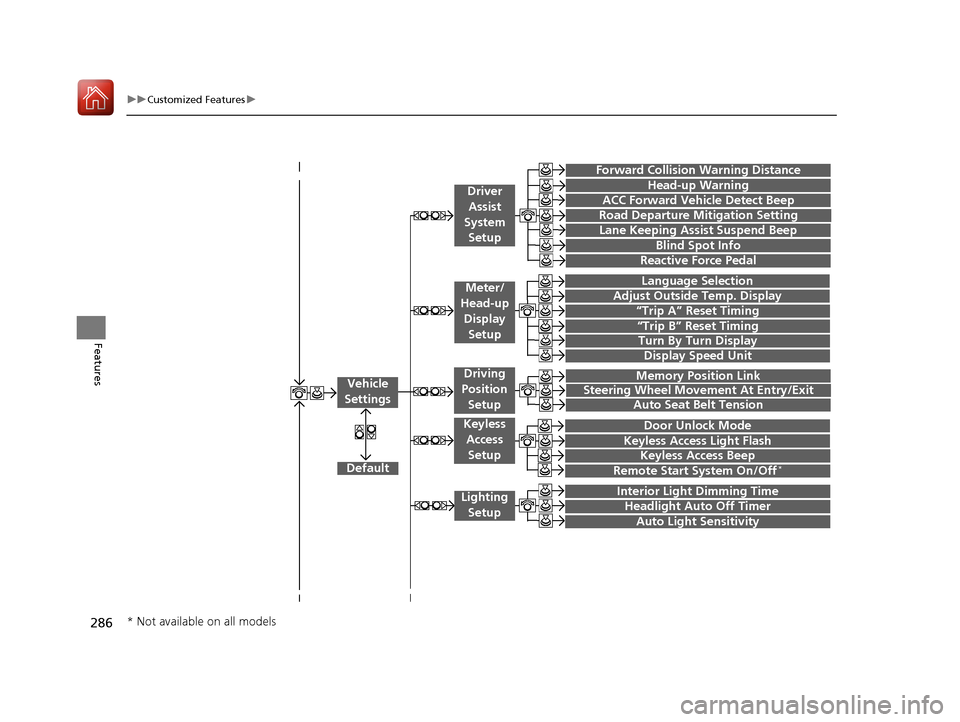
“Trip A” Reset Timing
“Trip B” Reset Timing
Language Selection
Adjust Outside Temp. Display
Forward Collision Warning Distance
ACC Forward Vehicle Detect Beep
Turn By Turn Display
Default
Memory Position Link
Door Unlock Mode
Keyless Access Light Flash
Interior Light Dimming Time
Headlight Auto Off Timer
Auto Light Sensitivity
Vehicle
Settings
Meter/
Head-up
Display Setup
Driver Assist
System Setup
Keyless Access
Setup
Lighting Setup
Keyless Access Beep
Lane Keeping Assist Suspend Beep
Blind Spot Info
Steering Wheel Movement At Entry/Exit
Auto Seat Belt Tension
Driving
Position
Setup
Display Speed Unit
Reactive Force Pedal
Head-up Warning
Road Departure Mitigation Setting
Remote Start System On/Off*
* Not available on all models
17 ACURA RLX E-AWD-31TY36300.book 286 ページ 2016年6月17日 金曜日 午前8時 29分
Page 288 of 577

287
uuCustomized Features u
Continued
Features
Fixed Guideline
Dynamic Guideline
Default
Rear
Camera
Cross Traffic Monitor
*1: Models with multi-view rear camera
Maintenance ResetMaintenance Info.
Wiper ActionWiper Setup
Key And Remote Unlock Mode
Keyless Lock Answer Back
Security Relock Timer
Auto Door Lock
Auto Door Unlock
Door
Setup
Auto Folding Door Mirror
Camera
Settings*1
17 ACURA RLX E-AWD-31TY36300.book 287 ページ 2016年6月17日 金曜日 午前8時 29分
Page 292 of 577
291
uuCustomized Features u
Continued
Features
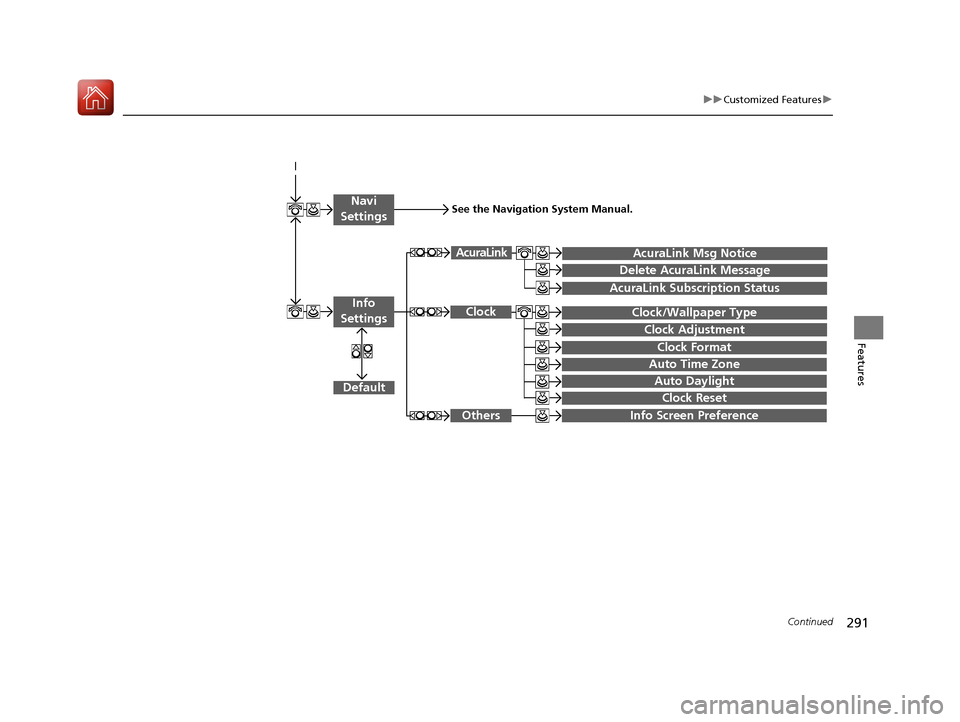
Auto Daylight
Clock Reset
Info Screen Preference
Clock Format
Auto Time Zone
Clock/Wallpaper Type
Clock Adjustment
Clock
Default
Others
Info
Settings
Navi
SettingsSee the Navigation System Manual.
AcuraLink Subscription Status
AcuraLink Msg Notice
Delete AcuraLink Message
AcuraLink
17 ACURA RLX E-AWD-31TY36300.book 291 ページ 2016年6月17日 金曜日 午前8時 29分
Page 295 of 577
294
uuCustomized Features u
Features
*1:Default SettingSetup
Group Customizable Features Descri
ption Selectable Settings
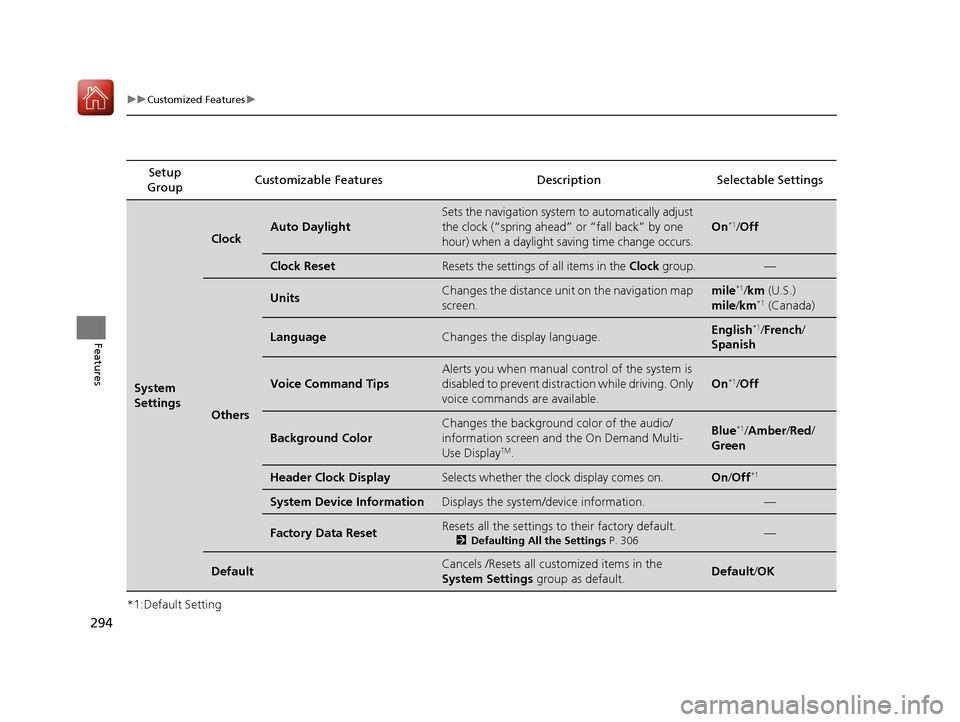
System
Settings
ClockAuto Daylight
Sets the navigation system to automatically adjust
the clock (“spring ahead” or “fall back” by one
hour) when a daylight saving time change occurs.
On*1/Off
Clock ResetResets the settings of all items in the Clock group.—
Others
UnitsChanges the distance unit on the navigation map
screen.mile*1/km (U.S.)
mile /km*1 (Canada)
LanguageChanges the display language.English*1/French /
Spanish
Voice Command Tips
Alerts you when manual control of the system is
disabled to prevent distraction while driving. Only
voice commands are available.
On*1/ Off
Background Color
Changes the background color of the audio/
information screen and the On Demand Multi-
Use Display
TM.
Blue*1/Amber /Red/
Green
Header Clock DisplaySelects whether the clock display comes on.On /Off*1
System Device InformationDisplays the system /device information.—
Factory Data ResetResets all the settings to their factory default.
2Defaulting All the Settings P. 306—
DefaultCancels /Resets all customized items in the
System Settings group as default.Default/OK
17 ACURA RLX E-AWD-31TY36300.book 294 ページ 2016年6月17日 金曜日 午前8時 29分
Page 297 of 577

296
uuCustomized Features u
Features
*1:Default SettingSetup
Group Customizable Features Descri
ption Selectable Settings
Vehicle
Settings Meter/
Head-
up
Display
SetupLanguage Selection
Changes the displayed language on the multi-
information display. English
*1/
French /
Spanish
Adjust Outside Temp.
Display Adjusts the temperature reading by a few
degrees. -5°F ~ ±0°F
*1
~ +5°F
(U.S.)
-3°C ~ ±0°C
*1 ~ +3°C
(Canada)
“Trip A” Reset Timing Changes the setting of how to reset trip meter A,
average fuel economy A,
average speed A, and
elapsed time A. When Refueled
/IGN
Off /Manually
Reset
*1
“Trip B” Reset Timing Changes the setting of how to reset trip meter B,
average fuel economy B,
average speed B, and
elapsed time B. When Refueled
/IGN
Off /Manually
Reset*1
Turn By Turn Display Selects whether the turn-by-turn display comes
on during the route guidance. On*1/
Off
Display Speed Unit Changes the speed unit for ACC with LSF on the
multi-information display, and the speed unit on
the head-up display. km/h
/mph
*1
(U.S.)
km/h*1/mph
(Canada)
17 ACURA RLX E-AWD-31TY36300.book 296 ページ 2016年6月17日 金曜日 午前8時 29分
Page 300 of 577

299
uuCustomized Features u
Continued
Features
*1:Default SettingSetup
Group Customizable Features Description Selectable Settings
Vehicle
Settings Mainte-
nance
Info.
Maintenance Reset
Resets the engine oil life display when you have
performed the maintenance service. —
Default Cancels/Resets all customized items in the
Vehicle Settings
group as default. Default/
OK
Camera
Settings
Rear
Camera
Fixed GuidelineSelects whether the fixed guidelines come on the
rear camera monitor.On*1/ Off
Dynamic GuidelineSelects whether the dynamic guidelines come on
the rear camera monitor.On*1/Off
DefaultCancels/Resets all customized items in the Rear
Camera group as default.Default/ OK
Cross Traffic MonitorTurns the cross traffic monitor feature on and off.On*1/Off
Models with
multi-view
rear camera
17 ACURA RLX E-AWD-31TY36300.book 299 ページ 2016年6月17日 金曜日 午前8時 29分
Page 302 of 577

301
uuCustomized Features u
Continued
Features
*1:Default SettingSetup
Group Customizable Features
DescriptionSelectable Settings
Camera
Settings
MVCS
Preferences
Show camera
when
decelerating
Sets the screen to automatically return to the
camera view at vehicle speeds of 7 mph (12 km/
h) or lower. The screen can return only when the
display has been switched to the audio/
information screen at the vehicle speed of over 9
mph (15 km/h).
On*1/ Off
Clear parking
guidance
automatically
Turns the parking guide lines on and off.On*1/Off
DisplayAdjusts the screen’s preferences.—
DefaultCancels/Resets all customized items in the
Camera Settings group as default.Default/OK
Cross Traffic MonitorTurns the cross traffic mo nitor feature on and off.On*1/Off
Models with
surround view
camera system
(MVCS)
17 ACURA RLX E-AWD-31TY36300.book 301 ページ 2016年6月17日 金曜日 午前8時 29分
Page 304 of 577
303
uuCustomized Features u
Continued
Features
*1:Default SettingSetup
Group Customizable Features Description Selectable Settings
Audio
SettingsOther
Source Select Popup
Selects whether the list of
selectable audio sources
comes on when the AUDIO button is pressed.On
/Off*1
HD Radio Mode*
Selects whether the audio system automatically
switches to the digital radio waves or receives the
analogue waves only. Auto*1/
Analog
Cover Art Turns on and off the cover art display.
On
*1/Off
Default Cancels/Resets all customized items in the
Audio
Settings group as default. Default/
OK
Phone
SettingsPhone
Connect phone
Pairs a new phone to HFL, connects or
disconnects a paired phone.
2Phone Setup P. 316
—
Bluetooth Device List
Pairs a new phone to HFL, edits or deletes a
paired phone, or creates a security PIN.
2Phone Setup P. 316
—
Edit Speed DialEdits, adds or deletes a speed dial entry.
2Phone Setup P. 316—
AM/FM mode
CD (MP3/WMA/AAC), iPod, USB,
Pandora®* or AhaTM mode
* Not available on all models
17 ACURA RLX E-AWD-31TY36300.book 303 ページ 2016年6月17日 金曜日 午前8時 29分
Page 305 of 577
304
uuCustomized Features u
Features
*1:Default SettingSetup
Group Customizable Features Descri
ption Selectable Settings
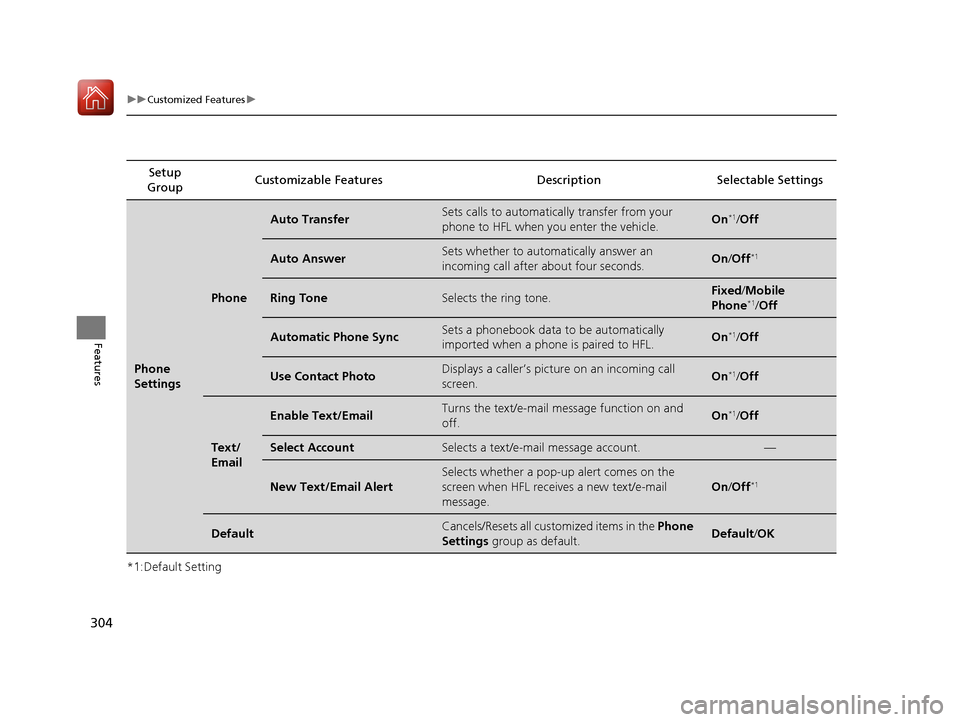
Phone
Settings
Phone
Auto TransferSets calls to automatically transfer from your
phone to HFL when you enter the vehicle.On*1/Off
Auto AnswerSets whether to automatically answer an
incoming call after about four seconds.On /Off*1
Ring ToneSelects the ring tone.Fixed /Mobile
Phone*1/ Off
Automatic Phone SyncSets a phonebook data to be automatically
imported when a phone is paired to HFL.On*1/Off
Use Contact PhotoDisplays a caller’s picture on an incoming call
screen.On*1/Off
Text/
Email
Enable Text/EmailTurns the text/e-mail me ssage function on and
off.On*1/ Off
Select AccountSelects a text/e-mail message account.—
New Text/Email Alert
Selects whether a pop-up alert comes on the
screen when HFL receiv es a new text/e-mail
message.
On /Off*1
DefaultCancels/Resets all customized items in the Phone
Settings group as default.Default/OK
17 ACURA RLX E-AWD-31TY36300.book 304 ページ 2016年6月17日 金曜日 午前8時 29分
Page 306 of 577
305
uuCustomized Features u
Features
*1:Default SettingSetup
Group Customizable Features Description Selectable Settings
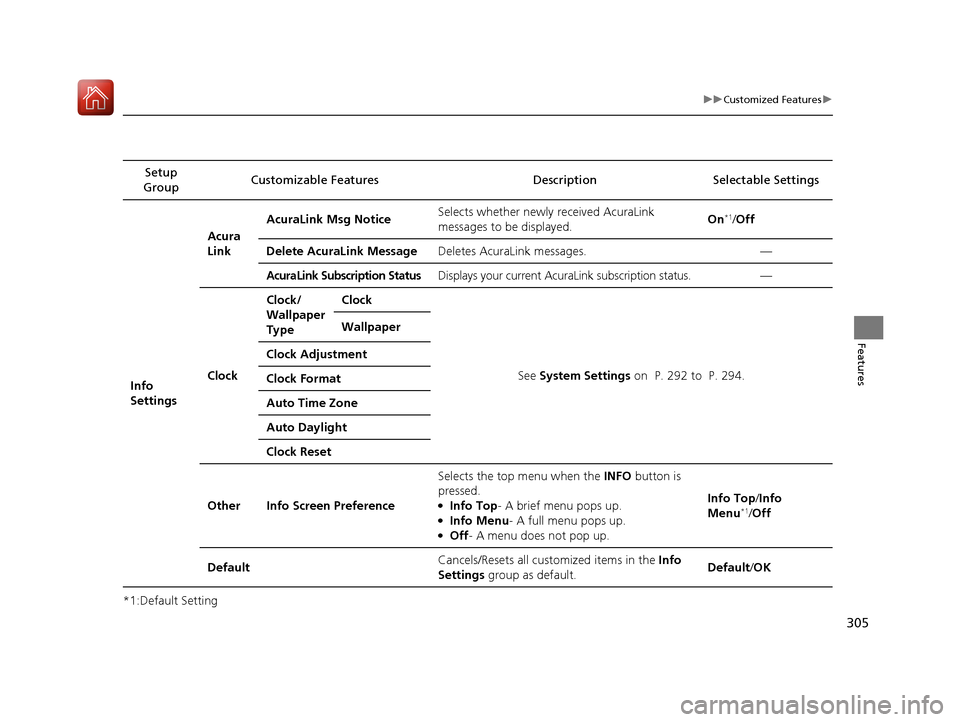
Info
Settings Acura
Link
AcuraLink Msg Notice
Selects whether newly received AcuraLink
messages to be displayed. On
*1/
Off
Delete AcuraLink Message Deletes AcuraLink messages. —
AcuraLink Subscription StatusDisplays your current AcuraLink subscription status. —
Clock Clock/
Wallpaper
Type
Clock
See System Settings on P. 292 to P. 294.
Wallpaper
Clock Adjustment
Clock Format
Auto Time Zone
Auto Daylight
Clock Reset
Other Info Screen Preference Selects the top menu when the
INFO button is
pressed.
●Info Top- A brief menu pops up.●Info Menu - A full menu pops up.●Off- A menu does not pop up. Info Top/
Info
Menu
*1/ Off
Default Cancels/Resets all customized items in the
Info
Settings group as default. Default/
OK
17 ACURA RLX E-AWD-31TY36300.book 305 ページ 2016年6月17日 金曜日 午前8時 29分