lock Acura RLX Hybrid 2017 Manual PDF
[x] Cancel search | Manufacturer: ACURA, Model Year: 2017, Model line: RLX Hybrid, Model: Acura RLX Hybrid 2017Pages: 577, PDF Size: 38.63 MB
Page 283 of 577

282
uuGeneral Information on the Audio System uCompatible iPod, iPhone, and USB Flash Drives
Features
Compatible iPod, iPhone, and USB Flash Drives
• Use a recommended USB flash drive of 256 MB or higher.
• Some digital audio players may not be compatible.
• Some USB flash drives (e.g., a device with security lockout) may not work.
• Some software files may not allow for audio play or text data display.
• Some versions of MP3, WMA, or AAC formats may be unsupported.
■iPod and iPhone Model Compatibility
Model
iPod (5th generation)
iPod classic 80GB/160GB (launch in 2007)
iPod classic 120GB (launch in 2008)
iPod classic 160GB (launch in 2009)
iPod nano (1st to 7th generation) released between 2005 and 2012
iPod touch (1st to 5th generation) released between 2007 and 2012
iPhone 3G/iPhone 3GS/iPhone 4/iPhone 4s /iPhone 5/iPhone 5c/iPhone 5s/iPhone 6/
iPhone 6 Plus/iPhone 6s/iPhone 6s Plus
■USB Flash Drives
1 iPod and iPhone Model Compatibility
This system may not work with all software versions
of these devices.
1USB Flash Drives
Files on the USB flash drive are played in their stored
order. This order may be different from the order
displayed on your PC or device.
17 ACURA RLX E-AWD-31TY36300.book 282 ページ 2016年6月17日 金曜日 午前8時 29分
Page 286 of 577
285
uuCustomized Features u
Continued
Features
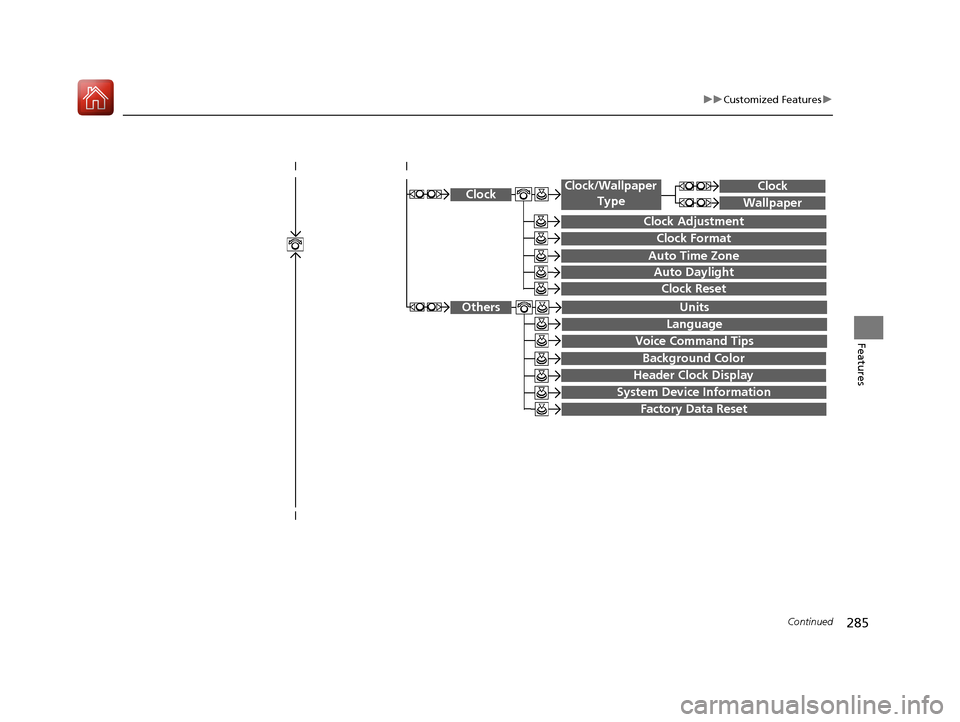
System Device Information
Factory Data Reset
Background Color
Header Clock Display
Clock Reset
Auto Time Zone
Auto Daylight
Clock
Clock Adjustment
Clock Format
Clock
Units
Language
Voice Command Tips
Others
Wallpaper
Clock/Wallpaper
Type
17 ACURA RLX E-AWD-31TY36300.book 285 ページ 2016年6月17日 金曜日 午前8時 29分
Page 287 of 577
286
uuCustomized Features u
Features
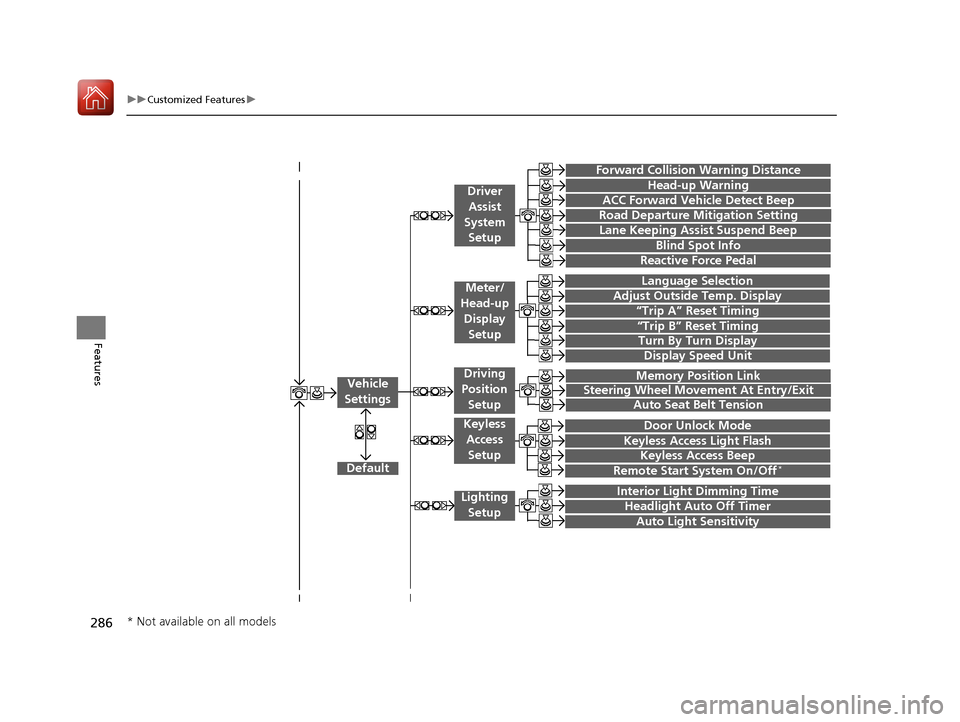
“Trip A” Reset Timing
“Trip B” Reset Timing
Language Selection
Adjust Outside Temp. Display
Forward Collision Warning Distance
ACC Forward Vehicle Detect Beep
Turn By Turn Display
Default
Memory Position Link
Door Unlock Mode
Keyless Access Light Flash
Interior Light Dimming Time
Headlight Auto Off Timer
Auto Light Sensitivity
Vehicle
Settings
Meter/
Head-up
Display Setup
Driver Assist
System Setup
Keyless Access
Setup
Lighting Setup
Keyless Access Beep
Lane Keeping Assist Suspend Beep
Blind Spot Info
Steering Wheel Movement At Entry/Exit
Auto Seat Belt Tension
Driving
Position
Setup
Display Speed Unit
Reactive Force Pedal
Head-up Warning
Road Departure Mitigation Setting
Remote Start System On/Off*
* Not available on all models
17 ACURA RLX E-AWD-31TY36300.book 286 ページ 2016年6月17日 金曜日 午前8時 29分
Page 288 of 577

287
uuCustomized Features u
Continued
Features
Fixed Guideline
Dynamic Guideline
Default
Rear
Camera
Cross Traffic Monitor
*1: Models with multi-view rear camera
Maintenance ResetMaintenance Info.
Wiper ActionWiper Setup
Key And Remote Unlock Mode
Keyless Lock Answer Back
Security Relock Timer
Auto Door Lock
Auto Door Unlock
Door
Setup
Auto Folding Door Mirror
Camera
Settings*1
17 ACURA RLX E-AWD-31TY36300.book 287 ページ 2016年6月17日 金曜日 午前8時 29分
Page 292 of 577
291
uuCustomized Features u
Continued
Features
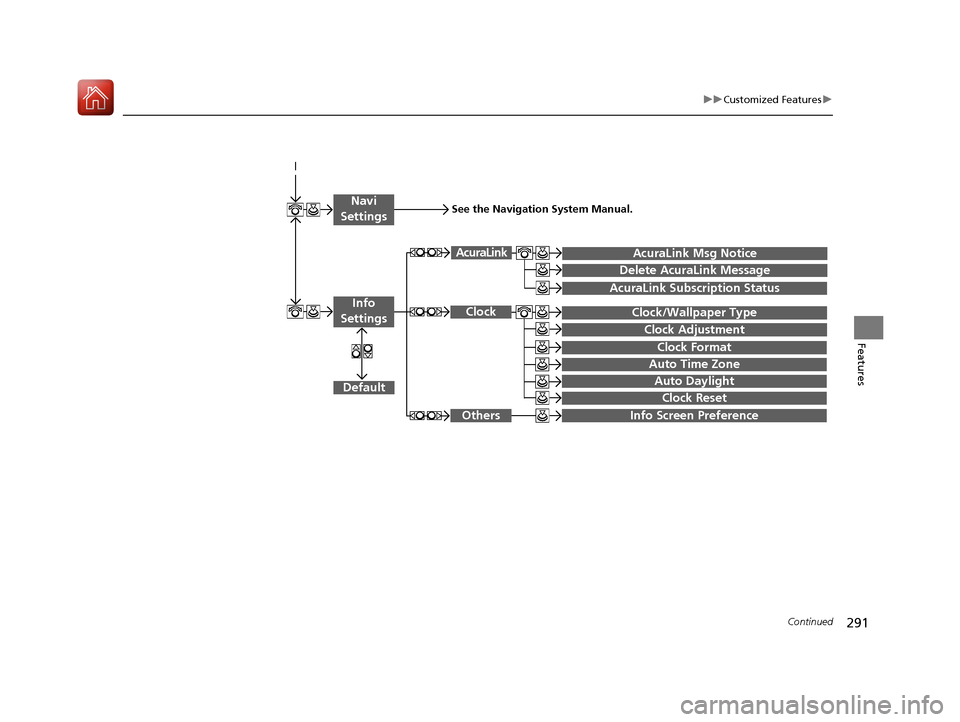
Auto Daylight
Clock Reset
Info Screen Preference
Clock Format
Auto Time Zone
Clock/Wallpaper Type
Clock Adjustment
Clock
Default
Others
Info
Settings
Navi
SettingsSee the Navigation System Manual.
AcuraLink Subscription Status
AcuraLink Msg Notice
Delete AcuraLink Message
AcuraLink
17 ACURA RLX E-AWD-31TY36300.book 291 ページ 2016年6月17日 金曜日 午前8時 29分
Page 294 of 577
293
uuCustomized Features u
Continued
Features
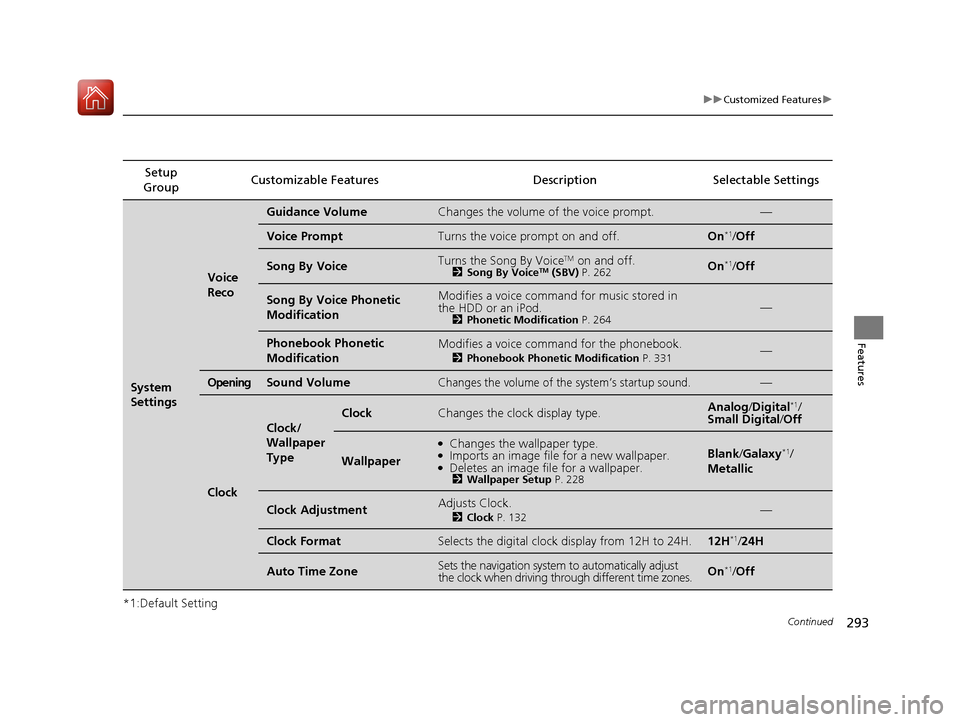
*1:Default SettingSetup
Group Customizable Features Description Selectable Settings
System
Settings
Voice
Reco
Guidance VolumeChanges the volume of the voice prompt.—
Voice PromptTurns the voice prompt on and off.On*1/
Off
Song By VoiceTurns the Song By VoiceTM on and off.2 Song By VoiceTM (SBV) P. 262On*1/Off
Song By Voice Phonetic
ModificationModifies a voice command for music stored in
the HDD or an iPod.
2 Phonetic Modification P. 264—
Phonebook Phonetic
ModificationModifies a voice command for the phonebook.
2Phonebook Phonetic Modification P. 331—
OpeningSound VolumeChanges the volume of the system’s startup sound.—
Clock
Clock/
Wallpaper
Type
ClockChanges the clock display type.Analog/Digital*1/
Small Digital/ Off
Wallpaper
●Changes the wallpaper type.●Imports an image file for a new wallpaper.●Deletes an image file for a wallpaper.2Wallpaper Setup P. 228
Blank/Galaxy*1/
Metallic
Clock AdjustmentAdjusts Clock.
2 Clock P. 132—
Clock FormatSelects the digital clock display from 12H to 24H.12H*1/24H
Auto Time ZoneSets the navigation system to automatically adjust
the clock when driving through different time zones.On*1/Off
17 ACURA RLX E-AWD-31TY36300.book 293 ページ 2016年6月17日 金曜日 午前8時 29分
Page 295 of 577
294
uuCustomized Features u
Features
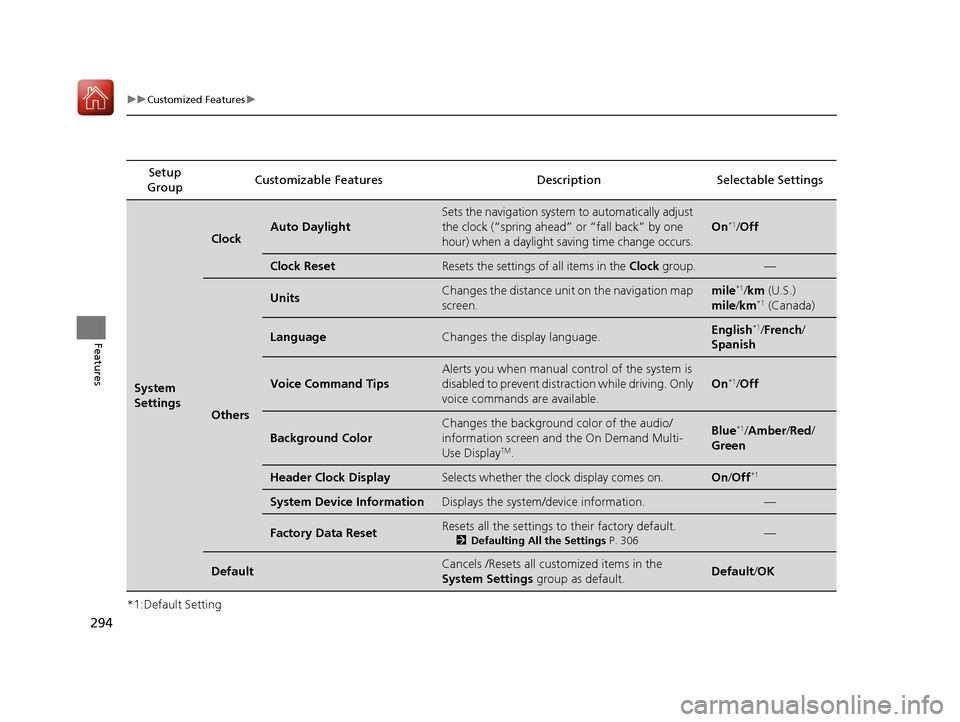
*1:Default SettingSetup
Group Customizable Features Descri
ption Selectable Settings
System
Settings
ClockAuto Daylight
Sets the navigation system to automatically adjust
the clock (“spring ahead” or “fall back” by one
hour) when a daylight saving time change occurs.
On*1/Off
Clock ResetResets the settings of all items in the Clock group.—
Others
UnitsChanges the distance unit on the navigation map
screen.mile*1/km (U.S.)
mile /km*1 (Canada)
LanguageChanges the display language.English*1/French /
Spanish
Voice Command Tips
Alerts you when manual control of the system is
disabled to prevent distraction while driving. Only
voice commands are available.
On*1/ Off
Background Color
Changes the background color of the audio/
information screen and the On Demand Multi-
Use Display
TM.
Blue*1/Amber /Red/
Green
Header Clock DisplaySelects whether the clock display comes on.On /Off*1
System Device InformationDisplays the system /device information.—
Factory Data ResetResets all the settings to their factory default.
2Defaulting All the Settings P. 306—
DefaultCancels /Resets all customized items in the
System Settings group as default.Default/OK
17 ACURA RLX E-AWD-31TY36300.book 294 ページ 2016年6月17日 金曜日 午前8時 29分
Page 298 of 577
297
uuCustomized Features u
Continued
Features
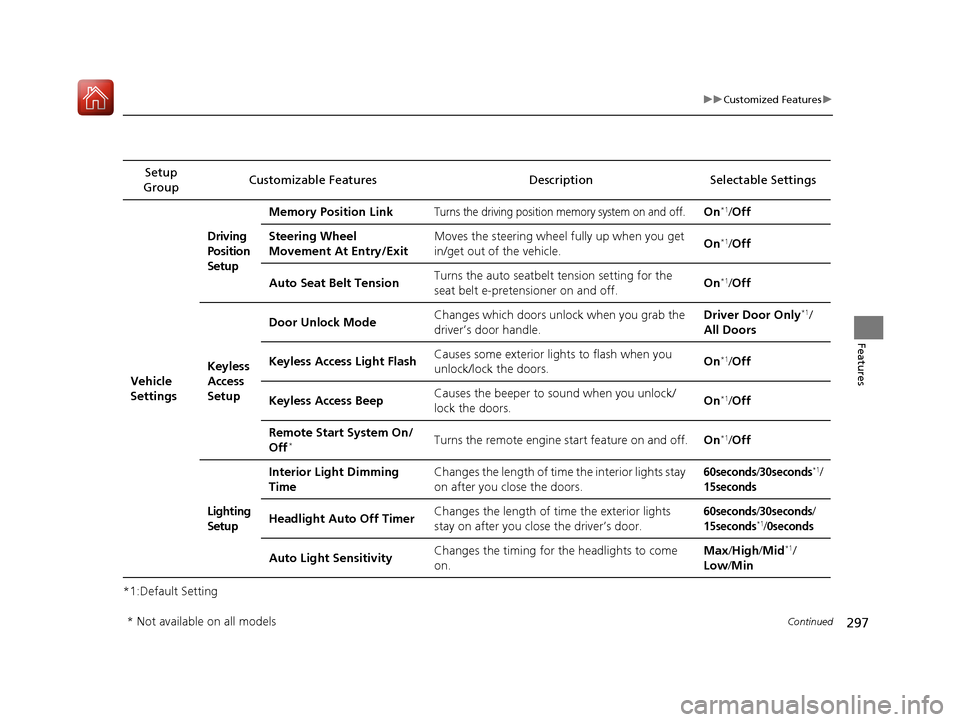
*1:Default SettingSetup
Group Customizable Features Description Selectable Settings
Vehicle
Settings Driving
Position
Setup
Memory Position Link
Turns the driving position memory system on and off.On*1/
Off
Steering Wheel
Movement At Entry/Exit Moves the steering wheel fully up when you get
in/get out of the vehicle.
On
*1/
Off
Auto Seat Belt Tension Turns the auto seatbelt
tension setting for the
seat belt e-pretensioner on and off. On
*1/
Off
Keyless
Access
Setup Door Unlock Mode
Changes which doors unlock when you grab the
driver’s door handle. Driver Door Only
*1/
All Doors
Keyless Access Light Flash Causes some exterior lights to flash when you
unlock/lock the doors. On
*1/
Off
Keyless Access Beep Causes the beeper to
sound when you unlock/
lock the doors. On
*1/
Off
Remote Start System On/
Off
*Turns the remote engine start feature on and off. On*1/Off
Lighting
Setup Interior Light Dimming
Time
Changes the length of time the interior lights stay
on after you close the doors.
60seconds/30seconds*1/
15seconds
Headlight Auto Off Timer
Changes the length of time the exterior lights
stay on after you close the driver’s door.60seconds/30seconds/
15seconds*1/0seconds
Auto Light SensitivityChanges the timing for the headlights to come
on. Max
/High /Mid*1/
Low /Min
* Not available on all models
17 ACURA RLX E-AWD-31TY36300.book 297 ページ 2016年6月17日 金曜日 午前8時 29分
Page 299 of 577

298
uuCustomized Features u
Features
*1:Default SettingSetup
Group Customizable Features Descri
ption Selectable Settings
Vehicle
Settings Door
SetupAuto Door Lock
Changes the setting for when the doors
automatically lock. With Vehicle Speed
*1/
Shift from P/ Off
Auto Door Unlock Changes the setting for when the doors
automatically unlock. All Doors When
Driver’s Door Opens
*1/
All Doors When
Shifted to Park /All
Doors When Ignition
Switched Off /Off
Key And Remote Unlock
Mode Sets up either the driver
’s door or all doors to
unlock on the first push of the remote. Driver Door
*1/
All
Doors
Keyless Lock Answer Back LOCK/UNLOCK- The exterior lights flash.
LOCK (2nd push)- The beeper sounds.
On
*1/
Off
Security Relock Timer Changes the time it takes for the doors to relock
and the security system to set after you unlock
the vehicle without opening any door. 90seconds/
60seconds/
30seconds
*1
Auto Folding Door Mirror
Changes how you can fold the door mirrors.Auto Fold With
Keyless*1/Manual Only
Wiper
SetupWiper Action Changes the setting for the automatic
intermittent wipers in the
AUTO position. Rain Sensing*1/
Intermittent /Speed
Sensitive
17 ACURA RLX E-AWD-31TY36300.book 298 ページ 2016年6月17日 金曜日 午前8時 29分
Page 306 of 577
305
uuCustomized Features u
Features
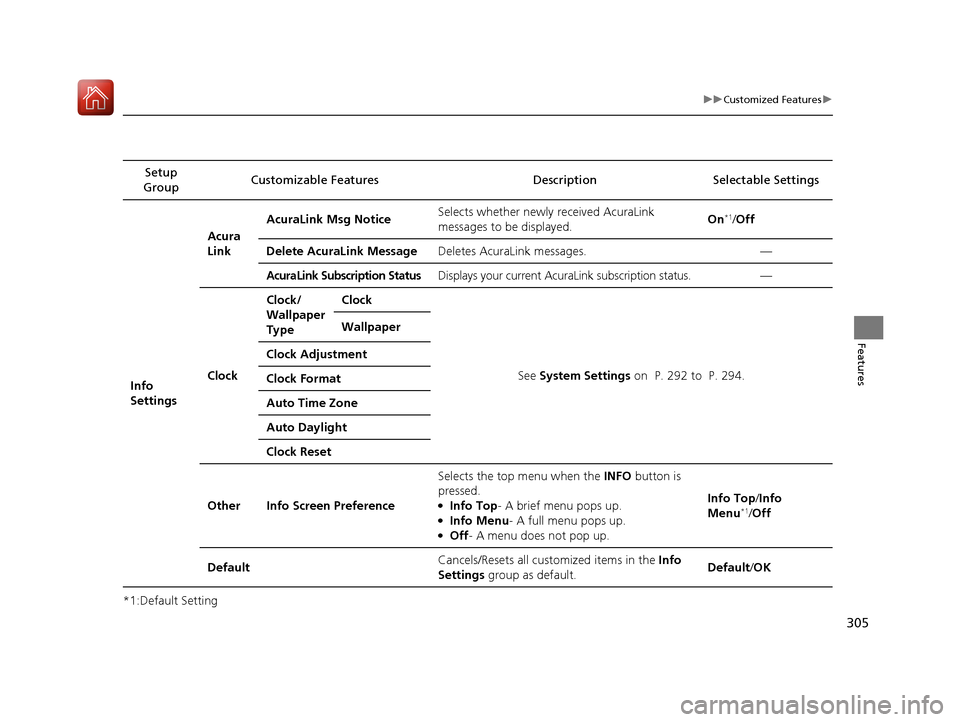
*1:Default SettingSetup
Group Customizable Features Description Selectable Settings
Info
Settings Acura
Link
AcuraLink Msg Notice
Selects whether newly received AcuraLink
messages to be displayed. On
*1/
Off
Delete AcuraLink Message Deletes AcuraLink messages. —
AcuraLink Subscription StatusDisplays your current AcuraLink subscription status. —
Clock Clock/
Wallpaper
Type
Clock
See System Settings on P. 292 to P. 294.
Wallpaper
Clock Adjustment
Clock Format
Auto Time Zone
Auto Daylight
Clock Reset
Other Info Screen Preference Selects the top menu when the
INFO button is
pressed.
●Info Top- A brief menu pops up.●Info Menu - A full menu pops up.●Off- A menu does not pop up. Info Top/
Info
Menu
*1/ Off
Default Cancels/Resets all customized items in the
Info
Settings group as default. Default/
OK
17 ACURA RLX E-AWD-31TY36300.book 305 ページ 2016年6月17日 金曜日 午前8時 29分