audio Acura RLX Hybrid 2017 Owner's Manual
[x] Cancel search | Manufacturer: ACURA, Model Year: 2017, Model line: RLX Hybrid, Model: Acura RLX Hybrid 2017Pages: 577, PDF Size: 38.63 MB
Page 3 of 577
Contents
This owner’s manual should be considered a permanent part of the
vehicle and should remain with the vehicle when it is sold.
This owner’s manual covers all models of your vehicle. You may find
descriptions of equipment and features that are not on your
particular model.
Images throughout this owner’s manu al (including the front cover)
represent features and equipment that are available on some, but
not all, models. Your particular mo del may not have some of these
features.
This owner’s manual is for vehicles sold in the United States and
Canada.
The information and specifications in cluded in this publication were
in effect at the time of approval for printing. Honda Motor Co., Ltd.
reserves the right, however, to discontinue or change specifications
or design at any time without notice and without incurring any
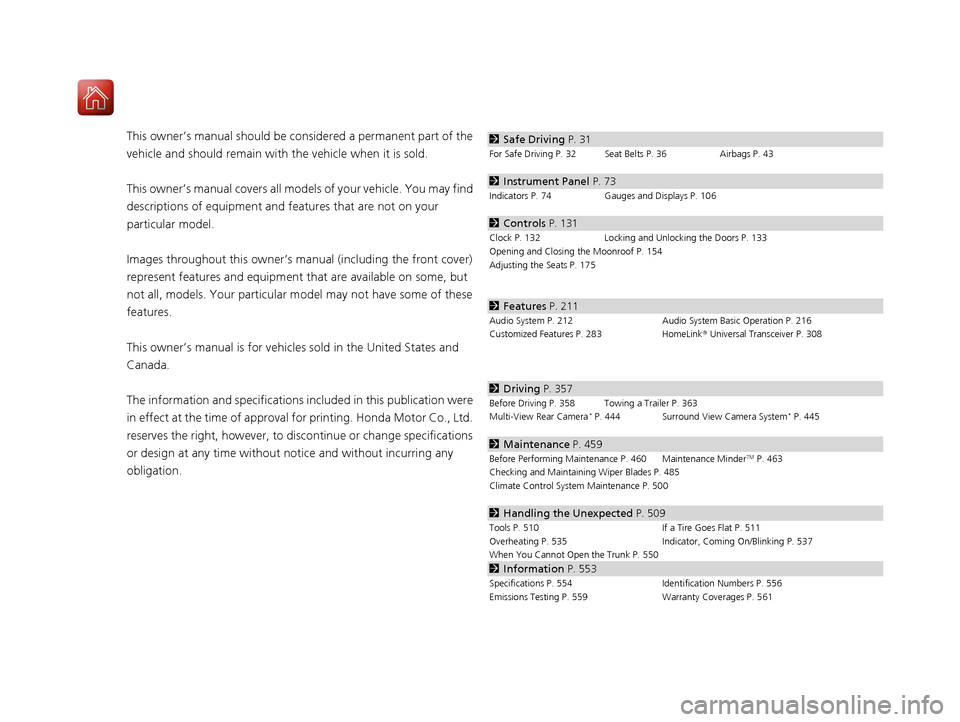
obligation.2 Safe Driving P. 31
For Safe Driving P. 32 Seat Belts P. 36 Airbags P. 43
2Instrument Panel P. 73
Indicators P. 74 Gauges and Displays P. 106
2Controls P. 131
Clock P. 132 Locking and Unlocking the Doors P. 133
Opening and Closing the Moonroof P. 154
Adjusting the Seats P. 175
2 Features P. 211
Audio System P. 212 Audio System Basic Operation P. 216
Customized Features P. 283 HomeLink® Universal Transceiver P. 308
2 Driving P. 357
Before Driving P. 358 Towing a Trailer P. 363
Multi-View Rear Camera* P. 444 Surround View Camera System* P. 445
2Maintenance P. 459
Before Performing Maintenance P. 460 Maintenance MinderTM P. 463
Checking and Maintaining Wiper Blades P. 485
Climate Control System Maintenance P. 500
2Handling the Unexpected P. 509
Tools P. 510 If a Tire Goes Flat P. 511
Overheating P. 535 Indicator, Coming On/Blinking P. 537
When You Cannot Open the Trunk P. 550
2 Information P. 553
Specifications P. 554 Identification Numbers P. 556
Emissions Testing P. 559 Warranty Coverages P. 561
17 ACURA RLX E-AWD-31TY36300.book 2 ページ 2016年6月17日 金曜日 午前8時29分
Page 4 of 577
Contents
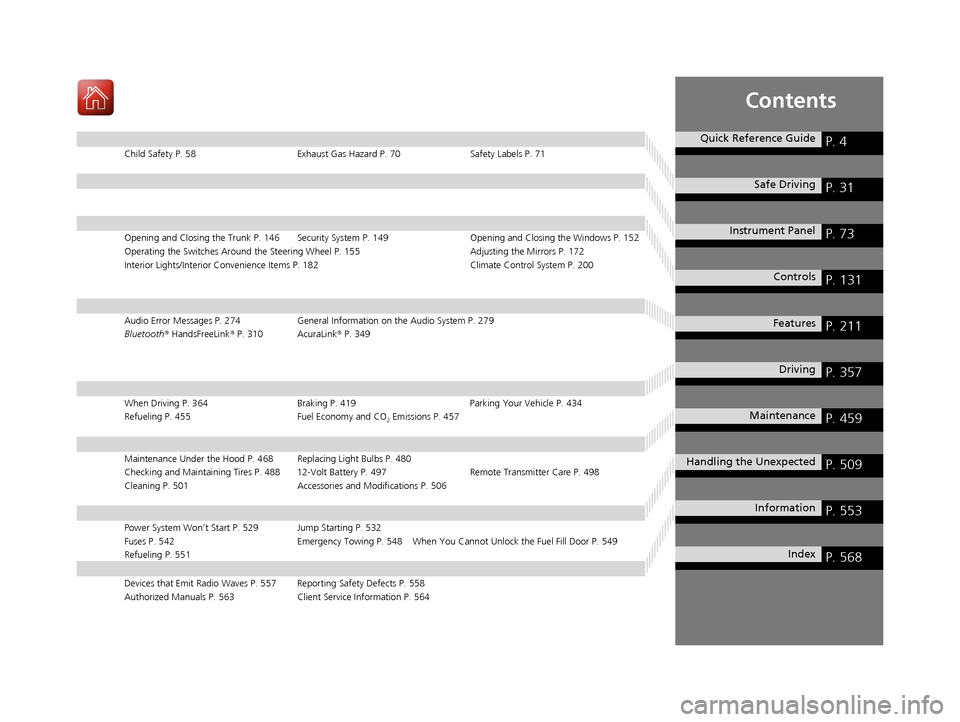
Child Safety P. 58Exhaust Gas Hazard P. 70Safety Labels P. 71
Opening and Closing the Trunk P. 146 Security System P. 149 Opening and Closing the Windows P. 152
Operating the Switches Around the Steering Wheel P. 155 Adjusting the Mirrors P. 172
Interior Lights/Interior Convenience It ems P. 182 Climate Control System P. 200
Audio Error Messages P. 274General Information on the Audio System P. 279
Bluetooth® HandsFreeLink ® P. 310 AcuraLink ® P. 349
When Driving P. 364 Braking P. 419Parking Your Vehicle P. 434
Refueling P. 455 Fuel Economy and CO
2 Emissions P. 457
Maintenance Under the Hood P. 468 Replacing Light Bulbs P. 480
Checking and Maintaining Tires P. 488 12-Volt Battery P. 497 Remote Transmitter Care P. 498
Cleaning P. 501 Accessories and Modifications P. 506
Power System Won’t Start P. 529 Jump Starting P. 532
Fuses P. 542 Emergency Towing P. 548 When You Cannot Unlock the Fuel Fill Door P. 549
Refueling P. 551
Devices that Emit Radio Waves P. 557 Reporting Safety Defects P. 558
Authorized Manuals P. 563 Client Service Information P. 564
Quick Reference GuideP. 4
Safe DrivingP. 31
Instrument PanelP. 73
ControlsP. 131
FeaturesP. 211
DrivingP. 357
MaintenanceP. 459
Handling the UnexpectedP. 509
InformationP. 553
IndexP. 568
17 ACURA RLX E-AWD-31TY36300.book 3 ページ 2016年6月17日 金曜日 午前8時29分
Page 5 of 577
4
Quick Reference Guide
Quick Reference Guide
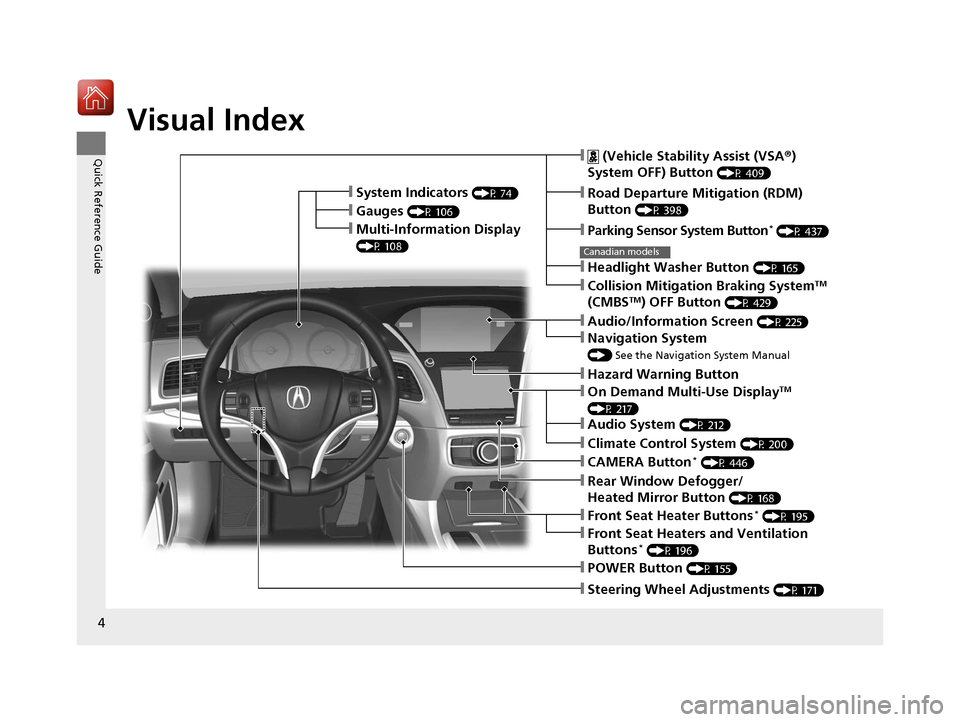
Visual Index
❙Steering Wheel Adjustments (P 171)
❙POWER Button (P 155)
❙ (Vehicle Stability Assist (VSA®)
System OFF) Button
(P 409)
❙Road Departure Mitigation (RDM)
Button
(P 398)
❙Parking Sensor System Button* (P 437)
❙Collision Mitigation Braking SystemTM
(CMBSTM) OFF Button (P 429)
❙Navigation System
() See the Navigation System Manual
❙Audio/Information Screen (P 225)
❙Hazard Warning Button
❙On Demand Multi-Use DisplayTM
(P 217)
❙Audio System (P 212)
❙System Indicators (P 74)
❙Gauges (P 106)
❙Multi-Information Display
(P 108)
❙Climate Control System (P 200)
❙Rear Window Defogger/
Heated Mirror Button
(P 168)
❙Front Seat Heater Buttons* (P 195)
❙Headlight Washer Button (P 165)
❙Front Seat Heaters and Ventilation
Buttons* (P 196)
❙CAMERA Button* (P 446)
Canadian models
17 ACURA RLX E-AWD-31TY36300.book 4 ページ 2016年6月17日 金曜日 午前8時29分
Page 6 of 577
5
Quick Reference Guide
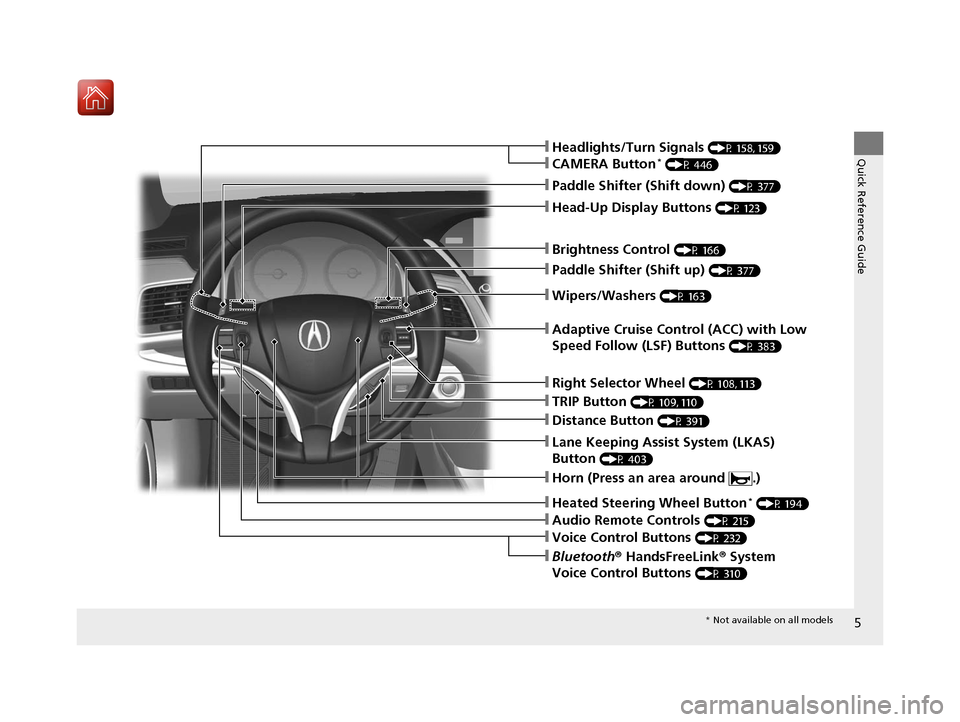
❙Wipers/Washers (P 163)
❙Headlights/Turn Signals (P 158, 159)
❙Paddle Shifter (Shift down) (P 377)
❙Paddle Shifter (Shift up) (P 377)
❙Horn (Press an area around .)
❙Voice Control Buttons (P 232)
❙Bluetooth® HandsFreeLink ® System
Voice Control Buttons
(P 310)
❙Brightness Control (P 166)
❙Adaptive Cruise Control (ACC) with Low
Speed Follow (LSF) Buttons
(P 383)
❙TRIP Button (P 109, 110)
❙Distance Button (P 391)
❙Lane Keeping Assist System (LKAS)
Button
(P 403)
❙Right Selector Wheel (P 108, 113)
❙Heated Steering Wheel Button* (P 194)
❙Head-Up Display Buttons (P 123)
❙Audio Remote Controls (P 215)
❙CAMERA Button* (P 446)
* Not available on all models
17 ACURA RLX E-AWD-31TY36300.book 5 ページ 2016年6月17日 金曜日 午前8時29分
Page 11 of 577
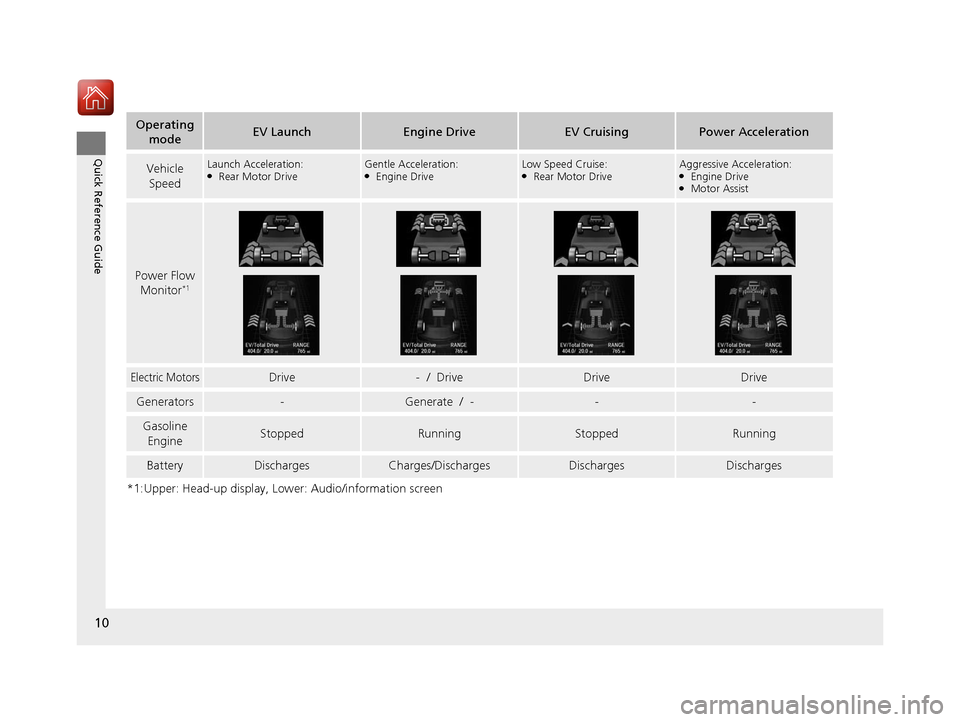
10
Quick Reference Guide
*1:Upper: Head-up display, Lower: Audio/information screen
Operating modeEV LaunchEngine DriveEV CruisingPower Acceleration
Vehicle
SpeedLaunch Acceleration:●Rear Motor DriveGentle Acceleration:●Engine DriveLow Speed Cruise:●Rear Motor DriveAggressive Acceleration:●Engine Drive●Motor Assist
Power Flow Monitor*1
Electric MotorsDrive- / DriveDriveDrive
Generators-Generate / ---
Gasoline
EngineStoppedRunningStoppedRunning
BatteryDischargesCharges/DischargesDischargesDischarges
17 ACURA RLX E-AWD-31TY36300.book 10 ページ 2016年6月17日 金曜日 午前8時2 9分
Page 12 of 577
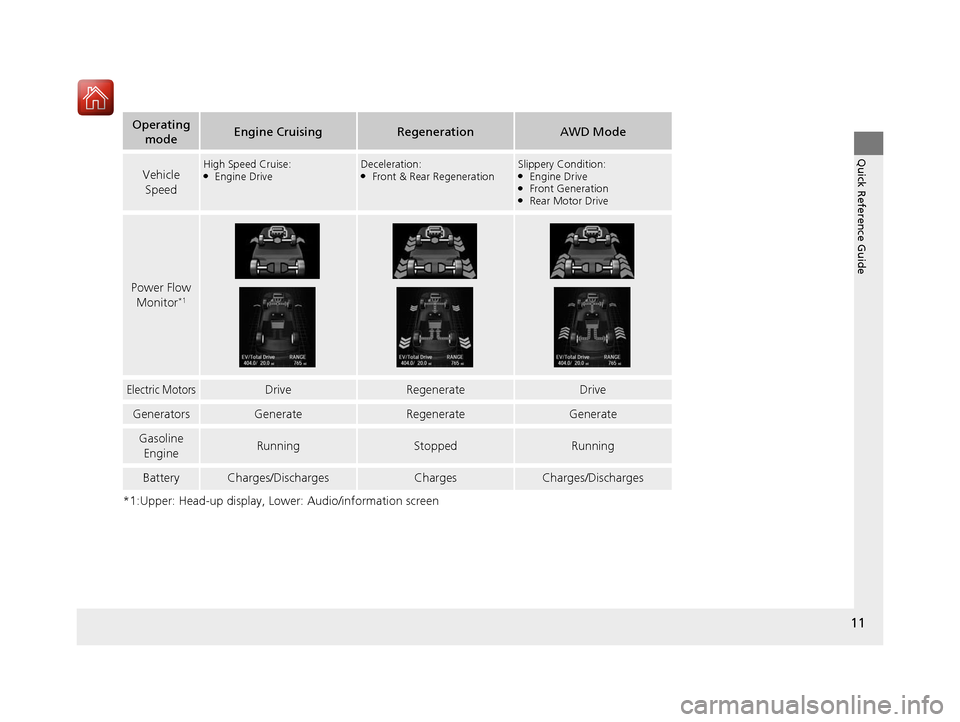
11
Quick Reference Guide
*1:Upper: Head-up display, Lower: Audio/information screen
Operating modeEngine CruisingRegenerationAWD Mode
Vehicle
SpeedHigh Speed Cruise:●Engine DriveDeceleration:●Front & Rear RegenerationSlippery Condition:●Engine Drive●Front Generation●Rear Motor Drive
Power Flow Monitor*1
Electric MotorsDriveRegenerateDrive
GeneratorsGenerateRegenerateGenerate
Gasoline
EngineRunningStoppedRunning
BatteryCharges/DischargesChargesCharges/Discharges
17 ACURA RLX E-AWD-31TY36300.book 11 ページ 2016年6月17日 金曜日 午前8時2 9分
Page 22 of 577
21
Quick Reference Guide
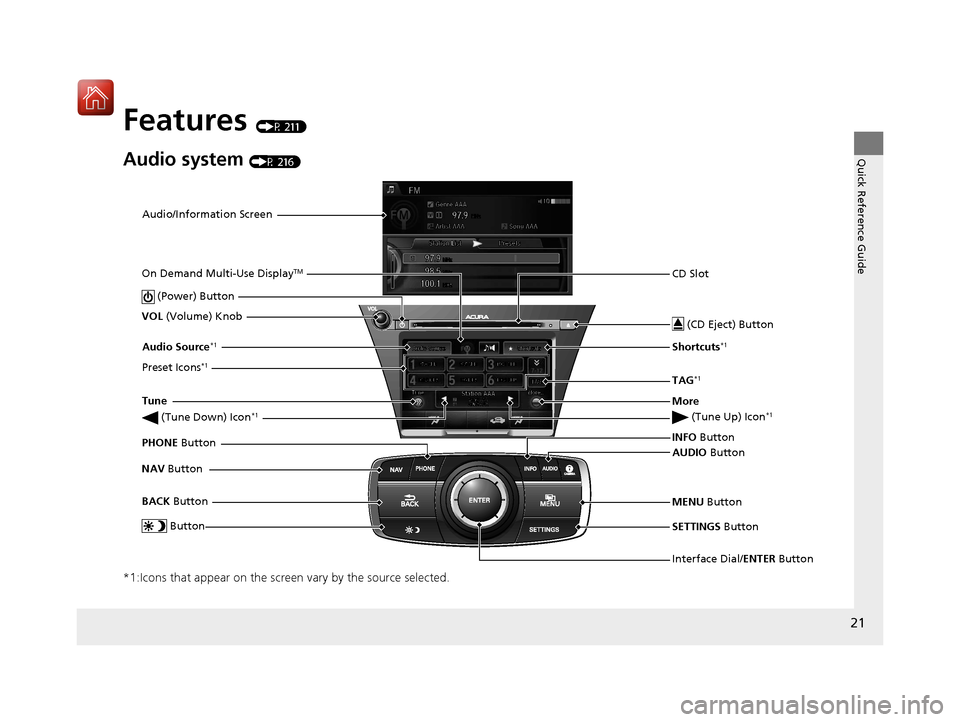
Features (P 211)
Audio system (P 216)
*1:Icons that appear on the screen vary by the source selected.
Audio/Information ScreenInterface Dial/ENTER Button
(Power) Button
CD Slot
(CD Eject) Button
SETTINGS Button
VOL
(Volume) Knob
BACK Button
NAV
Button AUDIO
Button
INFO
Button
On Demand Multi-Use Display
TM
PHONE
Button
Preset Icons
*1
(Tune Up) Icon*1
Audio Source*1
(Tune Down) Icon*1Tune
TAG
*1
More
Button
Shortcuts*1
MENU
Button
17 ACURA RLX E-AWD-31TY36300.book 21 ページ 2016年6月17日 金曜日 午前8時2 9分
Page 23 of 577
22
Quick Reference Guide
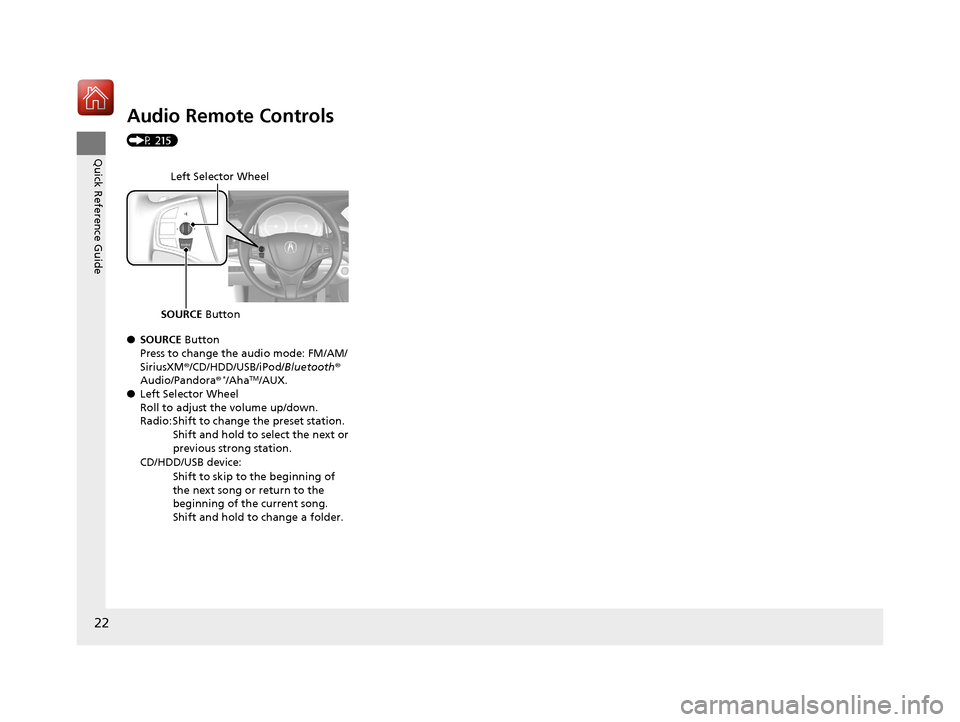
Audio Remote Controls
(P 215)
●SOURCE Button
Press to change the audio mode: FM/AM/
SiriusXM ®/CD/HDD/USB/iPod/ Bluetooth®
Audio/Pandora®
*/AhaTM/AUX.
● Left Selector Wheel
Roll to adjust the volume up/down.
Radio: Shift to change the preset station.
Shift and hold to select the next or
previous strong station.
CD/HDD/USB device: Shift to skip to the beginning of
the next song or return to the
beginning of the current song.
Shift and hold to change a folder.
Left Selector Wheel
SOURCE Button
17 ACURA RLX E-AWD-31TY36300.book 22 ページ 2016年6月17日 金曜日 午前8時2 9分
Page 114 of 577

Continued113
uuGauges and Displays uMulti-Information Display
Instrument Panel
Use the multi-information display to customize certain features.
■How to customize
Select the Vehicle Settings screen by rolling the right selector wheel while the
power mode is in ON, and the vehicle is at a complete stop.
Push the right selector wheel.
■Customized Features1 Customized Features
To customize other features , roll the right selector
wheel.
2 List of customizable options P. 116
2 Example of customization settings P. 121
Customization is possible when you see the driver’s
ID ( Driver 1 or Driver 2 ) on the screen.
The driver’s ID indicates which remote transmitter
you have used to unlock the driver’s door. The
customized settings are recalled every time you
unlock the driver’s door with that remote.
Change to
( P before you attempt to change any
customized setting.
Customizing is also av ailable from the audio/
information screen.
You cannot have Vehicle Settings displayed on the
multi-information display while the audio/
information screen shows the same menu. 2 Customized Features P. 283
Right Selector Wheel
Roll: Changes the
customize menus and
items.
Push : Enters the selected
item.
Multi-information Display: Goes to Vehicle Settings.
17 ACURA RLX E-AWD-31TY36300.book 113 ページ 2016年6月17日 金曜日 午前8時 29分
Page 129 of 577

uuGauges and Displays uHead-Up Display
128
Instrument Panel
Consists of two monitoring displays, one that indicates the vehicle’s power flow,
and the other, the torque distribution.
■Power flow monitor
Shows motor and engine power flow, indicating what supplies power to the vehicle,
or if the battery is being charged.
■Power Distribution Monitor
Head-up displayColor of
indicators
Power is
supplied by the
motors and the
engine.Blue
Power is only
supplied by the
motors.Blue
Power is only
supplied by the
engine.Blue
The motors
charge the High
Voltage battery.Green
1 Power Distribution Monitor
The power distribution monito r can be also displayed
on the audio/information display.
2 Audio/Information Screen P. 225
While the vehicle is stat ionary with the engine
running, the following may appear on the display.
Engine Icon
(Engine on)
Power Flow
Indicator
Engine Icon
(Engine off)
Power Flow
Indicator
Engine Icon
(Engine on)
Power Flow
Indicator
Engine Icon
(Engine on)
Power Flow
Indicator
17 ACURA RLX E-AWD-31TY36300.book 128 ページ 2016年6月17日 金曜日 午前8時 29分